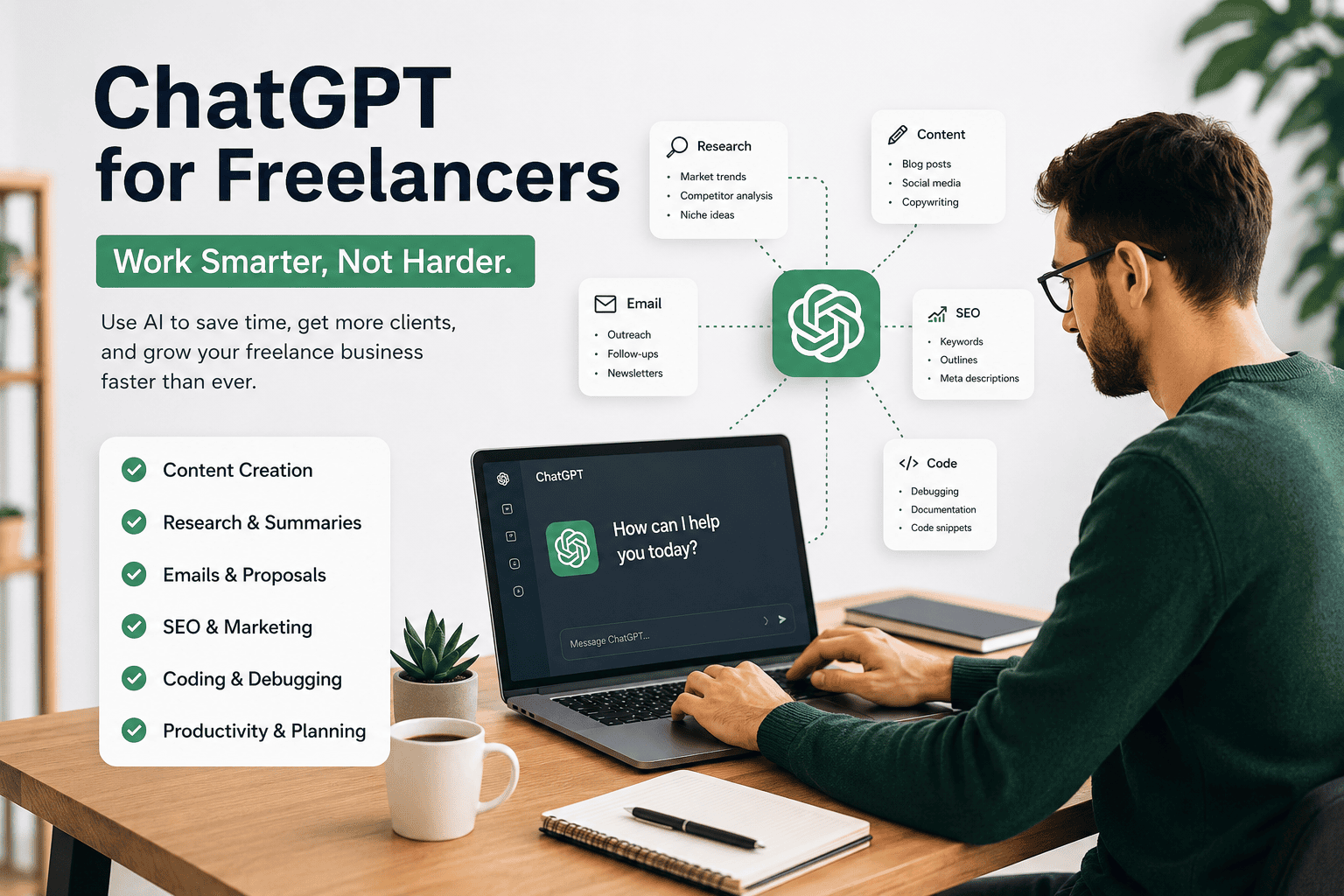
Freelancing has changed dramatically over the past few years.
Clients expect faster communication, quicker project delivery, better quality, and more competitive pricing than ever before. At the same time, freelancers are competing in a global marketplace where standing out requires more than technical skills alone.
This is where artificial intelligence—and particularly ChatGPT—has become a game changer.
Contrary to popular belief, ChatGPT isn’t replacing successful freelancers. Instead, it’s helping them work more efficiently by reducing repetitive tasks, accelerating research, improving communication, and freeing up more time for high-value work.
Think of ChatGPT as a highly capable digital assistant that helps you with planning, brainstorming, drafting, organizing, and refining your work. It can support many parts of your freelance business, but your expertise, creativity, and judgment remain essential.
The freelancers who are thriving today are not simply using AI—they’re learning how to combine AI with their own professional skills to deliver better results.
In this guide, you’ll learn how to integrate ChatGPT into every stage of the freelance workflow—from attracting clients to completing projects and building long-term relationships.
Why Every Freelancer Should Learn ChatGPT
Freelancers often wear multiple hats.
On any given day, you might be:
- Searching for new clients.
- Writing proposals.
- Replying to emails.
- Researching competitors.
- Planning projects.
- Creating deliverables.
- Managing revisions.
- Preparing invoices.
- Marketing your services.
Many of these tasks are repetitive and time-consuming.
ChatGPT can help reduce the effort involved in these routine activities, allowing you to spend more time on work that requires human insight and expertise.
For example, instead of spending an hour creating the first draft of a proposal, you can use ChatGPT to generate a structured draft in minutes and then personalize it for the client.
The result isn’t less work—it’s better use of your time.
What ChatGPT Can and Cannot Do
Understanding ChatGPT’s strengths and limitations is critical if you want to use it effectively.
ChatGPT can help you:
- Brainstorm ideas.
- Conduct initial research.
- Draft proposals and emails.
- Summarize documents.
- Create outlines.
- Explain technical concepts.
- Generate marketing copy.
- Improve grammar and readability.
- Organize information.
- Suggest alternative approaches.
ChatGPT cannot replace:
- Your professional experience.
- Industry expertise.
- Critical thinking.
- Client relationships.
- Strategic decision-making.
- Final quality assurance.
- Original creative judgment.
The most successful freelancers treat ChatGPT as a collaborator—not as a replacement for their own skills.
How ChatGPT Fits Into the Freelance Workflow
Every freelance project follows a series of stages.
Instead of thinking about ChatGPT as a writing tool, it’s more useful to see it as a productivity partner that can assist throughout the entire lifecycle of a project.
Find Client
      │
      ▼
Research Business
      │
      ▼
Understand Requirements
      │
      ▼
Prepare Proposal
      │
      ▼
Win Project
      │
      ▼
Research & Planning
      │
      ▼
Create Deliverables
      │
      ▼
Client Revisions
      │
      ▼
Project Delivery
      │
      ▼
Follow-Up & Retention
At nearly every stage, ChatGPT can help you work more efficiently.
For example:
- During client research, it can help summarize a company’s website and identify potential pain points.
- When writing proposals, it can generate a structured draft that you refine with project-specific details.
- During project execution, it can help organize ideas, explain concepts, or improve documentation.
- After delivery, it can assist with follow-up emails, testimonials requests, and case study outlines.
By integrating ChatGPT into each phase of your workflow, you create a more consistent and scalable freelance process.
Who Should Read This Guide?
This guide is designed for anyone who sells knowledge-based services.
Whether you’re just starting out or already managing multiple clients, you’ll find practical ways to use ChatGPT more effectively.
This article is especially useful for:
- SEO specialists.
- Content writers.
- Copywriters.
- Bloggers.
- Digital marketers.
- Web developers.
- Graphic designers.
- Virtual assistants.
- Social media managers.
- Video editors.
- Business consultants.
- Students preparing for freelance work.
- Small business owners offering professional services.
Even if your profession isn’t listed, many of the workflows in this guide can be adapted to your own business.
What You’ll Learn
By the end of this guide, you’ll understand how to use ChatGPT to:
- Research prospective clients more efficiently.
- Write stronger proposals.
- Improve communication with clients.
- Plan projects with greater clarity.
- Speed up content creation without sacrificing quality.
- Organize your freelance business using ChatGPT Projects.
- Build repeatable workflows that save time.
- Increase productivity while maintaining professional standards.
You’ll also discover where ChatGPT should—and shouldn’t—be used, helping you avoid common mistakes that can reduce the quality of your work.
A New Mindset for Freelancers
Many people ask the wrong question:
“Can ChatGPT do my freelance work?”
A better question is:
“Which parts of my freelance workflow can ChatGPT make faster, easier, or more consistent?”
This shift in thinking changes everything.
Instead of fearing AI, you begin using it strategically to enhance your own expertise.
Your value as a freelancer doesn’t come from typing faster—it comes from solving problems, understanding client needs, making informed decisions, and delivering results.
ChatGPT can support that process, but it can’t replace the experience and judgment that clients ultimately pay for.
Key Takeaways
Freelancing is becoming increasingly competitive, and efficiency matters more than ever.
ChatGPT isn’t a shortcut to success, but it is a powerful productivity tool when used thoughtfully.
By integrating it into your workflow, you can reduce repetitive work, improve consistency, and spend more time on high-value activities that grow your freelance business.
This guide will show you exactly how to do that—step by step.
What Can ChatGPT Actually Do for Freelancers? (19 Practical Use Cases)
One of the biggest misconceptions about ChatGPT is that it’s simply an AI writing tool.
In reality, ChatGPT can assist with almost every stage of a freelance business—from winning new clients to delivering projects, improving communication, and even planning future growth.
The key is understanding where AI adds value and where your expertise is still essential.
Instead of asking:
“Can ChatGPT do this task?”
Ask:
“Can ChatGPT help me complete this task more efficiently?”
That mindset unlocks far more opportunities.
The Freelance Workflow Where ChatGPT Helps Most
Most freelance projects follow a similar journey.
Lead Generation

↓

Client Research

↓

Proposal Writing

↓

Project Planning

↓

Content Creation / Development

↓

Quality Review

↓

Client Communication

↓

Delivery

↓

Feedback & Revisions

↓

Retention
Notice something?
Almost every stage contains repetitive work.
That’s exactly where ChatGPT excels.
1. Finding New Freelance Opportunities
Finding clients often takes more time than completing the actual work.
ChatGPT can help you:
- Brainstorm niche ideas.
- Research industries.
- Identify common business problems.
- Suggest services you could offer.
- Analyse company websites.
- Prepare outreach strategies.
Example
Instead of manually studying a business website for 30 minutes, you can ask ChatGPT to help summarize:
- Their services.
- Their target audience.
- Potential weaknesses.
- SEO opportunities.
- Marketing gaps.
- Content ideas.
You still verify the findings, but you start with a structured overview instead of a blank page.
2. Researching Potential Clients
Successful freelancers rarely send generic proposals.
Before contacting a prospect, it’s helpful to understand:
- What the company does.
- Who its customers are.
- What problems it may be facing.
- Where improvements could make the biggest impact.
ChatGPT can assist by organizing publicly available information into a concise summary, helping you prepare more personalized outreach.
3. Writing Better Proposals
Proposal writing is one of the most repetitive parts of freelancing.
Every proposal typically includes:
- Introduction.
- Understanding of the client’s problem.
- Proposed solution.
- Timeline.
- Deliverables.
- Pricing explanation.
- Closing statement.
Instead of starting from scratch every time, ChatGPT can generate a structured first draft that you customize for each client.
The personalization is still your responsibility—but AI can remove much of the repetitive formatting work.
4. Creating Professional Emails
Freelancers write emails constantly.
Examples include:
- Initial outreach.
- Discovery meeting follow-ups.
- Project updates.
- Revision requests.
- Deadline reminders.
- Payment reminders.
- Thank-you messages.
ChatGPT can help draft clear, professional emails while allowing you to adjust the tone to match the relationship with the client.
5. Planning Projects Before Starting
Jumping directly into execution often leads to missed requirements.
Instead, ChatGPT can help organize a project into manageable phases.
For example:
Client Requirements

↓

Research

↓

Planning

↓

Execution

↓

Review

↓

Delivery
Breaking projects into stages reduces confusion and improves communication with clients.
6. Brainstorming Ideas
Creative work often begins with a blank page.
Whether you’re writing an article, designing a logo, planning a campaign, or building an app, ChatGPT can generate starting points that spark new ideas.
Examples include:
- Blog topics.
- Marketing campaigns.
- Product names.
- Taglines.
- Social media content.
- Feature suggestions.
- Business ideas.
These suggestions should inspire your work—not replace your creativity.
7. Organizing Information
Freelancers frequently collect information from multiple sources.
ChatGPT can help:
- Summarize research.
- Organize meeting notes.
- Structure documentation.
- Categorize ideas.
- Simplify complex information.
This makes it easier to move from research to execution.
8. Explaining Complex Concepts
Sometimes clients aren’t experts in your field.
You may need to explain:
- SEO.
- Web development.
- Branding.
- Analytics.
- AI.
- Marketing.
ChatGPT can help draft explanations in language that’s easier for non-technical clients to understand.
9. Improving Existing Content
Rather than generating everything from scratch, ChatGPT is often most valuable as an editor.
It can help improve:
- Clarity.
- Grammar.
- Structure.
- Readability.
- Tone.
- Formatting.
Always review the final version to ensure it reflects your expertise and the client’s goals.
10. Managing Repetitive Tasks
Many freelance activities follow predictable patterns.
Examples include:
- Weekly reports.
- Meeting agendas.
- Status updates.
- Documentation.
- Checklists.
- SOP drafts.
ChatGPT can create reusable templates that reduce repetitive work.
11. Profession-Specific Use Cases
Different freelancers use ChatGPT in different ways.
Here are some practical examples.
12. For SEO Specialists
ChatGPT can assist with:
- Keyword clustering.
- Content briefs.
- Internal linking suggestions.
- Meta title ideas.
- Meta descriptions.
- Competitor summaries.
- Schema planning.
- Technical SEO explanations.
It accelerates research but doesn’t replace professional SEO strategy or data analysis.
13. For Content Writers
Common uses include:
- Topic ideation.
- Article outlines.
- Content structure.
- Editing.
- Headline variations.
- FAQ generation.
- Content refresh planning.
- Repurposing articles into newsletters or social posts.
The strongest results come from combining AI efficiency with your own subject expertise.
14. For Copywriters
ChatGPT can support:
- Landing page drafts.
- Product descriptions.
- Email campaigns.
- Call-to-action ideas.
- Sales page structures.
- Ad copy variations.
Final copy should always be refined to match the brand voice and marketing objectives.
15. For Digital Marketers
Useful applications include:
- Campaign planning.
- Audience research.
- Marketing funnels.
- Competitor analysis.
- Social media calendars.
- Content strategy.
- Performance reporting summaries.
AI helps speed up planning while strategic decisions remain human-led.
16. For Graphic Designers
Although ChatGPT doesn’t create finished designs on its own, it can help with:
- Creative briefs.
- Design concepts.
- Mood board ideas.
- Client questionnaires.
- Presentation copy.
- Design rationales.
This reduces time spent on communication and planning.
17. For Developers
Developers commonly use ChatGPT to:
- Explain unfamiliar code.
- Generate documentation.
- Debug simple issues.
- Suggest optimization ideas.
- Learn new frameworks.
- Understand APIs.
- Draft technical documentation.
It’s a helpful assistant, but production code still requires testing and review.
18. For Virtual Assistants
Virtual assistants can use ChatGPT for:
- Drafting emails.
- Scheduling templates.
- Customer support responses.
- Data organization.
- Meeting summaries.
- SOP documentation.
- Administrative checklists.
This improves efficiency while maintaining a professional standard of communication.
19. For Business Consultants
Consultants often use ChatGPT to:
- Organize research.
- Structure reports.
- Summarize interviews.
- Prepare workshop agendas.
- Draft recommendations.
- Brainstorm strategic options.
Human judgment remains essential for final recommendations.
Tasks Where You Should Be Careful
Despite its capabilities, ChatGPT isn’t suitable for every situation.
Avoid relying on it exclusively for:
- Legal advice.
- Financial decisions.
- Medical guidance.
- Confidential client information without appropriate safeguards.
- Final quality assurance.
- Strategic business decisions that require deep domain expertise.
Treat AI-generated content as a starting point, not the finished product.
The Biggest Productivity Shift
The greatest benefit isn’t that ChatGPT completes entire projects for you.
It’s that it reduces the time spent on repetitive, low-value tasks.
Instead of spending hours on formatting, drafting, or organizing information, you can focus on:
- Solving client problems.
- Improving quality.
- Building relationships.
- Learning new skills.
- Growing your freelance business.
That’s where long-term value is created.
Key Takeaways
ChatGPT is most effective when it’s integrated into your workflow rather than used as a replacement for your expertise.
Whether you’re a writer, SEO specialist, developer, designer, marketer, or consultant, AI can help you:
- Save time.
- Improve consistency.
- Reduce repetitive work.
- Organize information.
- Communicate more effectively.
The freelancers who benefit the most are those who use ChatGPT strategically while continuing to apply their own professional knowledge and critical thinking.
How to Use ChatGPT to Find Freelance Clients (Complete Client Acquisition Workflow)
For most freelancers, the biggest challenge isn’t delivering great work.
It’s finding a steady stream of clients.
Many freelancers spend hours searching job boards, sending generic proposals, and hoping someone replies. This approach is time-consuming and often produces inconsistent results.
ChatGPT can’t magically bring clients to your inbox, but it can significantly improve how you research prospects, personalize outreach, prepare proposals, and follow up professionally.
Instead of replacing your sales process, ChatGPT helps you make each step more efficient.
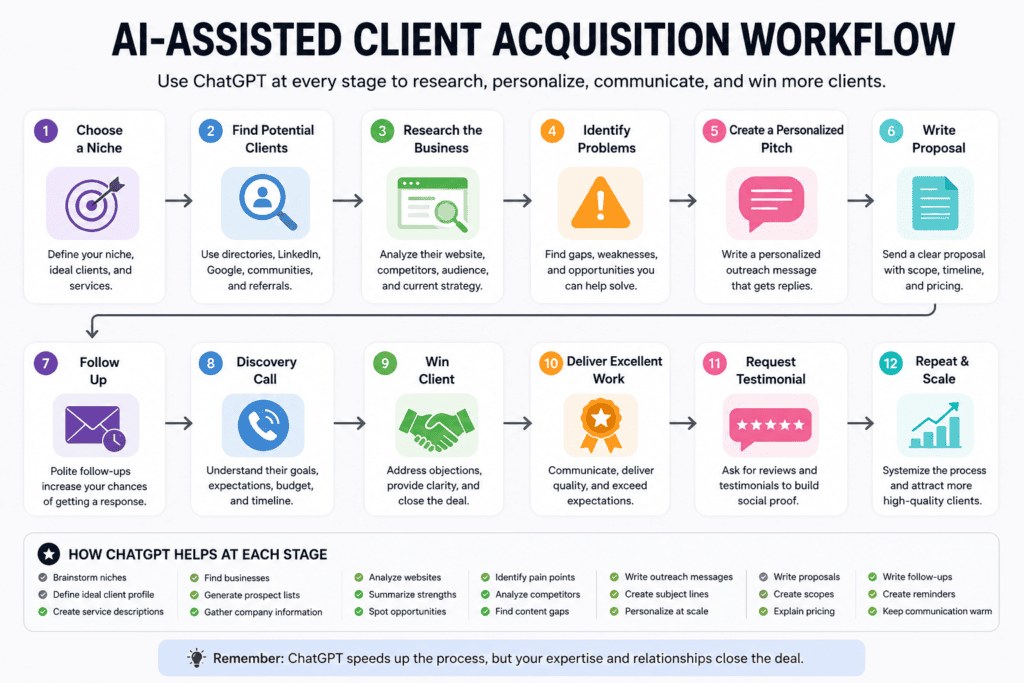
The AI-Assisted Client Acquisition System
Rather than thinking about client acquisition as a single activity, break it into repeatable stages.
Choose a Niche

↓

Find Potential Clients

↓

Research the Business

↓

Identify Problems

↓

Create a Personalized Pitch

↓

Write Proposal

↓

Follow Up

↓

Discovery Call

↓

Win Client

↓

Deliver Excellent Work

↓

Request Testimonial

↓

Repeat
Notice that ChatGPT supports almost every stage—but you remain responsible for relationship building and decision-making.
Step 1: Choose a Clear Freelance Niche
One of the biggest mistakes freelancers make is trying to serve everyone.
Compare these two positioning statements:
❌ “I do digital marketing.”
vs.
✅ “I help travel businesses increase organic traffic through SEO-driven content.”
The second immediately tells a potential client:
- Who you help.
- What you do.
- What outcome you deliver.
ChatGPT can help refine your positioning by brainstorming niche ideas, ideal customer profiles, and service descriptions.
Questions to answer before choosing a niche
- Which industries do I already understand?
- Which services do I enjoy delivering?
- Which services have consistent demand?
- Which clients are willing to pay premium rates?
- Where can I demonstrate measurable results?
The clearer your niche, the easier it becomes to market yourself.
Step 2: Build Your Ideal Client Profile
Not every business is your customer.
Before reaching out, define your ideal client.
Example:
Ideal Client

Industry:
Travel Agency

Company Size:
5–50 employees

Location:
UK & Europe

Problem:
Low organic traffic

Need:
SEO content & local visibility

Budget:
Mid-range to premium

Decision Maker:
Founder or Marketing Manager
Having a clear profile makes prospecting much more focused.
Step 3: Find Potential Clients
There are many legitimate ways to identify businesses that could benefit from your services.
Examples include:
- Company websites.
- Professional networking platforms.
- Industry directories.
- Local business listings.
- Startup communities.
- Business associations.
- Online marketplaces.
- Referrals from existing clients.
The goal isn’t to contact everyone.
It’s to build a list of businesses that match your niche and could genuinely benefit from your expertise.
Step 4: Research Each Business Before Contacting Them
This is where many freelancers skip an important step.
Sending the same message to every business rarely works.
Instead, spend a few minutes understanding the company.
Look for:
- Their products or services.
- Target audience.
- Recent news or updates.
- Blog activity.
- Website quality.
- Content gaps.
- Technical issues.
- Marketing opportunities.
ChatGPT can help organize your observations into a structured summary that makes proposal writing much easier.
Example Business Research Workflow
Company Website

↓

Products & Services

↓

Target Audience

↓

Strengths

↓

Weaknesses

↓

Potential Opportunities

↓

Suggested Freelance Service
This transforms generic outreach into personalized consulting.
Step 5: Identify Problems Before Selling Solutions
Clients rarely buy services.
They buy solutions.
Instead of saying:
“I offer SEO.”
Explain:
“I noticed your destination pages aren’t targeting location-specific search intent, which could limit your visibility for travellers searching those routes.”
That demonstrates understanding.
ChatGPT can help structure your findings, but the observations should come from your own research.
Step 6: Write Personalized Outreach Messages
Personalization is one of the biggest factors in successful outreach.
A strong message typically includes:
- A genuine observation.
- Recognition of the client’s business.
- A relevant insight.
- A clear explanation of how you can help.
- A simple call to action.
Avoid overly promotional language.
Focus on starting a conversation rather than making an immediate sale.
Good Outreach Structure
Greeting

↓

Personal Observation

↓

Business Insight

↓

Suggested Improvement

↓

Brief Introduction

↓

Invitation to Talk
This approach feels more natural than sending generic sales messages.
Step 7: Create Better Freelance Proposals
Winning proposals are rarely the longest.
They’re usually the clearest.
An effective proposal should answer five questions:
- What problem does the client have?
- How do you understand that problem?
- What’s your proposed solution?
- What results should they expect?
- Why are you the right person?
A simple structure works well:
Introduction

↓

Project Understanding

↓

Recommended Solution

↓

Scope of Work

↓

Timeline

↓

Deliverables

↓

Pricing

↓

Next Steps
ChatGPT can generate a polished first draft, but always customise it with project-specific details.
Step 8: Prepare for Discovery Calls
Before meeting a potential client, organise your thoughts.
Create a checklist covering:
- Client objectives.
- Current challenges.
- Budget expectations.
- Timeline.
- Success metrics.
- Questions you want to ask.
Preparation helps conversations feel more confident and productive.
Step 9: Handle Client Questions Professionally
Prospective clients often ask:
- Why should we choose you?
- What’s your process?
- How long will this take?
- Have you worked with similar businesses?
- How do you measure success?
Instead of improvising every answer, develop clear frameworks that you can personalise for each client.
Consistency builds trust.
Step 10: Follow Up Without Being Pushy
Many projects are won through thoughtful follow-up rather than the first message.
A professional follow-up should:
- Reference the previous conversation.
- Offer additional value if appropriate.
- Be polite and concise.
- Make it easy for the client to respond.
Avoid sending repeated messages without purpose.
Persistence should never become pressure.
Client Acquisition Dashboard
Treat prospecting as an ongoing system rather than a one-time task.
Prospects Added This Week

↓

Businesses Researched

↓

Personalized Outreach Sent

↓

Replies Received

↓

Discovery Calls

↓

Proposals Sent

↓

Projects Won

↓

Testimonials Received
Tracking these stages helps you identify where your process can improve.
Common Client Acquisition Mistakes
Many freelancers struggle not because of their skills, but because of avoidable mistakes.
Examples include:
- Contacting businesses without research.
- Sending identical proposals to everyone.
- Talking about services instead of business outcomes.
- Following up too aggressively—or not at all.
- Failing to define a clear niche.
- Not showcasing relevant work or results.
Improving these areas often has a greater impact than simply sending more proposals.
The Role of ChatGPT in Client Acquisition
ChatGPT doesn’t replace networking, relationship building, or trust.
What it does exceptionally well is reduce the repetitive work surrounding sales:
- Structuring research.
- Organising ideas.
- Drafting outreach.
- Refining proposals.
- Improving communication.
- Preparing meeting notes.
That allows you to spend more time building genuine relationships with potential clients.
Key Takeaways
Finding freelance clients is a repeatable process—not a matter of luck.
By combining thoughtful research, personalised communication, and consistent follow-up with ChatGPT’s ability to accelerate repetitive tasks, you can create a more efficient and professional client acquisition workflow.
The goal isn’t to automate relationships.
It’s to free up more time for the conversations and expertise that ultimately win projects.
ChatGPT for Freelance Writers & SEO Specialists: A Complete AI-Powered Content Workflow
If you’re a freelance writer, blogger, SEO specialist, or content marketer, ChatGPT can become one of the most valuable tools in your workflow.
But here’s the important distinction:
Professional writers don’t use ChatGPT to replace writing.
They use it to eliminate repetitive work so they can spend more time on strategy, research, editing, and creating content that genuinely helps readers.
The best-performing content still requires human experience, original insights, and editorial judgment.
ChatGPT simply helps you reach that final result faster.
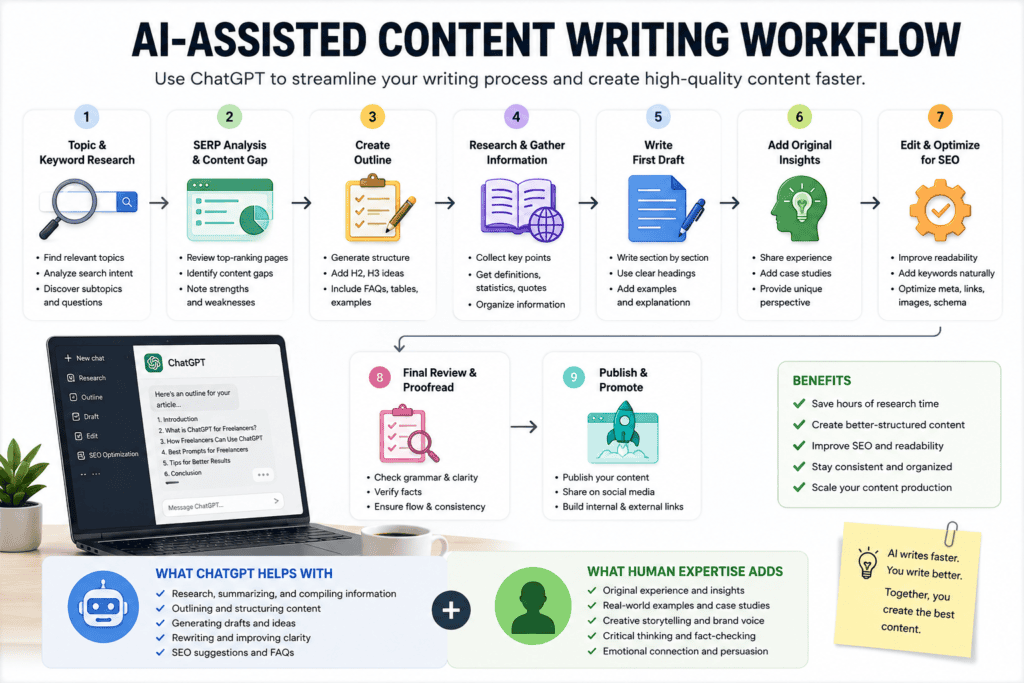
The Modern SEO Content Workflow
A professional SEO article isn’t created by opening ChatGPT and asking it to “write a blog.”
Instead, successful freelancers follow a structured process.
Choose Keyword

↓

Understand Search Intent

↓

Analyze SERP

↓

Study Competitors

↓

Identify Content Gaps

↓

Create Outline

↓

Research Topic

↓

Write Draft

↓

Add Original Insights

↓

Optimize SEO

↓

Internal Linking

↓

Final Review

↓

Publish

↓

Update Regularly
ChatGPT can assist throughout this workflow—but every stage still benefits from human expertise.
Step 1: Start With Search Intent—Not Keywords
Many beginners choose a keyword and immediately start writing.
That’s backwards.
Google doesn’t rank pages simply because they contain a keyword.
It ranks pages that satisfy the reason behind the search.
For example:
Keyword:
ChatGPT for freelancersPossible search intents include:
- Learning how freelancers use ChatGPT.
- Finding ways to save time.
- Improving client communication.
- Discovering AI workflows.
- Increasing freelance income.
Your article should answer these underlying questions—not just repeat the keyword.
Step 2: Analyze the SERP Before Writing
Before creating any content, study what Google already considers valuable.
Look for:
- Article length.
- Heading structure.
- Types of examples.
- Images.
- Comparison tables.
- FAQs.
- Videos.
- AI Overview.
- People Also Ask questions.
Ask yourself:
What information is missing?
That’s your opportunity.
For example, if every article explains what ChatGPT is but none provides complete freelancer workflows, that becomes your competitive advantage.
Step 3: Identify Content Gaps
Content gaps are the fastest way to outperform competitors.
Suppose the top-ranking pages include:
- Basic explanations.
- A few prompts.
- Generic advice.
You could improve the experience by adding:
- Real workflows.
- Decision trees.
- Comparison tables.
- Practical templates.
- Checklists.
- Common mistakes.
- Case studies.
- Industry-specific examples.
Google increasingly rewards pages that provide information gain—content that goes beyond what’s already available.
Step 4: Create a Comprehensive Content Brief
Before writing, organize your ideas.
A strong content brief should define:
Primary Keyword

↓

Search Intent

↓

Target Audience

↓

Secondary Keywords

↓

Questions to Answer

↓

Competitor Weaknesses

↓

Internal Links

↓

External References

↓

Images

↓

CTA
This roadmap helps you stay focused and ensures your article covers the topic comprehensively.
Step 5: Build a Detailed Outline
A detailed outline is one of the most important parts of the writing process.
Instead of asking ChatGPT to generate a complete article immediately, create a structure first.
Example:
Introduction

↓

Problem

↓

Solution

↓

Step-by-Step Guide

↓

Examples

↓

Mistakes

↓

FAQs

↓

Conclusion
This approach improves logical flow and makes the writing process much easier.
Step 6: Use ChatGPT as Your Research Assistant
Research often takes longer than writing.
ChatGPT can help you:
- Explain unfamiliar concepts.
- Compare related topics.
- Summarize publicly available information.
- Generate questions readers may have.
- Brainstorm supporting examples.
- Organize research into logical sections.
Always verify important facts with authoritative sources, especially when accuracy is essential.
Step 7: Write the First Draft
Once the research and outline are complete, drafting becomes much easier.
A good process is:
- Write section by section.
- Focus on one idea at a time.
- Use clear headings.
- Add examples.
- Explain concepts thoroughly.
Avoid generating an entire article in one prompt.
Breaking the article into sections produces better organization and higher-quality content.
Step 8: Add Original Experience
This is where most AI-generated content falls short.
Readers—and search engines—value insights that come from real work.
Examples include:
- Lessons from client projects.
- Mistakes you’ve made.
- Practical workflows.
- Personal recommendations.
- Before-and-after improvements.
- Real-world observations.
These elements make your content more trustworthy and more difficult for competitors to replicate.
Step 9: Optimize for SEO
After drafting, review your article for on-page optimization.
Checklist:
- Clear H1.
- Descriptive H2 and H3 headings.
- Natural keyword placement.
- Helpful meta title.
- Compelling meta description.
- Short paragraphs.
- Internal links.
- External references where appropriate.
- Descriptive image alt text.
- FAQ section.
Remember:
Optimization should improve readability—not make the article feel repetitive.
Step 10: Improve Readability
People rarely read every word.
They scan.
Make your content easy to consume by using:
- Short paragraphs.
- Bullet lists.
- Numbered steps.
- Comparison tables.
- Callout boxes.
- Flow diagrams.
- Checklists.
The easier your content is to navigate, the longer readers are likely to stay.
Step 11: Create Supporting Assets
Strong articles are more than text.
Consider adding:
- Original diagrams.
- Workflow illustrations.
- Comparison tables.
- Checklists.
- Infographics.
- Screenshots.
- Downloadable templates.
These elements improve user experience and make your content more shareable.
Step 12: Publish—Then Improve
Publishing isn’t the finish line.
High-performing articles are updated regularly.
Review your content periodically to:
- Refresh outdated information.
- Add new examples.
- Expand FAQs.
- Improve internal linking.
- Update screenshots.
- Cover emerging questions.
Content that evolves over time often performs better than content that’s never updated.
A Realistic AI-Assisted Writing Workflow
Here’s a practical workflow you can adopt:
Keyword Research

↓

SERP Analysis

↓

Search Intent

↓

Content Gap Analysis

↓

Detailed Outline

↓

Research

↓

Section-by-Section Drafting

↓

Original Insights

↓

Editing

↓

SEO Optimization

↓

Images

↓

Publish

↓

Monitor Rankings

↓

Update Regularly
Notice that ChatGPT supports almost every stage—but your expertise guides the process.
Common Mistakes Freelance Writers Make with ChatGPT
Avoid these common pitfalls:
- Publishing AI output without editing.
- Ignoring search intent.
- Skipping competitor analysis.
- Writing without an outline.
- Forgetting to add original insights.
- Overusing keywords.
- Neglecting internal linking.
- Failing to update existing content.
These mistakes reduce both user satisfaction and long-term SEO performance.
Key Takeaways
For freelance writers and SEO specialists, ChatGPT is most valuable as a productivity accelerator—not a content replacement.
When combined with proper SERP analysis, search intent research, structured outlines, and original expertise, it can dramatically reduce production time while helping you create higher-quality content.
The goal isn’t to produce more articles.
It’s to produce better articles more efficiently.
How Different Freelancers Can Use ChatGPT: Profession-Specific Workflows
One of ChatGPT’s biggest strengths is its versatility.
The same AI assistant can support a writer drafting blog posts, a developer debugging code, a designer preparing creative briefs, or a virtual assistant organizing administrative tasks.
The key isn’t using ChatGPT for everything.
It’s understanding which repetitive tasks can be accelerated without sacrificing quality.
Let’s explore how different freelance professionals can integrate ChatGPT into their daily workflow.
ChatGPT for SEO Specialists
SEO professionals spend significant time researching, planning, analyzing, and communicating.
ChatGPT can accelerate many of these supporting tasks.
Workflow
Receive Client Brief
        │
        ▼
Keyword Research
        │
        ▼
SERP Analysis
        │
        ▼
Content Gap Analysis
        │
        ▼
Outline Creation
        │
        ▼
Content Draft
        │
        ▼
On-Page SEO
        │
        ▼
Internal Linking
        │
        ▼
Final Review
Practical Uses
- Brainstorm keyword clusters.
- Generate topical maps.
- Organize search intent.
- Create article outlines.
- Draft FAQ sections.
- Suggest schema opportunities.
- Improve readability.
- Plan internal linking.
- Summarize competitor content.
- Create monthly SEO reports.
Human Expertise Still Required
- Keyword validation.
- Technical SEO audits.
- Search Console analysis.
- Link-building strategy.
- Business prioritization.
- Final editorial review.
ChatGPT for Content Writers
Professional writers rarely struggle with writing itself.
The biggest time sink is preparing before writing.
AI-Assisted Workflow
Topic

↓

Research

↓

Outline

↓

Draft

↓

Editing

↓

Optimization

↓

Publish

↓

Repurpose
ChatGPT Can Help With
- Topic ideation.
- Headline variations.
- Content briefs.
- Outline creation.
- FAQ generation.
- Editing.
- Simplifying technical language.
- Repurposing blogs into newsletters or social posts.
The writer remains responsible for originality, storytelling, and accuracy.
ChatGPT for Copywriters
Copywriting focuses on persuasion rather than information.
ChatGPT can speed up brainstorming but should never replace customer research.
Useful Tasks
- Landing page structures.
- Product descriptions.
- Email sequences.
- Ad copy variations.
- Call-to-action ideas.
- Sales page frameworks.
- A/B testing ideas.
Always refine the copy to match the brand’s tone, audience, and goals.
ChatGPT for Virtual Assistants
Virtual assistants often handle repetitive administrative work.
This makes them ideal candidates for AI-assisted workflows.
Daily Workflow
Client Request

↓

Research

↓

Organize Information

↓

Draft Response

↓

Review

↓

Deliver
Tasks That ChatGPT Can Assist With
- Email drafting.
- Meeting agendas.
- Calendar planning.
- Travel itineraries.
- Customer support templates.
- Data organization.
- SOP creation.
- Process documentation.
- Meeting summaries.
- Task prioritization.
The result is greater efficiency while maintaining a professional level of communication.
ChatGPT for Social Media Managers
Managing multiple platforms requires constant planning and creativity.
ChatGPT Can Help Generate
- Monthly content calendars.
- Caption ideas.
- Hashtag suggestions.
- Content repurposing.
- Audience personas.
- Campaign themes.
- Engagement questions.
- Content series ideas.
- Community response templates.
Final posts should always be reviewed to ensure they reflect the brand’s identity.
ChatGPT for Graphic Designers
Designers spend much more time communicating than many people realize.
ChatGPT can reduce that workload.
Examples
- Creative briefs.
- Client questionnaires.
- Mood board descriptions.
- Presentation copy.
- Design rationales.
- Brand messaging.
- Project timelines.
- Revision summaries.
Instead of replacing creativity, AI supports the planning process.
ChatGPT for UI/UX Designers
UX projects involve research, structure, and communication.
Useful applications include:
- User personas.
- Journey maps.
- User story drafts.
- UX interview questions.
- Feature prioritization.
- Documentation.
- Design presentations.
- Research summaries.
Design thinking remains a human-centered process.
ChatGPT for Developers
Developers increasingly use AI as a coding assistant.
However, its value extends beyond writing code.
Practical Uses
- Explaining unfamiliar functions.
- Debugging simple errors.
- Generating documentation.
- Writing comments.
- API explanations.
- SQL query assistance.
- Learning frameworks.
- Refactoring suggestions.
- Test case ideas.
- Deployment checklists.
Always test generated code thoroughly before deploying it to production.
ChatGPT for Video Editors
Video editing involves much more than editing software.
ChatGPT can assist before and after production.
Examples
- Script outlines.
- Storyboarding ideas.
- Shot lists.
- YouTube descriptions.
- Titles.
- Thumbnail text.
- Video chapters.
- Social media snippets.
- Client communication.
- Revision summaries.
This reduces administrative work and improves publishing efficiency.
ChatGPT for Business Consultants
Consultants manage large amounts of information.
ChatGPT can help organize that information into actionable insights.
Common Uses
- SWOT analysis templates.
- Workshop agendas.
- Interview summaries.
- Report structures.
- Presentation outlines.
- Executive summaries.
- Meeting preparation.
- Recommendation frameworks.
Final recommendations should always reflect your own expertise and professional judgment.
ChatGPT for Data Analysts
AI can simplify many documentation tasks associated with data analysis.
Examples include:
- Explaining metrics.
- SQL assistance.
- Report summaries.
- Dashboard documentation.
- Stakeholder communication.
- Data interpretation notes.
- Visualization ideas.
Analytical conclusions should always be verified against the underlying data.
ChatGPT for Translators
Professional translators can use ChatGPT as a support tool rather than a replacement.
Useful tasks include:
- Draft translations.
- Grammar suggestions.
- Tone adjustments.
- Localization ideas.
- Terminology consistency.
- Style refinement.
Critical translations—especially legal or technical documents—should always receive human review.
Universal Tasks Every Freelancer Can Improve with ChatGPT
Regardless of your profession, certain tasks are common across nearly all freelance businesses.
Examples include:
- Research.
- Planning.
- Brainstorming.
- Documentation.
- Proposal writing.
- Email communication.
- Meeting preparation.
- Project organization.
- Knowledge management.
- Learning new skills.
These repetitive activities often consume hours each week.
ChatGPT helps reduce that overhead, allowing you to focus on delivering value to clients.
Where Human Expertise Makes the Difference
AI can accelerate many tasks.
It cannot replace:
- Strategic thinking.
- Creativity.
- Negotiation.
- Client relationships.
- Industry experience.
- Ethical judgment.
- Accountability.
- Problem-solving in ambiguous situations.
Clients hire freelancers because they trust their expertise—not because they have access to AI.
The most successful professionals combine AI efficiency with human insight.
Choosing the Right Workflow
You don’t need to use ChatGPT for every task.
Start by identifying:
- Tasks you repeat frequently.
- Processes that follow predictable patterns.
- Activities that require drafting or organization.
- Areas where research consumes significant time.
These are usually the best opportunities for AI assistance.
Key Takeaways
ChatGPT isn’t designed for one profession.
It’s a flexible productivity tool that adapts to many freelance careers.
Whether you’re writing articles, designing interfaces, developing software, managing social media, or consulting with businesses, AI can help streamline repetitive work while allowing you to focus on higher-value activities.
The goal isn’t to automate your expertise.
It’s to give your expertise more time to shine.
25 ChatGPT Prompts Every Freelancer Should Save (Organized by Workflow)
One of the biggest mistakes freelancers make is believing that a single “magic prompt” will solve every problem.
In reality, the quality of ChatGPT’s output depends heavily on the context you provide.
A good prompt tells ChatGPT:
- Your role.
- The client’s industry.
- The objective.
- The target audience.
- The desired tone.
- The preferred output format.
- Any constraints or requirements.
Think of prompts as reusable templates that you customize for each project.
The following prompts are organized according to the stages of a typical freelance workflow.
Category 1: Client Research Prompts
Prompt 1: Analyze a Business Website
Act as a business consultant.

Analyze the following company website.

Identify:
- Target audience
- Products/services
- Unique selling proposition
- Strengths
- Weaknesses
- Missed opportunities
- Suggested improvements

Website:
[Insert URL or website content]
Prompt 2: Identify Business Pain Points
Based on this company's website and industry, identify the five biggest marketing, SEO, content, or operational challenges they may currently face.

For each challenge, explain why it matters and suggest a possible solution.
Prompt 3: Find Service Opportunities
Based on this business, identify which freelance services could provide the highest value.

Explain why each recommendation would benefit the company.
Prompt 4: Competitor Research
Compare these two companies.

Identify:

- Strengths
- Weaknesses
- Marketing differences
- Content strategy
- SEO opportunities
- User experience improvements
Prompt 5: Ideal Client Summary
Based on my niche and services, create a detailed ideal client profile including:

- Industry
- Company size
- Budget
- Goals
- Pain points
- Buying behavior
Category 2: Proposal Writing Prompts
Winning proposals aren’t about impressive language—they’re about demonstrating understanding.
Prompt 6: Personalized Proposal
Act as an experienced freelancer.

Write a personalized proposal for the following project.

Include:

- Introduction
- Understanding of the client's problem
- Recommended solution
- Deliverables
- Timeline
- Professional closing

Project description:

[Paste project]
Prompt 7: Improve My Proposal
Improve this freelance proposal.

Make it:

- More persuasive
- Easier to read
- Client-focused
- Professional
- Concise

Do not exaggerate or make unrealistic promises.
Prompt 8: Scope of Work
Create a professional scope of work document for this project.

Include:

Objectives

Deliverables

Timeline

Responsibilities

Exclusions

Success criteria
Prompt 9: Pricing Explanation
Help me explain my pricing professionally without sounding defensive.

Focus on value, outcomes, expertise, and long-term benefits.
Prompt 10: Discovery Call Questions
Create a list of discovery call questions for a potential client.

Organize them into:

Business Goals

Current Challenges

Budget

Timeline

Decision Makers

Success Metrics
Category 3: SEO & Content Marketing Prompts
This category is especially valuable for SEO freelancers, bloggers, and content marketers.
Prompt 11: Search Intent Analysis
Analyze the search intent behind the keyword:

[Keyword]

Identify:

Primary intent

Secondary intent

Likely audience

Questions users want answered

Content format Google appears to prefer
Prompt 12: SERP Gap Analysis
Analyze the top-ranking pages for this keyword.

Identify:

Common topics

Missing information

Weaknesses

Content gaps

Ideas that could make a new article more valuable.
Prompt 13: Pillar Page Outline
Create a comprehensive SEO-first pillar page outline for:

[Topic]

Include:

H2s

H3s

FAQ

Tables

Examples

Case studies

Internal linking ideas

Image suggestions
Prompt 14: Keyword Clustering
Group these keywords into logical topic clusters.

Explain why each keyword belongs together and suggest a content hierarchy.
Prompt 15: Internal Linking Strategy
Based on these published articles, suggest an internal linking strategy.

Identify:

Pillar pages

Supporting content

Anchor text

Link opportunities
Category 4: Content Creation Prompts
Prompt 16: Article Introduction
Write an engaging introduction for this article.

Use:

A relatable problem

Current context

Clear expectations

Natural keyword placement

Avoid clichés and AI-sounding phrases.
Prompt 17: Rewrite for Clarity
Rewrite this section.

Improve:

Flow

Clarity

Readability

Logical structure

Keep the original meaning.
Prompt 18: FAQ Generator
Generate 30 frequently asked questions for this topic.

Prioritize:

People Also Ask

AI Overview questions

Beginner questions

Advanced questions
Prompt 19: Comparison Table
Create a comparison table between:

Option A

Option B

Compare:

Features

Advantages

Disadvantages

Best use cases
Prompt 20: Article Conclusion
Write a conclusion that summarizes the article, reinforces the key takeaway, and encourages readers to take the next step.

Avoid generic closing statements.
Category 5: Client Communication Prompts
Strong communication builds trust and often leads to repeat business.
Prompt 21: Project Update Email
Write a professional project update email.

Include:

Current progress

Completed tasks

Next steps

Expected timeline

Friendly closing
Prompt 22: Revision Response
Help me respond to a client's revision request professionally.

Acknowledge their feedback.

Explain the changes.

Maintain a positive tone.
Prompt 23: Follow-Up Email
Write a polite follow-up email for a proposal I sent seven days ago.

Show interest without sounding pushy.
Prompt 24: Testimonial Request
Draft a professional email asking a satisfied client for a testimonial.

Keep it short, friendly, and easy to respond to.
Prompt 25: Referral Request
Write a polite message asking a satisfied client whether they know anyone else who could benefit from my services.

Avoid sounding salesy.
Why These Prompts Work
Most prompt collections focus only on what to type.
Professional freelancers focus on how to think.
Every prompt in this guide follows the same framework:
Role

↓

Context

↓

Objective

↓

Requirements

↓

Output Format

↓

Constraints
By giving ChatGPT clear instructions, you increase the chances of receiving useful, relevant, and structured responses.
Customize Every Prompt
Don’t copy prompts exactly as written.
Replace placeholders with details such as:
- Client industry.
- Business goals.
- Target audience.
- Brand voice.
- Deliverables.
- Budget.
- Timeline.
- Geographic market.
The more context you provide, the more useful the output is likely to be.
Build Your Own Prompt Library
As you complete more freelance projects, save your best prompts.
Organize them into categories like:
Client Research

↓

Sales

↓

SEO

↓

Writing

↓

Marketing

↓

Coding

↓

Communication

↓

Administration
Over time, you’ll develop a personal prompt library tailored to your workflow, saving hours on repetitive tasks.
Key Takeaways
The best prompts aren’t the longest—they’re the clearest.
By providing context, defining objectives, and specifying the desired output, you can turn ChatGPT into a reliable productivity partner for almost every stage of your freelance business.
Rather than searching for a “perfect prompt,” focus on building a reusable system that evolves alongside your experience.
Can ChatGPT Replace Freelancers? The Truth About AI, Skills & the Future of Freelancing
Since ChatGPT became widely available, freelancers around the world have asked the same question:
“Is AI going to take my job?”
It’s a reasonable concern.
When people see AI generating articles, writing code, answering questions, creating images, and automating tasks, it’s natural to wonder whether human freelancers will still be needed in the future.
The short answer is:
No, ChatGPT is not replacing most freelancers.
However, it is changing how freelance work is performed.
And that distinction matters.
The freelancers who understand this shift are likely to thrive.
Those who ignore it may struggle to remain competitive.
The Real Question Isn’t About Replacement
Many people ask:
“Can ChatGPT replace freelancers?”
A more useful question is:
“Which freelance tasks can ChatGPT automate?”
Because AI rarely replaces entire professions.
It usually automates specific tasks within those professions.
For example:
A freelance writer doesn’t only write.
They also:
- Research topics.
- Understand audiences.
- Interview experts.
- Analyze competitors.
- Make editorial decisions.
- Adapt tone.
- Verify facts.
- Build content strategies.
- Communicate with clients.
ChatGPT can assist with some of these activities.
It cannot fully replicate all of them.
What ChatGPT Is Good At
AI performs best when tasks are:
- Repetitive.
- Structured.
- Predictable.
- Pattern-based.
- Information-heavy.
Examples include:
Administrative Work
- Drafting emails.
- Formatting documents.
- Summarizing information.
- Creating checklists.
Content Support
- Generating outlines.
- Suggesting headlines.
- Rewriting text.
- Organizing research.
Technical Assistance
- Explaining code.
- Creating documentation.
- Debugging simple issues.
- Generating examples.
Planning
- Organizing workflows.
- Structuring projects.
- Brainstorming ideas.
These capabilities make freelancers more efficient.
But efficiency isn’t the same thing as replacement.
What ChatGPT Still Struggles With
Despite its strengths, AI has significant limitations.
Strategic Thinking
Clients often hire freelancers because they need guidance—not just execution.
A client may ask:
“Should we invest in SEO or paid advertising?”
That’s a strategic decision requiring context, experience, and judgment.
Relationship Building
Freelancing is built on trust.
Clients don’t continue working with you because you can type quickly.
They continue working with you because:
- You understand their business.
- You solve problems.
- You communicate effectively.
- You consistently deliver results.
Relationships remain a human advantage.
Original Experience
AI learns from patterns.
It doesn’t possess real-world experience.
For example:
A freelance SEO consultant who has managed dozens of client campaigns can provide practical insights based on actual outcomes.
AI can describe SEO.
Experience can explain what actually works.
Accountability
When a project succeeds or fails, someone is responsible.
Clients hire freelancers because they want expertise backed by accountability.
AI doesn’t assume responsibility for business decisions.
Humans do.
Creativity in Ambiguous Situations
Many freelance projects involve uncertainty.
Examples include:
- Brand positioning.
- Product messaging.
- User experience decisions.
- Marketing strategy.
- Business consulting.
These situations often require judgment rather than predictable answers.
Human creativity remains essential.
Which Freelance Jobs Are Most Affected?
AI’s impact isn’t equal across all professions.
Some tasks are becoming more automated than others.
Higher Automation Risk
Tasks that are:
- Highly repetitive.
- Template-driven.
- Low-complexity.
- Easily standardized.
Examples:
- Basic data entry.
- Simple transcription.
- Generic content generation.
- Routine administrative work.
Lower Automation Risk
Tasks that require:
- Expertise.
- Strategy.
- Creativity.
- Relationships.
- Decision-making.
Examples:
- SEO consulting.
- Brand strategy.
- UX design.
- Sales consulting.
- Technical development.
- Business coaching.
- High-level copywriting.
The more your work depends on judgment and expertise, the harder it becomes to automate.
The Freelancers Who Benefit Most From AI
Historically, technology tends to reward people who learn how to use it effectively.
Consider calculators.
They didn’t eliminate accountants.
They eliminated manual calculations.
The same principle applies to AI.
The most successful freelancers often use ChatGPT to:
- Reduce repetitive work.
- Improve productivity.
- Deliver projects faster.
- Focus on high-value activities.
- Serve more clients.
AI becomes a competitive advantage rather than a threat.
A Tale of Two Freelancers
Imagine two SEO freelancers.
Freelancer A
- Refuses to use AI.
- Performs every task manually.
- Spends hours on repetitive activities.
- Delivers good results.
Freelancer B
- Uses ChatGPT strategically.
- Automates repetitive work.
- Focuses on strategy.
- Delivers good results faster.
Who has the advantage?
Most clients care about outcomes, efficiency, and communication.
The second freelancer can often spend more time on activities that directly impact results.
How AI Is Changing Client Expectations
AI isn’t only affecting freelancers.
Clients are using AI too.
This creates new expectations.
Clients increasingly expect:
- Faster turnaround times.
- Better communication.
- More efficient processes.
- Higher-quality deliverables.
Freelancers who understand AI are often better positioned to meet these expectations.
New Opportunities Created by AI
Every technological shift creates new markets.
AI is no different.
Growing opportunities include:
AI Consulting
Helping businesses understand and implement AI tools.
Prompt Engineering
Creating workflows and prompt systems.
AI Content Strategy
Combining AI efficiency with human expertise.
Workflow Automation
Helping businesses streamline operations.
AI Training
Teaching teams how to use AI effectively.
AI-Assisted Marketing
Building systems that combine human creativity with AI-powered productivity.
For many freelancers, AI is creating opportunities faster than it’s eliminating them.
The Skills That Will Become More Valuable
As AI handles more routine tasks, certain human skills become increasingly important.
Critical Thinking
Evaluating information.
Questioning assumptions.
Making informed decisions.
Communication
Explaining ideas clearly.
Understanding client needs.
Managing expectations.
Strategic Planning
Connecting actions to business outcomes.
Creativity
Developing unique solutions.
Building original ideas.
Differentiating brands.
Relationship Management
Building trust and long-term partnerships.
These skills are difficult to automate and likely to remain valuable for years to come.
Future-Proofing Your Freelance Career
Instead of competing against AI, learn to work alongside it.
Ask yourself:
Which tasks consume the most time?
Which activities are repetitive?
Which workflows could become more efficient?
Which skills make me uniquely valuable?
The answers often reveal where AI can help and where your expertise matters most.
The Freelance Career Formula for the AI Era
The most resilient freelancers combine three things:
Human Expertise

+

AI Efficiency

+

Client Relationships

=

Competitive Advantage
Remove any one of these elements and your business becomes weaker.
Together, they create a powerful combination.
Common Myths About AI and Freelancing
Myth 1: AI Will Replace All Freelancers
Reality:
AI is automating tasks, not eliminating most professions.
Myth 2: Clients Only Want Cheap AI Content
Reality:
Businesses still need expertise, strategy, quality control, and accountability.
Myth 3: Using AI Is Cheating
Reality:
AI is a productivity tool.
What matters is the quality of the final result.
Myth 4: Freelancers Don’t Need to Learn AI
Reality:
Understanding AI is becoming an increasingly valuable professional skill.
Key Takeaways
ChatGPT is changing freelancing.
But change doesn’t automatically mean replacement.
The freelancers most likely to succeed in the coming years are those who:
- Learn how AI works.
- Use AI strategically.
- Focus on high-value skills.
- Build strong client relationships.
- Continue developing expertise.
Clients hire freelancers to solve problems, provide insights, and deliver results.
Those needs aren’t disappearing.
The tools are simply evolving.
How Much Time Can ChatGPT Save Freelancers? Real-World Productivity Examples
One of the biggest reasons freelancers adopt ChatGPT isn’t because it can do impossible things.
It’s because it can help reduce the amount of time spent on repetitive work.
That time can then be invested in:
- Finding new clients.
- Improving deliverables.
- Learning new skills.
- Serving existing clients.
- Taking on additional projects.
The exact amount of time saved varies depending on your profession, workflow, and how effectively you use AI.
The examples below are estimates designed to illustrate where AI can provide meaningful efficiency gains—not guaranteed outcomes.
The 80/20 Principle of AI Productivity
Many freelance tasks don’t require deep creative thinking.
Instead, they involve repetitive preparation.
For example:
Research

↓

Organizing Notes

↓

Formatting

↓

Summarizing

↓

Editing

↓

Documentation

↓

Emails
These activities often consume a significant portion of a freelancer’s week.
ChatGPT can accelerate many of them, allowing you to spend more time on high-value work.
Example 1: Freelance Writer
Without AI:
Topic Research

45 minutes

↓

Outline

30 minutes

↓

Draft

3 hours

↓

Editing

1 hour

↓

Formatting

30 minutes

=

5 hours 45 minutes
With ChatGPT assisting:
Topic Research

15 minutes

↓

Outline

10 minutes

↓

Draft Support

2 hours

↓

Editing

45 minutes

↓

Formatting

10 minutes

=

3 hours 20 minutes
Estimated time saved: Around 2 hours per article, depending on complexity and editing requirements.
The writer still performs the thinking, fact-checking, and refinement.
AI simply reduces repetitive preparation.
Example 2: SEO Specialist
Typical workflow:
Keyword Analysis

↓

SERP Review

↓

Outline

↓

Content Brief

↓

Metadata

↓

FAQ

↓

Internal Linking
ChatGPT can assist by:
- Structuring keyword clusters.
- Organizing search intent.
- Creating draft outlines.
- Generating FAQ ideas.
- Suggesting internal links.
The SEO specialist still validates data, analyzes ranking opportunities, and develops strategy.
Example 3: Virtual Assistant
Daily activities often include:
- Email drafting.
- Meeting summaries.
- Calendar planning.
- Customer responses.
- Documentation.
Instead of writing every message from scratch, ChatGPT can create structured drafts that the assistant reviews and personalizes.
Over a full week, these small time savings can add up significantly.
Example 4: Software Developer
Developers don’t simply write code.
They also:
- Read documentation.
- Debug issues.
- Explain technical concepts.
- Write comments.
- Prepare deployment notes.
ChatGPT can assist with many of these support activities, allowing developers to spend more time solving technical problems.
Testing and production decisions remain the developer’s responsibility.
Example 5: Social Media Manager
Without AI, a weekly content plan might involve:
- Brainstorming themes.
- Writing captions.
- Creating hashtags.
- Repurposing content.
- Preparing posting schedules.
ChatGPT can speed up the planning phase while leaving final editing and brand alignment to the manager.
Weekly Productivity Comparison
The exact numbers will differ for every freelancer, but a simplified comparison might look like this:
| Activity | Without AI | With AI Assistance |
|---|---|---|
| Research | High | Reduced |
| Planning | Moderate | Faster |
| First Draft | Manual | Assisted |
| Editing | Required | Still Required |
| Client Emails | Manual | Drafted & Reviewed |
| Documentation | Manual | Assisted |
| Repetitive Tasks | High | Lower |
The biggest improvements generally occur in preparation and organization rather than in final decision-making.
Where the Time Savings Come From
ChatGPT is most effective at reducing the need to repeatedly:
- Format documents.
- Organize information.
- Rewrite similar emails.
- Summarize lengthy material.
- Generate initial structures.
- Produce checklists.
- Create templates.
These are valuable tasks—but they don’t always require your highest level of expertise.
What Freelancers Should Do With the Time They Save
Saving time is only valuable if it’s used wisely.
Consider reinvesting those hours into activities that grow your business.
Examples include:
Finding New Clients
Consistent prospecting often has a greater long-term impact than working longer hours.
Learning New Skills
AI tools evolve rapidly.
Improving your technical and business skills helps you stay competitive.
Improving Quality
Instead of producing more work, use some of the saved time to improve:
- Research depth.
- Visual assets.
- Case studies.
- User experience.
- Quality assurance.
Higher-quality work often leads to stronger referrals and repeat clients.
Building Personal Branding
Many freelancers neglect marketing because they’re busy delivering projects.
Time saved through better workflows can be invested in:
- Blogging.
- LinkedIn content.
- Portfolio updates.
- Networking.
- Speaking opportunities.
Measuring Your Own Productivity
Rather than guessing, track your workflow for a few weeks.
A simple productivity log can help identify where AI provides the greatest benefit.
Example:
Task

↓

Time Without AI

↓

Time With AI

↓

Quality Difference

↓

Decision:
Continue Using AI?
This allows you to make evidence-based decisions about which workflows are worth keeping.
Productivity Is More Than Speed
One common misconception is that productivity simply means working faster.
In reality, productivity also includes:
- Better organization.
- Fewer repetitive tasks.
- More consistent communication.
- Reduced mental fatigue.
- Improved project planning.
ChatGPT can contribute to these outcomes even when the overall project duration doesn’t change dramatically.
Avoid the Productivity Trap
Using AI to generate more work isn’t always the right goal.
Instead of asking:
“How can I produce twice as much?”
Ask:
“How can I deliver better results with the time I already have?”
Clients rarely pay for the number of words you write or the number of hours you work.
They pay for outcomes.
AI should help you improve those outcomes—not simply increase your workload.
A Sustainable AI Workflow
The most effective freelancers don’t automate everything.
They automate the repetitive parts while keeping strategic and creative work firmly under human control.
A balanced workflow might look like this:
Research

(AI Assisted)

↓

Planning

(Human + AI)

↓

Execution

(Human Led)

↓

Editing

(Human Led)

↓

Quality Review

(Human)

↓

Delivery

(Human)
This approach maintains quality while still benefiting from AI’s strengths.
Key Takeaways
ChatGPT can provide meaningful productivity gains, particularly for repetitive tasks such as research organization, drafting, documentation, and communication.
The exact amount of time saved depends on your profession and workflow, but the greatest value often comes from reinvesting those saved hours into activities that require human expertise—building relationships, solving complex problems, improving quality, and growing your freelance business.
The goal isn’t to work faster for the sake of it.
It’s to work smarter while delivering exceptional value to your clients.
The Best ChatGPT Setup for Freelancers (Projects, Memory, Custom GPTs & Daily Workflow)
Using ChatGPT effectively isn’t just about writing better prompts.
It’s about building a system.
Many freelancers open a new chat for every task, lose important context, repeat the same instructions, and waste time explaining their business over and over again.
A structured setup helps reduce this friction and makes AI a more consistent part of your workflow.
Instead of treating ChatGPT as a search engine, think of it as a long-term work assistant that supports different parts of your freelance business.
Why Your Setup Matters
Imagine two freelancers.
Freelancer A
- Starts a new chat every day.
- Repeats project requirements.
- Loses previous conversations.
- Uses random prompts.
- Has no organized workflow.
Freelancer B
- Organizes work into dedicated projects.
- Uses reusable prompt templates.
- Keeps reference material together.
- Documents client preferences.
- Follows a repeatable process.
Both use the same AI tool.
The second freelancer usually spends less time repeating work and more time solving client problems.
A Recommended ChatGPT Workspace
Organize your work into separate areas instead of mixing everything in one conversation.
Example:
Freelance Business

│

├── Client Projects

├── SEO Research

├── Content Writing

├── Marketing

├── Proposal Templates

├── Learning

├── Personal Knowledge Base

└── Business Planning
Keeping related work together makes it easier to return to ongoing projects and maintain context.
Organizing Client Projects
Create a dedicated workspace or conversation for each long-term client.
Store information such as:
- Business overview.
- Brand voice.
- Target audience.
- Services.
- Previous discussions.
- Content guidelines.
- Frequently used terminology.
- Standard operating procedures (SOPs).
This reduces the need to repeat background information every time you start a new task.
Build a Reusable Prompt Library
Instead of searching the internet for prompts every week, create your own collection.
Suggested categories:
Client Research

↓

Proposal Writing

↓

SEO

↓

Content Creation

↓

Email Templates

↓

Social Media

↓

Coding

↓

Documentation

↓

Reporting
As you complete more projects, refine these prompts based on what consistently produces useful results.
Use ChatGPT for Knowledge Management
Freelancers accumulate a large amount of information over time.
Examples include:
- Meeting notes.
- Research findings.
- Process documentation.
- Content ideas.
- Client feedback.
- Lessons learned.
Rather than letting these insights remain scattered across documents and notebooks, organize them into a searchable knowledge base that you can reference when planning future work.
Create Standard Operating Procedures (SOPs)
If you perform the same task repeatedly, document it.
Examples include:
- Publishing a blog post.
- Delivering an SEO audit.
- Onboarding a new client.
- Preparing monthly reports.
- Conducting keyword research.
- Reviewing website content.
Once documented, ChatGPT can help maintain consistency by generating checklists and reminding you of each step.
Daily AI Workflow for Freelancers
A structured routine often works better than using AI only when you’re stuck.
Example:
Morning

↓

Review Priorities

↓

Research

↓

Client Communication

↓

Project Execution

↓

Editing & Review

↓

End-of-Day Summary

↓

Plan Tomorrow
This turns ChatGPT into a planning assistant as well as a content assistant.
Separate Brainstorming From Final Production
One common mistake is using the same conversation for brainstorming and final deliverables.
Instead:
Brainstorming
- Generate ideas.
- Explore alternatives.
- Ask questions.
- Test concepts.
Production
- Refine approved ideas.
- Improve clarity.
- Structure documents.
- Prepare final client-facing work.
Keeping these stages separate often results in cleaner, more focused outputs.
Build Checklists Instead of Relying on Memory
Checklists improve consistency.
Examples:
Blog Publishing Checklist
- Final proofread.
- Meta title.
- Meta description.
- Internal links.
- External references.
- Image optimization.
- Alt text.
- Schema review.
- Mobile formatting.
- Publish.
Client Delivery Checklist
- Final review.
- File naming.
- Documentation.
- Deliverables attached.
- Invoice prepared.
- Follow-up scheduled.
These lists help reduce avoidable mistakes.
Protect Client Information
When working with AI tools, always think carefully about confidentiality.
Good practices include:
- Avoid sharing sensitive personal information.
- Avoid uploading confidential contracts unless you have permission and understand the platform’s policies.
- Remove unnecessary identifiers when possible.
- Review outputs before sharing them with clients.
Responsible AI usage builds trust and professionalism.
Review Every AI Output
No matter how good AI becomes, every deliverable should be reviewed before it reaches a client.
Check for:
- Accuracy.
- Clarity.
- Brand voice.
- Grammar.
- Consistency.
- Missing information.
- Factual errors.
AI can draft quickly.
Quality assurance remains your responsibility.
A Sample Weekly AI Workflow
Here’s an example of how a freelance business might use ChatGPT throughout the week:
| Day | Primary AI Tasks |
|---|---|
| Monday | Planning, client research, proposal drafting |
| Tuesday | Keyword research, outlines, SEO briefs |
| Wednesday | Drafting content, editing, internal linking |
| Thursday | Client communication, reporting, revisions |
| Friday | Content updates, documentation, workflow improvements |
This isn’t a fixed schedule—it’s a framework you can adapt to your own business.
The Biggest Productivity Upgrade
The greatest improvement doesn’t come from learning one amazing prompt.
It comes from reducing repeated decisions.
When your workflows, templates, and knowledge are organized, ChatGPT becomes more consistent and your work becomes easier to manage.
Systems outperform shortcuts.
Key Takeaways
Freelancers get the most value from ChatGPT when they use it as part of an organized workflow rather than as an occasional writing tool.
By creating dedicated workspaces, maintaining reusable prompt libraries, documenting processes, reviewing AI-generated outputs, and protecting client information, you can build a system that saves time without compromising quality.
A well-structured setup supports long-term productivity and helps your freelance business scale more effectively.
Frequently Asked Questions About ChatGPT for Freelancers
1. What is ChatGPT, and how can freelancers use it?
ChatGPT is an AI assistant that can help freelancers with tasks such as research, brainstorming, outlining, drafting content, organizing information, writing emails, preparing proposals, summarizing documents, and learning new skills.
It works best as a productivity assistant rather than a replacement for professional expertise.
2. Can ChatGPT replace freelancers?
Not entirely.
ChatGPT can automate many repetitive tasks, but clients still rely on freelancers for strategy, creativity, communication, problem-solving, accountability, and industry-specific expertise.
The freelancers who learn to use AI effectively are generally better positioned than those who ignore it.
3. Is using ChatGPT for freelance work allowed?
In most cases, yes.
However, freelancers should:
- Review AI-generated content carefully.
- Respect client confidentiality.
- Follow platform policies.
- Verify important facts.
- Be transparent if a client specifically asks about AI usage.
Always comply with any contractual or legal obligations.
4. Which freelance jobs benefit the most from ChatGPT?
ChatGPT is useful across many freelance professions, including:
- SEO specialists
- Content writers
- Copywriters
- Developers
- Graphic designers
- UI/UX designers
- Virtual assistants
- Social media managers
- Video editors
- Marketing consultants
- Business consultants
The greatest benefits are usually seen in research, planning, documentation, and communication.
5. Can ChatGPT write client proposals?
Yes.
It can generate structured proposal drafts based on your project requirements.
However, the strongest proposals are personalized with your own insights, relevant experience, and an understanding of the client’s specific goals.
6. Can ChatGPT help me find freelance clients?
Indirectly.
ChatGPT can assist with:
- Prospect research.
- Business analysis.
- Outreach messages.
- Proposal writing.
- Follow-up emails.
- Discovery call preparation.
Finding clients still requires networking, relationship building, and consistent outreach.
7. Is ChatGPT useful for SEO freelancers?
Yes.
It can help with:
- Keyword clustering.
- Search intent analysis.
- Content outlines.
- FAQ generation.
- Internal linking ideas.
- Content briefs.
- Metadata drafts.
Keyword validation, SERP analysis, and SEO strategy should still be guided by professional judgment.
8. Can ChatGPT create complete blog posts?
It can generate drafts, but publishing AI-generated text without editing is rarely a good idea.
High-quality content typically requires:
- Fact-checking.
- Original insights.
- Better structure.
- Human editing.
- Updated information.
- Examples based on experience.
9. Does Google penalize AI-generated content?
Google focuses on the quality and usefulness of content rather than whether AI was used to help create it.
Content that is accurate, helpful, original, and written to satisfy user intent is generally more likely to perform well than content created solely to manipulate search rankings.
10. How can freelancers write better prompts?
A strong prompt usually includes:
- Your role.
- The objective.
- Background context.
- Target audience.
- Desired output.
- Tone.
- Constraints.
More context generally leads to more useful responses.
11. Can ChatGPT help with coding projects?
Yes.
Developers commonly use ChatGPT to:
- Explain code.
- Generate documentation.
- Suggest debugging approaches.
- Explore APIs.
- Learn frameworks.
- Create examples.
Generated code should always be reviewed and tested before deployment.
12. Is ChatGPT good for email writing?
Yes.
It can help draft:
- Client outreach emails.
- Project updates.
- Follow-up messages.
- Proposal responses.
- Revision communications.
- Thank-you emails.
Review the tone and accuracy before sending.
13. Can ChatGPT improve productivity?
For many freelancers, yes.
The biggest productivity improvements often come from reducing repetitive work such as:
- Drafting.
- Organizing notes.
- Summarizing documents.
- Creating templates.
- Formatting information.
14. How much time can ChatGPT save?
The answer depends on your workflow.
Many freelancers report meaningful time savings during research, planning, drafting, and administrative work.
The exact amount varies by profession, project complexity, and how effectively AI is integrated into the workflow.
15. Should freelancers rely entirely on AI?
No.
AI works best when combined with:
- Professional experience.
- Critical thinking.
- Creativity.
- Fact-checking.
- Quality assurance.
Human judgment remains essential.
16. Is ChatGPT free for freelancers?
ChatGPT offers both free and paid plans.
The best choice depends on your workload, the features you need, and how heavily you rely on AI in your business.
17. What’s the biggest mistake freelancers make with ChatGPT?
The most common mistake is publishing or delivering AI-generated work without reviewing it.
Freelancers should always:
- Verify facts.
- Improve clarity.
- Personalize outputs.
- Maintain brand voice.
- Ensure the final work meets client expectations.
18. Can ChatGPT help beginners start freelancing?
Yes.
It can explain concepts, suggest learning resources, help build portfolios, prepare resumes, draft proposals, and organize study plans.
However, practical experience and continuous learning remain essential.
19. Can ChatGPT help experienced freelancers?
Absolutely.
Experienced professionals often benefit by reducing administrative work, improving documentation, accelerating research, and streamlining communication.
Their expertise allows them to make better use of AI-generated suggestions.
20. What’s the future of freelancing with AI?
AI is likely to become a standard productivity tool rather than a replacement for skilled professionals.
Freelancers who combine domain expertise with AI-assisted workflows are likely to remain competitive as client expectations evolve.
Quick Answers
Can ChatGPT help freelancers earn more?
Potentially, yes. By reducing repetitive work, freelancers may have more time to acquire clients, improve quality, and expand their services. Income still depends on skills, pricing, demand, and business development.
Is ChatGPT safe for client work?
It can be, provided you review outputs carefully, avoid sharing confidential information unnecessarily, and follow your clients’ requirements and applicable policies.
Which freelancers should learn ChatGPT first?
Professionals in content writing, SEO, digital marketing, software development, virtual assistance, consulting, customer support, and research-heavy roles often see immediate productivity benefits.
Do clients know if freelancers use ChatGPT?
Not necessarily. What clients usually evaluate is the quality, accuracy, communication, and outcomes of the work they receive. If a client has specific AI-related requirements, follow those expectations and any contractual obligations.
Can ChatGPT replace Upwork or Fiverr?
No.
ChatGPT is a productivity tool.
Platforms that connect freelancers with clients serve a different purpose. AI can help you create stronger profiles, proposals, and portfolios, but it doesn’t replace freelance marketplaces.
Is prompt engineering still a valuable skill?
Understanding how to give clear instructions to AI remains useful, but the most valuable skill is solving real business problems. Good prompts support that goal—they don’t replace expertise.