Quick Answer
If a pending transaction disappears from your bank account, it doesn’t always mean something went wrong.
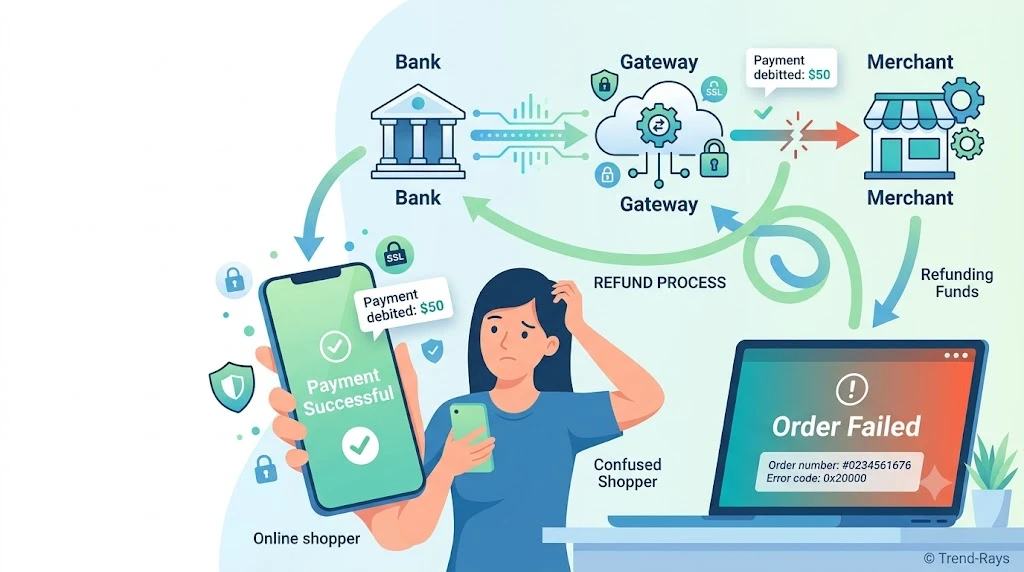
In many cases, it simply means the transaction has moved to its next stage. The payment may have:
- Been successfully completed and posted to your account.
- Expired because the merchant never captured the authorization.
- Been reversed automatically after a failed payment.
- Been temporarily removed while the bank and merchant reconcile the transaction.
A disappearing pending transaction is often a normal part of the card payment process—not necessarily a sign that your money has been lost.
The key is to determine what happened after the pending transaction disappeared. Did your account balance return to normal? Did the merchant complete your order? Or did the payment vanish without any confirmation?
This guide explains every possible scenario, how banks process pending transactions, and exactly what you should do next.
Introduction
You check your banking app in the morning and notice a pending transaction for an online purchase.
Later that day, you open the app again.
The transaction is gone.
Now you’re left wondering:
- Did my payment fail?
- Did I get my money back?
- Did the merchant still receive the payment?
- Should I make the payment again?
- Do I need to contact my bank?
- Is someone cancelling my transactions?
This situation confuses millions of consumers because banks often remove pending transactions without clearly explaining why.
The good news is that a disappearing pending transaction is usually a normal part of the payment process.
Pending transactions are temporary placeholders. They represent payments that have been authorized but haven’t yet reached their final status.
Once the transaction reaches its next stage, the pending entry may disappear entirely—even though the payment process is still continuing behind the scenes.
Sometimes that’s good news.
Sometimes it means the payment failed.
Sometimes it simply means the bank has updated the transaction status.
Understanding the difference can prevent duplicate payments, unnecessary customer support calls, and a lot of unnecessary worry.
In this guide, you’ll learn:
- Why pending transactions disappear
- Where your money goes after a pending charge disappears
- Whether the merchant can still charge you
- How banks process pending transactions
- When you should wait and when you should take action
- The most common reasons pending payments disappear unexpectedly
By the end of this article, you’ll know exactly what happened to your transaction—and what your next step should be.
What Is a Pending Transaction? (And Why Banks Show It)
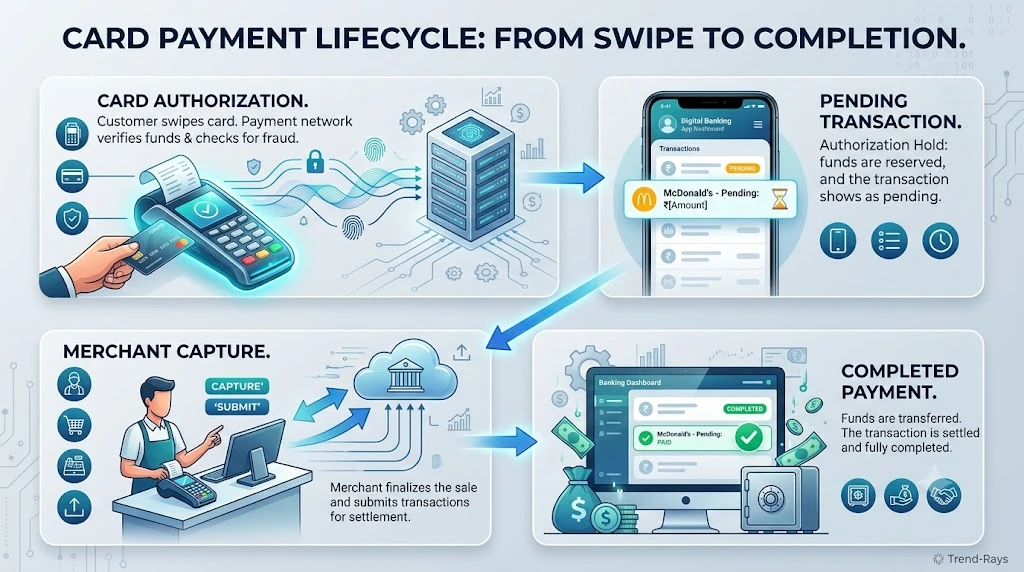
Before you can understand why a pending transaction disappears, it’s important to understand what a pending transaction actually is.
Many people assume that a pending transaction means the payment has already been completed.
That’s not always true.
In most cases, a pending transaction simply means:
Your bank is aware of the payment request, but the transaction hasn’t been finalized yet.
Think of it as a payment that is still in progress.
The bank is waiting to determine whether the transaction should become a completed payment, remain pending, or be cancelled altogether.
A Pending Transaction Is Not Always a Completed Charge
One of the biggest misconceptions is believing that pending means the merchant already has your money.
In reality, several things can still happen.
The payment may:
- Be successfully completed.
- Be cancelled by the merchant.
- Expire automatically.
- Be reversed.
- Disappear before settlement.
That’s why pending transactions are considered temporary records, not permanent account entries.
Why Banks Display Pending Transactions
Banks display pending transactions for one simple reason:
To show that part of your available balance has been reserved for a payment that is still being processed.
This prevents the same money from being spent twice.
Imagine you have:
Available Balance
₹20,000
You purchase a laptop for:
₹15,000
Immediately after authorization, your bank may show:
Current Balance
₹20,000
Available Balance
₹5,000
Pending Transaction
₹15,000
Although your current balance may not change immediately, the pending transaction tells you that ₹15,000 has been reserved while the payment is being processed.
Where Does a Pending Transaction Come From?
A pending transaction usually appears after your card payment has been authorized but before it has been settled.
The simplified payment flow looks like this:
Customer Makes Payment
        │
        ▼
Bank Authorizes Transaction
        │
        ▼
Pending Transaction Appears
        │
        ▼
Merchant Decides Whether to Capture Payment
        │
   ┌────┴────┐
   ▼         ▼
Captured   Not Captured
   │         │
   ▼         ▼
Completed  Authorization Expires
Payment     Pending Entry Disappears
This explains why a pending transaction isn’t necessarily a problem—it’s simply one stage in the payment lifecycle.
Why Does the Money Look Like It Has Already Left?
Many banking apps immediately reduce your available balance when a pending transaction is created.
This often causes customers to believe the merchant has already been paid.
In reality:
- Your bank has reserved the funds.
- The merchant may still be waiting to complete the transaction.
- Settlement may not have happened yet.
The pending transaction exists to reflect this temporary state.
Common Situations That Create Pending Transactions
Pending transactions are normal for many everyday purchases, including:
- Online shopping
- Hotel bookings
- Flight reservations
- Food delivery apps
- Fuel station payments
- Car rentals
- Subscription renewals
- International purchases
In all of these cases, the bank temporarily reserves funds while the payment moves through the processing system.
Why Different Banks Show Pending Transactions Differently
Not every banking app uses the same terminology.
Depending on your bank, you might see labels such as:
| Banking App | Possible Status |
|---|---|
| HDFC Bank | Pending |
| ICICI Bank | Under Process |
| SBI YONO | Pending Debit |
| Axis Bank | Processing |
| Chase | Pending |
| Bank of America | Processing |
| Revolut | Pending Card Payment |
| Monzo | Card Check or Pending |
Although the wording differs, these statuses often represent the same stage of the payment lifecycle.
Did You Know?
Some merchants intentionally leave transactions in a pending state until they’re certain they can fulfill your order. This is common for hotels, airlines, and online retailers that need to verify availability before collecting payment.
Key Takeaway
A pending transaction doesn’t automatically mean:
- Your payment has been completed.
- The merchant has received your money.
- Something has gone wrong.
It simply means the payment is still moving through the banking system and hasn’t yet reached its final outcome.
Understanding this makes it much easier to understand why pending transactions sometimes disappear—and why that’s often completely normal.
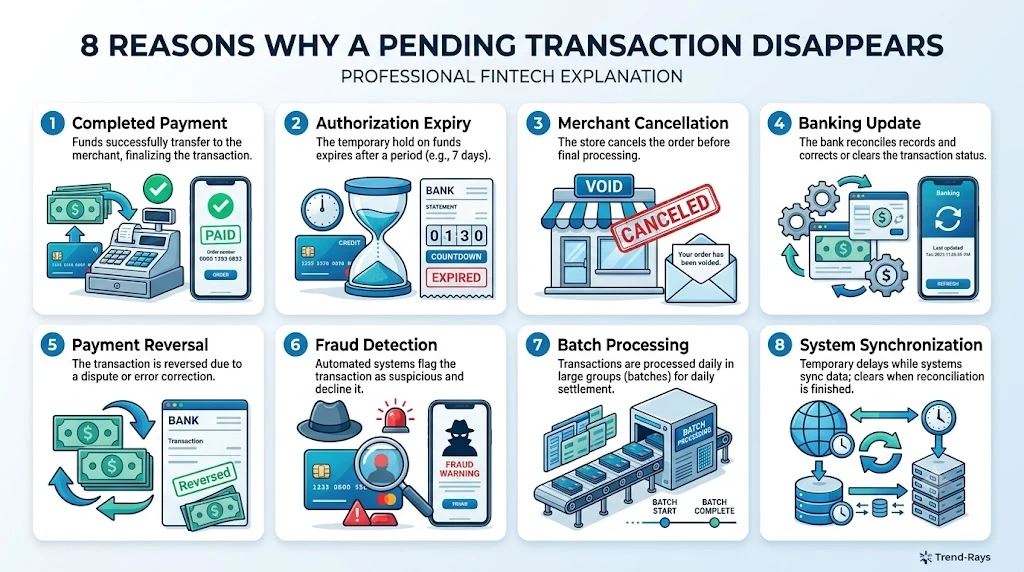
Why Did My Pending Transaction Disappear? (8 Common Reasons)
Seeing a pending transaction disappear can be alarming, especially if you weren’t expecting it.
Many people immediately assume:
- The bank cancelled the payment.
- The merchant refunded the money.
- The payment failed.
- Their account has a problem.
In reality, a disappearing pending transaction can mean several different things, and most of them are completely normal.
Let’s look at the most common reasons.
1. The Payment Was Successfully Completed
This is actually the best-case scenario.
Sometimes the pending transaction disappears because it has moved to the next stage of processing.
Instead of remaining under “Pending,” the transaction is posted as a completed payment.
For example:
Yesterday:
- Pending Transaction
- ₹2,850
Today:
- Pending entry disappears.
- A completed transaction for ₹2,850 appears in your transaction history.
Nothing went wrong.
The payment simply finished processing.
What You Should Check
- Recent completed transactions
- Merchant receipt
- Order confirmation
- Email confirmation
If the completed transaction exists, there’s usually nothing else you need to do.
2. The Merchant Never Completed the Payment
Another common reason is that the merchant never captured the authorization.
This can happen if:
- The item went out of stock.
- The booking failed.
- A technical error interrupted checkout.
- The merchant cancelled the order.
Since the payment never reached settlement, the authorization expired.
When that happens:
- The pending transaction disappears.
- Your available balance returns to normal.
- The merchant receives no payment.
Many customers mistake this for a refund.
Technically, it isn’t.
The payment simply never completed.
3. The Authorization Hold Expired
Every authorization has a limited lifespan.
If the merchant doesn’t complete the payment within that period, the authorization eventually expires.
Once it expires:
- The pending transaction is removed.
- The reserved funds become available again.
- The transaction disappears from the pending list.
This is one of the most common reasons people notice a pending payment suddenly vanish.
4. The Merchant Voided the Transaction
Sometimes the merchant intentionally cancels the authorization before capturing the payment.
This may happen because:
- Your order was cancelled.
- A duplicate order was detected.
- Inventory changed.
- Fraud checks failed.
- Pricing errors occurred.
Instead of collecting the money, the merchant releases the authorization.
As a result:
- The pending transaction disappears.
- The authorization is removed.
- Your available balance is restored.
5. The Bank Updated the Transaction Status
Banks continuously synchronize payment information with card networks and merchants.
Sometimes a pending transaction disappears simply because the bank has updated its internal records.
The payment may now be:
- Completed
- Cancelled
- Reversed
- Replaced with a finalized transaction
Different banking apps display these updates differently.
Some remove the pending transaction entirely before displaying the completed version.
Others replace it almost instantly.
6. The Payment Was Reversed Automatically
Occasionally, payment systems detect that the transaction cannot be completed.
Rather than waiting for the authorization to expire naturally, the payment network automatically reverses it.
Common reasons include:
- Merchant communication failure
- Payment gateway timeout
- Duplicate authorization
- Invalid processing response
The result is similar:
- Pending transaction disappears.
- Reserved funds become available.
- No completed payment exists.
7. The Merchant Used Batch Processing
Not every business processes payments instantly.
Some merchants process transactions in batches.
For example:
A retailer may authorize your card immediately but only submit completed payments later in the day.
During this transition:
- The pending transaction disappears.
- A completed transaction appears shortly afterward.
This delay is common with certain retailers, hotels, airlines, and businesses using batch settlement systems.
8. Your Banking App Refreshed Its Transaction History
Sometimes the payment hasn’t changed at all.
Only the way your banking app displays it has changed.
For example:
The app may:
- Refresh pending transactions.
- Merge duplicate entries.
- Update transaction categories.
- Replace a pending record with a finalized one.
This visual update can make it appear as though the transaction disappeared when it has simply moved to a different section of your account.
Always check:
- Completed transactions
- Transaction history
- Available balance
before assuming the payment has vanished.
Quick Summary
| Reason | What It Usually Means | Should You Worry? |
|---|---|---|
| Payment completed | Transaction moved from pending to completed | ✅ No |
| Merchant didn’t capture payment | Authorization expired | ✅ Usually no |
| Authorization hold expired | Reserved funds released | ✅ No |
| Merchant voided transaction | Order cancelled before settlement | ✅ Usually no |
| Bank updated status | Transaction information refreshed | ✅ No |
| Automatic reversal | Payment couldn’t be completed | ✅ Usually no |
| Batch processing | Merchant processed payment later | ✅ No |
| Banking app refresh | Display changed, not necessarily the payment | ✅ No |
Real-World Example
Imagine you order groceries worth ₹1,950.
Monday evening:
- Your banking app shows a pending transaction.
Tuesday morning:
- The pending transaction disappears.
You panic and think your payment has vanished.
However, after checking your account history, you discover:
- The merchant successfully processed your order.
- The pending entry was simply replaced by a completed transaction.
Nothing actually disappeared—the transaction just progressed to the next stage.
Did You Know?
Some banks remove pending transactions before showing the finalized payment. For a short period, it may look as though the payment has disappeared entirely, even though the completed transaction appears shortly afterward once account records are updated.
Key Takeaway
A disappearing pending transaction is not automatically a sign of a failed payment.
In many cases, it simply means the transaction has moved to its next stage—whether that’s completion, authorization expiry, automatic reversal, or a routine banking system update.
Before assuming something has gone wrong:
- Check your completed transaction history.
- Review your available balance.
- Confirm whether the merchant completed your order.
- Contact the merchant only if the payment status remains unclear.
Understanding these possibilities can help you avoid unnecessary worry and prevent duplicate payment attempts.
Does a Disappearing Pending Transaction Mean the Payment Failed?
Not necessarily.
This is one of the biggest misconceptions about pending transactions.
A disappearing pending transaction does not automatically mean the payment failed.
It simply means the pending status has ended.
What happened next depends on how the payment was processed.
In other words:
The pending transaction disappearing is an event—not a final result.
To know what actually happened, you need to look at what replaced it.
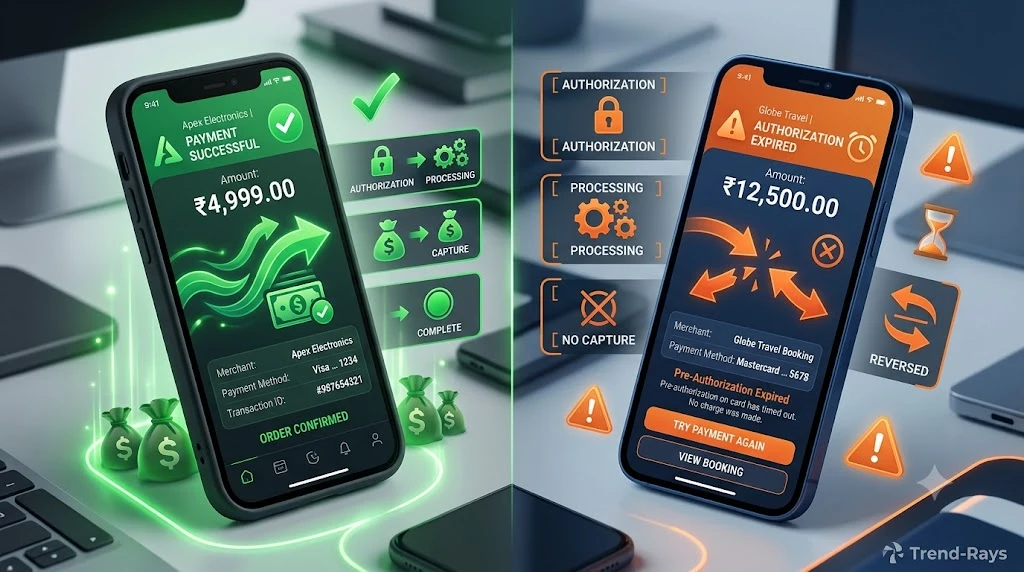
There Are Three Possible Outcomes
Once a pending transaction disappears, the payment usually falls into one of three categories.
Outcome 1: The Payment Was Successfully Completed
This is the most common outcome.
The pending transaction disappears because it has been replaced by a completed transaction.
For example:
Yesterday:
- Pending Transaction
- ₹4,200
Today:
- Pending entry disappears.
- Completed transaction for ₹4,200 appears.
Your order is confirmed.
The merchant has successfully received the payment.
In this situation, everything worked exactly as intended.
Outcome 2: The Authorization Expired
Sometimes the merchant never completes the payment.
Perhaps:
- The order failed.
- The website crashed.
- Inventory became unavailable.
- The merchant cancelled the transaction.
Since the payment was never captured, the authorization expires.
When this happens:
- The pending transaction disappears.
- Your available balance returns.
- No completed payment appears.
- The merchant doesn’t receive the money.
This is often mistaken for a refund, but technically it isn’t.
The payment simply never reached settlement.
Outcome 3: The Transaction Is Still Being Updated
Occasionally, payment systems need time to synchronize.
For a short period:
- The pending transaction disappears.
- The completed transaction hasn’t appeared yet.
This temporary gap can occur while:
- The bank updates transaction records.
- The merchant submits settlement files.
- The payment network completes reconciliation.
Usually, the final transaction appears after the banking systems finish processing.
How to Tell Which Situation You’re In
Instead of focusing only on the disappearing pending transaction, ask these questions.
Did a Completed Transaction Appear?
If yes:
Your payment was probably successful.
Look for:
- Merchant name
- Final transaction amount
- Posted transaction
- Order confirmation
If everything matches, there’s usually nothing more you need to do.
Did Your Available Balance Return to Normal?
If your available balance increased after the pending transaction disappeared and no completed payment exists, the authorization was most likely released.
This usually means:
- The payment wasn’t completed.
- The merchant didn’t collect the funds.
Did You Receive an Order Confirmation?
Order confirmation is often one of the strongest indicators that your payment succeeded.
Check:
- Email inbox
- Spam folder
- SMS messages
- Merchant account
- Order history
If the merchant confirms the order, the payment almost certainly completed—even if the pending transaction disappeared.
Does the Merchant Show No Order?
If:
- No completed payment exists
- No order confirmation exists
- The merchant can’t locate your purchase
then the payment probably wasn’t completed.
The authorization may simply have expired.
Signs Your Payment Was Successful
Your payment likely completed if you notice most of these:
- Completed transaction appears.
- Order confirmation email received.
- Merchant account shows the order.
- Invoice generated.
- Shipping confirmation received.
- Merchant confirms payment.
Signs the Payment Probably Failed
The payment likely didn’t complete if:
- No completed transaction appears.
- No order exists.
- Available balance returns.
- Merchant confirms no payment was received.
- Authorization disappears without settlement.
Real-World Example 1: Successful Payment
Sarah purchases a pair of headphones for ₹3,999.
Immediately after paying:
- Pending transaction appears.
The next morning:
- Pending transaction disappears.
- Completed transaction appears.
- Shipping email arrives.
Result:
The payment was successful.
The pending transaction simply progressed to its final stage.
Real-World Example 2: Failed Payment
Rahul books movie tickets online.
His card is authorized.
A pending transaction appears.
However:
- The booking system crashes.
- No tickets are issued.
- No confirmation email arrives.
Two days later:
- Pending transaction disappears.
- Available balance returns.
- No completed payment exists.
Result:
The payment failed.
The authorization expired because the merchant never captured it.
Quick Comparison
| What Happens After the Pending Transaction Disappears? | What It Usually Means |
|---|---|
| Completed transaction appears | Payment succeeded |
| Available balance returns | Authorization released |
| Merchant confirms order | Payment completed |
| Merchant has no order | Payment likely failed |
| No pending or completed transaction yet | Processing may still be updating |
Did You Know?
Some banking apps remove the pending transaction several hours before displaying the completed payment. During this short window, it may appear as though the transaction has vanished completely, even though it is still moving through the normal settlement process.
Key Takeaway
A disappearing pending transaction doesn’t tell you whether the payment succeeded or failed.
It only tells you that the pending stage has ended.
To determine the actual outcome, check:
- Whether a completed transaction appears.
- Whether your available balance changes.
- Whether the merchant confirms your order.
- Whether you receive a receipt or shipping confirmation.
Looking at these indicators together gives you a much clearer picture than relying on the pending status alone.
Where Did My Money Go After the Pending Transaction Disappeared?
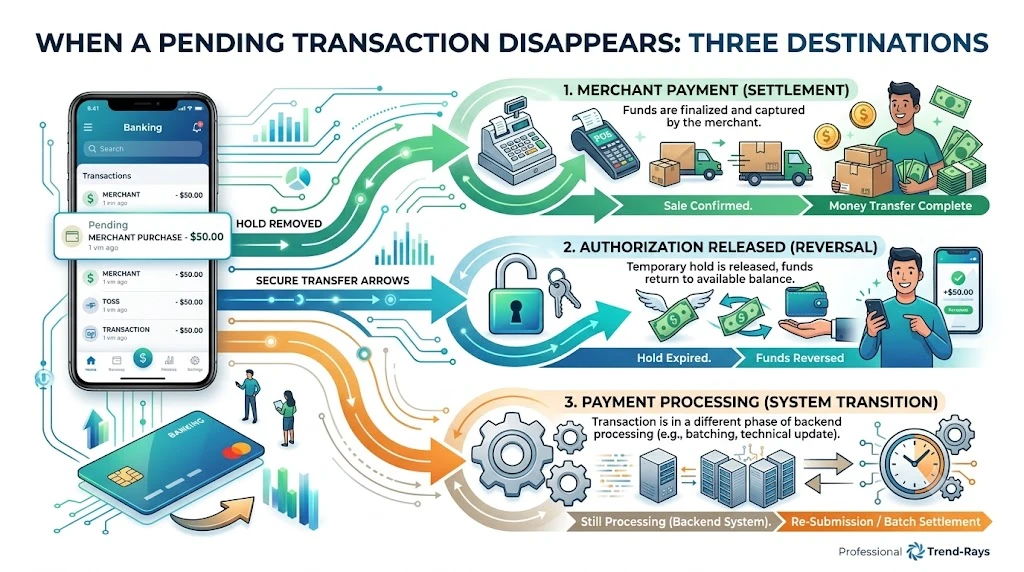
When a pending transaction disappears, the first question most people ask is:
“Where did my money go?”
It’s a reasonable concern.
After all, the pending transaction is no longer visible, but your account balance may still look different than you expected.
The good news is that your money doesn’t simply disappear.
Instead, it usually moves into one of three possible states, depending on how the payment was processed.
Understanding these possibilities can help you determine whether everything is working normally or whether you need to take action.
Scenario 1: The Merchant Successfully Received the Payment
This is the most common outcome.
Here’s what happens behind the scenes:
- Your bank authorizes the transaction.
- A pending transaction appears.
- The merchant captures the payment.
- The payment is settled through the card network.
- The pending transaction disappears.
- A completed transaction replaces it.
In this situation:
- Your money has been transferred to the merchant.
- Your available balance remains reduced.
- Your order is usually confirmed.
Nothing has gone wrong.
The payment has simply completed its normal journey.
Example
You purchase a smartwatch for ₹8,500.
Monday:
- Pending transaction appears.
Tuesday:
- Pending transaction disappears.
- Completed transaction appears.
- Shipping confirmation arrives.
Your money is now with the merchant because the payment was successfully settled.
Scenario 2: The Money Returned to Your Available Balance
Sometimes the merchant never completes the payment.
Perhaps:
- The item sold out.
- The website crashed.
- The booking failed.
- The merchant cancelled the order.
In these situations:
- The authorization expires.
- The bank removes the reservation.
- The pending transaction disappears.
- Your available balance increases again.
The merchant never receives the payment.
Many people describe this as:
“The money came back.”
Technically, the money never left permanently.
It was simply reserved temporarily by your bank.
Example
You attempt to book a hotel room for ₹12,000.
Your bank authorizes the payment.
The hotel later discovers the room is unavailable.
The booking is cancelled.
A few days later:
- The pending transaction disappears.
- Your available balance returns to normal.
No refund was required because the merchant never collected the money.
Scenario 3: The Payment Is Still Being Processed
Occasionally, payment systems update at different times.
This can create a short period where:
- The pending transaction has disappeared.
- The completed transaction hasn’t appeared yet.
Your money hasn’t vanished.
The transaction is simply moving through the final stages of processing.
This often happens while:
- Banks update transaction records.
- Payment networks reconcile payment information.
- Merchants submit settlement files.
During this brief period, it may look like your payment has disappeared even though the processing is still underway.
Why Doesn’t My Balance Match What I See?
This is another common source of confusion.
Many people compare:
- Current Balance
- Available Balance
without understanding the difference.
For example:
Current Balance
₹25,000
Available Balance
₹17,000
Even though the pending transaction has disappeared.
This can happen because:
- The completed transaction hasn’t been posted yet.
- The banking app hasn’t refreshed all account information.
- Different account balances update at different times.
Always review:
- Recent transactions
- Completed payments
- Merchant confirmation
instead of relying on only one balance figure.
Can the Merchant Still Receive the Money?
Yes—but only in certain situations.
If the payment was successfully authorized and the merchant is still within the allowed capture period, they may still complete the transaction.
However, if:
- The authorization has expired, or
- The bank has released the reserved funds,
the merchant generally cannot collect the payment using that authorization.
A new payment attempt would usually be required.
How Can You Confirm Where the Money Went?
The easiest way is to answer these questions.
Question 1
Did a completed transaction appear?
If yes:
The merchant most likely received the payment.
Question 2
Did your available balance increase?
If yes:
The authorization was probably released.
Question 3
Did you receive an order confirmation?
If yes:
The payment was almost certainly completed successfully.
Question 4
Does the merchant have no record of your order?
If yes:
The payment probably wasn’t completed.
Quick Reference Table
| What You Notice | Where the Money Is |
|---|---|
| Completed transaction appears | The merchant received the payment. |
| Available balance returns to normal | The authorization hold was released. |
| No transaction appears yet | The payment may still be processing. |
| Merchant confirms no payment received | The money is usually no longer reserved or is awaiting release, depending on the authorization status. |
| Order confirmation received | Payment has most likely been settled successfully. |
Real-World Example
Emma orders a laptop online.
The payment of ₹52,000 is authorized immediately.
Her banking app shows:
Pending Transaction – ₹52,000
The following day:
The pending transaction disappears.
Emma worries that her money has vanished.
She checks:
- Her order history.
- Her email.
- Her banking app.
She discovers:
- A completed transaction has appeared.
- The merchant has confirmed shipment.
The pending transaction didn’t disappear because something went wrong.
It disappeared because the payment moved from pending to completed.
Expert Tip
If you’re unsure where your money went, don’t rely on a single screen in your banking app.
Instead, check all three:
- Your completed transaction history
- Your available balance
- Your merchant order status
Looking at all three together provides a much more accurate picture than checking only the pending transactions list.
Did You Know?
A pending transaction disappearing is often a sign that the banking system has finished one stage of processing, not that the payment itself has disappeared. The next step may be a completed transaction, a released authorization, or—less commonly—a short reconciliation period before the final status is displayed.
Key Takeaway
When a pending transaction disappears, your money usually ends up in one of three places:
- With the merchant, if the payment was successfully completed.
- Back in your available balance, if the authorization expired or was released.
- Still moving through the banking system, if processing or reconciliation is still underway.
The pending transaction itself is only a temporary status.
To understand what really happened, always verify your completed transaction history, available balance, and merchant confirmation before assuming the payment has been lost.
Can the Merchant Still Charge You After a Pending Transaction Disappears?
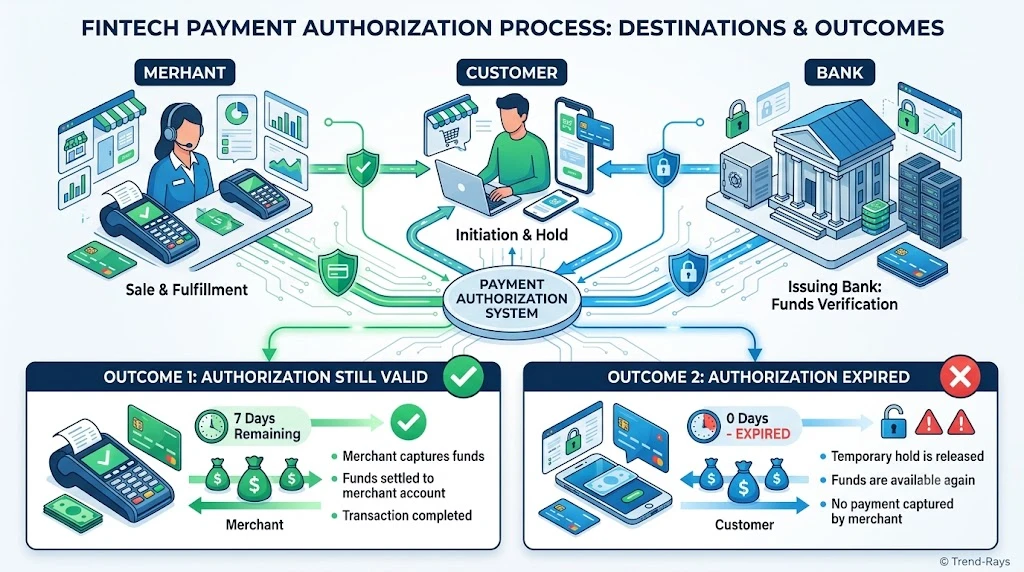
The short answer is:
Yes—but not always.
Whether a merchant can still collect payment after a pending transaction disappears depends on why the pending transaction disappeared in the first place.
This is where many consumers get confused.
They assume:
“If the pending transaction disappeared, the payment is over.”
That’s not necessarily true.
Sometimes the transaction has already become a completed payment.
Sometimes the authorization has expired.
And sometimes the payment is still moving through the final stages of processing.
Let’s look at each situation.
Scenario 1: The Merchant Already Captured the Payment
This is the simplest situation.
If the merchant captured the authorization before it disappeared from your pending transactions, the payment has already moved toward settlement.
In this case:
- The pending transaction disappears.
- A completed transaction appears.
- The merchant receives the funds.
The merchant isn’t charging you again.
They’re simply completing the original payment authorization.
Example
You order a smartphone online.
- Monday: Pending transaction appears.
- Tuesday morning: Merchant captures the payment.
- Tuesday afternoon: Pending transaction disappears.
- Wednesday: Completed transaction appears.
The merchant didn’t make a second charge.
They completed the original one.
Scenario 2: The Authorization Expired
If the merchant never captured the payment before the authorization expired, the situation changes completely.
The bank removes the authorization hold.
The pending transaction disappears.
The reserved funds become available again.
At this point, the original authorization generally can no longer be used to collect payment.
If the merchant still wants payment, they will usually need to request a new payment authorization.
Example
You try to purchase concert tickets.
- Card authorized.
- Pending transaction appears.
- Ticket booking fails.
- Authorization expires.
- Pending transaction disappears.
Three days later, the merchant cannot normally use that expired authorization to collect payment.
Instead, they would typically ask you to make the payment again.
Scenario 3: The Payment Is Still Being Finalized
Occasionally, the pending transaction disappears while the payment is still moving through banking systems.
This often happens during:
- Settlement processing.
- Batch processing.
- Banking system updates.
During this period:
- The merchant may still complete the payment using the existing authorization if it remains valid.
- Your banking app simply no longer shows it as pending.
This is why it’s important not to assume the payment failed simply because the pending entry disappeared.
Can a Merchant Charge My Card Weeks Later?
Generally, not using the original authorization.
Authorizations are designed to be temporary.
If a merchant waits too long without capturing the payment, the authorization usually expires.
After expiration:
- The original authorization is no longer valid.
- The merchant normally cannot collect payment using that expired authorization.
- A new payment approval from your bank is generally required.
Exactly how long an authorization remains valid depends on factors such as the card network, the type of merchant, and the payment agreement.
Why Hotels and Car Rental Companies Are Different
Certain industries work differently from a standard online purchase.
Hotels, car rental companies, and similar businesses often place an authorization hold first because the final amount isn’t known immediately.
For example:
A hotel may reserve ₹10,000 at check-in.
When you check out:
- Room charges are finalized.
- Additional services are added if applicable.
- The merchant completes the payment based on the final bill.
This is a normal use of authorization holds.
It doesn’t mean the hotel is charging you twice.
What If the Merchant Tries to Charge Me Again?
Sometimes customers accidentally make a second payment because they believe the first one failed.
This creates duplicate payment situations.
Before making another payment, always verify:
- Does the merchant already have your order?
- Has a completed transaction appeared?
- Has your available balance returned?
If you’re unsure, contact the merchant before authorizing another payment.
How to Know If the Merchant Can Still Collect Payment
Ask yourself these questions.
Has the payment already been completed?
If yes:
The merchant has already collected the payment.
If yes:
The merchant will generally need a new payment authorization.
Is the transaction still processing?
If yes:
The merchant may still complete the payment using the existing authorization if it remains valid.
Quick Comparison
| Situation | Can the Merchant Still Collect Payment? |
|---|---|
| Payment already completed | No additional charge needed. |
| Authorization still valid and processing | Yes, the original authorization may still be completed. |
| Authorization expired | Usually no. A new payment authorization is generally required. |
| Merchant cancelled the order | No, unless you place a new order. |
| Payment already settled | No, charging again would create a separate transaction. |
Real-World Example
David orders a gaming keyboard for ₹6,999.
His card is authorized immediately.
A pending transaction appears.
The following day:
The pending transaction disappears.
David assumes the payment failed and places another order.
A few hours later:
The first payment finishes processing.
Now:
- Order #1 is paid.
- Order #2 is also paid.
David has accidentally paid twice because he didn’t verify the status of the original transaction before making another payment.
This is one of the most common causes of duplicate charges.
Expert Tip
Before retrying any payment, always check three things:
- Your completed transaction history.
- Your order status with the merchant.
- Your email or SMS confirmations.
Spending two minutes verifying these details can save you days of refund requests and customer support conversations.
Did You Know?
Many duplicate payment complaints don’t result from banking errors—they happen because customers assume a disappeared pending transaction means the first payment failed and immediately submit a second payment.
Key Takeaway
A disappearing pending transaction doesn’t automatically prevent a merchant from collecting payment.
Whether they still can depends on the transaction’s stage:
- If the payment has already been captured, the merchant simply completes the original transaction.
- If the authorization is still valid, the payment may still be finalized.
- If the authorization has expired, the merchant will generally need a new payment authorization before collecting funds.
Before paying again, always verify whether the original transaction has already been completed or is still processing. Doing so can help you avoid one of the most common—and frustrating—payment mistakes: duplicate charges.
Why Do Banks Remove Pending Transactions?
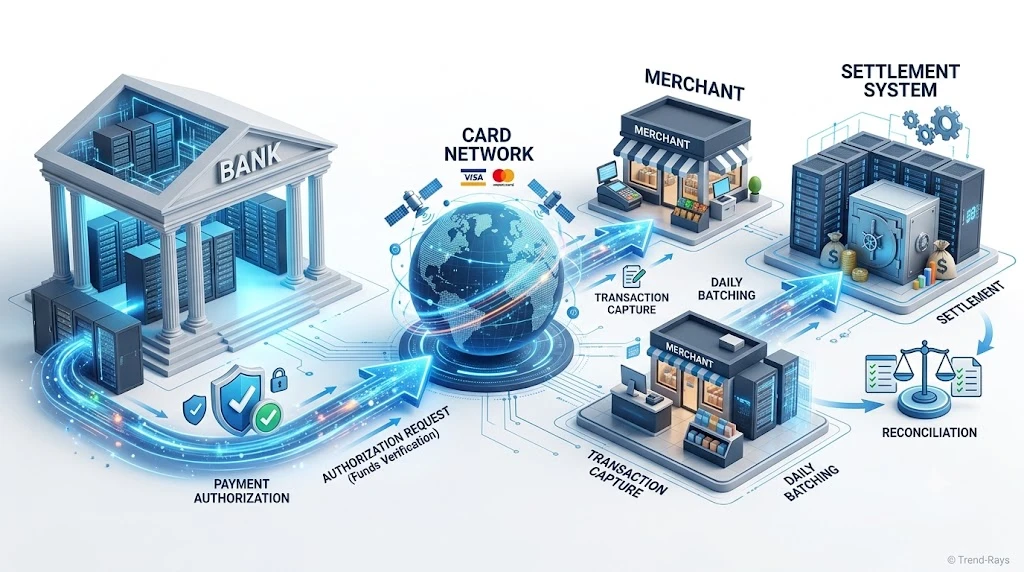
One of the most common questions people ask is:
“Why would my bank remove a pending transaction if the payment isn’t finished yet?”
At first glance, it seems strange.
If the transaction is still being processed, shouldn’t it remain visible?
The answer lies in how modern payment systems work.
A pending transaction is not intended to be a permanent record.
Instead, it’s a temporary status that tells you your bank is reserving funds while it waits for the next instruction from the payment network or the merchant.
Once that instruction arrives—or the authorization expires—the pending status is no longer needed.
Pending Transactions Are Temporary by Design
Think of a pending transaction as a temporary placeholder.
It exists to answer one question:
“Should the bank reserve these funds right now?”
While the answer is “yes,” the transaction remains pending.
Once the answer changes, the pending status is removed.
That doesn’t necessarily mean the payment has failed.
It simply means the payment has reached the next stage of its lifecycle.
Banks Don’t Decide the Final Outcome Alone
Many people assume the bank controls the entire payment.
In reality, several organizations work together.
A simplified payment flow looks like this:
Customer
     │
     ▼
Merchant
     │
     ▼
Payment Gateway
     │
     ▼
Card Network
     │
     ▼
Issuing Bank
The issuing bank can:
- Approve the authorization.
- Reserve the funds.
- Release the authorization if necessary.
However, the bank cannot decide whether the merchant wants to complete the purchase.
That decision belongs to the merchant.
Reason 1: The Merchant Captured the Payment
The most common reason for removing a pending transaction is simple:
The merchant has successfully completed the payment.
Once the merchant submits the capture request:
- The authorization stage ends.
- Settlement begins.
- The pending transaction is replaced with a completed transaction.
From the bank’s perspective, the pending status is no longer needed.
Reason 2: The Authorization Expired
Every authorization has a limited validity period.
If the merchant never captures the payment, the bank cannot reserve your funds indefinitely.
Eventually:
- The authorization expires.
- The reserved amount is released.
- The pending transaction disappears.
This protects customers from having money locked unnecessarily.
Reason 3: The Merchant Cancelled the Transaction
Sometimes the merchant intentionally decides not to complete the payment.
Examples include:
- Product out of stock
- Booking cancelled
- Duplicate order detected
- Pricing error
- Technical checkout failure
When the merchant voids the authorization, the bank removes the pending transaction because there’s no longer a valid payment to process.
Reason 4: Banking Systems Have Been Updated
Banks constantly receive updates from:
- Card networks
- Payment gateways
- Merchants
As new information arrives, transaction records are updated.
For example:
Yesterday:
- Pending transaction
Today:
- Completed transaction
or
- Authorization released
The bank isn’t deleting your payment.
It’s updating your account to reflect the latest payment status.
Reason 5: Fraud and Risk Controls
Banks also use automated risk systems.
If a transaction cannot be completed because of fraud detection or processing errors, the authorization may be cancelled automatically.
Possible reasons include:
- Duplicate authorization requests
- Merchant system failure
- Invalid transaction data
- Network communication errors
Rather than keeping an invalid authorization active, the bank removes the pending transaction once the issue has been resolved.
Why Different Banks Update at Different Speeds
Not every bank processes transactions on the same schedule.
Factors that affect update times include:
- Internal banking systems
- Payment network processing
- Merchant settlement schedules
- Time zones
- Weekends and public holidays
- Maintenance windows
That’s why two people making the same purchase at the same merchant may see different timing for pending transactions disappearing.
Why You Shouldn’t Panic Immediately
A disappearing pending transaction is often part of normal banking operations.
It doesn’t automatically mean:
- The payment failed.
- The merchant lost your payment.
- Your money disappeared.
Instead, it usually indicates that the bank has received new information and updated the transaction accordingly.
Before assuming something is wrong, check:
- Your completed transaction history.
- Your available balance.
- Your order confirmation.
- The merchant’s order status.
These provide a much clearer picture than the pending status alone.
Real-World Example
Priya orders a fitness tracker online for ₹4,750.
Monday afternoon:
- The bank authorizes the payment.
- A pending transaction appears.
Tuesday morning:
- The merchant confirms shipment.
- The bank receives the capture request.
- The pending transaction disappears.
- A completed transaction is posted.
From Priya’s perspective, it looked like the pending payment vanished.
From the bank’s perspective, the payment simply progressed to the next stage.
Did You Know?
Banks don’t keep pending transactions forever because doing so would unnecessarily reduce customers’ available balances. Once there’s enough information to complete or release the transaction, the pending status is removed to keep account records accurate.
Key Takeaway
Banks remove pending transactions because they’re designed to be temporary indicators, not permanent account entries.
A pending transaction usually disappears when:
- The merchant captures the payment.
- The authorization expires.
- The transaction is cancelled.
- Banking systems update the payment status.
- Automated processing resolves the authorization.
The disappearance of the pending status doesn’t tell you whether the payment succeeded or failed—it simply tells you that the pending stage has ended.
To determine the final outcome, always check your completed transactions, available balance, and merchant confirmation rather than relying only on the pending transaction list.
Should You Contact the Merchant or Your Bank? (And Who Can Actually Help?)
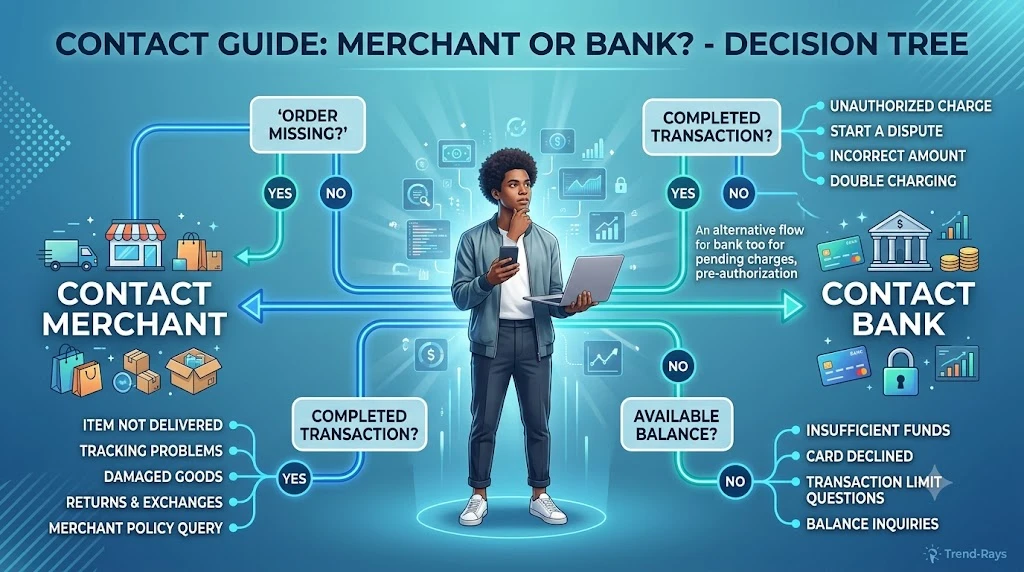
When a pending transaction disappears, many people don’t know who to contact.
Some immediately call their bank.
Others contact the merchant first.
Some end up being sent back and forth between both support teams.
The truth is:
The right person to contact depends on what happened after the pending transaction disappeared.
Understanding each organization’s role can save you hours of unnecessary phone calls and support tickets.
Start by Answering These Three Questions
Before contacting anyone, ask yourself:
- Did you receive an order confirmation?
- Does a completed transaction appear in your account?
- Did your available balance return to normal?
Your answers will usually tell you who can help.
Contact the Merchant First If…
The merchant should usually be your first point of contact when the issue involves your order rather than your bank account.
Examples include:
- Your order never appeared.
- The website crashed during checkout.
- You received no confirmation email.
- Your shopping cart emptied after payment.
- The merchant cancelled your order.
- You’re unsure whether the merchant received the payment.
Only the merchant can verify:
- Whether an order exists.
- Whether the authorization reached their payment system.
- Whether the payment was captured.
- Whether the order was cancelled.
- Whether a shipment has already been processed.
Your bank cannot see the merchant’s internal order records.
Contact Your Bank If…
Your bank becomes the right contact when the issue relates to your account or card transaction.
Examples include:
- Your available balance hasn’t returned after the expected processing period.
- A completed transaction appears but you don’t recognize it.
- The merchant confirms they never received payment, but your bank still shows a completed charge.
- You suspect fraud or unauthorized activity.
- You need clarification about the authorization or settlement status.
Your bank can verify:
- Whether the payment was authorized.
- Whether the authorization has expired.
- Whether the transaction settled successfully.
- Whether a reversal was processed.
- Whether additional investigation is needed.
When You May Need Both
Some situations require cooperation between the merchant and your bank.
For example:
The merchant says:
“We never received your payment.”
Your bank says:
“The payment was completed.”
Now both organizations need to investigate.
Typically:
- The merchant checks its payment gateway records.
- The bank checks the card network transaction records.
- The payment reference number is used to trace what happened.
These situations are uncommon but can occur if communication fails during payment processing.
What Information Should You Have Ready?
Regardless of who you contact, gathering the right information beforehand speeds up the investigation.
Keep these details ready:
- Transaction reference number
- Merchant name
- Payment amount
- Date and time of purchase
- Last four digits of the card used
- Order number (if available)
- Screenshot of the transaction
- Confirmation emails or SMS messages
- Previous support ticket numbers
Providing these details in your first message often avoids multiple rounds of follow-up questions.
Decision Guide
Use this table to decide who should be your first point of contact.
| Situation | Contact First | Why |
|---|---|---|
| Pending transaction disappeared but order exists | Merchant | They can confirm whether payment was captured. |
| Pending transaction disappeared and available balance returned | Usually no one initially | The authorization was likely released automatically. |
| Completed transaction appears but no order exists | Merchant | They can investigate whether payment reached the order system. |
| Merchant confirms no payment but bank shows completed payment | Bank | The bank can investigate settlement. |
| Unauthorized completed transaction | Bank immediately | They can secure your account and begin an investigation. |
| Order cancelled before payment completed | Merchant | They can confirm the authorization was not captured. |
Avoid This Common Mistake
Many customers make this sequence of calls:
- Call the bank.
- Bank says contact the merchant.
- Call the merchant.
- Merchant says contact the bank.
- Repeat.
This usually happens because neither side has enough information.
Instead of saying:
“My payment disappeared.”
Provide something like:
“On 15 July at approximately 2:30 PM, I attempted a payment of ₹2,450. A pending transaction appeared but has now disappeared. I have not received an order confirmation, and no completed transaction currently appears in my account. My transaction reference number is XXXXXXXX. Could you please confirm whether the payment was captured?”
This gives the support team everything they need to begin investigating immediately.
Real-World Example
Amit orders sports shoes online.
His bank shows:
- Pending transaction for ₹3,299.
The next day:
- The pending transaction disappears.
- No order confirmation arrives.
Instead of immediately calling his bank, Amit contacts the retailer.
The retailer checks its payment system and confirms:
The order failed before payment capture.
Since the authorization was never completed, Amit simply waits for the authorization to be released.
No dispute is necessary.
Expert Tip
If you’re unsure who to contact, start with the merchant whenever the issue is related to an order or purchase.
Start with your bank whenever the issue is related to your account balance, card transaction, or a completed charge that doesn’t match the merchant’s records.
This simple approach resolves most payment issues much faster than contacting both parties at the same time.
Did You Know?
Many payment investigations are resolved in minutes once the transaction reference number is provided. Without it, both the merchant and the bank often have to search manually through transaction logs, which can significantly slow the investigation.
Key Takeaway
A disappearing pending transaction doesn’t always require customer support.
If action is needed:
- Contact the merchant first for order-related issues, payment capture questions, or missing confirmations.
- Contact your bank for account-related concerns, completed charges, unauthorized transactions, or unresolved authorization questions.
- Keep your transaction reference number and payment details ready to help support teams investigate more efficiently.
Knowing who is responsible at each stage prevents unnecessary delays and helps you resolve payment issues much faster.
When Should You Worry? Warning Signs You Shouldn’t Ignore
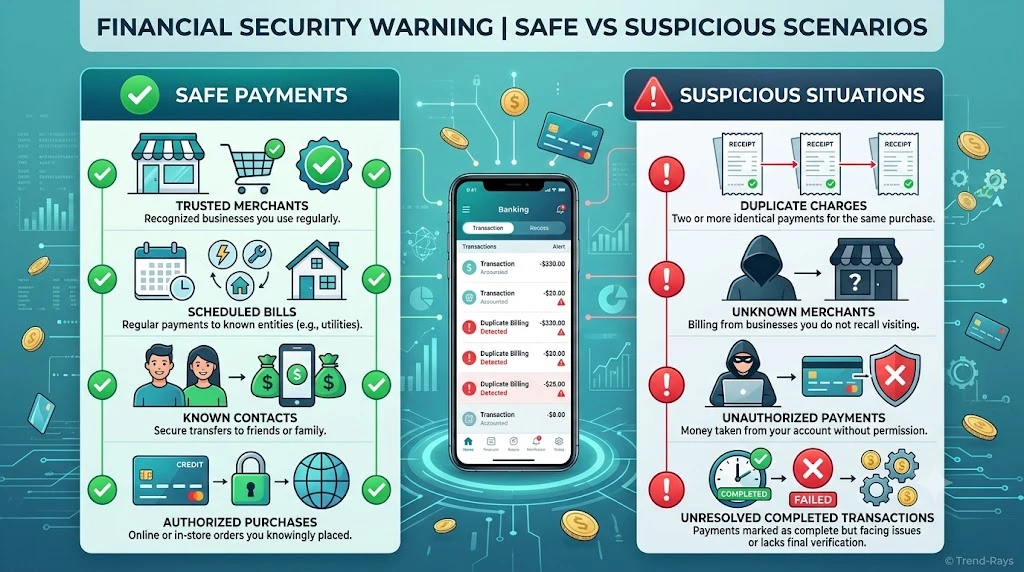
In most cases, a pending transaction disappearing is completely normal.
The payment has either:
- Been completed,
- Been cancelled,
- Had its authorization released, or
- Progressed to the next stage of processing.
However, there are situations where a disappearing pending transaction deserves closer attention.
Knowing the difference can help you identify genuine payment problems without worrying about routine banking updates.
Situation 1: The Merchant Says They Never Received the Payment, but Your Bank Shows a Completed Charge
This is one of the clearest signs that further investigation is needed.
For example:
Your bank shows:
Completed Transaction – ₹6,800
The merchant says:
“We never received your payment.”
At this point:
- The payment may have failed during settlement.
- The merchant may need to investigate through its payment gateway.
- Your bank may need to verify the settlement status.
Don’t assume either side is wrong.
Both organizations see different parts of the payment process.
Situation 2: Your Available Balance Never Returns
If:
- The pending transaction disappeared,
- No completed transaction exists,
- The merchant has no record of your order,
but your available balance remains reduced for an unusually long period, you should contact your bank.
This could indicate that the authorization hasn’t been fully released or that further investigation is required.
Situation 3: The Merchant Created Two Orders
Sometimes customers retry a payment because the pending transaction disappeared.
The result:
- Two successful payments.
- Two separate orders.
- Two completed transactions.
If you notice:
- Duplicate order confirmations,
- Multiple completed transactions, or
- Two shipment notifications,
contact the merchant immediately before the order is fulfilled.
Resolving duplicate payments is much easier before products are shipped.
Situation 4: You Don’t Recognize the Merchant
If a pending transaction disappears and is replaced by a completed transaction from a merchant you don’t recognize, don’t ignore it.
Although merchant names sometimes differ from brand names, you should verify the transaction.
If you still don’t recognize it after checking:
- Your recent purchases,
- Family members who may use the card,
- Subscription renewals,
contact your bank immediately.
Unauthorized transactions should always be reported as soon as possible.
Situation 5: You Continue Receiving Payment Notifications
If you receive repeated notifications such as:
- Payment Authorized
- Payment Completed
- Payment Reversed
- Payment Authorized Again
for the same purchase, there may be duplicate authorization attempts or repeated payment processing.
Contact the merchant before making another payment.
Repeated notifications don’t always mean multiple charges, but they should be verified.
Situation 6: The Merchant Asks You to Pay Again Without Checking the First Transaction
Be cautious if customer support immediately says:
“Please make the payment again.”
without first checking:
- Your transaction reference number,
- Payment status,
- Authorization records.
A responsible merchant should verify the original payment before requesting another one.
Otherwise, you risk creating duplicate payments.
Situation 7: Your Order Is Stuck for Several Days Without Updates
If:
- The pending transaction disappeared,
- No completed payment appears,
- No authorization release occurs,
- The merchant provides no update,
it’s reasonable to follow up.
Provide:
- Transaction reference number
- Payment amount
- Date and time
- Order details (if available)
Having complete information helps both the merchant and your bank investigate more efficiently.
Situation 8: You Notice Multiple Pending Transactions for the Same Purchase
Sometimes payment systems create more than one authorization attempt.
For example:
You click Pay Now.
Nothing happens.
You click again.
Now you see:
- Pending Transaction #1
- Pending Transaction #2
Later, one disappears while the other becomes a completed payment.
This is usually harmless if only one payment settles, but it’s worth monitoring to ensure duplicate charges don’t occur.
Warning Signs That Require Immediate Action
Although most disappearing pending transactions are harmless, contact your bank promptly if you notice any of these:
- A completed transaction you don’t recognize.
- Multiple completed charges for the same purchase.
- A merchant refusing to investigate despite having your transaction reference.
- Evidence of fraudulent or unauthorized activity.
- A completed charge for an order that doesn’t exist.
These situations deserve immediate attention rather than waiting for automatic updates.
Signs Everything Is Probably Fine
In contrast, you usually don’t need to worry if:
- Your completed transaction appears normally.
- Your order confirmation arrives.
- Your available balance returns after the authorization expires.
- The merchant confirms the payment wasn’t captured.
- Your banking app updates the transaction status within the normal processing period.
These are all common outcomes of routine payment processing.
Quick Decision Checklist
Ask yourself these questions:
✔ Did I receive an order confirmation?
✔ Does my completed transaction history match my purchase?
✔ Has my available balance updated correctly?
✔ Does the merchant recognize my payment?
✔ Do I have only one completed charge?
If you answered yes to all of these, your transaction likely completed normally.
If one or more answers are no, it’s worth contacting the appropriate support team.
Real-World Example
Neha purchases a smartwatch for ₹9,999.
Monday:
- Pending transaction appears.
Tuesday:
- Pending transaction disappears.
She becomes worried.
Before contacting anyone, she checks:
- Her completed transactions.
- Her email.
- The merchant’s order page.
Everything matches.
Her order has already shipped.
The pending transaction disappearing was simply part of the normal payment process.
By checking first instead of immediately retrying the payment, she avoided an unnecessary duplicate charge.
Expert Tip
Whenever you’re unsure about a payment, avoid making assumptions based on a single indicator.
Instead, verify all three:
- Your bank account
- Your merchant order status
- Your confirmation emails or SMS messages
Looking at all three together gives you the clearest understanding of what actually happened.
Did You Know?
Many customer support cases begin because users panic when a pending transaction disappears. In reality, the disappearance often indicates that the payment system has finished processing one stage and moved on to the next—not that the money has vanished.
Key Takeaway
A disappearing pending transaction is usually a normal banking event, not a financial emergency.
However, you should investigate further if:
- Your completed transaction doesn’t match your order.
- Your merchant can’t locate your payment.
- Your balance doesn’t update correctly after the expected processing period.
- You see duplicate charges or suspicious activity.
The best approach is to verify your payment status before taking action. A few minutes of checking your account history, merchant confirmation, and payment records can prevent unnecessary disputes and duplicate payments.
Frequently Asked Questions About Pending Transactions
1. Why did my pending transaction disappear?
A pending transaction usually disappears because it has reached the next stage of processing. The payment may have been completed, the authorization may have expired, or the merchant may have cancelled the transaction before capturing the payment.
2. Does a disappearing pending transaction mean I got my money back?
Not always.
A disappearing pending transaction can mean:
- The payment was completed.
- The authorization hold was released.
- The transaction was reversed.
- The payment is still being finalized.
Check your completed transaction history and available balance to determine what actually happened.
3. Can a pending transaction disappear without becoming a completed payment?
Yes.
If the merchant never captures the authorization, the bank eventually releases the reserved funds.
In that situation:
- The pending transaction disappears.
- No completed payment appears.
- The merchant doesn’t receive the money.
4. Can the merchant still charge me after the pending transaction disappears?
Sometimes.
If the authorization is still valid, the merchant may still complete the payment.
If the authorization has expired, the merchant will generally need to request a new payment authorization.
5. Why did my available balance change after the pending transaction disappeared?
Your available balance changes because pending transactions temporarily reserve funds.
Once the authorization is released or the payment is completed, your available balance is updated accordingly.
6. How long do pending transactions usually last?
The exact timeframe varies depending on:
- Your bank
- The merchant
- The payment network
- The type of purchase
Many pending transactions are resolved within a few days, while some may take longer depending on the merchant’s processing schedule.
7. Should I retry the payment if the pending transaction disappeared?
Not immediately.
Before making another payment:
- Check your completed transactions.
- Confirm your order status.
- Look for confirmation emails.
- Contact the merchant if you’re unsure.
Retrying too quickly may create duplicate payments.
8. Why does my banking app no longer show the pending transaction?
Your banking app may have:
- Replaced it with a completed transaction.
- Removed an expired authorization.
- Updated its transaction history.
- Refreshed account records.
This is often a normal banking update.
9. Can a pending transaction disappear and then come back?
It’s uncommon, but payment status can change as banking systems synchronize.
For example:
- A pending transaction disappears.
- The completed transaction appears later.
This doesn’t necessarily indicate a problem.
10. Why does the merchant say they never received my payment?
This can happen if:
- The authorization expired.
- The payment failed before settlement.
- The order wasn’t successfully created.
- The payment gateway experienced a processing issue.
If your bank shows a completed charge but the merchant can’t locate your payment, both parties may need to investigate.
11. Can weekends delay pending transactions?
Yes.
Some merchants and financial institutions process settlements differently on weekends and public holidays.
As a result, pending transactions may remain visible longer than they would during normal business days.
12. Is a pending transaction the same as a refund?
No.
A pending transaction is a temporary authorization.
A refund is a separate transaction that returns money after a completed payment has already been settled.
13. Why did my pending transaction disappear but my order is still processing?
Your order processing and payment processing are separate systems.
A merchant may have successfully captured your payment while still preparing your order for shipment.
Always check your order status separately from your banking app.
14. Can a pending transaction disappear because of fraud protection?
Yes.
Banks sometimes reverse authorizations automatically if fraud detection systems identify unusual activity or if transaction validation fails.
15. Does every pending transaction become a completed payment?
No.
Some pending transactions:
- Expire.
- Are cancelled.
- Are reversed.
- Never reach settlement.
Only successfully captured authorizations become completed payments.
16. Why do hotels and car rental companies keep transactions pending longer?
Hotels, car rental companies, and similar businesses often authorize your card before knowing the final amount.
The pending authorization helps reserve funds until the final bill is calculated.
17. What happens if I ignore a disappearing pending transaction?
If:
- Your completed transaction appears,
- Your order is confirmed,
- Your balance is correct,
you usually don’t need to do anything.
However, if something doesn’t match, you should investigate rather than ignoring it.
18. Can I dispute a pending transaction?
Many banks require a transaction to be completed before a formal dispute can begin.
If the payment is still pending, your bank may advise waiting until the final status is available.
Policies vary by financial institution.
19. Why do some banking apps show pending transactions differently?
Every bank has its own user interface.
Some display:
- Pending
- Processing
- Under Review
- Card Authorization
- Pending Debit
Although the wording differs, these often represent the same stage of payment processing.
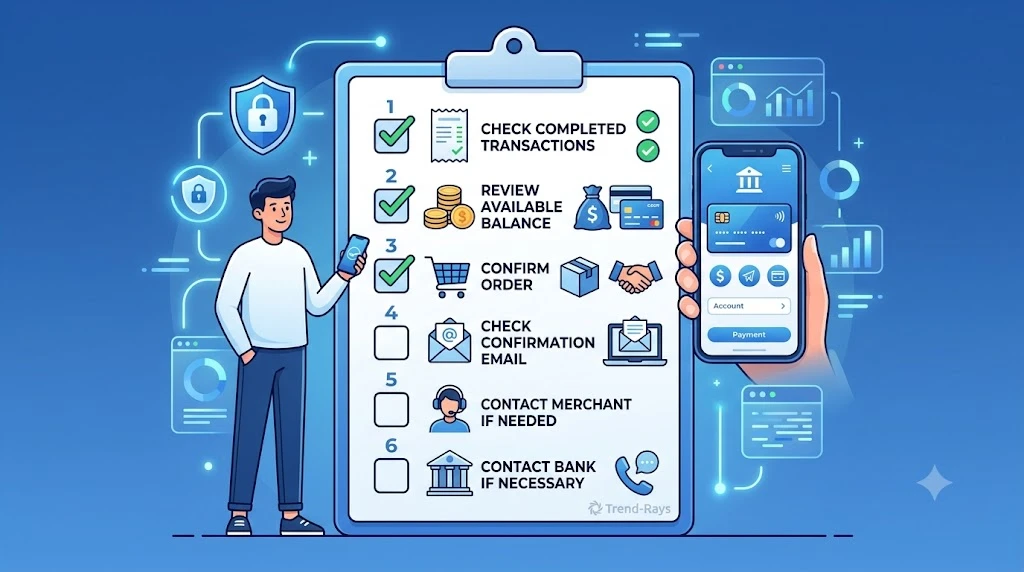
20. What’s the safest thing to do when a pending transaction disappears?
Don’t panic.
Follow these steps:
- Check your completed transaction history.
- Review your available balance.
- Confirm your order status with the merchant.
- Look for confirmation emails or SMS messages.
- Contact the merchant or your bank only if something doesn’t match.
Taking these simple steps will resolve most situations without creating duplicate payments or unnecessary support requests.
Final Thoughts
A disappearing pending transaction can look worrying at first, but in most cases, it’s simply a sign that your payment has moved beyond the authorization stage.
Whether the transaction becomes a completed payment, an expired authorization, or a released hold depends on what happened between your bank and the merchant after the initial authorization.
The most important thing to remember is this:
- A pending transaction is temporary.
- Its disappearance is not, by itself, a success or failure indicator.
- The final outcome is determined by the completed transaction, your available balance, and the merchant’s order status.
Instead of immediately retrying a payment or assuming your money has disappeared, take a few moments to verify:
- Your transaction history.
- Your available balance.
- Your order confirmation.
- Any communication from the merchant.
In many cases, you’ll discover that everything is working exactly as it should.
If something still doesn’t add up, contact the appropriate support team with your transaction reference number and payment details. Having complete information ready will help resolve the issue much faster.
By understanding how pending transactions, authorization holds, and payment settlements work together, you’ll be better equipped to handle future payment issues with confidence—and avoid common mistakes like duplicate payments or unnecessary disputes.