Quick Answer
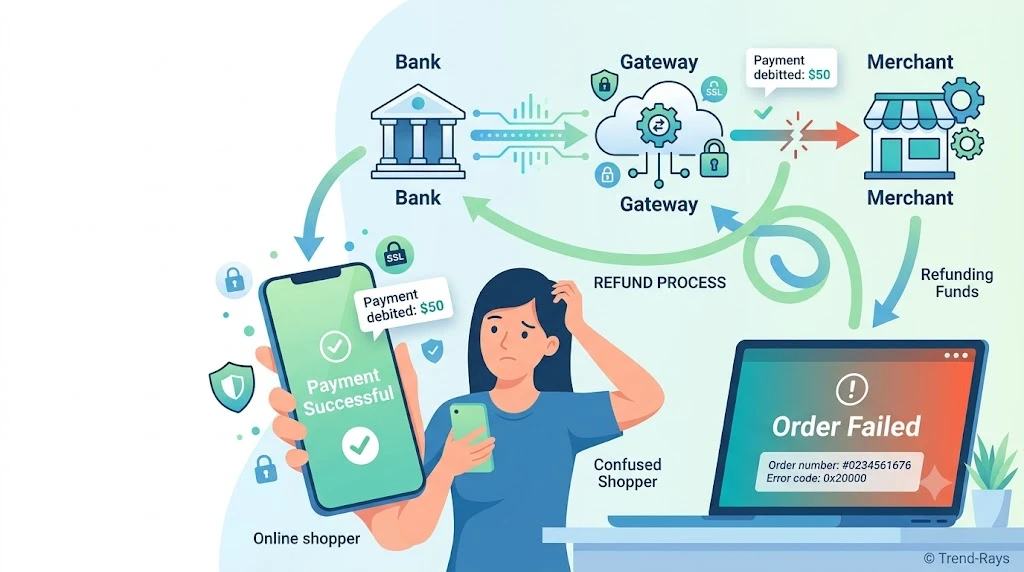
If your money was deducted but your order failed, it usually means your bank successfully processed the payment, but the merchant never completed or confirmed the transaction. In most cases, the money isn’t lost. It may be temporarily held by your bank, automatically reversed within a few business days, or refunded after the payment system reconciles the failed transaction. The right next step depends on where the payment failed and whether the merchant actually received the funds.
Introduction
Imagine ordering groceries, booking flight tickets, or paying for a new phone online.
You complete the payment, your banking app immediately shows that the money has been deducted, and then—just a few seconds later—you see an error message:
“Order failed.”
No confirmation email.
No order number.
No successful purchase.
But your money is gone.
It’s one of the most frustrating situations online shoppers face because two things appear to be true at the same time:
- Your bank says the payment was successful.
- The merchant says the order failed.
Naturally, questions start racing through your mind:
- Did I lose my money?
- Should I try paying again?
- Will I be charged twice?
- Who should I contact first—the bank or the merchant?
- How long will it take to get my money back?
The good news is that money deducted doesn’t automatically mean the merchant received it.
Modern online payments involve multiple systems working together in just a few seconds. If communication breaks down at any point during that process, your bank may complete its part of the transaction while the merchant never receives the confirmation needed to finalize your order.
Understanding where the payment failed is the key to knowing what happens next.
In this guide, you’ll learn why this happens, where your money actually goes, how long refunds or reversals usually take, what mistakes to avoid, and the exact steps to take to recover your payment as quickly as possible.
What Does “Money Debited but Order Failed” Actually Mean?
At first glance, the situation seems simple:
Money left your account, so the merchant must have been paid.
In reality, online payments don’t work that way.
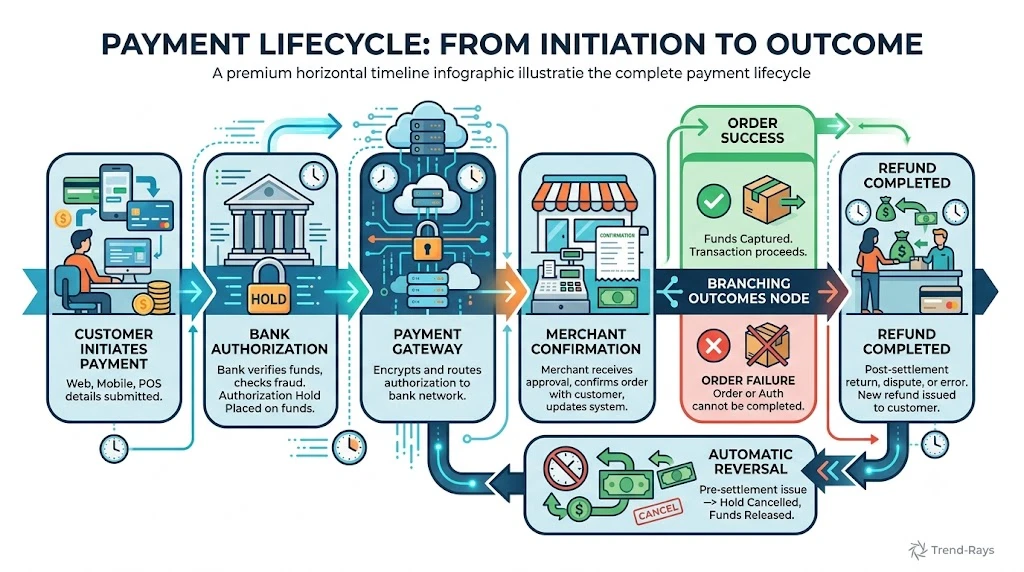
When you click Pay, several independent systems must communicate with one another before an order is officially completed.
A simplified payment flow looks like this:
Customer
      ↓
Merchant Website/App
      ↓
Payment Gateway
      ↓
Payment Processor
      ↓
Card Network / UPI Network
      ↓
Issuing Bank
Each participant has a specific job.
Your bank decides whether to approve the payment.
The payment network routes the transaction.
The payment gateway securely transfers information.
The merchant must then confirm that everything completed successfully before creating your order.
Problems occur when one part of this chain succeeds while another part fails.
For example:
- Your bank approves the payment.
- The payment gateway receives the approval.
- The merchant’s server crashes before confirming the order.
From your bank’s perspective, the payment was successful.
From the merchant’s perspective, the purchase never finished.
That’s why your account may show a debit even though no order exists.
This situation is sometimes called a successful payment with a failed transaction, but the exact cause can vary depending on where the communication stopped.
The important point to remember is this:
A debit from your bank account doesn’t necessarily mean the merchant has permanently received your money.
In many cases, the payment is still being processed behind the scenes, waiting to be automatically reversed or completed after the payment systems reconcile the transaction.
Where Is Your Money Right Now?
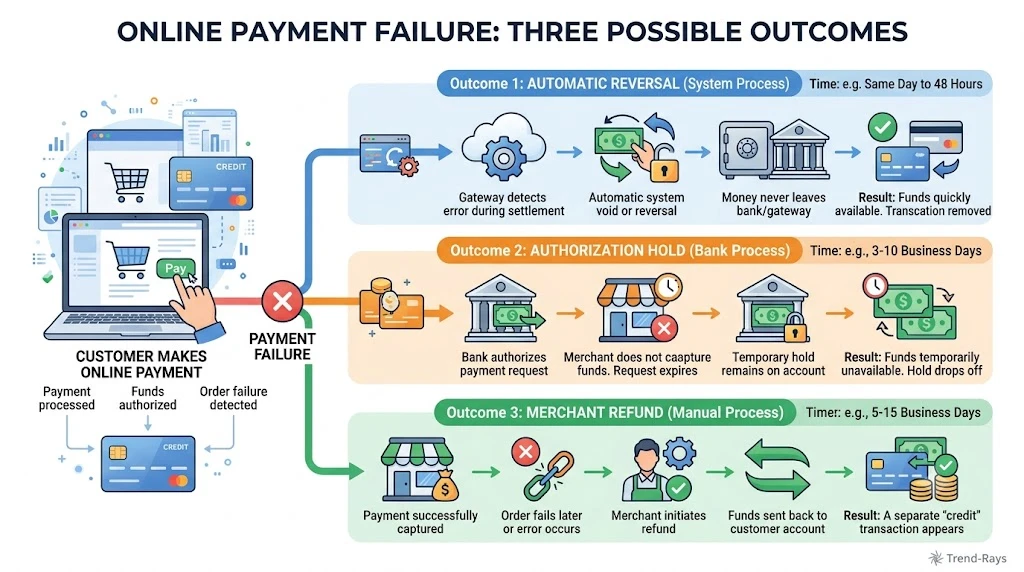
When a payment fails after money has already been deducted from your account, the biggest question is usually the simplest one:
“If the merchant didn’t receive my order, where did my money go?”
The answer depends on where the payment process stopped.
In many cases, your money is not sitting with the merchant at all.
Instead, it may be temporarily held within the banking and payment system while all parties verify what happened.
Think of an online payment like sending a package through multiple delivery hubs.
If the package gets stuck at one hub, it hasn’t necessarily reached its final destination.
The same idea applies to digital payments.
Your payment may be:
- Waiting for confirmation from the merchant.
- Being processed by the payment gateway.
- Held by your bank as a temporary authorization.
- Already on its way back to your account through an automatic reversal.
Because these checks happen automatically, customers often see money deducted before the payment system finishes determining whether the purchase actually succeeded.
Scenario 1: The Merchant Never Received the Payment
This is one of the most common situations.
Here’s what happens behind the scenes:
- Your bank approves the payment.
- The money leaves your available balance.
- The merchant’s server fails before receiving confirmation.
- No order is created.
Since the merchant never successfully completed the transaction, the payment usually cannot be captured.
In many cases, your bank automatically removes the temporary hold after verification, making the money available in your account again.
Scenario 2: The Merchant Received the Payment but Couldn’t Create the Order
Sometimes the payment reaches the merchant successfully, but another technical issue prevents the order from being created.
Examples include:
- Inventory changing during checkout
- Website timeout
- Booking system errors
- Internal server failures
- Duplicate transaction detection
In these situations, the merchant usually initiates a refund after confirming that no goods or services were provided.
Because refunds move through banking networks, they typically take longer than authorization reversals.
Scenario 3: The Payment Is Still Being Verified
Not every failed order is immediately classified as successful or unsuccessful.
Sometimes payment systems need additional time to reconcile transaction records.
During this period, you may notice:
- The payment appears as Pending.
- The order status remains unavailable.
- Customer support asks you to wait before taking further action.
This waiting period allows banks, payment gateways, and merchants to compare transaction logs and determine whether the payment should be completed, reversed, or refunded.
Although it can be frustrating, this process prevents duplicate payments and accidental refunds.
The Good News
The vast majority of these situations do not result in permanently lost money.
Instead, the payment usually follows one of three paths:
| What Happened? | What Usually Happens Next? |
|---|---|
| Merchant never received payment | Authorization hold expires or is automatically reversed. |
| Merchant received payment but order failed | Merchant processes a refund. |
| Payment still being verified | Payment systems reconcile the transaction before deciding whether to complete or reverse it. |
The important thing is not to assume that a debit automatically means your money has been permanently transferred to the merchant.
In many cases, the transaction is simply waiting for the payment ecosystem to determine the correct outcome.
How an Online Payment Actually Works (In Less Than 10 Seconds)
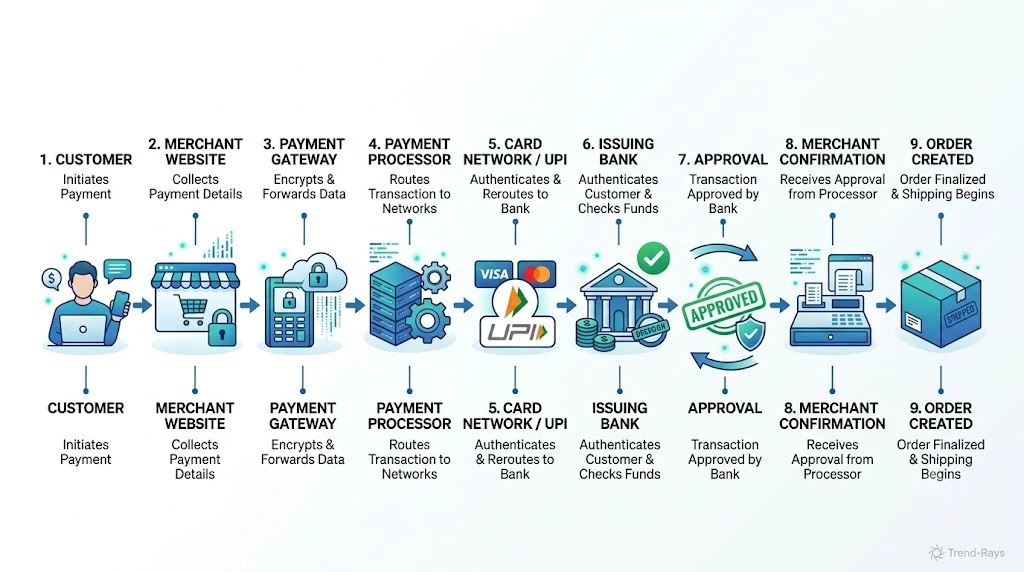
Understanding what happens behind the scenes makes it much easier to understand why payments occasionally fail.
Although the entire process usually takes only a few seconds, several independent systems must communicate successfully before your order is officially completed.
A simplified payment journey looks like this:
Customer
        ↓
Merchant Website or App
        ↓
Payment Gateway
        ↓
Payment Processor
        ↓
Card Network / UPI Network
        ↓
Issuing Bank
        ↓
Approval
        ↓
Merchant Confirmation
        ↓
Order Created
Each participant performs a different task.
Step 1: You Submit the Payment
When you click Pay, the merchant securely sends your payment request to a payment gateway.
At this point, no money has been transferred yet.
Step 2: Your Bank Reviews the Transaction
Your bank checks several things, including:
- Available balance
- Card status
- Spending limits
- Security rules
- Fraud detection systems
If everything looks normal, the bank approves the transaction.
Step 3: The Money Is Reserved
After approval, your bank either:
- Places an authorization hold, or
- Debits your account, depending on the payment method and banking system.
This is often the moment customers notice the money leaving their account.
However, the order still isn’t complete.
Step 4: The Merchant Must Confirm the Payment
The merchant now needs to receive confirmation that the payment succeeded.
Only after this confirmation can the system:
- Create your order
- Reserve inventory
- Generate booking IDs
- Issue tickets
- Send confirmation emails
If something fails during this stage, you may end up with exactly the situation this article is about:
Money deducted, but no successful order.
Step 5: The Payment System Resolves the Outcome
Depending on what happened, the payment system chooses one of three outcomes:
- Complete the transaction successfully.
- Reverse the authorization.
- Process a refund.
Most payment problems happen between Steps 3 and 4, when your bank has already approved the payment but the merchant cannot successfully complete the purchase.
Understanding this sequence explains why banks and merchants sometimes provide different information about the same transaction—and why patience is often necessary while the payment ecosystem finishes processing the request.
The 9 Most Common Reasons Money Gets Debited but the Order Fails
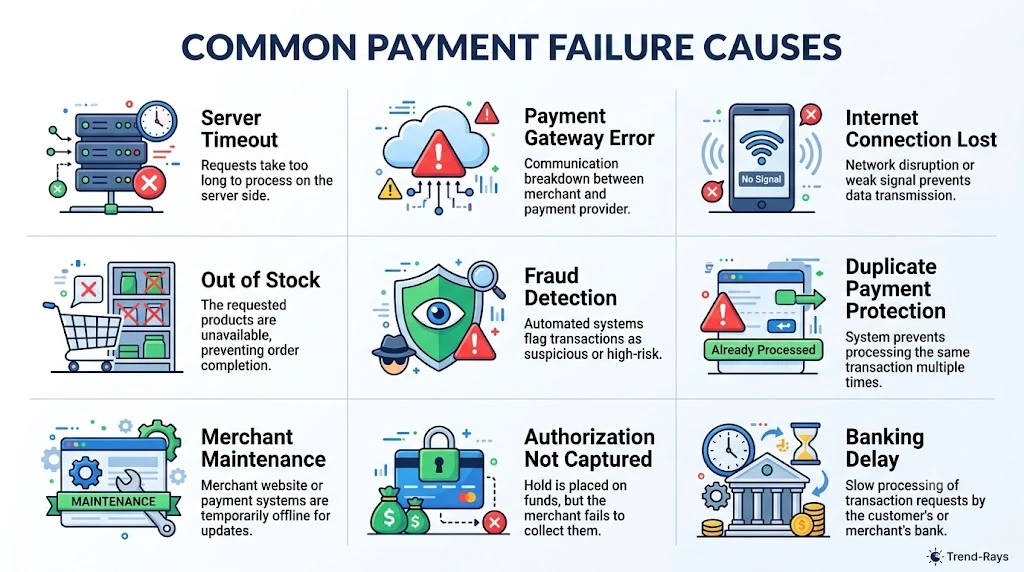
Although the error message may look the same every time, the underlying cause can be very different.
Understanding the reason behind the failed order helps you decide whether you should simply wait, contact the merchant, call your bank, or make another payment.
Here are the most common reasons.
1. The Merchant’s Server Timed Out Before Confirming the Order
This is one of the most frequent causes of failed online orders.
Your bank may approve the payment within a few seconds, but the merchant’s website or app also needs to receive that confirmation and create your order.
If the merchant’s server is overloaded, temporarily unavailable, or experiences a timeout, it may never finish the checkout process.
What You Might Notice
- Money deducted immediately.
- Error message such as:
- “Order Failed”
- “Something went wrong”
- “Unable to process your order.”
- No confirmation email.
- No order number appears in your account.
What Usually Happens
If the merchant never captures the payment, your bank often reverses the transaction automatically after verification.
What You Should Do
- Avoid making another payment immediately.
- Wait a few minutes and check whether the order appears.
- Check your email and order history.
- Contact the merchant if nothing changes.
2. The Payment Gateway Couldn’t Complete the Transaction
A payment gateway acts as the communication bridge between the merchant and your bank.
Sometimes your bank successfully approves the payment, but the gateway fails to deliver the approval back to the merchant because of:
- Network interruptions
- Gateway maintenance
- Temporary processing delays
- High transaction volume
As a result, the merchant assumes the payment failed even though your bank has already processed it.
Signs
- Bank SMS confirms payment.
- Merchant reports payment failure.
- No order confirmation.
What Usually Happens
The gateway later reconciles the transaction and either:
- Confirms the payment, or
- Automatically reverses it.
3. Your Internet Connection Was Interrupted During Checkout
A weak or unstable internet connection can interrupt communication between your device and the merchant.
For example:
- Payment reaches the bank.
- Bank approves it.
- Your internet disconnects before the merchant receives the final confirmation.
From your perspective, it looks like the payment disappeared.
Common Situations
- Mobile signal drops.
- Wi-Fi disconnects.
- App closes unexpectedly.
- Browser crashes.
- Battery dies during payment.
What To Do
- Reopen the merchant app.
- Refresh your order history.
- Avoid immediately making another payment.
This happens frequently during:
- Flash sales
- Limited-stock products
- Flight bookings
- Hotel reservations
- Concert tickets
Here’s what happens:
- You successfully pay.
- Someone else books the last available item milliseconds before your confirmation.
- The merchant cannot complete your purchase.
Instead of creating the order, the system cancels the transaction and starts the refund process.
Example
You buy the last available flight seat.
Your payment succeeds.
Before the airline confirms your booking, another reservation is finalized.
The booking fails even though the payment has already been initiated.
5. Fraud Detection Temporarily Blocked the Order
Banks and merchants use automated fraud detection systems to protect customers.
Sometimes a perfectly legitimate transaction is flagged because it appears unusual.
Common triggers include:
- Large purchase amount.
- Unusual location.
- New device.
- Multiple payment attempts.
- International merchant.
- Rapid consecutive transactions.
Your bank may approve the payment initially, but the merchant’s fraud system may cancel the order for additional verification.
What Happens Next
Depending on the merchant’s policy:
- The payment may be reversed automatically.
- The merchant may manually review the transaction.
- Additional identity verification may be requested.
6. Duplicate Payment Protection Cancelled the Transaction
Many payment systems automatically detect duplicate payment attempts.
Suppose:
- You click Pay.
- Nothing happens for several seconds.
- You assume the payment failed.
- You click Pay again.
The system may receive two nearly identical payment requests.
To avoid charging you twice, the merchant may cancel one transaction while the bank has already processed the authorization for both attempts.
Good Practice
If payment appears stuck, wait a few minutes before trying again.
Repeated payment attempts often create more confusion than the original issue.
7. The Merchant Was Performing System Maintenance
Large e-commerce websites regularly update their systems.
During maintenance:
- Orders may stop processing.
- Payment confirmation may be delayed.
- Temporary technical errors may occur.
Although payment systems continue communicating with banks, the merchant’s order system may be temporarily unavailable.
Result
Money appears deducted.
Order never completes.
Most merchants automatically reverse or refund these payments once services return to normal.
8. The Payment Was Authorized but Never Captured
Approving a payment and collecting the money are two different steps.
Many merchants first request an authorization from your bank.
Later, after confirming inventory or services, they “capture” the payment.
If something goes wrong before capture:
- The authorization expires.
- The reserved funds become available again.
- No completed order exists.
This is particularly common for:
- Hotels
- Car rentals
- Fuel stations
- Online travel bookings
9. Temporary Banking or Network Delays
Even when every system works correctly, payment networks occasionally experience delays.
Banks, card networks, payment gateways, and merchants all process millions of transactions every day.
Temporary congestion may delay:
- Payment confirmation.
- Order creation.
- Transaction reconciliation.
- Refund processing.
These delays usually resolve automatically without requiring customer intervention.
Before You Panic
If your money has just been deducted, give the system a little time.
Many “failed payment” problems resolve themselves within minutes as payment systems synchronize transaction records.
Quick Summary
| Reason | Typical Outcome | Recommended Action |
|---|---|---|
| Merchant server timeout | Automatic reversal or delayed confirmation | Wait, then check order history |
| Payment gateway delay | Reconciliation or reversal | Avoid paying again immediately |
| Internet interruption | Payment status unclear | Refresh app and verify order |
| Item became unavailable | Refund initiated | Wait for refund notification |
| Fraud screening | Manual review or cancellation | Contact merchant if no update |
| Duplicate payment protection | One transaction cancelled | Monitor account before retrying |
| Merchant maintenance | Delayed processing or refund | Retry later if needed |
| Authorization not captured | Hold expires automatically | Wait for release of funds |
| Banking or network delay | Transaction eventually reconciled | Allow processing time before escalating |
What Happens to Your Money After a Failed Order?
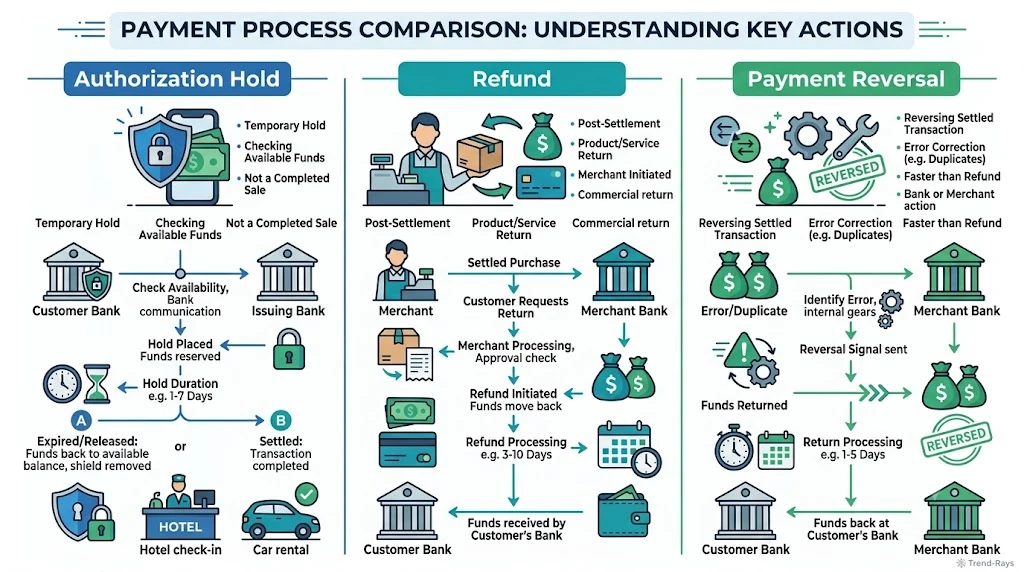
Seeing money disappear from your account without receiving a successful order can make it feel as though the payment has simply vanished.
Fortunately, that’s rarely what actually happens.
In most cases, your money follows one of several predictable paths through the payment system.
Understanding which path your payment is taking helps you know whether you simply need to wait or whether it’s time to contact customer support.
Scenario 1: The Payment Was Only Authorized
This is one of the most common outcomes.
Your bank approved the transaction and temporarily reserved the money, but the merchant never completed the purchase.
In this situation:
- The money may no longer appear in your available balance.
- The merchant has not permanently collected the payment.
- Your bank is holding the amount temporarily while waiting to see whether the merchant completes the transaction.
If the merchant never captures the payment, the authorization expires automatically and the funds become available in your account again.
This process is commonly called an authorization reversal.
Scenario 2: The Merchant Received the Payment but Cancelled the Order
Sometimes the payment succeeds, but the order cannot be completed.
Examples include:
- The product goes out of stock.
- A flight or hotel booking fails.
- A technical error prevents the order from being generated.
- The merchant detects a duplicate transaction.
In these situations, the merchant usually initiates a refund.
Unlike an authorization reversal, a refund must travel back through the payment network before reaching your bank account.
Because several systems are involved, refunds generally take longer than authorization reversals.
Scenario 3: The Transaction Is Still Being Reconciled
Not every payment is immediately classified as successful or failed.
Sometimes different systems receive information at different times.
For example:
- Your bank records the payment immediately.
- The payment gateway is still processing.
- The merchant is waiting for confirmation.
Until every system agrees on the final outcome, the transaction may remain in a temporary state.
This is why customer support often asks you to wait before opening a dispute.
The payment ecosystem first tries to resolve the issue automatically.
Authorization Reversal vs Refund
Many people use these terms interchangeably, but they are not the same.
| Authorization Reversal | Refund |
|---|---|
| Money was only temporarily reserved. | Money had already reached the merchant. |
| Merchant never completed the payment. | Merchant is returning a completed payment. |
| Usually processed automatically. | Usually initiated manually or automatically by the merchant. |
| Often completes faster. | May take several business days depending on the payment method. |
Knowing which situation applies to your payment helps set realistic expectations.
Why Different Banks Show Different Statuses
One reason customers become confused is that every bank presents transaction information differently.
For example, one bank may display:
- Pending
Another may display:
- Processing
Another may simply show:
- Debited
Even though the wording is different, the payment may still be moving through the same reconciliation process.
That’s why it’s important to look beyond the transaction label and also check:
- Whether the merchant created an order.
- Whether you received a confirmation email or SMS.
- Whether the merchant acknowledges receiving the payment.
Should You Make Another Payment?
This is one of the biggest mistakes customers make.
Imagine this sequence:
- You pay ₹2,500.
- Money is deducted.
- The order fails.
- You immediately pay another ₹2,500.
- A few minutes later, the original payment is also confirmed.
Now you’ve accidentally paid twice.
Before making another payment:
✅ Refresh the merchant’s order history.
✅ Check your email and SMS.
✅ Wait a few minutes if the payment was made recently.
✅ Contact the merchant if the order still doesn’t appear.
Retrying immediately should usually be your last option, not your first.
How Long Does It Usually Take to Get Your Money Back?
Although every bank and merchant follows its own processes, these are common timelines.
| Situation | Typical Time |
|---|---|
| Authorization hold expires | Within a few days, depending on the bank and payment network |
| Automatic payment reversal | Often within a few business days |
| Merchant-initiated refund | Usually several business days after the merchant processes it |
| Chargeback or payment dispute | Can take several weeks because the transaction is formally investigated |
If your payment still hasn’t been resolved after the expected timeframe, gather:
- Transaction ID
- Payment reference number
- Bank confirmation
- Order details (if available)
- Screenshots of any error messages
Having this information ready makes it much easier for both the merchant and your bank to investigate the issue.
Key Takeaway
The most important thing to remember is this:
Money deducted does not automatically mean money permanently lost.
In most situations, the payment is either:
- Temporarily reserved,
- Being verified,
- Automatically reversed, or
- Waiting for the merchant to complete the refund process.
Understanding which stage your payment is in helps you avoid unnecessary panic, duplicate payments, and delays in resolving the issue.
What Should You Do Immediately After Your Order Fails?
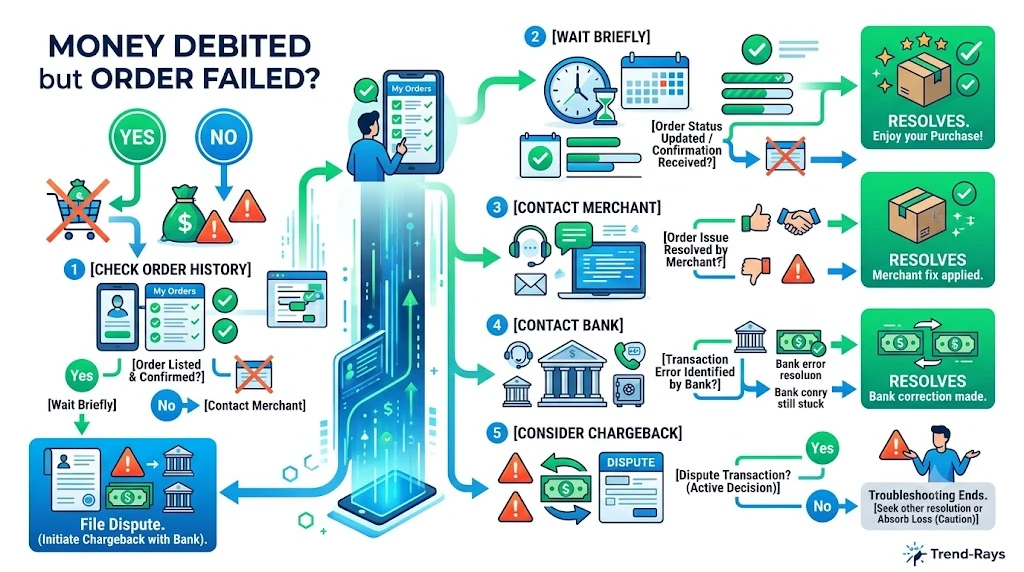
Discovering that your money has been deducted while your order fails can make you want to fix the problem immediately.
However, taking the wrong action—such as making another payment too quickly—can create even bigger problems, including duplicate charges and delayed refunds.
Follow these steps in order before trying to pay again.
Step 1: Don’t Panic or Retry the Payment Immediately
Your first reaction may be to refresh the page and make another payment.
Avoid doing this.
Many payment issues resolve automatically within a few minutes as banks, payment gateways, and merchants synchronize transaction records.
Making another payment too soon could result in:
- Two successful payments for the same purchase.
- Duplicate authorization holds.
- Multiple refund requests.
- Longer customer support investigations.
Wait Before Retrying
As a general rule, give the system a short amount of time to finish processing before assuming the payment has completely failed.
Step 2: Check Whether the Order Was Actually Created
Sometimes the payment succeeds even though the confirmation page fails to load.
Before contacting anyone, check:
- Your order history in the app or website.
- Your email inbox.
- Your SMS notifications.
- Your account dashboard.
If an order number already exists, the purchase may have completed successfully even though you saw an error message.
Step 3: Check Your Bank Transaction Status
Open your banking app or account statement and look at the payment.
Pay attention to whether it shows:
- Pending
- Processing
- Completed
- Reversed
The exact wording varies between banks, but it helps determine the next step.
Also note:
- Transaction ID
- Reference number
- Payment amount
- Date and time
You’ll need these details if you contact customer support later.
Step 4: Look for a Payment Confirmation From the Merchant
Some merchants send payment confirmations separately from order confirmations.
Check for:
- Payment received emails.
- SMS confirmations.
- In-app payment receipts.
- Wallet notifications.
If the merchant confirms payment but the order is missing, customer support can usually locate the transaction more quickly using the payment reference.
Step 5: Contact the Merchant First
In most situations, the merchant should be your first point of contact.
Why?
The merchant can verify whether they actually received the payment.
They can usually tell you whether:
- The payment is pending.
- The order failed.
- A refund has already been initiated.
- A manual correction is required.
When contacting support, provide:
- Transaction ID
- Payment reference
- Order attempt time
- Payment amount
- Screenshot of the debit notification (if available)
Providing complete information upfront often speeds up the investigation.
Step 6: Contact Your Bank If Necessary
If the merchant confirms that no payment was received, but your account still shows a completed debit after the expected processing period, contact your bank.
Ask the bank to verify:
- Whether the payment was successfully settled.
- Whether it is still pending.
- Whether an authorization reversal has already started.
- Whether a dispute or chargeback is appropriate.
Have these details ready:
- Account or card used
- Transaction reference number
- Date and time
- Merchant name
- Amount
Step 7: Keep All Records Until the Issue Is Resolved
Don’t delete emails or notifications related to the payment.
Save:
- Payment confirmation
- Error messages
- Screenshots
- Support ticket numbers
- Chat transcripts
- Refund confirmation emails
These records are useful if the issue needs to be escalated later.
What Not to Do
Many payment problems become more complicated because customers take unnecessary actions while the original transaction is still being processed.
Avoid these common mistakes:
❌ Making multiple payment attempts within a few minutes.
❌ Opening several support tickets for the same transaction.
❌ Assuming the money is permanently lost immediately after the debit.
❌ Ignoring emails from the merchant or your bank.
❌ Waiting too long to report a genuine problem after the normal processing period has passed.
Quick Recovery Checklist
If your money has been deducted but your order failed, use this checklist:
✅ Wait briefly before retrying the payment.
✅ Check your order history.
✅ Verify your bank transaction status.
✅ Look for payment confirmation emails or SMS messages.
✅ Contact the merchant with the transaction reference.
✅ Contact your bank if the issue remains unresolved after the expected processing timeframe.
✅ Keep all payment records until the case is closed.
Real-Life Example
Imagine you purchase a ₹3,499 pair of headphones from an online store.
- Your bank immediately sends an SMS confirming the debit.
- The website suddenly displays “Order Failed.”
- No order appears in your account.
Instead of making another payment immediately, you:
- Check your order history.
- Wait a short time to see if the order is created automatically.
- Save the transaction reference.
- Contact the merchant.
The merchant confirms that its server timed out before creating the order and starts an automatic refund.
By waiting and verifying first, you avoid accidentally paying a second time and creating a much more complicated refund process.
7 Common Mistakes That Can Delay Your Refund or Make the Situation Worse
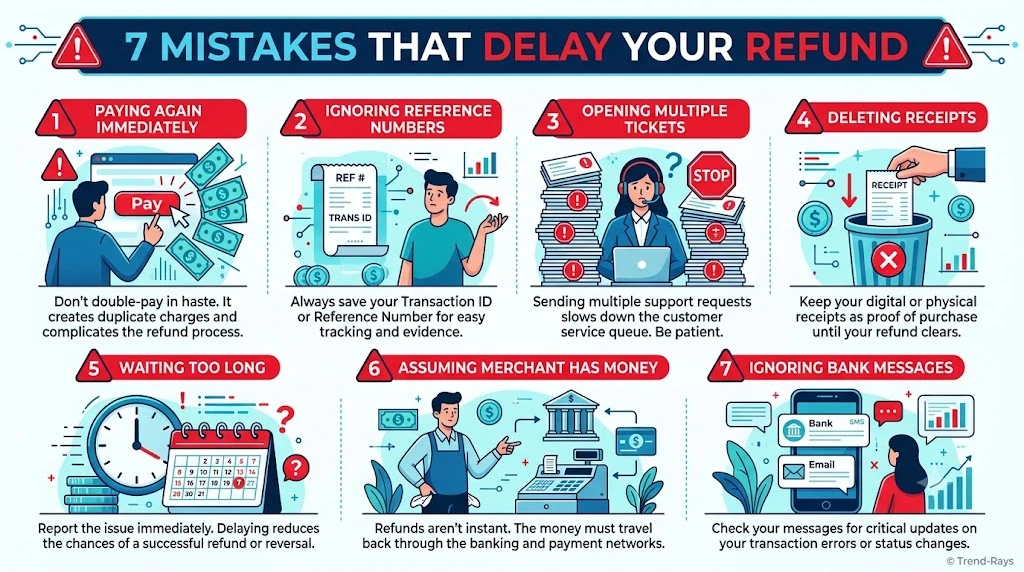
When money has already been deducted from your account, it’s natural to want an immediate solution.
Unfortunately, many customers unknowingly make the situation more complicated by taking the wrong actions before the payment system has finished processing the transaction.
Here are the most common mistakes to avoid.
Mistake 1: Making Another Payment Immediately
This is by far the most common mistake.
Imagine you pay ₹2,999 for an online purchase.
The payment succeeds, but the website displays:
“Order Failed.”
Thinking the payment didn’t go through, you immediately try again.
A few minutes later, both payments are processed successfully.
Now, instead of solving one problem, you’re dealing with:
- Two successful payments.
- A duplicate refund request.
- Longer support investigations.
- Additional waiting time.
Better Approach
Before making another payment:
- Refresh your order history.
- Check your email.
- Wait briefly for payment synchronization.
- Verify whether the original transaction completed successfully.
Mistake 2: Assuming the Merchant Has Already Received Your Money
A debit from your bank account doesn’t automatically mean the merchant has received the payment.
Many customers contact the merchant demanding an immediate refund before the payment has even reached the merchant’s system.
In reality, the transaction may still be:
- Pending.
- Waiting for confirmation.
- Automatically reversing.
- Being reconciled by the payment gateway.
Understanding this difference helps set realistic expectations.
Mistake 3: Ignoring the Transaction Reference Number
Every digital payment generates a unique reference number.
Many users never save it.
Without this information, customer support often needs significantly longer to locate the transaction.
Before contacting support, save:
- Transaction reference number
- Payment ID
- Date
- Time
- Amount
- Merchant name
These details make investigations much faster.
Mistake 4: Opening Multiple Support Tickets
It may seem helpful to contact:
- Live chat
- Email support
- Phone support
- Social media
- Banking support
…all at the same time.
However, multiple tickets for the same issue can actually slow the process.
Support teams may:
- Create duplicate investigations.
- Escalate the wrong case.
- Ask for the same documents repeatedly.
Instead, keep all communication within one support case whenever possible.
Mistake 5: Confusing an Authorization Hold With a Completed Payment
Many customers believe every debit is permanent.
That’s not always true.
Sometimes the bank has only reserved the funds temporarily while waiting for the merchant to complete the transaction.
If the merchant never captures the payment, the hold expires automatically and the money becomes available again.
Understanding this distinction prevents unnecessary panic during the first few hours after a failed payment.
Mistake 6: Deleting Payment Emails or Screenshots
After the issue appears to be resolved, many people delete:
- Payment receipts
- Error messages
- Bank notifications
- Confirmation emails
If the refund later encounters a problem, these records become valuable evidence.
Keep everything until:
- The money is back in your account.
- The order issue has been fully resolved.
- The transaction appears correctly on your bank statement.
Mistake 7: Waiting Too Long to Report a Genuine Problem
While patience is important during normal processing, waiting too long can also create complications.
If the expected processing period has passed and:
- No refund appears.
- No reversal occurs.
- The merchant cannot locate the payment.
- Your bank still shows a completed debit.
Don’t continue waiting indefinitely.
Instead:
- Contact the merchant.
- Contact your bank if necessary.
- Ask whether a payment dispute or formal investigation is appropriate.
Taking timely action helps ensure the issue is investigated while transaction records are still readily available.
Quick Summary
| Mistake | Better Approach |
|---|---|
| Paying again immediately | Verify the original transaction first. |
| Assuming the merchant has your money | Confirm whether the payment was actually received. |
| Losing the transaction reference | Save all payment details immediately. |
| Opening multiple support requests | Use a single support case whenever possible. |
| Treating every debit as a completed payment | Understand the difference between an authorization hold and a settled payment. |
| Deleting payment records | Keep receipts and screenshots until the issue is fully resolved. |
| Waiting indefinitely | Escalate appropriately after the expected processing period. |
Expert Tip
One habit experienced online shoppers develop is creating a payment folder for important transactions.
Whenever a payment issue occurs, they immediately save:
- Bank notification
- Payment receipt
- Order confirmation (if any)
- Error message
- Support case number
Having these records organized makes it much easier to resolve disputes and avoids searching through emails or messages later.
Who Should You Contact? Merchant, Bank, or Payment Provider?
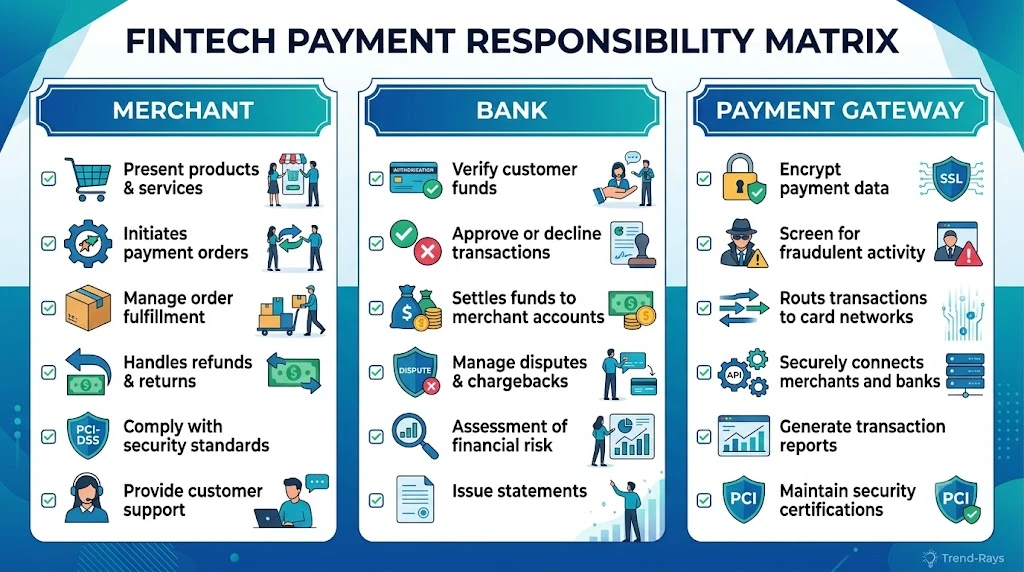
One of the biggest mistakes people make after a failed payment is contacting the wrong organization first.
Every online payment involves multiple parties, and each one is responsible for a different part of the transaction.
Understanding who controls each stage can save you hours of frustration.
Contact the Merchant First If…
In most situations, the merchant should be your first point of contact.
Why?
Only the merchant can confirm whether:
- Your order was successfully created.
- The payment reached their system.
- A refund has already been initiated.
- The order failed because of a technical issue.
- The payment is still waiting to be processed.
Examples
- Amazon order failed after payment.
- Flight booking not confirmed.
- Hotel reservation failed.
- Food delivery order missing.
- Movie ticket not generated.
The merchant has access to order records that your bank cannot see.
Information to Provide
- Transaction reference number
- Payment amount
- Date and time
- Email address used for the purchase
- Screenshot of the payment confirmation or error message
Providing these details in your first message helps customer support investigate the issue more quickly.
Contact Your Bank If…
Your bank becomes the right point of contact when the merchant confirms they never received the payment, or when the transaction still appears unresolved after the normal processing period.
Your bank can verify:
- Whether the payment was approved.
- Whether it is still pending.
- Whether an authorization hold exists.
- Whether an automatic reversal has already started.
- Whether the payment was successfully settled.
Banks can also explain why your available balance has changed or why a transaction remains pending.
Information Your Bank Will Usually Ask For
- Card or account used
- Transaction reference number
- Merchant name
- Payment amount
- Date and approximate time
- Any communication you’ve already had with the merchant
When Does the Payment Gateway Get Involved?
Most customers don’t need to contact the payment gateway directly.
Companies such as Razorpay, Cashfree, PhonePe Payment Gateway, PayU, Stripe, or other payment processors usually work behind the scenes.
If a gateway issue occurs, the merchant normally raises the investigation on your behalf.
As a customer, your best approach is usually:
- Contact the merchant.
- Allow the merchant to coordinate with the payment gateway if necessary.
This avoids duplicate investigations and keeps communication in one place.
When Should You Raise a Chargeback?
A chargeback is a formal process where your bank investigates a disputed card transaction.
It should generally be treated as a last resort, not the first step.
You should consider discussing a chargeback with your bank if:
- The merchant confirms they won’t issue a refund despite charging you.
- The merchant is unresponsive after reasonable follow-up.
- The payment was unauthorized or fraudulent.
- Goods or services were never provided, and normal refund attempts have failed.
- The expected resolution period has passed without progress.
A chargeback investigation typically requires supporting documents such as payment receipts, communication with the merchant, and screenshots of the failed transaction.
Decision Guide: Who Should You Contact?
| Situation | Best First Contact | Why? |
|---|---|---|
| Order failed immediately after payment | Merchant | They can confirm whether the order exists. |
| Money deducted but no order appears | Merchant | They can check whether payment reached their system. |
| Merchant says payment wasn’t received | Bank | The bank can verify the transaction status. |
| Transaction still shows pending after the expected processing period | Bank | They can explain whether a hold, reversal, or settlement is in progress. |
| Merchant confirms a refund was issued but the money hasn’t arrived after the normal timeframe | Bank | The bank can trace the incoming refund. |
| Merchant refuses to help or denies a legitimate refund | Bank (for chargeback advice) | A formal dispute may be appropriate if normal resolution fails. |
What Information Should You Keep Ready?
Regardless of who you contact, having complete information speeds up the investigation.
Prepare:
- Transaction reference number
- Order number (if available)
- Payment amount
- Date and time
- Merchant name
- Screenshots of any error messages
- Confirmation emails or SMS messages
- Previous support ticket numbers
The more complete your information, the faster customer support can locate your transaction.
Expert Tip: Explain the Timeline Clearly
Instead of saying:
“My payment failed.”
Try something more specific:
“I attempted to place an order on 15 July at approximately 3:45 PM. My bank confirmed the payment, but I never received an order confirmation. My transaction reference number is XXXXXXXXXX. Could you please confirm whether the payment reached your system?”
A clear timeline reduces unnecessary back-and-forth and helps support agents investigate the correct transaction.
Frequently Asked Questions
1. Will I Automatically Get My Money Back If My Order Failed?
In many cases, yes.
If the merchant never successfully completes the transaction, the payment is often reversed automatically or refunded after the payment systems finish verifying the transaction.
However, the exact timeline depends on whether the payment was only authorized, fully captured, or already settled with the merchant.
If the expected processing period has passed and you haven’t received your money, contact the merchant first and then your bank if necessary.
2. How Long Does It Usually Take to Get the Money Back?
There isn’t a single timeline that applies to every payment.
The processing time depends on:
- Your bank
- The payment method
- The merchant
- Whether the payment requires a refund or an authorization reversal
Some payments are reversed relatively quickly, while others may take several business days to appear in your account.
3. Should I Make Another Payment Immediately?
Usually, no.
Before retrying the payment:
- Check whether the order was actually created.
- Refresh your order history.
- Review your email and SMS notifications.
- Wait briefly for payment synchronization.
Retrying too quickly can sometimes result in duplicate payments.
4. Can the Merchant Receive My Money Even If the Order Failed?
Yes.
This is possible if the payment succeeded but the merchant’s ordering system failed afterward.
In these situations, the merchant normally initiates a refund after confirming that no goods or services were delivered.
5. Can Money Be Deducted Even If the Merchant Never Receives It?
Yes.
Sometimes your bank approves the payment, but the payment confirmation never reaches the merchant.
In these situations, the money may simply be held temporarily until the payment is automatically reversed.
6. What’s the Difference Between a Pending Transaction and a Completed Transaction?
A pending transaction is still being processed or verified.
A completed transaction has been fully settled between the bank and the merchant.
Pending payments may still be reversed, while completed transactions usually require a refund if the purchase cannot be completed.
7. Why Does My Bank Show “Debited” While the Merchant Says Payment Failed?
Both statements can be correct.
Your bank may have successfully approved the payment, while the merchant never received the confirmation required to complete the order.
This mismatch is one of the most common causes of payment-related confusion.
8. Should I Contact the Merchant or My Bank First?
In most situations, contact the merchant first.
The merchant can verify whether the payment reached their system and whether the order was created.
If the merchant confirms that no payment was received, your bank can investigate the transaction from its side.
9. What Is an Authorization Hold?
An authorization hold is a temporary reservation of funds.
The bank sets aside the payment amount while waiting for the merchant to complete the transaction.
If the merchant never captures the payment, the hold is eventually released and the money becomes available again.
10. What Happens If the Merchant Never Responds?
If you’ve made reasonable attempts to contact the merchant and the issue remains unresolved after the expected processing period, contact your bank for further guidance.
Depending on the circumstances, your bank may advise you about dispute or chargeback options.
11. Can I Lose My Money Permanently?
Permanent loss is uncommon in genuine payment processing failures.
Most issues are eventually resolved through:
- Authorization reversals
- Merchant refunds
- Payment reconciliation
- Formal dispute procedures, when appropriate
The key is to keep your payment records and report unresolved problems within a reasonable timeframe.
12. Why Did My Available Balance Decrease Even Though the Purchase Failed?
Your bank may have placed a temporary authorization hold on the funds.
Although the purchase wasn’t completed, the money may remain unavailable until the authorization expires or is reversed.
This doesn’t necessarily mean the merchant has received your payment.
13. Can I Cancel the Transaction Myself?
Generally, no.
Once the payment request has been submitted, it must be processed through the payment network.
If the order fails, the transaction usually resolves through an automatic reversal or a merchant-initiated refund rather than a customer cancellation.
14. What Information Should I Keep Before Contacting Support?
Have the following details ready:
- Transaction reference number
- Payment amount
- Date and time
- Merchant name
- Order number (if available)
- Screenshots of any error messages
- Payment confirmation emails or SMS messages
Providing complete information helps support teams investigate your case more efficiently.
15. Can This Happen With UPI, Debit Cards, Credit Cards, and Digital Wallets?
Yes.
Although the payment processes differ slightly, similar issues can occur across:
- UPI payments
- Debit cards
- Credit cards
- Mobile wallets
- Net banking
The underlying cause is often the same: one part of the payment process completed successfully while another part failed.
16. Is It Safe to Retry the Payment Later?
Yes—once you’ve confirmed that the original transaction didn’t successfully create an order and you’ve ruled out duplicate processing.
If you’re unsure, contact the merchant before attempting another payment.
17. Why Does the Merchant Ask Me to Wait?
Payment systems often need time to reconcile transaction records between:
- The merchant
- The payment gateway
- The card or UPI network
- Your bank
Waiting allows automatic reversals or confirmations to occur without creating duplicate transactions.
18. Can Banks Reverse a Transaction Automatically?
Yes.
If the merchant never captures an authorized payment, many banks automatically release the authorization hold or reverse the transaction according to their payment network procedures.
19. What If My Refund Is Delayed?
Start by checking whether the merchant has actually processed the refund.
If they confirm that it has been initiated but the expected processing period has passed, contact your bank with the refund reference or transaction details to trace the payment.
20. How Can I Reduce the Chances of This Happening Again?
While payment failures can’t always be prevented, you can reduce the risk by:
- Using a stable internet connection.
- Avoiding multiple payment attempts.
- Waiting for the payment page to finish loading.
- Keeping your banking app updated.
- Saving transaction references immediately after payment.
- Checking order confirmation before retrying any payment.
Final Thoughts
Having your money deducted while your order fails is stressful, but it doesn’t usually mean your money has disappeared.
Most payment issues are the result of temporary communication failures between banks, payment gateways, and merchants—not permanent financial loss.
The most important thing is to stay methodical:
- Verify whether the order was created.
- Check your transaction status.
- Avoid making duplicate payments.
- Contact the right party with complete transaction details.
- Keep your records until the issue is fully resolved.
In many cases, the payment will be automatically reversed or refunded once the transaction is reconciled.
By understanding how the payment process works and following the recovery steps in this guide, you can avoid unnecessary panic, reduce delays, and improve your chances of resolving the issue quickly.