Quick Answer
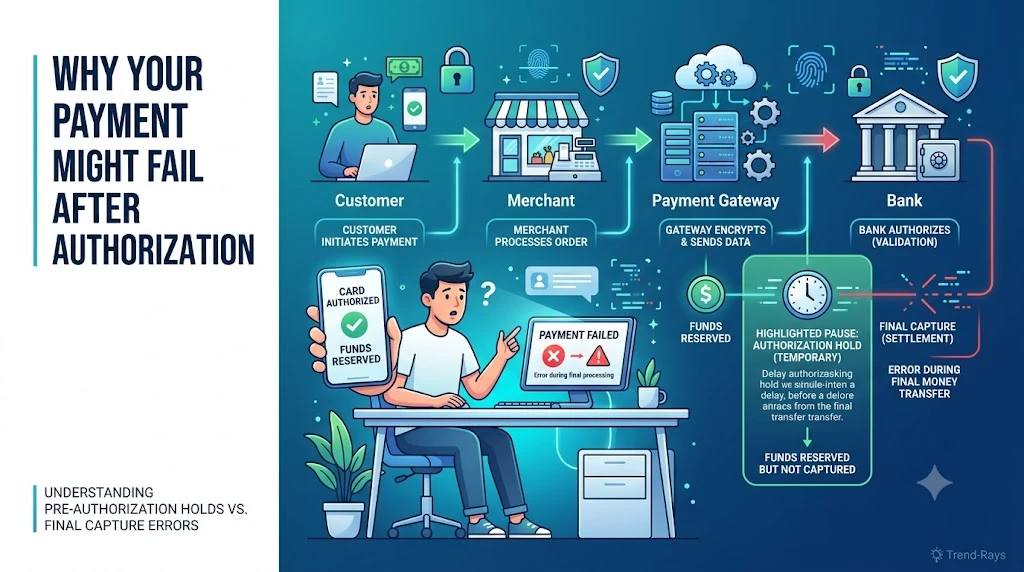
If your card shows “Authorized” but your payment still failed, it usually means your bank approved the transaction and reserved the funds, but the merchant never completed the payment process.
An authorization is not the same as a completed payment.
In many situations, the merchant never actually receives your money. Instead, the authorization expires automatically and the reserved amount becomes available in your account again.
The next step depends on whether the merchant captured the payment or the transaction stopped before completion.
Introduction
Imagine you’re paying for a hotel booking.
You enter your card details.
Your banking app immediately sends a notification:
₹4,850 Authorized (Example)
A few seconds later, the booking website displays:
Payment Failed
Now you’re left wondering:
- Was my card charged?
- Did the hotel receive my payment?
- Is my money gone?
- Why does my bank say the payment succeeded while the merchant says it failed?
- Should I try paying again?
The confusion comes from one simple misunderstanding:
Card authorization and payment completion are two different steps.
Many people assume that once their bank authorizes a transaction, the merchant automatically receives the money.
That’s not how card payments work.
In reality, authorization is only the first stage of a multi-step payment process.
The merchant must still complete additional steps before the payment becomes final.
If something goes wrong during those later stages, you can end up in the frustrating situation where your card shows an authorization, but your purchase never goes through.
In this guide, you’ll learn:
- What card authorization actually means
- Why payments sometimes fail after authorization
- Where your money is during an authorization hold
- How long authorization holds usually last
- Whether you should retry the payment
- When you should contact the merchant or your bank
By the end of this article, you’ll understand exactly what’s happening behind the scenes—and know what to do next if it happens again.
What Does “Card Authorized but Payment Failed” Actually Mean?
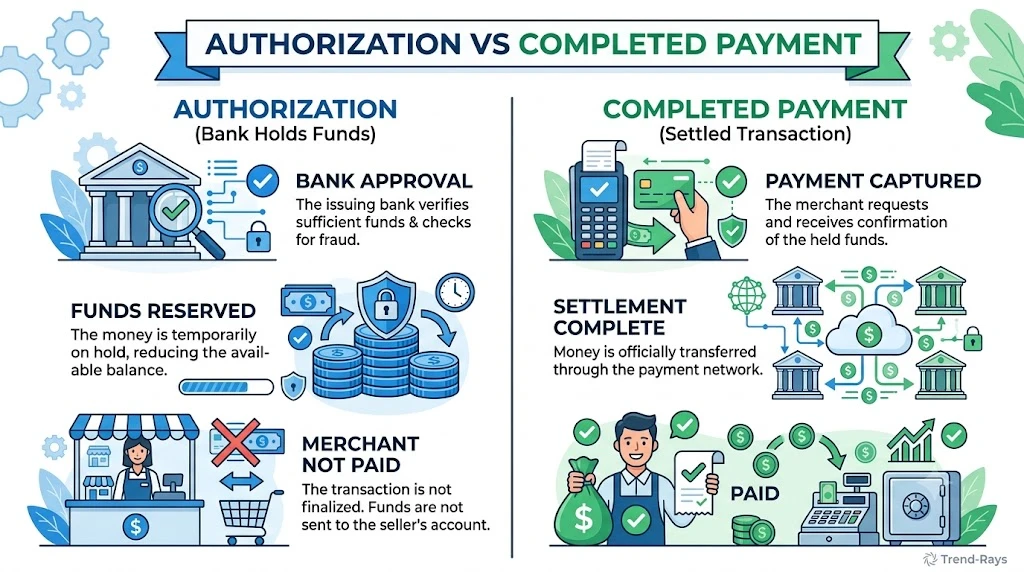
One of the biggest misconceptions about online payments is believing that authorization equals payment.
It doesn’t.
When your bank authorizes a card transaction, it’s simply saying:
“The customer has sufficient funds (or credit), and we approve this transaction if the merchant wants to complete it.”
Think of authorization as reserving a seat, not buying the ticket.
For example:
Imagine you’re booking a hotel room.
The hotel first checks whether your card is valid and whether enough funds are available.
Your bank approves the request and temporarily reserves the amount.
At this point:
- Your available balance may decrease.
- Your banking app may show the transaction as authorized or pending.
- The merchant still hasn’t permanently collected the money.
The merchant must now decide whether to capture the payment.
Only after capture does the transaction become a completed payment.
If the booking system crashes, the room becomes unavailable, or a technical error occurs before capture, the authorization simply expires and the reserved funds are released back to your account.
That’s why it’s entirely possible for both of these statements to be true at the same time:
- Your bank: “The transaction was authorized.”
- The merchant: “The payment failed.”
Neither system is wrong.
They’re simply referring to different stages of the payment process.
Did You Know?
Millions of card transactions are authorized every day without being completed. Hotels, airlines, fuel stations, and car rental companies frequently use authorizations to verify available funds before deciding whether to capture the payment later.
Authorization vs Payment: They’re Not the Same Thing
This is the single most important concept to understand.
People often use the words authorized, charged, and paid as though they mean the same thing.
They don’t.
Each represents a different stage of the payment lifecycle.
| Stage | What It Means | Has the Merchant Received the Money? |
|---|---|---|
| Authorization | Your bank approves the transaction and reserves the funds. | No. The money is only reserved. |
| Capture | The merchant confirms that the purchase should proceed and requests the funds. | Almost. The payment moves into settlement. |
| Settlement | The banking network transfers the funds to the merchant. | Yes. The payment is complete. |
Think of it like checking into a hotel:
- Authorization is like the hotel confirming your reservation and temporarily holding a security deposit.
- Capture is when you actually check in and the hotel decides to collect the payment.
- Settlement is when the money is fully transferred and the transaction is finalized.
If something goes wrong before capture, your bank normally releases the authorization hold after the required verification period.
That’s why seeing an authorization notification doesn’t necessarily mean you’ve been permanently charged.
Business Insight
Many businesses intentionally separate authorization from capture because it gives them flexibility.
For example:
- Hotels may authorize a card when you book but capture the payment closer to check-in.
- Car rental companies often authorize an estimated amount and capture the final amount after the vehicle is returned.
- Airlines may verify your card before issuing the final ticket.
- Online retailers sometimes authorize a payment first to ensure stock is available before completing the transaction.
This process protects both the customer and the merchant by reducing failed payments, minimizing fraud, and preventing charges for orders that cannot be fulfilled.
Why This Matters to You
If you understand the difference between authorization and a completed payment, you’ll be much less likely to:
- Panic when you see an authorization notification.
- Retry a payment too quickly.
- Mistakenly believe the merchant already has your money.
- Open unnecessary support requests before the transaction has had time to resolve.
Instead, you’ll know exactly which stage the payment has reached and what the most appropriate next step is.
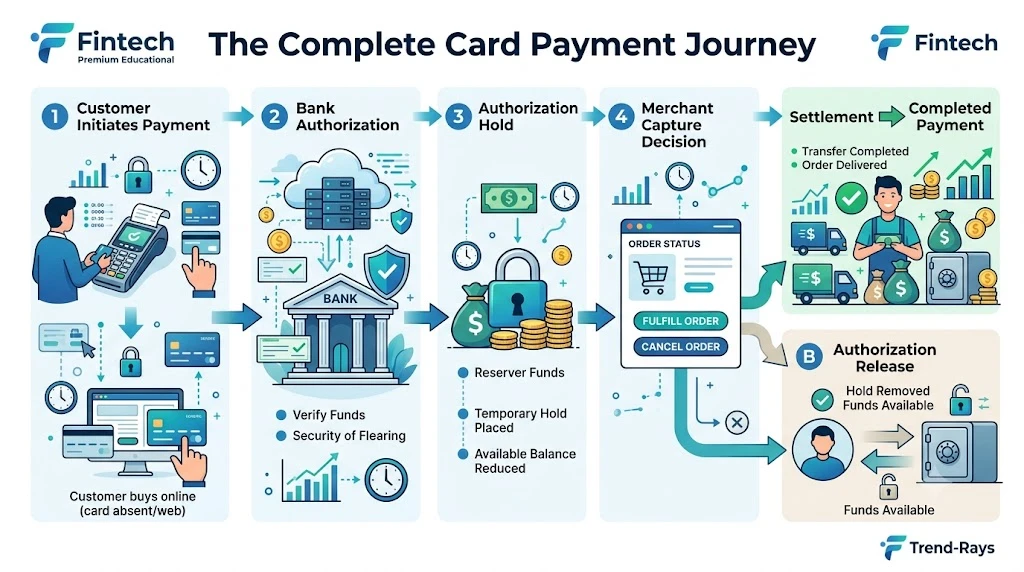
How Card Payments Actually Work (Step by Step)
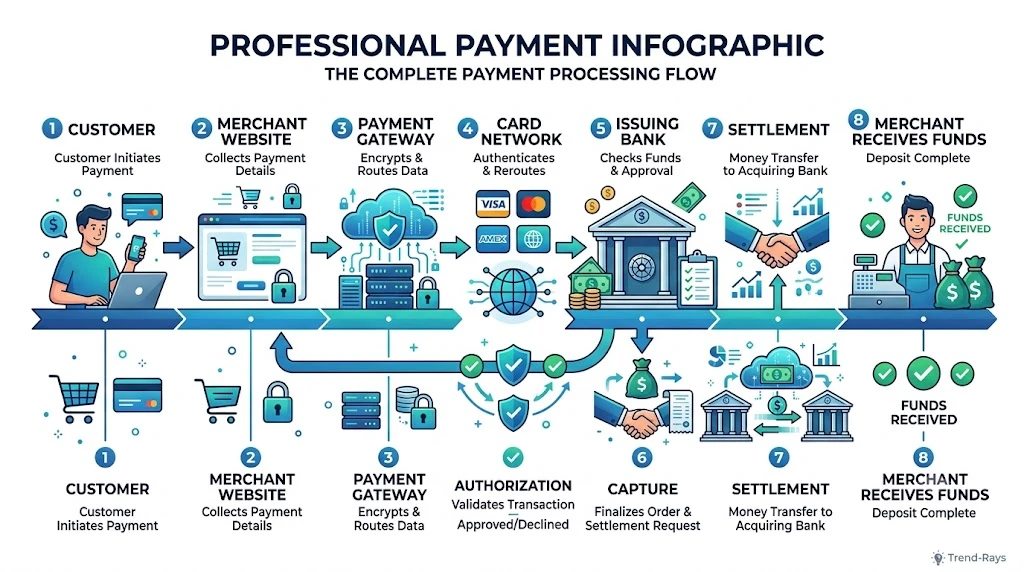
When you tap Pay Now, the entire payment process usually finishes in just a few seconds.
Behind those few seconds, however, several different organizations communicate with one another before your order is officially completed.
Understanding these steps makes it much easier to understand why a payment can be authorized but still fail.
Step 1: You Submit Your Card Details
The payment journey begins when you enter your card information and click Pay.
At this stage, the merchant securely sends your payment request to its payment gateway.
The request typically includes:
- Payment amount
- Merchant details
- Card information
- Security verification
- Transaction reference
Important: No money has moved yet.
The merchant is simply asking whether your bank is willing to approve the payment.
Step 2: The Payment Gateway Forwards the Request
The payment gateway acts as the secure communication bridge between the merchant and the banking network.
Its job is to:
- Encrypt sensitive payment information.
- Route the request through the appropriate payment network.
- Return the bank’s response to the merchant.
Think of the payment gateway as a highly secure courier carrying information—not money—between different systems.
Step 3: Your Bank Reviews the Transaction
Your card-issuing bank now decides whether the transaction should be approved.
Before authorizing the payment, the bank checks several factors, including:
- Whether your card is active.
- Whether sufficient funds or credit are available.
- Daily transaction limits.
- Security rules.
- Potential fraud indicators.
If everything looks normal, the bank sends back an approval.
This is called authorization.
Step 4: The Authorization Hold Is Created
After approval, your bank temporarily reserves the transaction amount.
This is known as an authorization hold.
At this point:
- Your available balance may decrease.
- Your banking app may display the transaction as Authorized or Pending.
- The merchant still hasn’t permanently received the money.
This is one of the biggest sources of confusion.
Many customers assume that because the balance has changed, the merchant has already been paid.
In reality, the money is simply being reserved while the merchant decides whether to complete the purchase.
Step 5: The Merchant Decides Whether to Capture the Payment
Once authorization is received, the merchant must decide whether to proceed with the order.
If everything is successful, the merchant captures the payment.
Examples:
- Stock is available.
- Flight seat is confirmed.
- Hotel room is reserved.
- Ticket is generated.
- Order passes fraud checks.
Only after capture does the payment move toward final settlement.
If the merchant cannot complete the order, the payment usually isn’t captured.
Instead, the authorization eventually expires, allowing the reserved funds to become available again.
Step 6: Settlement Completes the Payment
If the merchant captures the payment successfully, the banking network transfers the funds.
This final step is called settlement.
Once settlement is complete:
- The merchant receives the money.
- The payment becomes permanent.
- The transaction is officially completed.
At this point, the authorization stage is over.
Where Most Payment Failures Occur
Contrary to what many people think, most payment problems don’t happen when the bank approves the transaction.
They happen after authorization but before capture.
The process often looks like this:
Customer Clicks Pay
        │
        ▼
Bank Authorizes Payment ✅
        │
        ▼
Authorization Hold Created
        │
        ▼
Merchant Tries to Create Order
        │
        ├── Success
        │       ▼
        │   Payment Captured
        │       ▼
        │   Settlement Complete
        │       ▼
        │   Order Confirmed ✅
        │
        └── Failure
                ▼
        Order Not Created ❌
                ▼
Authorization Eventually Released
This explains why you can receive an SMS from your bank confirming the authorization while simultaneously seeing “Payment Failed” on the merchant’s website.
Both systems are reporting different stages of the same transaction.
Real-World Example
Suppose you’re purchasing a ₹12,000 smartphone online.
Here’s what happens:
- You click Pay Now.
- Your bank authorizes ₹12,000.
- Your available balance decreases.
- The merchant checks inventory.
- Just before confirming your order, the last unit is sold to another customer.
- The merchant cannot complete your purchase.
- No payment is captured.
- The authorization eventually expires.
- Your available balance returns to normal.
Although it looked like your card had been charged, the payment never reached the final settlement stage.
Did You Know?
Many hotels and car rental companies intentionally authorize your card days before they actually capture the payment.
This allows them to verify that funds are available without immediately completing the transaction. If the booking is cancelled before capture, the authorization usually expires instead of becoming a completed payment.
Key Takeaway
A successful authorization only means:
Your bank approved the transaction and temporarily reserved the funds.
It does not mean:
- The merchant has received the money.
- Your purchase is complete.
- The payment cannot still fail.
Understanding this distinction helps explain why authorization holds, payment failures, and automatic reversals are all normal parts of modern card payment systems.
Why Was My Card Authorized but the Payment Still Failed?
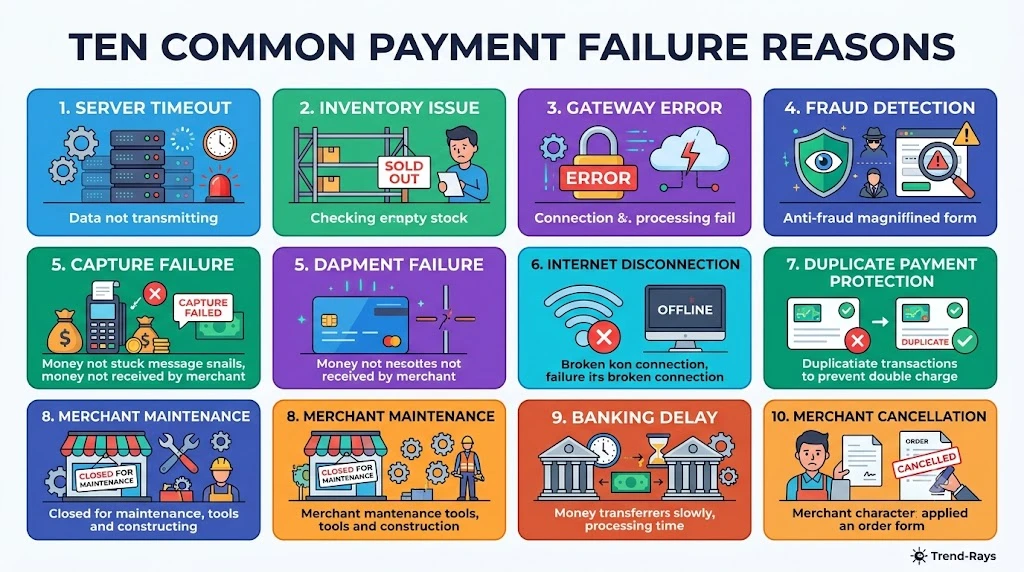
Card authorization only confirms that your bank approved the transaction and reserved the funds.
It doesn’t guarantee that the merchant successfully completed the purchase.
Several things can still go wrong before the payment reaches the final settlement stage.
Below are the most common reasons.
1. The Merchant’s Server Timed Out
This is one of the most frequent causes of payment failures.
Here’s what happens:
- Your bank approves the payment.
- Your card is authorized.
- The merchant attempts to create your order.
- The website or app experiences a server timeout before completing checkout.
From your bank’s perspective, everything worked correctly.
From the merchant’s perspective, the order was never successfully created.
What You’ll Usually See
- Card authorized notification.
- “Payment Failed” message.
- No order confirmation.
- No order number.
What Usually Happens Next
If the merchant never captures the payment, the authorization hold normally expires automatically.
2. The Merchant Never Captured the Payment
Authorization and payment capture are separate actions.
Even after authorization, the merchant must actively request the funds.
Sometimes they don’t.
Reasons include:
- Product became unavailable.
- Booking failed.
- Inventory changed.
- Internal validation failed.
- Customer cancelled before confirmation.
Without capture, settlement never happens.
The authorization eventually expires.
Business Insight
Many businesses intentionally delay payment capture until they’re certain they can fulfill the order.
For example:
- Hotels capture payments closer to check-in.
- Airlines may verify the card before issuing the ticket.
- Retailers may wait until stock is confirmed.
- Furniture stores often capture payment only when the item is ready for dispatch.
This reduces refunds while protecting customers from paying for unavailable products.
3. Payment Gateway Communication Failed
Payment gateways act as the messenger between the merchant and your bank.
Occasionally, communication breaks down after authorization.
Possible reasons include:
- Temporary gateway outage.
- Network congestion.
- API timeout.
- Gateway maintenance.
- Unexpected processing delay.
In these situations:
Your bank has already approved the payment.
The merchant never receives confirmation.
Result:
Authorization succeeds.
Order fails.
4. Fraud Detection Blocked the Transaction
Modern payment systems constantly monitor transactions for suspicious activity.
Even after authorization, additional fraud checks may reject the purchase.
Examples include:
- Large transaction value.
- New device.
- Unusual location.
- Multiple payment attempts.
- International purchase.
- High-risk merchant category.
Sometimes the payment is authorized first and then rejected during the merchant’s internal fraud review.
Imagine buying one of the last tickets for a concert.
Your bank authorizes the payment immediately.
Seconds later:
Someone else completes the booking first.
The merchant now has no inventory left.
Instead of capturing your payment, the merchant cancels the transaction.
The authorization later expires.
This commonly happens during:
- Flash sales.
- Flight bookings.
- Hotel reservations.
- Event tickets.
- Limited-edition product launches.
6. Internet Connection Was Interrupted
The payment journey depends on multiple confirmations being exchanged within seconds.
If your internet disconnects during checkout:
- The authorization request may already have reached the bank.
- The merchant never receives your confirmation.
- Your session expires.
The result:
Authorized.
Order failed.
Common Causes
- Weak Wi-Fi.
- Mobile data interruption.
- Browser crash.
- App force closes.
- Device battery dies.
7. Duplicate Payment Protection Was Triggered
Suppose you click Pay.
Nothing appears to happen.
You click Pay again.
Now the merchant receives two payment attempts.
To avoid charging you twice, many payment systems automatically reject or cancel one of them.
Unfortunately, one authorization may already have reached your bank before the duplicate detection occurs.
This often creates temporary authorization holds.
8. Merchant Maintenance or Technical Updates
Sometimes the payment infrastructure works perfectly while the merchant’s ordering system doesn’t.
Examples include:
- Scheduled maintenance.
- Software deployment.
- Database failure.
- Cloud outage.
- Payment module update.
The bank authorizes the transaction.
The merchant cannot process the order.
No capture occurs.
9. Banking Network Delays
Banks, payment gateways, and card networks process millions of transactions every day.
Temporary delays occasionally occur between:
- Authorization.
- Merchant confirmation.
- Settlement.
During these delays:
- Your banking app may show the transaction as authorized.
- The merchant may temporarily display a payment failure.
- The systems later reconcile automatically.
Many customers panic during this short delay even though no manual action is required.
10. The Merchant Cancelled the Transaction Intentionally
Some merchants automatically cancel transactions when certain business rules aren’t met.
Examples include:
- Shipping address verification failed.
- Price changed during checkout.
- Purchase exceeded quantity limits.
- Age verification failed.
- Promotional offer expired.
Although the bank already authorized the payment, the merchant chooses not to capture it.
The authorization eventually expires.
Quick Comparison Table
| Reason | Merchant Received Money? | What Usually Happens? |
|---|---|---|
| Server timeout | No | Authorization expires automatically. |
| Payment not captured | No | Hold released after expiry. |
| Gateway communication failure | Usually no | Automatic reconciliation or reversal. |
| Fraud screening | Usually no | Transaction cancelled before settlement. |
| Product unavailable | Usually no | Authorization expires or payment is reversed. |
| Internet interruption | Usually no | Session expires; authorization may remain temporarily. |
| Duplicate payment protection | Usually no | One authorization may be released automatically. |
| Merchant maintenance | No | Payment never captured. |
| Banking network delay | Not always | Temporary processing before final resolution. |
| Merchant cancellation | Usually no | Authorization eventually released. |
Did You Know?
A card authorization can exist without the merchant ever receiving the money. Authorization simply reserves funds. If the merchant never captures the payment, the banking system typically releases the authorization after the required verification period.
Key Takeaway
The important thing to remember is this:
An authorized card transaction is only the beginning of the payment process—not the end of it.
Most “card authorized but payment failed” situations occur because something prevented the merchant from capturing the payment after your bank had already approved it.
That distinction explains why your available balance may decrease even though no successful purchase was completed.
Where Is Your Money Right Now?
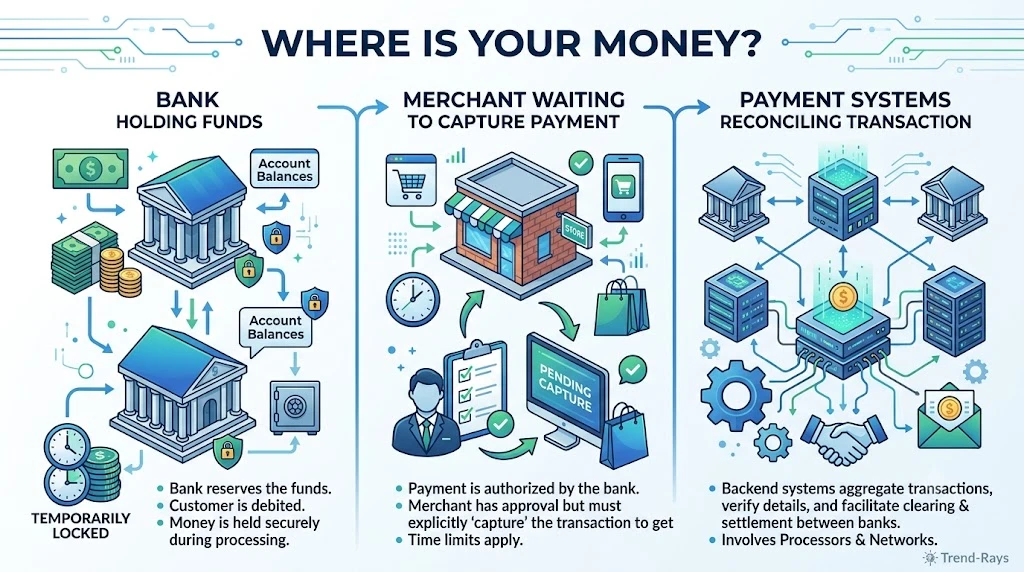
When your card shows “Authorized” but the payment fails, it can feel as though your money has disappeared.
Fortunately, that’s usually not what’s happening.
In most cases, your money is simply being held temporarily while the payment system determines whether the merchant will complete the transaction.
Think of it like placing a temporary reservation rather than making a permanent payment.
Until the merchant captures the authorized amount, your money remains in a transitional state.
Think of It Like Booking a Hotel Room
Imagine you’re booking a hotel online.
The hotel first checks whether your card can cover the booking amount.
Your bank says:
“Yes, the customer has enough funds.”
Your bank temporarily reserves the money.
However, the hotel hasn’t actually collected it yet.
If the booking succeeds, the hotel captures the payment.
If the booking fails, the reservation on your money is simply removed.
The same principle applies to most online card payments.
Your Money Is Usually in One of Three Places
Scenario 1: Your Bank Is Holding the Money
This is the most common situation.
The payment has been authorized, but the merchant hasn’t captured it.
What happens?
- Your available balance decreases.
- Your current balance may remain unchanged depending on your bank.
- The merchant hasn’t permanently received the funds.
This temporary reservation is called an authorization hold.
If the merchant never completes the transaction, the hold is eventually released.
Scenario 2: The Merchant Is Waiting to Capture the Payment
Sometimes the merchant successfully receives the authorization but delays capturing it.
This is common for businesses that don’t immediately finalize purchases.
Examples include:
- Hotels
- Airlines
- Car rental companies
- Some online retailers
The merchant first confirms that:
- Inventory is available.
- The booking is valid.
- Fraud checks are complete.
- Business rules have been satisfied.
Only then do they capture the payment.
Scenario 3: The Payment Is Being Reconciled
Occasionally, different systems receive updates at different times.
For example:
- Your bank has approved the transaction.
- The payment gateway is still processing.
- The merchant is waiting for confirmation.
During this period:
- Your banking app may continue showing the authorization.
- The merchant may temporarily report that the payment failed.
- Payment systems compare transaction records until the correct outcome is determined.
This reconciliation process helps prevent duplicate charges and incorrect settlements.
Why Did My Available Balance Decrease?
This question confuses many customers.
Suppose you have:
Current Balance
₹25,000
You attempt to purchase a laptop costing:
₹18,000
After authorization:
Current Balance
₹25,000
Available Balance
₹7,000
Many people believe the merchant has already received ₹18,000.
Not necessarily.
Your bank has simply reserved those funds so they can’t be spent elsewhere while the transaction is still pending.
If the merchant never captures the payment, the reserved amount becomes available again after the authorization expires.
Does the Merchant Already Have My Money?
Usually, no.
An authorization is essentially your bank telling the merchant:
“The funds are available if you decide to complete this purchase.”
Until the merchant captures the payment, they generally cannot treat those funds as a completed sale.
This is why customer support sometimes says:
“We never received the payment.”
Even though your banking app shows the transaction as authorized.
Both statements can be correct because they’re referring to different stages of the payment process.
What Happens If the Merchant Never Captures the Payment?
If the merchant doesn’t capture the authorization within the allowed timeframe, the authorization expires automatically.
When this happens:
- The reservation is removed.
- Your available balance increases.
- No payment is settled.
- The merchant receives nothing.
From your perspective, it may simply look like the money has “returned.”
In reality, it was never permanently transferred—it was only reserved.
Real-World Example
Imagine you order a ₹6,500 smartwatch.
The payment is authorized immediately.
However:
- The merchant discovers the item is out of stock.
- The order is cancelled.
- No payment is captured.
Although your banking app temporarily shows the authorization, the merchant never collects the money.
Once the authorization expires, the reserved ₹6,500 becomes available in your account again.
No refund is required because the payment was never fully completed.
Did You Know?
Many customers believe that every debit notification means the merchant has already been paid.
In reality, some banking apps send authorization alerts that look very similar to completed payment notifications.
That’s why checking the transaction status and merchant confirmation is often more important than relying on the notification alone.
Signs Your Money Is Still Only Authorized
You may be looking at an authorization hold rather than a completed payment if:
- The merchant says no order exists.
- Your banking app shows Pending, Authorized, or a similar status.
- No invoice or receipt has been issued.
- The order was cancelled immediately after checkout.
- Customer support asks you to wait while the payment is verified.
These are all strong indicators that the transaction hasn’t reached final settlement.
Key Takeaway
If your card is authorized but the payment failed, your money is usually not lost and often not sitting with the merchant.
Instead, it is typically:
- Temporarily reserved by your bank,
- Waiting for the merchant to capture it, or
- Being reconciled between payment systems before the authorization is either completed or released.
Understanding where your money is helps explain why the merchant may not be able to refund a payment they never actually received—and why waiting for the authorization to expire is often the correct next step.
How Long Does an Authorization Hold Last?
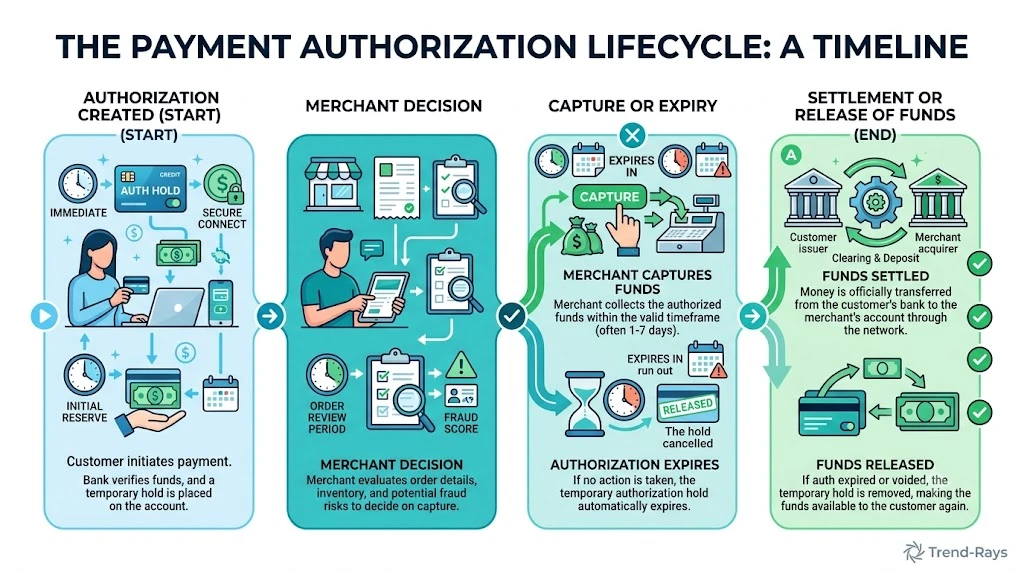
One of the first questions people ask after seeing an authorized payment that later fails is:
“When will my money become available again?”
The honest answer is:
It depends on how the transaction was processed and whether the merchant captures the authorization.
There isn’t a universal timeline because several organizations are involved, including:
- Your bank
- The merchant
- The payment gateway
- The card network (such as Visa, Mastercard, or RuPay)
Each has its own processing rules and timelines.
What Happens Immediately After Authorization?
Once your bank approves the payment, it temporarily reserves the transaction amount.
For example:
You attempt to make a purchase worth ₹5,000.
Your bank authorizes the payment.
Your available balance immediately decreases by ₹5,000.
At this stage:
- The money has not necessarily left your account permanently.
- The merchant may not have received it.
- The authorization remains active while the merchant decides whether to capture the payment.
If the merchant successfully captures the payment, the transaction moves toward settlement.
If they don’t, the authorization eventually expires.
Why Do Authorization Holds Last Different Amounts of Time?
Not every merchant works the same way.
For example:
Online Retailers
Most online stores either:
- Capture the payment almost immediately, or
- Release the authorization if the order cannot be completed.
Hotels
Hotels often authorize your card during booking or check-in.
The authorization may remain until:
- You check in,
- You check out,
- The hotel confirms the final bill.
Car Rental Companies
Rental companies frequently authorize more than the estimated rental amount.
This allows them to cover:
- Fuel charges
- Damage deposits
- Late return fees
The unused portion is released after the rental is completed.
Fuel Stations
Some self-service fuel stations authorize a fixed amount before dispensing fuel.
Once the final amount is known, the authorization is adjusted or released.
Why Does My Friend’s Bank Release Holds Faster Than Mine?
Many readers compare their experience with friends or family members.
Different banks may:
- Update pending transactions at different intervals.
- Process authorization releases on different schedules.
- Display authorization holds differently in their banking apps.
For example:
Two customers make the same purchase.
Both payments fail.
Customer A’s bank releases the authorization sooner.
Customer B’s bank takes longer to update the available balance.
Neither bank is necessarily doing anything wrong—they simply follow different internal processing schedules.
What Can Delay the Release?
Several factors can extend the time before an authorization disappears.
These include:
- Merchant systems taking longer to confirm cancellation.
- Temporary payment network delays.
- Banking holidays.
- Weekends affecting processing schedules.
- Manual fraud reviews.
- Technical reconciliation between the merchant and the payment gateway.
Although these situations can be frustrating, they don’t automatically mean anything has gone wrong.
Should You Contact the Merchant Immediately?
Not always.
If the authorization was created only a short time ago, waiting briefly is often the best first step.
Many authorizations are released automatically without any action from the customer.
However, if:
- the merchant confirms that the order failed,
- the authorization remains well beyond the normal processing period communicated by your bank or the merchant, or
- the payment status doesn’t change despite follow-up,
then it’s appropriate to contact customer support for clarification.
Authorization Hold vs Refund Timeline
One reason customers become confused is that authorization holds and refunds follow different processes.
| Authorization Hold | Refund |
|---|---|
| Funds are temporarily reserved. | Money has already reached the merchant and is being returned. |
| Often released automatically if not captured. | Requires the merchant to initiate a return of funds. |
| No completed purchase exists. | A completed payment is being reversed. |
| Usually resolves once the authorization expires or is released. | Depends on the merchant’s refund process and banking network. |
This distinction is important because waiting for an authorization release is different from waiting for a refund.
How Can You Tell Whether the Hold Has Been Released?
You may notice one or more of the following:
- Your available balance increases.
- The pending or authorized transaction disappears from your banking app.
- The authorization status changes.
- The reserved funds become available for new purchases.
Some banks notify customers when the authorization is released, while others simply update the account balance without sending an alert.
Real-World Example
Suppose you try to purchase a ₹8,000 smartwatch.
- Your bank authorizes the transaction.
- The merchant’s website crashes before creating the order.
- The merchant never captures the payment.
Over the next few days, your bank continues showing the authorization as pending.
Once the authorization expires or is released, your available balance returns to normal without the merchant ever collecting the money.
Although it may look like the money has been “returned,” it was actually a reserved amount being released, not a traditional refund.
Did You Know?
Some banking apps continue displaying expired authorizations in the transaction history even after the funds have already been released.
That’s why your available balance is often a better indicator than the transaction list alone.
Key Takeaway
An authorization hold is temporary by design.
Its purpose is to reserve funds while the merchant decides whether to complete the purchase.
If the merchant never captures the payment, the authorization is normally released and the reserved funds become available again.
The exact timing varies because it depends on the merchant, your bank, the payment network, and how the transaction is processed—not because your money has necessarily been lost.
Should You Retry the Payment or Wait?
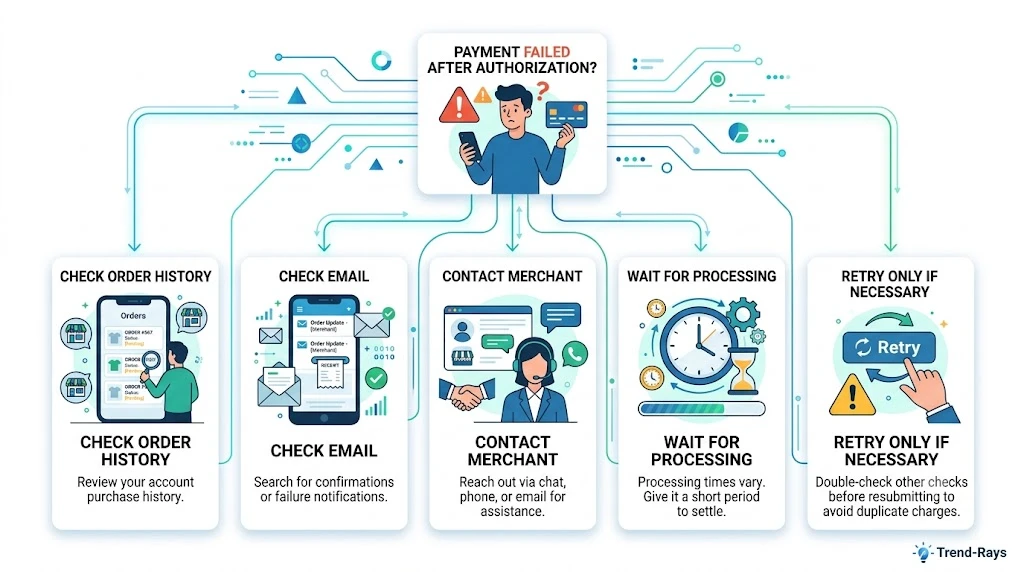
When a payment fails after your card has already been authorized, your first instinct may be to try again immediately.
In most situations, that’s not the best approach.
Before making another payment, you should first determine whether the original transaction is still being processed.
A few minutes of patience can save you from dealing with duplicate authorizations or even duplicate completed payments.
Don’t Retry Immediately
Suppose you click Pay Now.
Your banking app instantly sends a notification:
₹3,250 Authorized
At the same time, the merchant’s website displays:
Payment Failed
If you immediately make another payment, several things could happen:
- The original transaction completes successfully after a short delay.
- The second payment is also authorized.
- You now have two transactions instead of one.
- You’ll need to request a refund for the duplicate payment.
This situation is much more common than many people realize.
Check These Things Before Paying Again
Before retrying the transaction, take a few minutes to verify what actually happened.
1. Check Your Order History
Log in to the merchant’s website or app.
Look for:
- A new order number.
- Pending orders.
- Recently placed orders.
- Payment confirmation.
Sometimes the payment succeeds even though the confirmation page fails to load.
2. Check Your Email and SMS
Many merchants send order confirmations automatically.
Look for:
- Order confirmation email.
- Payment receipt.
- Booking confirmation.
- Shipping confirmation.
If you’ve already received these, making another payment is usually unnecessary.
3. Check Your Banking App
Review the transaction status.
Common statuses include:
- Authorized
- Pending
- Processing
- Completed
These labels vary between banks, but they provide clues about the current stage of the payment.
4. Wait Briefly Before Trying Again
Many payment issues resolve automatically while the payment gateway, merchant, and bank reconcile the transaction.
Giving the system a little time to finish processing is often the safest approach.
When Is It Usually Safe to Retry?
Retrying the payment may be appropriate when:
- No order appears in your account.
- The merchant confirms that no payment was received.
- The original authorization has been released or the payment attempt is no longer active.
- Customer support specifically advises you to make another payment.
Even then, it’s a good idea to verify the situation one last time before proceeding.
When Should You Avoid Retrying?
Avoid making another payment if:
- Your order already appears in your account.
- You have received an order confirmation email.
- The merchant confirms that the payment is still being processed.
- Customer support asks you to wait.
- You’re unsure whether the first payment completed successfully.
Making another payment while the original transaction is still unresolved is one of the leading causes of duplicate charges.
Decision Guide
Use this simple checklist before clicking Pay again.
| Situation | Retry Now? |
|---|---|
| Order confirmation received | ❌ No |
| Order appears in your account | ❌ No |
| Merchant confirms payment is being processed | ❌ No |
| No order exists and merchant confirms no payment was received | ✅ Usually yes |
| Authorization has already been released | ✅ Usually yes |
| You’re unsure about the transaction status | ⏳ Verify first before retrying |
What If You Accidentally Paid Twice?
If you discover that both payment attempts were successful:
- Don’t panic.
- Save both transaction reference numbers.
- Contact the merchant.
- Explain that duplicate payments were made for the same purchase.
- Keep all receipts until the duplicate payment is refunded.
Most merchants have procedures for handling duplicate transactions, but resolving them is much easier when you report the issue promptly and provide complete payment details.
Real-World Example
You’re buying a pair of running shoes online.
- You pay ₹4,500.
- Your bank authorizes the payment.
- The website crashes and shows “Payment Failed.”
Instead of paying again immediately, you:
- Check your order history.
- Refresh your email.
- Wait a few minutes.
- Contact the merchant.
The merchant confirms that the order was successfully created despite the website error.
Because you didn’t retry the payment, you avoided an unnecessary duplicate charge.
Did You Know?
During major shopping events such as festival sales or flash sales, payment systems often experience heavier traffic than usual. A brief delay in confirmation doesn’t necessarily mean the payment has failed—it may simply still be moving through the processing and reconciliation stages.
Key Takeaway
If your card has already been authorized, treat the transaction as unresolved until you’ve confirmed its final status.
In many cases, the safest approach is:
- Verify whether an order was created.
- Check your payment status.
- Wait briefly if the transaction is still processing.
- Retry only after you’re confident the original payment won’t complete.
A few minutes of verification can prevent duplicate payments, unnecessary refunds, and avoidable customer support issues.
Authorization Hold vs Refund: What’s the Difference?
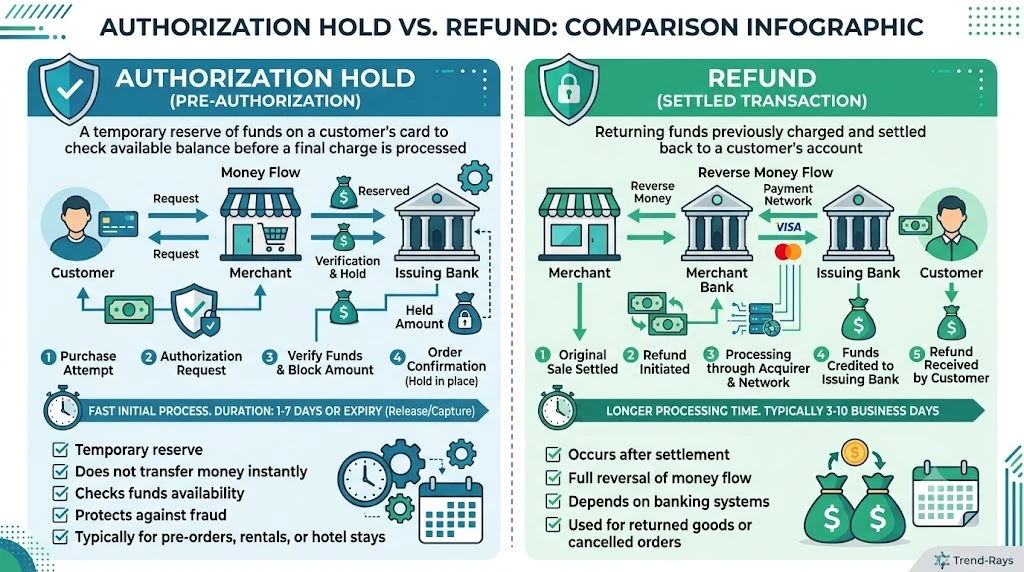
Many people assume that every payment problem ends with a refund.
In reality, that’s not always true.
If your card was authorized but the payment failed before the merchant captured it, you may not need a refund at all.
Instead, your bank simply releases the authorization hold.
Although both situations eventually make your money available again, they are completely different processes.
What Is an Authorization Hold?
An authorization hold is a temporary reservation of funds made by your bank.
It happens after your bank approves the transaction but before the merchant completes the payment.
Think of it like placing a temporary reservation on your money.
The bank is effectively saying:
“These funds are reserved in case the merchant decides to complete this purchase.”
At this stage:
- Your available balance usually decreases.
- The merchant has not necessarily received the money.
- The payment has not been finalized.
If the merchant never captures the payment, the authorization expires and the reserved funds become available again.
What Is a Refund?
A refund is different.
A refund only happens after a completed payment has already reached the merchant.
For example:
- Your payment is authorized.
- The merchant captures the payment.
- The transaction settles successfully.
- The order is later cancelled.
- The merchant returns the money.
In this case, the merchant already has your payment and must send it back through the banking system.
That’s why refunds often take longer than authorization releases.
The Biggest Difference
The simplest way to remember it is:
Authorization Hold = Money Reserved
Refund = Money Returned
An authorization hold prevents the money from being spent elsewhere.
A refund reverses a payment that has already been completed.
Side-by-Side Comparison
| Authorization Hold | Refund |
|---|---|
| Bank temporarily reserves funds. | Merchant returns money after a completed payment. |
| Merchant may never receive the payment. | Merchant has already received the payment. |
| No completed purchase exists. | A completed purchase already occurred. |
| Usually released automatically if not captured. | Requires the merchant to initiate a refund. |
| No money is transferred back because settlement never occurred. | Money travels back through the payment network to your bank. |
Example 1: Authorization Hold
Suppose you try to buy a ₹2,500 pair of headphones.
- Your bank authorizes the payment.
- The website crashes.
- The merchant never captures the payment.
Result:
Your bank eventually removes the authorization hold.
Your available balance returns to normal.
No refund is required because the payment never reached the merchant.
Example 2: Refund
Now imagine a different situation.
You purchase the same headphones.
- Payment is authorized.
- Merchant captures the payment.
- The order is confirmed.
- The merchant later discovers the item is damaged and cancels your order.
Now the merchant already has your money.
Instead of releasing an authorization hold, they initiate a refund through the payment network.
Why Refunds Usually Take Longer
Many customers wonder:
“If my money can be reserved instantly, why can’t refunds happen instantly too?”
The answer lies in how the payment process works.
A refund is effectively a new financial transaction.
It usually involves:
- The merchant approving the refund.
- The payment gateway processing the request.
- The card network transmitting the refund.
- Your bank receiving and posting the returned funds.
Each step requires verification and processing.
An authorization release, on the other hand, often happens automatically when the merchant never completes the payment.
Which Situation Are You Probably In?
If:
- Your banking app says Authorized or Pending
- The merchant says the payment failed
- No order confirmation exists
- The merchant confirms they never received the payment
You’re probably looking at an authorization hold, not a refund.
If:
- Your order was confirmed
- The merchant later cancelled it
- Customer support says they have processed a refund
You’re waiting for a refund, not an authorization release.
Knowing the difference helps you understand what to expect and who to contact if there are delays.
Why Customer Support Sometimes Uses the Wrong Word
Some customer support agents use the word “refund” as a general term for any money that becomes available again.
Technically, that’s not always correct.
If the merchant never captured your payment, what actually happened was the authorization hold was released, not that a refund was processed.
Understanding this distinction can make conversations with your bank or the merchant much clearer.
Did You Know?
Hotels, fuel stations, and car rental companies generate millions of authorization holds every day. Many of these holds are never converted into completed payments because the final amount changes or the transaction is cancelled before settlement.
Key Takeaway
The easiest way to remember the difference is:
- Authorization Hold: Your bank has reserved your money, but the merchant hasn’t necessarily received it.
- Refund: The merchant received your money and is now sending it back.
If your card was authorized but the payment failed, you’re often waiting for an authorization release, not a refund.
Understanding that difference helps explain why the process, timeline, and responsibilities are different in each case.
Who Should You Contact? Merchant, Bank, or Card Issuer?
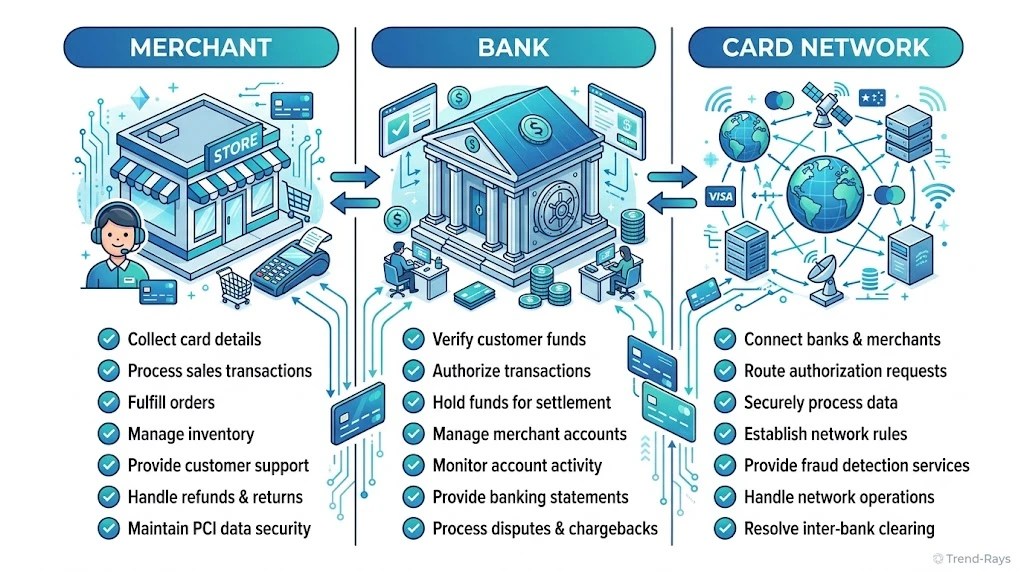
If your card has been authorized but your payment failed, contacting the right organization first can save you a significant amount of time.
Many customers waste hours because they start with the wrong support team.
The best place to start depends on where the payment stopped in the transaction process.
Contact the Merchant First in Most Cases
For most payment failures, the merchant should be your first point of contact.
Why?
Because only the merchant can confirm whether:
- The order was successfully created.
- The payment reached their system.
- The authorization was captured.
- A technical issue interrupted checkout.
- A refund has already been initiated.
Your bank cannot see the merchant’s internal order database.
Even if your bank approved the payment, it cannot tell you whether the merchant successfully generated your order.
Contact the Merchant If…
The merchant should usually be your first choice when:
- Your order failed immediately after payment.
- No order confirmation was received.
- The website crashed during checkout.
- The payment page displayed an error.
- Your card shows “Authorized” but no order appears.
When contacting support, provide:
- Transaction reference number
- Payment amount
- Date and time
- Email address used for the purchase
- Screenshot of the payment error (if available)
Providing these details in your first message often speeds up the investigation.
Contact Your Bank If…
Your bank becomes the right point of contact when the merchant confirms they never received the payment, or when the authorization remains unresolved beyond the expected processing period.
Your bank can verify:
- Whether the transaction was approved.
- Whether the authorization is still active.
- Whether the authorization has already been released.
- Whether the payment moved to settlement.
- Whether additional investigation is required.
The bank can also explain why your available balance has changed and what the current transaction status means.
Contact Your Bank If…
You should usually speak to your bank when:
- The merchant confirms no payment was received.
- The authorization remains visible for longer than expected.
- Your available balance hasn’t updated after the expected processing period.
- You suspect an unauthorized transaction.
- The merchant asks for confirmation that the authorization still exists.
What About the Card Network?
Companies like:
- Visa
- Mastercard
- RuPay
- American Express
operate the payment networks that connect banks and merchants.
However, individual customers generally cannot contact these networks directly to resolve an authorization issue.
Instead:
- Your bank communicates with the card network.
- The merchant communicates with its payment provider.
- The customer communicates with the merchant or the bank.
This keeps investigations within the organizations that actually manage your transaction.
What About the Payment Gateway?
Payment gateways such as Stripe, Razorpay, Cashfree, PayU, and similar providers facilitate communication between the merchant and the banking network.
In most consumer transactions, you don’t need to contact the gateway yourself.
If a gateway issue occurs:
- The merchant can investigate through its gateway dashboard.
- The gateway provides technical information to the merchant.
- Your bank only sees the financial side of the transaction.
That’s why starting with the merchant is usually the fastest option.
When Should You Escalate the Issue?
Most authorization problems resolve automatically.
However, you should consider escalating the issue if:
- The merchant cannot locate your payment.
- The authorization remains unresolved well beyond the expected processing period.
- Both the merchant and your bank provide conflicting information.
- You believe the transaction was unauthorized.
- The merchant refuses to investigate despite having your transaction details.
Escalation doesn’t always mean filing a formal dispute immediately.
Often, it simply means requesting that the merchant and the bank coordinate their investigations using the transaction reference number.
Decision Guide
Use this table to determine who should be your first point of contact.
| Situation | Contact First | Reason |
|---|---|---|
| Order failed immediately after checkout | Merchant | They can verify whether an order exists. |
| Card authorized but no confirmation email | Merchant | They can check whether the payment reached their system. |
| Merchant confirms no payment was received | Bank | The bank can verify the authorization status. |
| Authorization remains unresolved beyond the expected processing period | Bank | The bank can investigate the pending authorization. |
| Merchant confirms a refund was processed | Bank | The bank can trace the incoming refund or explain when it will appear. |
| Unauthorized card transaction | Bank immediately | The bank can secure the account and advise on dispute procedures. |
What Information Should You Keep Ready?
Whether you’re contacting the merchant or your bank, having complete information will make the investigation much smoother.
Prepare:
- Transaction reference number
- Card type (credit or debit)
- Merchant name
- Payment amount
- Date and time of the transaction
- Order number (if available)
- Screenshots of error messages
- Confirmation emails or SMS messages
- Previous support ticket numbers
Support teams can often locate a transaction much faster when these details are provided upfront.
Expert Tip
Instead of saying:
“My payment failed.”
Provide a clear timeline:
“I attempted a payment of ₹3,999 at approximately 2:15 PM using my Visa debit card. My bank shows the transaction as authorized, but no order was created. My transaction reference number is XXXXXXXXXX. Could you please confirm whether the authorization was captured or whether the order failed before payment completion?”
This gives customer support everything they need to begin investigating immediately.
Did You Know?
In many payment investigations, the transaction reference number is more useful than your order number. Even if the order was never created, the payment reference allows both the merchant and the bank to trace what happened to the authorization request.
Key Takeaway
If your card has been authorized but the payment failed:
- Start with the merchant to determine whether the order was created or the payment was captured.
- Contact your bank if the merchant confirms they never received the payment or if the authorization remains unresolved.
- Keep your transaction reference number handy, as it’s the fastest way for support teams to trace your payment.
Knowing who is responsible at each stage helps you avoid being redirected between different support teams and speeds up the resolution process.
8 Common Mistakes That Can Delay the Release of an Authorization Hold
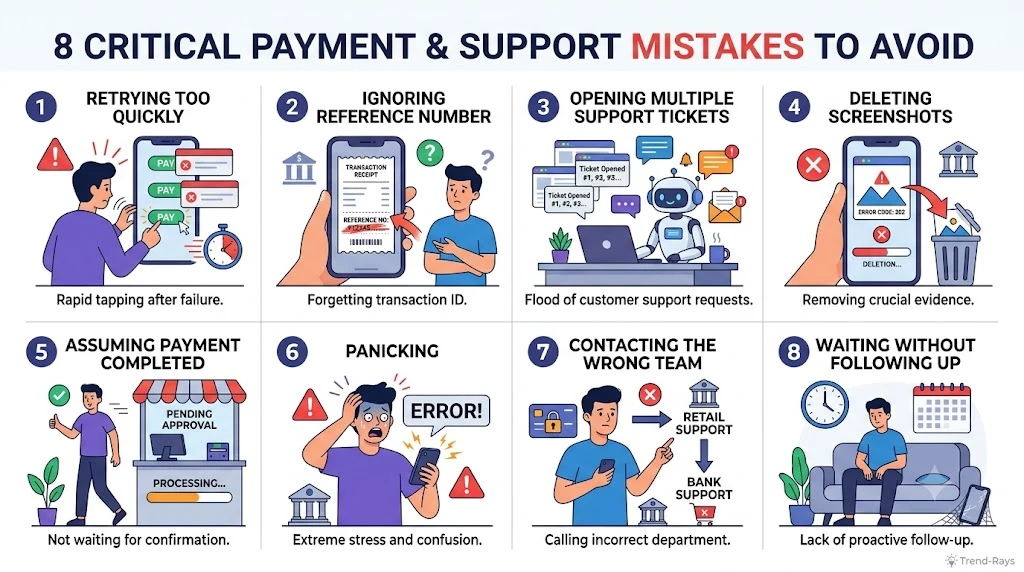
Seeing an authorized transaction without a successful order confirmation can make anyone anxious.
Unfortunately, many customers react too quickly and unintentionally complicate the situation.
Avoiding these common mistakes can save you time, reduce unnecessary stress, and prevent duplicate payment problems.
1. Retrying the Payment Too Quickly
This is the most common mistake.
Many people see:
Payment Failed
and immediately click Pay Again.
Meanwhile, the original authorization is still being processed.
Possible outcome:
- First authorization remains active.
- Second payment succeeds.
- Both transactions eventually settle.
Now, instead of solving one problem, you’re dealing with duplicate charges.
Better Approach
Always verify whether:
- An order was created.
- The merchant received the authorization.
- The first transaction is still pending.
Only retry after confirming the original payment won’t complete.
2. Confusing an Authorization With a Completed Charge
Many banking apps display notifications like:
₹7,500 Debited
even though the transaction is only authorized.
Customers often assume:
“The merchant already has my money.”
In reality:
- The funds may simply be reserved.
- Settlement hasn’t occurred.
- The merchant may never receive the payment.
Understanding this difference prevents unnecessary panic.
3. Contacting Only the Bank
Many customers immediately call their bank.
The bank can confirm whether the authorization exists.
However, it cannot tell you whether the merchant successfully created your order.
That’s why the merchant should usually be your first contact for failed checkout problems.
4. Opening Multiple Support Tickets
Some customers contact:
- Live chat
- Email support
- Phone support
- Social media
- Their bank
—all within a few minutes.
Although this feels proactive, it often creates duplicate investigations.
Different support agents may:
- Ask for the same documents.
- Escalate separate cases.
- Delay resolution because multiple teams are reviewing the same transaction.
Better Approach
Keep all communication within one support case whenever possible.
5. Ignoring the Transaction Reference Number
Your transaction reference number is one of the most important pieces of information during any payment investigation.
Unfortunately, many customers don’t save it.
Without it, support teams often have to search manually for your payment.
Before contacting anyone, note:
- Transaction reference number
- Date and time
- Amount
- Merchant name
- Last four digits of the card used
These details can significantly reduce investigation time.
6. Deleting Payment Notifications
Many users clear:
- SMS alerts
- Banking notifications
- Payment confirmation emails
- Error screenshots
because they assume the issue will resolve automatically.
If the authorization later requires manual investigation, those records become valuable evidence.
Keep everything until the transaction has been fully resolved.
7. Assuming Every Delay Means Something Is Wrong
Payment systems involve several organizations working together.
Temporary delays don’t automatically indicate an error.
For example:
- The bank has approved the authorization.
- The payment gateway is updating its records.
- The merchant is waiting for confirmation.
During this period, the transaction may appear inconsistent across different systems.
Patience during the early stages often prevents unnecessary stress.
8. Waiting Indefinitely Without Following Up
Patience is important—but so is knowing when to take action.
If:
- the merchant still can’t locate the authorization,
- your bank continues showing the authorization well beyond the normal processing period, or
- there has been no update despite previous communication,
don’t assume it will resolve forever on its own.
Follow up with the merchant first, then your bank if needed.
Keeping a record of previous conversations makes subsequent investigations much easier.
Quick Summary
| Mistake | Better Approach |
|---|---|
| Retrying the payment immediately | Verify the first transaction before paying again. |
| Assuming authorization equals payment | Remember that authorization only reserves funds. |
| Contacting only the bank | Start with the merchant for order-related issues. |
| Opening multiple support tickets | Stick to one support case whenever possible. |
| Losing the transaction reference | Save it immediately after the payment attempt. |
| Deleting receipts and screenshots | Keep all records until the issue is resolved. |
| Panicking over short processing delays | Allow time for payment systems to reconcile. |
| Never following up | Escalate appropriately if the issue remains unresolved after the expected processing period. |
Expert Tip
Create a simple folder called Payment Records on your phone or computer.
Whenever a payment issue occurs, save:
- Bank notification
- Transaction reference
- Screenshot of the error
- Merchant confirmation (if any)
- Support ticket number
- Email correspondence
Having everything in one place makes future investigations much faster and avoids searching through old emails or messages.
Did You Know?
Many duplicate payment cases happen not because payment systems fail, but because customers unknowingly submit a second payment before the first authorization has finished processing.
A few minutes of verification can prevent hours of refund requests and support conversations.
Key Takeaway
Most authorization-related problems resolve without major complications.
However, reacting too quickly—or without understanding what an authorization actually means—can create unnecessary delays.
The safest approach is to:
- Verify the transaction first.
- Keep your payment records.
- Contact the appropriate support team.
- Avoid duplicate payment attempts.
- Follow up if the issue remains unresolved after the expected processing period.
Frequently Asked Questions
1. Does “Card Authorized” Mean the Payment Was Successful?
No.
A card authorization only means your bank approved the transaction and temporarily reserved the required funds.
The payment is only considered successful after the merchant captures the authorization and the transaction is settled.
2. Why Was My Card Authorized but My Order Failed?
This usually happens because something interrupted the payment process after your bank approved the transaction.
Common causes include:
- Merchant server errors
- Payment gateway issues
- Inventory problems
- Internet interruptions
- Merchant failing to capture the payment
3. Has the Merchant Already Received My Money?
Not necessarily.
If your card only shows an authorization, the merchant may not have received any money yet.
The funds are often still reserved by your bank until the merchant either captures the payment or the authorization expires.
4. Will the Authorization Hold Disappear Automatically?
In many situations, yes.
If the merchant never captures the payment, the authorization hold is generally released automatically according to the processing rules of your bank and the card network.
5. Should I Contact My Bank or the Merchant First?
For most authorization-related payment failures, start with the merchant.
The merchant can confirm:
- Whether your order exists.
- Whether they received the authorization.
- Whether the payment was captured.
If the merchant confirms they never received the payment, your bank can investigate the authorization from its side.
6. Can I Spend the Money That Is Under Authorization Hold?
Usually not.
While the authorization is active, those funds are normally unavailable for other purchases because your bank has temporarily reserved them.
Once the authorization is released, your available balance is updated.
7. Is an Authorization Hold the Same as a Refund?
No.
An authorization hold reserves your money before a payment is completed.
A refund returns money after a completed payment has already reached the merchant.
These are two completely different processes.
8. Can a Merchant Cancel an Authorization?
Yes.
If the merchant decides not to complete the purchase, they simply don’t capture the authorization.
The reserved funds are then released according to the payment network and your bank’s processing rules.
9. Why Does My Banking App Say “Authorized” Instead of “Completed”?
Many banking apps distinguish between:
- Authorized transactions
- Pending transactions
- Completed transactions
An authorization means the transaction has not yet reached final settlement.
The wording varies between banks, but it generally indicates that processing is still underway.
10. Can an Authorization Become a Completed Payment Later?
Yes.
If the merchant captures the payment after authorization, the transaction proceeds to settlement and becomes a completed payment.
11. Should I Retry the Payment Immediately?
Usually not.
Before making another payment:
- Check your order history.
- Look for confirmation emails.
- Review the transaction status.
- Contact the merchant if you’re unsure.
Retrying too quickly may result in duplicate authorizations or duplicate payments.
12. Why Did My Available Balance Decrease?
Your bank has most likely reserved the transaction amount during authorization.
This reduces your available balance even though the merchant may not yet have received the funds.
13. Can an Authorization Hold Turn Into a Refund?
No.
An authorization hold doesn’t become a refund.
Either:
- The merchant captures the payment and settlement occurs, or
- The authorization expires and the reserved funds are released.
A refund only applies after a completed payment.
14. What Happens If the Merchant Never Captures the Payment?
If the merchant never captures the authorization, the payment usually never reaches settlement.
The authorization eventually expires, and the reserved funds become available in your account again.
15. Can My Bank Remove the Authorization Immediately?
In most cases, the authorization follows payment network rules and processing procedures.
Your bank may not always be able to remove it instantly unless specific conditions are met.
If you believe there’s a problem, contact your bank and ask them to explain the current status of the authorization.
16. What Documents Should I Keep?
Keep:
- Transaction reference number
- Payment confirmation
- Screenshots
- Order details (if any)
- Support ticket numbers
- Emails from the merchant
These records make investigations much easier.
17. Why Does the Merchant Say They Never Received My Payment?
Because authorization and settlement are different stages.
Your bank may have approved the transaction, but the merchant never received the confirmation needed to capture the payment.
Both statements can be correct.
18. Can This Happen With Debit Cards and Credit Cards?
Yes.
Authorization holds can occur with:
- Debit cards
- Credit cards
- Prepaid cards
Although processing rules vary slightly, the overall payment flow remains the same.
19. Is My Money Lost If My Card Was Authorized?
Usually not.
Most authorization-related payment failures are temporary.
The funds are often:
- Reserved by your bank,
- Waiting for the merchant to capture the payment, or
- Pending release if the transaction isn’t completed.
Permanent loss is uncommon in genuine authorization failures.
20. How Can I Prevent This From Happening Again?
Although payment failures can’t always be avoided, you can reduce the risk by:
- Using a stable internet connection.
- Avoiding multiple clicks on the payment button.
- Waiting for confirmation before closing the app or browser.
- Saving your transaction reference number.
- Verifying your order before attempting another payment.
Final Thoughts
Seeing a “Card Authorized” notification followed by a “Payment Failed” message can be confusing, especially when your available balance suddenly decreases.
The important thing to remember is that authorization is only the first stage of a card payment.
It confirms that your bank has approved the transaction and temporarily reserved the funds—it does not necessarily mean the merchant has received your money.
In many cases, the merchant never captures the authorization, and the reserved amount is released automatically after the payment process concludes.
If this happens to you:
- Stay calm and avoid making another payment immediately.
- Check whether an order was actually created.
- Review your transaction status in your banking app.
- Contact the merchant first if you’re unsure whether the payment reached them.
- Keep your payment records until the transaction is fully resolved.
Understanding the difference between authorization, capture, and settlement helps remove much of the uncertainty around payment failures and makes it easier to know what action—if any—you should take.