
Quick Answer
Seeing your bank confirm that a payment was successful while the merchant insists they never received it is one of the most frustrating payment problems you can experience.
You’ve probably already checked your banking app.
It clearly shows:
Payment Successful
Yet when you contact the merchant, you’re told:
“We haven’t received your payment.”
Naturally, you’re left wondering:
- Where did my money go?
- Has the merchant made a mistake?
- Is my bank showing incorrect information?
- Will I lose my money?
- Should I pay again?
- Who should I contact first?
The good news is that, in most cases, your money isn’t lost.
This situation usually occurs because different parts of the payment system are seeing different stages of the same transaction.
Your bank may confirm that it successfully processed the payment authorization, while the merchant’s payment system may still be waiting for settlement, reconciliation, or confirmation from its payment gateway.
In other cases, a technical issue, delayed settlement, or failed communication between payment providers can temporarily prevent the merchant from seeing your payment—even though your bank has already debited the amount.
Understanding how modern payment processing works is the key to resolving this issue without unnecessary stress.
In this guide, you’ll learn:
- Why your bank says the payment succeeded.
- Why the merchant may still report a failed payment.
- Where your money actually is.
- Whether the merchant will eventually receive it.
- How long you should wait before taking action.
- Whether you should contact the bank or the merchant first.
- How to avoid paying twice while trying to fix the problem.
By the end of this article, you’ll understand exactly what’s happening behind the scenes and know the safest way to resolve the issue.
Introduction
Imagine ordering a new laptop online.
You complete the payment.
Within seconds, your banking app sends a notification:
₹64,999 Debited – Payment Successful
Everything looks normal.
But instead of seeing an order confirmation, the website displays:
Confused, you contact customer support.
After checking your order, the merchant replies:
“We never received your payment.”
Now you’re caught between two completely different answers.
Your bank says:
“The payment was successful.”
The merchant says:
“The payment failed.”
Both statements seem to contradict each other.
So who is right?
Surprisingly, both may be telling the truth—based on the information available to them.
This happens because a card or online payment doesn’t move directly from your bank account to the merchant.
Instead, it passes through several systems, including:
- Your bank
- The card network or payment network
- A payment gateway or payment processor
- The merchant’s acquiring bank
- The merchant’s order management system
If any part of this chain experiences a delay, timeout, or synchronization issue, your bank may record a successful transaction while the merchant’s system still shows that no payment has been received.
Although this situation can be alarming, it’s usually temporary and often resolves without any manual intervention.
The biggest mistake people make at this stage is immediately attempting the payment again.
Doing so can result in duplicate charges, duplicate orders, and lengthy refund processes.
Instead, it’s important to understand where your payment is in the processing lifecycle before taking any action.
In this guide, we’ll walk through the entire journey of an online payment—from the moment you click Pay Now until the merchant receives the funds—and explain why these temporary mismatches sometimes occur.
Once you understand the payment process, the conflicting messages from your bank and the merchant will make much more sense.
How Can the Bank Say the Payment Was Successful While the Merchant Says It Failed?
At first, this sounds impossible.
After all, a payment should have only two outcomes:
- Successful
- Failed
So how can your bank say the payment was successful while the merchant insists it failed?
The answer lies in one important fact:
A “successful payment” doesn’t always mean the merchant has received the money.
This is one of the biggest misconceptions about online payments.
When your banking app displays:
Payment Successful
it usually means your bank successfully completed its part of the transaction.
It does not necessarily mean that the merchant has already received, verified, and recorded the payment.
Those are separate stages.
A Payment Doesn’t Travel Directly From You to the Merchant
Many people imagine online payments like handing cash to a cashier.
You give money.
The merchant receives it immediately.
Digital payments work very differently.
Your payment travels through several independent systems before reaching the merchant.
A simplified payment journey looks like this:
You
   │
   ▼
Your Bank
   │
   ▼
Card Network / Payment Network
   │
   ▼
Payment Gateway or Payment Processor
   │
   ▼
Merchant's Acquiring Bank
   │
   ▼
Merchant's Payment System
   │
   ▼
Order Confirmation
Each organization performs its own checks before forwarding the payment to the next stage.
If one stage experiences a delay or technical issue, the previous stage may already consider the transaction successful.
Your Bank Only Knows Its Part of the Journey
When your bank says:
Payment Successful
it’s confirming something very specific:
- Your account had sufficient funds.
- The transaction was authorized.
- The payment request was successfully sent through the payment network.
- The bank completed its responsibility.
At that moment, the bank may have no visibility into what happens inside the merchant’s systems afterward.
The merchant, meanwhile, is waiting for confirmation from its own payment infrastructure before creating your order.
The Merchant Has Different Success Criteria
For the merchant, a payment is considered successful only when all of the following happen:
- The payment gateway confirms the transaction.
- The acquiring bank accepts the payment.
- The merchant’s payment system records it.
- The order management system creates the order.
- The inventory is updated.
- A confirmation is generated.
If any one of these steps fails, the merchant may legitimately report:
“Payment Failed”
—even though your bank has already completed its own processing.
Think of It Like Sending a Parcel
Imagine sending an important parcel.
Your courier tells you:
“Your parcel has been successfully dispatched.”
But the recipient calls and says:
“Nothing has arrived.”
Both statements can be true.
The parcel has left the sender.
It simply hasn’t reached the recipient yet.
Online payments often work in the same way.
Your bank confirms the payment has left its system.
The merchant may still be waiting to receive or process it.
Why This Happens More Often Than People Realize
Most online payments complete in just a few seconds.
Because the process is so fast, we rarely notice the different stages.
However, delays become more noticeable when:
- Internet connections drop during checkout.
- Payment gateways experience heavy traffic.
- Banking systems perform maintenance.
- Merchant servers become overloaded.
- Payment confirmations arrive late.
- Settlement files are delayed.
In these situations, the systems temporarily become out of sync.
Example
Rahul purchases headphones online for ₹3,499.
He clicks Pay Now.
Within seconds:
His banking app displays:
Payment Successful
But the shopping website suddenly crashes before showing an order confirmation.
When Rahul contacts customer support, the merchant says:
“We don’t have any payment against your order.”
At this point:
- Rahul’s bank has successfully processed the payment request.
- The merchant’s order system never received the final confirmation.
The payment may still arrive later, or it may eventually be reversed depending on what happened during processing.
Neither side is necessarily giving incorrect information—they’re reporting the transaction based on the stage they can see.
Why You Shouldn’t Immediately Pay Again
This is where many duplicate payments begin.
People assume:
“The merchant says payment failed, so I’ll try again.”
A few minutes later:
- The original payment reaches the merchant.
- The second payment also succeeds.
Now:
- Two successful payments exist.
- Two orders may be created.
- One refund becomes necessary.
Waiting briefly and verifying the transaction status is almost always safer than immediately retrying the payment.
The Bank and Merchant See Different Systems
It’s important to remember:
Your bank sees:
- Authorization
- Debit
- Settlement initiation
The merchant sees:
- Payment gateway confirmation
- Payment receipt
- Order creation
- Inventory allocation
These systems communicate with each other, but they aren’t always updated at exactly the same moment.
That’s why temporary mismatches can occur.
Expert Tip
Whenever your bank confirms a successful payment but the merchant says it failed, don’t focus on who is “right.”
Instead, ask:
At which stage of the payment journey is the transaction currently stuck?
Once you identify the stage, the solution becomes much easier.
Did You Know?
Large e-commerce platforms process thousands of transactions every minute. Even if 99.9% complete within seconds, a tiny fraction may experience delays due to payment gateway timeouts, network interruptions, or reconciliation processes. These temporary exceptions are uncommon but are a normal part of large-scale payment systems.
Key Takeaway
When your bank says the payment was successful but the merchant says it failed, it doesn’t necessarily mean someone made a mistake.
It usually means the two organizations are looking at different stages of the same payment.
Your bank confirms that it successfully authorized and processed the payment request.
The merchant waits until its own systems receive, verify, and record that payment before treating the order as successful.
Understanding this distinction is the first step toward resolving the issue calmly—and avoiding unnecessary duplicate payments.
How Online Payments Actually Work (Step-by-Step)
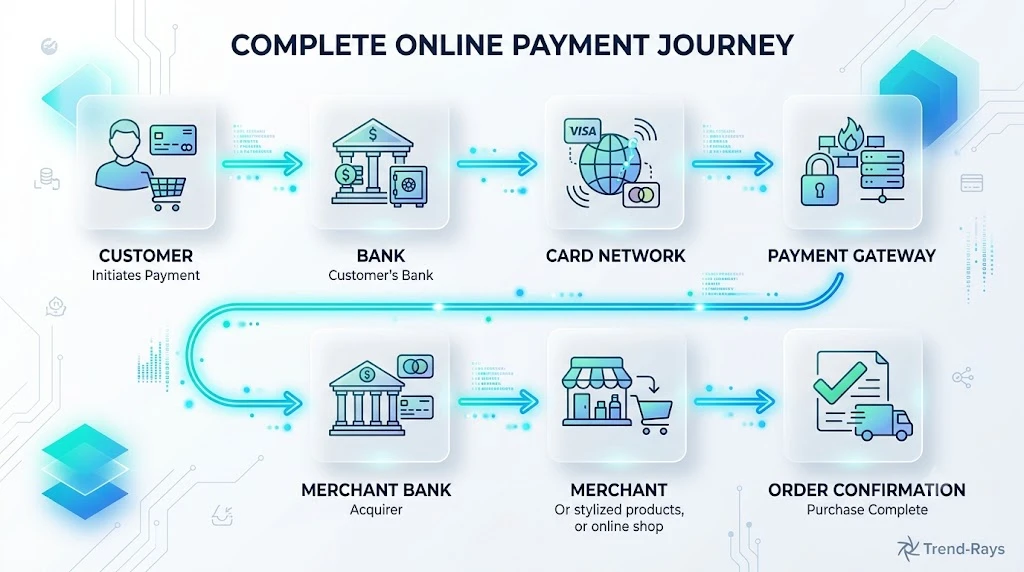
To understand why your bank and the merchant can report different payment statuses, you first need to understand what happens after you click Pay Now.
Many people assume online payments happen instantly.
In reality, even a payment that appears to complete in two or three seconds goes through several independent systems behind the scenes.
Each system performs its own checks before passing the transaction to the next one.
If one stage experiences a delay, timeout, or technical issue, different organizations may temporarily see different payment statuses.
Let’s follow a typical payment from beginning to end.
Step 1: You Initiate the Payment
Everything starts when you click:
- Pay Now
- Confirm Purchase
- Complete Payment
Depending on the payment method, you may:
- Enter your debit card details.
- Use a credit card.
- Approve a UPI request.
- Authenticate through online banking.
- Use a digital wallet.
At this stage, no money has actually reached the merchant.
You’re simply asking your bank to authorize the transaction.
Step 2: Your Bank Checks the Transaction
Your bank performs several security checks before approving the payment.
These typically include:
- Is your card active?
- Are sufficient funds available?
- Has the card expired?
- Does the transaction appear legitimate?
- Has fraud detection flagged any unusual activity?
If everything looks normal, the bank approves the authorization.
This is the point where many banking apps display:
Payment Successful
However, this message only confirms that the authorization was approved.
The merchant still hasn’t received the money.
Step 3: The Payment Travels Through the Network
After authorization, the transaction moves through the payment network.
Depending on your payment method, this may involve:
- Visa
- Mastercard
- RuPay
- UPI
- American Express
- Other payment networks
The payment network acts like a secure messenger.
Its job is to transmit payment information between financial institutions.
It doesn’t decide whether your order is successful.
Step 4: The Payment Gateway Processes the Transaction
The payment then reaches the merchant’s payment gateway or payment processor.
This system is responsible for:
- Receiving the authorization.
- Validating transaction details.
- Communicating with the merchant.
- Forwarding settlement instructions.
- Recording payment status.
If the gateway experiences a delay or outage, the merchant may temporarily be unable to confirm your payment.
This is one of the most common reasons customers hear:
“We haven’t received your payment yet.”
Step 5: The Merchant Verifies the Payment
Once the payment gateway confirms the transaction, the merchant performs additional checks.
These may include:
- Matching the payment to your order.
- Confirming inventory availability.
- Detecting duplicate orders.
- Running fraud screening.
- Creating the order record.
Only after these steps are complete does the merchant usually display:
Order Confirmed
Until then, customer support may genuinely be unable to locate your payment.
Step 6: Settlement Begins
Authorization is only the beginning.
The actual movement of funds happens during settlement.
Settlement is the process of transferring money from your bank to the merchant’s bank.
Although many payments settle quickly, some may take longer depending on:
- The payment network.
- Banking schedules.
- Merchant processing times.
- Weekends and public holidays.
- Cross-border transactions.
- Batch settlement cycles.
This explains why your bank can confirm a successful payment before the merchant has actually received the funds.
The Entire Payment Journey
Here’s a simplified overview of the complete process:
Customer Clicks Pay
        │
        ▼
Bank Authorizes Payment
        │
        ▼
Payment Network Transfers Request
        │
        ▼
Payment Gateway Validates Transaction
        │
        ▼
Merchant Receives Confirmation
        │
        ▼
Order Created
        │
        ▼
Settlement Transfers Funds
Notice that “Payment Successful” from your bank occurs much earlier than “Merchant Receives Funds.”
That’s why temporary mismatches can occur.
Where Things Can Go Wrong
Most payments complete without any issues.
However, delays can occur at almost any stage.
For example:
Bank Stage
- Authorization delay
- Fraud review
- Temporary banking outage
Payment Network
- Network congestion
- Communication timeout
- Routing delays
Payment Gateway
- Server maintenance
- API timeout
- Duplicate transaction detection
- Processing queue delays
Merchant System
- Website crash
- Order creation failure
- Inventory synchronization issues
- Internal payment verification delay
Any one of these problems can temporarily separate your bank’s payment status from the merchant’s order status.
Real-World Example
Anita books airline tickets costing ₹18,750.
She completes the payment.
Her banking app immediately shows:
Payment Successful
However, the airline website unexpectedly refreshes and displays:
Payment Failed
What actually happened?
- The bank successfully authorized the payment.
- The payment gateway experienced a temporary timeout.
- The airline’s booking system never received the confirmation.
- A few minutes later, the payment gateway automatically retransmits the confirmation.
- The booking is successfully created without Anita making another payment.
If Anita had attempted to pay again immediately, she might have ended up with two successful payments for the same booking.
Why Payment Statuses Sometimes Update Later
Even after your bank confirms payment, different systems continue exchanging information.
Updates may include:
- Settlement confirmation.
- Authorization release.
- Order creation.
- Refund initiation.
- Reconciliation between banks.
- Merchant accounting updates.
That’s why payment statuses can continue changing even after you’ve closed the checkout page.
Expert Tip
When a payment problem occurs, don’t judge the transaction based on the first message you see.
Instead, think of online payments as a relay race.
Each participant must successfully pass the baton before the next participant can continue.
If one runner is delayed, the race hasn’t necessarily failed—it simply hasn’t finished yet.
Did You Know?
Large online retailers often process millions of payment messages every day. Even a brief interruption lasting a few seconds between the payment gateway and the merchant’s order system can temporarily create situations where a bank confirms a successful payment while the merchant hasn’t yet recorded it.
Key Takeaway
An online payment isn’t a single event—it’s a sequence of connected stages.
Your bank, the payment network, the payment gateway, and the merchant each see a different part of that journey.
That’s why it’s entirely possible for your bank to report a successful payment while the merchant temporarily reports that no payment has been received.
Understanding this payment lifecycle makes it much easier to identify where a transaction may be delayed and helps you avoid taking unnecessary actions, such as making the same payment twice.
Where Is Your Money Right Now? Understanding Authorization, Settlement, and Payment Holds
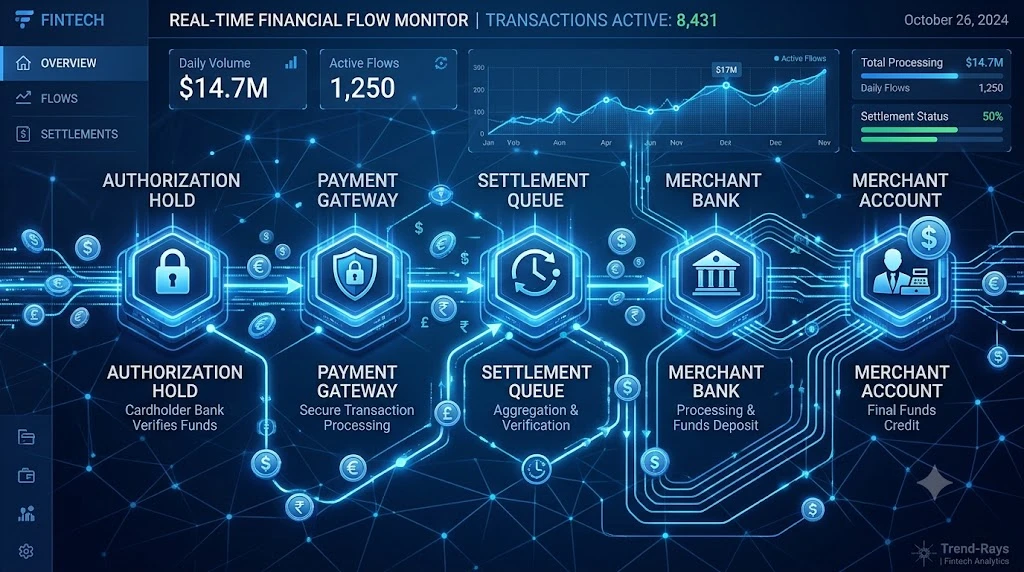
After learning how online payments travel between banks, payment networks, and merchants, the next question most people ask is:
“If the merchant says they haven’t received my money, then where is it?”
This is a perfectly reasonable question.
After all, your bank has already deducted the amount from your account.
So where is your money actually sitting?
The answer depends on which stage of the payment process the transaction has reached.
In most situations, the money is not lost.
Instead, it’s temporarily waiting for the next step in the payment lifecycle.
Let’s look at the most common possibilities.
Scenario 1: The Money Is Reserved Through an Authorization Hold
One of the most common situations is an authorization hold.
When your bank approves a card payment, it doesn’t always transfer the money immediately.
Instead, it temporarily reserves the amount.
Think of it as setting the money aside.
You can’t spend those funds again, but the merchant doesn’t yet have them either.
For example:
Current Balance
₹12,000
Available Balance
₹8,500
The remaining ₹3,500 may simply be reserved for a purchase that hasn’t been fully processed.
This is why your available balance may decrease before the merchant receives the payment.
Scenario 2: The Money Is Waiting for Settlement
After authorization comes settlement.
Settlement is the process where the reserved funds are actually transferred from your bank to the merchant’s bank.
Between authorization and settlement, the money is effectively “in transit.”
Your bank has already approved the payment.
The merchant is waiting for the final transfer.
Settlement may take longer because of:
- Merchant batch processing
- Banking schedules
- Weekends
- Public holidays
- Payment gateway delays
- Cross-border transactions
During this stage, it’s possible for:
- Your bank to report a successful payment.
- The merchant to report that no payment has yet been received.
Scenario 3: The Payment Gateway Is Still Processing the Transaction
Sometimes the payment has successfully left your bank but is still being processed by the merchant’s payment gateway.
Payment gateways perform several tasks, including:
- Validating transaction details.
- Checking for duplicate payments.
- Confirming authorization.
- Sending payment confirmations.
- Updating the merchant’s systems.
If this communication is delayed, the payment gateway may know about the payment before the merchant’s order management system does.
This creates a temporary mismatch.
Scenario 4: The Merchant’s System Hasn’t Updated Yet
Large online stores often use multiple connected systems.
A payment may successfully reach:
- The payment gateway,
while the:
- Order management system,
- Inventory database, or
- Customer support dashboard
hasn’t yet synchronized.
In these cases, customer support genuinely cannot locate your payment—even though the payment gateway has already accepted it.
A short delay often resolves the issue automatically.
Scenario 5: The Payment Is Being Reversed
Sometimes the payment never completes.
Perhaps:
- The checkout page crashed.
- The payment gateway timed out.
- The merchant cancelled the transaction.
- Fraud checks interrupted processing.
In these situations, the authorization may eventually be released.
Your bank returns the reserved funds to your available balance.
The merchant never receives the payment.
This is commonly referred to as a payment reversal or authorization release.
Think of It Like an Airport Journey
Imagine your money as a passenger flying to another city.
Your passenger:
- Leaves home.
- Arrives at the airport.
- Passes security.
- Waits at the departure gate.
- Boards the aircraft.
- Lands at the destination.
- Collects luggage.
If someone calls halfway through the journey and asks,
“Has the passenger arrived?”
the answer is:
Not yet.
But the passenger hasn’t disappeared either.
Online payments work in much the same way.
Your money moves through several checkpoints before it reaches the merchant.
During that journey, different organizations see different stages.
Why Your Bank Balance Changes Before the Merchant Receives the Money
Many customers assume:
“If my account balance has decreased, the merchant must already have the money.”
That’s not necessarily true.
Your bank reduces your available funds because it has approved the authorization.
However, settlement may still be pending.
This temporary difference helps prevent customers from spending the same money twice while the payment is being processed.
Real-World Example
Priya purchases a smartphone online for ₹28,999.
Her bank immediately shows:
Payment Successful
The retailer, however, reports:
“We’re still waiting for payment confirmation.”
What actually happened?
- The bank successfully authorized the transaction.
- The payment gateway accepted the request.
- The merchant’s settlement batch won’t process until later that day.
- After reconciliation is completed, the merchant receives the payment and the order is confirmed.
Throughout this process, Priya’s money was never lost—it was simply moving through the payment system.
Can Your Money Get Stuck Forever?
In the vast majority of cases, no.
Payment systems are designed to reconcile transactions.
Eventually, one of two things happens:
Outcome 1
The merchant receives the payment.
Your order is confirmed.
Outcome 2
The payment cannot be completed.
The authorization expires.
The reserved funds are released back to your account.
Both outcomes are part of normal payment processing.
Only a small percentage of transactions require manual investigation.
Expert Tip
Don’t judge a payment based solely on your account balance.
Always verify three things together:
- Your bank’s transaction history.
- The merchant’s order status.
- Your confirmation emails or SMS messages.
Looking at only one of these can lead to incorrect conclusions about where your money actually is.
Did You Know?
Many merchants don’t receive payments individually in real time. Instead, they receive batches of settled transactions at scheduled intervals. This is one reason why your bank can confirm a successful payment before the merchant’s accounting system reflects the funds.
Key Takeaway
If your bank says the payment was successful but the merchant says it failed, your money is usually in one of three places:
- Temporarily reserved through an authorization hold.
- Waiting for settlement between financial institutions.
- Being processed by the payment gateway before reaching the merchant.
In most situations, the payment simply needs more time to complete its journey. Understanding these stages helps explain why your bank and the merchant can temporarily report different payment statuses without either side being incorrect.
8 Common Reasons the Merchant Says Your Payment Failed (Even Though the Bank Says It Was Successful)
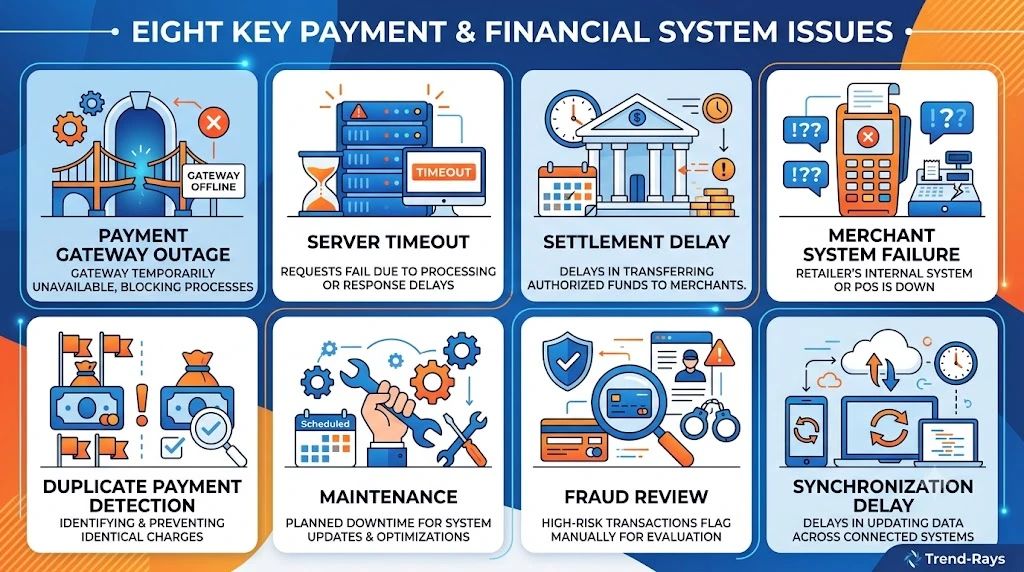
If your bank confirms the payment but the merchant insists it never arrived, don’t assume that someone has made a mistake.
In reality, there are several legitimate reasons why both parties can temporarily report different payment statuses.
Here are the most common ones.
1. Payment Gateway Communication Failure
This is one of the most frequent causes of the problem.
Here’s what happens:
- Your bank successfully approves the payment.
- The payment gateway receives the authorization.
- Before the gateway can notify the merchant, the connection is interrupted.
As a result:
Your bank records:
Payment Successful
The merchant’s system records:
Payment Failed
The payment itself may still be safely processed later once communication is restored.
Example
A retailer’s payment gateway experiences a five-second server timeout during checkout.
Thousands of customers complete payments successfully through their banks.
However, some orders are never created because the payment confirmation never reaches the merchant’s website.
2. Website or App Crashed After Payment
Sometimes the payment succeeds, but the checkout page crashes before displaying the confirmation screen.
This often happens when:
- The internet connection drops.
- The browser freezes.
- The mobile app closes unexpectedly.
- The server becomes overloaded.
Customers assume:
In reality:
- The payment may already be processing.
- The order may appear a few minutes later.
- The merchant may still be waiting for confirmation.
This is why refreshing the page or checking your order history is usually safer than paying again immediately.
3. Delayed Settlement Between Banks
Remember that authorization and settlement are different stages.
Your bank may approve the payment instantly.
The merchant receives the actual funds only after settlement.
During this period:
Bank:
Payment Successful
Merchant:
Payment Not Yet Received
This delay is completely normal for many payment systems.
4. Merchant’s Order System Failed
Large e-commerce websites don’t rely on a single computer.
They often have separate systems for:
- Payments
- Orders
- Inventory
- Shipping
- Customer support
Sometimes:
The payment succeeds.
But the order creation process fails.
Customer support checks the order database and says:
“No payment found.”
Meanwhile, the payment gateway has already received the transaction.
The merchant eventually reconciles the payment manually.
5. Duplicate Transaction Detection
Many payment gateways automatically block suspected duplicate payments.
Imagine this situation:
You click Pay Now.
Nothing happens.
You click again.
The gateway now detects:
Two identical payments.
To prevent double charging, one payment may be held for manual verification.
While verification is taking place:
Your bank may display a successful payment.
The merchant may temporarily reject the order.
6. Temporary Technical Maintenance
Banks and payment gateways perform routine maintenance.
Although customers rarely notice, even short maintenance windows can temporarily interrupt communication between systems.
For example:
- Bank approves payment.
- Gateway enters maintenance.
- Merchant waits for confirmation.
- Confirmation arrives later after services resume.
This delay usually resolves without customer intervention.
7. Fraud or Security Verification
Some transactions require additional review.
This is more common when:
- The purchase amount is unusually large.
- The payment originates from a new device.
- The location appears unusual.
- Fraud detection systems identify suspicious activity.
Your bank may approve the payment.
The merchant may pause order processing until security verification is complete.
This helps protect both customers and merchants from fraudulent transactions.
8. Human Error During Payment Review
Occasionally, the problem isn’t technical.
It may simply be that customer support is looking in the wrong place.
For example:
The payment has already reached the merchant’s payment gateway.
But the support agent checks only the order database.
Since the order wasn’t created automatically, they incorrectly conclude:
“We haven’t received your payment.”
Once the payment reference number is reviewed by the payments team, the transaction is usually located quickly.
Which Reason Is Most Common?
Although every payment system is different, the most common causes are:
- Payment gateway communication delays.
- Merchant website or app failures after payment.
- Settlement still in progress.
- Order creation failures.
- Duplicate payment detection.
Fortunately, most of these situations are temporary and don’t result in lost money.
Real-World Example
Rohan purchases concert tickets worth ₹4,999.
His bank instantly confirms:
Payment Successful
However, the ticketing website shows:
Payment Failed. Please Try Again.
Instead of making another payment, Rohan waits a few minutes.
He then refreshes his account and discovers:
- The order has been created.
- The tickets are available.
- The payment gateway simply took longer than expected to synchronize with the merchant’s system.
By waiting instead of retrying, he avoids paying twice for the same tickets.
Expert Tip
If your bank confirms a successful payment, don’t rely solely on the error message shown during checkout.
Before making another payment:
- Check your email for an order confirmation.
- Log in to your account and review your recent orders.
- Wait a few minutes if the merchant advises that payment verification is still in progress.
- Contact the merchant with your transaction reference number if no confirmation appears.
A few minutes of patience can prevent duplicate payments and unnecessary refund requests.
Did You Know?
Many payment gateways automatically retry failed confirmation messages. This means a payment that initially appears unsuccessful can still reach the merchant a short time later without you taking any action.
Key Takeaway
When a bank reports a successful payment but the merchant reports a failed one, the issue is often caused by a delay or interruption somewhere between authorization, payment processing, and order creation.
The payment itself may be perfectly valid.
Understanding these eight common causes helps explain why conflicting payment statuses occur—and why immediately attempting another payment is rarely the safest solution.
What Should You Do Next? A Step-by-Step Action Plan
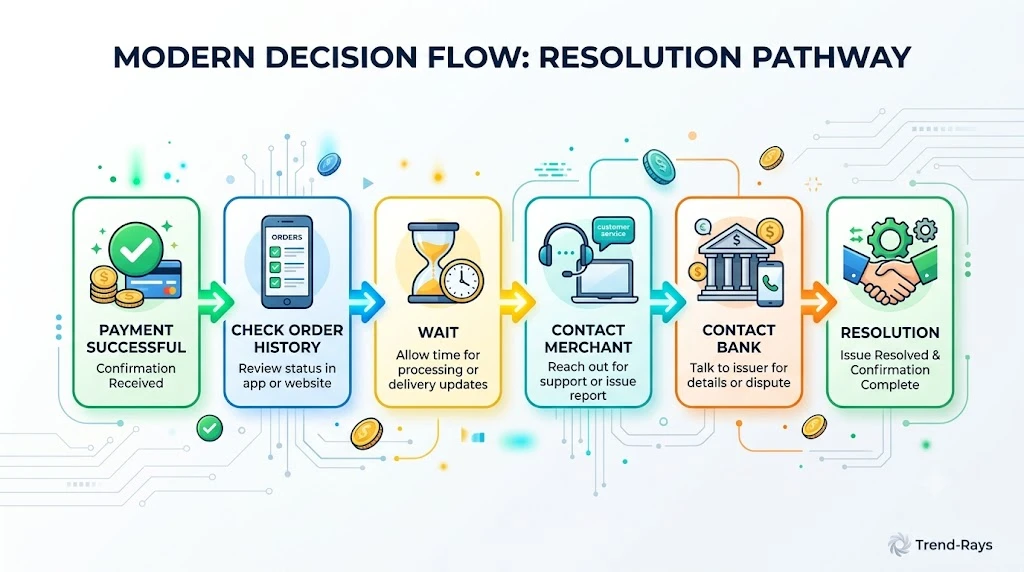
At this point, you understand why your bank and the merchant may report different payment statuses.
The next question is even more important:
What should you actually do?
The answer depends on how much time has passed since the payment and what information you already have.
Following the correct sequence can save you hours of frustration—and help you avoid duplicate payments or unnecessary disputes.
Step 1: Don’t Make Another Payment Immediately
This is the single biggest mistake customers make.
Imagine this situation:
You pay ₹2,499.
The website displays:
Payment Failed
Your banking app shows:
Payment Successful
Without checking anything else, you immediately make another payment.
Ten minutes later:
- The first payment reaches the merchant.
- The second payment also succeeds.
Now you’ve paid twice.
Although refunds are usually possible, they often take days—or even longer depending on the merchant and payment method.
Unless the merchant specifically confirms that no payment authorization exists, avoid paying again immediately.
Step 2: Check Your Banking App Carefully
Don’t rely only on the payment notification.
Open your banking app and verify:
- Is the transaction marked as Pending?
- Does it say Completed or Successful?
- Has the amount actually been debited?
- Is a transaction reference number available?
Take a screenshot if possible.
You’ll need these details if you contact support later.
Step 3: Check Your Email, SMS, and Order History
Many people stop after seeing the payment error page.
Instead, check whether the merchant has already created your order.
Look for:
- Order confirmation emails
- SMS notifications
- Recent orders in your account
- Invoice downloads
- Shipment notifications
Sometimes the payment succeeds even though the checkout page displays an error.
Step 4: Wait a Short Time
Not every payment issue requires immediate action.
Payment systems often synchronize automatically.
As a general rule:
- Wait a few minutes for payment confirmations to update.
- Refresh your order history instead of repeatedly refreshing the payment page.
- Avoid closing support tickets too quickly if the merchant asks you to wait for verification.
Many “missing payments” resolve themselves once payment gateways complete reconciliation.
Step 5: Contact the Merchant First
If your bank shows a successful payment but you still don’t have an order confirmation after waiting a reasonable amount of time, contact the merchant.
Provide as much information as possible, including:
- Transaction reference number
- Payment amount
- Date and time of payment
- Payment method used
- Order ID (if one was generated)
Instead of saying:
“My payment failed.”
Say something more specific:
“My bank shows the payment as successful, but I haven’t received an order confirmation. Could you please check your payment gateway using the transaction reference number?”
This gives the merchant a much better starting point for investigating the issue.
Step 6: Contact Your Bank if Necessary
If the merchant cannot locate the payment after checking its payment systems, contact your bank.
Ask questions such as:
- Has the payment been fully settled?
- Is it still under authorization?
- Has the merchant captured the payment?
- Is the transaction eligible for reversal?
- Can you confirm the payment status using the transaction reference?
Your bank can often provide information that isn’t visible to the merchant.
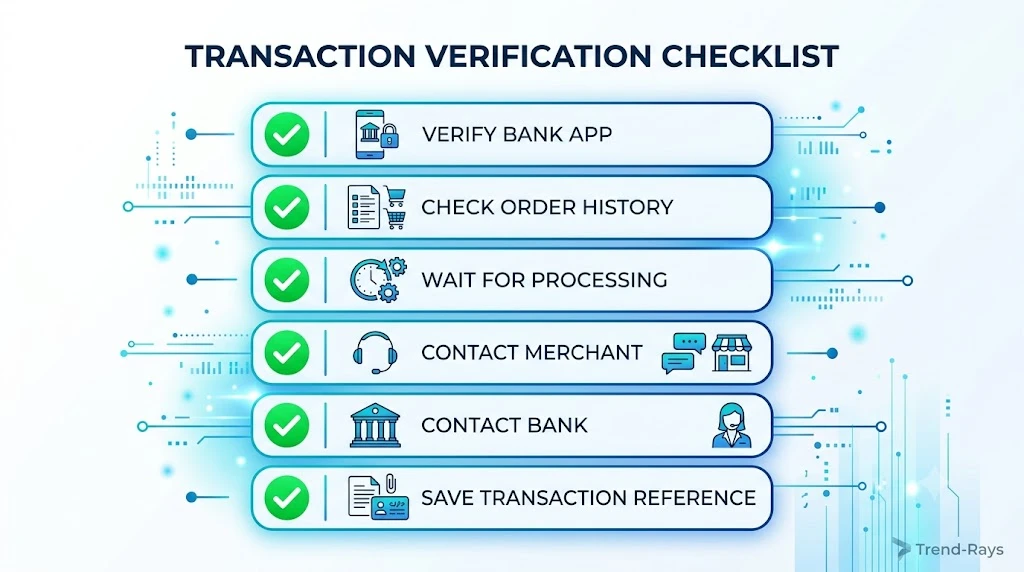
Step 7: Keep All Evidence
Whenever a payment issue occurs, save:
- Screenshots of your banking app
- Payment confirmation messages
- Error messages
- Order confirmation emails
- Chat transcripts with customer support
- Transaction reference numbers
Having complete records makes investigations much faster if the issue needs to be escalated.
Step 8: Know When to Escalate
Most payment mismatches resolve within the normal payment lifecycle.
However, you should consider escalation if:
- Your bank confirms the payment has settled.
- The merchant still insists no payment exists after checking the transaction reference.
- The order remains unresolved beyond the merchant’s stated investigation period.
- You’re asked to pay again without any attempt to investigate the original transaction.
At this stage, your bank and the merchant may need to work together to trace the payment.
A Simple Decision Flow
Use this checklist whenever you encounter this problem:
Bank says “Payment Successful”
↓
Check your order history
↓
Order confirmed?
- Yes → No further action needed.
- No → Continue.
↓
Wait for payment synchronization
↓
Still no order?
↓
Contact the merchant with your transaction reference number
↓
Merchant still can’t locate the payment?
↓
Contact your bank for payment tracing or settlement confirmation
Following this sequence helps avoid unnecessary confusion and duplicate charges.
Real-World Example
Amit pays ₹7,999 for a smartwatch.
His bank immediately confirms:
Payment Successful
The merchant’s website shows:
Payment Failed
Instead of paying again, Amit:
- Checks his email.
- Finds no confirmation.
- Waits 15 minutes.
- Contacts the merchant with his transaction reference number.
The merchant checks its payment gateway and discovers that the payment confirmation arrived late due to a temporary synchronization delay.
The order is manually created, and Amit receives his confirmation without making a second payment.
By following a structured approach, he avoids a duplicate charge and a lengthy refund process.
Expert Tip
Whenever you contact customer support, avoid saying only:
“My payment failed.”
Instead, provide specific details from the beginning.
For example:
“My bank shows Transaction ID XXXXX as successful for ₹3,250 at 2:15 PM, but my order wasn’t created. Could you please verify the payment using this transaction reference?”
Support teams can investigate much faster when they receive complete information.
Did You Know?
Many merchants can search their payment gateway using a transaction reference number even if no order was created. This often helps locate payments that aren’t immediately visible in the merchant’s order management system.
Key Takeaway
When your bank reports a successful payment but the merchant reports a failure, don’t rush to make another payment.
Instead:
- Verify your banking app.
- Check your order status.
- Wait briefly for systems to synchronize.
- Contact the merchant with your transaction reference number.
- Contact your bank only if the merchant still cannot locate the payment.
Following these steps gives you the best chance of resolving the issue quickly while avoiding duplicate payments and unnecessary refund requests.
How to Avoid Paying Twice for the Same Order
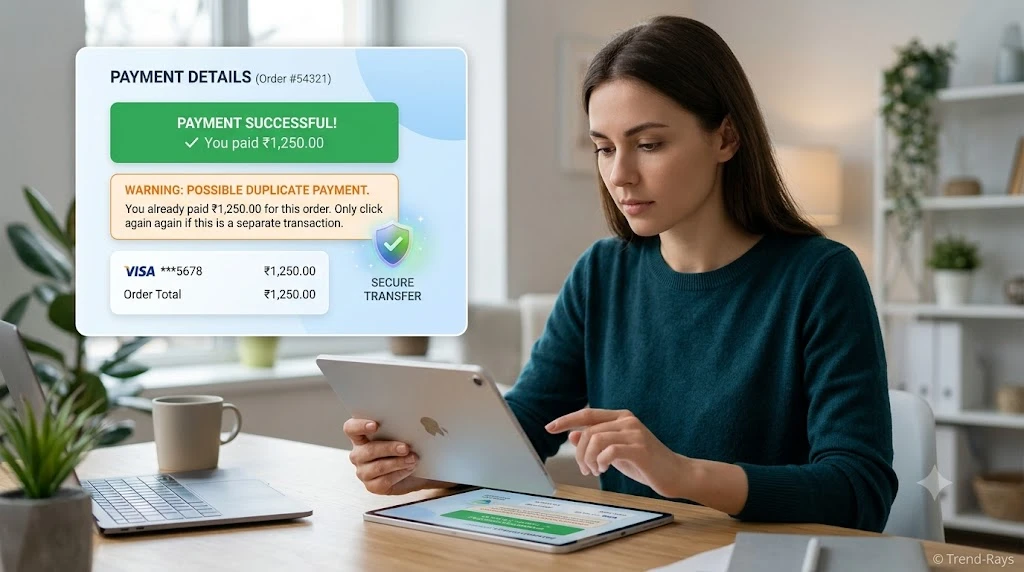
One of the biggest risks when your bank says “Payment Successful” but the merchant says “Payment Failed“ is accidentally making the payment again.
It usually happens because customers panic.
The merchant’s website displays:
Payment Failed
The customer assumes:
“The payment didn’t go through.”
Without checking anything else, they click Pay Now again.
A few minutes later:
- The original payment is successfully processed.
- The second payment also succeeds.
- Two payments are now linked to the same purchase.
Although merchants can usually refund one of the payments, the process often takes several business days and may require multiple support requests.
Fortunately, this situation is almost always preventable.
Why Duplicate Payments Happen
Duplicate payments usually aren’t caused by banking errors.
Instead, they happen because the customer unknowingly creates a second transaction while the first one is still being processed.
Common situations include:
- Refreshing the checkout page repeatedly.
- Clicking the Pay button multiple times.
- Closing the payment window too early.
- Switching between mobile data and Wi-Fi during checkout.
- Using the browser’s Back button while payment is still processing.
- Attempting payment again after seeing a temporary error message.
In many cases, the original payment was already progressing through the payment system.
The customer simply couldn’t see it yet.
Signs That You Should NOT Pay Again
Before making another payment, ask yourself these questions.
Your Banking App Shows “Payment Successful”
If your bank has already confirmed a successful transaction, stop and investigate before attempting another payment.
A successful debit means the payment has already entered the payment processing system.
You Received a Transaction Reference Number
If your bank generated a:
- Transaction ID
- Reference Number
- UTR
- ARN
- Authorization Code
your payment can usually be traced.
This is much safer than creating a completely new payment.
The Merchant Says They’re Investigating
If customer support tells you:
“We’re checking with our payment team.”
Avoid making another payment until they complete their investigation.
Many payment issues resolve during reconciliation.
Your Order Status Is Still Updating
Some merchants take several minutes to create an order after payment confirmation.
If the order page says:
- Processing
- Verifying Payment
- Awaiting Confirmation
give the system time before trying again.
Situations Where a Second Payment Might Be Appropriate
There are situations where making another payment is reasonable—but only after confirmation.
Examples include:
- Your bank confirms that the original transaction failed completely.
- The authorization has already been reversed.
- The merchant confirms that no payment authorization exists.
- Your account balance has already been restored after the authorization expired.
Only after confirming these facts should you consider paying again.
What If You Already Paid Twice?
Don’t panic.
Duplicate payments happen more often than people realize.
If you discover that you’ve been charged twice:
Step 1
Collect both transaction reference numbers.
Step 2
Take screenshots showing both successful payments.
Step 3
Contact the merchant first.
Many merchants can identify duplicate payments immediately.
Step 4
If the merchant cannot resolve the issue, contact your bank.
Your bank can help verify both transactions and explain whether:
- Both were settled.
- One is still pending.
- One has already been reversed.
Real-World Example
Neha orders groceries worth ₹2,850.
After completing payment:
Her banking app says:
Payment Successful
The grocery app displays:
Something went wrong. Please try again.
Instead of waiting, Neha immediately pays again.
Ten minutes later:
- Two successful transactions appear.
- The grocery store creates two identical orders.
- One payment must now be refunded.
If she had waited just a few minutes and contacted customer support with her transaction reference number, the duplicate payment could have been avoided.
Five Rules to Prevent Duplicate Payments
1. Never click Pay repeatedly.
One click is enough.
Repeated clicks can generate multiple authorization requests.
2. Don’t refresh the payment page immediately.
Many payment gateways need several seconds to complete processing.
Refreshing too early can interrupt the customer-facing confirmation page without affecting the payment itself.
3. Always check your banking app before retrying.
If the amount has already been debited, investigate first.
Don’t assume the payment failed simply because the website displayed an error.
4. Keep the transaction reference number.
This number is far more useful than simply saying:
“My payment failed.”
Support teams can trace payments much faster using transaction references.
5. Contact support before making another payment.
A five-minute conversation can save you days of waiting for a refund.
Expert Tip
Whenever you see conflicting payment messages, remember this simple rule:
A successful bank debit deserves investigation—not another payment.
Waiting a few minutes and checking the transaction status is almost always safer than immediately attempting a second payment.
Did You Know?
Many payment gateways automatically reject repeated payment requests that look identical within a short time window. However, if enough time passes between attempts—or if the second payment follows a different processing path—both transactions may still succeed, resulting in duplicate charges.
Key Takeaway
Duplicate payments are usually caused by impatience rather than payment system failures.
If your bank confirms a successful payment:
- Verify your order status.
- Check your transaction history.
- Contact the merchant with your transaction reference.
- Wait for payment reconciliation when appropriate.
Only attempt another payment after you’ve confirmed that the original transaction genuinely failed or was reversed.
Frequently Asked Questions
The following questions are based on real searches from Google, Reddit, Quora, banking forums, and payment support communities. Including these FAQs helps satisfy additional search intent and increases the article’s topical coverage.
Will the Merchant Eventually Receive My Payment?
In many cases, yes.
If your bank has successfully authorized the payment, the merchant may receive it once the payment gateway completes processing and settlement.
However, if the transaction ultimately fails during processing, the authorization is usually reversed and the funds become available in your account again.
The outcome depends on where the payment is in the processing lifecycle.
Can My Bank Show “Payment Successful” Even If the Merchant Never Gets the Money?
Yes.
Your bank’s confirmation means it successfully processed the payment request on its side.
It doesn’t guarantee that the merchant has completed:
- Payment verification
- Settlement
- Order creation
That’s why both systems can temporarily display different statuses.
Should I Make Another Payment Immediately?
No.
If your bank already shows a successful payment, avoid paying again until you’ve:
- Checked your order history.
- Waited for payment synchronization.
- Contacted the merchant with your transaction reference number.
Making another payment too quickly is one of the most common causes of duplicate charges.
How Long Should I Wait Before Contacting Support?
If you don’t receive an order confirmation after a reasonable waiting period, contact the merchant first.
Some payment confirmations appear within minutes, while others take longer because of payment gateway processing or settlement delays.
If the merchant cannot locate the payment after checking your transaction reference, contact your bank for further assistance.
What Is a Transaction Reference Number?
A transaction reference number is a unique identifier assigned to your payment.
Depending on your bank or payment method, it may also be called:
- Transaction ID
- Payment Reference
- Authorization Code
- UTR (for many bank transfers)
- ARN (for some card transactions)
This number helps banks and merchants trace your payment much more quickly.
Can a Merchant Find My Payment Without an Order Number?
Often, yes.
Many merchants can search their payment gateway using:
- Transaction reference number
- Payment amount
- Date and time of payment
- Last four digits of your card
Providing these details greatly improves the chances of locating your payment.
Why Does My Bank Balance Decrease Before My Order Is Confirmed?
Because your bank may place an authorization hold on the funds before settlement is completed.
The money is temporarily reserved so it can’t be spent elsewhere while the payment is being processed.
This doesn’t always mean the merchant has already received it.
What Happens If the Merchant Never Receives the Payment?
If the payment cannot be completed successfully, the authorization is generally released or reversed.
Once this happens, the reserved amount becomes available in your account again.
The exact timing depends on your bank and the payment network.
Can Internet Problems Cause This Issue?
Yes.
If your internet connection drops after the bank authorizes the payment but before the merchant receives confirmation, you may see:
- Bank: Payment Successful
- Merchant: Payment Failed
The payment may still complete later once systems synchronize.
Can Payment Gateway Problems Cause This?
Absolutely.
Payment gateways connect banks and merchants.
If a gateway experiences:
- Server outages
- Processing delays
- Communication failures
- API timeouts
the merchant may temporarily be unable to verify an otherwise successful payment.
Is My Money Lost?
In the vast majority of cases, no.
Usually one of two things happens:
- The merchant eventually receives the payment.
- The authorization is reversed and your funds become available again.
Payments are designed to reconcile, even when temporary delays occur.
Can This Happen With Debit Cards and Credit Cards?
Yes.
The same payment processing principles apply to both debit and credit card transactions.
Although some processing timelines may differ, authorization, settlement, and payment confirmation work in a similar way.
Does This Happen With UPI Payments Too?
Yes.
While UPI works differently from card payments, temporary issues can still occur due to:
- Bank server delays
- PSP (Payment Service Provider) issues
- Merchant system outages
- Payment confirmation delays
The troubleshooting process is similar: verify the transaction, avoid paying again immediately, and contact the merchant with your transaction reference if needed.
Can I Cancel a Successful Payment?
Not usually.
Once a payment has been successfully authorized and processed, it cannot simply be cancelled by the customer.
If the transaction needs to be reversed, it generally requires:
- A merchant refund, or
- A reversal initiated through the payment system if the transaction didn’t complete.
What Information Should I Give Customer Support?
To help the merchant investigate quickly, provide:
- Transaction reference number
- Payment amount
- Date and time of payment
- Payment method used
- Registered email address
- Registered mobile number
- Order number (if available)
Giving complete information from the start can significantly reduce investigation time.
Final Thoughts
Receiving two conflicting payment messages can be stressful:
- Your bank says the payment was successful.
- The merchant says the payment failed.
While this feels alarming, it usually doesn’t mean your money has disappeared.
In most cases, the transaction is simply at different stages of the payment process. Your bank has completed its role by authorizing the payment, while the merchant may still be waiting for confirmation, settlement, or reconciliation.
The safest approach is to stay methodical:
- Don’t rush to make another payment.
- Verify your transaction details.
- Check your order status.
- Keep your transaction reference number handy.
- Contact the merchant first, then your bank if necessary.
Understanding how online payments work helps you avoid unnecessary worry, duplicate payments, and long refund delays.
As digital payments become more common, knowing how to troubleshoot issues like this is a valuable skill that can save both time and money.
Continue Reading
If you’re facing related payment issues, these guides may also help:
- Money Debited but Order Failed: Why It Happens and What to Do
- Pending Transaction Disappeared: What It Means and Where Your Money Went
- Merchant Says Payment Failed but Money Was Deducted (coming soon)
- Duplicate Payment Made Online: How to Get Your Money Back (coming soon)
- Temporary Authorization Hold Explained (coming soon)
- Why Is My Refund Still Pending? (coming soon)