Gift cards are one of the most popular payment methods for birthdays, holidays, employee rewards, and promotional offers.
But they also create one very common problem.
You have a gift card.
You find something you want to buy.
Then you realize the gift card doesn’t cover the full purchase price.
So naturally you ask:
Can you split payment between a gift card and a credit card?
In many cases, yes.
Many retailers allow customers to apply the available balance from a retailer-issued gift card first and then pay the remaining balance with a credit card, debit card, or another eligible payment method.
However, the answer isn’t always that simple.
Whether split payment works depends on several factors, including:
- The type of gift card you’re using.
- Whether it’s a retailer gift card or a prepaid Visa/Mastercard gift card.
- The retailer’s checkout system.
- Whether you’re shopping online or in a physical store.
- The payment methods accepted by the merchant.
For example, a Target GiftCard behaves differently from a Visa Gift Card, even though both can be used to make purchases.
Likewise, some retailers make split payments straightforward, while others restrict customers to a single payment card during online checkout.
Understanding these differences before you begin checkout can save time, prevent declined payments, and help you avoid unnecessary frustration.
In this guide, you’ll learn:
- When you can combine a gift card with a credit card.
- Which types of gift cards support split payments.
- Why some purchases fail even when money is available.
- How online and in-store checkout differ.
- Common mistakes to avoid.
- A retailer comparison table showing how major stores handle gift card split payments.
Whether you’re buying electronics, groceries, clothing, furniture, or everyday essentials, this guide will help you understand exactly how gift card split payments work in 2026.
Quick Answer
If you’re looking for the short answer, here’s what you need to know.
| Payment Combination | Generally Supported? | Notes |
|---|---|---|
| Retailer Gift Card + Credit Card | ✅ Usually Yes | Common at many major retailers |
| Retailer Gift Card + Debit Card | ✅ Usually Yes | Remaining balance charged to debit card |
| Retailer Gift Card + Cash | ✅ Often Yes (In-Store) | Depends on store policy |
| Two Retailer Gift Cards | ✅ Usually Yes | Subject to retailer limits |
| Visa Gift Card + Credit Card | ⚠️ Sometimes | Depends on merchant checkout system |
| Mastercard Gift Card + Credit Card | ⚠️ Sometimes | May require manual balance entry |
| American Express Gift Card + Credit Card | ⚠️ Sometimes | Merchant-dependent |
| Prepaid Debit Gift Card + Another Card | ⚠️ Varies | Depends on retailer support |
Short Answer
Yes—many retailers allow you to split payment between a retailer-issued gift card and a credit card.
In most cases, the available balance on the gift card is applied first, and the remaining amount is charged to your credit card.
However, the experience can vary depending on the type of gift card you’re using. Retailer-issued gift cards are generally the easiest to combine with another payment method, while prepaid Visa, Mastercard, and American Express gift cards may have additional limitations depending on the merchant’s checkout system.
Understanding which type of gift card you have is the first step toward a successful split payment.
The Most Important Thing to Understand: Not All Gift Cards Work the Same Way
If you’ve searched online for answers about split payments, you’ve probably seen conflicting information.
One article says:
“Yes, you can.”
Another says:
“No, you can’t.”
In many cases, both answers are technically correct.
The difference usually isn’t the retailer.
It’s the type of gift card you’re using.
Understanding this distinction explains why one purchase succeeds while another fails—even at the same store.
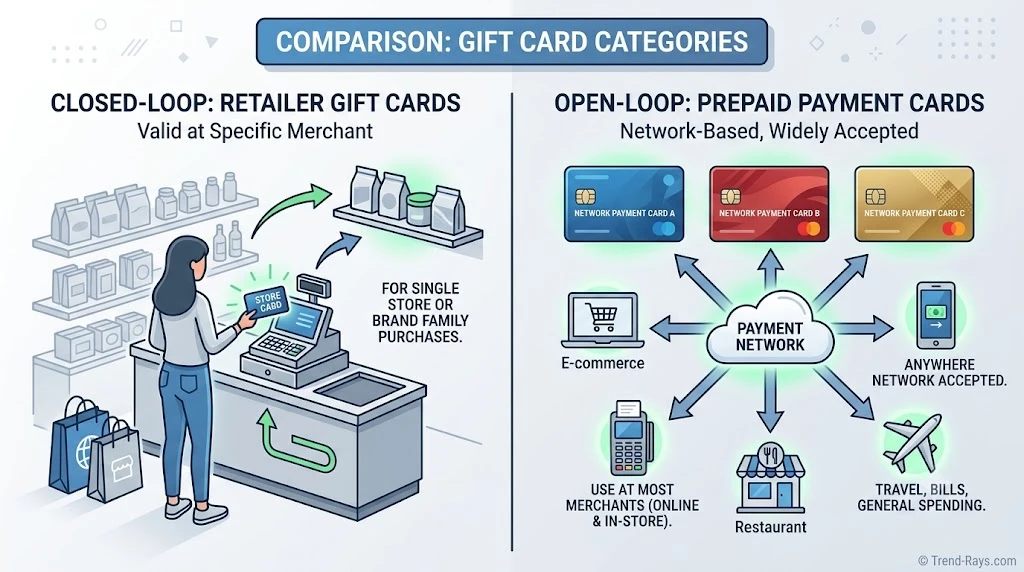
Type 1: Retailer Gift Cards
Retailer gift cards are issued by a specific store and can only be used with that retailer.
Examples include:
- Target GiftCard
- Walmart Gift Card
- Best Buy Gift Card
- Costco Shop Card
- Macy’s Gift Card
- IKEA Gift Card
These gift cards are managed directly by the retailer.
During checkout, the retailer can instantly verify the available balance, deduct it from your purchase, and charge the remaining amount to another eligible payment method.
For this reason, retailer gift cards are the easiest type of gift card to combine with a credit or debit card.
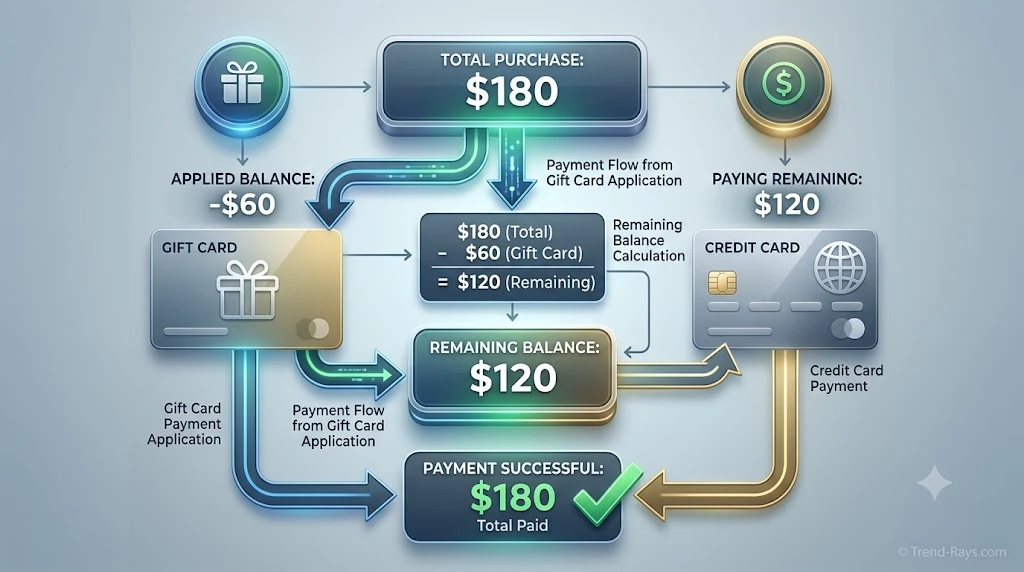
Example:
Purchase Total:
$180
Retailer Gift Card:
$60
Credit Card:
$120
For many major retailers, this is a normal checkout process.
Type 2: Open-Loop Gift Cards
Open-loop gift cards work differently.
Instead of being issued by one retailer, they’re issued through major payment networks such as:
- Visa
- Mastercard
- American Express
These cards can usually be used anywhere their payment network is accepted.
However, because they’re processed like regular payment cards rather than store credit, split payments become more complicated.
Example:
You have:
Visa Gift Card
Balance:
$35
Purchase Total:
$60
The merchant’s payment system must know to charge exactly $35 to the Visa Gift Card before charging the remaining $25 to another payment method.
Not every online checkout system supports this process.
That’s why prepaid Visa or Mastercard gift cards often create confusion during online shopping.
Why Retailer Gift Cards Are Easier
Retailer-issued gift cards are part of the retailer’s own payment system.
That means the checkout software already knows:
- Your available balance.
- How much should be deducted.
- How much remains to be paid.
The remaining balance is then charged to another eligible payment method.
Everything happens automatically.
Why Visa and Mastercard Gift Cards Can Be More Difficult
Open-loop gift cards don’t automatically tell the merchant how much money remains on the card.
Some merchants require customers to:
- Check the remaining balance beforehand.
- Enter the exact amount to charge.
- Complete the remaining payment with another payment method.
If the merchant doesn’t support manual split payments, the transaction may be declined—even when the gift card still has money available.
This is one of the most common reasons shoppers think their prepaid gift card is “not working.”
Online Shopping vs. In-Store Shopping
Retailer gift cards usually work smoothly both online and in stores.
Open-loop prepaid gift cards, however, often perform better in physical stores because a cashier can manually process the remaining balance if the point-of-sale system supports split payments.
Online checkout systems are generally less flexible because they’re designed to process payment automatically without assistance.
Quick Comparison
| Feature | Retailer Gift Card | Visa / Mastercard / Amex Gift Card |
|---|---|---|
| Works only at one retailer | ✅ Yes | ❌ No |
| Can often be combined with another payment method | ✅ Yes | ⚠️ Sometimes |
| Merchant knows remaining balance automatically | ✅ Yes | ❌ No |
| Online split payment usually easier | ✅ Yes | ⚠️ Depends on merchant |
| Processed like store credit | ✅ Yes | ❌ Processed like a payment card |
Why This Matters Before You Checkout
Before attempting a split payment, ask yourself one simple question:
“Is this a retailer gift card or a prepaid payment card?”
That answer will determine how likely your split payment is to work.
Understanding this difference can save you time, prevent declined transactions, and help you choose the right payment method before you begin checkout.
In the next section, we’ll explain exactly how gift card split payments work, step by step, and what happens behind the scenes when you complete a purchase.
How Split Payments Work With Gift Cards
Once you understand the difference between retailer gift cards and prepaid payment cards, the next question becomes much easier:
How does a split payment actually work?
For most retailer-issued gift cards, the checkout process is surprisingly simple.
Instead of charging your entire purchase to one payment method, the retailer applies your available gift card balance first.
Any remaining amount is then charged to another eligible payment method, such as a credit card or debit card.
The entire purchase is still completed as one transaction.
Example 1: Retailer Gift Card + Credit Card
Imagine you’re buying a new coffee machine.
Purchase Total:
$185
Gift Card Balance:
$75
Remaining Balance:
$110
Credit Card:
Charged $110
During checkout:
- The retailer checks your gift card balance.
- $75 is deducted automatically.
- Your credit card is charged for the remaining $110.
- Your purchase is complete.
You don’t need to calculate the remaining balance yourself because the retailer’s checkout system does it automatically.
Example 2: Retailer Gift Card + Debit Card
The process works almost exactly the same.
Purchase Total:
$240
Gift Card:
$100
Debit Card:
$140
After the gift card balance is applied, the remaining amount is withdrawn from your checking account through your debit card.
Example 3: Multiple Gift Cards
Many retailers also allow customers to redeem more than one retailer-issued gift card during the same transaction.
For example:
Purchase Total:
$250
Gift Card #1:
$40
Gift Card #2:
$60
Remaining Balance:
$150
Credit Card:
$150
This is especially common during the holiday season when shoppers receive several smaller gift cards.
What Happens Behind the Scenes?
From the customer’s perspective, split payment looks simple.
Behind the scenes, several things happen almost instantly.
The retailer’s payment system:
- Verifies the gift card balance.
- Deducts the available amount.
- Calculates the remaining purchase total.
- Requests authorization from your credit card issuer or bank.
- Completes the transaction if both payment sources are approved.
Because retailer gift cards are managed by the store itself, this process usually happens within seconds.
Why Retailer Gift Cards Usually Work Smoothly
Retailers control their own gift card systems.
That means they always know:
- The exact remaining balance.
- Whether the card is active.
- How much should be deducted.
There is no need to guess how much money remains on the card.
This is one reason retailer-issued gift cards are significantly easier to use than prepaid Visa or Mastercard gift cards when making split payments.
What About Prepaid Visa or Mastercard Gift Cards?
The process is often different.
Unlike retailer gift cards, prepaid Visa or Mastercard gift cards don’t automatically tell the merchant how much money is available.
If your prepaid card contains:
$28.63
and your purchase totals:
$60
the merchant’s checkout system must know to charge exactly $28.63 before requesting the remaining $31.37 from another payment method.
Some retailers support this process.
Others don’t.
If the checkout system attempts to charge the full $60 to the prepaid card, the authorization will likely fail because the available balance isn’t sufficient.
Why Online Checkout Can Be More Complicated
Online checkout systems are designed to automate payments.
Unlike a cashier in a physical store, the website can’t always adjust payment amounts manually during the transaction.
This is why prepaid gift cards are more likely to work successfully in stores than online, depending on the retailer’s payment system.
Retailer-issued gift cards don’t usually have this limitation because the retailer controls the gift card balance internally.
Quick Summary
Split payments generally work like this:
- The gift card balance is verified.
- The available amount is deducted.
- The remaining balance is calculated automatically.
- Your second payment method covers the rest.
- The purchase is completed as one transaction.
The process is usually seamless with retailer-issued gift cards, while prepaid payment cards may require additional steps or may not be supported for split payments at every merchant.
Key Takeaway
Using a gift card together with a credit card or debit card is usually straightforward when you’re shopping with a retailer-issued gift card.
The retailer automatically applies the available gift card balance first, then charges the remaining amount to your second payment method.
Understanding how this process works also explains why prepaid Visa, Mastercard, and American Express gift cards can sometimes behave differently—even though they’re all commonly referred to as “gift cards.”
In the next section, we’ll compare online checkout and in-store checkout, because where you shop can have a significant impact on whether a gift card split payment succeeds.
Which Major Retailers Allow Gift Card and Credit Card Split Payments?
One of the biggest misconceptions about split payments is that every retailer follows the same rules.
They don’t.
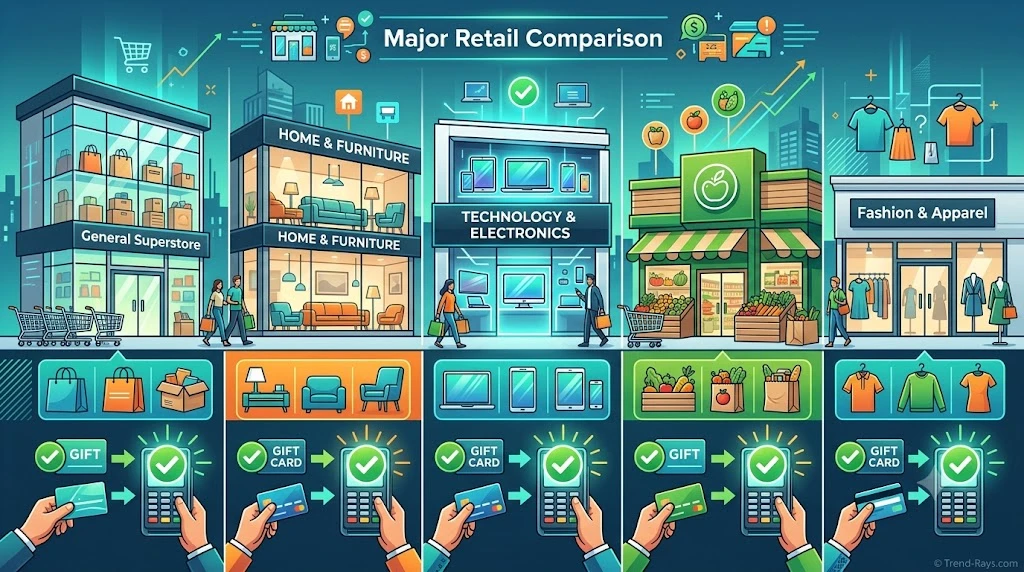
Some retailers make it easy to combine a retailer-issued gift card with another payment method, while others place restrictions on certain payment combinations or checkout scenarios.
The comparison below summarizes how several popular U.S. retailers generally handle retailer-issued gift cards together with another eligible payment method.
| Retailer | Retailer Gift Card + Credit Card | Retailer Gift Card + Debit Card | Notes |
|---|---|---|---|
| Target | ✅ Yes | ✅ Yes | Gift card balance is generally applied before the remaining balance is charged. |
| Walmart | ✅ Yes | ✅ Yes | Walmart Gift Cards can generally be combined with another eligible payment method. |
| Best Buy | ✅ Yes | ✅ Yes | Best Buy Gift Cards may be used with another eligible payment method. |
| Costco | ✅ Generally Yes | ✅ Generally Yes | Costco Shop Cards can typically be combined with another eligible payment method, subject to membership and payment rules. |
| IKEA | ✅ Generally Yes | ✅ Generally Yes | IKEA Gift Cards can generally be applied before another payment method. |
| Macy’s | ✅ Yes | ✅ Yes | Macy’s Gift Cards usually work with another eligible payment method. |
Note: Policies can change over time, and some payment combinations may vary depending on whether you’re shopping online or in a physical store. Always review the retailer’s current payment information before making a large purchase.
Retailer Gift Cards Are Usually the Easiest Option
Retailer-issued gift cards are designed to work within that retailer’s own checkout system.
Because of this, they’re usually the simplest type of gift card to combine with another payment method.
Examples include:
- Target GiftCard
- Walmart Gift Card
- Best Buy Gift Card
- Costco Shop Card
- IKEA Gift Card
- Macy’s Gift Card
In most cases, the available balance is deducted automatically before your credit or debit card is charged for the remainder.
Prepaid Gift Cards Follow Different Rules
Prepaid Visa, Mastercard, and American Express gift cards don’t belong to a specific retailer.
Instead, they’re processed like ordinary payment cards.
As a result:
- Some merchants support split payments with prepaid gift cards.
- Others require the exact remaining balance to be entered.
- Some online checkout systems don’t support partial authorizations at all.
This is why shoppers often report different experiences even when using the same prepaid gift card at different stores.
Online Stores May Handle Payments Differently
Even if two retailers both allow gift card split payments, their online checkout systems may not behave identically.
For example:
- One retailer may automatically apply the remaining gift card balance.
- Another may require manual entry of the gift card before selecting a second payment method.
- Some stores support more gift cards per order than others.
- Certain payment combinations may only be available in physical stores.
Reading the payment instructions during checkout can help avoid unnecessary declines.
Why This Comparison Matters
Understanding retailer differences helps you choose the right payment strategy before you begin shopping.
If your gift card doesn’t fully cover the purchase, knowing whether the retailer allows another payment method can save time and reduce the chance of an abandoned checkout.
It also prevents a common mistake:
Assuming that because one retailer supports a particular payment combination, every retailer does as well.
Learn More About Individual Retailers
If you’re shopping at a specific store, these detailed guides explain each retailer’s payment policy in more depth:
These articles cover retailer-specific payment rules, supported payment combinations, common checkout issues, and practical tips for completing your purchase successfully.
Key Takeaway
Most major retailers allow customers to combine their own retailer-issued gift cards with another eligible payment method.
However, the exact experience depends on the retailer’s checkout system and the type of gift card you’re using.
Retailer-issued gift cards are generally much easier to use than prepaid Visa or Mastercard gift cards because the retailer can automatically verify and apply the available balance during checkout.
In the next section, we’ll look at the most common reasons gift card split payments fail and the steps you can take to avoid checkout problems.
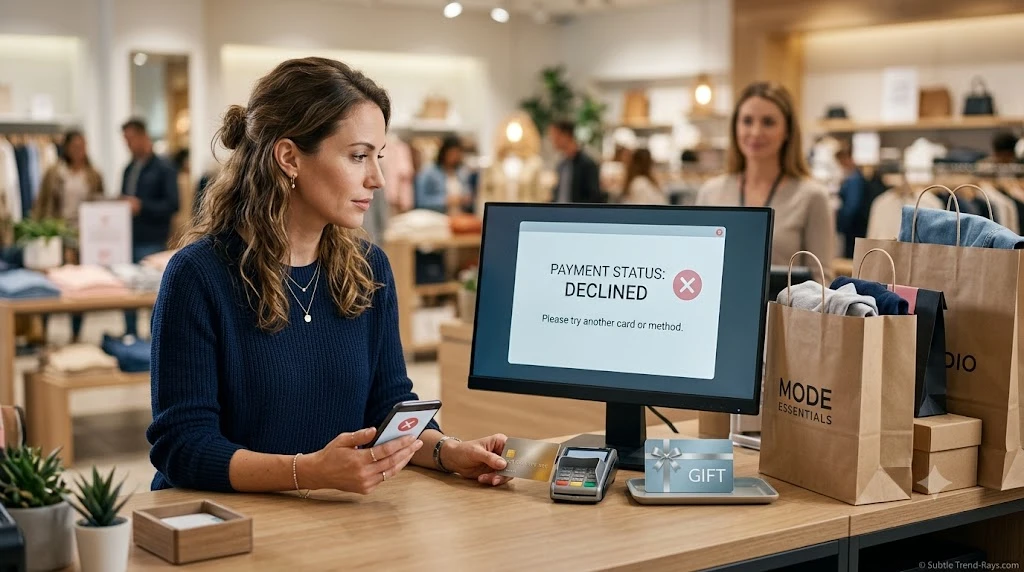
Why Gift Card and Credit Card Split Payments Sometimes Fail
One of the most frustrating checkout experiences is seeing your payment declined—even though you know there’s money on your gift card and your credit card is working.
In many cases, the problem isn’t with either payment method.
It’s the way the merchant’s checkout system processes split payments.
Fortunately, most issues have simple explanations and, in many cases, straightforward solutions.
The Gift Card Doesn’t Have Enough Balance
This is the most common reason shoppers experience problems.
For example:
Purchase Total:
$120
Gift Card Balance:
$35
If the retailer automatically recognizes the $35 balance, the remaining $85 is charged to your credit card.
However, if the checkout system attempts to authorize the full $120 on the gift card first, the transaction may fail.
This issue is far more common with prepaid Visa, Mastercard, and American Express gift cards than with retailer-issued gift cards.
The Merchant Doesn’t Support Split Payments
Not every retailer allows customers to combine multiple payment methods during checkout.
Some online stores require the entire purchase to be paid using a single payment card.
Others support retailer-issued gift cards but don’t allow split payments with prepaid gift cards.
Before assuming something is wrong with your cards, verify whether the merchant actually supports the payment combination you’re trying to use.
Your Credit Card Was Declined
Sometimes the gift card works perfectly—but the second payment method doesn’t.
Common reasons include:
- Insufficient available credit
- Incorrect billing address
- Expired card
- Temporary fraud protection
- Bank security checks
- Daily spending limits
If your credit card issuer declines the authorization, the entire purchase may fail even though the gift card was accepted.
Incorrect Gift Card Information
Entering the wrong gift card number or PIN is another common issue.
Double-check:
- Gift card number
- PIN or security code (if applicable)
- Remaining balance
- Activation status
A simple typing error can prevent the retailer from verifying the available balance.
Using a Prepaid Gift Card Online
Prepaid gift cards often create the most confusion during online shopping.
Unlike retailer-issued gift cards, they behave like standard payment cards.
If the merchant’s website doesn’t support partial authorizations or manual payment splits, the transaction may be declined—even when the prepaid card still has funds available.
In some cases, the same prepaid gift card may work successfully in a physical store where a cashier can process the transaction differently.
Authorization Holds
Some merchants place temporary authorization holds on payment cards before completing a purchase.
These holds can temporarily reduce your available balance.
If you’re using:
- a prepaid gift card,
- a debit card,
- or a credit card with limited available credit,
an authorization hold may leave less available funding than you expect.
Checking your current available balance before trying again can help avoid repeated declines.
The Retailer’s Checkout System Has Limitations
Every retailer uses a different payment platform.
Some systems automatically calculate remaining balances after applying a gift card.
Others don’t.
For example, one retailer may allow:
Gift Card → Credit Card
while another may only support:
Gift Card → Debit Card
or require the full balance to be paid using one payment method.
The checkout software—not just the payment methods—often determines whether split payment succeeds.
How to Improve Your Chances of Success
Before starting checkout:
- Check your gift card balance.
- Verify your credit card has enough available credit.
- Confirm your billing information is accurate.
- Read the retailer’s payment instructions.
- If using a prepaid Visa or Mastercard gift card, know the exact remaining balance.
- Keep a backup payment method available if needed.
A few minutes of preparation can prevent the majority of payment problems.
Quick Troubleshooting Checklist
Before trying again, ask yourself:
- ✅ Is this a retailer-issued gift card or a prepaid Visa/Mastercard gift card?
- ✅ Have I checked the exact remaining balance?
- ✅ Does the retailer support split payments?
- ✅ Does my credit card have enough available credit?
- ✅ Have I entered the correct gift card number and PIN?
- ✅ Could my bank have temporarily blocked the transaction?
Working through this checklist often identifies the problem without needing to contact customer support.
Key Takeaway
Most gift card and credit card split payment failures are not caused by the gift card itself.
Instead, they usually result from one of four issues:
- Insufficient available balance
- Merchant payment restrictions
- Credit card authorization problems
- Checkout system limitations
Understanding how each payment method works—and how the retailer processes split payments—can dramatically improve your chances of completing your purchase successfully.
In the next section, we’ll answer the most frequently asked questions about combining gift cards with credit cards, debit cards, prepaid gift cards, and other payment methods.

Why Retailers Allow Gift Card and Credit Card Split Payments
At first glance, allowing customers to combine a gift card with another payment method might seem like a simple convenience.
From a retailer’s perspective, however, it serves several important business purposes.
Understanding these reasons helps explain why many major retailers have invested in payment systems that support split payments.
Gift Cards Rarely Cover the Entire Purchase
Many gift cards are issued in fixed amounts such as:
- $10
- $25
- $50
- $100
In reality, customers often choose products that cost more than the value of the gift card.
Imagine a customer receives a $50 gift card for their birthday.
While shopping, they find a pair of wireless headphones priced at $129.
If the retailer didn’t allow another payment method, the customer would have two choices:
- Leave without buying the headphones.
- Choose a cheaper product.
By allowing the remaining $79 to be paid with a credit or debit card, the retailer completes the sale and the customer gets the item they actually wanted.
Split payments make this process simple.
Gift Cards Encourage Higher Spending
Retailers know that customers frequently spend more than the value of their gift card.
For example:
Gift Card Value:
$50
Actual Purchase:
$92
Additional Customer Spending:
$42
From the retailer’s perspective, allowing split payments increases the average transaction value while giving customers more flexibility.
Better Customer Experience
Nobody enjoys discovering at checkout that a gift card isn’t enough to complete a purchase.
Split payments reduce frustration by letting customers pay the remaining balance immediately instead of abandoning the purchase.
This creates a smoother shopping experience both online and in physical stores.
Fewer Abandoned Shopping Carts
Online retailers spend significant resources encouraging customers to complete their purchases.
If customers couldn’t combine a gift card with another payment method, many would simply leave the checkout page without buying anything.
Supporting split payments helps reduce abandoned carts and improves conversion rates.
Encouraging Gift Card Redemption
Retailers also benefit when customers redeem their gift cards.
A redeemed gift card often brings customers back into the store or onto the retailer’s website, where they’re likely to browse additional products and spend beyond the gift card’s value.
For many businesses, gift cards are not just payment tools—they’re also customer retention tools.
Why Some Retailers Don’t Allow Every Type of Split Payment
Although many retailers support gift card split payments, not every payment combination is possible.
This isn’t always because the retailer doesn’t want to offer the feature.
In many cases, technical and operational factors influence what’s supported.
Payment Processor Limitations
Every retailer relies on payment processing technology to authorize transactions.
Some systems can automatically process multiple payment methods during one purchase.
Others are designed to authorize only one payment card at a time.
These technical differences explain why two retailers may have very different checkout experiences.
Fraud Prevention
Allowing multiple payment methods can increase the complexity of fraud detection.
Retailers and payment processors monitor unusual payment patterns to reduce fraudulent transactions.
Restricting certain payment combinations may help lower the risk of payment fraud.
Refund Complexity
Refunds become more complicated when multiple payment methods are involved.
For example:
Purchase Total:
$180
Gift Card:
$50
Credit Card:
$130
If the customer later returns the item, the retailer must determine:
- How much should be refunded to the gift card?
- How much should return to the credit card?
Handling these situations correctly requires additional payment logic.
Older Checkout Systems
Some merchants still use older ecommerce or point-of-sale software that wasn’t designed to support flexible payment combinations.
Instead of manually calculating partial payments, these systems simply require one payment method to cover the full purchase.
As retailers modernize their payment platforms, support for flexible checkout options continues to improve.

Real Shopping Scenarios
Understanding real-world situations often makes split payments easier to visualize.
Scenario 1: Birthday Gift
Emma receives a $25 retailer gift card for her birthday.
She finds a jacket priced at $68.
At checkout:
- The retailer deducts $25 from the gift card.
- The remaining $43 is charged to her credit card.
Her purchase is completed in one transaction.
Scenario 2: Holiday Shopping
Michael has three retailer gift cards from the holiday season.
Rather than making three separate purchases, he combines the gift cards during checkout and pays the remaining balance with his debit card.
This allows him to use all of his gift card balances efficiently.
Scenario 3: Prepaid Visa Gift Card
Sophia has a prepaid Visa Gift Card with $18.72 remaining.
She attempts to buy a $60 item online.
Because the merchant’s website doesn’t support partial authorizations for prepaid cards, the payment is declined.
The same card may work successfully in a physical store if the retailer’s point-of-sale system supports manual split payments.
Scenario 4: Family Shopping
A father uses a retailer gift card he received through a workplace reward program.
His daughter pays the remaining balance using her credit card.
Together, they complete the purchase without wasting the remaining gift card balance.
These everyday situations explain why split payments have become an important feature for both shoppers and retailers.

Smart Payment Strategies Before Checkout
Whether you’re shopping online or in a physical store, a few simple habits can make split payments much smoother.
Use Retailer Gift Cards First
Retailer-issued gift cards are generally processed automatically, making them the easiest payment method to apply before another card.
Check Your Remaining Balance
Knowing your exact gift card balance before shopping helps you estimate how much will remain to be paid with another payment method.
Keep a Backup Payment Method Available
Even if you expect your gift card to cover most of the purchase, having a credit or debit card ready can prevent unnecessary delays at checkout.
For Prepaid Gift Cards, Know the Exact Balance
Prepaid Visa, Mastercard, and American Express Gift Cards often work best when you know the precise remaining balance before attempting a purchase.
This can reduce the likelihood of declined authorizations.
Review Retailer Payment Policies
Payment policies can change over time.
If you’re planning a large purchase, spending a few moments reviewing the retailer’s accepted payment methods can help avoid surprises during checkout.
Key Takeaway
Split payments aren’t simply a customer convenience—they’re also a practical solution for retailers.
By allowing customers to combine gift cards with another payment method, retailers make it easier to complete purchases, reduce abandoned carts, encourage gift card redemption, and improve the overall shopping experience.
For shoppers, understanding how and why these payment systems work makes it much easier to choose the right payment method, avoid common checkout problems, and use every dollar of a gift card effectively.
Frequently Asked Questions
Can You Use a Gift Card and a Credit Card Together?
Yes, in many cases.
Many retailers allow customers to apply the balance from a retailer-issued gift card first and then charge the remaining amount to a credit card.
However, support depends on the retailer’s checkout system and the type of gift card you’re using.
Can You Use a Gift Card and a Debit Card Together?
Yes.
Many retailers also allow customers to combine a retailer-issued gift card with a debit card.
The gift card balance is generally deducted first, and the remaining amount is charged to the debit card.
What Happens If My Gift Card Doesn’t Cover the Full Purchase?
If the retailer supports split payments, the remaining balance can usually be paid with another eligible payment method such as a credit card or debit card.
If split payments aren’t supported, you may need to use a different payment method or complete the purchase at another retailer that allows multiple payment sources.
Can You Split Payment With a Visa Gift Card?
Sometimes.
Visa Gift Cards are processed as prepaid payment cards rather than retailer gift cards.
Whether they can be combined with another payment method depends on the merchant’s checkout system.
Some retailers support this type of split payment, while others require the prepaid card to cover the entire purchase amount.
Can You Split Payment With a Mastercard Gift Card?
Yes, in some situations.
Like Visa Gift Cards, prepaid Mastercard Gift Cards behave like payment cards rather than store credit.
Support for split payments varies by retailer.
Knowing the exact remaining balance before checkout can improve the chances of a successful transaction.
Can You Use Multiple Gift Cards for One Purchase?
Often, yes.
Many retailers allow customers to redeem multiple retailer-issued gift cards during one transaction.
If the combined balances don’t fully cover the purchase, another eligible payment method can usually be used for the remaining amount.
The number of gift cards accepted per order may vary by retailer.
Does Online Checkout Work the Same as In-Store Checkout?
Not always.
Physical stores often have more flexible checkout systems because cashiers can manually assist with certain payment scenarios.
Online checkout is usually more automated, which may limit some split payment combinations—especially when using prepaid Visa or Mastercard Gift Cards.
Why Is My Gift Card Being Declined?
Common reasons include:
- The available balance is lower than expected.
- The gift card hasn’t been activated.
- The card number or PIN was entered incorrectly.
- The retailer doesn’t support the payment combination you’re attempting.
- The merchant’s checkout system doesn’t support partial authorizations.
Checking your gift card balance before shopping is one of the easiest ways to avoid these issues.
Are Retailer Gift Cards Better Than Prepaid Gift Cards for Split Payments?
In most cases, yes.
Retailer-issued gift cards are integrated directly into the retailer’s payment system, allowing the remaining balance to be calculated automatically.
Prepaid Visa, Mastercard, and American Express Gift Cards rely on the merchant’s payment processor, making split payments less predictable.
Yes, in many situations.
For example, one person may contribute a retailer gift card while the second person pays the remaining balance using a credit or debit card.
Whether this is possible depends on the retailer’s accepted payment combinations.
Which Retailers Commonly Allow Gift Card and Credit Card Split Payments?
Many major retailers support this payment method for their own retailer-issued gift cards, including:
- Target
- Walmart
- Best Buy
- Costco
- IKEA
- Macy’s
Policies can change, so it’s always worth checking the retailer’s latest payment information before making a large purchase.
Final Thoughts
If you’ve been wondering whether you can split payment between a gift card and a credit card, the answer is yes in many cases—but the type of gift card matters.
Retailer-issued gift cards are generally the easiest to combine with another payment method because they’re managed by the retailer’s own checkout system.
Prepaid Visa, Mastercard, and American Express Gift Cards can also work, but support varies depending on the merchant and whether its payment system allows partial authorizations or split payments.
Before shopping, remember these three simple rules:
- Know what type of gift card you have.
- Check the remaining balance before checkout.
- Confirm that the retailer supports the payment combination you want to use.
Following these steps can help you avoid declined transactions and make the checkout process much smoother.
Related Guides
If you’re shopping at a specific retailer, these detailed guides may help:
- Can You Split Payment Between Two Cards Online?
- Can You Split Payment on Walmart?
- Can You Split Payment on Target?
- Can You Split Payment on Best Buy?
Each guide explains the retailer’s payment policies, supported payment combinations, common checkout issues, and practical tips for completing your purchase successfully.