If you’re shopping on Walmart and wondering whether you can pay with two different credit cards, two debit cards, or multiple payment methods, you’re not alone.
This is one of the most common checkout questions shoppers ask—especially when:
- One card doesn’t have enough available funds.
- You want to use the remaining balance on a gift card.
- You’re splitting a purchase with someone else.
- You’re trying to use store credit alongside another payment method.
- You have money spread across multiple accounts.
Unfortunately, Walmart’s payment rules aren’t always obvious, and the answer depends on how you’re shopping and which payment methods you’re using.
For example, using a Walmart Gift Card together with another payment method is treated differently from attempting to use two separate debit cards. Likewise, some payment combinations available in-store may not be available through Walmart’s online checkout.
This guide explains exactly what Walmart allows, what it doesn’t allow, and the practical alternatives available if your preferred payment combination isn’t supported.
Whether you’re shopping on Walmart.com, using the Walmart app, or checking out in a physical store, you’ll learn which payment methods work together and how to avoid common checkout problems.
Quick Answer
If you’re looking for the short version, here’s what you need to know.
| Payment Combination | Walmart Online | Walmart Stores |
|---|---|---|
| Two Credit Cards | ❌ Generally Not Supported | ❌ Generally Not Supported |
| Two Debit Cards | ❌ Generally Not Supported | ❌ Generally Not Supported |
| Credit Card + Debit Card | ❌ Generally Not Supported | ⚠️ May vary by transaction and cashier assistance |
| Walmart Gift Card + Credit Card | ✅ Yes | ✅ Yes |
| Walmart Gift Card + Debit Card | ✅ Yes | ✅ Yes |
| Walmart Gift Card + Walmart Gift Card | ✅ Yes (within system limits) | ✅ Yes |
| Walmart Gift Card + Walmart Pay | ✅ Yes | ✅ Yes |
| EBT + Another Payment Method (eligible purchases) | ✅ Supported for qualifying items | ✅ Supported for qualifying items |
| FSA/HSA Card + Another Payment Method (eligible purchases) | ✅ Supported for qualifying items | ✅ Supported for qualifying items |
The Short Answer
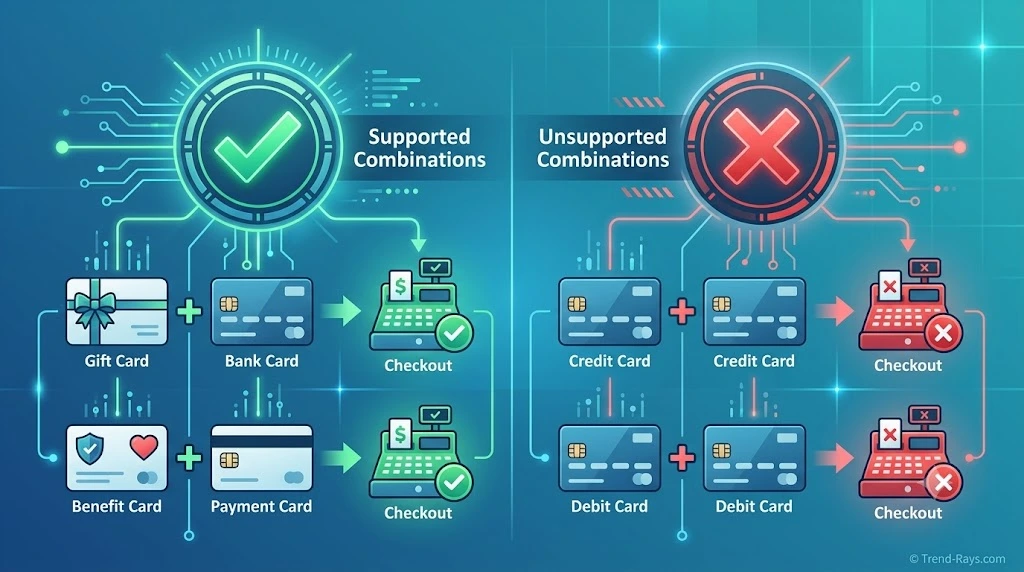
For most online purchases, Walmart does not allow customers to split one transaction between two separate credit cards or two separate debit cards.
However, Walmart does support several other payment combinations, including:
- Walmart Gift Cards with another eligible payment method.
- EBT combined with another payment method for qualifying purchases.
- FSA or HSA cards combined with another payment method for eligible healthcare products.
- Walmart Gift Cards used together when redeeming available balances.
This distinction is important because many shoppers confuse split payment with using a gift card plus another payment method.
Although both involve multiple payment sources, Walmart processes them differently behind the scenes.
Throughout this guide, we’ll explain exactly how each payment combination works and which alternatives are available if Walmart doesn’t support the payment method you were hoping to use.
Understanding Walmart’s Split Payment Policy
One reason shoppers become confused is that Walmart accepts many different payment methods, but not all of them can be combined during the same checkout.
Walmart’s checkout system is designed to keep payment processing simple and secure. In most cases, it authorizes a single primary bank card for each transaction while allowing certain retailer-managed balances—such as Walmart Gift Cards—or government benefit cards for eligible purchases to be applied first.
This means there is a significant difference between:
- Using two separate bank cards, and
- Combining a gift card or eligible benefit card with another payment method.
For example:
Generally Allowed
- Walmart Gift Card + Credit Card
- Walmart Gift Card + Debit Card
- EBT + Debit Card (for eligible purchases)
- FSA/HSA Card + Credit or Debit Card (for eligible healthcare items)
Generally Not Allowed
- Credit Card + Credit Card
- Debit Card + Debit Card
- Credit Card + Debit Card during standard online checkout
Because Walmart’s payment system treats retailer-issued balances differently from bank-issued cards, these combinations are processed using separate rules.
Understanding that distinction makes it much easier to know what to expect before you reach the payment page—and can help you avoid declined transactions or checkout delays.
In the next section, we’ll take a closer look at what Walmart officially says about split payments and explain how those policies apply to real-world shopping scenarios.
What Walmart Officially Says About Split Payments
The confusion around Walmart’s split payment policy usually comes from one simple misunderstanding:
Walmart supports multiple types of payment methods—but it doesn’t treat them all the same way.
Many shoppers assume that because Walmart accepts gift cards, debit cards, credit cards, EBT, and digital wallets, they should also be able to combine any two payment methods during checkout.
In reality, Walmart’s payment system separates bank-issued payment methods from retailer-issued balances and eligible benefit cards.
That distinction determines which payment combinations are accepted.
Bank Cards vs. Walmart-Managed Balances
Think of Walmart’s checkout as processing payments in two different categories.
Category 1: Bank-Issued Payment Methods
These include:
- Visa credit cards
- Mastercard credit cards
- American Express cards
- Discover cards
- Debit cards linked to checking accounts
For standard online orders, Walmart generally authorizes one primary bank card for the transaction.
Because of this, customers usually cannot divide a purchase between:
- Two credit cards
- Two debit cards
- One credit card and one debit card
Category 2: Walmart-Managed or Eligible Payment Sources
These include payment methods that Walmart can process separately before requesting authorization from your bank.
Examples include:
- Walmart Gift Cards
- Walmart eGift Cards
- EBT cards for eligible grocery purchases
- FSA or HSA cards for qualifying healthcare products
Since these payment sources follow different processing rules, Walmart can often apply their available balance first before charging the remaining amount to another eligible payment method.
This is why shoppers are able to combine a Walmart Gift Card with a debit or credit card, even though they generally can’t combine two different bank cards.
Why This Difference Matters
Imagine these two checkout scenarios.
Example 1
Purchase Total:
$150
You have:
- Walmart Gift Card: $50
- Credit Card
Result:
The gift card is applied first.
The remaining $100 is charged to your credit card.
This type of transaction is commonly supported because the gift card is managed within Walmart’s own payment system.
Example 2
Purchase Total:
$150
You have:
- Credit Card A: $75 available
- Credit Card B: $75 available
Many shoppers expect Walmart to split the payment evenly between both cards.
In most cases, Walmart’s online checkout does not support this type of transaction because it would require two separate bank-card authorizations for one purchase.
Why Doesn’t Walmart Simply Allow Two Cards?
From a customer’s perspective, splitting a payment seems straightforward.
Behind the scenes, however, every card transaction requires:
- Authorization from the card issuer.
- Fraud and security checks.
- Funds verification.
- Settlement with the payment network.
- Refund tracking if the order is cancelled or returned.
Using two separate bank cards adds another layer of complexity to each of these steps.
For a retailer processing millions of transactions every day, keeping online checkout focused on one primary bank card helps reduce payment errors, simplify refunds, and improve checkout speed.
That’s one reason why many large ecommerce retailers follow a similar approach.
Does Walmart’s Policy Differ Online and In Stores?
Sometimes.
Walmart.com has standardized payment rules built into its online checkout system.
Physical stores, on the other hand, involve:
- Cashiers
- Self-checkout systems
- Different payment terminals
- Store-specific operational procedures
Because of this, certain payment situations may be handled differently in-store than online.
For example, customers using cash, Walmart Gift Cards, or eligible benefit cards may have more flexibility during an in-store purchase than during an online checkout.
However, shoppers should not assume that physical stores routinely allow purchases to be divided between two separate credit or debit cards, as this is generally not part of Walmart’s standard payment policy.
We’ll examine the differences between online shopping and in-store purchases in more detail later in this guide.
The Key Takeaway
The most important thing to remember is that Walmart distinguishes between payment methods it manages internally and those issued by banks.
That distinction explains why combinations such as:
- Walmart Gift Card + Credit Card
- Walmart Gift Card + Debit Card
- EBT + Another Eligible Payment Method
are generally supported,
while combinations such as:
- Credit Card + Credit Card
- Debit Card + Debit Card
are generally not available through Walmart’s standard online checkout.
Understanding this difference makes the rest of Walmart’s payment policy much easier to follow.
In the next section, we’ll answer one of the most searched questions directly:
Can you use two credit cards on Walmart?
Can You Use Two Credit Cards on Walmart?
Short Answer
No—Walmart generally does not allow customers to split a single online purchase between two separate credit cards.
If you’re shopping on Walmart.com or using the Walmart app, you’ll typically be asked to choose one primary credit card to complete your purchase.
Although Walmart accepts major credit cards for online orders, its standard checkout system isn’t designed to divide one transaction across multiple credit card authorizations.
For shoppers who have available credit spread across two different cards, this can be frustrating—but it’s a limitation of Walmart’s checkout process rather than your credit cards themselves.
Why Doesn’t Walmart Accept Two Credit Cards?
At first glance, splitting a purchase between two credit cards seems simple.
For example:
Purchase Total:
$200
Credit Card A:
$120 available
Credit Card B:
$80 available
Many shoppers expect Walmart to process:
- Card A → $120
- Card B → $80
However, online payment systems must complete several steps before an order is approved.
Each credit card transaction requires:
- Authorization from the issuing bank.
- Fraud and identity verification.
- Confirmation of available credit.
- Payment network approval.
- Settlement after the purchase is completed.
Repeating this process for multiple credit cards during one checkout increases complexity and can create additional challenges if:
- The order is cancelled.
- An item is returned.
- One authorization succeeds while another fails.
- A temporary hold is placed on one of the cards.
To keep checkout faster and more reliable, Walmart generally processes one primary credit card transaction for each online order.
What If One Credit Card Doesn’t Have Enough Available Credit?
This is one of the most common reasons shoppers search for split payment options.
Imagine you’re purchasing a new television for $650.
Your available credit is:
Card A:
$400
Card B:
$500
Although your total available credit is more than enough, Walmart’s online checkout usually won’t divide the purchase between both cards.
Instead, you’ll need to consider another approach.
Possible alternatives include:
- Using a Walmart Gift Card together with your credit card.
- Reducing the size of your purchase.
- Splitting the purchase into multiple eligible orders.
- Using another payment method with sufficient available funds.
- Choosing an eligible financing option if available.
We’ll explore each of these alternatives later in this guide.
Does This Apply to the Walmart App Too?
Yes.
The Walmart app generally follows the same payment rules as Walmart.com.
If you’re checking out through the app, you’ll normally select one primary credit card for the transaction.
Available Walmart Gift Cards, eligible benefit cards, or other supported payment methods may still be applied where appropriate, but using two separate credit cards for one online purchase is generally not part of the standard checkout experience.
Are There Any Exceptions?
Most everyday online purchases follow the same payment policy.
However, there are situations where your final payment experience may differ depending on:
- The type of product.
- The payment method selected.
- Eligible government benefit cards.
- Walmart Gift Card balances.
- Available financing options.
- In-store purchases handled by store associates.
These situations don’t usually involve splitting a purchase between two separate credit cards, but they can affect which payment combinations are available.
Better Alternatives to Two Credit Cards
If your goal is simply to complete your purchase, one of these options may work better than trying to split the payment between two credit cards.
Use a Walmart Gift Card
If you already have a Walmart Gift Card—or purchase one using another payment source—you can often apply that balance before paying the remaining amount with a single credit card.
Split the Purchase Into Separate Orders
When practical, dividing your items into two different orders allows you to use different payment methods for each transaction.
Before doing this, check:
- Shipping costs
- Minimum order requirements
- Promotional discounts
- Product availability
Consider Walmart Financing
Depending on eligibility and the products you’re purchasing, Walmart may offer financing solutions through participating providers.
These options aren’t the same as using two credit cards, but they can help shoppers complete larger purchases without needing multiple payment cards.
Key Takeaway
If you’re hoping to divide a Walmart online purchase between two separate credit cards, the answer is generally no.
Walmart’s online checkout is designed to process one primary credit card transaction per order, while allowing certain retailer-managed payment sources—such as Walmart Gift Cards—or eligible benefit cards to be combined where applicable.
For shoppers who need additional flexibility, alternatives like gift cards, separate orders, or eligible financing options are usually more effective than attempting to split a purchase between two credit cards.
Next, we’ll answer another common question:
Can you use two debit cards on Walmart?
Can You Use Two Debit Cards on Walmart?
Short Answer
No—Walmart generally does not allow customers to split a single online purchase between two separate debit cards.
If you’re shopping on Walmart.com or using the Walmart app, you’ll normally need to complete your purchase using one primary debit card or another eligible payment combination supported during checkout.
Although debit cards are accepted for most Walmart purchases, the standard online checkout process isn’t designed to divide one transaction across multiple debit cards.
Why Shoppers Want to Use Two Debit Cards
Unlike credit cards, debit cards are linked directly to available funds in a bank account.
Many shoppers search for this option because their money is divided between different accounts.
Common situations include:
- You have two checking accounts.
- Part of your paycheck was deposited into another account.
- You’re using a prepaid debit card with a remaining balance.
- You’re shopping with a family member who wants to contribute.
- One debit card doesn’t have enough available funds for the full purchase.
For example:
Purchase Total:
$180
Debit Card A:
$100 available
Debit Card B:
$120 available
Although you have enough money overall, Walmart’s online checkout generally won’t split the transaction between both cards.
Why Doesn’t Walmart Allow Two Debit Cards?
The reason is similar to Walmart’s policy on multiple credit cards.
Each debit card transaction requires:
- Bank authorization.
- Available balance verification.
- Fraud screening.
- Payment approval.
- Final settlement after the order is processed.
If one authorization succeeds while another fails, processing the order becomes significantly more complicated.
Refunds can also become more difficult because the retailer must determine exactly how much should be returned to each payment source.
To simplify checkout and reduce payment errors, Walmart generally processes one primary debit card per online transaction.
What About Prepaid Debit Cards?
Many prepaid debit cards function like standard debit cards during online checkout.
However, Walmart generally treats them as a single payment method rather than allowing customers to combine multiple prepaid debit cards in one online order.
If your prepaid card doesn’t contain enough funds to cover the purchase, the transaction may be declined unless another supported payment combination is available.
Does This Rule Apply In Store?
In most situations, Walmart’s standard policy regarding multiple bank cards remains the same.
However, physical stores may occasionally offer additional flexibility depending on:
- The payment terminal.
- The type of purchase.
- Store procedures.
- Assistance from a cashier.
Because in-store payment experiences can vary, shoppers should avoid assuming that a purchase can always be divided between two debit cards simply because they’re shopping in person.
If you’re planning a large purchase, asking a store associate before checkout is often the best approach.
Better Alternatives If One Debit Card Doesn’t Have Enough Money
Instead of trying to use two debit cards, consider one of these options.
Use a Walmart Gift Card
If you already have a Walmart Gift Card, you can generally apply it first and pay the remaining balance with one eligible debit card.
Wait for Pending Transactions to Clear
Sometimes your available balance appears lower than expected because another purchase has placed a temporary authorization hold on your account.
Waiting until those holds are released may give your debit card enough available funds to complete the purchase.
Transfer Funds Between Accounts
If both debit cards belong to you, transferring money into one account before shopping may be easier than attempting to use two separate payment methods.
Transfer times vary depending on your bank and the transfer method you choose.
Split the Purchase Into Separate Orders
If your cart contains multiple items, creating two separate orders may allow you to use a different payment method for each transaction.
Before doing this, consider:
- Shipping costs.
- Delivery times.
- Promotional discounts.
- Stock availability.
Can You Combine a Debit Card With Other Payment Methods?
Yes—in certain situations.
Examples that are commonly supported include:
- Walmart Gift Card + Debit Card
- EBT + Debit Card (for eligible purchases)
- FSA or HSA Card + Debit Card (for qualifying healthcare items)
These payment combinations work because Walmart processes retailer-managed balances or eligible benefit cards differently from standard bank-issued debit cards.
Key Takeaway
If you’re hoping to split one Walmart online purchase between two separate debit cards, the answer is generally no.
Instead, Walmart’s checkout is designed around one primary debit card while allowing certain supported payment combinations—such as Walmart Gift Cards or eligible benefit cards—to be applied where appropriate.
If your debit card doesn’t have enough available funds, using a supported alternative or adjusting your purchase is usually the most practical solution.
Next, we’ll look at one of the payment combinations that does work for many shoppers:
Using a Walmart Gift Card together with another payment method.

Can You Use a Walmart Gift Card With Another Payment Method?
Short Answer
Yes.
Unlike two separate credit cards or two debit cards, Walmart generally allows customers to combine a Walmart Gift Card with another eligible payment method during checkout.
This is one of the few forms of split payment that Walmart’s online checkout is specifically designed to support.
For many shoppers, this is the easiest solution when a gift card doesn’t cover the full purchase price.
How It Works
When you apply a Walmart Gift Card during checkout, Walmart deducts the available gift card balance first.
If money is still owed, the remaining balance is charged to your selected payment method.
Example
Order Total:
$175
Walmart Gift Card Balance:
$60
Remaining Balance:
$115
Checkout Result:
- Walmart Gift Card → $60
- Credit Card → $115
The same process generally works if you’re using an eligible debit card instead of a credit card.
Can You Combine a Walmart Gift Card With a Credit Card?
Yes.
This is one of the most common payment combinations supported by Walmart.
Typical checkout flow:
- Apply your Walmart Gift Card.
- Walmart deducts the available balance.
- Your credit card is charged for the remaining amount.
This makes Walmart Gift Cards especially useful when:
- You’ve received one as a gift.
- You’re using promotional rewards.
- Your gift card balance isn’t enough to cover the full purchase.
Can You Combine a Walmart Gift Card With a Debit Card?
Yes.
The checkout process is similar.
Example:
Purchase Total:
$90
Gift Card:
$25
Debit Card:
Charged $65
For many shoppers, this is the simplest way to complete an order when they have a remaining gift card balance.
Can You Use More Than One Walmart Gift Card?
In many cases, yes.
Walmart generally allows customers to redeem multiple Walmart Gift Cards during a single online purchase, subject to system limits.
This can be helpful if you’ve accumulated several smaller gift cards over time.
For example:
- Birthday gift cards
- Holiday gift cards
- Promotional gift cards
- Customer service credits
If the combined gift card balance still doesn’t cover your purchase, the remaining amount can usually be paid using another eligible payment method.
Why Walmart Allows Gift Cards but Not Two Credit Cards
Many shoppers find this confusing.
After all, both situations involve using more than one payment source.
The difference is how the payment is processed.
A Walmart Gift Card is issued and managed by Walmart.
Because Walmart controls the gift card balance, it can:
- Verify the balance instantly.
- Deduct the available amount immediately.
- Calculate the remaining balance before requesting payment from your bank.
Two credit cards work differently.
Each card requires a separate authorization from a different financial institution, making checkout, refunds, and payment processing significantly more complex.
That’s why Walmart supports one of these payment combinations but generally not the other.
What Happens If Your Gift Card Doesn’t Cover the Entire Purchase?
Nothing unusual.
The checkout simply calculates the remaining balance after your gift card has been applied.
For example:
Purchase Total:
$210
Gift Card Balance:
$45
Remaining Payment:
$165
As long as your selected payment method has enough available funds or credit, the transaction can usually be completed without any additional steps.
Can You Reload a Walmart Gift Card During Checkout?
No.
If your gift card balance isn’t enough, you’ll need to complete the purchase using another eligible payment method or reload the gift card separately if that option is available.
The online checkout itself isn’t designed to add funds to an existing gift card during the payment process.
Common Mistakes to Avoid
❌ Assuming Every Gift Card Works the Same Way
Only eligible Walmart Gift Cards can be applied through Walmart’s checkout system.
Third-party gift cards purchased at Walmart generally follow the rules of their own issuer.
❌ Forgetting to Check Your Remaining Balance
Before shopping, verify your gift card balance.
Knowing exactly how much is available helps prevent payment errors and reduces the chance of interrupted checkout.
❌ Trying to Replace a Second Credit Card With Another Bank Card
Remember that a Walmart Gift Card is processed differently from a bank-issued payment card.
If your goal is to use two separate debit or credit cards, adding another bank card usually won’t bypass Walmart’s checkout restrictions.
Key Takeaway
If you’re looking for a supported form of split payment at Walmart, using a Walmart Gift Card together with another eligible payment method is usually your best option.
Unlike two separate credit or debit cards, Walmart Gift Cards are integrated into Walmart’s payment system, allowing the available balance to be applied first before charging the remaining amount to an eligible credit or debit card.
For many shoppers, this provides nearly the same flexibility as traditional split payment while remaining fully supported by Walmart’s checkout process.
In the next section, we’ll examine another important distinction that often confuses shoppers:
How Walmart’s payment options differ between online checkout and shopping in physical stores.
Can You Use a Walmart Gift Card With Another Payment Method?
Short Answer
Yes.
Unlike two separate credit cards or two debit cards, Walmart generally allows customers to combine a Walmart Gift Card with another eligible payment method during checkout.
This is one of the few forms of split payment that Walmart’s online checkout is specifically designed to support.
For many shoppers, this is the easiest solution when a gift card doesn’t cover the full purchase price.
How It Works
When you apply a Walmart Gift Card during checkout, Walmart deducts the available gift card balance first.
If money is still owed, the remaining balance is charged to your selected payment method.
Example
Order Total:
$175
Walmart Gift Card Balance:
$60
Remaining Balance:
$115
Checkout Result:
- Walmart Gift Card → $60
- Credit Card → $115
The same process generally works if you’re using an eligible debit card instead of a credit card.
Can You Combine a Walmart Gift Card With a Credit Card?
Yes.
This is one of the most common payment combinations supported by Walmart.
Typical checkout flow:
- Apply your Walmart Gift Card.
- Walmart deducts the available balance.
- Your credit card is charged for the remaining amount.
This makes Walmart Gift Cards especially useful when:
- You’ve received one as a gift.
- You’re using promotional rewards.
- Your gift card balance isn’t enough to cover the full purchase.
Can You Combine a Walmart Gift Card With a Debit Card?
Yes.
The checkout process is similar.
Example:
Purchase Total:
$90
Gift Card:
$25
Debit Card:
Charged $65
For many shoppers, this is the simplest way to complete an order when they have a remaining gift card balance.
Can You Use More Than One Walmart Gift Card?
In many cases, yes.
Walmart generally allows customers to redeem multiple Walmart Gift Cards during a single online purchase, subject to system limits.
This can be helpful if you’ve accumulated several smaller gift cards over time.
For example:
- Birthday gift cards
- Holiday gift cards
- Promotional gift cards
- Customer service credits
If the combined gift card balance still doesn’t cover your purchase, the remaining amount can usually be paid using another eligible payment method.
Why Walmart Allows Gift Cards but Not Two Credit Cards
Many shoppers find this confusing.
After all, both situations involve using more than one payment source.
The difference is how the payment is processed.
A Walmart Gift Card is issued and managed by Walmart.
Because Walmart controls the gift card balance, it can:
- Verify the balance instantly.
- Deduct the available amount immediately.
- Calculate the remaining balance before requesting payment from your bank.
Two credit cards work differently.
Each card requires a separate authorization from a different financial institution, making checkout, refunds, and payment processing significantly more complex.
That’s why Walmart supports one of these payment combinations but generally not the other.
What Happens If Your Gift Card Doesn’t Cover the Entire Purchase?
Nothing unusual.
The checkout simply calculates the remaining balance after your gift card has been applied.
For example:
Purchase Total:
$210
Gift Card Balance:
$45
Remaining Payment:
$165
As long as your selected payment method has enough available funds or credit, the transaction can usually be completed without any additional steps.
Can You Reload a Walmart Gift Card During Checkout?
No.
If your gift card balance isn’t enough, you’ll need to complete the purchase using another eligible payment method or reload the gift card separately if that option is available.
The online checkout itself isn’t designed to add funds to an existing gift card during the payment process.
Common Mistakes to Avoid
❌ Assuming Every Gift Card Works the Same Way
Only eligible Walmart Gift Cards can be applied through Walmart’s checkout system.
Third-party gift cards purchased at Walmart generally follow the rules of their own issuer.
❌ Forgetting to Check Your Remaining Balance
Before shopping, verify your gift card balance.
Knowing exactly how much is available helps prevent payment errors and reduces the chance of interrupted checkout.
❌ Trying to Replace a Second Credit Card With Another Bank Card
Remember that a Walmart Gift Card is processed differently from a bank-issued payment card.
If your goal is to use two separate debit or credit cards, adding another bank card usually won’t bypass Walmart’s checkout restrictions.
Key Takeaway
If you’re looking for a supported form of split payment at Walmart, using a Walmart Gift Card together with another eligible payment method is usually your best option.
Unlike two separate credit or debit cards, Walmart Gift Cards are integrated into Walmart’s payment system, allowing the available balance to be applied first before charging the remaining amount to an eligible credit or debit card.
For many shoppers, this provides nearly the same flexibility as traditional split payment while remaining fully supported by Walmart’s checkout process.
In the next section, we’ll examine another important distinction that often confuses shoppers:
How Walmart’s payment options differ between online checkout and shopping in physical stores.
Online vs. In-Store: Does Walmart’s Split Payment Policy Change?
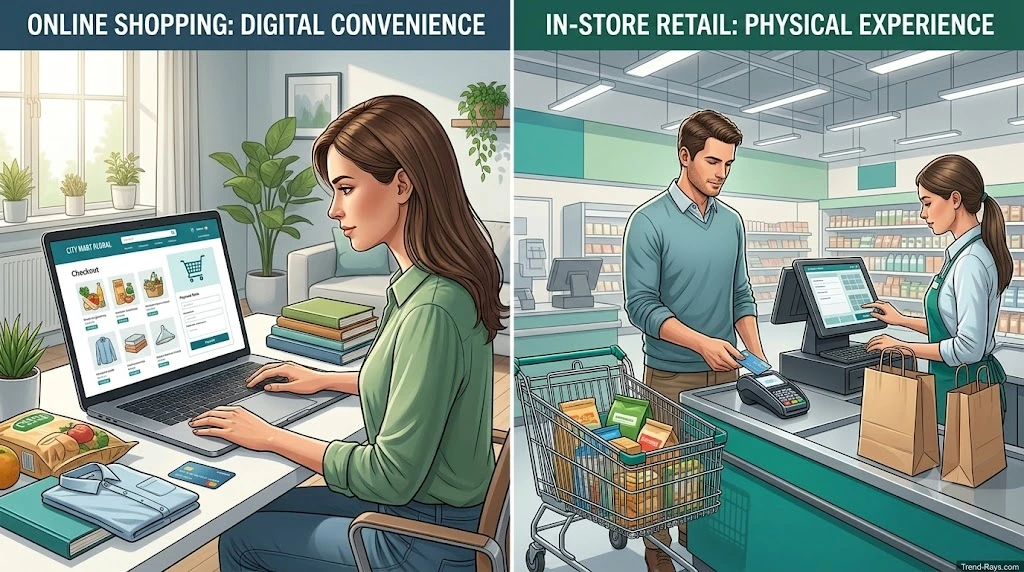
One reason shoppers find conflicting answers online is that shopping on Walmart.com isn’t the same as shopping in a physical Walmart store.
Although both use Walmart’s payment systems, the checkout experience is different.
Online purchases follow standardized rules built into Walmart’s ecommerce platform, while in-store purchases involve payment terminals, cashiers, and sometimes store-specific procedures.
Understanding this difference can help you avoid unexpected payment issues.
Walmart.com (Online Checkout)
For most online purchases, Walmart’s checkout is designed around a single primary bank-issued payment card.
That means you generally cannot split one online order between:
- Two credit cards
- Two debit cards
- One credit card and one debit card
However, Walmart does support several other payment combinations for eligible transactions, including:
- Walmart Gift Card + Credit Card
- Walmart Gift Card + Debit Card
- Eligible EBT + Another Payment Method
- Eligible FSA/HSA Card + Another Payment Method
Because these payment methods are processed differently, they can often be combined during checkout even though two separate bank cards cannot.
Shopping in a Physical Walmart Store
In-store purchases work differently because payment is processed through a point-of-sale (POS) terminal rather than Walmart’s online checkout.
Depending on the type of purchase and the payment methods involved, shoppers may have access to options that don’t exist online, such as:
- Paying part of an order with cash.
- Using a Walmart Gift Card before another payment method.
- Combining eligible benefit cards with another payment method for qualifying items.
However, this should not be interpreted as a general policy allowing two separate credit cards or two separate debit cards for one purchase.
If you’re planning to use multiple payment methods in a physical store, it’s best to ask a cashier before completing your purchase, as payment capabilities can vary depending on the transaction and store equipment.
What About Self-Checkout?
Self-checkout often creates the most confusion.
Many shoppers assume that because they’re operating the payment terminal themselves, they’ll have more flexibility.
In reality, self-checkout generally follows the same payment rules programmed into Walmart’s in-store systems.
For example, shoppers can commonly:
- Redeem Walmart Gift Cards.
- Use eligible payment methods for qualifying purchases.
- Complete purchases with one primary debit or credit card.
If your intended payment combination isn’t supported by the self-checkout terminal, a store associate may be able to advise you on available alternatives.
Why Online and In-Store Experiences Can Feel Different
The biggest difference is how the transaction is processed.
Online orders are handled by Walmart’s ecommerce platform, which follows consistent payment rules for millions of customers.
In stores, transactions pass through:
- Point-of-sale terminals.
- Cash registers.
- Self-checkout systems.
- Store associates when assistance is needed.
Because the payment environment is different, customers sometimes report experiences that don’t exactly match online checkout.
That’s why you’ll occasionally find conflicting advice on forums or social media.
When in doubt, rely on Walmart’s published payment policies and confirm unusual payment situations with a store associate before beginning checkout.
Online vs. In-Store Comparison
| Payment Scenario | Walmart.com | Walmart Store |
|---|---|---|
| Two Credit Cards | ❌ Generally not supported | ❌ Generally not supported |
| Two Debit Cards | ❌ Generally not supported | ❌ Generally not supported |
| Walmart Gift Card + Credit Card | ✅ Yes | ✅ Yes |
| Walmart Gift Card + Debit Card | ✅ Yes | ✅ Yes |
| Cash + Card | ❌ Not applicable | ✅ Yes |
| Eligible EBT + Another Payment Method | ✅ For qualifying purchases | ✅ For qualifying purchases |
| Eligible FSA/HSA + Another Payment Method | ✅ For qualifying purchases | ✅ For qualifying purchases |
Which Option Gives You More Flexibility?
If your preferred payment method isn’t supported online, shopping in a physical Walmart store may provide additional options depending on the type of payment you’re using.
For example, paying with cash, redeeming certain store-issued balances, or receiving assistance from a cashier may be easier in person than through an automated online checkout.
However, shoppers should not expect physical stores to routinely split purchases between two separate credit cards or two separate debit cards, as that is generally not part of Walmart’s standard payment process.
Key Takeaway
Whether you’re shopping online or visiting a Walmart store, the most important distinction is the type of payment method you’re trying to combine—not simply where you’re shopping.
Walmart generally supports combinations involving Walmart Gift Cards and certain eligible benefit cards, while two separate bank-issued cards are typically not accepted as a standard split-payment option.
Understanding this difference can help you choose the right payment method before you reach checkout and avoid unnecessary payment declines or delays.
In the next section, we’ll look at the best alternatives if Walmart doesn’t support the payment combination you wanted to use, including practical workarounds that many shoppers overlook.
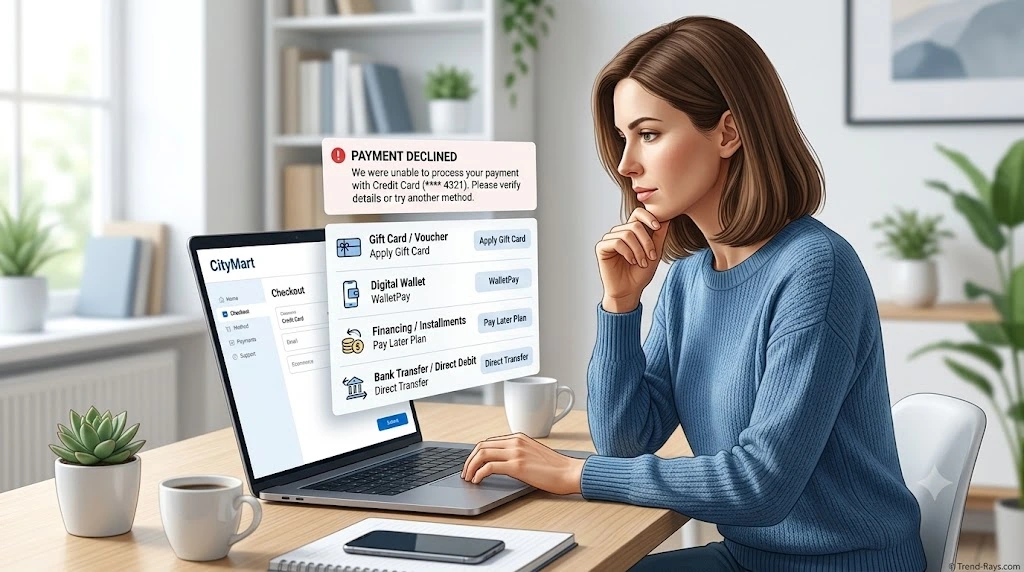
What to Do If Walmart Doesn’t Allow Your Preferred Payment Method
Finding out that Walmart doesn’t support your preferred payment combination can be frustrating—especially if you’ve already filled your cart and are ready to check out.
The good news is that you often don’t need to abandon your purchase.
Depending on your situation, there are several practical alternatives that can help you complete your order without using two separate credit cards or debit cards.
Option 1: Use a Walmart Gift Card
For many shoppers, this is the simplest solution.
If you already have a Walmart Gift Card, you can usually apply its balance first and then pay the remaining amount with one eligible credit or debit card.
Example
Order Total:
$140
Walmart Gift Card:
$40
Credit Card:
Charged $100
This approach gives you much of the flexibility people expect from split payments while using a payment combination that Walmart generally supports.
Option 2: Split Your Purchase Into Two Separate Orders
If your cart contains multiple items, placing two separate orders may allow you to use different payment methods for each purchase.
For example:
Order 1
Kitchen appliances
Paid with Credit Card A
Order 2
Household supplies
Paid with Debit Card B
Before doing this, consider:
- Shipping costs
- Delivery dates
- Minimum order requirements
- Promotional discounts
- Product availability
Sometimes splitting an order can affect free shipping thresholds or bundle discounts.
Option 3: Transfer Funds Before Shopping
If both payment cards belong to you, transferring money into one account before placing your order may be easier than trying to combine multiple bank cards during checkout.
Many banks now offer:
- Instant internal transfers
- Same-day transfers
- Mobile banking transfers
Checking your available balance before shopping can help prevent declined payments.
Option 4: Use an Eligible Benefit Card
If you’re purchasing qualifying products, Walmart may allow certain benefit cards to be combined with another eligible payment method.
Examples include:
- EBT for eligible grocery purchases
- FSA cards for qualifying healthcare items
- HSA cards for eligible medical products
These aren’t traditional split payments between two bank cards, but they do allow different payment sources to be used for the same order when the purchase qualifies.
Option 5: Consider Financing (If Available)
Depending on your eligibility and the products you’re buying, Walmart may offer financing options through participating providers.
Financing isn’t the same as splitting a payment between two cards, but it can make larger purchases more manageable without needing multiple payment methods.
Before choosing any financing option, review:
- Interest rates
- Repayment terms
- Promotional offers
- Eligibility requirements
Only use financing if it fits your financial situation.
Option 6: Check Your Available Balance
Many payment failures occur because shoppers confuse their account balance with their available balance.
Your available balance may be lower than expected because of:
- Pending transactions
- Temporary authorization holds
- Scheduled payments
- Recent purchases that haven’t settled yet
Checking your available balance before placing an order can save time and help avoid unnecessary payment declines.
Option 7: Contact Walmart Customer Support for Unusual Situations
Most payment questions have straightforward answers, but some situations are unique.
For example:
- A payment keeps failing even though your card works elsewhere.
- Your Walmart Gift Card isn’t being accepted.
- An authorization hold hasn’t been released.
- A refund hasn’t appeared on your original payment method.
In these cases, Walmart Customer Care may be able to explain what happened or suggest the appropriate next steps.
Common Mistakes to Avoid
Trying the Same Declined Card Repeatedly
Repeated payment attempts can create multiple authorization holds, making your available balance appear lower than it actually is.
Assuming Every Retailer Uses the Same Rules
Payment policies vary widely between retailers.
Just because another online store allows a particular payment combination doesn’t mean Walmart will support it.
Waiting Until Checkout to Check Your Gift Card Balance
Knowing your gift card balance before you start shopping makes it much easier to choose the right payment method and avoid interruptions during checkout.
Ignoring Shipping or Discount Requirements
If you split your purchase into multiple orders, make sure you don’t accidentally lose:
- Free shipping eligibility
- Bulk discounts
- Promotional offers
- Coupon savings
Sometimes keeping everything in one order is more valuable than using multiple payment methods.
Which Alternative Is Best?
The right solution depends on why you wanted to split your payment in the first place.
| Your Situation | Recommended Alternative |
|---|---|
| Gift card doesn’t cover the purchase | Use the Walmart Gift Card with one eligible payment card |
| Money is split between two bank accounts | Transfer funds into one account before checkout |
| Buying with another person | Consider placing separate orders if practical |
| Purchasing eligible groceries | Use EBT with another eligible payment method where applicable |
| Buying qualifying healthcare products | Use an eligible FSA or HSA card with another payment method |
| Card was declined unexpectedly | Check your available balance and verify your payment details |
Key Takeaway
Although Walmart generally doesn’t allow customers to split one online purchase between two separate credit cards or debit cards, that doesn’t necessarily mean your purchase can’t be completed.
Gift cards, eligible benefit cards, separate orders, balance transfers, and financing options often provide practical alternatives that solve the same problem without requiring unsupported payment combinations.
Choosing the right option before checkout can help you avoid payment declines, reduce frustration, and complete your purchase more smoothly.
In the next section, we’ll answer the most frequently asked questions about Walmart split payments, including gift cards, refunds, self-checkout, and other scenarios shoppers commonly encounter.

Frequently Asked Questions
Can You Split Payment Between Two Credit Cards at Walmart?
For most online purchases, no.
Walmart generally requires one primary credit card for each online transaction. If you have money or available credit spread across two different credit cards, you’ll usually need to choose another solution, such as using a Walmart Gift Card with one credit card or placing separate orders when practical.
Can You Split Payment Between Two Debit Cards at Walmart?
Generally, no.
Walmart’s online checkout isn’t designed to divide one purchase between two separate debit cards.
If your available funds are spread across multiple bank accounts, transferring money into one account before checkout is often the simplest solution.
Can You Use a Credit Card and a Debit Card Together at Walmart?
For standard online purchases, this combination is generally not supported.
Walmart’s checkout typically processes one primary bank-issued payment card per order.
However, combinations involving Walmart Gift Cards or eligible benefit cards may still be available depending on the purchase.
Can You Use a Walmart Gift Card and a Credit Card Together?
Yes.
This is one of the most common payment combinations supported by Walmart.
The gift card balance is usually applied first, and any remaining balance is charged to your selected credit card.
Can You Use a Walmart Gift Card and a Debit Card Together?
Yes.
If your Walmart Gift Card doesn’t cover the full purchase price, the remaining balance can generally be paid using one eligible debit card.
This makes gift cards one of the easiest alternatives to traditional split payment.
Can You Use Multiple Walmart Gift Cards?
In many cases, yes.
Walmart generally allows customers to redeem multiple Walmart Gift Cards during a single purchase, subject to system limitations.
If the total gift card balance doesn’t cover your order, another eligible payment method can usually be used for the remaining amount.
Does Walmart Allow Split Payments Through Walmart Pay?
Walmart Pay stores your selected payment method within the Walmart app, but it doesn’t typically change Walmart’s underlying payment rules.
If a payment combination isn’t supported through Walmart’s standard checkout, using Walmart Pay generally won’t enable two separate credit or debit cards for the same purchase.
Can You Split Payment at Walmart Self-Checkout?
Self-checkout follows Walmart’s programmed payment system.
You can generally use supported payment methods such as Walmart Gift Cards and one eligible bank card, but shoppers shouldn’t expect self-checkout to routinely allow purchases to be divided between two separate credit cards or debit cards.
If you have an unusual payment situation, asking a store associate for assistance is often the best approach.
Can You Pay Part Cash and Part Card at Walmart?
For in-store purchases, paying with cash and then using a card for the remaining balance is commonly available.
Cash isn’t an option for Walmart.com orders, so online purchases must be completed using supported electronic payment methods.
Can Two People Pay for One Walmart Order?
Not through two separate bank cards during standard online checkout.
If two people want to share the cost of a purchase, they may consider:
- Using a Walmart Gift Card purchased by one person.
- Placing separate orders for different items.
- Reimbursing each other outside of Walmart’s checkout process.
What Happens If My Payment Is Declined?
A declined payment doesn’t always mean there’s a problem with your card.
Common reasons include:
- Insufficient available funds
- Incorrect billing information
- Temporary authorization holds
- Bank security checks
- Expired payment cards
- Payment verification issues
Before trying again, confirm your payment details and check your available balance.
Can I Change My Payment Method After Placing an Order?
It depends on the order status.
Once an order has been processed, changing the original payment method may not be possible.
If you need help, contact Walmart Customer Care as soon as possible to determine which options are available for your specific order.
Does Walmart’s Payment Policy Change Over Time?
Yes.
Retailers periodically update payment methods, checkout features, and accepted payment options.
Before making an important purchase, it’s always a good idea to review Walmart’s latest payment information or confirm any unusual payment situation with customer support.
Final Thoughts
Although Walmart accepts a wide range of payment methods, using two separate credit cards or two separate debit cards for one online purchase generally isn’t supported.
The good news is that many shoppers can achieve the same goal by using payment combinations that Walmart does support, such as Walmart Gift Cards with an eligible credit or debit card, or by choosing practical alternatives like separate orders or eligible benefit cards for qualifying purchases.
Understanding these options before checkout can help you avoid declined payments, reduce frustration, and complete your purchase with fewer surprises.
If you’re looking beyond Walmart, you may also find our guide on splitting payment between two cards online helpful. It compares payment policies across major retailers and explains which payment combinations are commonly supported across different ecommerce platforms.