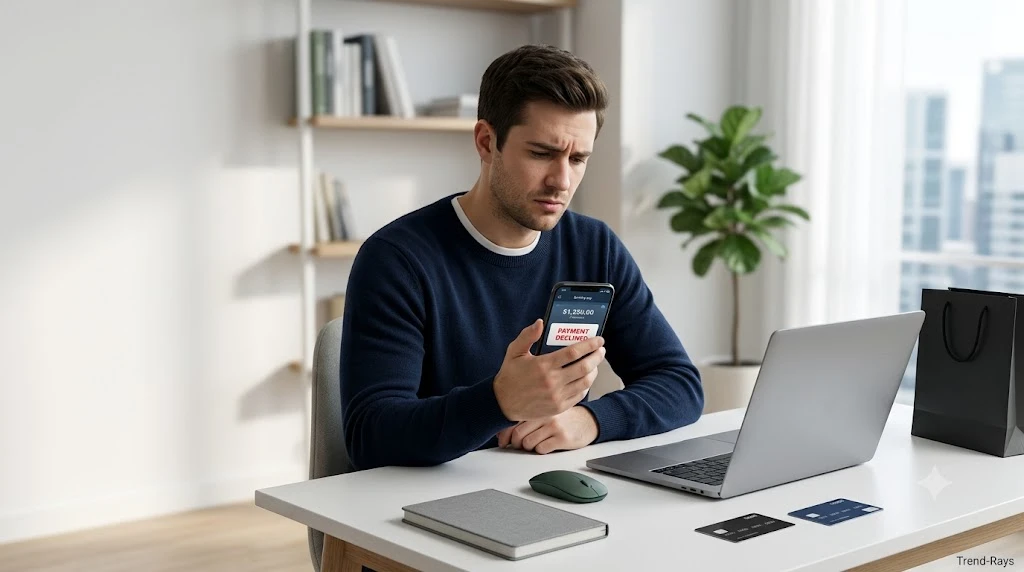
You’ve checked your bank account.
The money is there.
You try to pay for your purchase.
Payment declined.
Few checkout experiences are more confusing.
Whether you’re buying groceries, booking a flight, paying for a streaming subscription, or shopping online, seeing a declined payment despite having enough money can leave you wondering what went wrong.
The surprising truth is that having money in your account doesn’t automatically guarantee that a payment will be approved.
Every card transaction passes through multiple systems before it reaches the merchant.
Your bank isn’t the only company involved.
The payment may also be reviewed by:
- The retailer or merchant
- A payment processor
- Your card network
- Your bank’s fraud detection system
- Security verification systems
If any one of these systems cannot approve the transaction, your payment may be declined—even when your available balance appears sufficient.
The good news is that most payment declines have a logical explanation.
In many cases, the issue can be resolved in just a few minutes once you know where to look.
In this guide, you’ll learn:
- Why payments are declined even when you have money.
- The difference between your account balance and your available balance.
- How banks decide whether to approve a transaction.
- The most common reasons online and in-store payments fail.
- How to identify the exact cause of your declined payment.
- Practical steps to help prevent future payment problems.
By the end of this guide, you’ll understand how modern payment systems work and know exactly what to check the next time a transaction is unexpectedly declined.
Quick Answer
A payment can be declined even if you have money because your account balance is only one part of the approval process.
Before a transaction is approved, several checks take place.
For example:
- Your bank verifies that sufficient funds or available credit exist.
- The merchant’s payment system requests authorization.
- The payment processor routes the transaction.
- The card network validates the request.
- Fraud detection systems analyze whether the payment appears legitimate.
If any of these checks fail, the transaction may be declined.
Some of the most common reasons include:
- Your available balance is lower than your current account balance.
- A pending transaction has temporarily reduced available funds.
- Your bank suspects unusual activity and blocks the payment.
- The billing address or security code doesn’t match.
- The merchant doesn’t accept your payment method.
- Your card has expired or has temporary restrictions.
- A payment processor or banking system is experiencing technical issues.
In other words, a declined payment doesn’t necessarily mean you don’t have enough money.
It simply means that one or more parts of the payment approval process could not successfully authorize the transaction.
How a Card Payment Is Actually Approved
Many people imagine a payment as a simple exchange between their card and the store.
In reality, every card transaction passes through several organizations before the purchase is approved.
A simplified version of the process looks like this:
Customer
      │
      ▼
Merchant or Online Store
      │
      ▼
Payment Processor
      │
      ▼
Card Network
(Visa, Mastercard, American Express, etc.)
      │
      ▼
Issuing Bank
      │
      ▼
Approve or Decline
      │
      ▼
Response Returned to Merchant
Each step happens in just a few seconds.
If every participant approves the request, your payment is completed.
If any participant rejects the transaction—for example because of suspected fraud, incorrect payment information, network issues, or insufficient available funds—the payment is declined.
This explains why two people using the same bank can sometimes have completely different experiences when shopping at the same retailer.
Why Understanding This Process Matters
Many troubleshooting guides immediately list possible reasons for declined payments.
However, understanding how payments are approved makes it much easier to identify where the problem actually occurred.
Instead of assuming your bank is always responsible, you’ll know that the issue could originate from:
- The merchant’s checkout system.
- The payment processor.
- The card network.
- Your bank’s authorization system.
- Temporary technical outages.
- Security or fraud prevention checks.
Knowing where the transaction can fail is the first step toward fixing it quickly.
In the next section, we’ll look at the single most common reason payments are declined even though customers believe they have enough money: the difference between your account balance and your available balance.
Reason #1: Your Available Balance Is Lower Than Your Account Balance
One of the biggest reasons people become confused after a declined payment is that they look at their banking app and see money in their account.
Naturally, they assume the payment should have gone through.
However, the figure you see as your account balance isn’t always the amount you can actually spend.
What matters during payment authorization is usually your available balance.
Understanding the difference between these two numbers solves a surprising number of payment mysteries.
Account Balance vs. Available Balance
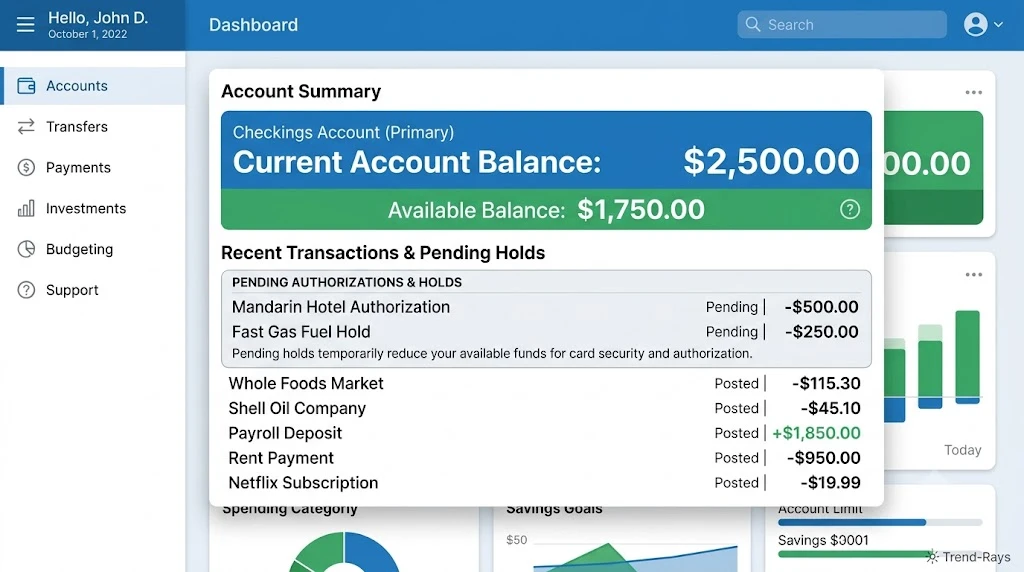
Although the terms sound similar, they represent different things.
Account Balance
Your account balance is the total amount of money currently shown in your account.
It may include:
- Recent deposits.
- Pending deposits.
- Money that has not yet cleared.
- Funds temporarily reserved for other transactions.
Available Balance
Your available balance is the amount your bank currently allows you to spend.
This figure takes into account:
- Pending card transactions.
- Authorization holds.
- ATM withdrawals waiting to settle.
- Debit card purchases.
- Scheduled payments.
- Temporary banking restrictions.
When your card is used, banks normally check your available balance, not simply your account balance.
A Simple Example
Imagine your bank account shows:
Account Balance: $850
At first glance, everything looks fine.
However, you also have:
- Hotel authorization hold: $250
- Gas station pre-authorization: $100
- Pending grocery purchase: $75
Your available balance may now be closer to:
$425
If you attempt to make a purchase worth $500, the transaction may be declined even though your account still appears to contain $850.
This is one of the most common causes of unexpected payment declines.
Why Banks Use Available Balance
Banks don’t simply look at the money currently displayed in your account.
They also consider money that has already been committed to other transactions.
This helps prevent situations where customers accidentally spend the same money twice before earlier purchases have officially settled.
Although this system can sometimes feel confusing, it’s designed to reduce overdrafts and improve payment reliability.
Pending Transactions Can Reduce Your Spending Power
Some purchases remain in a pending state for several hours—or even several days.
Examples include:
- Restaurant payments before the final tip is added.
- Hotel reservations.
- Car rental deposits.
- Fuel station pre-authorizations.
- Online orders waiting to ship.
During this time, those funds may still be unavailable even though the final charge hasn’t yet appeared on your statement.
Authorization Holds Can Be Larger Than the Final Purchase
Certain businesses temporarily reserve more money than the final purchase amount.
For example:
You buy:
$45 of fuel.
The fuel station may temporarily authorize:
$100
Until the transaction settles, your available balance may be reduced by the larger authorization amount rather than the final purchase value.
Hotels and car rental companies commonly use similar authorization holds to cover potential additional charges.
How to Check Your Available Balance
Most banking apps display both figures separately.
Look for labels such as:
- Available Balance
- Current Balance
- Pending Transactions
- Holds
- Authorizations
If you’re unsure which number represents money you can actually spend, your bank’s customer support can usually clarify the difference.
What You Can Do
If your payment was declined but your account balance looks sufficient:
- Check your available balance instead of only your account balance.
- Review any pending transactions.
- Look for temporary authorization holds.
- Wait for pending purchases to settle if possible.
- Contact your bank if the available balance appears incorrect.
Many payment problems are resolved simply by identifying funds that are temporarily unavailable.
Key Takeaway
Seeing money in your account doesn’t always mean those funds are immediately available for new purchases.
Banks authorize transactions using your available balance, which may already reflect pending purchases, authorization holds, or other temporary restrictions.
Checking your available balance should always be the first step when a payment is declined—even if your account balance appears more than sufficient.
In the next section, we’ll examine another common cause of declined payments: pending transactions and temporary authorization holds, and why they can affect your spending power even before purchases are officially completed.
Reason #2: A Pending Transaction or Authorization Hold Is Reducing Your Available Funds
Even if your bank account appears to have plenty of money, a payment can still be declined because some of those funds are temporarily reserved.
This is known as a pending transaction or an authorization hold.
It’s one of the most misunderstood parts of modern card payments—and one of the most common reasons people believe their bank has made a mistake.
What Is a Pending Transaction?
When you make a purchase with a debit or credit card, the payment usually doesn’t move immediately from your account to the merchant.
Instead, the transaction often passes through two stages:
- Authorization
- Settlement
During the authorization stage, your bank reserves the required amount to make sure the money will still be available when the merchant officially completes the transaction.
Until settlement happens, the payment remains pending.
What Is an Authorization Hold?
An authorization hold is a temporary reservation of funds placed on your account before the final payment is processed.
Think of it as the bank saying:
“We’re setting this money aside because a merchant may need it shortly.”
The money hasn’t permanently left your account yet.
However, it usually cannot be spent elsewhere.
This reduces your available balance even though your current account balance may still appear higher.
Businesses That Commonly Use Authorization Holds
Some industries almost always use temporary authorizations because the final purchase amount isn’t known immediately.
Examples include:
Hotels
Hotels often place a temporary hold that covers:
- Your room rate
- Taxes
- Incidental expenses
- Security deposits
The hold may remain until checkout or shortly afterward.
Fuel Stations
When paying at the pump, many fuel stations authorize more than the expected purchase amount.
For example:
Actual fuel purchased:
$42
Temporary authorization:
$100
Once the transaction settles, the unused portion of the hold is released.
Car Rental Companies
Rental companies frequently place larger authorization holds to cover:
- Fuel charges
- Additional rental days
- Damage deposits
- Toll fees
These holds may remain active for several days after the vehicle is returned.
Restaurants
Restaurants often authorize the original bill before the final amount—including any tip—is submitted.
Until the final amount settles, your available balance may temporarily reflect the higher reserved amount.
Online Retailers
Some online stores authorize your payment immediately but don’t complete the charge until your order ships.
If shipping is delayed, the authorization may remain pending for several days.
Why Authorization Holds Can Cause Payment Declines
Imagine you have:
Available Balance:
$220
You book a hotel.
The hotel places a:
$180 authorization hold
Your available balance is now approximately:
$40
A few hours later, you attempt to purchase a $75 item.
Although your account may still display a larger current balance, your available balance isn’t high enough.
The payment is declined.
This often surprises customers because they don’t realize another merchant has already reserved part of their funds.
How Long Do Pending Transactions Last?
The exact timing depends on:
- Your bank
- The merchant
- Your card network
- The payment processor
Many pending transactions clear within:
- A few hours
- One business day
- Two to five business days
Authorization holds for hotels, rental cars, or international purchases may sometimes remain longer.
Can You Remove an Authorization Hold?
Usually, customers cannot remove a legitimate authorization hold themselves.
However, you may be able to:
- Wait for the merchant to finalize the transaction.
- Contact the merchant if the hold appears unusually long.
- Contact your bank if you believe the authorization is incorrect or has not been released after an unreasonable period.
Banks generally cannot remove valid holds without confirmation from the merchant.
How to Avoid Problems Caused by Pending Transactions
You can reduce the likelihood of payment declines by following a few simple habits:
- Check your available balance before making another large purchase.
- Keep extra funds available when traveling.
- Expect temporary holds at hotels, fuel stations, and car rental companies.
- Review your banking app regularly for pending authorizations.
- Avoid making several large purchases back-to-back if your available balance is limited.
Planning ahead can prevent many unexpected payment failures.
Key Takeaway
Pending transactions and authorization holds don’t necessarily mean money has left your account.
Instead, they temporarily reserve funds while a purchase is being completed.
Because banks usually authorize new payments using your available balance, these temporary holds can reduce your spending power and cause additional purchases to be declined—even though your account balance appears healthy.
In the next section, we’ll look at another major reason payments fail despite sufficient funds: your bank’s fraud detection system, which may intentionally block legitimate purchases to protect your account from unauthorized activity.
Reason #3: Your Bank’s Fraud Detection System Flagged the Transaction

One of the most frustrating payment declines happens when your bank blocks a purchase that you actually intended to make.
You have enough money.
Your card details are correct.
The merchant accepts your payment method.
Yet the transaction is still declined.
In many cases, this happens because your bank’s fraud detection system believes the purchase may be unauthorized.
Although this can feel inconvenient, it’s actually one of the most important security features protecting your account.
Why Banks Monitor Every Card Transaction
Every time you use your debit or credit card, your bank performs an automated risk assessment before deciding whether to approve the payment.
The system analyzes hundreds of factors within seconds.
These may include:
- Your normal spending habits.
- The merchant category.
- The transaction amount.
- The location of the purchase.
- The device being used.
- Previous purchases.
- The time of day.
- Recent login activity.
If the transaction appears unusual compared with your normal behavior, your bank may temporarily decline it.
A Real-World Example
Imagine you normally use your debit card for:
- Grocery shopping
- Fuel purchases
- Local restaurants
- Monthly subscriptions
One evening, your bank suddenly receives an authorization request for:
$1,800
From:
An electronics retailer in another country.
Even if this purchase is legitimate, the transaction is very different from your normal spending pattern.
Your bank may temporarily decline it while attempting to verify that you—not someone else—are making the purchase.
Common Situations That Trigger Fraud Alerts
Fraud detection systems are designed to recognize unusual activity, not just fraudulent activity.
Some situations that commonly trigger additional security checks include:
Large Purchases
Buying expensive items such as:
- Laptops
- Smartphones
- Televisions
- Furniture
- Jewelry
may trigger additional verification if the amount is much higher than your usual spending.
Shopping While Traveling
Using your card in another city or country can sometimes appear suspicious if your bank isn’t aware of your travel plans.
Although many banks have improved their travel detection systems, international purchases can still trigger temporary blocks.
Multiple Purchases in a Short Time
Making several purchases within a few minutes may resemble stolen card activity.
For example:
- Grocery store
- Gas station
- Electronics store
- Online retailer
all within a short period.
The bank may temporarily pause further authorizations until it confirms the activity.
Online Purchases From New Merchants
Shopping on a website you’ve never used before can increase the transaction’s risk score.
This is particularly true if:
- The merchant is located overseas.
- The purchase amount is unusually high.
- The website uses a different payment processor than merchants you’ve previously used.
Repeated Declined Attempts
If multiple payment attempts fail because of incorrect information, your bank may temporarily block additional authorizations as a precaution.
This helps reduce the risk of automated fraud attempts.
Why Banks Sometimes Decline Legitimate Purchases
Many customers wonder:
“Why would my bank stop me from spending my own money?”
The answer comes down to risk management.
Banks face a difficult balance:
Approve every transaction quickly
↓
Greater fraud losses
OR
Decline suspicious transactions
↓
Occasional inconvenience for legitimate customers
Most banks prefer the second option.
From a security perspective, it’s better to temporarily interrupt one legitimate purchase than to approve a fraudulent transaction that could result in thousands of dollars being stolen.
How to Tell If Fraud Detection Is the Problem
Signs that fraud protection may have caused the decline include:
- You receive a fraud alert by text message, email, or phone call.
- Your banking app requests confirmation of the purchase.
- The same payment works after contacting your bank.
- Other payment methods continue working normally.
- The decline occurs during travel or after an unusually large purchase.
Many banks allow customers to approve suspicious transactions directly through their mobile banking app.
What You Should Do
If you believe fraud detection caused the decline:
- Open your banking app and check for security notifications.
- Review recent account activity.
- Respond to any fraud verification messages from your bank.
- Contact your bank if you don’t receive a notification but suspect the transaction was blocked.
- Retry the purchase only after the bank confirms the restriction has been removed.
Avoid repeatedly attempting the same payment, as multiple declines in a short period can sometimes trigger additional security measures.
Can Fraud Detection Be Wrong?
Yes.
Fraud detection systems use sophisticated algorithms, but they are not perfect.
Occasionally, completely legitimate purchases are mistakenly flagged as suspicious.
These are known as false positives.
Although false positives can be inconvenient, they are generally considered preferable to allowing unauthorized transactions to succeed.
Key Takeaway
Your bank doesn’t only verify whether you have enough money.
It also evaluates whether the transaction appears safe.
If a purchase looks unusual compared with your normal spending behavior, the bank may temporarily decline it—even when your available balance is more than sufficient.
Understanding how fraud detection works can help you respond quickly, verify legitimate purchases, and reduce the likelihood of repeated payment declines in the future.
In the next section, we’ll examine another surprisingly common cause of failed payments: incorrect billing information, including billing addresses, ZIP codes, CVV codes, and card details that don’t exactly match your bank’s records.
Reason #4: Your Billing Information Doesn’t Match
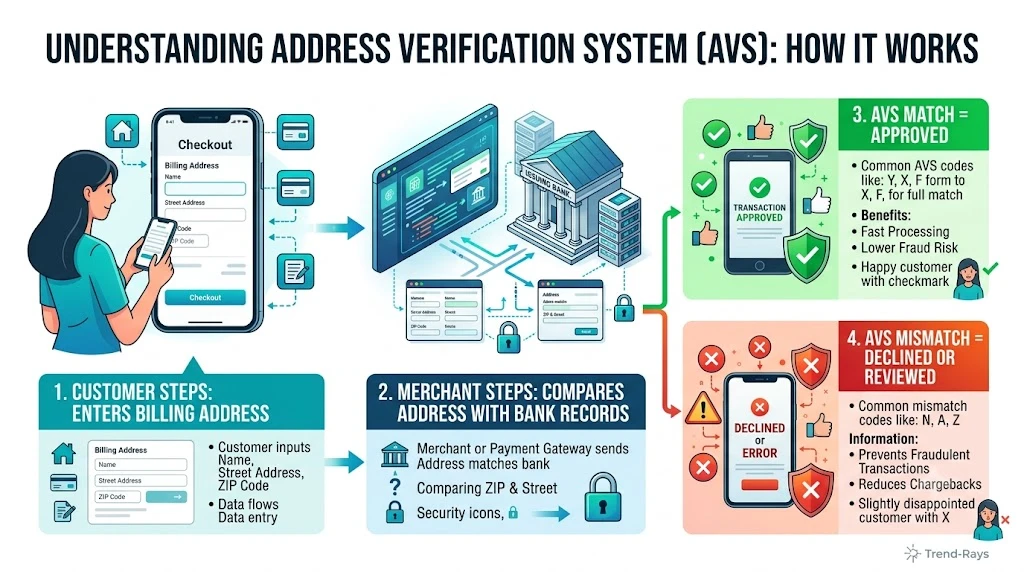
Sometimes your payment isn’t declined because of your bank balance or fraud detection.
Instead, it’s because the information you entered during checkout doesn’t exactly match the details your bank has on file.
This is especially common with online purchases.
Even a small mistake—such as an old ZIP code or an incorrect CVV—can cause the merchant to reject the transaction before it’s completed.
What Is Billing Information?
Billing information helps verify that the person making the purchase is the legitimate cardholder.
Depending on the merchant, this may include:
- Cardholder name
- Card number
- Expiration date
- CVV or security code
- Billing address
- ZIP or postal code
- Country
- Phone number (occasionally)
Although not every merchant checks every field, many compare this information with your bank’s records before requesting payment authorization.
What Is Address Verification (AVS)?
Many online retailers use a security system called the Address Verification System (AVS).
AVS compares the billing address and ZIP or postal code entered during checkout with the information your bank has on file.
If the information doesn’t match closely enough, the merchant may:
- Decline the payment.
- Request another payment method.
- Ask you to verify your details before trying again.
This helps reduce fraudulent online transactions.
Common Billing Information Mistakes
Small errors are more common than many shoppers realize.
Examples include:
- Using an old home address after moving.
- Entering the shipping address instead of the billing address.
- Typing the wrong apartment or unit number.
- Misspelling the street name.
- Using the wrong ZIP or postal code.
- Selecting the wrong country.
- Entering an incorrect CVV.
- Using a nickname instead of the name printed on the card.
Although these mistakes seem minor, automated checkout systems may reject the transaction immediately.
Billing Address vs. Shipping Address
One of the most common sources of confusion is the difference between these two addresses.
Billing Address
The billing address is the address registered with your bank or card issuer.
This is the information used to verify your payment card.
Shipping Address
The shipping address is simply where you want the order delivered.
It can be completely different from your billing address.
For example, you might ship a gift directly to a family member while still using your own billing address during payment.
Mixing up these two addresses is a common reason for online payment declines.
Why the CVV Matters
The CVV (Card Verification Value) is the three- or four-digit security code printed on your card.
Merchants use it to confirm that the person making the purchase physically possesses the payment card.
Entering the wrong CVV can result in an immediate decline, even if every other piece of information is correct.
Recently Moved? Update Your Bank
If you’ve recently changed your address but haven’t updated your bank, your online purchases may fail because the billing information no longer matches.
Before making important online purchases, verify that your bank has your current:
- Billing address
- ZIP or postal code
- Phone number (if required)
Keeping this information current reduces unnecessary payment declines.
How to Fix Billing Information Problems
If your payment is declined:
- Double-check every field before submitting the payment again.
- Confirm that the billing address matches your bank’s records—not necessarily your shipping address.
- Verify your CVV and expiration date.
- Make sure the cardholder name matches the card exactly.
- Update your personal information with your bank if you’ve recently moved.
Taking a few extra seconds to review these details often resolves the problem without needing to contact customer support.
Key Takeaway
Incorrect billing information is one of the easiest payment problems to fix.
Unlike fraud alerts or authorization holds, billing mismatches are usually caused by simple typing mistakes or outdated personal information.
Before assuming your bank has declined your card, carefully review your billing address, ZIP code, CVV, and card details.
A small correction may be all that’s needed for your payment to be approved successfully.
In the next section, we’ll explore another common cause of declined payments: merchant restrictions and payment acceptance rules, and why some businesses simply don’t accept certain cards or payment methods.
Reason #5: The Merchant Doesn’t Accept Your Payment Method
Sometimes the problem isn’t your bank.
It isn’t your balance.
And it isn’t your card.
Instead, the merchant simply doesn’t support the payment method you’re trying to use.
This is more common than many shoppers realize.
Every business chooses which payment methods it accepts based on its payment processor, costs, customer preferences, and operational requirements.
If your card isn’t supported, the transaction may be declined before your bank even has a chance to approve it.
Not Every Merchant Accepts Every Card
Although Visa and Mastercard are accepted almost everywhere, other payment methods may have more limited acceptance.
Examples include:
- American Express
- Discover
- Certain prepaid cards
- Virtual cards
- International cards
- Corporate cards
- Some digital wallets
A merchant may decide not to support one or more of these payment methods.
In that situation, your payment isn’t being rejected because you lack funds—it’s simply an unsupported payment option.
Some Merchants Restrict Certain Card Types
Many online stores distinguish between different kinds of cards.
For example, they may accept:
- Standard debit cards
- Personal credit cards
while refusing:
- Prepaid gift cards
- Anonymous prepaid cards
- Some virtual cards
- International-issued cards
These restrictions are often designed to reduce fraud or simplify payment processing.
Subscription Services May Have Additional Requirements
Many subscription-based businesses require payment methods that support recurring billing.
Some prepaid gift cards and temporary virtual cards don’t allow recurring charges.
As a result, the initial payment—or a future renewal—may be declined even though funds are available.
Examples include:
- Video streaming services
- Music subscriptions
- Cloud storage
- Software subscriptions
- Online memberships
International Purchases
If you’re shopping on an overseas website, additional restrictions may apply.
Some merchants only accept:
- Domestic payment cards
- Cards issued in specific countries
- Local payment networks
Likewise, some banks block international transactions unless international payments have been enabled.
Even when your account has enough money, these restrictions can prevent the purchase from being completed.
High-Risk Merchant Categories
Banks and payment processors classify certain industries as higher risk than others.
Examples include:
- Online gambling
- Cryptocurrency exchanges
- Adult content
- Digital asset marketplaces
- Certain financial services
Some banks automatically block transactions involving these merchant categories unless customers specifically authorize them.
Temporary Merchant Problems
Occasionally, the merchant itself experiences payment issues.
Examples include:
- Payment processor outages
- Website maintenance
- Checkout software bugs
- Server failures
- Gateway connection problems
In these situations, multiple customers may experience payment declines at the same time.
If the problem originates with the merchant, waiting a short time before trying again is often the best solution.
How to Tell Whether the Merchant Is the Problem
Some signs that the issue may be on the merchant’s side include:
- Your card works successfully at other stores.
- Multiple customers report payment problems.
- The retailer acknowledges a technical issue.
- Different payment cards fail in exactly the same way.
- The checkout page repeatedly crashes before payment is completed.
If several payment methods fail at the same merchant but work elsewhere, the retailer’s payment system may be responsible.
What You Can Do
If you suspect the merchant is causing the problem:
- Review the merchant’s accepted payment methods.
- Try another supported payment option.
- Wait a few minutes if a temporary technical issue is suspected.
- Check the retailer’s status or support page for known outages.
- Contact customer support if the issue continues.
Avoid repeatedly submitting the same payment within a short period, as multiple failed attempts may trigger additional fraud checks.
Key Takeaway
A declined payment doesn’t always indicate a problem with your bank or your card.
Sometimes the merchant simply doesn’t accept your payment method or is experiencing technical issues with its checkout system.
Understanding that merchants control their own payment acceptance rules can save time and help you choose a payment method that is more likely to succeed.
In the next section, we’ll explore another common but often overlooked reason for payment declines: daily spending limits and transaction limits imposed by banks and card issuers.
Reason #6: You’ve Reached Your Daily Spending or Transaction Limit
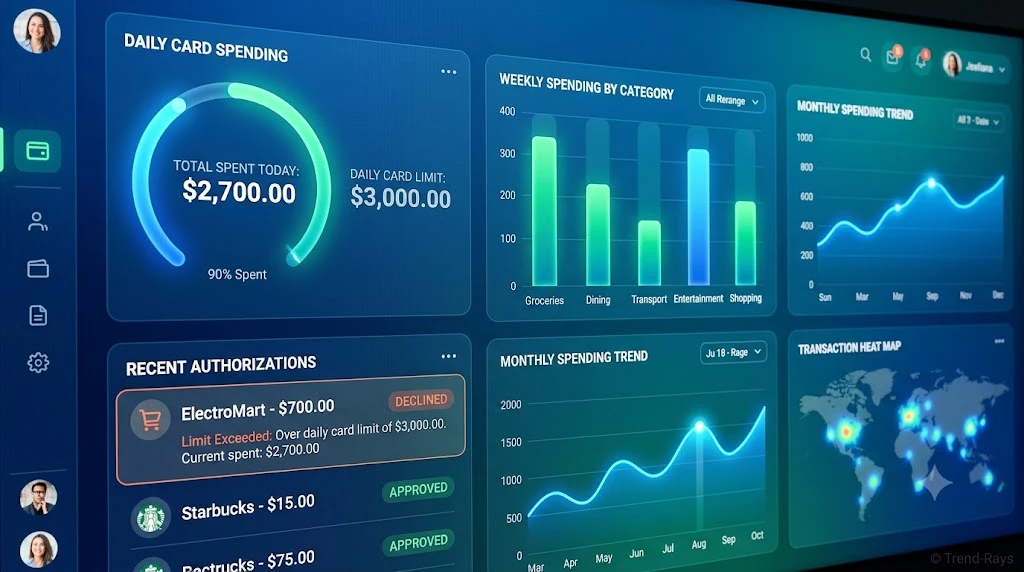
Many people assume that as long as they have enough money in their account, every purchase should be approved.
In reality, banks often place daily limits on how much money can be spent, withdrawn, or transferred within a specific period.
These limits are separate from your account balance.
That means you could have $8,000 in your account but still have a $2,500 daily card spending limit.
If your purchase exceeds that limit, your payment may be declined—even though sufficient funds are available.
What Are Daily Spending Limits?
Daily spending limits are maximum amounts your bank allows you to spend using your debit or credit card within a 24-hour period.
These limits help:
- Reduce fraud losses.
- Protect customers if a card is stolen.
- Limit unauthorized spending.
- Manage financial risk.
Most customers never notice these limits because their normal spending stays well below them.
However, large purchases can quickly exceed the allowed amount.
Different Types of Banking Limits
Many banks apply several different limits at the same time.
Examples include:
Daily Purchase Limit
The maximum amount you can spend using your card during one day.
ATM Withdrawal Limit
The maximum amount you can withdraw from cash machines within 24 hours.
Contactless Payment Limit
Some countries and merchants apply limits to contactless payments before requiring PIN verification.
Online Transaction Limit
Some banks allow customers to set separate limits specifically for online purchases.
International Spending Limit
Certain banks require international card usage to be enabled separately from domestic purchases.
A Real-World Example
Suppose your bank account contains:
$6,500
Your debit card has a daily purchase limit of:
$3,000
Earlier that day you purchased:
- Furniture: $1,600
- Electronics: $1,100
Total spending:
$2,700
Later, you attempt to purchase a new television for:
$700
Although your account still contains more than enough money, your total daily spending would become:
$3,400
Because this exceeds your daily limit, the transaction may be declined.
Banks May Count Pending Purchases Toward Your Limit
Another detail many customers don’t realize is that pending authorizations may also count toward certain spending limits.
For example:
- Hotel authorization holds.
- Fuel station pre-authorizations.
- Online purchases awaiting shipment.
Even if these transactions haven’t fully settled, they may temporarily reduce the amount you’re allowed to spend that day.
Why Banks Use Spending Limits
Banks don’t set spending limits to inconvenience customers.
Instead, they serve several important purposes.
Fraud Protection
If a criminal steals your card, spending limits reduce the amount that can be lost before suspicious activity is detected.
Risk Management
Large, unusual purchases create higher financial risk for both banks and merchants.
Limits help control that risk while still allowing legitimate transactions after verification.
Customer Security
Some banks even allow customers to customize their own spending limits through mobile banking apps.
Lower limits provide an extra layer of protection against unauthorized transactions.
How to Check Your Spending Limits
Many banks display spending limits directly inside their mobile banking apps.
Look for sections such as:
- Card Controls
- Spending Limits
- Debit Card Settings
- Security Settings
- Transaction Limits
If you can’t find the information, customer support can usually confirm your current limits.
Can Spending Limits Be Increased?
In many cases, yes.
Depending on your bank, you may be able to:
- Temporarily increase your daily limit.
- Permanently raise your spending limit.
- Approve a single high-value purchase.
- Enable international spending before traveling.
Some banks allow these changes instantly through their mobile app, while others require a phone call or branch visit.
What You Should Do
If you believe you’ve reached your spending limit:
- Check your banking app for current card limits.
- Review today’s purchases.
- Consider whether pending transactions are contributing to the limit.
- Contact your bank if you need to increase the limit.
- Retry the purchase after the limit has been adjusted.
For planned high-value purchases—such as furniture, appliances, or travel bookings—it’s often a good idea to check your limits before shopping.
Key Takeaway
Having enough money in your account doesn’t guarantee that a large purchase will be approved.
Banks often enforce daily spending limits that operate independently of your account balance.
Understanding these limits can help you avoid unexpected payment declines and make large purchases more smoothly.
In the next section, we’ll examine another common reason for declined payments: international transactions and foreign purchases, including why your card may work perfectly at home but fail when traveling or shopping on overseas websites.
Reason #7: Your Card Is Blocked for International Transactions
A payment may be declined even though you have enough money simply because your card isn’t authorized for international use.
Many people assume that if their card works at local stores, it should also work everywhere online.
Unfortunately, that’s not always the case.
Banks often apply separate security rules to international transactions because overseas payments generally carry a higher fraud risk than domestic purchases.
What Counts as an International Transaction?
An international transaction isn’t limited to shopping while traveling abroad.
It can also include:
- Buying from an overseas online store.
- Paying for international software subscriptions.
- Purchasing digital products from another country.
- Booking foreign hotels or airlines.
- Paying international freelancers or businesses.
Even if you’re sitting at home, the merchant may process payments in another country.
Why Banks Restrict International Payments
International transactions are more difficult for banks to verify.
Compared with local purchases, they often involve:
- Different currencies.
- Foreign payment processors.
- Overseas merchants.
- Higher fraud rates.
- Additional regulatory requirements.
Because of these factors, some banks disable international transactions by default until customers specifically enable them.
A Real-World Example
Imagine you live in the United States.
You decide to purchase a premium software subscription from a company headquartered in Ireland.
Although the amount is only $39, your card is declined.
Why?
Your bank may recognize the transaction as international and automatically block it until you confirm that the purchase is legitimate.
This doesn’t mean your account lacks funds—it simply means your bank wants additional verification.
Currency Conversion Can Affect Approval
International purchases sometimes involve currency conversion.
For example:
A website displays:
€95
Your bank converts the amount into your local currency.
Depending on exchange rates and fees, the final authorization request may be slightly higher than expected.
If your available balance is very close to the purchase amount, this difference may contribute to a declined payment.
Foreign Merchant Restrictions
Some merchants choose to accept payments only from customers located in specific countries.
Examples include:
- Region-specific streaming services.
- Government websites.
- Country-restricted ecommerce stores.
- Local event ticket platforms.
In these cases, the merchant—not your bank—may reject the transaction.
International Travel Can Trigger Fraud Alerts
Using your card in another country may also activate your bank’s fraud detection system.
For example:
You normally shop in:
New York.
Today your card is used in:
Tokyo.
Even if you’re genuinely traveling, your bank may temporarily decline the payment until it verifies your identity.
Many banks now allow customers to notify them about travel plans through their mobile banking apps, reducing the likelihood of unnecessary declines.
Online Services May Process Payments Overseas
Many popular digital services process payments through international companies.
Examples include:
- Cloud storage providers.
- Design software.
- Marketing platforms.
- AI subscription services.
- Online learning platforms.
Although these services may appear local, the payment itself may be processed in another country.
How to Fix International Payment Problems
If your international payment is declined:
- Confirm that international transactions are enabled on your card.
- Check whether your bank has blocked the transaction for security reasons.
- Verify that your available balance covers any exchange-rate differences.
- Confirm the merchant accepts customers from your country.
- Contact your bank before attempting the payment repeatedly.
In many cases, the issue can be resolved within minutes after confirming the purchase with your bank.
How to Prevent International Payment Declines
Before traveling or making purchases from overseas merchants:
- Enable international card usage if your bank requires it.
- Keep your contact information updated.
- Monitor your banking app for fraud alerts.
- Allow a small financial buffer to account for exchange-rate fluctuations.
- Notify your bank of international travel if recommended.
These simple precautions can reduce the chances of legitimate purchases being blocked.
Key Takeaway
International payments involve additional security checks that don’t usually apply to domestic purchases.
Even with sufficient funds, your bank may decline a transaction because of international restrictions, fraud prevention rules, currency conversion, or merchant policies.
Understanding these factors makes international shopping and travel payments much smoother—and helps you resolve declines more quickly when they occur.
In the next section, we’ll cover another surprisingly common reason for payment failures: expired cards, damaged cards, and outdated card information, which can prevent otherwise valid transactions from being approved.
Reason #8: Your Card Has Expired or Your Card Details Are Outdated
Sometimes the explanation is much simpler than fraud detection or spending limits.
Your payment may be declined because the card information being used is no longer valid.
This often happens after:
- Receiving a replacement card.
- Renewing an expired card.
- Reporting a lost or stolen card.
- Updating your bank account.
Many people continue using old payment details without realizing it—especially for online purchases and subscription services.
Expired Cards Are Automatically Declined
Every debit and credit card has an expiration date.
Once that date passes, merchants can no longer successfully authorize new transactions using that card.
Even if:
- Your bank account has plenty of money.
- Your credit limit is available.
- The card itself looks fine.
An expired card will usually be declined automatically.
Replacement Cards Often Have New Details
Many banks issue replacement cards when:
- The previous card expires.
- A card is reported lost.
- A card is stolen.
- Fraud is suspected.
- The physical card becomes damaged.
Although your account remains the same, the replacement card may have:
- A new card number.
- A new expiration date.
- A new CVV security code.
If you continue using the old information during checkout, the payment will almost certainly fail.
Saved Cards Are a Common Cause of Declined Payments
This is one of the most overlooked problems.
Many websites securely save payment information for future purchases.
Examples include:
- Online retailers.
- Streaming platforms.
- Food delivery apps.
- Ride-sharing apps.
- Travel booking websites.
- Cloud software subscriptions.
If your bank issues a replacement card but you don’t update these saved payment methods, future purchases may suddenly begin failing.
Subscription Payments Often Fail First
Recurring subscriptions are usually the first place customers notice outdated card details.
Imagine your card expires in June.
In July:
Your streaming subscription renews automatically.
The payment fails because the merchant still has your old expiration date.
This may result in:
- Service interruption.
- Failed renewal emails.
- Temporary account suspension.
Updating your payment information usually resolves the issue immediately.
Physical Card Damage Can Also Cause Problems
Although less common today, damaged cards can still create payment issues.
Examples include:
- Worn magnetic strips.
- Cracked chips.
- Broken contactless antennas.
- Water damage.
- Excessive bending.
If chip transactions repeatedly fail but contactless payments still work (or vice versa), the physical card itself may need replacement.
Digital Wallets Can Contain Old Cards
Digital wallets don’t always update automatically.
If you recently received a replacement card, remember to review payment methods stored in:
- Apple Pay
- Google Wallet
- Samsung Wallet
- PayPal
- Browser autofill
- Password managers
Using outdated card details in any of these services can trigger payment declines.
How to Check Whether This Is the Problem
Ask yourself:
- Has my card recently expired?
- Did I receive a replacement card?
- Am I using an old saved payment method?
- Does the expiration date match the physical card?
- Is the CVV correct?
- Does the card appear physically damaged?
Answering these questions can quickly identify whether outdated card information is responsible.
What You Should Do
If you suspect outdated card information:
- Verify the expiration date.
- Check the card number carefully.
- Confirm the CVV.
- Update saved payment methods.
- Replace damaged cards if necessary.
- Retry the transaction using the new information.
If the problem continues after updating your details, your bank can confirm whether the card itself has any restrictions.
Key Takeaway
Payment declines aren’t always caused by insufficient funds or banking problems.
Sometimes the issue is simply that the payment information being submitted no longer matches your current card.
Keeping your saved payment methods updated after receiving a replacement card can prevent many unexpected declines—particularly for subscriptions and online shopping.
In the next section, we’ll examine another often-overlooked cause of payment failures: temporary bank outages, payment processor issues, and technical problems, which can interrupt transactions even when both your card and account are perfectly fine.
Reason #9: A Temporary Bank or Payment Network Outage Is Preventing the Transaction
Not every payment decline is caused by insufficient funds, fraud detection, or incorrect card information.
Sometimes the entire payment system is experiencing a temporary technical problem.
These outages are usually short-lived, but while they last, even perfectly valid transactions may be declined.
This can happen even when:
- Your account has enough money.
- Your card is active.
- Your billing information is correct.
- The merchant accepts your payment method.
In these situations, the issue isn’t with you—it’s with the payment infrastructure processing the transaction.
Reason #9: A Temporary Bank or Payment Network Outage Is Preventing the Transaction
Not every payment decline is caused by insufficient funds, fraud detection, or incorrect card information.
Sometimes the entire payment system is experiencing a temporary technical problem.
These outages are usually short-lived, but while they last, even perfectly valid transactions may be declined.
This can happen even when:
- Your account has enough money.
- Your card is active.
- Your billing information is correct.
- The merchant accepts your payment method.
In these situations, the issue isn’t with you—it’s with the payment infrastructure processing the transaction.
How Modern Card Payments Work
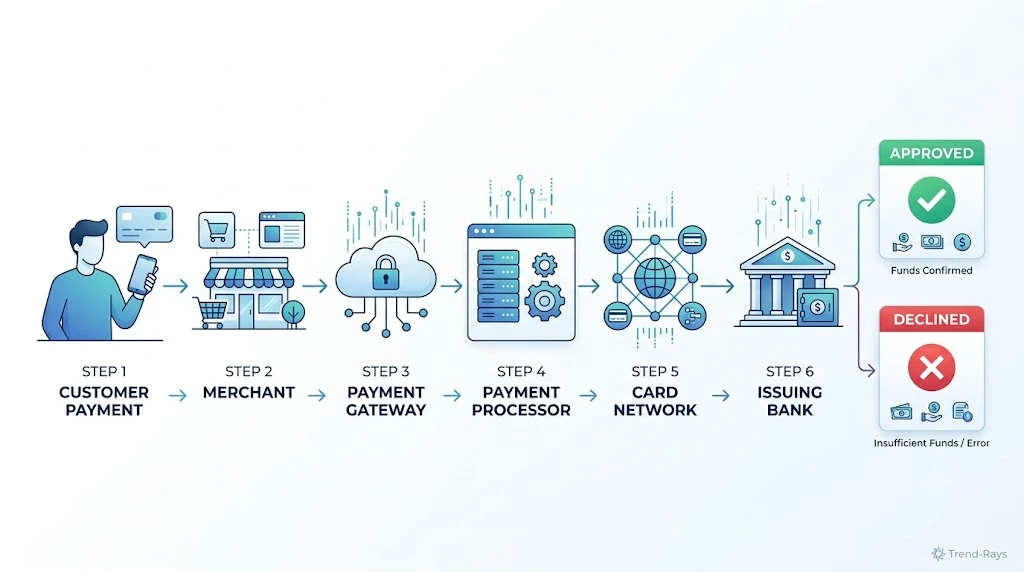
A single card payment depends on several independent systems communicating with one another in just a few seconds.
These systems include:
- The merchant’s checkout platform.
- The payment gateway.
- The payment processor.
- The card network.
- Your bank’s authorization system.
If any one of these systems becomes unavailable, the authorization request may fail before your payment is completed.
Where Technical Problems Can Occur
Your Bank
Banks occasionally perform:
- Scheduled maintenance.
- Software updates.
- Infrastructure upgrades.
- Emergency security fixes.
During these periods, some transactions may be delayed or temporarily declined.
Payment Processor
Companies that route card transactions sometimes experience service interruptions.
If the processor cannot communicate with your bank, the payment may fail even though both you and the merchant are ready to complete the transaction.
Card Network
Major card networks process billions of transactions every year.
Although outages are rare, temporary disruptions can affect payments across multiple banks and merchants simultaneously.
Merchant Checkout System
Sometimes the retailer’s own website or payment platform experiences problems.
Symptoms may include:
- Checkout pages that freeze.
- Error messages during payment.
- Repeated authorization failures.
- Unexpected session timeouts.
In these cases, trying a different payment card often won’t solve the problem because the issue originates with the merchant.
Signs That a Technical Problem May Be Responsible
You may be dealing with a temporary outage if:
- Multiple payment methods fail at the same merchant.
- Friends or family report similar problems.
- The retailer announces a payment issue.
- Your banking app shows no fraud alerts or account restrictions.
- The transaction works successfully after waiting a short time.
These situations suggest that the payment infrastructure—not your account—is causing the decline.
A Real-World Example
Imagine you’re purchasing concert tickets online.
You enter your payment details.
The checkout loads for several seconds before displaying:
“Payment could not be processed.”
You immediately try a second card.
The same thing happens.
A few minutes later, the ticket company’s social media account announces that its payment provider is experiencing technical difficulties.
In this situation, neither of your cards was actually the problem.
The payment system itself was temporarily unavailable.
Should You Keep Trying the Same Payment?
Repeatedly clicking the payment button isn’t always the best approach.
Multiple failed attempts within a short period may:
- Trigger fraud monitoring.
- Create duplicate authorization holds.
- Increase customer frustration.
- Make troubleshooting more difficult.
If you suspect a technical outage, it’s often better to wait a few minutes before trying again.
What You Can Do
If you believe a temporary outage is responsible:
- Check your bank’s mobile app for service alerts.
- Visit the merchant’s support or status page.
- Refresh the checkout session and try again later.
- Use another device or internet connection if appropriate.
- Contact customer support if the issue continues.
If your card works successfully at another retailer during the same period, the problem is likely isolated to the original merchant.
How Long Do Payment Outages Last?
Most payment-related technical issues are resolved quickly.
Many interruptions last:
- A few minutes.
- Less than one hour.
- Occasionally several hours during major incidents.
Long-term outages are uncommon because banks, payment processors, and merchants continuously monitor their payment infrastructure.
Key Takeaway
Even the most reliable payment systems occasionally experience technical problems.
When every part of your payment information is correct but transactions continue to fail, a temporary outage affecting your bank, the merchant, or the payment network may be responsible.
Before assuming something is wrong with your account, consider whether the payment infrastructure itself may be experiencing a short-term disruption.
In the next section, we’ll compare debit cards and credit cards, explaining why one may be declined while the other is approved—even when both belong to the same person.
Reason #10: Debit Cards and Credit Cards Are Approved Differently
Many people assume debit cards and credit cards work exactly the same way.
After all, both can be used to pay at stores, online retailers, restaurants, and subscription services.
However, behind the scenes, banks evaluate these payments differently.
This is why you may occasionally experience a situation where:
- Your debit card is declined.
- Your credit card is approved.
Or the opposite.
Understanding these differences can help you choose the right payment method when one card unexpectedly stops working.
The Biggest Difference
The main distinction is where the money comes from.
Debit Card
A debit card uses money that already exists in your bank account.
Before approving the payment, your bank checks:
- Available balance.
- Pending transactions.
- Authorization holds.
- Daily spending limits.
- Account restrictions.
If any of these checks fail, the payment may be declined.
Credit Card
A credit card doesn’t immediately use your bank balance.
Instead, your card issuer determines whether:
- Enough available credit remains.
- The purchase fits your normal spending behavior.
- The transaction passes fraud checks.
- Your account is in good standing.
Because the approval process is different, a credit card may succeed even when a debit card does not.
Why a Debit Card May Be Declined While a Credit Card Works
Some common reasons include:
Low Available Balance
Your checking account may not have enough available funds.
Your credit card, however, still has unused credit available.
Pending Authorizations
Hotels, gas stations, or restaurants may have temporarily reserved money in your checking account.
This reduces your available balance for debit purchases.
A credit card isn’t affected in the same way because it relies on your available credit rather than your bank balance.
Different Fraud Rules
Banks sometimes apply different fraud detection models to debit and credit cards.
A transaction that appears risky on a debit card may still be approved on a credit card after additional verification.
Merchant Preferences
Certain merchants process debit and credit transactions differently.
In rare situations, one payment method may succeed while another experiences technical problems.
Why a Credit Card May Be Declined While a Debit Card Works
The opposite situation can also happen.
Examples include:
- You’ve reached your credit limit.
- Your credit card account is temporarily restricted.
- A recent payment hasn’t yet restored available credit.
- Your issuer blocks the transaction for fraud prevention.
Meanwhile, your debit account still contains enough available money, allowing that payment to proceed successfully.
Which Card Is Better for Large Purchases?
There isn’t one correct answer for every situation.
However, many financial experts recommend using credit cards for larger purchases because they often provide:
- Purchase protection.
- Fraud protection.
- Chargeback rights.
- Extended warranties.
- Travel insurance benefits (on eligible cards).
Debit cards, on the other hand, withdraw money directly from your bank account.
Some people prefer them because they help avoid borrowing and interest charges.
The best option depends on your financial habits and the protections offered by your card issuer.
Should You Try Another Card?
If one card is declined, trying another valid payment method can sometimes help identify where the problem originates.
For example:
- Debit card declined.
- Credit card approved.
This suggests the issue may relate to your checking account rather than the merchant.
Likewise:
- Credit card declined.
- Debit card approved.
This may indicate a problem with your credit account instead of your bank balance.
Although this isn’t a guaranteed diagnostic method, it often provides a useful clue.
What You Should Do
If one payment method is declined:
- Check your available bank balance.
- Review your available credit.
- Look for pending transactions or authorization holds.
- Confirm neither account has restrictions.
- Contact your bank or card issuer if the problem continues.
Understanding which payment method is failing can significantly reduce troubleshooting time.
Key Takeaway
Debit cards and credit cards may look similar, but they follow different approval processes.
A payment decline on one doesn’t automatically mean the other will fail.
Knowing how each payment method is evaluated helps you choose the best alternative and better understand why a transaction was rejected.
In the next section, we’ll explore another increasingly common cause of payment failures: digital wallets such as Apple Pay, Google Wallet, Samsung Wallet, and PayPal, and why payments sometimes fail even though the underlying card is perfectly valid.
Reason #11: Your Digital Wallet Payment Failed
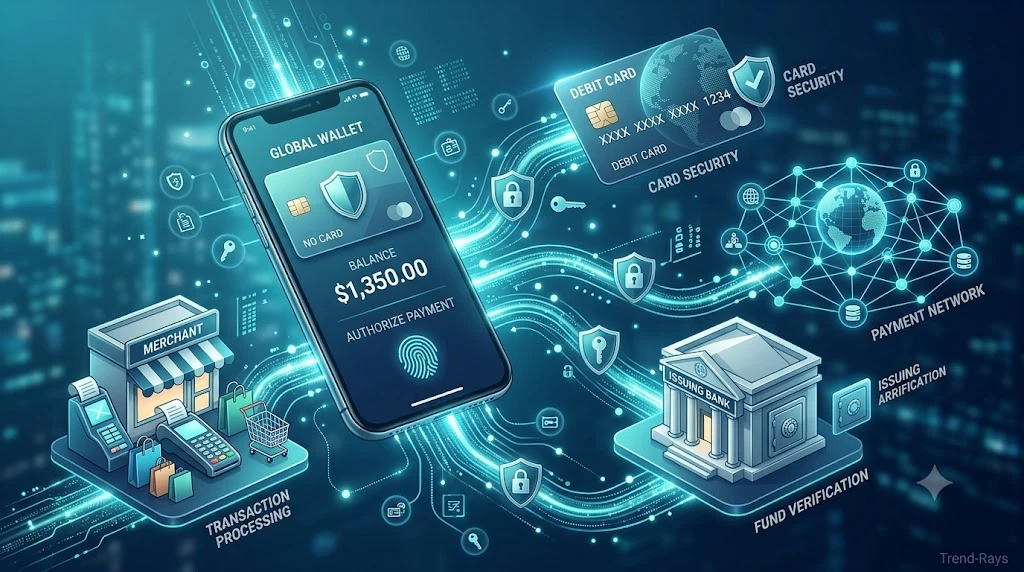
Digital wallets have made paying for purchases faster and more convenient.
Instead of entering your card details every time, you simply tap your phone or click a payment button.
However, many people become confused when a payment through Apple Pay, Google Wallet, Samsung Wallet, or PayPal is declined.
A common assumption is:
“Apple Pay isn’t working.”
or
“Google Wallet is broken.”
In reality, the digital wallet is often not the actual cause of the problem.
Most digital wallets simply act as a secure bridge between you, your payment card, and the merchant.
If any part of that chain fails, the wallet payment may also fail.
How Digital Wallet Payments Work
Although the payment appears almost instant, several systems still participate behind the scenes.
A simplified process looks like this:
Customer

↓

Digital Wallet
(Apple Pay, Google Wallet, Samsung Wallet, PayPal)

↓

Stored Payment Card

↓

Payment Network

↓

Issuing Bank

↓

Merchant

↓

Approved or Declined
Notice something important.
The wallet itself usually isn’t deciding whether your payment succeeds.
Your bank and the underlying payment card still make the final authorization decision.
The Card Inside Your Wallet May Be the Problem
Many digital wallet declines occur because of the card linked to the wallet.
For example:
- The card expired.
- The replacement card wasn’t added.
- The bank blocked the transaction.
- Available funds are insufficient.
- Fraud detection intervened.
Although you see an Apple Pay or Google Wallet error, the real issue often exists with the payment card itself.
Authentication Problems
Some digital wallet payments require additional identity verification.
Examples include:
- Face ID
- Fingerprint authentication
- Device PIN
- Two-factor authentication
- Banking app approval
If authentication cannot be completed successfully, the payment may never reach your bank for authorization.
Outdated Cards Stored in Your Wallet
One of the most common causes of wallet payment failures occurs after receiving a replacement card.
For example:
Your debit card expires.
Your bank sends a new card.
You activate it.
However, your phone still contains the old version.
When you attempt to pay using your digital wallet, the transaction is declined because the stored card information is no longer valid.
Merchant Limitations
Not every retailer supports every digital wallet.
For example, a store may accept:
- Apple Pay
but not:
- Google Wallet
Or it may support contactless card payments while not accepting mobile wallets for online purchases.
This depends entirely on the merchant’s payment system.
Internet Connectivity Matters
Although contactless wallet payments can sometimes work offline, many online wallet transactions require:
- Internet access.
- Banking verification.
- Merchant communication.
- Token validation.
Poor connectivity may interrupt one of these steps, resulting in a failed payment.
Device Security Can Affect Payments
Digital wallets rely heavily on device security.
Payments may fail if:
- Your phone hasn’t been unlocked recently.
- Security settings have changed.
- The wallet app requires reauthentication.
- The device’s operating system is outdated.
- The secure element or payment token needs to be refreshed.
Restarting the device or reopening the wallet app sometimes resolves these temporary issues.
PayPal Works Slightly Differently
PayPal deserves special mention because it often sits between your bank and the merchant.
A PayPal payment may fail because:
- Your linked bank account has restrictions.
- Your linked card has expired.
- Your PayPal balance is insufficient.
- The merchant doesn’t support your funding source.
- PayPal requests additional account verification.
In these situations, the issue may originate from either PayPal or the linked payment method.
How to Troubleshoot Digital Wallet Payments
If your wallet payment is declined:
- Confirm that the linked card is still active.
- Check whether the card has expired.
- Verify your available balance or available credit.
- Update any replacement cards stored in the wallet.
- Make sure your device has internet access if required.
- Complete any requested authentication.
- Try using the physical card directly.
If the physical card also fails, the problem almost certainly lies with the card or bank—not the wallet.
Key Takeaway
Digital wallets rarely make independent approval decisions.
Most payment failures occur because of the underlying card, your bank’s security checks, authentication requirements, or merchant acceptance rules.
Before assuming that Apple Pay, Google Wallet, Samsung Wallet, or PayPal is malfunctioning, verify the payment method connected to the wallet.
Doing so will often identify the real cause much more quickly.
In the next section, we’ll look at another common cause of payment failures: prepaid cards and gift cards, including why they frequently behave differently from standard debit and credit cards.
Reason #12: You’re Using a Prepaid Card or Gift Card
Prepaid cards and gift cards may look like regular debit or credit cards, but they don’t always follow the same payment rules.
As a result, many people are surprised when a prepaid card is declined—even though it still has money available.
The issue is often not the balance itself, but the way prepaid cards are designed and accepted by merchants.
How Prepaid Cards Differ From Debit Cards
A standard debit card is linked directly to your bank account.
A prepaid card, on the other hand, contains a fixed amount of money that was loaded onto the card in advance.
Examples include:
- Visa prepaid cards
- Mastercard prepaid cards
- Store gift cards
- Reloadable prepaid cards
- Payroll cards
Although these cards can often be used like debit cards, they usually have additional restrictions.
Why Prepaid Cards Are Sometimes Declined
Several situations can cause a prepaid card to fail even when funds remain.
The Purchase Is Larger Than the Remaining Balance
Suppose your prepaid card contains:
$38
You attempt to make a purchase worth:
$42
Unlike some debit cards, many prepaid cards don’t allow partial approvals automatically.
Instead of charging $38 and asking for another payment method for the remaining $4, the entire transaction may be declined.
Online Merchants Require Billing Information
Many prepaid cards require you to register a billing address before they can be used online.
If no billing address is associated with the card, online verification may fail, causing the payment to be declined.
The Merchant Doesn’t Accept Prepaid Cards
Some businesses intentionally refuse prepaid cards.
Common examples include:
- Hotel bookings
- Car rentals
- Subscription services
- Airline reservations
- Certain online marketplaces
These businesses often require a standard debit or credit card because they may need to place authorization holds or process future charges.
Recurring Payments
Many subscription services require payment methods that support recurring billing.
Some prepaid cards cannot be used for recurring payments, even if sufficient funds are available.
As a result, automatic renewals may fail.
International Restrictions
Some prepaid cards are limited to domestic transactions.
If you attempt to use them:
- On an overseas website
- While traveling internationally
- For payments processed in another country
the transaction may be declined automatically.
Authorization Holds Can Create Problems
Hotels, gas stations, and car rental companies frequently place temporary authorization holds.
If a prepaid card doesn’t contain enough funds to cover both the purchase and the hold, the transaction may be rejected.
For example:
Hotel stay:
$180
Temporary authorization:
$250
Although your final bill may only be $180, the card must usually support the larger temporary authorization amount.
How to Check Whether Your Prepaid Card Can Be Used
Before making a purchase, verify:
- The available balance.
- Whether the card has been activated.
- Whether online purchases are supported.
- Whether international transactions are allowed.
- Whether the merchant accepts prepaid cards.
- Whether a billing address must be registered.
Most prepaid card providers explain these rules on their websites or in the cardholder agreement.
What You Should Do
If your prepaid card is declined:
- Confirm the remaining balance.
- Register your billing address if required.
- Check whether the merchant accepts prepaid cards.
- Try a smaller purchase if the remaining balance is close to the purchase amount.
- Use another payment method if authorization holds are expected.
These steps resolve many prepaid card issues without needing customer support.
Key Takeaway
Prepaid cards and gift cards don’t always behave like traditional debit or credit cards.
Merchant restrictions, authorization holds, billing verification, and recurring payment requirements can all cause a prepaid card to be declined—even when money remains on the card.
Understanding these limitations helps you choose the right payment method and avoid unexpected payment failures.
In the next section, we’ll answer one of the most practical questions readers have: Who should you contact first—the merchant or your bank? Knowing the answer can save time and help resolve payment problems much faster.
Who Should You Contact First: Your Bank or the Merchant?
After a payment is declined, many people immediately call their bank.
Others contact the merchant.
Sometimes they end up being sent back and forth because neither side appears to know what happened.
The fastest way to resolve a declined payment is to contact the right party first.
The table below can help you decide.
| Situation | Contact First | Why |
|---|---|---|
| Card declined at several different stores | Your bank | The issue is likely related to your account, card, or bank authorization. |
| Only one merchant declines your payment | The merchant | Your card works elsewhere, suggesting the issue is with that retailer or its payment system. |
| You received a fraud alert | Your bank | Only your bank can remove a fraud-related block or verify the transaction. |
| Checkout page displays technical errors | The merchant | Website or payment gateway problems are usually handled by the retailer. |
| Incorrect billing address or payment details | You (then retry) | Correct the information before contacting support. |
| Large purchase declined | Your bank | A spending limit or fraud check may require approval. |
| International purchase declined | Your bank | International transactions may need to be enabled or verified. |
| Hotel or rental authorization hold | The merchant first | The merchant controls when authorization holds are released. |
When You Should Contact Your Bank
Your bank can usually help when the decline involves:
- Fraud alerts.
- Account restrictions.
- Daily spending limits.
- International transaction settings.
- Expired or replacement cards.
- Available balance questions.
- Authorization approvals.
- Card activation issues.
When you call, be prepared to provide:
- The approximate time of the transaction.
- The purchase amount.
- The merchant’s name.
- Whether the payment was online or in person.
- Any error message you received.
Having this information ready allows customer support to locate the authorization request much more quickly.
When You Should Contact the Merchant
The merchant is often the better first contact if:
- The payment only fails on their website.
- Other payment methods also fail.
- Their checkout page displays errors.
- The purchase involves an authorization hold.
- The merchant recently announced technical issues.
- You believe the charge was processed incorrectly.
The merchant may be able to see:
- Whether the authorization request reached their system.
- Why the payment gateway rejected the transaction.
- Whether the order was partially created.
- Whether duplicate authorization requests exist.
This information is usually not visible to your bank.
Questions to Ask Your Bank
Instead of saying:
“My card doesn’t work.”
Ask more specific questions, such as:
- Was this transaction declined by the bank?
- Was the payment ever authorized?
- Was fraud detection triggered?
- Have I reached a spending limit?
- Is international spending enabled?
- Is there an authorization hold affecting my available balance?
- Is my card currently restricted?
Specific questions often produce much faster answers.
Questions to Ask the Merchant
If the issue appears merchant-related, ask:
- Did you receive my authorization request?
- Was the payment gateway experiencing problems?
- Is my payment method supported?
- Was the order partially created?
- Can you see a decline reason on your side?
- Should I retry the payment now or wait?
These questions help determine whether the issue lies with the merchant’s systems or somewhere else in the payment chain.
Before Contacting Anyone
Before calling support, take two minutes to check:
✓ Your available balance.
✓ Pending transactions.
✓ Authorization holds.
✓ Billing information.
✓ Card expiration date.
✓ Internet connection (for online purchases).
✓ Whether your card works at another merchant.
Many payment issues can be solved without contacting anyone once these basic checks are completed.
Keep Notes if the Problem Continues
If repeated payment attempts fail, write down:
- Date and time.
- Merchant name.
- Purchase amount.
- Payment method used.
- Error message shown.
- Support ticket or reference number.
These details make it much easier for banks and merchants to investigate the problem if escalation becomes necessary.
Key Takeaway
Banks and merchants can each see different parts of the payment process.
Knowing which party to contact first can save considerable time and frustration.
As a general rule:
- If the problem affects multiple merchants, contact your bank first.
- If the problem occurs only with one merchant, contact the merchant first.
Following this approach helps you identify the source of the problem more quickly and increases the chances of resolving the issue on the first attempt.
In the next section, we’ll bring everything together with a 2-minute payment decline troubleshooting checklist—a simple step-by-step process you can follow before contacting support.
The 2-Minute Payment Decline Troubleshooting Checklist
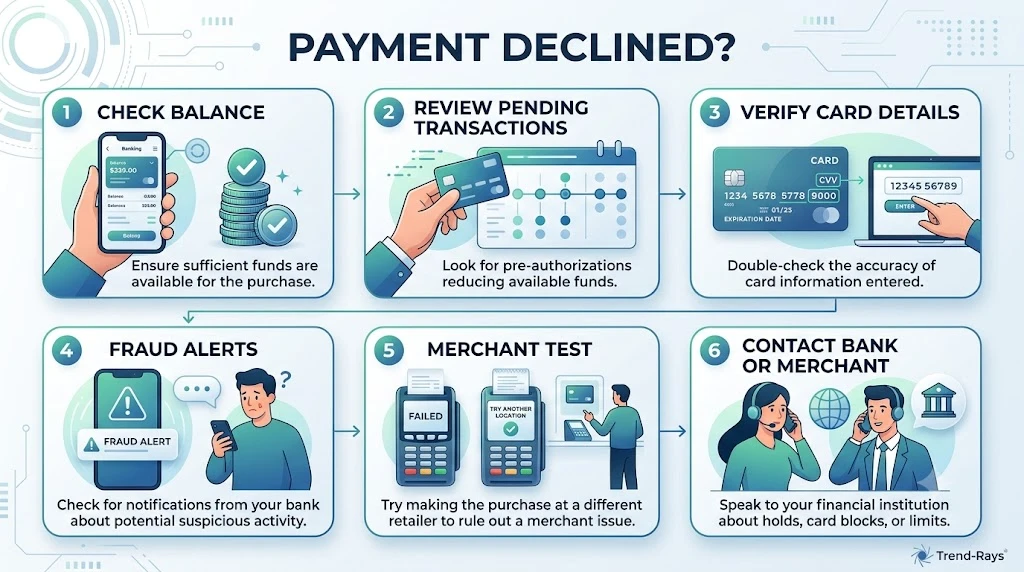
If your payment has been declined, don’t panic.
Before contacting your bank or the merchant, work through this quick checklist.
In many cases, you’ll identify—and even solve—the problem in just a few minutes.
Step 1: Check Your Available Balance
Don’t rely only on your account balance.
Instead, verify your available balance, since pending transactions and authorization holds may temporarily reduce the amount you can spend.
✓ Sufficient available balance?
Yes → Continue to Step 2
No → Wait for pending transactions to settle or add funds.
Step 2: Review Pending Transactions
Open your banking app and look for:
- Pending purchases
- Authorization holds
- Hotel deposits
- Fuel station pre-authorizations
- Recent online purchases
If one of these is reducing your available balance, it may explain the decline.
✓ Nothing unusual?
Continue to Step 3
Step 3: Verify Your Card Details
Especially for online purchases, double-check:
- Card number
- Expiration date
- CVV
- Billing address
- ZIP or postal code
Even a small typo can cause the transaction to fail.
✓ Everything correct?
Continue to Step 4
Step 4: Check Whether Your Card Has Expired
Ask yourself:
- Did my card recently expire?
- Did my bank issue a replacement card?
- Have I updated saved payment methods?
If you’re using an old card number or expiration date, update the information before trying again.
✓ Card is current?
Continue to Step 5
Step 5: Look for Bank Alerts
Open your banking app.
Check for:
- Fraud alerts
- Security notifications
- Transaction verification requests
- Temporary restrictions
Many banks allow you to approve blocked transactions directly in the app.
✓ No alerts?
Continue to Step 6
Step 6: Try Another Merchant
If possible, make a small purchase elsewhere.
If your card works at another retailer:
The original merchant may be experiencing technical problems.
If it fails everywhere:
The issue is more likely related to your card or bank.
Step 7: Try Another Payment Method
If available, try:
- Another debit card
- A credit card
- Apple Pay
- Google Wallet
- PayPal
This simple test often reveals whether the problem is tied to one specific payment method.
Step 8: Consider Recent Travel or Large Purchases
Have you recently:
- Traveled internationally?
- Made several purchases today?
- Attempted a very large transaction?
If so, your bank may have triggered additional fraud or spending-limit checks.
Step 9: Check for Merchant Problems
If only one website or store is affected:
- Refresh the page.
- Wait a few minutes.
- Look for maintenance announcements.
- Contact the merchant.
Technical issues are more common than many people realize.
Step 10: Contact the Right Support Team
After completing the previous steps:
Contact your bank if:
- Multiple merchants decline your card.
- You suspect fraud protection.
- Your spending limit may have been reached.
- International transactions are blocked.
Contact the merchant if:
- Only one retailer declines the payment.
- The checkout page displays errors.
- Other customers report similar issues.
- The merchant controls an authorization hold.
Quick Decision Flow
Payment Declined
        │
        ▼
Enough Available Balance?
        │
   ┌────┴────┐
   │         │
 No         Yes
   │         │
Add Funds    ▼
       Pending Transactions?
              │
         ┌────┴────┐
         │         │
       Yes        No
         │         │
Wait for Hold      ▼
          Card Details Correct?
                   │
              ┌────┴────┐
              │         │
             No        Yes
              │         │
     Correct Details    ▼
              Fraud Alert?
                   │
              ┌────┴────┐
              │         │
             Yes       No
              │         │
      Contact Bank      ▼
          Works Elsewhere?
                   │
              ┌────┴────┐
              │         │
             Yes       No
              │         │
 Contact Merchant   Contact Bank
Save This Checklist
Payment declines happen to almost everyone at some point.
Saving this checklist can help you troubleshoot future payment problems quickly without immediately calling customer support.
In many cases, you’ll identify the cause in less than two minutes.
Key Takeaway
Most declined payments can be narrowed down by following a simple, logical process.
Rather than guessing, start with your available balance, review pending transactions, verify your card details, and determine whether the issue is with your bank or the merchant.
A structured approach saves time, reduces frustration, and often resolves the problem without needing outside assistance.
Next, we’ll answer the most frequently asked questions people have about declined payments, including whether repeated declines affect your credit score, whether you can retry a failed payment safely, and what different decline messages actually mean.
Payment Declined Error Messages Explained
One of the most frustrating parts of a declined payment is the error message itself.
Instead of clearly explaining what went wrong, many payment systems display vague messages such as:
- Transaction Declined
- Do Not Honor
- Payment Failed
- Issuer Declined
These messages are designed primarily for payment systems—not customers.
As a result, they often don’t tell you exactly what caused the problem.
The guide below explains some of the most common payment decline messages, what they usually mean, and the best next step to take.
Common Payment Decline Messages
| Error Message | What It Usually Means | What You Should Do |
|---|---|---|
| Insufficient Funds | Your available balance isn’t high enough to cover the transaction. | Add funds, wait for pending transactions to settle, or use another payment method. |
| Do Not Honor | A generic decline from your card issuer. The bank chose not to approve the transaction but didn’t provide the merchant with a detailed explanation. | Contact your bank if the problem continues. |
| Issuer Declined | Your bank rejected the authorization request. This could relate to fraud detection, spending limits, or account restrictions. | Check your banking app for alerts or contact your bank. |
| Transaction Not Permitted | Your card isn’t allowed to perform this type of transaction. International purchases, cash advances, or online payments may be disabled. | Verify your card settings with your bank. |
| Restricted Card | Your card has usage restrictions or has been temporarily blocked. | Contact your bank before retrying the payment. |
| Invalid CVV | The security code entered doesn’t match your card. | Carefully re-enter the CVV printed on the card. |
| Invalid Expiration Date | The expiration date entered is incorrect or the card has expired. | Verify the expiration date or use your replacement card. |
| Incorrect Billing Address | Address Verification System (AVS) couldn’t match your billing information. | Confirm your billing address matches your bank’s records exactly. |
| Authentication Failed | Additional identity verification (such as 3D Secure) wasn’t completed successfully. | Retry the verification process and ensure authentication is approved. |
| Expired Card | The payment card has passed its expiration date. | Update your payment method using your new card. |
| Card Not Supported | The merchant doesn’t accept your payment method or card type. | Use another supported payment method or contact the merchant. |
| Payment Gateway Error | The merchant’s payment processor experienced a temporary technical problem. | Wait a few minutes and try again later. |
| Duplicate Transaction | A similar payment was recently submitted, and the processor rejected the duplicate attempt. | Wait for confirmation before trying again. |
| Temporary Hold | Funds are temporarily reserved because of a previous authorization. | Wait for the hold to be released or contact the merchant. |
Why Error Messages Can Be Misleading
Many customers expect payment systems to explain the exact reason a transaction failed.
In reality, merchants often receive only limited information from the issuing bank.
For security reasons, banks intentionally avoid revealing detailed fraud detection rules or internal risk assessments.
This helps prevent criminals from learning how to bypass payment security systems.
As a result, two customers receiving the same message—such as “Do Not Honor”—may actually be experiencing completely different underlying problems.
Which Error Messages Usually Require Calling Your Bank?
You should normally contact your bank if you receive messages such as:
- Do Not Honor
- Issuer Declined
- Restricted Card
- Transaction Not Permitted
- Suspected Fraud
- Security Restriction
Only your bank can explain whether the decline was caused by fraud prevention, spending limits, account restrictions, or another internal authorization rule.
Which Error Messages Can You Usually Fix Yourself?
Some problems don’t require contacting customer support at all.
You can often resolve them yourself by correcting the payment information.
Examples include:
- Invalid CVV
- Incorrect expiration date
- Billing address mismatch
- Expired card
- Outdated saved payment method
Taking a few moments to review your payment details can save unnecessary calls to both your bank and the merchant.
Key Takeaway
Payment decline messages rarely tell the whole story.
Many are intentionally broad because banks limit the amount of information shared during the authorization process.
Instead of focusing only on the wording of the error message, use it as a starting point.
Combine it with the troubleshooting checklist in this guide to identify whether the issue is related to your card, your bank, the merchant, or the payment network.
Doing so will usually help you resolve the problem much faster than simply retrying the payment multiple times.
Frequently Asked Questions
1. Why was my payment declined when I have enough money?
Having enough money in your account doesn’t always mean a payment will be approved. Banks typically authorize transactions using your available balance, not your total account balance. Pending transactions, authorization holds, spending limits, fraud detection systems, incorrect billing information, or merchant-specific restrictions can all cause a payment to be declined even when your account appears to have sufficient funds.
2. Does a declined payment mean my bank account is empty?
No. A declined payment does not automatically mean your account is out of money. Many declines occur because of temporary authorization holds, security checks, incorrect payment information, expired cards, merchant acceptance rules, or technical issues. Checking your available balance and recent account activity is a good first step.
3. Can I retry a declined payment immediately?
Yes, but only after identifying the likely cause of the decline. Repeatedly submitting the same payment without correcting the underlying problem may trigger additional fraud monitoring or create temporary authorization holds. If you aren’t sure why the payment failed, review your account or contact your bank before trying again.
4. Will a declined card payment affect my credit score?
Generally, no. A single declined debit or credit card transaction does not affect your credit score. However, if a recurring credit card payment is missed and eventually becomes a late payment on your credit account, that separate issue could affect your credit history.
5. Why does my card work in stores but not online?
Online merchants often perform additional security checks, including billing address verification (AVS), CVV verification, and fraud screening. A mismatch in any of these details—or restrictions on online transactions—may cause online payments to fail while in-store purchases continue working normally.
6. Why does my card work online but not in stores?
This may indicate a damaged chip, worn magnetic strip, contactless issue, or terminal compatibility problem. If online purchases continue working but physical card payments consistently fail, contacting your bank for a replacement card is usually the best solution.
7. Why was only one merchant unable to accept my card?
If your card works everywhere except one retailer, the issue is often on the merchant’s side. Their payment processor, checkout system, accepted payment methods, or temporary technical problems may be responsible. Contacting the merchant is usually the fastest way to investigate.
8. Can pending transactions cause other payments to fail?
Yes. Pending transactions and authorization holds reduce your available balance, which is the amount your bank normally uses during payment authorization. Until those transactions settle, additional purchases may be declined if sufficient available funds are not remaining.
9. Why is my debit card declined but my credit card works?
Debit cards depend on your available bank balance, while credit cards rely on your available credit limit. Because the approval processes differ, one payment method may succeed even when the other is declined due to spending limits, pending transactions, or account-specific restrictions.
Most authorization holds are released within a few hours to several business days, depending on the merchant and your bank. Hotels, car rental companies, and international merchants may keep holds active longer because the final purchase amount isn’t immediately known.
11. Can my bank decline an international purchase even if I have enough money?
Yes. Many banks apply additional security measures to international transactions. If international payments are disabled, the purchase appears unusual, or fraud prevention systems identify additional risk, the transaction may be declined until verified.
12. Why do subscription payments suddenly fail?
Subscription renewals commonly fail because the saved payment card has expired, the card was replaced, the available balance is insufficient, or the merchant still has outdated payment information. Updating your payment method usually resolves the problem.
13. Does using the wrong billing address cause payment declines?
Yes. Many online merchants use Address Verification System (AVS) checks to compare your billing address with the information your bank has on file. If the details don’t match closely enough, the transaction may be rejected for security reasons.
14. Can prepaid cards be declined even if they still have money?
Yes. Prepaid cards often have additional restrictions that don’t apply to standard debit cards. Some merchants don’t accept prepaid cards, while others require billing address registration or recurring payment support. Authorization holds may also exceed the available prepaid balance.
15. Why does Apple Pay or Google Wallet say my payment was declined?
In most cases, the wallet itself isn’t the problem. The decline usually originates from the linked payment card, your bank’s fraud detection system, authentication requirements, or the merchant’s payment processor. Checking the underlying card is often the quickest way to identify the issue.
16. Should I contact my bank or the merchant first?
If your card fails at multiple businesses, contact your bank first. If the problem occurs only with one merchant while your card works elsewhere, contact the merchant. This approach usually saves time because each party can only investigate the part of the payment process they control.
17. Can a temporary bank outage cause payment declines?
Yes. Banks, payment processors, merchants, and card networks occasionally experience temporary technical issues. During these outages, legitimate payments may fail even when your account and card are functioning normally. Waiting a short time before retrying often resolves the issue.
18. What’s the first thing I should check after a payment is declined?
Start by checking your available balance, not just your account balance. Then review pending transactions, authorization holds, fraud alerts, billing information, card expiration date, and recent spending. Following a structured troubleshooting process often identifies the problem before you need to contact customer support.