
Introduction
School administrators have never had more software available to them.
Every year, new platforms promise to solve attendance management, staff communication, scheduling, reporting, parent engagement, document management, and countless other administrative challenges.
For schools, it’s tempting to believe that every operational problem has a software solution waiting to be purchased.
Yet many administrators share a different reality.
Despite adding more subscriptions, they still spend hours every week writing emails, preparing reports, organizing meetings, updating policies, planning events, and responding to routine administrative requests.
The workload hasn’t disappeared.
In many cases, it has simply shifted from paperwork to managing multiple digital platforms.
This raises an important question.
Do schools actually need more software, or do they need better workflows?
For many repetitive administrative tasks, the answer is surprisingly simple.
Modern AI tools—many of which are already available through existing workplace software or as general-purpose assistants—can help administrators complete common tasks faster without requiring another dedicated platform.
That doesn’t mean schools should stop investing in technology altogether.
Specialized software remains essential for functions such as student information systems, payroll, finance, learning management, attendance, and regulatory compliance.
However, many day-to-day administrative tasks don’t require another subscription.
They require a smarter way of working.
In this guide, we’ll explore seven practical AI workflows that can help reduce administrative workload, improve communication, and streamline routine office tasks—often using tools schools already have access to.
Along the way, we’ll also discuss when investing in new software genuinely makes sense, how to avoid unnecessary technology sprawl, and why improving workflows usually delivers a greater return than simply adding another application to the school’s technology stack.
Why Schools Keep Buying More Software – Yet Still Feel Overwhelmed
Technology has transformed school administration over the past decade.
Most schools now rely on a combination of digital platforms for everything from attendance tracking and admissions to payroll, communication, document storage, and learning management.
While each platform solves a specific problem, the overall result is often a growing collection of disconnected systems.
A typical administrator might begin the day by checking email, opening the student information system, reviewing calendars, updating documents, responding to parent messages, attending virtual meetings, preparing reports, and switching between multiple browser tabs dozens of times before lunch.
Each system works.
Together, they can create friction.
Adding another application doesn’t always reduce workload.
Sometimes it simply introduces another login, another notification, another training session, and another subscription to manage.
This phenomenon is sometimes referred to as software sprawl—the gradual accumulation of digital tools that increase complexity rather than reducing it.
The issue isn’t that schools use technology.
The issue is that technology alone doesn’t solve inefficient workflows.
For example:
- Purchasing a new communication platform doesn’t eliminate the need to write emails.
- Buying a reporting tool doesn’t automatically organize meeting notes.
- Adding another planning application doesn’t create better event checklists.
- Installing a new dashboard doesn’t reduce the time required to draft newsletters.
These tasks still depend on people.
What often changes the equation isn’t another platform.
It’s reducing the amount of repetitive work involved in producing the documents, communications, and planning materials that schools create every day.
Artificial intelligence is particularly effective at assisting with these repetitive tasks because it complements existing software instead of replacing it.
Rather than asking administrators to learn an entirely new system, AI can help them work more efficiently within the tools they already use.
Before evaluating another software purchase, it’s worth asking a simple question:
Is this a software problem—or is it a workflow problem?
In many schools, improving the workflow delivers greater long-term value than adding another application.
Workflow 1: Stop Writing Routine Emails From Scratch
School administrators send dozens—sometimes hundreds—of emails every week.
Some require careful thought and personal attention.
Many others follow familiar patterns.
Parents need reminders about upcoming events.
Teachers need updates about schedules.
Staff require meeting invitations.
Prospective families ask similar admissions questions.
These routine communications are essential, but they often consume far more time than necessary because every message starts with a blank page.
AI changes that process.
Instead of replacing the administrator, it provides a well-structured first draft that can be reviewed, edited, and personalized before being sent.
The result is less time spent typing and more time spent communicating thoughtfully.
The Traditional Workflow
Without AI, a typical email often looks like this:
- Open a new email.
- Think about the wording.
- Search for previous emails with similar content.
- Rewrite sections manually.
- Check grammar and formatting.
- Proofread.
- Send.
Individually, this may take only ten or fifteen minutes.
Repeated throughout the day, those minutes add up quickly.
The AI-Assisted Workflow
A more efficient approach is to give AI clear instructions before drafting.
For example:
Write a professional email reminding parents that permission slips for next week’s field trip must be returned by Friday. Use a friendly tone, keep the message under 200 words, and encourage parents to contact the school office with any questions.
Within seconds, AI can produce a structured draft.
The administrator then:
- Reviews the content.
- Adds school-specific details.
- Verifies dates and contact information.
- Adjusts the tone if necessary.
- Sends the final version.
The administrator remains in complete control while avoiding repetitive writing.
Emails That AI Can Help Draft
AI is particularly useful for recurring communications such as:
- Parent reminders
- School closure notifications
- Attendance follow-ups
- Event invitations
- Staff announcements
- Professional development reminders
- Admissions follow-ups
- Newsletter introductions
- Examination schedules
- Holiday notices
Each of these follows a predictable structure, making them well suited for AI-assisted drafting.
Estimated Time Savings
Imagine a school office sends:
- 8 parent emails
- 5 staff announcements
- 3 admissions responses
each week.
If AI reduces the drafting time for each message by even 10 minutes, that’s more than 2½ hours saved every week on email writing alone.
Across an academic year, those savings become significant.
When AI Is the Wrong Choice
Not every email should be written with AI assistance.
Administrators should take extra care when communicating about:
- Student disciplinary matters
- Safeguarding concerns
- Legal issues
- Confidential personnel matters
- Medical situations
- Highly sensitive parent conversations
- Crisis communications
These messages often require careful judgment, empathy, and context that extend beyond drafting efficiency.
AI may help organize ideas, but the final wording should come directly from the responsible administrator.
Practical Tips for Better AI Email Drafts
The quality of AI-generated emails depends heavily on the prompt provided.
For better results:
- Specify the audience (parents, teachers, staff, or prospective families).
- State the purpose clearly.
- Mention the desired tone.
- Include any important dates or deadlines.
- Set a preferred length.
- Ask AI to use clear, jargon-free language.
The more context you provide, the less editing you’ll need afterward.
Real-World Example
Consider two approaches to the same task.
Without Context
Write a school email.
The result is likely to be generic and require substantial editing.
With Context
You are a school administrator. Write a friendly email to parents explaining that the annual science fair has been moved from Thursday to Friday due to weather conditions. Reassure families that the schedule remains the same, keep the email under 250 words, and end with contact information for the school office.
The second prompt gives AI everything it needs to produce a useful first draft.
Key Takeaway
Schools don’t need dedicated email-writing software to improve communication.
In many cases, they simply need a faster drafting process.
AI doesn’t remove the administrator from the workflow.
It removes the blank page.
And for busy school offices, that small change can save hours over the course of a month while keeping every message under human review and aligned with the school’s communication standards.
Workflow 2: Turn One School Meeting Into Five Ready-to-Use Documents
Meetings are an unavoidable part of school administration.
Whether discussing curriculum planning, safeguarding, admissions, staffing, budgets, inspections, or upcoming events, leadership teams spend a considerable amount of time preparing for meetings—and even more time documenting what happened afterward.
Ironically, the meeting itself is often the shortest part of the process.
The real administrative workload begins once everyone leaves the room.
Someone still needs to:
- Organize handwritten notes.
- Prepare meeting minutes.
- List action items.
- Assign responsibilities.
- Share follow-up emails.
- Update project plans.
- Store documentation for future reference.
Much of this work follows predictable patterns, making it an excellent candidate for AI-assisted workflows.
Rather than viewing AI as a note-taking tool, administrators can think of it as a documentation assistant that helps transform one meeting into multiple useful outputs.
The Traditional Workflow
A typical leadership meeting often looks like this:
Before the meeting:
- Create an agenda.
- Prepare discussion topics.
- Gather supporting documents.
During the meeting:
- Take notes.
- Record decisions.
- Capture action items.
After the meeting:
- Rewrite notes.
- Format meeting minutes.
- Write a follow-up email.
- Assign tasks.
- Update planning documents.
Depending on the length of the meeting, this documentation process can easily consume another one or two hours.
The AI-Assisted Workflow
Instead of manually rewriting everything, administrators can use AI to organize their notes into several structured documents.
One meeting can generate:
Professional Meeting Minutes
Convert rough notes into a clear, well-structured summary suitable for record-keeping.
Action Item List
Extract every agreed task together with:
- Responsible person
- Deadline
- Priority
- Status
This reduces the risk of important follow-up work being forgotten.
Staff Communication
Create a concise announcement highlighting only the decisions relevant to teachers and staff.
Not everyone needs the full meeting minutes.
AI can produce a shorter internal update that is easier to read.
Leadership Summary
Generate an executive summary containing only:
- Key decisions
- Risks
- Outstanding issues
- Next steps
This is particularly useful for principals, governing boards, or district leadership.
Future Planning Document
Transform meeting outcomes into a structured project plan that can be expanded during future meetings.
Instead of starting from scratch each time, administrators build on previous work.
A Single Meeting—Multiple Outputs
Think about the administrative value.
One meeting can produce:
Meeting
↓
Meeting Minutes
↓
Action List
↓
Staff Update
↓
Leadership Summary
↓
Project Plan
Instead of preparing each document individually, administrators review AI-generated drafts and make any necessary adjustments before sharing them.
Estimated Time Savings
Imagine a school leadership team holds:
- One senior leadership meeting.
- One department meeting.
- One planning meeting.
every week.
If AI reduces post-meeting documentation by even 45 minutes per meeting, the school saves more than two hours every week.
Over an academic year, that represents dozens of hours that can be redirected toward strategic leadership rather than administrative paperwork.
When AI Shouldn’t Be Used Alone
Meeting documentation still requires careful human review.
AI should never independently summarize meetings involving:
- Confidential personnel matters
- Student disciplinary cases
- Safeguarding discussions
- Legal proceedings
- Financial approvals
- Sensitive investigations
These discussions often depend on nuance, context, and precise wording that only participants can accurately confirm.
AI can help organize information, but it should not become the official record without verification.
Practical Prompt Example
Instead of asking:
Summarize this meeting.
Provide more detailed instructions.
For example:
You are assisting a school principal. Convert these meeting notes into professional meeting minutes using the following headings: attendees, agenda items, key decisions, action items, deadlines, and next meeting date. Keep the writing concise, objective, and suitable for internal school records.
Clear prompts consistently produce better documentation.
Small Improvements That Add Up
Schools often focus on saving hours through major technology investments.
In reality, productivity gains frequently come from improving small, repetitive tasks.
If every meeting generates five useful documents instead of one, administrators spend less time rewriting information and more time acting on decisions.
That’s where AI provides its greatest value—not by replacing meetings, but by reducing the administrative effort that follows them.
Key Takeaway
The goal isn’t to automate meetings.
It’s to automate the repetitive documentation that meetings generate.
By turning one set of notes into multiple practical outputs, AI helps schools improve communication, accountability, and follow-through without introducing another dedicated meeting management platform.
Workflow 3: Stop Starting Every School Policy From a Blank Page
Every school depends on documentation.
Policies help create consistency, establish expectations, support compliance, and provide guidance for staff, students, and parents.
Whether you’re updating an existing document or creating a new one, policy writing is rarely a quick task.
A single policy often requires administrators to:
- Decide on the document structure.
- Research existing guidance.
- Organize key points.
- Write multiple sections.
- Review wording.
- Edit for clarity.
- Share drafts for feedback.
- Revise several times before approval.
Starting with a blank document every time slows the process considerably.
AI doesn’t eliminate the review process—but it can eliminate the blank page.
The Traditional Workflow
Creating a new policy often follows this pattern:
Research
↓
Open a blank document
↓
Create headings
↓
Write the first draft
↓
Review internally
↓
Revise
↓
Approve
↓
Publish
For complex policies, the first draft alone can consume several hours.
Much of that time is spent organizing information rather than making important decisions.
The AI-Assisted Workflow
Instead of beginning with an empty document, administrators can ask AI to generate a structured first draft.
For example:
Create a draft outline for a school visitor management policy. Include sections covering purpose, scope, visitor sign-in procedures, safeguarding expectations, emergency procedures, staff responsibilities, and document review. Use clear professional language suitable for an internal policy document.
Rather than producing a finished policy, AI provides a framework that administrators can refine, expand, and align with their school’s specific requirements.
This approach allows leadership teams to spend more time evaluating content and less time formatting documents.
Documents AI Can Help Draft
Schools produce far more documentation than many people realize.
AI can assist with creating first drafts for:
- Visitor management policies
- Staff handbook updates
- Volunteer guidance
- Professional development procedures
- Event planning guidelines
- Administrative process documents
- Communication standards
- Internal operating procedures
- Committee terms of reference
- School improvement plans
- Risk assessment templates
- Office workflow documentation
These documents still require review, but AI can significantly reduce the effort involved in preparing the initial version.
Why Structure Matters More Than Speed
One of AI’s greatest strengths isn’t simply generating text.
It’s organizing information logically.
For example, instead of spending thirty minutes deciding which sections a policy should contain, administrators receive a structured outline immediately.
A typical document may include:
- Purpose
- Scope
- Definitions
- Responsibilities
- Procedures
- Roles
- Exceptions
- Review schedule
- Related documents
Even if every section is rewritten, having a logical starting point saves valuable planning time.
Estimated Time Savings
Imagine a school updates:
- Two internal procedures.
- One operational guideline.
- One committee document.
each month.
If AI reduces drafting time by just 90 minutes per document, the administrative team could recover six or more hours every month, while still maintaining full editorial control over the final version.
When AI Shouldn’t Draft the Final Policy
AI should never become the sole author of documents involving:
- Legal compliance
- Employment contracts
- Regulatory obligations
- Student safeguarding requirements
- Government reporting
- Financial governance
- Official disciplinary procedures
These documents often require legal review, local regulatory knowledge, and organizational approval.
AI can provide structure and drafting assistance, but it should not determine policy.
A Better Prompt Produces a Better Draft
Compare these two prompts.
Generic Prompt
Write a school policy.
The result is likely to be broad and difficult to use.
Specific Prompt
You are assisting a K–12 school administrator. Create the first draft of an internal visitor management policy. Include headings for purpose, visitor identification, safeguarding expectations, emergency procedures, staff responsibilities, and annual policy review. Write in clear, professional language without referencing any specific laws or jurisdictions.
The second prompt gives AI enough context to produce a document that requires far less restructuring.
AI Helps You Focus on Decisions, Not Formatting
Writing a policy isn’t simply about producing text.
It’s about making informed decisions.
Administrators should spend their time discussing:
- What procedures are appropriate?
- Who is responsible?
- How often should the policy be reviewed?
- What risks need to be addressed?
Those conversations add value.
Formatting headings, rewriting repetitive paragraphs, and organizing sections are areas where AI can provide meaningful support.
Key Takeaway
Schools don’t need AI to decide their policies.
They need AI to reduce the time required to draft, organize, and revise them.
When used responsibly, AI becomes a collaborative writing assistant that accelerates document preparation while leaving every important decision in the hands of school leaders.
By removing the friction of starting from scratch, administrators can devote more attention to developing policies that genuinely improve school operations rather than simply producing more paperwork.
Workflow 4: Turn One School Event Into Every Communication You Need
Every school event creates a surprising amount of administrative work.
Whether it’s an annual function, sports day, parent-teacher conference, science fair, graduation ceremony, fundraising event, or open house, the event itself is only one part of the job.
Long before the event begins, administrators are responsible for preparing multiple communications for different audiences.
Parents need invitations.
Teachers need schedules.
Students require instructions.
Office staff need checklists.
Leadership teams want progress updates.
After the event, schools often prepare thank-you messages, newsletters, website updates, and social media posts.
Although each document serves a different purpose, much of the information is the same.
Without a structured workflow, administrators end up rewriting the same details repeatedly.
AI can significantly reduce this duplication.
The Traditional Workflow
Consider a typical school event.
An administrator may create:
- Parent invitation email
- Staff briefing
- Student announcement
- Website notice
- Newsletter article
- Event agenda
- Volunteer instructions
- Post-event thank-you email
- Photo caption
- Community update
Each document starts independently.
Dates, locations, timings, and event details are copied repeatedly into different formats.
This repetitive work consumes valuable time while increasing the risk of inconsistencies.
The AI-Assisted Workflow
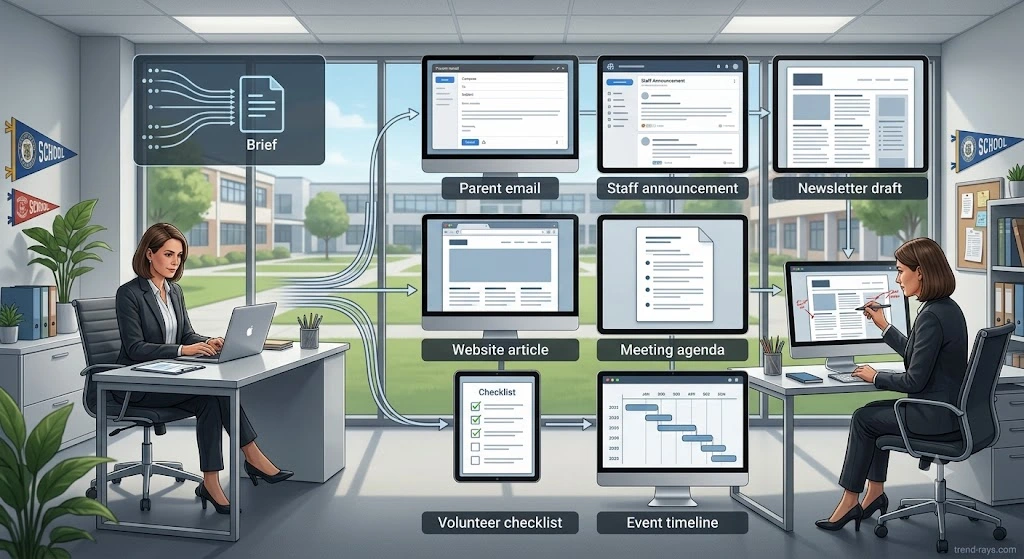
Instead of creating every document separately, administrators begin with one structured event brief.
For example:
- Event name
- Date and time
- Venue
- Purpose
- Target audience
- Key activities
- Important reminders
- Contact information
AI can then transform this single source into multiple communication formats.
One Event Brief, Multiple Outputs
From one event summary, AI can generate:
Parent Invitation
A friendly email explaining the event, important timings, and any required permissions.
Staff Briefing
A concise document outlining responsibilities, schedules, and logistical arrangements.
Student Announcement
Age-appropriate information that can be shared during assemblies or through classroom communication.
Website Announcement
An SEO-friendly article introducing the event to prospective families and the wider community.
Newsletter Feature
A polished story highlighting the purpose and significance of the event.
Social Media Caption
Short, engaging posts suitable for platforms such as Facebook, Instagram, or LinkedIn.
Volunteer Instructions
Clear guidance covering arrival times, responsibilities, emergency contacts, and event procedures.
Post-Event Thank-You Message
A professional email thanking parents, staff, volunteers, sponsors, and participants for their support.
Why This Workflow Matters
Schools often don’t need more communication.
They need consistent communication.
When multiple people prepare documents independently, small inconsistencies can appear.
Examples include:
- Different event timings.
- Incorrect venue names.
- Conflicting instructions.
- Missing deadlines.
- Outdated contact details.
Starting from one verified event brief helps maintain consistency across every communication channel.
AI accelerates this process without changing the underlying information.
Estimated Time Savings
Imagine a school organizes:
- Four major events.
- Eight smaller activities.
during a single academic term.
If AI reduces communication preparation by just 90 minutes per event, administrators recover well over 18 hours of administrative time across the term.
More importantly, they spend less time copying information between documents and more time ensuring each event runs smoothly.
When Human Review Is Essential
Although AI can prepare communication drafts quickly, administrators should always verify:
- Dates and times.
- Venue information.
- Emergency procedures.
- Permission requirements.
- Contact details.
- Accessibility information.
- School branding and tone.
A small factual error can easily confuse families or staff.
AI assists with drafting—but accuracy remains a human responsibility.
Example Prompt
Instead of requesting:
Write something about Sports Day.
Provide AI with context.
For example:
You are assisting a school office. Based on the following event details, create: (1) a parent invitation email, (2) a staff briefing, (3) a website announcement, (4) a newsletter article, and (5) a thank-you message after the event. Keep the tone professional, welcoming, and suitable for a K–12 school.
This approach transforms AI from a writing tool into a communication workflow assistant.
Beyond Events: A Repeatable Communication System
The same workflow can be applied to many recurring school activities.
Examples include:
- Admissions campaigns
- Examination schedules
- Graduation ceremonies
- School trips
- Parent-teacher meetings
- Holiday celebrations
- Community outreach programs
- Fundraising initiatives
- Orientation days
- Professional development workshops
Rather than creating new content every time, administrators can develop repeatable workflows that maintain consistency while reducing effort.
Key Takeaway
Schools don’t need separate software for every type of communication.
In many cases, they simply need a smarter content production process.
By using one verified event brief as the foundation for multiple communication formats, AI helps administrators reduce repetitive writing, maintain consistent messaging, and deliver information more efficiently to every audience.
The result isn’t just faster communication.
It’s better organized communication.
Workflow 5: Plan School Events in Hours Instead of Days
Behind every successful school event is an enormous amount of planning.
Whether it’s an annual sports day, graduation ceremony, parent-teacher conference, science exhibition, cultural festival, school trip, orientation program, or fundraising event, administrators coordinate hundreds of moving parts before the first guest even arrives.
The event itself might last a few hours.
Planning often stretches across several weeks.
Administrators must think about logistics, staffing, communication, budgets, safety, scheduling, vendors, volunteers, equipment, permissions, contingency plans, and dozens of small details that are easy to overlook.
None of these responsibilities disappear with AI.
What changes is the amount of time required to organize them.
Instead of starting every event plan from scratch, administrators can use AI to create structured planning frameworks that can be customized for each occasion.
The Traditional Planning Process
Imagine planning a school science fair.
A typical workflow might include:
- Brainstorming ideas.
- Creating a planning document.
- Building a timeline.
- Assigning staff responsibilities.
- Preparing equipment lists.
- Coordinating vendors.
- Writing parent communication.
- Preparing student instructions.
- Organizing volunteers.
- Developing contingency plans.
- Creating post-event evaluation forms.
Each task is handled separately, often by multiple people using different documents.
Important details can easily become scattered across emails, spreadsheets, notebooks, and shared folders.
The AI-Assisted Workflow
Instead of building everything manually, administrators begin with a simple event description.
For example:
Plan a school science fair for approximately 500 students. Create a preparation timeline beginning eight weeks before the event. Include staffing, equipment, communication, risk management, volunteer coordination, venue preparation, judging schedule, contingency planning, and post-event evaluation.
AI can then organize the project into logical phases that administrators review and refine.
Rather than replacing planning, it accelerates the process of creating a comprehensive starting point.
AI Can Generate More Than a Checklist
Many people think AI simply creates task lists.
In reality, it can support multiple planning documents simultaneously.
From one event brief, administrators can generate:
Project Timeline
A week-by-week preparation schedule with key milestones.
Responsibility Matrix
A structured list showing:
- Task
- Assigned staff member
- Deadline
- Current status
This improves accountability and reduces confusion.
Equipment Checklist
Generate categorized lists for:
- Audio equipment
- Seating
- Signage
- Sports equipment
- Registration materials
- Safety supplies
- Certificates
- Decorations
Administrators can then adapt the list to their school’s needs.
Risk Assessment Framework
AI can suggest common operational considerations such as:
- Weather disruptions
- First aid arrangements
- Emergency procedures
- Crowd management
- Accessibility
- Equipment failures
The final assessment should always be completed by the appropriate staff members.
Volunteer Coordination Plan
Create role descriptions, reporting times, communication instructions, and shift schedules for parent volunteers or community members.
Post-Event Review Template
Instead of ending the project once the event finishes, AI can generate a structured evaluation form covering:
- What worked well
- Challenges encountered
- Budget observations
- Staff feedback
- Parent feedback
- Recommendations for next year
This helps schools build institutional knowledge rather than repeating the same planning process every year.
The Real Productivity Gain
AI doesn’t magically organize an event.
People still make the decisions.
What AI reduces is the administrative effort required to organize information.
Administrators spend less time formatting spreadsheets, copying previous documents, and creating repetitive checklists.
They spend more time focusing on logistics, communication, and execution.
That’s where the real productivity improvement occurs.
Estimated Time Savings
Suppose a school organizes:
- Annual Day
- Sports Day
- Graduation Ceremony
- Science Fair
- Cultural Festival
- Parent Orientation
every academic year.
If AI reduces planning and documentation by just three hours per major event, the administration team saves nearly 20 hours annually—without purchasing a dedicated event management platform.
The larger the school, the greater these savings become.
When AI Has Limits
AI cannot visit venues.
It cannot inspect safety equipment.
It cannot negotiate with vendors.
It cannot supervise volunteers.
It cannot approve budgets.
And it cannot respond to unexpected situations during an event.
Those responsibilities require experienced administrators, teachers, and support staff.
AI assists with planning.
People deliver successful events.
Example Prompt
Instead of writing:
Help plan a graduation ceremony.
Provide detailed context.
For example:
You are assisting a school administration team planning a graduation ceremony for 350 students. Create an eight-week planning timeline, staff responsibility matrix, equipment checklist, communication schedule, contingency plan, volunteer coordination checklist, and post-event evaluation template. Present everything in clear sections suitable for project management.
The more information administrators provide, the more useful the resulting framework becomes.
Build Reusable Event Planning Templates
One of the biggest long-term benefits of AI is creating reusable planning systems.
Rather than generating every document from scratch each year, schools can develop standardized workflows for recurring events.
Over time, these templates become increasingly refined, helping new staff members onboard more quickly while ensuring consistency across departments.
Instead of reinventing the process every year, schools continuously improve it.
Key Takeaway
Schools don’t need AI to organize events for them.
They need AI to organize the planning process.
By transforming a simple event description into timelines, checklists, communication plans, responsibility matrices, and evaluation templates, AI helps administrators reduce repetitive planning work while keeping every important operational decision firmly in human hands.
That’s a smarter workflow—not just another piece of software.

The Hidden Cost of Buying Too Much School Software
When schools look for ways to improve productivity, the first instinct is often to purchase another application.
Need better communication?
Buy a communication platform.
Need project management?
Subscribe to another collaboration tool.
Need meeting notes?
Install an AI meeting assistant.
Need newsletters?
Find a marketing platform.
Each purchase may solve a specific problem.
But over time, something unexpected happens.
Instead of simplifying work, schools begin managing an ever-growing collection of software subscriptions, user accounts, dashboards, and vendor relationships.
The result isn’t always greater efficiency.
Sometimes it’s greater complexity.
This phenomenon is commonly referred to as software sprawl—the gradual accumulation of digital tools that overlap in functionality and create more administrative overhead than expected.
More Software Doesn’t Always Mean More Productivity
Technology should reduce friction.
Yet many schools unknowingly create new layers of work every time another platform is introduced.
Every additional system typically requires:
- User accounts
- Password management
- Staff onboarding
- Training sessions
- Permission settings
- Data management
- Technical support
- Software updates
- Vendor renewals
- Annual budget reviews
None of these activities directly improve student learning.
They are simply part of maintaining another digital system.
Before purchasing new software, it’s worth asking whether the problem requires a new platform—or simply a better workflow.
The Four Hidden Costs Schools Often Overlook
The purchase price of software is only one part of the total investment.
Many schools underestimate the operational costs that continue long after the subscription has been approved.
1. Training Fatigue
Every new application requires staff to learn another interface, another set of features, and another way of completing familiar tasks.
Even intuitive software demands time for onboarding.
When schools introduce multiple tools within a short period, staff can become overwhelmed rather than empowered.
2. Context Switching
Imagine a typical administrator’s day.
They may move between:
- Calendar
- Student information system
- Document storage
- Video meetings
- Finance software
- Attendance platform
- HR portal
- Learning management system
- Internal messaging tools
Every switch requires mental adjustment.
Research on workplace productivity consistently suggests that frequent context switching reduces efficiency and increases cognitive load.
Adding another platform may unintentionally increase interruptions instead of reducing them.
3. Subscription Creep
Many software purchases begin with a modest monthly fee.
Over time, schools may add:
- Additional user licenses
- Premium features
- AI add-ons
- Storage upgrades
- Support plans
- Integration services
Individually, each expense appears manageable.
Collectively, they can become a significant portion of the technology budget.
Conducting an annual software audit often reveals subscriptions that are underused or duplicate existing capabilities.
4. Integration Challenges
Schools rarely operate with a single software platform.
Different systems may not communicate effectively with one another.
Administrators then spend valuable time:
- Exporting spreadsheets.
- Copying information manually.
- Updating multiple databases.
- Verifying duplicate records.
- Troubleshooting synchronization issues.
Ironically, software intended to improve efficiency can sometimes create entirely new workflows.
The Better Question to Ask
Instead of immediately asking:
“Which software should we buy?”
Try asking:
“Which repetitive task consumes the most time, and can our existing tools or AI help us complete it more efficiently?”
This subtle shift changes the conversation from purchasing technology to improving operations.
In many cases, the greatest productivity gains come from redesigning workflows rather than expanding the software stack.
Signs Your School May Have Too Many Tools
Your school may be experiencing software sprawl if:
- Staff perform similar tasks in multiple systems.
- Different departments use separate tools for the same purpose.
- Employees frequently forget which platform contains the latest information.
- Training sessions focus more on navigating software than improving processes.
- New subscriptions are approved before existing tools are fully evaluated.
- Teams regularly export and re-enter the same data across different applications.
Recognizing these signs is the first step toward building a simpler, more sustainable technology environment.
AI Complements Existing Systems
One of AI’s greatest strengths is that it often works alongside existing platforms rather than replacing them.
For example, AI can help administrators:
- Draft emails before sending them through Outlook or Gmail.
- Summarize meetings regardless of the video conferencing platform used.
- Prepare reports using information from existing school systems.
- Generate planning documents that can be stored in familiar cloud storage platforms.
This allows schools to improve productivity without immediately replacing established infrastructure.
When New Software Is the Right Investment
A balanced approach is important.
There are many situations where purchasing specialized software is the right decision.
For example:
- A growing school opening multiple campuses.
- New regulatory reporting requirements.
- Student information systems nearing end-of-life.
- Significant cybersecurity improvements.
- Finance and payroll modernization.
- Large-scale admissions management.
- Enterprise-level data analytics.
The objective isn’t to avoid buying software.
It’s to ensure that every purchase solves a genuine operational problem rather than compensating for an inefficient workflow.
A Simple Decision Framework Before Buying Anything
Before approving another software subscription, ask your team these five questions:
- What specific problem are we trying to solve?
- Can our existing tools already solve at least part of this problem?
- Could AI reduce the repetitive work without adding another platform?
- What ongoing costs—training, support, licensing, and maintenance—will this software introduce?
- How will we measure whether this investment actually improves productivity six months from now?
If these questions cannot be answered clearly, it may be worth improving the workflow before expanding the technology stack.
Key Takeaway
Technology should make school administration simpler—not more complicated.
The most effective schools aren’t necessarily the ones using the greatest number of digital tools.
They’re the ones that understand which problems require new software and which problems require better workflows.
Artificial intelligence offers an opportunity to simplify routine work without automatically increasing the number of platforms staff must learn and maintain.
Sometimes the smartest technology decision isn’t buying something new.
It’s making better use of what you already have.

When Buying New School Software Actually Makes Sense
Throughout this guide, we’ve explored how AI can help school administrators reduce repetitive work without immediately purchasing another platform.
That doesn’t mean schools should stop investing in software altogether.
In fact, there are many situations where adopting a dedicated solution is not only beneficial but essential.
The key is understanding the difference between workflow problems and system problems.
AI is excellent at helping people create, organize, summarize, and communicate information.
It is not designed to replace complex enterprise systems that manage critical school operations.
Knowing where AI ends and specialized software begins helps schools make smarter technology investments.
AI Is a Productivity Layer—Not a School Management System
Think of AI as an assistant that works alongside your existing technology.
It can:
- Draft emails.
- Summarize meetings.
- Organize reports.
- Generate first drafts of policies.
- Create project plans.
- Prepare newsletters.
- Brainstorm ideas.
- Improve written communication.
What it doesn’t do is replace the operational systems that schools depend on every day.
Functions such as attendance tracking, student records, payroll, financial accounting, transportation management, and regulatory reporting require purpose-built platforms with structured databases, permissions, audit trails, and compliance features.
These systems remain the foundation of school administration.
Situations Where New Software Is Worth the Investment
There are several scenarios where purchasing dedicated software is often the right decision.
Your School Has Outgrown Existing Systems
As schools expand, administrative complexity increases.
Managing multiple campuses, larger student populations, or additional staff members often requires software designed to handle higher volumes of data and more sophisticated workflows.
In these situations, relying solely on manual processes or AI-generated documents is unlikely to be sufficient.
Regulatory and Compliance Requirements Have Changed
Education regulations evolve over time.
Schools may need software that supports:
- Secure record management.
- Audit trails.
- Mandatory reporting.
- Role-based access controls.
- Document retention policies.
- Regulatory compliance.
These are responsibilities that AI cannot manage independently.
You Need Structured Data, Not Just Better Documents
AI is excellent at producing text.
However, some administrative tasks depend on structured databases rather than written documents.
Examples include:
- Student information systems.
- Learning management systems.
- Library management.
- Fee collection.
- Transportation tracking.
- Payroll administration.
- Human resources management.
These platforms store, organize, and retrieve large amounts of information in ways that AI alone cannot replace.
Small schools can often manage workflows with relatively simple tools.
Larger organizations usually require centralized systems that allow different departments to collaborate using consistent information.
When admissions, finance, HR, academics, and leadership all rely on shared data, integrated software becomes increasingly valuable.
Security and Access Control Are Critical
Many school processes involve sensitive information.
Dedicated enterprise software often includes features such as:
- Multi-factor authentication.
- User permissions.
- Activity logs.
- Encrypted databases.
- Automated backups.
- Compliance reporting.
These capabilities are essential for protecting confidential information and meeting organizational responsibilities.
The Best Technology Strategy Combines Both
Schools don’t have to choose between AI and specialized software.
In most cases, the strongest approach combines both.
A student information system manages structured student records.
AI helps draft parent communications using information from those records.
A finance platform tracks budgets.
AI helps prepare executive summaries for leadership meetings.
A learning management system organizes classroom resources.
AI assists teachers in creating announcements, quizzes, and instructional materials.
Rather than competing with existing software, AI often increases the value of systems schools already own.
A Practical Technology Decision Matrix
Before purchasing any new platform, school leaders can ask a simple question:
| If your goal is to… | The best first step is… |
|---|---|
| Reduce repetitive writing | Improve workflows with AI |
| Create reports faster | Use AI to draft and summarize |
| Improve internal communication | Combine AI with existing email and collaboration tools |
| Manage student records | Invest in a dedicated Student Information System |
| Handle payroll and finance | Use specialized finance software |
| Meet regulatory reporting requirements | Choose software designed for compliance |
| Coordinate school-wide operations | Evaluate integrated management platforms |
The goal isn’t to replace every system with AI.
It’s to ensure each technology serves a clear purpose.
Avoid Buying Software for the Wrong Reasons
Schools sometimes invest in new platforms because:
- Another school is using them.
- A vendor demonstrates impressive features.
- AI is a trending topic.
- Staff hope technology will solve deeper organizational challenges.
While these motivations are understandable, they don’t always lead to better outcomes.
Technology works best when it supports a clearly defined operational need.
Before signing a contract, identify the specific problem, measure the current workflow, and determine how success will be evaluated after implementation.
Key Takeaway
Artificial intelligence can dramatically reduce the time spent on repetitive administrative work, but it isn’t a replacement for every category of school software.
Dedicated platforms remain essential for managing structured data, ensuring compliance, protecting sensitive information, and supporting complex operational processes.
The most effective schools don’t ask whether they should choose AI or software.
They ask how AI can make the software they already rely on even more valuable.
By combining efficient workflows with the right technology, schools can improve productivity without creating unnecessary complexity—and ensure that every technology investment delivers meaningful, measurable value.
A Simple 10-Minute AI Readiness Assessment for Schools
One of the biggest mistakes schools make is assuming they’re either “ready for AI” or “not ready at all.”
In reality, AI adoption isn’t an all-or-nothing decision.
A school doesn’t need to automate every workflow or invest in expensive technology before seeing meaningful benefits.
Often, the best place to start is by evaluating how work is currently done.
This simple assessment helps school leaders identify whether their biggest opportunities lie in improving workflows, introducing AI, or investing in new software.
The exercise takes about ten minutes and can be completed by principals, school office managers, operations teams, or leadership committees.
Step 1: Identify Your Biggest Administrative Bottlenecks
Start by listing the tasks that consume the most time each week.
Don’t think about software yet.
Think about work.
Examples might include:
- Writing parent emails.
- Preparing meeting agendas.
- Creating newsletters.
- Organizing event plans.
- Updating internal documents.
- Preparing inspection reports.
- Responding to repetitive enquiries.
- Drafting policies.
- Scheduling meetings.
- Producing board reports.
The goal is to identify repetitive activities rather than isolated one-time projects.
Step 2: Ask One Important Question
For every task on your list, ask:
Does this task require human judgment—or repetitive documentation?
Tasks involving empathy, leadership, negotiation, or decision-making should remain human-led.
Tasks involving repetitive writing, formatting, summarizing, or organizing information are often excellent candidates for AI assistance.
This distinction helps schools avoid trying to automate responsibilities that require professional expertise.
Step 3: Score Each Workflow
Use the following simple framework.
| Workflow | Repetitive? | Requires Human Judgment? | AI Could Help? |
|---|---|---|---|
| Parent reminders | ✅ | Low | ✅ Yes |
| Meeting agendas | ✅ | Low | ✅ Yes |
| Monthly newsletters | ✅ | Medium | ✅ Yes |
| Student discipline meetings | ❌ | High | ❌ No |
| Staff performance reviews | ❌ | High | ❌ No |
| School improvement planning | Partial | High | ✅ Assist Only |
| Policy first drafts | ✅ | Medium | ✅ Yes |
| Safeguarding documentation | Partial | Very High | Human-led with careful review |
This simple exercise often reveals that schools already have several workflows where AI could provide immediate value without changing existing systems.
Step 4: Look Before You Buy
Once you’ve identified potential AI workflows, review your current software stack.
Ask questions such as:
- Can our existing email platform already support this?
- Do we already have document collaboration tools?
- Are we paying for AI capabilities we haven’t enabled?
- Does our current workflow simply need better templates rather than another application?
Many schools discover they’re underusing technology they already own.
Optimizing existing tools is often faster and more cost-effective than introducing new ones.
Step 5: Start With One Pilot Project
Resist the temptation to roll out AI across the entire school immediately.
Instead, choose one workflow.
For example:
- Parent communication.
- Weekly newsletters.
- Meeting documentation.
- Event planning.
- Internal reports.
Run the pilot for four to six weeks.
Measure:
- Time saved.
- Staff feedback.
- Document quality.
- Number of revisions required.
- User confidence.
Small, measurable improvements create stronger long-term adoption than large-scale implementations introduced too quickly.
Step 6: Create Simple AI Guidelines
Before expanding AI usage, schools should establish a few practical ground rules.
Examples include:
- AI-generated documents must always be reviewed by a staff member.
- Sensitive student or personnel information should only be used in accordance with school policy and applicable privacy requirements.
- AI should support administrative work—not replace professional judgment.
- Staff should use approved workflows rather than experimenting independently with sensitive tasks.
- Prompt templates should be shared to encourage consistency across departments.
These principles don’t need to be complicated.
Clear expectations are usually more valuable than lengthy documentation.
What Success Looks Like
A successful AI initiative isn’t measured by how often AI is used.
It’s measured by outcomes.
Schools should ask:
- Are administrators spending less time on repetitive paperwork?
- Is communication becoming more consistent?
- Are staff responding more quickly?
- Are fewer documents being created from scratch?
- Has leadership gained more time for students, teachers, and strategic planning?
If the answer to these questions is yes, the initiative is delivering genuine value.
AI Readiness Checklist
Before introducing AI into new workflows, ask yourself:
Workflow
☐ Have we identified the repetitive task?
☐ Do we understand the current process?
☐ Is there a clear opportunity to save time?
Technology
☐ Have we evaluated our existing software first?
☐ Are we avoiding unnecessary new subscriptions?
☐ Can AI integrate into our current workflow?
People
☐ Have staff received basic AI training?
☐ Does everyone understand their review responsibilities?
☐ Are prompt templates available?
Governance
☐ Do we have clear guidance on responsible AI use?
☐ Are privacy and confidentiality being protected?
☐ Is there a process for reviewing AI-generated content?
Measurement
☐ Have we defined what success looks like?
☐ Will we review results after the pilot?
☐ Are we improving workflows based on staff feedback?
Final Thought Before You Buy Anything
Schools often ask:
“What’s the best AI tool for education?”
A better question is:
“What’s the biggest source of repetitive work in our school today?”
Answer that question first.
Then decide whether AI, better workflows, or new software is the right solution.
Technology should always follow the problem—not the other way around.
Frequently Asked Questions
Can AI reduce paperwork in schools?
Yes, but it works best when applied to repetitive administrative tasks rather than complex decision-making.
School administrators spend a significant amount of time preparing emails, meeting agendas, newsletters, reports, event plans, policy drafts, and internal documentation. AI can accelerate the creation of these first drafts, allowing staff to spend more time reviewing content and less time starting from a blank page.
The greatest benefit comes from reducing repetitive writing—not eliminating human oversight.
Do schools need expensive AI software to save time?
Not necessarily.
Many schools already have access to productivity tools that include AI capabilities or can use a general-purpose AI assistant for drafting and organizing administrative work.
Before purchasing another platform, schools should evaluate whether existing software and improved workflows can solve the problem.
Often, optimizing current processes delivers a better return than adding another subscription.
What’s the difference between AI and school management software?
They serve different purposes.
School management software stores and manages structured information such as attendance, student records, grades, payroll, and finance.
AI, on the other hand, helps people create, summarize, organize, and improve information.
Rather than replacing school management systems, AI complements them by reducing repetitive administrative work.
Yes.
AI can generate well-structured first drafts for newsletters, principal updates, event highlights, and community announcements.
Administrators should review all dates, names, achievements, and school-specific information before publishing.
Can AI help with school inspection reports?
Yes.
AI can assist by organizing notes, summarizing observations, improving document structure, and refining language.
However, inspection findings, professional judgments, and compliance statements should always be reviewed and approved by school leadership.
Is AI suitable for small schools?
Absolutely.
Smaller schools often benefit the most because administrative teams typically manage multiple responsibilities with limited staff.
Reducing repetitive documentation can free valuable time without requiring significant investment.
Can AI replace school office staff?
No.
School office professionals perform many responsibilities that involve communication, organization, judgment, problem-solving, and relationship management.
AI supports these professionals by reducing repetitive writing and administrative tasks—it does not replace their expertise.
Should schools create an AI policy before staff begin using AI?
Yes.
Even if AI is used only for drafting documents or brainstorming ideas, schools should establish clear guidance covering:
- Approved use cases.
- Privacy expectations.
- Human review requirements.
- Confidential information handling.
- Staff responsibilities.
Simple governance introduced early is usually more effective than trying to introduce rules after widespread adoption.
What is the first workflow schools should automate with AI?
For most schools, parent communication is an excellent starting point.
Writing reminder emails, announcements, newsletters, and routine updates involves repetitive work that AI can accelerate while remaining easy for administrators to review.
Beginning with one low-risk workflow allows staff to gain confidence before expanding AI into other administrative tasks.
Can AI improve school productivity without hiring additional staff?
In many cases, yes.
AI cannot replace employees, but it can reduce the amount of time spent on repetitive documentation.
When routine administrative work becomes more efficient, existing staff often have more capacity to focus on planning, communication, student support, and strategic initiatives.
Is buying another software subscription always the best solution?
Not always.
Sometimes the real issue isn’t a lack of software—it’s an inefficient workflow.
Before investing in another platform, schools should evaluate whether:
- The task is repetitive.
- Existing tools are underused.
- AI could reduce manual effort.
- Staff training could improve current processes.
Only after answering these questions should schools consider adding another system.
Can AI help schools with long-term planning?
Yes.
AI is useful for brainstorming ideas, organizing strategic plans, preparing timelines, drafting improvement plans, and creating structured planning documents.
Leadership teams should always make the final decisions, but AI can significantly reduce the time required to prepare planning materials.
What’s the biggest mistake schools make when adopting AI?
One of the most common mistakes is focusing on technology before understanding the underlying workflow.
Schools often ask:
“Which AI tool should we buy?”
A more productive question is:
“Which repetitive task consumes the most time, and how can we improve that workflow?”
Starting with the problem rather than the product usually leads to better outcomes and more sustainable AI adoption.

Conclusion: The Goal Isn’t to Buy Less Software—It’s to Solve the Right Problem
Schools have never had access to more technology than they do today.
Every month, new platforms promise to improve communication, automate administration, simplify planning, and increase productivity. It’s easy to believe that the next subscription will finally solve the workload challenges facing school leaders.
Sometimes it does.
But often, it doesn’t.
The reason is simple.
Many administrative challenges aren’t caused by a lack of software.
They’re caused by repetitive workflows that haven’t been redesigned.
Writing the same type of email every week.
Creating meeting agendas from scratch.
Copying information between documents.
Preparing reports using the same structure month after month.
Planning recurring events with a blank document every year.
These aren’t software problems.
They’re workflow problems.
That’s where AI offers its greatest value.
Not by replacing school management systems.
Not by making professional decisions.
And certainly not by replacing the people who lead schools every day.
Instead, AI helps reduce the repetitive work that surrounds those responsibilities.
It gives administrators a faster starting point.
A better draft.
A more organized plan.
A clearer summary.
The final decisions still belong to people.
And they should.
Schools are built on relationships, trust, experience, and professional judgment.
No AI system can understand the unique culture of a school community, reassure an anxious parent, mentor a new teacher, or make difficult leadership decisions during challenging situations.
Those responsibilities will always require human leadership.
The most successful schools won’t necessarily be the ones using the greatest number of AI tools.
They’ll be the schools that ask better questions before adopting new technology.
Questions such as:
- Is this truly a software problem?
- Are we solving a workflow bottleneck or simply adding another platform?
- Could our existing tools achieve the same outcome with better processes?
- Will this technology give our staff more time for students and teachers?
These questions often lead to better long-term decisions than chasing every new product that enters the market.
If there’s one idea to take away from this guide, let it be this:
Don’t measure technology by how advanced it is. Measure it by how much meaningful time it gives back to the people who serve your school community.
If AI helps your leadership team spend less time formatting documents and more time supporting students, coaching teachers, collaborating with families, and improving learning outcomes, then it’s delivering genuine value.
If it simply adds another dashboard, another login, another training session, and another subscription, it may not be solving the real problem at all.
Technology should never become another administrative burden.
It should quietly remove the burdens that already exist.
For many schools, that journey doesn’t begin with buying another platform.
It begins with looking at everyday workflows and asking:
“How can we do this better with the tools we already have?”
Sometimes, the most valuable technology investment isn’t a new purchase.
It’s making better use of what you already own.
Continue Exploring Practical AI for Education
If this guide helped you rethink how AI fits into school administration, you may also find these resources on Trend-Rays valuable:
- AI for School Administrators: The Complete Practical Guide (Our comprehensive pillar guide covering governance, workflows, privacy, implementation, and responsible adoption.)
- How to Create an AI Policy for Schools (Coming Soon)
- The Ultimate ChatGPT Prompt Library for School Administrators (Coming Soon)
- How to Use AI to Write Better Parent Emails (Coming Soon)
- AI Meeting Notes for Schools: Practical Workflows That Save Time (Coming Soon)
- How to Audit Your School’s Software Stack Before Buying New Tools (Coming Soon)
Together, these resources are designed to help school leaders make informed technology decisions based on real operational needs—not marketing promises.