Hardening GitHub Actions against the Miasma Worm requires completely severing its propagation loops within your CI/CD pipelines. Miasma is a self-replicating supply chain attack that targets developer environments by exploiting OpenID Connect (OIDC) trust, scraping secrets directly from /proc/<pid>/mem on GitHub Actions runners, and pushing orphan commits to bypass branch protections. To remediate this threat, DevOps teams must immediately restrict the default GITHUB_TOKEN to read-only access, enforce strict id-token: write scoping for OIDC federations, pin all third-party workflows to explicit commit SHAs rather than mutable tags, and eradicate persistence hooks left inside AI coding tools (such as Claude Code and Cursor).
The June 2026 Miasma Infrastructure Crisis
The traditional model of network-based anomaly detection is officially obsolete. In late May and early June 2026, a catastrophic, self-propagating credential-harvesting toolkit known as the Miasma Worm compromised over 73 Microsoft repositories and deeply infiltrated Red Hat Cloud Services.
Unlike legacy malware that exploits unpatched CVEs, Miasma operates entirely within the legitimate trust boundaries of modern developer ecosystems. It does not break GitHub; it exploits the assumptions built into OpenID Connect (OIDC), automated pull requests, and AI developer tools.
If a single developer on your team clones a poisoned repository or installs a compromised npm package, the worm executes a multi-stage Bun runtime dropper. It immediately sweeps the local machine for AWS, Azure, and GitHub Personal Access Tokens (PATs). Worse, when it reaches your CI/CD environment, it executes a highly advanced memory-scraping technique—targeting the Runner.Worker process on GitHub Actions runners to extract masked workflow secrets directly out of memory.
[ Compromised npm/PyPI Package ] ──► [ Local Dev Token Sweep ] ──► [ Orphan Commit Push to CI/CD ]
                                                                             │
                                   [ Valid SLSA Provenance Forged ] ◄── [ OIDC Token Hijacked ]
Once inside your repository, it creates orphan commits and forces tags to bypass standard branch protection rules, turning your own GitHub Actions architecture into a Command & Control (C2) node to spread the infection to downstream users.
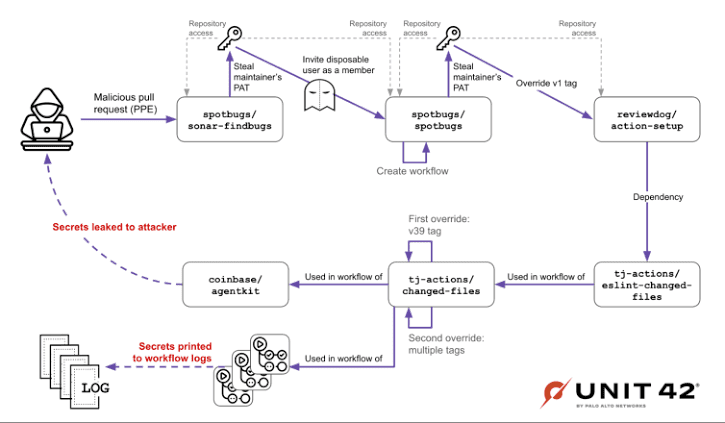
The Execution Vector: How Miasma Exploits GitHub Defaults
To build an effective defense, you must understand exactly which pipeline defaults Miasma exploits to achieve lateral movement.
- OIDC Trust Abuse: Miasma targets repositories configured to request an OIDC token with
id-token: writepermissions. It hijacks this token during the build process to authenticate against npm or PyPI, forging valid SLSA provenance attestations for its own malicious payload. - Runner Memory Scraping: Secrets masked in GitHub Actions logs are not actually encrypted in system memory. The worm runs a script to locate the GitHub
Runner.WorkerPID and scans/proc/<pid>/cmdlineand/proc/<pid>/memto extract plaintext database passwords, cloud API keys, and deployment credentials. - Living off the Pull Request (LOTP): The worm specifically targets open pull requests. It extracts the head branches via GraphQL and injects its payload into the existing project files, knowing that developers are highly likely to interact with active PR code soon.
Hardening the GITHUB_TOKEN and OIDC Permissions
By default, the GITHUB_TOKEN generated for your workflows often possesses overly broad permissions. You must explicitly declare a “Least Privilege” permission model at the top of every YAML workflow file.
If a workflow does not strictly require write access to your repository contents or the ability to mint OIDC tokens, lock it down.
YAML
# Production Configuration: Strict Least-Privilege Workflow Headers
name: Secure Production Build
on:
  push:
    branches: [ "main" ]

# 1. Strip all default permissions globally
permissions: read-all

jobs:
  build-and-publish:
    runs-on: ubuntu-latest

    # 2. Re-grant ONLY the specific permissions required for this job
    permissions:
      contents: read       # Required to checkout the code
      id-token: write      # Required ONLY if publishing via OIDC to AWS/GCP/npm
      packages: write      # Required ONLY if pushing to GitHub Container Registry

    steps:
      - name: Harden Runner Environment
        uses: step-security/harden-runner@v2.8.0
        with:
          # Restrict outbound network traffic to prevent C2 exfiltration
          allowed-endpoints: >
            github.com:443
            api.github.com:443
            registry.npmjs.org:443
The Cloud IAM Defense: Hardening OIDC Subject Claims (AWS & Azure)
Securing the GitHub runner is only half the battle. Because Miasma attempts to hijack the OIDC token to authenticate against your cloud provider, your cloud Identity and Access Management (IAM) policies must be ruthlessly strict.
If your AWS IAM Role or Azure AD Workload Identity only checks the aud (audience) claim, the Miasma worm can use a compromised repository in your organization to request a token and successfully assume the role. You must enforce strict sub (subject) string matching to ensure the cloud role can only be assumed if the request originates from a specific repository and a specific branch.
AWS IAM Trust Policy Hardening Example:
JSON
{
  "Version": "2012-10-17",
  "Statement": [
    {
      "Effect": "Allow",
      "Principal": {
        "Federated": "arn:aws:iam::123456789012:oidc-provider/token.actions.githubusercontent.com"
      },
      "Action": "sts:AssumeRoleWithWebIdentity",
      "Condition": {
        "StringEquals": {
          "token.actions.githubusercontent.com:aud": "sts.amazonaws.com"
        },
        "StringLike": {
          // CRITICAL: Prevent Miasma from using a hijacked token from a different repo or PR branch
          // This ensures the role is ONLY assumed by the main branch of your production repository.
          "token.actions.githubusercontent.com:sub": "repo:YourOrg/YourProductionRepo:ref:refs/heads/main"
        }
      }
    }
  ]
}
By locking down the subject claims on the cloud provider side, even if Miasma successfully scrapes a token from a compromised developer branch or a secondary testing repository, the cloud provider will reject the authentication request, breaking the worm’s exfiltration loop.
Runner Memory Protection & Persistence Eradication
Because Miasma installs a passwordless sudo rule (echo 'runner ALL=(ALL) NOPASSWD:ALL' > /mnt/runner) to escalate privileges and scrape runner memory, you must isolate your CI/CD execution environments.
Pin Dependencies to Immutable SHAs
Miasma hijacks GitHub Actions semver tags (e.g., @v2 or @v3) via orphan commits with cloned author metadata. If your workflow uses @v3, the underlying code can change without warning. You must pin all actions to an immutable commit SHA.
- Vulnerable:
uses: actions/checkout@v4 - Secure:
uses: actions/checkout@b4ffde65f46336ab88eb53be808477a3936bae11
Secure AI Tooling Configurations
The Miasma campaign actively targets local developer environments by injecting malicious execution hooks into the configuration files of AI coding agents. If a developer’s machine is compromised, revoking their GitHub PAT is not enough. You must manually inspect and clean the following local files before issuing new credentials:
~/.claude/settings.json(Checks forSessionStarthooks)~/.cursor/rules/setupvscode/tasks.json
Enforcing Cryptographic Provenance (SLSA Level 3)
The most dangerous aspect of the Miasma worm is its ability to hijack your CI/CD runner and forge valid SLSA (Supply-chain Levels for Software Artifacts) provenance documents. It tricks downstream package managers (like npm) into believing the malicious code was legitimately compiled by your build system.
To counter this, your pipeline must adopt cryptographically signed build attestations using Sigstore and Cosign, verifying the exact identity of the runner that built the artifact.
If an attacker pushes an orphan commit and attempts to build an artifact, they will lack the ephemeral OIDC keys generated by a verified, protected workflow run.
YAML
# Production Configuration: Generating Tamper-Proof Artifact Attestations
      - name: Generate SLSA Provenance and Sign Artifact
        uses: actions/attest-build-provenance@v1
        with:
          subject-path: 'dist/enterprise-binary-linux-amd64'
          # This action automatically uses the GitHub OIDC token to generate a
          # short-lived certificate via Sigstore, proving the binary was built
          # from a verified workflow and not a hijacked memory script.
By implementing native GitHub artifact attestations, your enterprise clients can run gh attestation verify on your software before deploying it, ensuring that even if an attacker scraped memory on a previous runner, they cannot forge the cryptographic signature of your isolated release workflow.
Threat Hunting: Querying the GitHub Enterprise Audit Log
Security teams cannot wait for developers to report suspicious local activity. You must proactively hunt for Miasma indicators of compromise (IoCs) across your GitHub Enterprise audit logs, routing these events directly into your SIEM (Splunk, Datadog, or Azure Sentinel).
Configure your log ingestion pipelines to trigger immediate alerts on the following high-fidelity GitHub audit events:
git.pushwith Orphan Signatures: Monitor for push events that lack a linear commit history matching known pull request merges.repo.update_actions_secretAnomalies: Miasma frequently attempts to alter repository secrets to establish persistence. Alert on any secret updates that occur outside of approved administrative maintenance windows.integration_installation.repositories_added: Track if a new, unvetted GitHub App or OAuth integration is suddenly granted access to core production repositories by a compromised developer account.workflows.updatecontainingid-token: write: Any pull request or direct push that attempts to elevate workflow permissions to include OIDC token generation should trigger an immediate, automated pull request block requiring secondary administrative approval.
The Triage Pipeline: Remediating a Suspected Miasma Infection
If your infrastructure logs show connections to known Miasma endpoints or unauthorized tag modifications, execute this containment sequence immediately.
1.Sever OIDC Trust and Revoke Tokens:Must be completed before reviewing code.
Immediately revoke all GitHub Personal Access Tokens (PATs), AWS/GCP service account keys, and npm publish tokens exposed to the affected repositories. Delete the active OIDC federations in your cloud provider IAM settings to kill any active Miasma deployment loops.
2.Purge Local Persistence Hooks:
Instruct all developers who interacted with the repository since June 1, 2026, to audit their local environments. They must delete any flag files at /tmp/.bun_ran and clear persistence hooks planted in ~/.claude/settings.json or VS Code configuration files.
3.Audit Orphan Commits and Tag Overrides:
Use the GitHub GraphQL API to scan for newly created orphan commits (commits with no parent history) that possess spoofed author timestamps. Force-delete any release tags that have been redirected to these malicious commits.
4.Implement Fine-Grained PATs:
When re-issuing credentials to developers, permanently ban the use of classic PATs. Enforce the use of Fine-Grained PATs restricted strictly to the required repositories, or transition entirely to short-lived GitHub App tokens for machine-to-machine automation.
The CI/CD Supply Chain Threat Evaluator
Because supply chain attacks involve multiple moving parts across local machines, cloud providers, and version control systems, DevOps teams often struggle to calculate their exact exposure. Use this interactive pipeline evaluator to audit your current GitHub Actions architecture and generate an immediate mitigation checklist:
CI/CD Supply Chain Threat Evaluator
Interactive Miasma Worm Exposure Assessment
Active Exploitation Vectors
Remediation Checklist
- Modify
workflow.ymlheaders to explicitly statepermissions: read-all. - Update AWS/Azure IAM JSON trust policies to enforce exact repository and branch
subclaim matching. - Replace all mutable action tags with 40-character commit SHAs.
Strategic B2B FAQ Block
What is the Miasma worm supply chain attack?
Miasma is a sophisticated, self-propagating credential-harvesting worm that targets developer environments and CI/CD pipelines. It executes via malicious npm/PyPI packages or poisoned AI configurations, stealing cloud credentials and hijacking GitHub Actions OIDC tokens to push backdoored code into downstream repositories.
How does Miasma steal secrets from GitHub Actions?
Once executed inside a GitHub Actions runner, the Miasma payload locates the Runner.Worker process PID. It then scans the /proc/<pid>/cmdline and /proc/<pid>/mem directories to extract plaintext workflow secrets, database passwords, and cloud tokens directly from the system memory.
Why is pinning GitHub Actions to a commit SHA necessary?
Miasma bypasses standard branch protections by creating malicious orphan commits and force-pushing existing semantic version tags (like @v2) to point to the new, poisoned commit. Pinning your workflows to an explicit, immutable commit SHA ensures your pipeline always pulls the exact, verified code structure, neutralizing tag-hijacking attacks.