When Microsoft Entra ID (formerly Azure AD) displays a “Pass-through Authentication Failed” or “Inactive Agent” status, on-premise users are immediately locked out of cloud applications. The Solution: To resolve this critical sync error, SysAdmins must verify outbound connectivity on Port 443 to Microsoft’s datacenters, check the local Windows Event Viewer for Event IDs 31019 or 31034, and forcefully restart the AzureADConnectAuthenticationAgent service. If the agent is severely outdated, an in-place upgrade of the Microsoft Entra Connect server is required to restore secure identity federation.

The Infrastructure Crisis: When PTA Goes Down
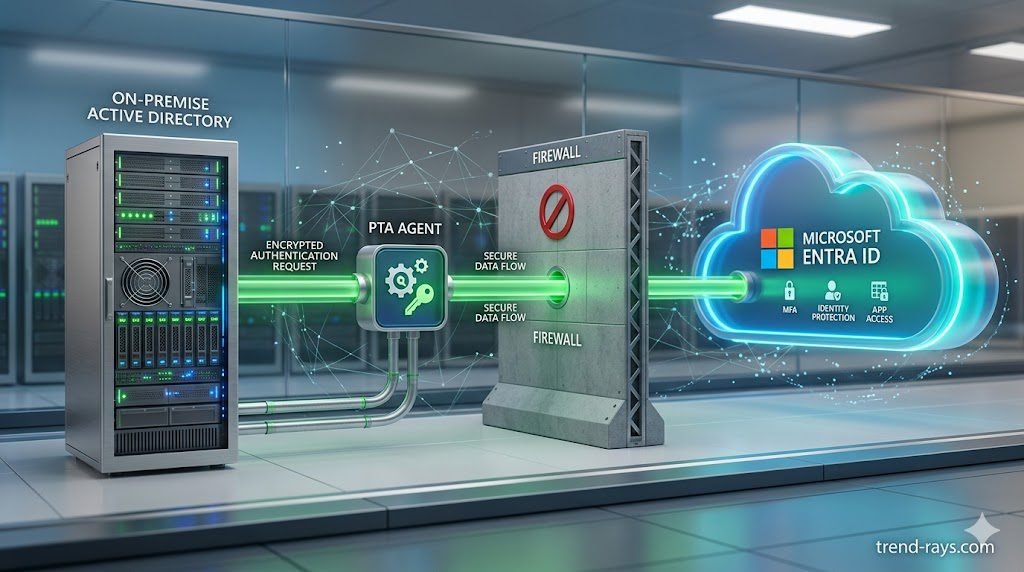
In a hybrid enterprise environment, Identity and Access Management (IAM) is the central nervous system. Pass-through Authentication (PTA) allows users to sign into cloud applications (like Microsoft 365 or Salesforce) using their exact on-premise Active Directory passwords without syncing the password hashes to the cloud.
When the PTA agent fails, the bridge collapses. Employees entering the correct credentials will be repeatedly denied access. From a business perspective, every hour the PTA agent is offline translates to thousands of dollars in lost productivity and a massive spike in Helpdesk tickets.
Furthermore, if your identity perimeter is compromised or offline, you cannot enforce advanced compliance architectures, such as those detailed in our master guide on Enforcing Entra ID Number Matching to Stop MFA Fatigue. To secure the cloud, the on-premise sync must be flawless.
Root Cause Analysis: Why PTA Fails
Pass-through Authentication agents are lightweight, but they are highly sensitive to network changes. Before running random PowerShell scripts, IT Architects must identify which of the three core pillars failed:
- Network Disconnection: The PTA agent requires persistent outbound connections. If a firewall rule changed overnight, the connection drops.
- Agent Stagnation: Microsoft frequently updates the Entra ID backend. If your on-premise agent has not been updated in over 12 months, the TLS handshake will fail.
- Domain Controller Unavailability: The PTA agent must validate the password against a local Domain Controller. If the DC is offline or DNS is broken, the agent cannot verify the user.
Step-by-Step Troubleshooting Guide
Follow these exact steps to triage and resolve the Pass-through Authentication failure.
Step 1: Check the Entra ID Connect Health Dashboard
Do not start troubleshooting on the local server. Start in the cloud.
- Log into the Microsoft Entra Admin Center.
- Navigate to Hybrid management > Microsoft Entra Connect > Connect Sync.
- Look at the Pass-through Authentication agent status.
- If it reads Inactive, it means the cloud has not received a heartbeat from your on-premise server in over 120 minutes. If it reads Active but users still cannot log in, the issue is likely a local Active Directory DNS failure, not a cloud sync issue.
Step 2: Verify Outbound Port 443 Connectivity
Pass-through Authentication does not require any inbound firewall ports. It only requires outbound Port 443 (HTTPS) and Port 80 (HTTP).
- If your network team recently deployed a new web proxy or SSL inspection appliance, it will break the PTA agent’s certificate validation.
- The Fix: You must ensure that the server hosting the PTA agent can reach
*.msappproxy.netand*.servicebus.windows.netbypassing any SSL inspection firewalls.
Step 3: Investigate Event Viewer (Event ID 31019 & 31034)
Log into the on-premise server hosting the Azure AD Connect tool and open the Windows Event Viewer. Navigate to Application and Services Logs > Microsoft > AzureAdConnect > AuthenticationAgent > Admin.
Look for these critical Event IDs:
- Event ID 31019: Indicates the agent cannot connect to the local Domain Controller. Verify that the server’s primary DNS points to an active, healthy DC.
- Event ID 31034: Indicates the agent cannot communicate with the Microsoft cloud. This is definitive proof of a firewall block, proxy issue, or expired TLS certificate.
Step 4: Restart the AzureADConnectAuthenticationAgent Service
Often, a memory leak or temporary network blip causes the agent to hang. A forceful restart is required. Open an elevated PowerShell prompt on the Connect server and run:
PowerShell
Restart-Service -Name "AzureADConnectAuthenticationAgent" -Force
Restart-Service -Name "AzureADConnectAuthenticationUpdater" -Force
Wait exactly 5 minutes, then refresh the Entra ID Connect Health dashboard in your web browser to see if the heartbeat registers as Active.
Step 5: Force an In-Place Agent Upgrade
If the service restarts and firewall rules are correct but the agent remains inactive, your agent is likely deprecated.
- Open the Control Panel and uninstall the “Microsoft Azure AD Connect Authentication Agent.”
- Log into the Entra ID portal, download the latest lightweight PTA agent installer.
- Run the installer. You will be prompted to enter Global Administrator credentials to re-register the agent with your tenant.
High Availability: Preventing Future Downtime
A single point of failure in your identity architecture is unacceptable. Microsoft best practices dictate that you should never rely on a single Pass-through Authentication agent.
While the primary agent is installed on the Azure AD Connect server, you can (and should) install standalone PTA agents on at least two other member servers within your local domain. If the primary server crashes or is rebooted for Windows Updates, the secondary agents will instantly pick up the authentication queue, resulting in zero downtime for your end-users.
Frequently Asked Questions (Entra ID Connect Sync)
Why is my Pass-through Authentication status ‘Inactive’?
An ‘Inactive’ status means the Microsoft cloud has not received a ping from your on-premise agent in over 120 minutes. This is almost universally caused by an outbound firewall blocking Port 443, a proxy server intercepting the SSL traffic, or the local Windows service hanging and requiring a restart.
How do I force sync Azure AD Connect?
If you have fixed the PTA issue and need to immediately sync local Active Directory changes (like password resets or new user creations) to the cloud without waiting for the 30-minute delta sync timer, open PowerShell on the AD Connect server and run: Start-ADSyncSyncCycle -PolicyType Delta.
What is the difference between Password Hash Sync (PHS) and Pass-through Authentication (PTA)?
Password Hash Sync (PHS) takes a mathematical hash of your users’ local passwords and stores a copy of that hash in the Microsoft Cloud, allowing the cloud to authenticate users independently. Pass-through Authentication (PTA) stores no passwords in the cloud; every time a user logs into Microsoft 365, the cloud queries your on-premise servers in real-time to validate the password.

![How to Detect Repackaged "Flat-Pack" Malware on Endpoints (2026) 3 One of the most dangerous blind spots in modern enterprise security does not come from sophisticated nation-state hackers—it comes from your own employees trying to bypass IT restrictions. Whether it is a remote worker downloading a cracked version of Adobe Premiere, or an employee installing a pirated "repack" of a video game (like a FitGirl or Dodi repack) onto their corporate laptop, the threat vector is the same. Threat actors are now heavily relying on repackaged "flat-pack" malware—inexpensive, off-the-shelf malicious components bundled inside seemingly legitimate software installers. These "piggyback" attacks are designed to silently execute InfoStealers, ransomware, or Remote Access Trojans (RATs) while the user is distracted by the installation of the main program. Because the malware is heavily compressed and obfuscated, traditional signature-based Antivirus (AV) completely fails to detect it. In this guide, we break down exactly how modern Security Operations Center (SOC) teams use Endpoint Detection and Response (EDR) platforms to hunt, isolate, and neutralize repackaged malware before it can compromise the corporate network. The Corporate Threat of "Repacks" (Why Antivirus Fails) To understand how to defeat flat-pack malware, you must understand why legacy security tools fail to see it. Traditional Antivirus relies on Static Properties Analysis. It scans a file's code on the hard drive and checks if its digital "signature" matches a known database of bad files. Malware authors easily bypass this by "packing" or compressing the malicious payload inside a custom wrapper. Because the wrapper's code is mathematically unique, the AV scans it, finds no matching signature, and allows the file to execute. Furthermore, attackers are utilizing "vibe-hacking" and social engineering to distribute these files. They buy sponsored search engine ads for "Microsoft Teams Installer" or "Free PDF Editor," which redirect employees to cloned websites serving the repackaged malware. The legitimate application actually installs and functions perfectly, but a secondary, invisible child process unpacks the malicious payload directly into the computer's volatile memory (RAM), bypassing the hard drive entirely. (Image Prompt 1 - Featured Hero) Prompt: A highly photorealistic, 16:9 cinematic image of a modern Security Operations Center (SOC). In the foreground, a dark-mode glowing computer monitor displays a complex cybersecurity threat-hunting dashboard. A red warning alert reads "Obfuscated Payload Detected." In the background, out-of-focus IT analysts monitor large digital wall screens. Cool blue and aggressive red cyber lighting. A clear, semi-transparent watermark reading "trend-rays.com" sits neatly in the bottom right corner. Step 1: Hunting for Indicators of Compromise (IoCs) If your organization does not yet have an enterprise EDR solution deployed, your IT administrators must actively hunt for the behavioral footprints—known as Indicators of Compromise (IoCs)—left behind by repackaged software. When analyzing an endpoint suspected of a shadow IT infection, look for these specific anomalies: Suspicious Child Processes: Legitimate software installers rarely need to invoke command-line tools. If a setup file (e.g., setup_v2.exe) suddenly spawns cmd.exe, PowerShell.exe, or WMI Provider Host in the background, it is a massive red flag that a flat-pack script is attempting to alter registry keys or disable local Windows Defender settings. Abnormal Memory Allocation: Packed malware must eventually unpack itself in memory to execute. Look for processes that allocate highly unusual amounts of memory relative to their size on the disk. Unrecognized Outbound Beacons: InfoStealers bundled in repacks will immediately attempt to exfiltrate browser passwords and session cookies. Monitor your network firewall logs for endpoints making sudden, persistent outbound connections to unknown IP addresses or unregistered domains (often using Telegram bots or Discord webhooks as Command and Control servers). Step 2: Deploying EDR to Catch "Unpacking" in Memory While manual threat hunting is possible, it does not scale. To protect a fleet of 5,000 corporate laptops, you need Endpoint Detection and Response (EDR). Unlike legacy AV, EDR focuses on Behavioral Analysis and continuous telemetry. It does not care what a file looks like; it cares what the file does. When an employee runs a repackaged installer, the EDR agent monitors the execution in real-time. The moment the hidden malware attempts to unpack itself and inject code into a legitimate process (like explorer.exe), the EDR’s machine learning algorithms flag the behavior as hostile. Top 3 Enterprise EDR Solutions for Repack Detection If you are upgrading your endpoint security stack in 2026, these three platforms provide the most robust defense against obfuscated, flat-pack payloads: CrowdStrike Falcon (Best for Memory Scanning): CrowdStrike’s lightweight agent is peerless at detecting fileless malware and in-memory unpacking. Its AI models instantly recognize the behavioral signatures of InfoStealers attempting to scrape credential vaults, killing the process in milliseconds before data exfiltration can occur. SentinelOne Singularity (Best for Automated Rollback): SentinelOne operates entirely autonomously on the endpoint, meaning it does not need a cloud connection to stop a threat. If a repackaged ransomware payload manages to execute, SentinelOne's "Storyline" technology can track every single file the malware altered and execute a 1-click automated rollback, restoring the PC to its pre-infected state instantly. Microsoft Defender XDR (Best for Windows-Native Environments): For organizations heavily invested in the Microsoft 365 ecosystem, Defender XDR provides incredible native telemetry. It correlates data not just from the endpoint, but from Office 365 emails and Azure Active Directory, allowing SOC analysts to see if the repackaged malware was initially delivered via a phishing link. (Image Prompt 2 - Threat Isolation) Prompt: A photorealistic 16:9 close-up of a cybersecurity professional's dual-monitor workstation. The screen displays an Enterprise EDR dashboard (like SentinelOne or CrowdStrike) showing a visual node-graph of a malware attack. One specific malicious file node is highlighted in bright red and marked "Isolated / Quarantined." Clean, bright corporate IT office lighting. A clear, semi-transparent watermark reading "trend-rays.com" sits neatly in the bottom right corner. The CISO Playbook: Blocking Shadow IT at the Perimeter Detecting malware is good; preventing the execution entirely is better. Chief Information Security Officers (CISOs) must implement strict "Zero Trust" policies to prevent employees from running unverified repacks in the first place. Enforce Application Allowlisting: Use tools like Windows AppLocker to create a strict Allowlist. Block the execution of any .exe, .msi, or script that does not reside in a protected directory (like Program Files) or isn't signed by a trusted corporate publisher. Revoke Local Admin Rights: 90% of repackaged malware requires administrative privileges to install its rootkits or disable security telemetry. By implementing a Privilege Access Management (PAM) solution, employees cannot install unauthorized software without an IT helpdesk ticket. Deploy DNS Filtering: Block access to known software piracy forums, torrent trackers, and "free software" directories at the network level using tools like Cisco Umbrella or Cloudflare Gateway. The True Cost of a Repack Breach (ROI & Business Impact) When an executive pushes back on the budget required for premium EDR software, it is vital to contextualize the financial devastation of a single successful flat-pack malware breach. An employee downloading a cracked PDF editor to "save the company $15 a month" can easily result in the deployment of an InfoStealer. That malware scrapes the employee's browser cookies, capturing their active session token for the company's AWS environment or Salesforce CRM. The attacker bypasses Multi-Factor Authentication (MFA) entirely using the stolen token, accesses your customer database, and deploys network-wide ransomware. The resulting downtime, ransom demands, regulatory fines (GDPR, HIPAA, or CCPA), and class-action lawsuits frequently exceed millions of dollars. Investing in an EDR platform that costs $50 per endpoint annually is the cheapest insurance policy a modern enterprise can buy. Frequently Asked Questions (Endpoint Malware Defense) What is flat-pack malware? Flat-pack malware refers to malicious payloads that are heavily compressed, obfuscated, and bundled together with legitimate software components using off-the-shelf hacker tools. This "repackaging" technique allows attackers to rapidly generate new malware variants that bypass traditional, signature-based antivirus scanners. Why is downloading FitGirl or Dodi repacks a corporate security risk? While often used by gamers to pirate software, "repacks" are a massive vector for shadow IT. Because these installers are inherently modified to bypass digital rights management (DRM), employees who download them onto corporate hardware often accidentally execute hidden InfoStealers or Remote Access Trojans (RATs) embedded by third-party distributors. What is the difference between EDR and Antivirus? Traditional Antivirus uses static signatures to block known bad files on the hard drive. Endpoint Detection and Response (EDR) uses behavioral analysis, AI telemetry, and memory scanning to monitor what a program is actively doing. EDR can detect and kill unknown, "zero-day" malware that legacy AV cannot see. How do InfoStealers bypass MFA? When an InfoStealer (often hidden in repackaged software) infects an endpoint, it targets the web browser's local storage to steal active session cookies. Attackers can import these stolen cookies into their own browsers, allowing them to log into corporate systems (like Microsoft 365 or Slack) without needing a password or triggering an MFA prompt. Conclusion & Next Steps The perimeter of your corporate network is no longer defined by your office firewall; it is defined by the security of your employees' endpoints. Relying on legacy antivirus to stop modern, repackaged malware is a guaranteed path to a data breach. By deploying behavioral-based EDR solutions and strictly policing shadow IT, you can isolate threats in memory before they execute their payloads. Securing your endpoints against rogue software is critical, but it is only half the battle. Threat actors are also using advanced AI to bypass human verification. Ensure your organization is prepared for the next wave of social engineering by reading our definitive guide on [Best Enterprise AI Voice Cloning SaaS for Corporate Training] to learn how to deploy deepfake guardrails and secure corporate communications.](https://trend-rays.com/wp-content/uploads/2026/03/unnamed-54-1.jpg)