Buying electronics isn’t always a small purchase.
Whether you’re ordering a new laptop, upgrading your smartphone, purchasing a gaming console, or investing in a home appliance, it’s common to reach checkout and realize you’d prefer to pay using more than one payment method.
Maybe you have:
- A Best Buy Gift Card that doesn’t cover the full amount.
- Available credit spread across two credit cards.
- A debit card with only part of the required balance.
- Store credit or rewards you’d like to combine with another payment method.
- Someone else helping pay for the purchase.
Naturally, many shoppers wonder:
Can you split payment on Best Buy?
The answer depends on which payment methods you’re trying to combine.
Some combinations are supported, like split payments between two cards online, while others generally aren’t.
Understanding the difference before checkout can save you time, prevent declined transactions, and help you choose the most effective payment option for your purchase.
In this guide, we’ll explain:
- Whether Best Buy allows split payments.
- Which payment combinations work.
- Whether you can use two credit cards or two debit cards.
- How Best Buy Gift Cards are handled.
- Differences between online checkout and in-store purchases.
- Practical alternatives if your preferred payment method isn’t supported.
By the end of this guide, you’ll know exactly what to expect before placing your order.
Quick Answer
If you’re looking for a quick overview, here’s how Best Buy generally handles common payment combinations.
| Payment Combination | BestBuy.com | Best Buy Stores |
|---|---|---|
| Two Credit Cards | ❌ Generally Not Supported | ⚠️ May vary depending on transaction |
| Two Debit Cards | ❌ Generally Not Supported | ⚠️ May vary depending on transaction |
| Credit Card + Debit Card | ❌ Generally Not Supported | ⚠️ May vary depending on store procedures |
| Best Buy Gift Card + Credit Card | ✅ Yes | ✅ Yes |
| Best Buy Gift Card + Debit Card | ✅ Yes | ✅ Yes |
| Multiple Best Buy Gift Cards | ✅ Yes (subject to system limits) | ✅ Yes |
| My Best Buy Rewards Certificates + Card | ✅ Yes | ✅ Yes |
| Financing + Gift Card | ✅ Often Supported | ✅ Often Supported |
Short Answer
For most online purchases, Best Buy generally does not allow customers to split one purchase between two separate credit cards or two separate debit cards.
However, Best Buy does support several payment combinations involving:
- Best Buy Gift Cards
- My Best Buy Rewards Certificates
- Promotional certificates
- Eligible financing options
- One primary debit or credit card
Many shoppers searching for “split payment” are actually trying to combine a gift card with another payment method—and that is something Best Buy commonly supports.
Throughout this guide, we’ll explain exactly which payment combinations work, which don’t, and what you can do if your preferred payment option isn’t available.
What Best Buy Officially Says About Split Payments
One reason shoppers get conflicting answers about Best Buy’s payment policy is that the retailer supports many different payment methods, but not all of them can be combined during checkout.
For example, Best Buy accepts:
- Major credit cards
- Debit cards
- Best Buy Gift Cards
- My Best Buy® Reward Certificates
- PayPal
- Apple Pay
- Zip
- Progressive Leasing
- My Best Buy Credit Card
- Other eligible payment options depending on the purchase and shopping channel.
Because there are so many supported payment methods, it’s easy to assume that any two of them can be combined.
That isn’t always the case.
Bank Cards Are Treated Differently
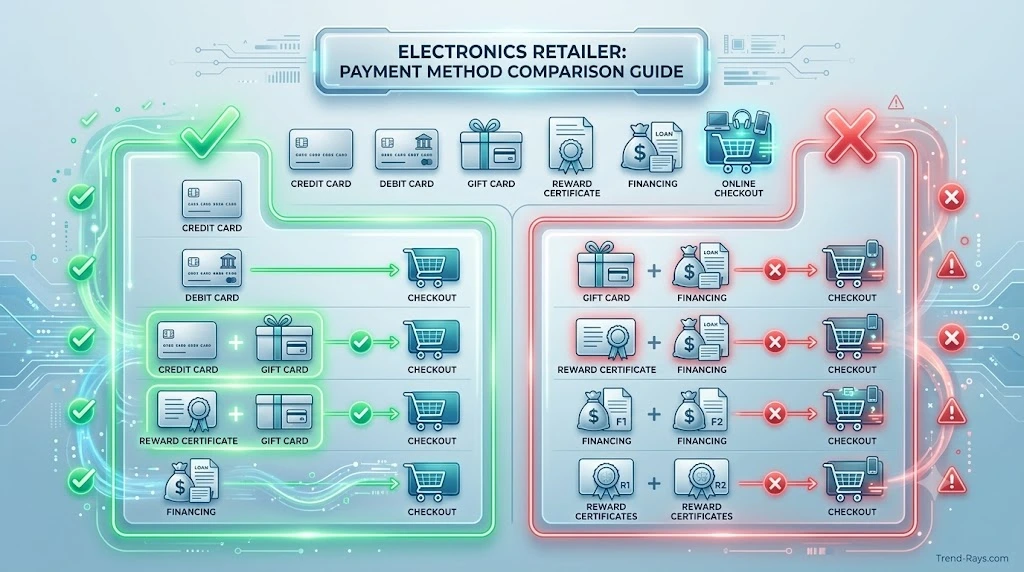
For standard BestBuy.com orders, Best Buy generally allows one primary bank-issued payment card.
This means you typically cannot complete a single online purchase using:
- Two credit cards
- Two debit cards
- A credit card plus another debit card
- PayPal together with a credit or debit card
- Apple Pay together with a credit or debit card
These restrictions are part of Best Buy’s online checkout system rather than limitations of the cards themselves.
Payment Combinations That Are Supported
Although two bank cards generally can’t be combined online, Best Buy supports several combinations that many shoppers mistake for traditional split payments.
These commonly include:
- Best Buy Gift Card + Credit Card
- Best Buy Gift Card + Debit Card
- Best Buy Gift Card + My Best Buy Credit Card
- My Best Buy Reward Certificates + Another Eligible Payment Method
In these situations, Best Buy applies the available gift card or reward certificate balance first before charging the remaining amount to your selected primary payment method.
Best Buy’s Partial Payment Program Is Different
This is where many online articles become confusing.
Best Buy also offers a Partial Payment Policy for certain qualifying merchandise.
This is not the same as splitting one checkout between two credit cards.
Instead, it allows customers to make multiple payments over time toward eligible merchandise before taking delivery.
Key points include:
- Partial payments are available only for qualifying products.
- Merchandise is not reserved until fully paid.
- Delivery or pickup generally isn’t scheduled until payment is complete.
- Customers may cancel and receive a refund according to the policy.
Because the name sounds similar, many shoppers mistakenly believe this program allows two-card checkout. In reality, they’re completely different features.
Why Best Buy Doesn’t Allow Multiple Credit Cards Online
Every online payment requires:
- Card authorization
- Fraud screening
- Balance verification
- Settlement processing
- Refund tracking
Allowing two or more bank cards during one online transaction increases the complexity of each of these steps.
Instead, Best Buy’s checkout is designed around one primary payment card while allowing retailer-managed payment sources—such as Best Buy Gift Cards and Reward Certificates—to reduce the remaining balance before final payment.
The Key Takeaway
The easiest way to understand Best Buy’s payment system is to separate bank-issued payment cards from Best Buy-managed payment sources.
Generally supported:
- Best Buy Gift Card + Credit Card
- Best Buy Gift Card + Debit Card
- Reward Certificates + Eligible Payment Method
Generally not supported online:
- Two credit cards
- Two debit cards
- Credit card + debit card
- PayPal + credit card
- Apple Pay + credit card
Understanding this distinction makes the rest of Best Buy’s payment policy much easier to follow.
In the next section, we’ll answer the question most shoppers search for first:
Can you use two credit cards on Best Buy?

Can You Use Two Credit Cards on Best Buy?
Short Answer
Generally, no.
If you’re shopping on BestBuy.com, you typically cannot split a single purchase between two separate credit cards during the standard online checkout process.
Instead, Best Buy’s online payment system is designed to authorize one primary bank-issued payment card for each transaction.
If your available credit is spread across multiple credit cards, you’ll usually need to choose another supported payment option, such as combining a Best Buy Gift Card with one credit card or using an eligible financing option.
Why Shoppers Want to Use Two Credit Cards
Electronics purchases are often much more expensive than everyday online shopping.
For example, you might be purchasing:
- A $1,200 gaming laptop
- A $900 smartphone
- A $2,000 OLED television
- A premium home theater system
In these situations, it’s common for shoppers to have enough total credit available—but not on a single card.
Imagine this example:
Purchase Total
$1,500
Credit Card A
Available Credit: $800
Credit Card B
Available Credit: $900
Although your total available credit is more than enough to cover the purchase, Best Buy’s online checkout generally won’t divide the transaction between both cards.
Why Doesn’t Best Buy Allow Two Credit Cards Online?
From a shopper’s perspective, splitting the payment seems simple.
Behind the scenes, however, each credit card transaction requires its own:
- Authorization request
- Fraud screening
- Identity verification
- Credit availability check
- Settlement process
If one authorization succeeds while another fails, the transaction becomes significantly more complicated.
Additional challenges can also arise if:
- An order is cancelled before shipping.
- Only part of the order is returned.
- One authorization expires before the order is fulfilled.
- A temporary hold remains on one card while another payment fails.
To reduce these risks, Best Buy’s online checkout generally processes one primary credit card rather than attempting to coordinate multiple card authorizations for the same order.
Does This Rule Apply to the Best Buy App?
Yes.
The Best Buy mobile app follows the same checkout infrastructure as BestBuy.com.
If you’re completing your purchase through the app, you’ll normally select one primary payment card while using any eligible Best Buy-managed balances—such as Gift Cards or Reward Certificates—before the remaining balance is charged.
Using the app doesn’t usually enable payment combinations that aren’t already supported on the website.
Can You Use Two Credit Cards in a Best Buy Store?
In-store purchases can sometimes differ from online transactions because payment is processed through a point-of-sale (POS) system rather than the ecommerce checkout.
Depending on the purchase, payment method, and store procedures, a cashier may have options that aren’t available online.
However, shoppers should not assume that every Best Buy store routinely allows purchases to be divided between two separate credit cards.
If you’re planning a high-value purchase and intend to use multiple payment methods, asking a store associate before checkout is the best way to understand what options are available for your specific transaction.
Better Alternatives to Using Two Credit Cards
Although two-credit-card checkout generally isn’t supported online, several practical alternatives may help you complete your purchase.
Use a Best Buy Gift Card
If you have a Best Buy Gift Card, you can usually apply its balance first before paying the remaining amount with one eligible credit card.
For many shoppers, this provides the flexibility they’re looking for without requiring two separate credit card authorizations.
Redeem My Best Buy® Reward Certificates
If you’ve earned Reward Certificates through the My Best Buy program, they can typically be applied to eligible purchases before charging the remaining balance to your primary payment method.
This is another retailer-managed payment source that functions differently from a second credit card.
Explore Financing Options
Best Buy offers financing on eligible purchases through participating credit products.
Depending on your eligibility, financing may be a more practical solution than attempting to divide a purchase between multiple credit cards.
Always review the terms, promotional periods, and repayment requirements before choosing any financing option.
Split the Purchase Into Separate Orders
If your cart contains multiple products, placing two separate orders may allow you to use different payment methods for each transaction.
Before doing this, check:
- Shipping costs
- Delivery schedules
- Promotional pricing
- Bundle discounts
- Product availability
Common Misunderstandings
“I Have Enough Total Credit”
Having enough combined credit across multiple cards doesn’t necessarily mean the checkout system can divide the payment.
Online checkout is based on the payment methods supported—not your total available credit.
“Another Retailer Lets Me Use Two Cards”
Retailers have different payment systems.
A payment combination supported by one retailer isn’t automatically supported by another.
Best Buy’s checkout rules are determined by its own payment infrastructure and policies.
Key Takeaway
If you’re shopping online at Best Buy, the answer is generally no—you can’t split a single purchase between two separate credit cards.
However, that doesn’t mean you’re out of options.
Combining a Best Buy Gift Card, using Reward Certificates, exploring financing, or adjusting your purchase can often solve the same problem while staying within Best Buy’s supported payment methods.
In the next section, we’ll answer another common question:
Can you use two debit cards on Best Buy?
Can You Use Two Debit Cards on Best Buy?
Short Answer
Generally, no.
For most purchases made through BestBuy.com or the Best Buy mobile app, you cannot split one online transaction between two separate debit cards.
Best Buy’s online checkout is designed to process one primary bank-issued payment card per order. If your funds are divided across multiple debit cards, you’ll typically need to use another supported payment combination or choose an alternative way to complete your purchase.
Why Do Shoppers Want to Use Two Debit Cards?
Unlike credit cards, debit cards draw money directly from your bank account.
Many shoppers have enough money to pay for their purchase—but it’s spread across different accounts.
Common examples include:
- Two personal checking accounts
- A joint account and a personal account
- A payroll card with only part of the available balance
- A prepaid debit card with remaining funds
- Two people sharing the cost of a purchase
For example:
Purchase Total
$850
Debit Card A
Available Balance: $500
Debit Card B
Available Balance: $600
Even though you have more than enough money overall, Best Buy’s online checkout generally won’t divide the purchase between both debit cards.
Why Doesn’t Best Buy Allow Two Debit Cards Online?
Processing multiple debit cards creates many of the same challenges as processing multiple credit cards.
Each transaction requires:
- Verification of available funds
- Authorization from the issuing bank
- Fraud and security screening
- Payment approval
- Settlement after the purchase
If one authorization succeeds and another fails, the retailer must determine how to handle the order, refunds, and temporary authorization holds.
To keep online checkout simpler and more reliable, Best Buy generally authorizes one primary debit card per transaction rather than coordinating multiple bank-issued cards.
What About Prepaid Debit Cards?
Many prepaid debit cards can be used at Best Buy anywhere standard debit cards are accepted.
However, they are generally treated as one payment method, not as a balance that can be combined with another debit card during online checkout.
If your prepaid card doesn’t contain enough money to cover the purchase, you’ll usually need to choose another supported payment option rather than adding a second debit card.
Does This Apply to In-Store Purchases?
Online and in-store purchases don’t always follow identical workflows.
In physical Best Buy stores, payment is processed through point-of-sale systems with assistance from store associates when needed.
Because of this, some payment scenarios may differ from the online checkout experience.
However, shoppers should not assume that a Best Buy store will routinely split one purchase between two separate debit cards.
If you’re planning a large purchase and intend to use multiple payment methods, speaking with a store associate before checkout is the best way to understand what options may be available for your specific transaction.
Better Alternatives to Two Debit Cards
If one debit card doesn’t have enough available funds, these options are often more practical than trying to split the payment.
Use a Best Buy Gift Card
If you have a Best Buy Gift Card, you can generally apply it first and pay the remaining balance with one eligible debit card.
This is one of the most common supported payment combinations.
Transfer Funds Into One Account
If both debit cards belong to you, moving funds into a single account before checkout may be the easiest solution.
Many banks now support:
- Instant internal transfers
- Same-day transfers
- Mobile banking transfers
Checking your available balance before shopping can help prevent payment declines.
Redeem My Best Buy® Reward Certificates
If you’ve earned Reward Certificates through the My Best Buy program, applying them before checkout can reduce the amount that must be charged to your debit card.
This won’t allow two debit cards, but it can lower the remaining balance enough for one card to cover the purchase.
Split the Purchase Into Separate Orders
If you’re buying several products, placing two separate orders may allow you to use different payment methods for each transaction.
Before doing so, consider:
- Shipping thresholds
- Promotional pricing
- Bundle discounts
- Delivery schedules
- Product availability
Common Mistakes to Avoid
Confusing Available Balance With Account Balance
Pending transactions and authorization holds can reduce your available balance even if your account shows enough total funds.
Always check your available balance before completing checkout.
Assuming Online and In-Store Rules Are Identical
While both use Best Buy’s payment systems, the checkout process is different.
Options available through a cashier may not exist on BestBuy.com or in the mobile app.
Expecting Prepaid Cards to Work Like Gift Cards
Prepaid debit cards are issued by financial institutions and are processed differently from Best Buy Gift Cards.
Because of that, they generally can’t be used to create a traditional split-payment transaction with another debit card during online checkout.
Key Takeaway
If you’re shopping online, Best Buy generally doesn’t allow one purchase to be divided between two separate debit cards.
Instead, shoppers who need additional flexibility are usually better served by supported alternatives such as:
- Best Buy Gift Cards
- My Best Buy Reward Certificates
- Funding one account before checkout
- Splitting items into separate orders when practical
These options help solve the same problem without relying on an unsupported payment combination.
In the next section, we’ll cover one of the most useful payment combinations that Best Buy does support:
Using a Best Buy Gift Card together with another payment method.
Can You Use a Best Buy Gift Card With Another Payment Method?
Short Answer
Yes.
Unlike two separate credit cards or two separate debit cards, Best Buy generally allows customers to combine a Best Buy Gift Card with another eligible payment method during checkout.
This is one of the most common and widely supported payment combinations available on BestBuy.com and in Best Buy stores.
For shoppers who have a gift card that doesn’t cover the full purchase price, this is often the easiest way to complete an order.
How Best Buy Gift Cards Work During Checkout
When you redeem a Best Buy Gift Card, its available balance is applied to your purchase first.
If money is still owed, the remaining balance is charged to your selected payment method.
Example
Purchase Total:
$950
Best Buy Gift Card:
$250
Remaining Balance:
$700
Checkout Result:
- Best Buy Gift Card → $250
- Credit Card → $700
This process is handled automatically during checkout and is one of the reasons shoppers often confuse gift card payments with traditional split payments.
Can You Use a Best Buy Gift Card With a Credit Card?
Yes.
This is one of the most common payment combinations supported by Best Buy.
Typical checkout flow:
- Enter or redeem your Best Buy Gift Card.
- The available balance is deducted from your order.
- Your credit card is charged for the remaining balance.
This is especially useful when:
- Your gift card doesn’t cover the full purchase.
- You’re buying expensive electronics.
- You’ve received a gift card during the holidays.
- You’re using store credit before paying the remaining amount.
Can You Use a Best Buy Gift Card With a Debit Card?
Yes.
The process works in much the same way.
For example:
Purchase Total:
$300
Gift Card:
$75
Debit Card:
Charged $225
This payment combination is commonly supported because Best Buy processes its own gift cards separately from bank-issued payment cards.
Can You Use Multiple Best Buy Gift Cards?
In many cases, yes.
Best Buy generally allows customers to redeem multiple Best Buy Gift Cards during a single purchase, subject to system limits and checkout requirements.
This can be helpful if you’ve accumulated several smaller gift cards from:
- Birthdays
- Holiday gifts
- Promotional offers
- Customer service credits
If the combined balance still doesn’t cover your purchase, another eligible payment method can usually be used for the remaining amount.
What About My Best Buy® Reward Certificates?
This is where Best Buy differs from many other retailers.
If you’re a member of the My Best Buy rewards program, you may earn Reward Certificates that can be redeemed on eligible purchases.
Reward Certificates function differently from credit cards.
Instead of being another bank-issued payment method, they reduce the purchase amount before the remaining balance is charged to your selected payment method.
For example:
Purchase Total:
$600
Reward Certificate:
$50
Remaining Balance:
$550
Primary Credit Card:
Charged $550
Many shoppers overlook this option because they assume Reward Certificates work like a second payment card.
In reality, they’re processed much more like retailer-issued credit.
What About Promotional Certificates?
Best Buy occasionally issues promotional certificates through special offers or marketing campaigns.
When eligible, these certificates are generally applied before charging your primary payment method, similar to Reward Certificates.
However, promotional certificates may include:
- Expiration dates
- Product exclusions
- Minimum purchase requirements
- Other promotional terms
Always review the certificate details before relying on it during checkout.
Why Best Buy Allows Gift Cards but Not Two Credit Cards
This difference often confuses shoppers.
After all, both situations involve more than one payment source.
The key difference is ownership.
Best Buy controls:
- Gift Card balances
- Reward Certificates
- Promotional Certificates
Because these are retailer-managed payment sources, Best Buy can immediately verify their value and deduct them before requesting payment from your bank.
Two separate credit cards, however, require independent authorizations from different financial institutions, making online checkout much more complex.
Common Mistakes to Avoid
Assuming Reward Certificates Are the Same as Gift Cards
Although both reduce the amount you owe, they are different products with different terms and eligibility requirements.
Waiting Until Checkout to Check Your Gift Card Balance
Knowing your available gift card balance before shopping makes it easier to estimate the remaining amount you’ll need to pay.
Confusing Gift Cards With Visa or Mastercard Gift Cards
A Best Buy Gift Card is different from a prepaid Visa or Mastercard gift card.
Visa and Mastercard gift cards are processed like bank-issued payment cards, while Best Buy Gift Cards are retailer-managed payment methods.
Key Takeaway
If you’re looking for a supported way to use more than one payment source at Best Buy, combining a Best Buy Gift Card with another eligible payment method is one of the best options available.
Unlike two separate credit cards or debit cards, Best Buy Gift Cards, Reward Certificates, and eligible promotional certificates are processed as retailer-managed balances, allowing them to reduce the purchase amount before the remaining balance is charged to one primary payment card.
For many shoppers, this provides the flexibility they need while remaining fully compatible with Best Buy’s checkout system.
In the next section, we’ll examine another area that often causes confusion:
How Best Buy’s payment options differ between online checkout and shopping in physical stores.

Online vs. In-Store: Does Best Buy’s Payment Policy Change?
Many shoppers receive different answers about Best Buy’s payment options because they’re comparing two different checkout systems.
Shopping on BestBuy.com isn’t the same as shopping in a physical Best Buy store.
Although both use Best Buy’s payment infrastructure, the way transactions are processed is different.
Online purchases follow standardized ecommerce checkout rules, while in-store purchases are processed through point-of-sale (POS) systems with assistance from store associates when needed.
Understanding this distinction can help you choose the right payment method before reaching checkout.
Shopping on BestBuy.com
For most online purchases, Best Buy’s checkout is designed around one primary bank-issued payment card.
That means you generally cannot divide a single online purchase between:
- Two credit cards
- Two debit cards
- One credit card and one debit card
However, Best Buy commonly supports combinations involving retailer-managed payment sources, including:
- Best Buy Gift Cards
- My Best Buy® Reward Certificates
- Eligible promotional certificates
These payment sources reduce the amount owed before your remaining balance is charged to one eligible payment card.
Shopping in a Best Buy Store
When you shop in a physical store, your purchase is processed through an in-store payment terminal rather than the online checkout system.
This creates a different payment environment.
For example, in-store purchases may involve:
- Cash payments
- Gift Cards
- Reward Certificates
- Assistance from a cashier
- Certain financing options available at the register
Because of these differences, shoppers sometimes report experiences that aren’t identical to what they see online.
However, you should not assume that every Best Buy store routinely allows purchases to be split between two separate credit cards or two separate debit cards.
If you’re planning to use multiple payment methods for a large purchase, asking a store associate before checkout is the best way to understand what options are available for your specific transaction.
What About Store Pickup Orders?
Store pickup often creates confusion because the order is collected in person.
However, if you placed the order through BestBuy.com, the payment generally follows the online checkout rules—even if you’re picking the item up at a physical store.
In other words:
- Where you receive the product isn’t the same as where the payment is processed.
If your order was paid online, changing or splitting the payment method at pickup may not be possible once the transaction has been finalized.
Does the Best Buy Mobile App Work Differently?
No.
The Best Buy app uses the same underlying checkout system as BestBuy.com.
Whether you’re shopping through the website or the mobile app, you’ll generally encounter the same payment rules regarding:
- Primary payment cards
- Gift Cards
- Reward Certificates
- Promotional certificates
- Financing options
Using the app doesn’t usually unlock additional payment combinations that aren’t already supported online.
Online vs. In-Store Comparison
| Payment Scenario | BestBuy.com | Best Buy Store |
|---|---|---|
| Two Credit Cards | ❌ Generally not supported | ⚠️ May vary depending on transaction and store procedures |
| Two Debit Cards | ❌ Generally not supported | ⚠️ May vary depending on transaction and store procedures |
| Best Buy Gift Card + Credit Card | ✅ Yes | ✅ Yes |
| Best Buy Gift Card + Debit Card | ✅ Yes | ✅ Yes |
| My Best Buy® Reward Certificates + Card | ✅ Yes | ✅ Yes |
| Promotional Certificates + Card | ✅ Eligible purchases | ✅ Eligible purchases |
| Cash + Card | ❌ Not applicable | ✅ Yes |
Why the Experiences Can Feel Different
Many shoppers assume the payment policy changes depending on where they’re shopping.
In reality, the biggest difference is how the transaction is processed.
Online orders rely on a standardized ecommerce checkout designed for speed and consistency.
In-store purchases involve payment terminals, cashiers, and additional payment options that don’t exist online, such as cash.
This difference explains why some payment experiences vary without changing Best Buy’s overall approach to supported payment methods.
Key Takeaway
The most important distinction isn’t whether you’re shopping online or in a store—it’s which payment methods you’re trying to combine.
Best Buy generally supports retailer-managed payment sources, such as Gift Cards and Reward Certificates, alongside one eligible payment card.
By contrast, combining two separate bank-issued credit or debit cards during a standard online checkout generally isn’t supported.
Understanding this difference before you begin checkout can help you avoid payment issues and choose the payment method that best fits your purchase.
In the next section, we’ll cover the best alternatives if Best Buy doesn’t support your preferred payment combination, including practical solutions for completing large purchases.

What to Do If Best Buy Doesn’t Allow Your Preferred Payment Method
Discovering that your preferred payment combination isn’t supported can be frustrating—especially when you’re ready to purchase an expensive item like a laptop, TV, gaming console, or home appliance.
Fortunately, not being able to use two credit cards or two debit cards doesn’t necessarily mean you have to abandon your purchase.
Depending on your situation, there are several practical alternatives that can help you complete your order.
Option 1: Use a Best Buy Gift Card
For many shoppers, this is the easiest alternative.
If you already have a Best Buy Gift Card, you can generally apply its balance first and then pay the remaining amount with one eligible credit or debit card.
Example
Purchase Total:
$1,100
Best Buy Gift Card:
$300
Remaining Balance:
$800
Primary Credit Card:
Charged $800
This is one of the most common supported payment combinations available at Best Buy.
Option 2: Redeem My Best Buy® Reward Certificates
If you’ve earned Reward Certificates through the My Best Buy rewards program, redeeming them before checkout can reduce the amount charged to your primary payment method.
For example:
Purchase Total:
$700
Reward Certificate:
$50
Remaining Balance:
$650
Primary Payment Card:
Charged $650
Many shoppers forget about available Reward Certificates, even though they can significantly reduce the final purchase amount.
Option 3: Consider Promotional Financing
For eligible purchases, Best Buy may offer financing through participating credit products.
Depending on your eligibility, financing can be a more practical solution than attempting to split one purchase between multiple bank cards.
Before choosing financing, review:
- Promotional interest periods
- Standard interest rates
- Minimum monthly payments
- Eligibility requirements
Financing should only be used if it aligns with your budget and repayment plans.
Option 4: Split the Purchase Into Separate Orders
If you’re buying multiple products rather than one expensive item, creating separate orders may allow you to use different payment methods for each purchase.
Example:
Order 1
Laptop Accessories
Paid with Credit Card A
Order 2
Monitor
Paid with Debit Card B
Before splitting an order, check:
- Free shipping requirements
- Bundle discounts
- Promotional pricing
- Product availability
- Delivery schedules
Option 5: Transfer Funds Before Checkout
If both payment cards belong to you, transferring money into one account before placing your order is often simpler than trying to use two different debit cards.
Many financial institutions now offer:
- Instant transfers
- Same-day transfers
- Mobile banking transfers
Checking your available balance beforehand can help avoid payment declines.
Option 6: Verify Available Credit or Funds
Many payment problems occur because shoppers confuse:
- Account balance
- Available balance
- Available credit
Pending authorizations or recent purchases may temporarily reduce the amount available for a new transaction.
Before trying again, verify:
- Available credit on your credit card
- Available balance in your bank account
- Any pending authorizations
- Daily spending limits imposed by your bank
Option 7: Contact Best Buy Customer Care
If your payment should have worked but didn’t, Best Buy Customer Care may be able to help clarify the issue.
Examples include:
- Gift Card balance not applying correctly
- Reward Certificate issues
- Unexpected payment errors
- Checkout problems
- Questions about financing eligibility
In some cases, your bank or card issuer may also need to confirm why the transaction was declined.
Common Mistakes to Avoid
Repeatedly Submitting the Same Declined Payment
Submitting the same card multiple times can result in repeated authorization attempts, which may temporarily reduce your available credit or available bank balance until pending holds expire.
Assuming Every Payment Method Can Be Combined
Best Buy accepts many payment methods, but that doesn’t mean every combination is supported.
Understanding which payment sources are retailer-managed—and which are bank-issued—can help you choose the right option before checkout.
Forgetting About Reward Certificates
Many shoppers search for ways to split payments without realizing they already have Reward Certificates available in their My Best Buy account.
Checking your rewards before placing a large order may reduce the amount you need to pay.
Ignoring Promotional Terms
Gift Cards, Reward Certificates, financing offers, and promotional certificates may each have different eligibility requirements.
Reviewing the applicable terms before checkout can help prevent unexpected payment issues.
Which Alternative Is Best?
The right option depends on why you wanted to split your payment.
| Your Situation | Recommended Solution |
|---|---|
| Gift Card doesn’t cover the purchase | Use the Gift Card with one eligible payment card |
| You have Reward Certificates | Redeem them before paying the remaining balance |
| Buying multiple products | Consider separate orders if practical |
| One debit card doesn’t have enough funds | Transfer money into one account |
| Purchasing a high-value item | Explore eligible financing options |
| Unexpected payment error | Verify your available funds or contact customer support |
Key Takeaway
Although Best Buy generally doesn’t allow one online purchase to be divided between two separate credit cards or two separate debit cards, there are several practical alternatives that accomplish the same goal.
Using a Best Buy Gift Card, redeeming Reward Certificates, considering eligible financing, or adjusting how you place your order can often help you complete your purchase without relying on unsupported payment combinations.
In the next section, we’ll answer the most frequently asked questions about Best Buy split payments, including Gift Cards, Reward Certificates, financing, store purchases, and other common checkout scenarios.

Frequently Asked Questions
Can You Split Payment Between Two Credit Cards at Best Buy?
For most purchases made through BestBuy.com, the answer is generally no.
Best Buy’s online checkout is designed to process one primary bank-issued credit card for each transaction. If you need additional payment flexibility, using a Best Buy Gift Card or Reward Certificate together with one eligible payment card is often the best alternative.
Can You Split Payment Between Two Debit Cards at Best Buy?
Generally, no.
Best Buy’s standard online checkout doesn’t typically support dividing one purchase between two separate debit cards.
If your funds are spread across multiple accounts, transferring money into one account before checkout is often the simplest solution.
Can You Use a Credit Card and a Debit Card Together at Best Buy?
For standard online purchases, this combination is generally not supported.
Best Buy’s checkout usually requires one primary bank-issued payment card.
However, retailer-managed payment sources such as Best Buy Gift Cards or My Best Buy® Reward Certificates may still be combined with an eligible payment card.
Can You Use a Best Buy Gift Card and a Credit Card Together?
Yes.
This is one of the most common payment combinations supported by Best Buy.
Your Gift Card balance is typically applied first, and the remaining balance is charged to your selected credit card.
Can You Use a Best Buy Gift Card and a Debit Card Together?
Yes.
If your Gift Card doesn’t cover the full purchase price, the remaining balance can generally be paid using one eligible debit card.
Can You Use Multiple Best Buy Gift Cards?
In many cases, yes.
Best Buy generally allows customers to redeem multiple Best Buy Gift Cards during a single purchase, subject to applicable system limits and checkout rules.
If the combined Gift Card balance doesn’t cover the full purchase, another eligible payment method can usually be used for the remaining amount.
Can You Combine My Best Buy® Reward Certificates With Other Payment Methods?
Yes.
Reward Certificates are designed to reduce the purchase amount before the remaining balance is charged to your selected payment method.
They work differently from bank-issued payment cards and are one of the easiest ways to lower the amount you pay at checkout.
Can You Use Financing Together With a Gift Card?
In many eligible situations, yes.
If you’re financing an eligible purchase, Best Buy Gift Cards can often be applied before the remaining financed balance is calculated.
Specific eligibility may vary depending on the financing program and the products being purchased.
Can You Pay Part Cash and Part Card at Best Buy?
For purchases made in a physical Best Buy store, paying with cash and then using a card for the remaining balance is generally possible.
Cash isn’t accepted for BestBuy.com orders, so online purchases must be completed using supported electronic payment methods.
Does Store Pickup Change the Payment Rules?
No.
If you place your order through BestBuy.com, the payment follows the online checkout rules—even if you choose in-store pickup.
Picking up an order at a store doesn’t usually allow you to change the original payment method after the transaction has been completed.
Why Was My Best Buy Payment Declined?
A payment can be declined for several reasons, including:
- Insufficient available funds
- Not enough available credit
- Incorrect billing information
- Temporary authorization holds
- Bank fraud prevention checks
- Card issuer security verification
Before trying again, verify your payment details and confirm your available balance or available credit with your financial institution.
Can Two People Pay for One Best Buy Purchase?
Best Buy doesn’t generally support splitting one online purchase between two separate bank-issued cards.
If two people are sharing the cost, practical alternatives include:
- Using a Best Buy Gift Card purchased by one person.
- Redeeming available Reward Certificates.
- Placing separate orders for different products when appropriate.
- Reimbursing one another outside of the checkout process.
Does Best Buy’s Payment Policy Change Over Time?
Yes.
Retailers regularly update their accepted payment methods, financing options, and checkout systems.
Before making a significant purchase, it’s a good idea to review Best Buy’s latest payment information or contact customer support if your payment situation is unusual.
Final Thoughts
Although Best Buy accepts a wide range of payment methods, splitting one online purchase between two separate credit cards or two separate debit cards generally isn’t supported.
The good news is that Best Buy offers several alternatives that provide similar flexibility.
Using a Best Buy Gift Card, redeeming My Best Buy® Reward Certificates, taking advantage of eligible financing, or adjusting how you place your order can often help you complete your purchase without running into unsupported payment combinations.
Understanding these options before checkout can save time, reduce frustration, and make buying high-value electronics much easier.
If you’re comparing payment policies across different retailers, you may also find our guide on splitting payment between two cards online helpful. It explains which payment combinations are commonly supported by major retailers and how their checkout systems differ.