What is MCP RBAC?
Model Context Protocol (MCP) RBAC is the application of strict, tool-level permissions to AI agents. Instead of granting an AI client blanket access to an entire MCP server, strict RBAC binds the agent to a specific allow-list of authorized tools, preventing unauthorized actions and mitigating the risk of indirect prompt injections.
Securing a Model Context Protocol (MCP) server requires overcoming the “Confused Deputy” vulnerability, where an autonomous AI agent executes backend commands using elevated service credentials rather than the end-user’s actual permissions. Because the base MCP specification does not natively enforce identity routing, enterprise environments must deploy an MCP Gateway. This centralized proxy layer sits between the AI host and the downstream tools, enforcing strict Role-Based Access Control (RBAC), mapping OAuth 2.0 Identity Provider (IdP) tokens to specific tool-level execution scopes, and maintaining independent inbound and outbound authentication paths.
How to Configure Strict RBAC on Model Context Protocol (MCP) Servers
1. The MCP Security Crisis & The Confused Deputy
The Model Context Protocol (MCP) has rapidly become the universal standard for connecting Large Language Models (LLMs) to enterprise data sources. It is widely praised as the “USB-C for AI.” However, implementing an open MCP server inside a corporate network without a structural security overlay is highly dangerous.
MCP reverses traditional client-server mechanics. Instead of a human client requesting a specific dataset, the LLM actively decides which backend tools the server should execute based on its semantic interpretation of a prompt.
This introduces the Confused Deputy Problem. If an AI agent (the deputy) possesses high-level backend permissions, an external user or an indirect prompt injection attack can trick the agent into executing destructive commands—such as deleting repository branches or exporting customer SQL rows—on behalf of an unauthorized entity. Passing raw client tokens straight to downstream APIs breaks fundamental zero-trust boundaries because the backend tools cannot verify if the token holder actually authorized the specific algorithmic action.
2. Architecting the MCP Gateway (Closing the Front Door)
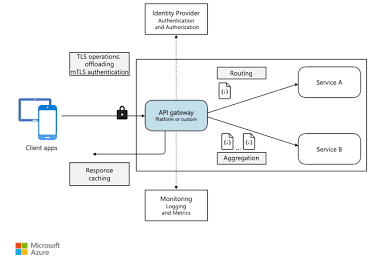
Direct connections between an AI IDE (like Cursor) or a hosted LLM and an enterprise MCP server are fundamentally un-auditable. To secure the pipeline, you must deploy a centralized MCP Gateway.
Acting as a Reverse Proxy and API Gateway, this layer becomes the single ingress point for authentication, TLS termination, and rate-limiting. Never expose an MCP server directly to a public LLM host.
To ensure your downstream MCP servers only accept traffic from your secure gateway, you must configure network-level header validation.
YAML
# Production Configuration: Nginx Proxy to Restrict MCP Access
server {
    listen 443 ssl;
    server_name mcp-gateway.trend-rays.com;

    location / {
        # Require OAuth 2.0 validation via external IdP
        auth_request /oauth2/auth;

        # Inject the secure boundary token that the backend MCP server verifies
        proxy_set_header X-MCP-Gateway-Secret "secure_vault_token_hash_8819";

        # Route to the internal MCP Server
        proxy_pass http://internal-mcp-server:8080;
    }
}
3. Inbound vs. Outbound Authentication Routing
Enterprise startups frequently fail security audits because they use a single, hardcoded API key for all their AI agent operations. A secure MCP architecture cleanly separates how the agent authenticates to the gateway from how the gateway authenticates to the data.
Inbound Authentication (Client to Gateway)
Human users and AI agents must be treated as distinct entities.
- Human Developers: Authenticate using federated IdP mapping (such as Okta or Azure AD) where their session is tied to standard corporate Active Directory groups.
- Autonomous Agents: Authenticate using short-lived Virtual Account Machine-to-Machine (M2M) tokens, ensuring that if an agent goes rogue, its session expires within 15 minutes.
Outbound Authentication (Gateway to Tool)
Once the gateway verifies the inbound request, it should not pass the user’s raw session token to the downstream API. Instead, it must utilize dynamic token generation—issuing short-lived OAuth 2.0 bearer tokens mapped strictly to the requested tool’s execution requirements. This prevents total session hijacking if an MCP backend server is compromised.
4. Implementing Granular RBAC and Tool-Level Scopes
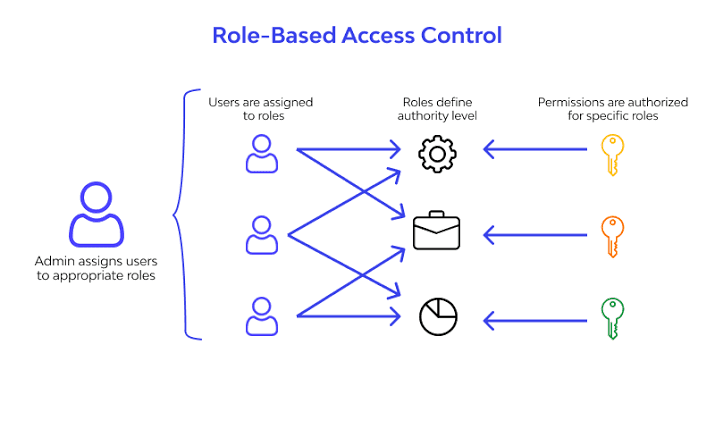
Access control must never be limited to a binary “access the server” or “block the server” state. It must be evaluated at the granular tool execution level.
This is known as the Agentic Permission Budget. For example, an intern’s Okta profile mapped to your github-mcp-server should only be authorized to execute the read_repository tool. In contrast, a Senior DevOps engineer’s profile can be allowed to execute the merge_pull_request tool.
Calculate how different user roles dictate programmatic tool capabilities using this interactive RBAC mapping matrix:
5. Telemetry, Observability, and Blast Radius Containment
If an agent is hijacked via a contextual prompt injection, your infrastructure team must be able to detect the anomaly in milliseconds. The base MCP protocol does not log execution context; your gateway must enforce it.
Required Logging Parameters
A compliant MCP telemetry sink must capture:
- The originating Identity (User or M2M Token ID).
- The exact Tool Name invoked.
- The explicit Invocation Parameters.
- The total Response Size.
The Fatal Flaw in Default MCP Deployments
By default, when an AI agent connects to an MCP server, it gains access to every tool exposed by that server. This server-level access creates a massive security flaw known as the “confused deputy” problem.
For example, if an agent connects to a customer database server to use a lookup_user tool, it simultaneously gains access to the delete_user tool. If the agent is compromised via a malicious prompt, it could execute destructive actions because the core MCP specification does not natively restrict which specific tools the agent is authorized to call at the connection layer.
Why You Need an AI Gateway for Strict RBAC
- Note: If you generate a custom architecture diagram to accompany this section, remember to apply the trend-rays.com watermark to the image before uploading it to your media library.
To enforce strict RBAC, enterprise deployments must place an AI Gateway or proxy between the LLM client and the MCP server. Because standard MCP lacks native granular authorization, the gateway acts as the enforcement layer.
The Secure Request Flow:
- The client sends a request with an authentication token (like a JWT).
- The AI Gateway intercepts the connection and validates the user’s role claims.
- The Gateway cross-references the requested tool against an environment-specific “Virtual Key” (an allow-list of approved tools for that role).
- If the tool is permitted, the Gateway forwards the request to the MCP server. If not, it blocks the request to prevent data exfiltration or unauthorized actions.
Never use token passthrough directly to the MCP server without this middleware validation.
Anomaly Detection & Human-in-the-Loop (HITL)
Monitoring the “Response Size” is critical. If an MCP tool typically returns 2KB of data but suddenly attempts to return 45MB after a specific query, it indicates a massive database exfiltration attempt.
To contain the blast radius of state-changing operations, configure your MCP Gateway to pause execution and trigger a webhook demanding a manual Human-in-the-Loop (HITL) approval click (via Slack or Microsoft Teams) before the backend processes any DELETE, UPDATE, or SEND_EMAIL tool requests.
Strategic B2B FAQ Block
Can the Model Context Protocol (MCP) natively enforce RBAC?
No. The base MCP specification outlines the transport and messaging format for tool execution but lacks native protocols for identity routing and Role-Based Access Control. Security must be enforced via an intermediary MCP Gateway or strict host-side validation.
What is the Confused Deputy problem in AI agents?
It occurs when a malicious user or injected prompt tricks an AI agent into executing a backend tool using the agent’s elevated system permissions, completely bypassing the security constraints that would normally apply to the end-user.
Why do I need an MCP Gateway?
An MCP Gateway provides a centralized control plane to enforce authentication, map Identity Provider (IdP) tokens to specific server tools, rate-limit automated requests, and generate unalterable audit logs before an LLM can interact with enterprise data.