![One of the most dangerous blind spots in modern enterprise security does not come from sophisticated nation-state hackers—it comes from your own employees trying to bypass IT restrictions. Whether it is a remote worker downloading a cracked version of Adobe Premiere, or an employee installing a pirated "repack" of a video game (like a FitGirl or Dodi repack) onto their corporate laptop, the threat vector is the same. Threat actors are now heavily relying on repackaged "flat-pack" malware—inexpensive, off-the-shelf malicious components bundled inside seemingly legitimate software installers. These "piggyback" attacks are designed to silently execute InfoStealers, ransomware, or Remote Access Trojans (RATs) while the user is distracted by the installation of the main program. Because the malware is heavily compressed and obfuscated, traditional signature-based Antivirus (AV) completely fails to detect it. In this guide, we break down exactly how modern Security Operations Center (SOC) teams use Endpoint Detection and Response (EDR) platforms to hunt, isolate, and neutralize repackaged malware before it can compromise the corporate network. The Corporate Threat of "Repacks" (Why Antivirus Fails) To understand how to defeat flat-pack malware, you must understand why legacy security tools fail to see it. Traditional Antivirus relies on Static Properties Analysis. It scans a file's code on the hard drive and checks if its digital "signature" matches a known database of bad files. Malware authors easily bypass this by "packing" or compressing the malicious payload inside a custom wrapper. Because the wrapper's code is mathematically unique, the AV scans it, finds no matching signature, and allows the file to execute. Furthermore, attackers are utilizing "vibe-hacking" and social engineering to distribute these files. They buy sponsored search engine ads for "Microsoft Teams Installer" or "Free PDF Editor," which redirect employees to cloned websites serving the repackaged malware. The legitimate application actually installs and functions perfectly, but a secondary, invisible child process unpacks the malicious payload directly into the computer's volatile memory (RAM), bypassing the hard drive entirely. (Image Prompt 1 - Featured Hero) Prompt: A highly photorealistic, 16:9 cinematic image of a modern Security Operations Center (SOC). In the foreground, a dark-mode glowing computer monitor displays a complex cybersecurity threat-hunting dashboard. A red warning alert reads "Obfuscated Payload Detected." In the background, out-of-focus IT analysts monitor large digital wall screens. Cool blue and aggressive red cyber lighting. A clear, semi-transparent watermark reading "trend-rays.com" sits neatly in the bottom right corner. Step 1: Hunting for Indicators of Compromise (IoCs) If your organization does not yet have an enterprise EDR solution deployed, your IT administrators must actively hunt for the behavioral footprints—known as Indicators of Compromise (IoCs)—left behind by repackaged software. When analyzing an endpoint suspected of a shadow IT infection, look for these specific anomalies: Suspicious Child Processes: Legitimate software installers rarely need to invoke command-line tools. If a setup file (e.g., setup_v2.exe) suddenly spawns cmd.exe, PowerShell.exe, or WMI Provider Host in the background, it is a massive red flag that a flat-pack script is attempting to alter registry keys or disable local Windows Defender settings. Abnormal Memory Allocation: Packed malware must eventually unpack itself in memory to execute. Look for processes that allocate highly unusual amounts of memory relative to their size on the disk. Unrecognized Outbound Beacons: InfoStealers bundled in repacks will immediately attempt to exfiltrate browser passwords and session cookies. Monitor your network firewall logs for endpoints making sudden, persistent outbound connections to unknown IP addresses or unregistered domains (often using Telegram bots or Discord webhooks as Command and Control servers). Step 2: Deploying EDR to Catch "Unpacking" in Memory While manual threat hunting is possible, it does not scale. To protect a fleet of 5,000 corporate laptops, you need Endpoint Detection and Response (EDR). Unlike legacy AV, EDR focuses on Behavioral Analysis and continuous telemetry. It does not care what a file looks like; it cares what the file does. When an employee runs a repackaged installer, the EDR agent monitors the execution in real-time. The moment the hidden malware attempts to unpack itself and inject code into a legitimate process (like explorer.exe), the EDR’s machine learning algorithms flag the behavior as hostile. Top 3 Enterprise EDR Solutions for Repack Detection If you are upgrading your endpoint security stack in 2026, these three platforms provide the most robust defense against obfuscated, flat-pack payloads: CrowdStrike Falcon (Best for Memory Scanning): CrowdStrike’s lightweight agent is peerless at detecting fileless malware and in-memory unpacking. Its AI models instantly recognize the behavioral signatures of InfoStealers attempting to scrape credential vaults, killing the process in milliseconds before data exfiltration can occur. SentinelOne Singularity (Best for Automated Rollback): SentinelOne operates entirely autonomously on the endpoint, meaning it does not need a cloud connection to stop a threat. If a repackaged ransomware payload manages to execute, SentinelOne's "Storyline" technology can track every single file the malware altered and execute a 1-click automated rollback, restoring the PC to its pre-infected state instantly. Microsoft Defender XDR (Best for Windows-Native Environments): For organizations heavily invested in the Microsoft 365 ecosystem, Defender XDR provides incredible native telemetry. It correlates data not just from the endpoint, but from Office 365 emails and Azure Active Directory, allowing SOC analysts to see if the repackaged malware was initially delivered via a phishing link. (Image Prompt 2 - Threat Isolation) Prompt: A photorealistic 16:9 close-up of a cybersecurity professional's dual-monitor workstation. The screen displays an Enterprise EDR dashboard (like SentinelOne or CrowdStrike) showing a visual node-graph of a malware attack. One specific malicious file node is highlighted in bright red and marked "Isolated / Quarantined." Clean, bright corporate IT office lighting. A clear, semi-transparent watermark reading "trend-rays.com" sits neatly in the bottom right corner. The CISO Playbook: Blocking Shadow IT at the Perimeter Detecting malware is good; preventing the execution entirely is better. Chief Information Security Officers (CISOs) must implement strict "Zero Trust" policies to prevent employees from running unverified repacks in the first place. Enforce Application Allowlisting: Use tools like Windows AppLocker to create a strict Allowlist. Block the execution of any .exe, .msi, or script that does not reside in a protected directory (like Program Files) or isn't signed by a trusted corporate publisher. Revoke Local Admin Rights: 90% of repackaged malware requires administrative privileges to install its rootkits or disable security telemetry. By implementing a Privilege Access Management (PAM) solution, employees cannot install unauthorized software without an IT helpdesk ticket. Deploy DNS Filtering: Block access to known software piracy forums, torrent trackers, and "free software" directories at the network level using tools like Cisco Umbrella or Cloudflare Gateway. The True Cost of a Repack Breach (ROI & Business Impact) When an executive pushes back on the budget required for premium EDR software, it is vital to contextualize the financial devastation of a single successful flat-pack malware breach. An employee downloading a cracked PDF editor to "save the company $15 a month" can easily result in the deployment of an InfoStealer. That malware scrapes the employee's browser cookies, capturing their active session token for the company's AWS environment or Salesforce CRM. The attacker bypasses Multi-Factor Authentication (MFA) entirely using the stolen token, accesses your customer database, and deploys network-wide ransomware. The resulting downtime, ransom demands, regulatory fines (GDPR, HIPAA, or CCPA), and class-action lawsuits frequently exceed millions of dollars. Investing in an EDR platform that costs $50 per endpoint annually is the cheapest insurance policy a modern enterprise can buy. Frequently Asked Questions (Endpoint Malware Defense) What is flat-pack malware? Flat-pack malware refers to malicious payloads that are heavily compressed, obfuscated, and bundled together with legitimate software components using off-the-shelf hacker tools. This "repackaging" technique allows attackers to rapidly generate new malware variants that bypass traditional, signature-based antivirus scanners. Why is downloading FitGirl or Dodi repacks a corporate security risk? While often used by gamers to pirate software, "repacks" are a massive vector for shadow IT. Because these installers are inherently modified to bypass digital rights management (DRM), employees who download them onto corporate hardware often accidentally execute hidden InfoStealers or Remote Access Trojans (RATs) embedded by third-party distributors. What is the difference between EDR and Antivirus? Traditional Antivirus uses static signatures to block known bad files on the hard drive. Endpoint Detection and Response (EDR) uses behavioral analysis, AI telemetry, and memory scanning to monitor what a program is actively doing. EDR can detect and kill unknown, "zero-day" malware that legacy AV cannot see. How do InfoStealers bypass MFA? When an InfoStealer (often hidden in repackaged software) infects an endpoint, it targets the web browser's local storage to steal active session cookies. Attackers can import these stolen cookies into their own browsers, allowing them to log into corporate systems (like Microsoft 365 or Slack) without needing a password or triggering an MFA prompt. Conclusion & Next Steps The perimeter of your corporate network is no longer defined by your office firewall; it is defined by the security of your employees' endpoints. Relying on legacy antivirus to stop modern, repackaged malware is a guaranteed path to a data breach. By deploying behavioral-based EDR solutions and strictly policing shadow IT, you can isolate threats in memory before they execute their payloads. Securing your endpoints against rogue software is critical, but it is only half the battle. Threat actors are also using advanced AI to bypass human verification. Ensure your organization is prepared for the next wave of social engineering by reading our definitive guide on [Best Enterprise AI Voice Cloning SaaS for Corporate Training] to learn how to deploy deepfake guardrails and secure corporate communications.](https://trend-rays.com/wp-content/uploads/2026/03/unnamed-54-1.jpg "How to Detect Repackaged \"Flat-Pack\" Malware on Endpoints (2026) 1")
One of the most dangerous blind spots in modern enterprise security does not come from sophisticated nation-state hackers—it comes from your own employees trying to bypass IT restrictions.
Whether it is a remote worker downloading a cracked version of Adobe Premiere, or an employee installing a pirated “repack” of a video game (like a FitGirl or Dodi repack) onto their corporate laptop, the threat vector is the same. Threat actors are now heavily relying on repackaged “flat-pack” malware—inexpensive, off-the-shelf malicious components bundled inside seemingly legitimate software installers.
These “piggyback” attacks are designed to silently execute InfoStealers, ransomware, or Remote Access Trojans (RATs) while the user is distracted by the installation of the main program. Because the malware is heavily compressed and obfuscated, traditional signature-based Antivirus (AV) completely fails to detect it.
In this guide, we break down exactly how modern Security Operations Center (SOC) teams use Endpoint Detection and Response (EDR) platforms to hunt, isolate, and neutralize repackaged malware before it can compromise the corporate network.
The Corporate Threat of “Repacks” (Why Antivirus Fails)
To understand how to defeat flat-pack malware, you must understand why legacy security tools fail to see it.
Traditional Antivirus relies on Static Properties Analysis. It scans a file’s code on the hard drive and checks if its digital “signature” matches a known database of bad files. Malware authors easily bypass this by “packing” or compressing the malicious payload inside a custom wrapper. Because the wrapper’s code is mathematically unique, the AV scans it, finds no matching signature, and allows the file to execute.
Furthermore, attackers are utilizing “vibe-hacking” and social engineering to distribute these files. They buy sponsored search engine ads for “Microsoft Teams Installer” or “Free PDF Editor,” which redirect employees to cloned websites serving the repackaged malware. The legitimate application actually installs and functions perfectly, but a secondary, invisible child process unpacks the malicious payload directly into the computer’s volatile memory (RAM), bypassing the hard drive entirely.

The Delivery Mechanism: How “Vibe-Hacking” Fools Your Employees
You might be wondering: Why would a corporate accountant download a pirated software repack in the first place? The answer lies in the evolution of AI-driven social engineering, specifically a 2026 trend known as “Vibe-Hacking.”
“Generative AI doesn’t just spoof emails; threat actors are now using advanced audio deepfakes to impersonate executives on phone calls. To understand how to implement deepfake guardrails and secure your internal corporate communications, read our complete guide on the Best Enterprise AI Voice Cloning SaaS for Corporate Training.
In the past, phishing emails were easy to spot due to poor grammar or strange formatting. Today, threat actors use generative AI to scrape your company’s public communications, LinkedIn posts, and leaked internal memos to perfectly replicate your corporate “vibe.”
They generate highly targeted, hyper-realistic emails posing as your IT department. The email might say, “Action Required: Please install the updated Microsoft Teams compression patch before the Q3 All-Hands call.” It includes a link to a flawlessly spoofed Microsoft landing page. The employee, believing they are following IT protocol, downloads the repackaged installer. The legitimate Teams app updates, but the hidden “flat-pack” malware silently unpacks in the background. Your employees aren’t trying to pirate software; they are being expertly manipulated by AI.
The Anatomy of a Repack Attack: What Are They Actually Dropping?
When an employee double-clicks a pirated software installer, the visible installation wizard is just a distraction. In the background, the “wrapper” is silently executing secondary payloads. To formulate a solution, SOC teams must first understand which specific malware attacks are typically bundled in these flat-packs.
- 1. InfoStealers (The Immediate Threat): Families of malware like RedLine or Raccoon Stealer are the most common payloads in repacked software. They do not damage the computer; instead, they operate silently, scraping the Google Chrome or Microsoft Edge credential vaults. They immediately exfiltrate saved passwords, cryptocurrency wallet keys, and active SaaS session cookies back to a Command and Control (C2) server.
- 2. Crypto-Jacking (The Silent Drain): Attackers will bundle hidden crypto-miners (like XMRig) inside cracked video games or heavy utility software. These miners throttle the corporate laptop’s CPU to 100% to mine Monero for the attacker. While not immediately destructive to data, it severely degrades employee productivity and physically destroys corporate hardware through overheating.
- 3. Initial Access Brokers (The Ransomware Precursor): The most dangerous repacks drop a “backdoor” or Remote Access Trojan (RAT). The original attacker does not deploy ransomware; instead, they sell this backdoor access on the dark web to sophisticated Ransomware-as-a-Service (RaaS) cartels (like LockBit or ALPHV), who will later use it to move laterally across your network and encrypt your servers.
Incident Response Solutions: How to Neutralize an Active Infection
If your telemetry indicates that a repackaged payload has successfully unpacked and executed, prevention has failed. You must immediately shift into Incident Response (IR). Here are the exact solutions to contain the attack:
Solution 1: Immediate Network Isolation (Quarantine)
The absolute first step is to sever the endpoint from the corporate network to prevent lateral movement.
- The Action: Do not simply turn off the machine—you will lose vital forensic data stored in the RAM. Instead, use your network dashboard or EDR tool to trigger a “Network Isolate” command. This severs all Wi-Fi and Ethernet connections to the internet and internal servers, allowing only the security team’s diagnostic tools to communicate with the infected laptop.
Solution 2: Aggressive Credential Resetting
Because 90% of repackaged malware drops an InfoStealer within the first 60 seconds of execution, you must assume all passwords on that machine are compromised.
- The Action: Force a global password reset for the infected user’s Active Directory account. More importantly, use your SSO provider (like Okta or Microsoft Entra) to instantly revoke and invalidate all active browser session tokens. This ensures that even if the attacker stole the employee’s cookies, they cannot use them to access your cloud environments.
Solution 3: Forensic Imaging and Reimaging
Never attempt to “clean” a machine infected by a flat-pack repack. Because these wrappers use advanced rootkits, you can never be 100% sure the registry is entirely clean.
- The Action: Capture a forensic image of the drive (if required by your cyber insurance policy for post-breach analysis). Once captured, the only secure solution is to completely wipe the hard drive and deploy a fresh, clean OS image from the IT department’s trusted server.

Step 1: Hunting for Indicators of Compromise (IoCs)
If your organization does not yet have an enterprise EDR solution deployed, your IT administrators must actively hunt for the behavioral footprints—known as Indicators of Compromise (IoCs)—left behind by repackaged software.
When analyzing an endpoint suspected of a shadow IT infection, look for these specific anomalies:
- Suspicious Child Processes: Legitimate software installers rarely need to invoke command-line tools. If a setup file (e.g.,
setup_v2.exe) suddenly spawnscmd.exe,PowerShell.exe, orWMI Provider Hostin the background, it is a massive red flag that a flat-pack script is attempting to alter registry keys or disable local Windows Defender settings. - Abnormal Memory Allocation: Packed malware must eventually unpack itself in memory to execute. Look for processes that allocate highly unusual amounts of memory relative to their size on the disk.
- Unrecognized Outbound Beacons: InfoStealers bundled in repacks will immediately attempt to exfiltrate browser passwords and session cookies. Monitor your network firewall logs for endpoints making sudden, persistent outbound connections to unknown IP addresses or unregistered domains (often using Telegram bots or Discord webhooks as Command and Control servers).
Step 2: Deploying EDR to Catch “Unpacking” in Memory
While manual threat hunting is possible, it does not scale. To protect a fleet of 5,000 corporate laptops, you need Endpoint Detection and Response (EDR).
Unlike legacy AV, EDR focuses on Behavioral Analysis and continuous telemetry. It does not care what a file looks like; it cares what the file does. When an employee runs a repackaged installer, the EDR agent monitors the execution in real-time. The moment the hidden malware attempts to unpack itself and inject code into a legitimate process (like explorer.exe), the EDR’s machine learning algorithms flag the behavior as hostile.
Top 3 Enterprise EDR Solutions for Repack Detection
If you are upgrading your endpoint security stack in 2026, these three platforms provide the most robust defense against obfuscated, flat-pack payloads:
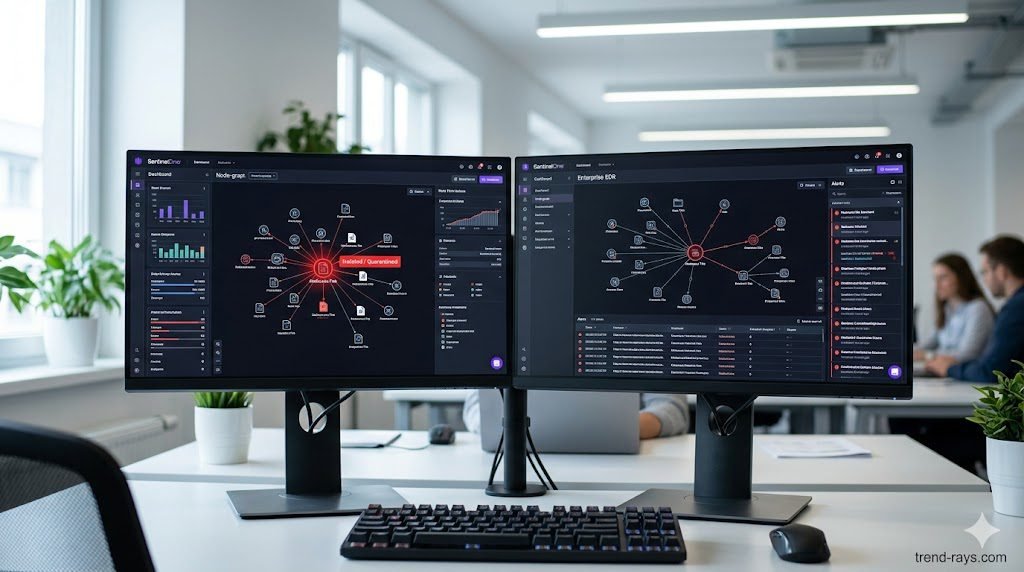
- CrowdStrike Falcon (Best for Memory Scanning): CrowdStrike’s lightweight agent is peerless at detecting fileless malware and in-memory unpacking. Its AI models instantly recognize the behavioral signatures of InfoStealers attempting to scrape credential vaults, killing the process in milliseconds before data exfiltration can occur.
- SentinelOne Singularity (Best for Automated Rollback): SentinelOne operates entirely autonomously on the endpoint, meaning it does not need a cloud connection to stop a threat. If a repackaged ransomware payload manages to execute, SentinelOne’s “Storyline” technology can track every single file the malware altered and execute a 1-click automated rollback, restoring the PC to its pre-infected state instantly.
- Microsoft Defender XDR (Best for Windows-Native Environments): For organizations heavily invested in the Microsoft 365 ecosystem, Defender XDR provides incredible native telemetry. It correlates data not just from the endpoint, but from Office 365 emails and Azure Active Directory, allowing SOC analysts to see if the repackaged malware was initially delivered via a phishing link.
The Ultimate Solution: Hardware-Enforced Micro-Virtualization
While EDR is critical for catching malicious behavior in memory, the gold standard of enterprise cybersecurity in 2026 is moving from a “detect and block” mindset to a “contain and isolate” mindset using Zero Trust Hardware Architecture.
If you cannot trust the user to identify vibe-hacked phishing emails, you must remove the user’s ability to compromise the host machine.
- How Micro-Virtualization Works: Enterprise security platforms (like HP Wolf Security or Bromium) use the CPU’s native virtualization features to create temporary, hardware-enforced micro-virtual machines (micro-VMs) every time an employee opens an email attachment, clicks a link, or runs an unverified
.exe. - The Result: If an employee executes a flat-pack malware installer, the malware unpacks and encrypts everything it sees. However, it is only seeing the inside of a disposable, isolated micro-VM. It has no access to the actual Windows OS, the corporate network, or the user’s browser cookies. The moment the employee closes the application window, the micro-VM—along with the malware—is instantly destroyed, leaving the host PC completely untouched.
The CISO Playbook: Blocking Shadow IT at the Perimeter
Detecting malware is good; preventing the execution entirely is better. Chief Information Security Officers (CISOs) must implement strict “Zero Trust” policies to prevent employees from running unverified repacks in the first place.
- Enforce Application Allowlisting: Use tools like Windows AppLocker to create a strict Allowlist. Block the execution of any
.exe,.msi, or script that does not reside in a protected directory (likeProgram Files) or isn’t signed by a trusted corporate publisher. - Revoke Local Admin Rights: 90% of repackaged malware requires administrative privileges to install its rootkits or disable security telemetry. By implementing a Privilege Access Management (PAM) solution, employees cannot install unauthorized software without an IT helpdesk ticket.
- Deploy DNS Filtering: Block access to known software piracy forums, torrent trackers, and “free software” directories at the network level using tools like Cisco Umbrella or Cloudflare Gateway.
The True Cost of a Repack Breach (ROI & Business Impact)
When an executive pushes back on the budget required for premium EDR software, it is vital to contextualize the financial devastation of a single successful flat-pack malware breach.
If an InfoStealer scrapes a session token, attackers gain immediate access to your highly sensitive cloud applications. This is why financial firms and wealth managers must ensure every tool in their stack is strictly regulated—down to utilizing SOC-2 Compliant AI Note-Takers—to prevent a localized endpoint breach from becoming a massive regulatory fine.
An employee downloading a cracked PDF editor to “save the company $15 a month” can easily result in the deployment of an InfoStealer. That malware scrapes the employee’s browser cookies, capturing their active session token for the company’s AWS environment or Salesforce CRM.
The attacker bypasses Multi-Factor Authentication (MFA) entirely using the stolen token, accesses your customer database, and deploys network-wide ransomware. The resulting downtime, ransom demands, regulatory fines (GDPR, HIPAA, or CCPA), and class-action lawsuits frequently exceed millions of dollars. Investing in an EDR platform that costs $50 per endpoint annually is the cheapest insurance policy a modern enterprise can buy.
Ransomware cartels actively look for legacy infrastructure. If your endpoint is compromised, attackers will immediately attempt to move laterally into your core accounting servers. This is why securely bridging modern cloud tools with on-premise servers is critical, as detailed in our guide on How to Integrate AI Quoting Software with Legacy QuickBooks Desktop.
Frequently Asked Questions (Endpoint Malware Defense)
What is flat-pack malware?
Flat-pack malware refers to malicious payloads that are heavily compressed, obfuscated, and bundled together with legitimate software components using off-the-shelf hacker tools. This “repackaging” technique allows attackers to rapidly generate new malware variants that bypass traditional, signature-based antivirus scanners.
Why is downloading FitGirl or Dodi repacks a corporate security risk?
While often used by gamers to pirate software, “repacks” are a massive vector for shadow IT. Because these installers are inherently modified to bypass digital rights management (DRM), employees who download them onto corporate hardware often accidentally execute hidden InfoStealers or Remote Access Trojans (RATs) embedded by third-party distributors.
What is the difference between EDR and Antivirus?
Traditional Antivirus uses static signatures to block known bad files on the hard drive. Endpoint Detection and Response (EDR) uses behavioral analysis, AI telemetry, and memory scanning to monitor what a program is actively doing. EDR can detect and kill unknown, “zero-day” malware that legacy AV cannot see.
How do InfoStealers bypass MFA?
When an InfoStealer (often hidden in repackaged software) infects an endpoint, it targets the web browser’s local storage to steal active session cookies. Attackers can import these stolen cookies into their own browsers, allowing them to log into corporate systems (like Microsoft 365 or Slack) without needing a password or triggering an MFA prompt.
Conclusion & Next Steps
The perimeter of your corporate network is no longer defined by your office firewall; it is defined by the security of your employees’ endpoints. Relying on legacy antivirus to stop modern, repackaged malware is a guaranteed path to a data breach. By deploying behavioral-based EDR solutions and strictly policing shadow IT, you can isolate threats in memory before they execute their payloads.
Securing your endpoints against rogue software is critical, but it is only half the battle. Threat actors are also using advanced AI to bypass human verification. Ensure your organization is prepared for the next wave of social engineering by reading our definitive guide on Best Enterprise AI Voice Cloning SaaS for Corporate Training to learn how to deploy deepfake guardrails and secure corporate communications.
Once your endpoints are locked down and your network is secured against shadow IT, you can safely focus on scaling your business operations. Discover how to safely deploy customer-facing automation by exploring our breakdown of the 6 Best Custom AI Chatbots for Small Businesses.