Getting a passport photo rejected is one of the most frustrating and costly travel delays you can experience. With the U.S. State Department, UK HM Passport Office, and global passport agencies implementing incredibly strict AI-driven biometric compliance checks in 2026, the old “selfie against a white wall” trick simply does not work anymore.
Historically, applicants had to drive to a local pharmacy, stand under harsh fluorescent lighting, and pay $17 or more for an unflattering photo. Today, smartphone cameras are more than capable of capturing high-resolution images—provided you have the right software to format them.
We have rigorously tested the top applications across iOS, Android, and the web to find the absolute best passport photo apps. We evaluated them on their ability to perform automatic cropping, AI background removal, app size, processing privacy, and strict adherence to ICAO 9303 standards.
Whether you need a lightweight free passport photo app for your iPhone, a biometric compliance check for an international visa, or a highly technical Android cropping tool, here is our definitive, deep-dive list.
1. PhotoAiD: Best Overall for Guaranteed Acceptance
Developer: PhotoAiD S.A. | Compatibility: iOS 15.5+, iPadOS, Mac M1+, Android, Web | App Size: ~93.2 MB
PhotoAiD is currently the gold standard in the travel document industry. What sets it apart from a sea of generic photo editors is its strict dual-verification system. It doesn’t rely solely on an AI background remover; every photo is also reviewed by a human biometric expert before the user is allowed to download it. This eliminates the risk of algorithm hallucinations where AI might accidentally clip the edge of an ear or fail to recognize a shadow.
The app supports over 40 languages and covers documentation rules for dozens of countries. The standout feature is the 200% money-back guarantee; if a passport agency rejects a photo formatted by PhotoAiD, the developer will refund you double the purchase price.
Best Use Case: Travelers who cannot afford any application delays, parents struggling to capture compliant baby passport photos (where keeping the subject still is difficult), and users who want a ship-to-home physical print option.
Step-by-Step Guide:
- Open the app and select your specific document type (e.g., U.S. Passport, Schengen Visa, DV Lottery).
- Upload an existing photo or capture a new one using the built-in augmented reality (AR) camera guide, which outlines exactly where to place your head and chin.
- The AI instantly processes the image, stripping the background and scaling the dimensions to precisely 2×2 inches (or the required local equivalent).
- Wait approximately 3 minutes for a human expert to verify lighting, shadow placement, and facial positioning.
- Pay to download the verified digital file or order physical prints.
The Pricing Reality: Freemium model. The app is entirely free to download and test the AR camera, but downloading the official, verified, un-watermarked digital file costs between $6 and $9.
[Image Placeholder: A visual walkthrough of the PhotoAiD app interface showing the AI background removal process. The trend-rays.com watermark is displayed in the bottom right corner.]
2. Passport Photo Online
Developer: Azuby Labs / Thanh Hai Le | Compatibility: iOS 15.6+, iPadOS, Mac M1+, Android | App Size: ~61 MB
Passport Photo Online is a specialized powerhouse designed specifically for handling international documentation. Rather than just focusing on standard U.S. passports, this app features an updated, built-in database of biometric requirements for over 150 different countries. It utilizes proprietary features like “AutoCrop AI” for facial alignment and “CleanCut Background” for instant studio-style finishes.
The technical architecture of the app is highly responsive. It acts as a “smart camera”—if you are standing too close to the lens, or if the ambient room lighting is too dark, the app’s sensors will warn you before you snap the picture, saving you from taking endless unusable photos.
Best Use Case: Expats, international students, or travelers applying for foreign visas (like a European ID or a Chinese business visa) that require wildly different millimeter dimensions and background color requirements than the standard U.S. 2×2 inch format.
Step-by-Step Guide:
- Select the specific country and document from the app’s global list.
- Follow the real-time camera warnings regarding lighting and distance.
- Capture the photo. The “CleanCut” algorithm removes the background, and the “SizeFit Generator” applies the correct pixel density.
- Review the AI-generated compliance score before finalizing the purchase.
The Pricing Reality: Paid. Expect to pay around $7 for the verified digital download. While the app is free to install, the final export is locked behind a paywall.
3. PhotoGov: Best Truly Free App
Developer: PhotoGov Portal | Compatibility: Web-Based (Mobile & Desktop browsers) | App Size: N/A (Zero download required)
If you search the iOS App Store or Google Play for a “free passport photo app,” you will inevitably download dozens of applications that let you edit your photo perfectly, only to slap a massive, unremovable watermark over your face right before you hit the export button. PhotoGov is the refreshing, vital exception to this predatory industry trend.
Operating entirely within your browser, PhotoGov is built for users who want a fast, automated, and 100% free digital download. Because it is web-based, it consumes zero storage space on your device. The servers utilize pure AI to auto-crop the face, center the eyes according to government mathematical grids, and apply a compliant white background.
Best Use Case: Budget-conscious users who have a solid understanding of how to take a well-lit base photo and simply need the software to do the mathematical cropping and background replacement without any hidden fees.
Step-by-Step Guide:
- Access the PhotoGov website via Safari, Chrome, or any modern browser.
- Upload your high-resolution raw photo.
- The AI immediately processes the image server-side, executing the crop and background replacement in seconds.
- Click download to receive your high-resolution JPEG immediately, ready for printing.
The Pricing Reality: 100% Free. There are absolutely no watermarks, no forced premium subscriptions, and no hidden paywalls.
[Image Placeholder: A side-by-side comparison chart of PhotoAiD, Passport Photo Online, and PhotoGov features. The trend-rays.com watermark is clearly applied.]
4. U.S. State Department Web Tool
Developer: Bureau of Consular Affairs (U.S. Govt) | Compatibility: Web-Based | App Size: N/A
Highly recommended by users on Reddit and private travel forums, the U.S. government actually provides its own official photo cropper (travel.state.gov/photo). Because it is buried deep within the State Department’s website infrastructure, many travelers do not know it exists.
This tool is entirely utilitarian. It does not possess AI background removal, it does not fix your lighting, and it will not color-correct your image. However, it provides the exact, undisputed mathematical sizing guides that the government uses to process your physical application. If your head fits perfectly within the tool’s green overlay circles, you can be absolutely certain the sizing will not trigger an automated rejection.
Best Use Case: DIY photographers who already have a photo taken with perfect, even lighting against a plain white wall, and purely need a secure, official cropping mechanism.
Step-by-Step Guide:
- Navigate to the State Department’s official photo page on a desktop or mobile browser.
- Upload your raw image.
- Use your mouse or touchscreen to zoom and pan the image so the crown of your head and the bottom of your chin rest directly within the green alignment circles.
- Click crop and download the precisely formatted 2×2 inch square.
The Pricing Reality: 100% Free, funded by taxpayers.
5. iVisa Passport Photo
Developer: iVisa | Compatibility: iOS, Android | App Size: ~45 MB
iVisa is a massive corporate player in the travel industry, primarily known for expediting travel declarations, e-Visas, and digital nomad paperwork. Their standalone passport photo app is heavily integrated into this broader travel ecosystem, making it a highly unique utility.
Instead of just outputting a generic photo, the iVisa app connects directly to their legal compliance databases. When you take a photo through their app, it isn’t just checked against general guidelines; it is checked against the exact requirements of the specific consulate you are applying to on that specific day.
Best Use Case: Frequent flyers, business travelers, and digital nomads who are actively using the iVisa platform to process their actual visa paperwork and want to handle their photos in the exact same portal.
Step-by-Step Guide:
- Download the app and select your destination country.
- The app prompts you to capture a photo tailored to that specific country’s current diplomatic rules.
- An iVisa internal expert reviews the photo.
- The photo is automatically attached to your pending visa application within the iVisa digital system, bypassing the need to download and re-upload the file elsewhere.
The Pricing Reality: Paid. Pricing varies depending on the specific document and whether you are bundling the photo with their broader visa expediting services.
6. Passport Size Photo Maker
Developer: Appable Yazilim Hizmetleri | Compatibility: iOS 15.0+, iPadOS | App Size: ~62.6 MB
Consistently ranking high in the App Store, this application functions as a comprehensive digital photo booth and printing studio. It supports highly specific, niche formats like the U.S. Green Card Diversity Visa (DV) Lottery (600×600 px) and the Singapore IC Identity Card.
What makes this app shine is its final export functionality. Rather than just giving you a single 2×2 square, the app features an advanced ID picture template generator. It allows users to format multiple copies of their passport photo onto standard consumer printing paper sizes (A4, 4×6, 5×7).
Best Use Case: Users who want to completely bypass premium pharmacy printing fees and intend to print their own physical sheets at home or via a cheap local kiosk (like Walmart or CVS).
Step-by-Step Guide:
- Upload your image and select the required country size template.
- Wait for the built-in background remover to clear the messy background and replace it with stark white.
- Enter the “Print Studio” mode to arrange 2, 4, or 6 copies of the photo onto a standard 4×6 photo layout.
- Export the final collage to your camera roll.
The Pricing Reality: Freemium. Core formatting features are free with ads, while high-resolution exports and advanced AI removals require a premium subscription.
[Image Placeholder: A collage showing the user interfaces of 4 different apps side-by-side to compare user experience. The trend-rays.com watermark is visible across the graphic.]
7. Passport Photo – ID Photo App
Developer: Yarsa Labs | Compatibility: iOS 15.6+, iPadOS, Mac M1+, Android | App Size: ~144.3 MB
Developed by Yarsa Labs, this application is beloved by technical users because it explicitly measures facial proportions against ICAO 9303 standards—the international biometric treaty standard. At 144.3 MB, it is a heavyweight application that houses massive amounts of local data to process your image without heavily relying on cloud servers.
The app features an excellent manual interface, allowing the user to precisely tweak the exact boundaries of the face, neck, and shoulders. Furthermore, it recently added document scanning features, allowing you to scan the front and back of your current ID into a PDF format alongside your new photo.
Best Use Case: Highly technical users, Android enthusiasts, and individuals who need to scan supplemental documents (like a driver’s license) along with generating their new passport photo.
Step-by-Step Guide:
- Open the app and bypass the initial premium upgrade screen to access the free core features.
- A highly detailed, technical grid overlays your camera screen.
- Align your eyes, chin, and top of the head precisely with the grid lines.
- Use the manual settings to tweak exposure if the lighting is slightly dark.
- Export the photo to a 3×4 or 4×6 print sheet.
The Pricing Reality: Free core features (ad-supported), with a premium upgrade required for advanced background removal and removal of ads.
8. Passport Booth
Developer: TAPUNIVERSE LLC | Compatibility: iOS 15.0+, iPadOS | App Size: ~11.7 MB
In an era where massive tech companies harvest user data, Passport Booth by TAPUNIVERSE LLC is a breath of fresh air. Coming in at a remarkably tiny 11.7 MB, this incredibly lightweight app boasts a crucial privacy feature listed right on its App Store page: Data Not Collected. The developer explicitly states they do not collect any user data, usage analytics, or device identifiers.
Despite its small size, it supports requirements for over 150 countries. It does not rely on heavy cloud-based AI; instead, it provides clean visual guides and allows you to manually adjust background colors, brightness, and opacity locally on your device.
Best Use Case: Highly privacy-conscious users who absolutely refuse to have their biometric facial data uploaded to a third-party cloud server for processing.
Step-by-Step Guide:
- Open the app completely offline if desired.
- Import a photo from your Files app.
- Select your country and document type.
- Use the visual requirement guides to manually crop, rotate, and align the photo.
- Use the built-in sliders to manually adjust the subject’s brightness separate from the background.
- Save locally to your device in JPEG, PNG, or HEIF format.
The Pricing Reality: Freemium. The core local editing tools are free to use.
9. PersoFoto
Developer: PersoFoto Web Services | Compatibility: Web-Based | App Size: N/A
If your phone storage is completely full and you cannot download even an 11 MB app, PersoFoto is an exceptional browser-based alternative. Operating out of Europe, this tool is highly compliant with strict GDPR privacy laws, ensuring your uploaded photo is not retained or sold to third parties.
The interface is incredibly straightforward. It does not attempt to “guess” where your face is using AI. Instead, it places a transparent mask on your screen that you drag and scale over your uploaded image.
Best Use Case: Desktop users, users with full phone storage, or individuals prioritizing European privacy standards.
Step-by-Step Guide:
- Go to PersoFoto on any desktop or mobile browser.
- Upload your image.
- Drag the alignment mask over the photo until your eyes and chin match the outlined guides.
- Click “Next” to generate the final crop.
- Download the digital file instantly.
The Pricing Reality: 100% Free for the digital crop. They only charge a fee if you explicitly request them to print and ship physical copies to your home address.
10. IDPhoto4You
Developer: Independent Web Developer | Compatibility: Web-Based | App Size: N/A
IDPhoto4You is an older web-based tool, and while its interface looks like it belongs in 2012, the mechanics under the hood are flawless.
The U.S. State Department requires that your head measures exactly between 1 inch and 1 3/8 inches from the bottom of the chin to the top of the head within the 2×2 frame. Many modern AI apps aggressively crop photos, pushing the head size to the absolute maximum limit, which can trigger rejections. IDPhoto4You features an exact, on-screen ruler that allows you to verify the millimeter scale of your head before printing.
Best Use Case: Detail-oriented users who want absolute manual control over the exact scaling of their face to ensure it falls within the 1 to 1 3/8 inch requirement.
Step-by-Step Guide:
- Upload your photo to the bare-bones website.
- Input your required print size (e.g., 4×6).
- Use their manual drag-and-drop tool to scale the size of your head within the 2×2 frame until it perfectly matches the measurement rulers provided on the X and Y axes.
- Export the print sheet.
The Pricing Reality: 100% Free (Supported by website banner ads).
11. Passport Photo Editor Online (6Hive)
Developer: 6Hive OU | Compatibility: iOS Web App / Desktop | App Size: N/A
Designed specifically for the strict tolerances of U.S. passports, 6Hive’s web application acts as a virtual photo booth. It strips away all international visa options and focuses purely on ensuring the American standard is met.
It features a unique step-by-step wizard that forces the user to confirm they are not wearing glasses, that their lighting is even, and that their expression is neutral before it even allows the upload button to activate.
Best Use Case: First-time passport applicants who need their hand held through the strict U.S. government rules before editing.
Step-by-Step Guide:
- Complete the pre-upload checklist wizard on the site.
- Upload a high-resolution selfie.
- Let the web script auto-crop the image to 600×600 pixels (the exact digital requirement for U.S. online applications).
- Download the digital asset.
The Pricing Reality: Free to use.
12. Passport & ID Photo Maker (Digital Suit App)
Developer: App Nursery Pty Ltd | Compatibility: iOS | App Size: ~85 MB
This application recently received a massive interface overhaul featuring Apple’s Liquid Glass design language. It is easily the most beautiful and fluid app on this list.
However, its standout feature is a controversial one: the “Suit Overlay.” The app allows you to upload a casual photo in a t-shirt, and its AI will digitally map a formal suit jacket, dress shirt, and tie perfectly over your shoulders.
Best Use Case: Creating highly professional company ID cards, student university IDs, LinkedIn profiles, or gym passes where a formal appearance is desired but an actual suit is unavailable.
Step-by-Step Guide:
- Upload a casual, forward-facing photo.
- Use the automatic background replacement to change the backdrop to office grey or stark white.
- Select the “Wardrobe” tool and choose a digital suit that matches your body frame.
- Scale the suit to seamlessly blend with your neck line.
- Export the professional headshot.
The Pricing Reality: Free to use, with premium exports for high-resolution AI renders.
WARNING: You cannot use the digital suit overlay feature for an official U.S. Passport or Visa. The State Department strictly forbids artificial uniform overlays or digital clothing alterations. Only use this app for its standard cropping tools if applying for official government travel documents.
2026 U.S. Passport Photo Guidelines: How to Take the Perfect Shot
Even the absolute best passport photo editor app cannot fix a terrible base picture. The AI facial recognition software used by the State Department will flag images that are heavily filtered or distorted. Follow these critical steps before opening your app:
- Use the Rear Camera, Not the Selfie Camera: Never use the front-facing selfie lens. Selfie cameras use wide-angle lenses that distort your facial proportions (making your nose look larger and your ears smaller). This lens distortion alters your biometric faceprint, leading to instant rejection. Have a friend take the photo or use a tripod.
- Find Uniform, Natural Lighting: Stand about two feet away from a plain wall, facing a large window during the day. Avoid overhead lighting at all costs, as it casts deep shadows under your eyes and nose—a primary cause for government AI rejection.
- Wardrobe and Accessories: You cannot wear uniforms or camouflage. Eyeglasses are strictly forbidden in U.S. passport photos unless you have a signed doctor’s note for a rare medical circumstance. Remove all hats, headphones, and large hair accessories.
- Neutral Expression: Keep both eyes open and your mouth completely closed. A natural, unexaggerated smile is technically allowed by the U.S., but a strict neutral expression is highly recommended to avoid any automated rejections.
The True Cost Comparison: Apps vs. Pharmacy Kiosks
If you are wondering whether to download an app or just drive to the store, here is the stark cost breakdown for 2026:
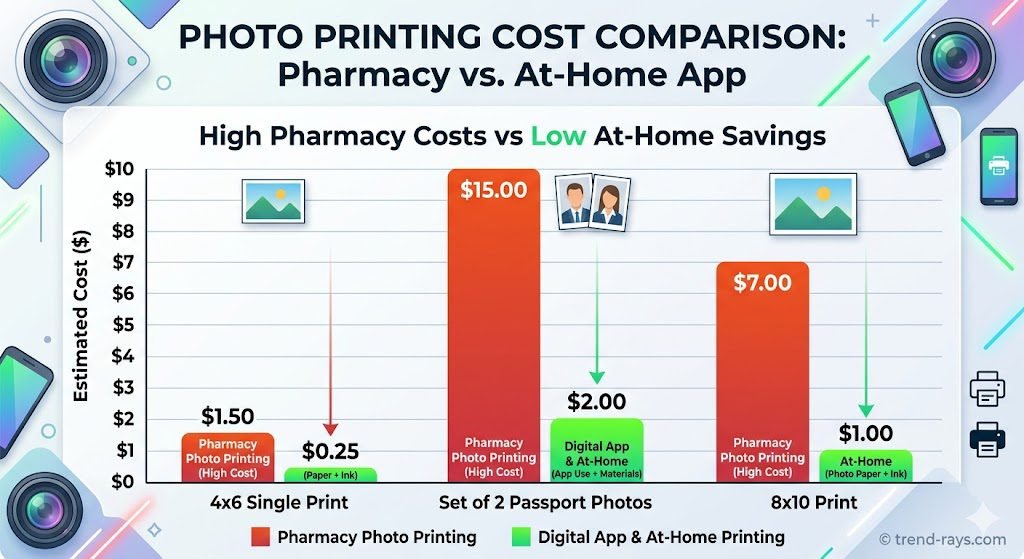
- CVS / Walgreens / Rite Aid Pharmacy: Averaging $16.99 to $18.99 for two printed photos. You get zero digital copies, and you are entirely reliant on the store clerk’s photography skills under harsh ceiling lights.
- USPS / Post Office: $15.00 at the time of your appointment.
- Premium Apps (PhotoAiD, Passport Photo Online): Averaging $6.00 to $9.00 for a digitally verified file. If you combine this with the [best budget tech hacks -> Link to a money-saving tech/apps article on trend-rays.com], you can print it yourself for just $0.35, bringing your total cost under $10 while guaranteeing acceptance.
- Free Apps (PhotoGov) + DIY Printing: $0.35 total. If you are willing to handle the cropping and uploading yourself, this is the ultimate budget hack.
The $0.35 Print Hack: How to Print Your Digital Photo
If you use an app to generate a compliant digital file, you do not need to pay $10+ for premium shipping to get physical copies.
- Use your app (like Passport Size Photo Maker) to generate a 4×6 inch photo template. This template will automatically place two identical 2×2 inch passport photos onto a standard 4×6 photo layout.
- Send this 4×6 digital file to a local Walgreens, CVS, or Walmart via their respective consumer apps.
- Print it as a standard 4×6 glossy or matte photograph. This typically costs around 35 cents.
- Pick up the 4×6 photo and simply cut out the 2×2 squares along the provided guidelines. You now have official physical photos for pennies!
How to Take a Baby Passport Photo at Home
Capturing an infant passport photo is notoriously difficult because babies cannot follow instructions or sit still at a pharmacy kiosk. This is where smartphone apps truly shine, turning your phone into an essential [travel planning gadget -> Link to travel apps/gadgets article on trend-rays.com].
While the U.S. government has slightly relaxed rules for newborns (e.g., their eyes do not have to be perfectly open), the background and lighting rules remain strict.
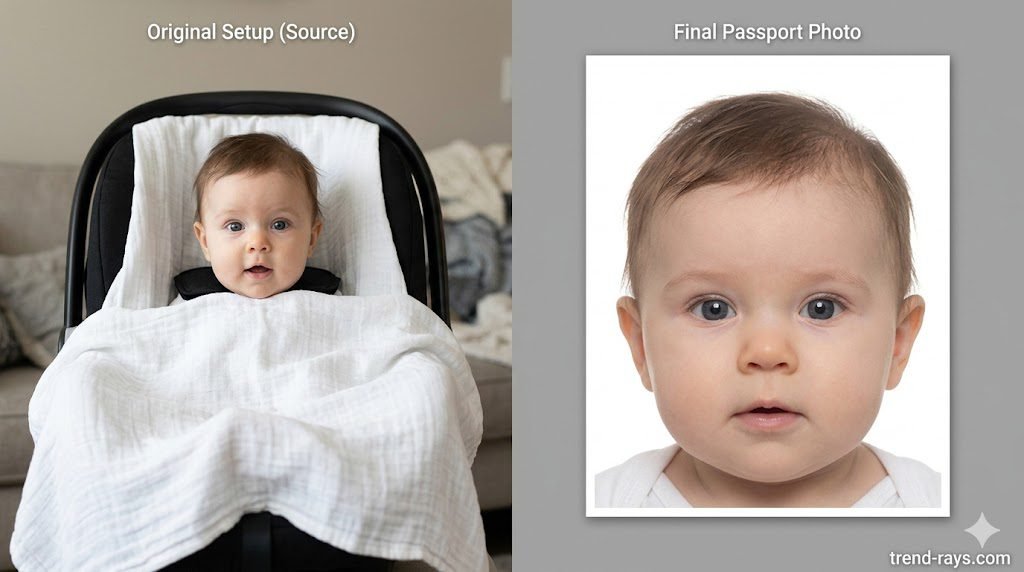
The Car Seat Trick:
- Drape a plain, bright white sheet over your baby’s car seat.
- Place the baby in the seat. This provides neck support and keeps them relatively still while ensuring the required plain white background.
- Stand directly above the baby to take the photo, ensuring your body does not cast a shadow over their face.
- Use an app with AI background removal to cleanly erase any wrinkles in the white sheet.
Digital vs. Printed Passport Photos: Which Do You Need?
With the U.S. State Department rolling out its Online Passport Renewal (OPR) system, many travelers are confused about whether they need a physical print or a digital JPEG. The app you choose depends on how you are applying:
- For Online Renewals: If you meet the criteria to renew your passport online, you strictly need a digital passport photo. You must upload an original, uncompressed JPEG file. Using an app on a high-end device—like the cameras found on the [latest flagship Android phones -> Link to a smartphone review/tech specs page on trend-rays.com]—is perfect for this, as you can directly upload the 600×600 pixel file to the government portal.
- For First-Time Applicants & Minors: If you are applying for the first time, applying for a child, or replacing a lost passport, you must apply in person at an acceptance facility (like a post office). For this, you need a physical printed photo. You must bring a 2×2 inch print on glossy or matte photo paper.
Frequently Asked Questions (People Also Ask)
What is the best free app for passport photos?
Currently, PhotoGov is the best truly free app with AI background removal, while the U.S. State Department’s online photo tool is the best official free cropper.
Does the iPhone have a built-in passport photo maker?
No, iOS does not have a native, built-in passport photo maker. While the iPhone’s Photos app has a fantastic background removal tool (lifting a subject from the background), it does not automatically format the image to the strict 2×2 inch dimensions, nor does it perform biometric compliance checks. You will still need a third-party app.
Can I take my own passport photo on my phone?
Yes. The U.S. State Department fully accepts photos taken on smartphones as long as they meet all biometric guidelines: exactly 2×2 inches (51 x 51 mm), high resolution, no digital filters, plain white or off-white background, and printed on standard glossy or matte photo paper.
Do passport photo apps guarantee acceptance?
Premium apps like PhotoAiD and Passport Photo Online offer acceptance guarantees because they utilize human experts to double-check the AI’s formatting. If your photo is rejected by the passport agency, they offer a refund. Completely free apps generally rely purely on automation and do not offer financial guarantees.