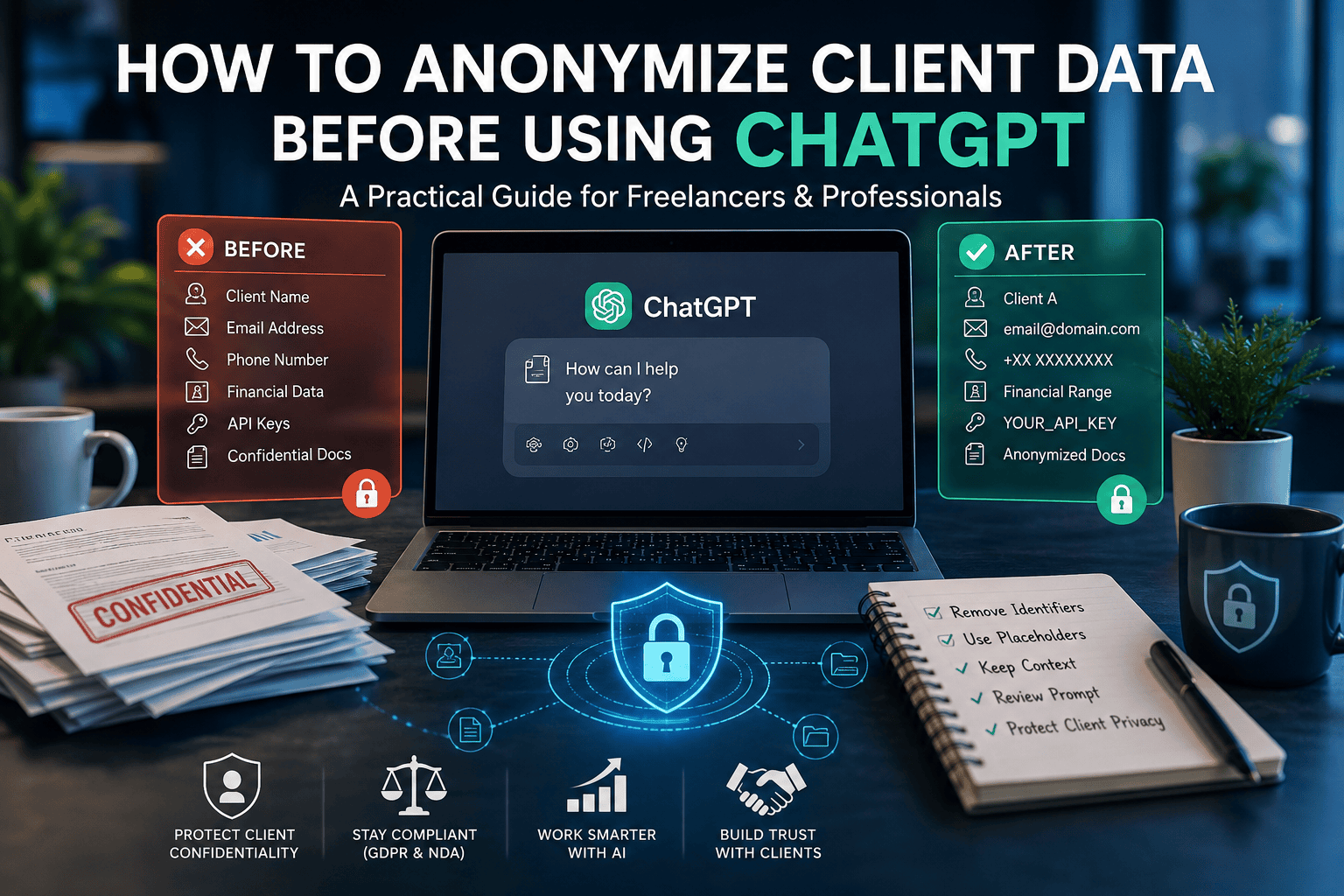
Introduction
Artificial intelligence has become part of the modern freelance workflow.
Whether you’re a writer refining an article, a developer debugging code, an SEO consultant optimizing content, or a virtual assistant drafting emails, tools like ChatGPT can dramatically improve productivity. Tasks that once took hours can often be completed in minutes with the right prompt.
But alongside these benefits comes an increasingly important question:
How do you use AI without exposing confidential client information?
This isn’t just a technical concern—it’s a professional one.
Every day, freelancers and agencies work with sensitive materials such as contracts, customer emails, financial reports, source code, marketing strategies, legal documents, and personal information. Uploading these files directly into an AI assistant without careful review can create unnecessary privacy, security, or contractual risks.
The good news is that you usually don’t need to choose between protecting client confidentiality and benefiting from AI.
The answer is client data anonymization.
Instead of sharing documents exactly as you receive them, anonymization allows you to remove or replace identifying details while preserving the information that ChatGPT actually needs to help you. In many situations, this simple step provides the same quality of AI assistance while significantly reducing unnecessary disclosure.
For example, rather than asking:
“Rewrite Acme Corporation’s confidential proposal for a €2.4 million warehouse automation project launching in Berlin next month.”
You could ask:
“Rewrite this proposal for a large warehouse automation project. Improve clarity, executive readability, and persuasive language.”
The writing challenge remains the same.
The confidential details do not.
That small change illustrates one of the most valuable habits any AI user can develop: share the task, not the identity.
This guide is designed to help you build that habit.
Rather than offering generic advice like “remove sensitive information,” we’ll show you exactly how to prepare documents before using AI through practical examples, workflows, checklists, and profession-specific scenarios.
By the end of this guide, you’ll know how to:
- Understand what client data should be anonymized before using AI.
- Distinguish between anonymization, pseudonymization, and redaction.
- Identify personal, confidential, and commercially sensitive information.
- Prepare emails, contracts, spreadsheets, PDFs, and source code for AI assistance.
- Apply anonymization techniques across different freelance professions.
- Avoid common mistakes that can accidentally expose client information.
- Build a repeatable workflow that balances productivity with confidentiality.
Whether you’re an independent freelancer, a consultant, part of an agency, or a small business owner integrating AI into your daily work, these practices can help you use AI more responsibly while maintaining the trust your clients place in you.
Executive Summary
If you’re short on time, here’s the most important takeaway:
Before using ChatGPT or any AI assistant, remove or replace information that could identify your client unless it’s genuinely necessary for the task.
A good anonymization workflow typically follows these principles:
- Identify the information you’re planning to share.
- Remove names, email addresses, account numbers, passwords, and other identifiers where possible.
- Generalize unnecessary business details such as exact revenue figures or internal project names.
- Share only the minimum amount of information needed for the AI to complete the task.
- Review the AI’s output before delivering work to your client.
This approach helps reduce privacy risks without sacrificing the productivity benefits that AI can provide.
Throughout this guide, we’ll move from simple concepts to practical implementation, showing real-world examples that you can immediately apply to your own freelance workflow.
Why This Guide Is Different
Most articles about AI privacy stop after telling you to “be careful.”
This guide goes much further.
You’ll find:
- Step-by-step anonymization workflows.
- Before-and-after examples for real client documents.
- Industry-specific guidance for writers, developers, marketers, consultants, and agencies.
- Printable checklists and templates.
- Practical prompt examples you can adapt immediately.
- Clear explanations written in plain English rather than legal jargon.
Our goal isn’t simply to explain anonymization.
Our goal is to help you use AI confidently, responsibly, and professionally—without compromising the trust that forms the foundation of every successful client relationship.
What Is Client Data Anonymization? (Explained in Plain English)
Imagine you’re asking ChatGPT to improve a proposal for one of your clients.
The proposal contains:
- Your client’s name
- Contact details
- Revenue figures
- Internal project names
- Product roadmap
- Customer information
Does ChatGPT need all of that information to improve the writing?
Usually, the answer is no.
It only needs the content, not the identity.
That’s the idea behind client data anonymization.
Simple Definition
Client data anonymization is the process of removing, replacing, or generalizing information that could identify a person, company, or project before sharing the remaining content with an AI tool.
The goal is simple:
Give the AI enough context to complete the task—without exposing unnecessary confidential information.
Think of it like covering the names on an exam paper before asking someone to proofread it.
They can still evaluate the writing.
They just don’t know who wrote it.
Why Anonymization Matters
Many freelancers assume AI needs to see the original document exactly as it exists.
In reality, that’s rarely true.
Let’s look at a simple example.
Original Prompt
Rewrite Acme Financial's proposal for a €2.8 million banking software migration project launching in Amsterdam next quarter.Anonymized Prompt
Rewrite this proposal for a large enterprise software migration project. Improve clarity, structure, and executive readability.The second prompt removes:
- Company name
- Industry-specific identity
- Exact budget
- Location
- Timeline
Yet ChatGPT can still perform the task effectively.
This illustrates an important principle you’ll see throughout this guide:
The AI usually needs your objective—not your client’s identity.
What Counts as Client Data?
Many people think client data only means personal information like names or email addresses.
In practice, it includes much more.
Client data can include:
Personal Information
- Full names
- Email addresses
- Phone numbers
- Postal addresses
- Passport numbers
- National identification numbers
- Employee IDs
Business Information
- Company names
- Internal project names
- Product codenames
- Marketing strategies
- Sales reports
- Financial forecasts
- Investor presentations
Technical Information
- Source code
- API documentation
- Internal URLs
- Database schemas
- Authentication systems
- Cloud architecture
Operational Information
- Meeting notes
- Customer support tickets
- CRM exports
- Vendor contracts
- HR documents
- Internal policies
Even if this information doesn’t identify an individual, it may still identify a business or reveal commercially sensitive information.
The Three Goals of Anonymization
Effective anonymization isn’t about hiding everything.
It’s about finding the right balance.
A good anonymization process should achieve three objectives.
1. Protect Identity
Remove information that identifies:
- Individuals
- Companies
- Clients
- Employees
- Suppliers
- Projects
2. Preserve Context
The AI still needs enough information to understand the task.
For example:
Instead of removing everything:
Rewrite this.
Provide meaningful context:
Rewrite this executive proposal for a software implementation project.
Context improves AI responses.
Identity often doesn’t.
3. Minimize Risk
The less unnecessary information you share, the lower the likelihood of accidental exposure.
This principle aligns with the broader privacy concept of data minimization, which encourages sharing only the information necessary for a specific purpose.
Real-World Example
Imagine you’re an SEO consultant.
Your client sends this instruction:
“Please rewrite the landing page for Acme Robotics. Our new warehouse automation platform increased productivity by 42% and generated €6.3 million in new contracts last year.”
What information does ChatGPT actually need?
Probably only this:
Rewrite this landing page for a warehouse automation software company. Improve clarity, readability, and persuasive language.
The AI doesn’t need:
- Company name
- Revenue
- Exact performance figures
- Internal business success metrics
The result is often just as good.
The risk is significantly lower.
Common Misconception: “Anonymization Means Deleting Everything”
This is one of the biggest myths surrounding AI privacy.
Good anonymization doesn’t make a document useless.
It removes or generalizes only the details that aren’t necessary for the task.
Think of it like preparing a case study.
You might replace:
- “Acme Corporation”
with
- “A manufacturing company”
You still preserve:
- The business challenge
- The writing style
- The structure
- The objective
The AI has enough context to help.
Anonymization Is a Spectrum
Not every task requires the same level of anonymization.
For example:
Low Risk
Proofreading a public blog post that’s already published.
Minimal anonymization may be needed.
Medium Risk
Improving an unpublished marketing article.
Generalize company names and internal references.
Higher Risk
Working with:
- Medical records
- Legal documents
- Payroll information
- Customer databases
- Financial reports
These situations require much greater care and may not be appropriate for general-purpose AI tools without approved workflows.
Understanding this spectrum helps you make better decisions rather than applying the same approach to every document.
A Helpful Analogy
Imagine you’re asking a professional editor to improve your writing.
Would they need to know:
- Your client’s bank account number?
- Employee payroll?
- Customer email list?
- Internal passwords?
Of course not.
The same logic applies to AI.
The information should always be proportional to the task you’re asking it to perform.
Quick Reference Table
| Goal | What It Means | Example |
|---|---|---|
| Protect Identity | Remove identifying details | Replace “Acme Ltd” with “Company A” |
| Preserve Context | Keep information needed for the task | Describe the project type without naming the client |
| Minimize Risk | Share only what is necessary | Remove revenue figures if they don’t affect the writing task |
Key Takeaways
Client data anonymization isn’t about making your documents unreadable.
It’s about removing unnecessary identifying information while preserving the context that allows AI to provide useful assistance.
By focusing on the task rather than the identity of the client, freelancers can often achieve the same quality of AI output with significantly less privacy and confidentiality risk.
In short:
Protect identities. Preserve context. Share only what’s necessary.
That single principle will guide every practical example throughout the rest of this article.
Anonymization vs. Pseudonymization vs. Redaction vs. Data Masking
If you’ve researched AI privacy before, you’ve probably encountered terms like:
- Anonymization
- Pseudonymization
- Redaction
- Data Masking
- Tokenization
At first glance, they sound interchangeable.
They’re not.
Each technique serves a different purpose, and understanding the differences helps you choose the right approach before sharing information with AI.
The simplest way to think about them is this:
All of these techniques protect information—but they protect it in different ways.
Let’s break them down one by one.
1. What Is Anonymization?
Anonymization is the process of removing or transforming information so that a person or organization can no longer reasonably be identified from the remaining data.
The goal isn’t simply to hide names.
The goal is to remove enough identifying details that the information cannot realistically be traced back to the original subject.
Example
Original
Acme Robotics hired Sarah Johnson to lead its €3.2 million warehouse automation project in Hamburg.Anonymized
A manufacturing company hired a project manager to lead a large warehouse automation project.Notice what changed:
| Removed | Reason |
|---|---|
| Company name | Identifies the client |
| Person’s name | Identifies an individual |
| Exact budget | May reveal confidential business information |
| Specific city | May narrow identification |
The AI still understands:
- Industry
- Project type
- Writing context
That’s enough.
When to Use Anonymization
Anonymization is often appropriate when you’re asking AI to help with:
- Writing
- Editing
- Summarizing
- Brainstorming
- Translation
- Grammar improvements
- General business advice
Because these tasks usually don’t require knowing exactly who the client is.
2. What Is Pseudonymization?
Pseudonymization is different.
Instead of removing identifiers completely, you replace them with substitutes.
For example:
Original
Sarah Johnson approved the proposal.↓
Employee 14 approved the proposal.Or
Customer A
Company B
Project X
The important difference is this:
Someone with access to additional information could still reconnect those placeholders to the real identities.
That’s why pseudonymized data may still be considered personal data in many privacy contexts.
When Is Pseudonymization Useful?
It’s particularly useful when you need to:
- Keep track of multiple people in the same document.
- Preserve relationships between individuals.
- Maintain consistency across a long conversation.
For example:
Instead of writing:
Customer
Customer
Customer
You might write:
Customer A
Customer B
Customer C
The AI can still follow the discussion without knowing who those customers are.
3. What Is Redaction?
Redaction means permanently removing or obscuring specific pieces of information.
You’ve probably seen this in legal documents where sections appear like this:
██████████
or
[REDACTED]
Unlike anonymization, redaction doesn’t replace information.
It simply removes it.
Example
Original
Account Number:
123456789
↓
Account Number:
[REDACTED]
When Should You Use Redaction?
Redaction works well for:
- Passwords
- API keys
- Banking information
- Authentication tokens
- Personal identification numbers
- Medical record numbers
These values are usually irrelevant to the AI task and should simply be removed.
4. What Is Data Masking?
Data masking replaces sensitive values with realistic—but fictional—alternatives.
Unlike redaction, the information still looks authentic.
Example
Original
john.smith@example.com↓
user@example.comOriginal
Visa ending 8241↓
Visa ending 0000Original
+44 7712 345678↓
+44 7000 000000The format remains useful for testing or demonstrating workflows without exposing real information.
When Is Data Masking Useful?
Data masking is common in:
- Software testing.
- Product demonstrations.
- Training materials.
- Example datasets.
- Technical documentation.
It allows realistic examples without using genuine customer information.
5. What Is Tokenization?
Tokenization replaces sensitive information with unique reference values (tokens).
Example:
Original
Customer ID:
458392
↓
Token:
A91X-204
The real value is stored separately.
The token itself has no meaningful value without access to the secure mapping system.
Tokenization is widely used in payment systems and enterprise security, but it’s generally more relevant to software architecture than everyday freelance AI workflows.
Quick Comparison Table
| Technique | Reversible? | Best For | Example |
|---|---|---|---|
| Anonymization | Generally not intended to be reversible | Removing identities while preserving context | “Acme Ltd.” → “Manufacturing company” |
| Pseudonymization | Potentially, with additional information | Long documents and ongoing references | “Sarah Johnson” → “Employee A” |
| Redaction | No | Removing unnecessary sensitive information | API key → [REDACTED] |
| Data Masking | Usually no in practical examples | Demonstrations, testing, training | Real email → user@example.com |
| Tokenization | Yes, through a secure mapping system | Enterprise systems and payment processing | Customer ID → Token A91X-204 |
Which Method Should Freelancers Use?
Most freelancers don’t need enterprise-level security techniques.
For everyday AI workflows, a practical combination usually works best:
Step 1
Anonymize client names.
↓
Step 2
Pseudonymize repeated references if needed.
↓
Step 3
Redact passwords and credentials.
↓
Step 4
Mask sample data where realistic examples help.
This layered approach keeps prompts useful while reducing unnecessary exposure.
Real Prompt Transformation
Before
Rewrite Acme Financial's proposal for John Smith regarding Project Falcon. Budget is €1.8 million. Contact john.smith@acmefinancial.com.After
Rewrite this proposal for a financial services company regarding a large enterprise software project. Improve clarity, structure, and persuasive language.

Client names, contact information, and internal project identifiers have been removed.
The second prompt provides the AI with everything it needs to improve the writing—without exposing identifying details that aren’t necessary for the task.
Decision Guide: Which Technique Should You Choose?
| Your Situation | Recommended Technique |
|---|---|
| Editing a client proposal | Anonymization |
| Referring to multiple people consistently | Pseudonymization |
| Removing passwords or API keys | Redaction |
| Creating examples for documentation | Data masking |
| Building secure enterprise applications | Tokenization |
Common Mistakes
Mistake 1
Removing names but leaving unique project titles.
A project codename can sometimes identify a client just as easily as a company name.
Mistake 2
Redacting everything.
If you remove too much information, the AI loses the context needed to help effectively.
Mistake 3
Assuming pseudonymization is the same as anonymization.
Replacing “John Smith” with “Employee A” may still allow someone with additional information to identify the individual.
Mistake 4
Leaving metadata untouched.
Remember that attached documents can contain filenames, comments, revision histories, or hidden properties that reveal more than the visible text.
Practical Rule of Thumb
When preparing information for AI, ask yourself:
Does the AI need to know this specific detail to complete the task?
If the answer is no, consider:
- Generalizing it.
- Replacing it with a placeholder.
- Removing it entirely.
Simple questions like this often prevent unnecessary disclosure.
Key Takeaways
Although these terms are related, they solve different problems:
- Anonymization removes identities while preserving context.
- Pseudonymization replaces identities with placeholders to maintain consistency.
- Redaction permanently removes sensitive information that isn’t needed.
- Data masking creates realistic but fictional examples.
- Tokenization is primarily an enterprise security technique for protecting sensitive identifiers.
For most freelancers using ChatGPT, the most effective workflow combines anonymization, selective pseudonymization, and redaction depending on the task.
What Counts as Sensitive Client Information? (The Complete Freelancer Checklist)
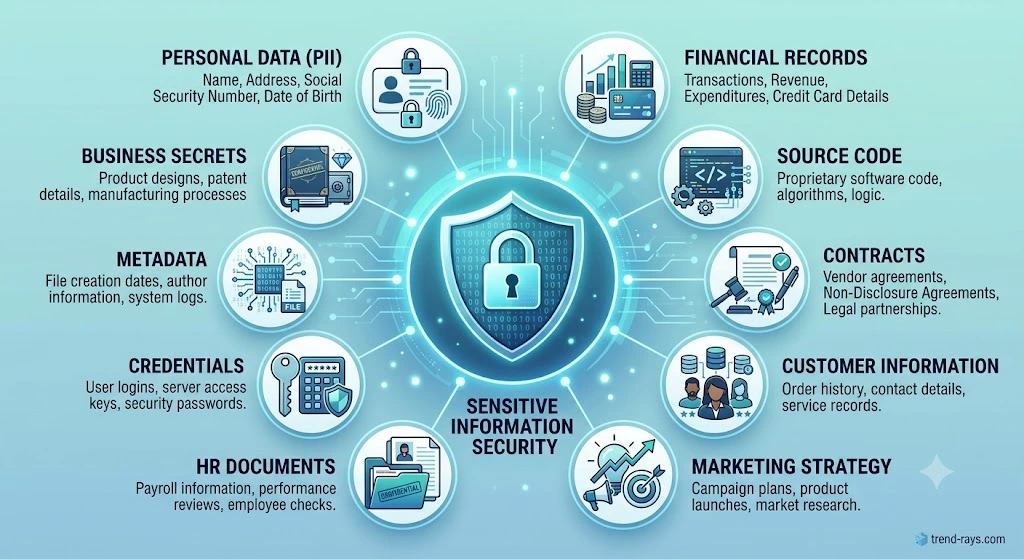
One of the biggest misconceptions about AI privacy is that only personal information needs protection.
In reality, freelancers and agencies often work with many different types of confidential information.
Some identify a person.
Some identify a business.
Some reveal competitive strategies.
Some expose security systems.
Others may not seem sensitive at first—but when combined with other details, they can reveal much more than intended.
Before using ChatGPT or any AI assistant, it’s worth asking one simple question:
“Does the AI actually need this information to complete the task?”
If the answer is no, consider removing, replacing, or generalizing it.
The following checklist can help you identify information that deserves a second look.
1. Personal Identifiable Information (PII)
Personally identifiable information is any information that can identify an individual directly or indirectly.
Examples include:
✅ Full names
✅ Email addresses
✅ Phone numbers
✅ Home addresses
✅ Date of birth
✅ National ID numbers
✅ Passport numbers
✅ Driver’s licence numbers
✅ Social security or tax identification numbers
✅ Employee IDs
✅ Student IDs
✅ Customer IDs linked to individuals
✅ Profile photos
✅ Signatures
✅ Personal websites
✅ LinkedIn profile URLs
✅ GPS locations
Example
Instead of:
Sarah JohnsonUse:
Project Manager2. Business Confidential Information
Many freelancers mistakenly remove personal names but leave company-specific information untouched.
Businesses also have confidential information.
Examples include:
- Company name
- Subsidiary names
- Internal project names
- Product codenames
- Supplier names
- Client lists
- Vendor agreements
- Partnership negotiations
- Acquisition plans
- Internal presentations
- Product launch schedules
- Marketing roadmaps
- Sales strategies
- Pricing models
- Competitive analysis
- Customer segmentation
- Business forecasts
Example
Instead of:
Project FalconUse:
Internal software project3. Financial Information
Financial information often appears in proposals, reports, invoices, and spreadsheets.
Examples include:
- Revenue figures
- Profit margins
- Payroll information
- Bank account numbers
- Credit card details
- Tax documents
- Budgets
- Investment plans
- Purchase orders
- Outstanding invoices
- Pricing agreements
- Vendor payments
- Cash flow reports
- Financial forecasts
Better Practice
Rather than:
Annual revenue: €4,863,229
Use:
Annual revenue: Mid-seven figures
The context remains useful without exposing exact business figures.
4. Technical Information
Developers frequently paste technical content into AI tools.
Not all technical information carries the same level of risk, but some details deserve extra care.
Examples include:
- API keys
- Access tokens
- Authentication credentials
- SSH keys
- Encryption keys
- Database passwords
- Connection strings
- Internal IP addresses
- Private repositories
- Production URLs
- Internal architecture diagrams
- Cloud infrastructure details
- Source code containing proprietary logic
- Security configurations
Safe Alternative
Instead of:
API_KEY=sk_live_abc123...Use:
API_KEY=YOUR_API_KEY5. Legal Documents
Legal documents often contain information that extends beyond names.
Examples include:
- Contracts
- NDAs
- Settlement agreements
- Licensing agreements
- Employment contracts
- Client agreements
- Intellectual property filings
- Court correspondence
- Regulatory filings
- Confidential legal opinions
If you’re asking AI to explain or summarize a legal clause, consider sharing only the relevant excerpt after removing identifying details.
6. Customer Information
Customer data deserves special attention because it often combines personal and business information.
Examples include:
- Customer databases
- CRM exports
- Purchase history
- Support tickets
- Customer complaints
- Loyalty program data
- Subscription records
- Account activity
- Survey responses
Better Practice
Instead of uploading a spreadsheet containing thousands of customer records, summarize the trends you’re interested in.
For example:
“Customer retention declined by 12% during the last quarter. What factors should I investigate?”
The AI can help analyze the problem without needing access to individual customer records.
7. Human Resources Information
HR documents frequently contain highly sensitive information.
Examples include:
- Employee evaluations
- Salary information
- Job applications
- CVs and résumés
- Interview notes
- Disciplinary records
- Performance reviews
- Internal promotions
- Medical leave records
Even if your task is simply improving grammar, review the document carefully before sharing it with AI.
8. Marketing and Strategy Documents
Marketing professionals often work with information that competitors would find valuable.
Examples include:
- Keyword research
- Content calendars
- SEO strategies
- Campaign budgets
- Advertising performance
- Conversion data
- Email marketing plans
- Audience research
- Product positioning
- Brand messaging
Most editing tasks don’t require revealing exact budgets, client names, or future campaign dates.
9. Metadata (The Hidden Information People Forget)
Even if you’ve cleaned the visible text, your file may still contain hidden information.
Examples include:
- File names
- Author names
- Document comments
- Revision history
- Tracked changes
- Embedded properties
- Hidden spreadsheet tabs
- PDF metadata
- Image EXIF data
For example:
Acme_Final_Merger_Proposal_v7.pdfalready reveals information before the document is opened.
When possible, rename files and remove unnecessary metadata before sharing.
10. Credentials and Security Information
These should almost never appear in AI prompts unless you’re working within a specifically approved and secure environment.
Examples include:
- Passwords
- One-time codes
- Recovery keys
- MFA backup codes
- Wi-Fi passwords
- VPN credentials
- Server login details
- Cloud console credentials
- Secret environment variables
If a debugging task requires showing configuration, replace sensitive values with placeholders.
The “Need-to-Know” Test
Before submitting any prompt, ask yourself these five questions:
- Does the AI need this information to complete the task?
- Could this identify a person or organization?
- Would I be comfortable if this detail appeared in a client meeting?
- Can I replace it with a placeholder without changing the task?
- Have I reviewed any attached files for hidden information?
If you answer “yes” to questions 2 or 5—or “no” to question 1—it’s a good signal that further anonymization may be appropriate.
Printable Prompt Review Checklist
Use this quick checklist before pressing Enter:
| Check | Completed |
|---|---|
| Removed names and contact details | ☐ |
| Generalized company information | ☐ |
| Removed passwords and API keys | ☐ |
| Checked attachments for metadata | ☐ |
| Shared only the relevant excerpt | ☐ |
| Reviewed the prompt one final time | ☐ |
This simple review takes less than a minute and can prevent accidental disclosure of information that wasn’t necessary to share.
Key Takeaways
Sensitive client information isn’t limited to names or email addresses.
It can include business strategies, financial records, source code, HR files, legal documents, metadata, credentials, and any detail that could identify a person, organization, or confidential project.
The safest approach is to apply the need-to-know principle:
Only include the information that is genuinely required for the AI to help you complete the task.
Everything else should be removed, generalized, or replaced with placeholders whenever practical.
The Step-by-Step Workflow to Anonymize Client Data Before Using ChatGPT
Think of anonymization as preparing a document before sending it to an external reviewer.
You wouldn’t hand over confidential files without first checking what they contain.
The same principle applies to AI.
Rather than asking:
“Can I upload this document?”
Ask:
“What does the AI actually need to complete my task?”
That single mindset shift makes every step below much easier.
The 7-Step AI Prompt Preparation Workflow
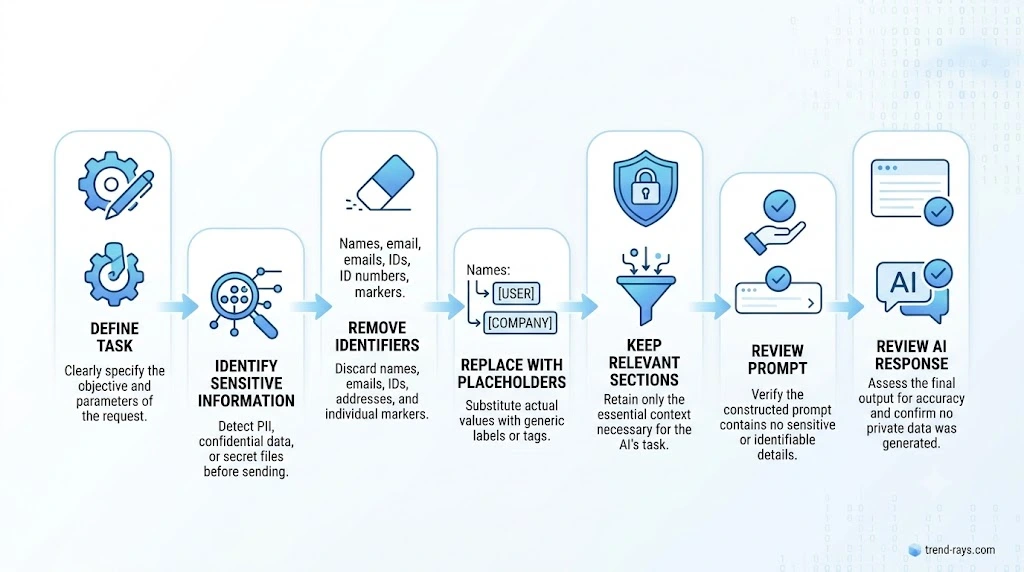
Instead of guessing every time, use this repeatable workflow before submitting any prompt to ChatGPT or another AI assistant.
It takes only a few minutes and can become part of your standard operating procedure.
Step 1: Define Your Objective First
This is the mistake almost everyone makes.
They open ChatGPT…
…copy the document…
…and only then decide what they want.
Reverse that process.
Ask yourself:
What exactly am I asking the AI to do?
Examples:
✔ Improve grammar
✔ Rewrite for clarity
✔ Summarize a report
✔ Explain technical documentation
✔ Translate content
✔ Suggest headlines
✔ Debug a function
Notice something?
None of those objectives require knowing your client’s identity.
Example
❌ Poor Prompt
Here's our entire 42-page proposal. Make it better.✅ Better Approach
Objective:
Improve executive readability.
Now you know exactly what information is relevant.
Step 2: Identify Sensitive Information
Before copying anything into ChatGPT, scan the document for information that could identify:
- A person
- A business
- A customer
- A project
- A financial record
- A secure system
A quick review often reveals more than you expect.
Common items to look for
- Names
- Email addresses
- Phone numbers
- Company names
- Project codenames
- Customer IDs
- Invoice numbers
- Internal URLs
- API keys
- Financial figures
- Meeting notes
- Comments
- Hidden metadata
Think of this as your privacy audit.
Step 3: Remove or Generalize What Isn’t Needed
Now ask a simple question about each piece of information:
Does ChatGPT actually need this detail?
If the answer is no, remove or replace it.
Example
Original
Acme Logistics↓
Logistics companyOriginal
Project Falcon↓
Internal software projectOriginal
€4,875,123↓
Multi-million euro annual revenueOriginal
Berlin Office↓
Regional officeNotice that the business context stays the same, while the identifying details disappear.
Step 4: Replace Sensitive Details with Placeholders
Sometimes the AI needs to know that multiple people or systems exist, but not who they are.
That’s where placeholders help.
Good Examples
| Original | Placeholder |
|---|---|
| Sarah Johnson | Project Manager |
| Acme Robotics | Manufacturing Company |
| Project Falcon | Internal Project |
| Client ABC | Client A |
| john@example.com | user@example.com |
| API_KEY=abc123 | API_KEY=YOUR_API_KEY |
Consistency matters.
If “Client A” appears throughout the prompt, don’t suddenly switch to “Customer 1.”
Keeping placeholders consistent helps the AI follow relationships within the document.
Step 5: Keep Only the Relevant Excerpt
One of the biggest productivity mistakes is uploading entire documents.
Imagine you’re asking:
“Can you improve this introduction?”
Why upload:
- 80 pages
- 14 appendices
- confidential contracts
- internal budgets
- customer lists
Instead:
Copy only the section that needs work.
Example
Need:
Executive Summary
Upload:
Executive Summary
Not:
Entire proposal
This approach improves privacy and often produces better AI responses because the model has a more focused task.
Step 6: Review Your Prompt Before You Submit It
Never press Enter immediately.
Read your prompt one more time.
Ask yourself:
- Did I leave any names?
- Are there email addresses?
- Any hidden project names?
- Exact revenue figures?
- Internal product codenames?
- API credentials?
- Personal information?
- Metadata in the attached file?
This final review usually takes less than a minute.
It can prevent mistakes that are difficult to undo.
Step 7: Review the AI’s Response Before Delivering It
Many freelancers forget this step.
Even if your prompt is perfect, the AI’s response still needs review.
Check for:
- Accuracy
- Hallucinated facts
- Outdated information
- Incorrect legal assumptions
- Confidential information copied from the prompt
- Brand voice
- Formatting
- Client requirements
Remember:
AI generates drafts.
Professionals deliver finished work.
The Workflow at a Glance
Define the Objective
          ↓
Identify Sensitive Information
          ↓
Remove or Generalize
          ↓
Replace with Placeholders
          ↓
Keep Only Relevant Sections
          ↓
Review the Prompt
          ↓
Review AI Output
          ↓
Deliver to Client
This simple process is easy to memorize and can be used regardless of your profession.
Full Before-and-After Example
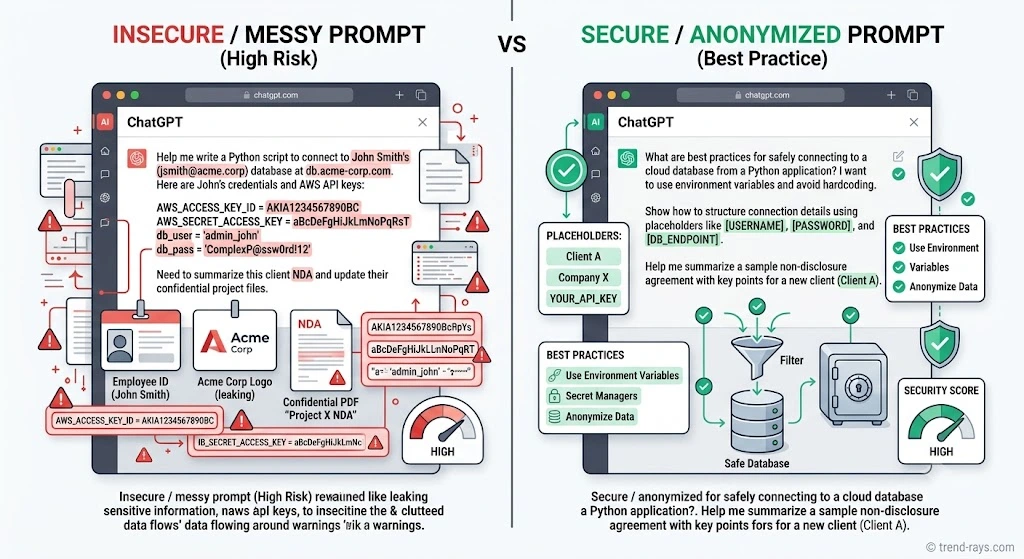
Original Prompt
Rewrite Acme Robotics' proposal for Project Falcon.

Client:
Sarah Johnson

Budget:
€3,850,000

Launch:
October 2026

Contact:
sarah.johnson@acmerobotics.com

Improve the executive summary.
Improved Prompt
Rewrite the executive summary for a proposal related to a large manufacturing automation project.

Improve:

• clarity
• executive readability
• persuasive language
• logical structure

Client names, contact information, internal project names, exact financial figures, and launch dates have been removed because they are not required for this editing task.
Notice that the AI still has everything it needs to produce a high-quality result.
Common Workflow Mistakes
Mistake 1
Opening ChatGPT before deciding what you actually need.
Mistake 2
Uploading entire PDFs when only two paragraphs require editing.
Mistake 3
Removing names but leaving unique project identifiers.
Mistake 4
Leaving passwords or API keys inside configuration files.
Mistake 5
Skipping the final review because “it’s only AI.”
The 30-Second Prompt Review Rule
Before pressing Enter, quickly ask yourself:
✅ Can this identify someone?
✅ Can this identify the company?
✅ Does the AI actually need this information?
✅ Can I replace it with a placeholder?
✅ Have I checked the attachment?
If you’re unsure about any answer, revise the prompt before submitting it.
Quick Reference Workflow Table
| Step | What to Do | Why It Matters |
|---|---|---|
| 1 | Define the objective | Focus the AI on the actual task |
| 2 | Identify sensitive information | Find what should not be shared unnecessarily |
| 3 | Remove or generalize | Reduce unnecessary disclosure |
| 4 | Replace with placeholders | Preserve context while protecting identities |
| 5 | Share only relevant excerpts | Improve privacy and response quality |
| 6 | Review the prompt | Catch overlooked details before submission |
| 7 | Review the AI output | Ensure accuracy, quality, and compliance |
Key Takeaways
A secure AI workflow doesn’t begin when you open ChatGPT.
It begins when you define your objective.
From there, every step—identifying sensitive information, removing unnecessary details, using placeholders, limiting the excerpt, and reviewing both the prompt and the AI’s response—helps protect client trust without sacrificing productivity.
The goal isn’t to hide everything.
The goal is to share only what the AI genuinely needs to complete the task.
25+ Real Before-and-After Examples of Anonymizing Client Data Before Using ChatGPT
Understanding anonymization is one thing.
Applying it correctly is another.
The easiest way to build confidence is by seeing real-world examples.
In this section, we’ll look at common freelance scenarios and compare:
- ❌ An unsafe prompt
- ✅ A safer alternative
- 💡 Why the change matters
Remember, these examples are educational. Your exact approach should always reflect the nature of your work, your client’s requirements, and any contractual or legal obligations.
Example 1: Blog Editing
❌ Before
Rewrite Acme Solar's blog post announcing its €8 million expansion into Spain.✅ After
Rewrite this blog post announcing a company's expansion into a new European market. Improve readability, transitions, and SEO while preserving the original message.Why It Works
The AI doesn’t need:
- Company name
- Expansion budget
- Country
It only needs the writing task.
Example 2: Email Writing
❌ Before
Rewrite this email to Sarah Johnson at GreenTech Solutions about the delayed invoice #54872.✅ After
Rewrite this professional email to a client regarding a delayed invoice. Make the tone polite, confident, and solution-oriented.Why It Works
The AI can improve the tone without knowing:
- Recipient’s name
- Company
- Invoice number
Example 3: SEO Content
❌ Before
Optimize this landing page for Acme Robotics targeting "warehouse automation software Germany."✅ After
Optimize this landing page for a B2B warehouse automation software company. Improve keyword placement, headings, and readability.Why It Works
The optimization strategy remains the same without exposing the client’s identity.
Example 4: Source Code Review
❌ Before
Here's our production API with live authentication keys. Why is authentication failing?✅ After
Here's a simplified version of the authentication logic with API keys replaced by placeholders. Can you help identify potential issues?Why It Works
The debugging task stays intact while removing credentials that should never be shared unnecessarily.
Example 5: Contract Review
❌ Before
Explain clause 14 of Acme Corporation's software licensing agreement with XYZ Manufacturing.✅ After
Explain this software licensing clause in plain English. Company names and identifying details have been removed.Why It Works
The legal language—not the parties’ identities—is what matters.
Example 6: Financial Report
❌ Before
Summarize our Q2 report showing €14.8 million revenue and a 37% profit margin.✅ After
Summarize this quarterly business report. Replace exact figures with general observations and highlight the main business trends.Why It Works
The AI can identify trends without relying on precise financial numbers.
Example 7: Customer Support
❌ Before
Analyze these 250 customer complaints from our CRM.✅ After
Analyze these anonymized customer support messages and identify recurring themes, pain points, and improvement opportunities.Why It Works
Customer identities aren’t needed to identify common issues.
Example 8: Resume Improvement
❌ Before
Improve John Smith's CV for a job application at Microsoft.✅ After
Improve this software engineer's resume. Focus on achievements, readability, and stronger action verbs.Why It Works
The editing advice doesn’t depend on specific names or employers.
Example 9: Translation
❌ Before
Translate this confidential client proposal for ABC Pharmaceuticals.✅ After
Translate this business proposal while maintaining a professional tone. Client names and identifying information have been removed.Why It Works
Translation quality doesn’t require knowing the client’s identity.
Example 10: Marketing Strategy
❌ Before
Review our Black Friday campaign strategy for Company X launching on 21 November with a €500,000 budget.✅ After
Review this seasonal marketing campaign strategy. Suggest improvements for messaging, audience targeting, and conversion optimization.Why It Works
Strategic advice can be given without exposing launch dates or budgets.
Example 11: Graphic Design Brief
❌ Before
Create logo ideas for Acme Legal Group's confidential rebrand launching next month.✅ After
Generate logo concepts for a professional legal services firm undergoing a brand refresh. Focus on trust, simplicity, and modern typography.Example 12: Social Media Calendar
❌ Before
Plan Instagram posts for XYZ Fitness based on their confidential Q3 marketing strategy.✅ After
Create a one-month Instagram content calendar for a fitness business focusing on engagement, education, and lead generation.Example 13: Spreadsheet Analysis
❌ Before
Analyze this spreadsheet containing employee salaries and bonuses.✅ After
Analyze this anonymized compensation dataset and identify overall trends, outliers, and possible reporting improvements.Example 14: HR Performance Review
❌ Before
Rewrite this performance review for employee Sarah Johnson.✅ After
Rewrite this employee performance review using clearer, more constructive language while maintaining a professional tone.Example 15: Project Proposal
❌ Before
Improve our proposal for Project Atlas, scheduled for launch in Berlin with Client XYZ.✅ After
Improve this proposal for a large enterprise implementation project. Focus on clarity, value proposition, and executive readability.Pattern Recognition: What Changed?
Across every example, the same principles appear repeatedly.
| Unsafe Detail | Better Alternative |
|---|---|
| Company name | Industry or business type |
| Employee name | Job title or placeholder |
| Customer name | Customer A / Client A |
| Exact revenue | General revenue range |
| Project codename | Internal project |
| Invoice number | Invoice reference |
| Email address | user@example.com |
| API key | YOUR_API_KEY |
| Launch date | Upcoming launch |
| Office location | Regional office |
Notice that the task never changes.
Only the identifying details do.
The “Context Without Identity” Principle
A useful habit is to ask yourself:
Can I describe the situation without revealing who it’s about?
For example:
Instead of:
“Rewrite Acme Robotics’ proposal.”
Try:
“Rewrite this proposal for a manufacturing technology company.”
Instead of:
“Summarize Sarah Johnson’s HR review.”
Try:
“Summarize this employee performance review.”
The AI still understands the assignment.
The confidential details remain protected.
Quick Prompt Transformation Checklist
Before you submit a prompt:
- ☐ Replace names with roles or placeholders.
- ☐ Generalize company names where possible.
- ☐ Remove contact details.
- ☐ Replace exact financial figures if they’re unnecessary.
- ☐ Remove credentials, passwords, and API keys.
- ☐ Delete internal project codenames.
- ☐ Check attachments for hidden metadata.
- ☐ Confirm the remaining information is sufficient for the AI to complete the task.
Key Takeaways
The safest AI prompts are rarely the shortest—they’re the most focused.
By removing identities while preserving context, you allow the AI to concentrate on the task rather than the people or organizations behind it.
Across writing, coding, marketing, design, HR, finance, and customer support, the principle remains the same:
Keep the context. Remove the identity.
That single habit can dramatically improve both privacy and prompt quality.
Industry-Specific AI Privacy Workflows (10 Professional Scenarios)
Every profession uses AI differently.
Some professionals work primarily with text.
Others handle financial records, customer databases, contracts, source code, or medical information.
The good news is that the same core principle applies across every industry:
Share only the information the AI needs to complete the task—and no more.
The following workflows demonstrate how different professionals can apply that principle in their daily work.
1. Freelance Writers & Content Creators
Common AI Tasks
- Grammar correction
- Article rewriting
- Blog outlines
- Tone improvement
- Headline generation
- SEO optimization
Common Risks
Writers often receive:
- Unpublished articles
- Product launch content
- Ghostwritten material
- Client interviews
- Internal brand messaging
Publishing or exposing this content too early could damage client trust.
Recommended Workflow
✅ Remove:
- Client name
- Product names
- Internal campaign titles
- Publishing dates
Keep:
- Writing style
- Structure
- Audience
- Tone
Example
Instead of:
Rewrite Acme’s product launch article.
Use:
Rewrite this product launch article for a B2B software company using a more conversational tone.
2. SEO Consultants
SEO professionals frequently use AI for:
- Keyword clustering
- Meta descriptions
- Internal linking
- Content briefs
- Technical explanations
Sensitive Information
- Keyword research
- Traffic reports
- Competitor analysis
- Client domain strategy
- Search Console exports
Better Workflow
Instead of uploading complete SEO reports:
Share only:
- Relevant page content
- Ranking goals
- Keyword intent
- Content structure
Generalize:
- Domain names
- Traffic numbers
- Client identities
3. Software Developers
Developers are among the heaviest AI users.
Typical tasks include:
- Debugging
- Refactoring
- Documentation
- Code explanation
- Unit testing
- Production API keys
- Database credentials
- Access tokens
- SSH keys
- Private repositories
- Environment secrets
Better Practice
Instead of:
DATABASE_PASSWORD=myrealpasswordUse:
DATABASE_PASSWORD=YOUR_PASSWORDLikewise, replace proprietary class names or client-specific identifiers with generic placeholders when they’re not essential to the debugging task.
4. Digital Marketing Agencies
Marketing teams often work with highly confidential business information.
Examples include:
- Launch campaigns
- Advertising budgets
- Audience research
- Conversion data
- Sales funnels
- Brand positioning
Better Workflow
Rather than sharing the complete campaign strategy, ask focused questions such as:
“Review this landing page for stronger calls to action aimed at enterprise software buyers.”
The AI can improve messaging without seeing the full marketing plan.
5. Virtual Assistants
Virtual assistants regularly handle:
- Client emails
- Meeting notes
- Calendars
- CRM updates
- Administrative documents
Review Before Sharing
Remove:
- Email addresses
- Phone numbers
- Calendar invitations
- Meeting links
- Customer identities
The AI usually needs only the message itself—not the participants’ contact information.
6. Accountants & Bookkeepers
Financial professionals frequently ask AI to explain tax concepts, improve reports, or summarize financial documents.
High-Risk Information
- Tax IDs
- Bank details
- Payroll records
- Client account numbers
- Exact revenue figures
- Financial statements
Better Workflow
Replace specific numbers with ranges when precision isn’t required.
Instead of:
Revenue: €6,247,921
Use:
Revenue: Mid-seven figures
This preserves business context while reducing unnecessary disclosure.
7. Lawyers & Legal Consultants
Legal professionals often use AI to:
- Explain clauses
- Summarize contracts
- Draft templates
- Compare legal language
Additional Considerations
Legal documents may contain privileged or confidential information.
Before using AI:
- Remove names of parties where possible.
- Replace company names with placeholders.
- Focus on the clause or legal issue that needs explanation.
For example:
Explain this limitation of liability clause in plain English.
Rather than uploading an entire agreement when only one section requires analysis.
8. Recruiters & HR Professionals
Recruiters frequently use AI for:
- Job descriptions
- Interview questions
- Candidate summaries
- Performance review improvements
Sensitive Information
- Candidate names
- CVs
- Salary expectations
- Interview notes
- Performance evaluations
Better Workflow
Instead of:
Improve Sarah Johnson’s performance review.
Use:
Improve this employee performance review using more constructive and balanced language.
9. Graphic Designers & Creative Professionals
Designers increasingly use AI to:
- Generate concepts
- Improve creative briefs
- Brainstorm branding
- Develop mood boards
- Write presentation copy
Remove
- Confidential product names
- Rebranding timelines
- Client identities
- Internal design specifications
Describe the creative challenge rather than revealing confidential project details.
10. Healthcare & Medical Professionals
Healthcare is one of the most sensitive environments for AI.
Medical records may contain:
- Patient names
- Medical histories
- Test results
- Insurance information
- Hospital identifiers
Best Practice
If AI is being used to explain a medical concept or improve educational material, remove identifying information and ensure the use aligns with applicable privacy laws, professional standards, and organizational policies.
Clinical decision-making should never rely solely on AI-generated responses.
Universal Workflow for Every Profession
Although the examples above differ, the underlying process remains remarkably consistent.
Define the Task
        ↓
Identify Sensitive Information
        ↓
Remove Unnecessary Details
        ↓
Replace with Placeholders
        ↓
Share Only the Relevant Section
        ↓
Review the Prompt
        ↓
Review the AI Response
Whether you’re editing a blog post or debugging code, the same workflow applies.
Profession-by-Profession Quick Reference
| Profession | Common AI Task | Information to Remove First |
|---|---|---|
| Writer | Editing articles | Client names, unpublished products |
| SEO Consultant | Content optimization | Domain names, traffic reports |
| Developer | Debugging code | API keys, credentials, production URLs |
| Marketing Agency | Campaign planning | Budgets, launch dates, strategy documents |
| Virtual Assistant | Email drafting | Contact details, meeting links |
| Accountant | Financial summaries | Bank details, tax IDs, payroll records |
| Lawyer | Contract explanation | Party names, confidential clauses where possible |
| Recruiter | Performance reviews | Candidate names, salary details |
| Designer | Creative briefs | Brand refresh timelines, confidential product names |
| Healthcare Professional | Educational content | Patient identifiers, medical record details |
Common Pattern Across Every Industry
Notice something interesting?
No matter the profession, professionals rarely need to reveal:
- Names
- Contact information
- Exact financial figures
- Credentials
- Internal project names
- Confidential strategies
Instead, they need to communicate:
- The task
- The context
- The desired outcome
That’s enough for AI to provide meaningful assistance in many situations.
Key Takeaways
AI can support professionals across almost every industry, but responsible use begins with thoughtful preparation.
Rather than asking whether you can upload a document, ask whether every detail in that document is actually necessary for the task.
By tailoring your anonymization approach to your profession, you can often improve both privacy and the quality of the AI’s response.
The most effective prompts are usually the most focused—not the most detailed.
The 15 Most Common Mistakes Professionals Make When Using ChatGPT With Client Data
Most privacy incidents don’t happen because someone intentionally shares confidential information.
They happen because people are in a hurry.
A freelancer copies an entire document instead of a single paragraph.
A developer pastes a configuration file without noticing an API key.
A marketer uploads a presentation that still contains confidential speaker notes.
These aren’t usually technical failures—they’re workflow failures.
The good news is that they’re also preventable.
Below are the mistakes professionals make most often and the habits that help avoid them.
Mistake 1: Copying the Entire Document
One of the most common habits is uploading a complete file when only a small section needs work.
Imagine you want help improving a two-paragraph introduction.
Instead of copying those two paragraphs, you upload:
- An 80-page proposal
- Financial appendices
- Customer lists
- Internal notes
- Executive comments
The AI didn’t need most of that information.
Better Approach
Share only the section related to your question.
The less unnecessary information you include, the lower the privacy risk—and the more focused the AI’s response is likely to be.
Mistake 2: Forgetting Hidden Metadata
Many people carefully remove names from the visible text but forget the hidden information stored inside the file.
Examples include:
- Document author names
- Tracked changes
- Comments
- Revision history
- File properties
- Spreadsheet tabs
- Image EXIF data
- PDF metadata
Even a filename like:
Acme_Merger_Strategy_Final_v12.pdfreveals information before anyone opens the document.
Better Approach
Whenever possible:
- Accept or remove tracked changes.
- Delete unnecessary comments.
- Rename files generically.
- Remove document metadata before sharing.
Mistake 3: Leaving API Keys and Passwords in Code
Developers often focus on solving a bug and overlook credentials inside configuration files.
Examples include:
- API keys
- Database passwords
- Secret tokens
- OAuth credentials
- Private certificates
Better Approach
Replace every sensitive value with a placeholder.
For example:
Instead of:
API_KEY=sk_live_xxxxxxxxxUse:
API_KEY=YOUR_API_KEYThe debugging context remains intact without exposing credentials.
Mistake 4: Assuming Public AI Means Private by Default
Some users assume that because they’re logged into an account, everything they submit is automatically private.
The reality is that AI services have different policies, settings, and enterprise features.
Before using any AI platform with business information, understand:
- Your organization’s policies.
- The AI provider’s documentation.
- Available privacy settings.
- Client contractual requirements.
When in doubt, anonymize first.
Mistake 5: Removing Names but Leaving Unique Identifiers
Replacing:
Sarah Johnson
with
Employee
is a good start.
But if the document still contains:
- Project Atlas
- Building 14
- Office in Helsinki
- Launch on 17 September
- Department 7
Someone familiar with the project may still recognize it.
Better Approach
Review the entire document—not just obvious personal information.
Mistake 6: Sharing Exact Financial Figures Without a Reason
Many prompts include information like:
- Revenue
- Profit
- Client budgets
- Contract values
Yet the AI often doesn’t need exact numbers.
Better Approach
Generalize where precision isn’t necessary.
Instead of:
Revenue: €12,482,193
Use:
Revenue: Low eight figures
The business context remains useful while reducing unnecessary disclosure.
Mistake 7: Using Real Customer Data for Examples
It’s tempting to paste customer emails or support tickets directly into ChatGPT.
Even if your goal is simply improving tone, real customer identities may not be necessary.
Better Approach
Replace:
- Names
- Contact details
- Account numbers
- Order references
with placeholders before asking the AI to help.
Mistake 8: Ignoring Non-Text Information
Many users focus only on written content.
But confidential information can also appear in:
- Screenshots
- Charts
- Graphs
- Logos
- Maps
- Diagrams
- Photos
- Watermarks
Before uploading an image, examine what it reveals beyond the obvious subject.
A prompt that mixes editing, financial analysis, legal review, and marketing advice often requires sharing far more information than necessary.
Better Approach
Break large tasks into smaller prompts.
Smaller prompts are usually:
- Easier to anonymize.
- Easier for AI to answer accurately.
- Easier to review.
Mistake 10: Forgetting Attachments
Sometimes the prompt is perfectly anonymized…
…but the attached file isn’t.
Always review:
- PDFs
- Word documents
- Excel files
- PowerPoint presentations
- ZIP archives
- Screenshots
before uploading them.
Mistake 11: Blindly Trusting AI Output
AI can summarize, rewrite, and explain information remarkably well.
But it can also:
- Misinterpret context.
- Omit important details.
- Generate incorrect information.
- Produce confident-sounding mistakes.
Better Approach
Treat AI as a drafting assistant—not the final reviewer.
Every response should be checked before sharing it with a client.
Mistake 12: Forgetting Your Client’s NDA or Internal Policies
Even if anonymization reduces privacy risks, your client may have contractual requirements that limit how documents can be used.
Before using AI, consider:
- Non-disclosure agreements (NDAs).
- Internal company policies.
- Industry regulations.
- Client-specific instructions.
An effective workflow respects both privacy and contractual obligations.
Mistake 13: Assuming Every AI Task Requires the Original File
Sometimes users upload an entire document when a simple description would be enough.
For example:
Instead of uploading a confidential proposal, ask:
“What sections make an executive proposal more persuasive?”
You receive useful guidance without sharing the document at all.
Mistake 14: Inconsistent Placeholders
Suppose you replace:
- Sarah Johnson
with:
- Client A
Later in the same prompt you write:
- Sarah
Then later:
- Marketing Manager
The AI—and the reader—can become confused.
Better Approach
Create one consistent set of placeholders and use them throughout the conversation.
Mistake 15: Skipping the Final Review
The last mistake is often the simplest.
You’re in a hurry.
The prompt looks fine.
You press Enter.
A final 30-second review could have caught:
- A forgotten email address.
- A hidden project codename.
- An attachment with metadata.
- A copied password.
- An unnecessary customer reference.
Sometimes the most effective privacy tool isn’t software—it’s a final human review.
The “STOP” Method Before Every Prompt
To make this process easy to remember, use the STOP method before you submit any AI prompt.
| Letter | Question |
|---|---|
| S – Scan | Have I scanned the document for sensitive information? |
| T – Trim | Can I remove anything the AI doesn’t need? |
| O – Obscure | Should I replace names, figures, or identifiers with placeholders? |
| P – Preview | Have I reviewed the prompt and any attachments one final time? |
If you can answer “yes” to each question, you’re much less likely to expose information unnecessarily.
Quick Self-Audit Checklist
Before pressing Enter, ask yourself:
- ☐ Am I sharing only the relevant section?
- ☐ Have I removed personal and company identifiers?
- ☐ Did I check for passwords, API keys, and credentials?
- ☐ Have I reviewed any attachments?
- ☐ Is every placeholder consistent?
- ☐ Have I considered any client or organizational policies?
- ☐ Will I review the AI’s response before using it?
Key Takeaways
Most mistakes involving client data and AI don’t happen because professionals ignore privacy—they happen because everyday workflows leave room for oversight.
By slowing down for a brief review and following a structured process, you can dramatically reduce unnecessary disclosure while still benefiting from AI.
Good AI hygiene isn’t about perfection.
It’s about building habits that become second nature over time.
GDPR, Client Confidentiality, and AI: What Freelancers Actually Need to Know

If you’ve searched for information about AI privacy, you’ve almost certainly come across references to the General Data Protection Regulation (GDPR).
For many freelancers, consultants, and small business owners, seeing legal terminology can make AI privacy feel overwhelming.
The reality is much simpler.
You don’t need to become a privacy lawyer to develop better AI habits.
You do need to understand a few key principles that help you make more informed decisions when working with client information.
This section explains those principles in plain English.
Important: This guide provides general educational information and is not legal advice. If you work in a highly regulated industry or have questions about specific legal obligations, consult qualified legal or compliance professionals.
Why GDPR Is Mentioned So Often
The GDPR is a privacy law that applies in many situations involving the processing of personal data connected to individuals in the European Economic Area.
Although it is often discussed in relation to AI, the regulation itself is technology-neutral.
In other words:
GDPR doesn’t exist because of ChatGPT.
It applies to many ways organizations collect, store, use, and share personal data.
AI is simply another context where those privacy principles become relevant.
What Is Personal Data?
One of the biggest misconceptions is that personal data only means someone’s name.
In reality, personal data can include any information that identifies—or could reasonably help identify—an individual.
Examples include:
- Full names
- Email addresses
- Phone numbers
- Postal addresses
- Customer numbers linked to individuals
- Employee IDs
- Online account identifiers
- IP addresses in some contexts
- Photographs
- Voice recordings
Sometimes a single piece of information isn’t enough to identify someone.
But when combined with other details, identification may become possible.
That’s why reviewing the full context matters.
Personal Data vs. Business Data
Not all business information is personal data.
For example:
| Information | Usually Personal Data? |
|---|---|
| Company name | Not by itself |
| Product name | No |
| Annual revenue | No |
| Employee email address | Usually yes |
| CEO’s personal email | Usually yes |
| Customer phone number | Usually yes |
| Internal project codename | Not necessarily, but it may still be confidential |
Even if information isn’t classified as personal data, it may still be commercially sensitive or protected by contractual obligations.
Privacy and confidentiality are related—but they’re not identical concepts.
Understanding the Principle of Data Minimization
One of the most practical ideas for freelancers is data minimization.
In simple terms, it means:
Only use or share the information that is genuinely necessary for the task.
Think about asking a friend to proofread a report.
Do they need:
- Every internal email?
- Payroll records?
- Customer database?
- Financial forecasts?
Probably not.
The same logic applies when using AI.
If the AI only needs two paragraphs to improve your writing, there’s rarely a reason to upload the entire document.
This principle doesn’t just support privacy—it often produces better AI responses because the prompt is more focused.
Why Client Confidentiality Goes Beyond Privacy Laws
Even when a document doesn’t contain personal data, it may still be confidential.
For example:
- Product launch plans
- Acquisition discussions
- Source code
- Marketing strategies
- Pricing models
- Investor presentations
- Trade secrets
Sharing these unnecessarily could create business risks regardless of whether privacy laws apply.
That’s why many freelancers adopt the habit of anonymizing information whenever practical—not only to support privacy, but also to protect client trust.
What About NDAs?
Many freelancers work under Non-Disclosure Agreements (NDAs).
An NDA is a contractual commitment to keep specified information confidential.
The exact terms vary from one agreement to another.
Some NDAs explicitly address the use of third-party services or AI tools.
Others may not mention AI at all.
Before using AI with client materials, it’s a good idea to:
- Understand the confidentiality obligations in your agreement.
- Follow any client-specific instructions.
- Ask for clarification if you’re unsure whether a particular workflow is permitted.
Anonymization can reduce risk, but it does not automatically override contractual obligations.
Does Anonymization Solve Every Privacy Problem?
No.
Anonymization is a valuable risk-reduction technique, but it’s not a universal solution.
For example:
If a document still contains enough unique details to identify a person or organization, simply removing names may not be enough.
Similarly, if your client has prohibited the use of AI for certain materials, anonymization alone doesn’t change those contractual requirements.
Think of anonymization as one important layer in a broader privacy and confidentiality strategy.
Practical Questions to Ask Before Using AI
Before you submit any prompt, ask yourself:
1. Does the AI actually need this information?
If not, remove it.
2. Can I replace identifying details with placeholders?
If yes, do so.
3. Am I complying with my client’s instructions?
Review any project-specific requirements.
4. Would I be comfortable explaining this workflow to my client?
If the answer is no, reconsider the prompt.
Transparency is often a good test of whether a workflow is appropriate.
5. Have I reviewed both the prompt and any attachments?
Hidden comments, tracked changes, and metadata can reveal more than the visible text.
A Practical Decision Tree
Use this simple decision process before sharing information with AI.
Start
  │
  ▼
Do I need AI for this task?
  │
  ├── No → Complete the work without AI.
  │
  └── Yes
        │
        ▼
Does the AI need the original document?
        │
        ├── No → Describe the task instead.
        │
        └── Yes
              │
              ▼
Can I anonymize unnecessary identifying details?
              │
              ├── Yes → Remove or replace them.
              │
              └── No
                    │
                    ▼
Review client policies, contractual obligations, and the AI service's features before deciding how to proceed.
This isn’t a legal test—it’s a practical workflow that encourages thoughtful decision-making.
Building Client Trust Through Responsible AI Use
Clients increasingly expect professionals to use AI responsibly.
That doesn’t necessarily mean avoiding AI.
It means using it with care.
Responsible habits include:
- Explaining your workflow when appropriate.
- Removing unnecessary identifying information.
- Sharing only what is needed.
- Reviewing AI-generated output before delivery.
- Staying informed about changes in your tools and obligations.
Trust is built through consistent, professional behavior—not just technical safeguards.
Key Takeaways
You don’t need to memorize privacy regulations to make better AI decisions.
A few practical principles go a long way:
- Understand what counts as personal and confidential information.
- Share only what the AI genuinely needs.
- Respect client instructions and contractual obligations.
- Use anonymization as a risk-reduction technique—not as a guarantee.
- Review both your prompts and AI-generated responses before using them.
When in doubt, err on the side of caution and transparency.
Frequently Asked Questions About Anonymizing Client Data Before Using ChatGPT
1. Can I use ChatGPT with client information?
Yes, but you should first consider whether the AI actually needs the identifying information to complete the task.
In many cases, you can replace names, email addresses, project titles, and other identifiers with placeholders while preserving enough context for the AI to provide useful assistance.
Always review your client’s instructions, contractual obligations, and the AI platform’s documentation before sharing confidential material.
2. Is replacing a client’s name enough?
Usually not.
A document may still contain:
- Project codenames
- Unique locations
- Email addresses
- Financial figures
- Customer IDs
- Internal references
Effective anonymization considers the entire document rather than just obvious personal identifiers.
3. What’s the difference between anonymization and redaction?
Anonymization removes or generalizes identifying information while preserving context.
Redaction removes information entirely.
For example:
Anonymization
“Acme Corporation” → “Manufacturing company”
Redaction
“API Key: [REDACTED]”
Both techniques are useful, but they solve different problems.
4. Should I anonymize source code?
If the code contains:
- API keys
- Passwords
- Internal URLs
- Client names
- Proprietary business logic
- Credentials
then those elements should generally be removed or replaced with placeholders unless they are essential to the task.
5. Can I upload contracts into ChatGPT?
Before uploading a contract, consider:
- Whether the entire document is necessary.
- Whether identifying information can be removed.
- Whether your client agreement or NDA restricts AI use.
- Whether sharing only the relevant clause would accomplish your goal.
Often, a single clause is enough for explanation or drafting assistance.
6. Can I anonymize PDFs?
Yes.
Before uploading a PDF:
- Remove unnecessary pages.
- Check comments and annotations.
- Review metadata.
- Rename the file if the filename reveals confidential information.
Remember that visible text isn’t the only source of information.
Examples include:
- Passwords
- API keys
- Recovery codes
- Banking credentials
- Private cryptographic keys
- Customer databases
- Authentication tokens
If these details aren’t required for the task, remove them before using AI.
8. Does anonymization affect AI quality?
Usually, no.
In many writing, editing, brainstorming, and summarization tasks, the AI performs just as well when identifying details are replaced with generic placeholders.
The quality of the prompt often depends more on clear instructions than on confidential specifics.
9. Should freelancers create an AI usage policy?
If AI is a regular part of your workflow, having a simple internal policy can be helpful.
It might cover topics such as:
- When AI may be used.
- What information should be anonymized.
- Review procedures.
- Client communication.
- Quality assurance.
Even solo freelancers benefit from documenting consistent practices.
10. Can agencies use the same workflow?
Yes.
The principles remain the same, although agencies often add:
- Internal approval processes.
- Staff training.
- Prompt review procedures.
- Client-specific guidelines.
- Standard operating procedures (SOPs).
A consistent workflow helps maintain quality across larger teams.
11. Is anonymization only about personal data?
No.
Many business documents contain confidential information that doesn’t identify an individual but still deserves protection.
Examples include:
- Product roadmaps
- Marketing strategies
- Pricing models
- Source code
- Acquisition plans
- Internal research
Confidentiality extends beyond personal data.
12. What if I’m unsure whether something should be removed?
Ask yourself:
Does the AI actually need this detail to complete the task?
If the answer is “no” or “I’m not sure,” consider removing or generalizing it before submitting the prompt.
13. Can I use placeholders throughout a long document?
Yes.
In fact, consistent placeholders often improve readability.
For example:
- Client A
- Company B
- Employee 1
- Project X
The important point is to remain consistent from beginning to end.
14. Do screenshots contain sensitive information?
They can.
Before uploading screenshots, check for:
- Email addresses
- Usernames
- Browser tabs
- Notifications
- Internal dashboards
- Customer names
- URLs
- Watermarks
Images frequently reveal more than intended.
15. Is reviewing the AI response really necessary?
Absolutely.
AI-generated responses should always be reviewed for:
- Accuracy
- Completeness
- Hallucinations
- Formatting
- Tone
- Confidential information
- Client requirements
Professional judgment remains an essential part of the workflow.
16. Can anonymization guarantee compliance with privacy laws?
No.
Anonymization is an important privacy technique, but it is not a guarantee that all legal or contractual obligations have been met.
Applicable laws, industry standards, client agreements, and organizational policies should also be considered.
17. Is it better to describe the problem instead of uploading the document?
In many cases, yes.
For example:
Instead of uploading an entire proposal, ask:
“What makes an executive summary persuasive?”
You may receive useful guidance without sharing any confidential material.
18. Should I anonymize information even if I trust the AI platform?
Trust and good workflow are separate issues.
Even when using a platform with strong privacy features, sharing only the information necessary for the task is generally a sensible professional habit.
19. How long does anonymization usually take?
For most routine tasks, reviewing and anonymizing a prompt takes only a few minutes.
With practice, it becomes a natural part of your workflow.
20. What’s the single most important rule?
If there’s one principle to remember from this guide, it’s this:
Share the task—not the identity.
When you preserve the context while removing unnecessary identifying information, you often achieve the same AI results with significantly less privacy and confidentiality risk.
Quick Reference Summary
Before using ChatGPT with client materials, remember these five principles:
- Define the task before preparing the prompt.
- Remove or generalize information the AI doesn’t need.
- Replace identifying details with consistent placeholders where appropriate.
- Review both the prompt and any attachments.
- Check the AI’s response before delivering your work.
These habits are simple, repeatable, and applicable across writing, development, marketing, consulting, design, finance, and many other professions.
Final Thoughts
Artificial intelligence is changing the way professionals work.
For freelancers, agencies, and businesses, the question is no longer whether AI will become part of everyday workflows.
The real question is:
How can we use it responsibly?
The answer isn’t avoiding AI.
It’s developing better habits.
When you define your objective first, remove unnecessary identifying information, use placeholders consistently, review your prompts carefully, and check every AI-generated response before sharing it with a client, you create a workflow that balances productivity with professionalism.
The strongest AI users aren’t those who share the most information.
They’re the ones who know exactly what to share—and what to keep private.
As AI tools continue to evolve, responsible prompt preparation will remain one of the most valuable professional skills you can develop.
Because technology may change quickly.
Trust does not.