Have you ever tried sending a message with just a “Space” on WhatsApp? You can’t. The send button simply won’t appear.
WhatsApp blocks empty messages to prevent spam. But what if you want to confuse your friends, ghost a group chat, or just pull a harmless prank?
You need the Invisible Character. In this guide, we give you a magic button to copy invisible text that WhatsApp thinks is a real word. You can use this to send “ghost” messages, blank statuses, or even names without text.
⚡ Try It Now: Invisible Text Generator
Click the button below to copy the magic invisible character to your clipboard.
👻 The Ghost Text Copier
Click the button to copy the invisible character.
Method 1: The Copy-Paste Trick
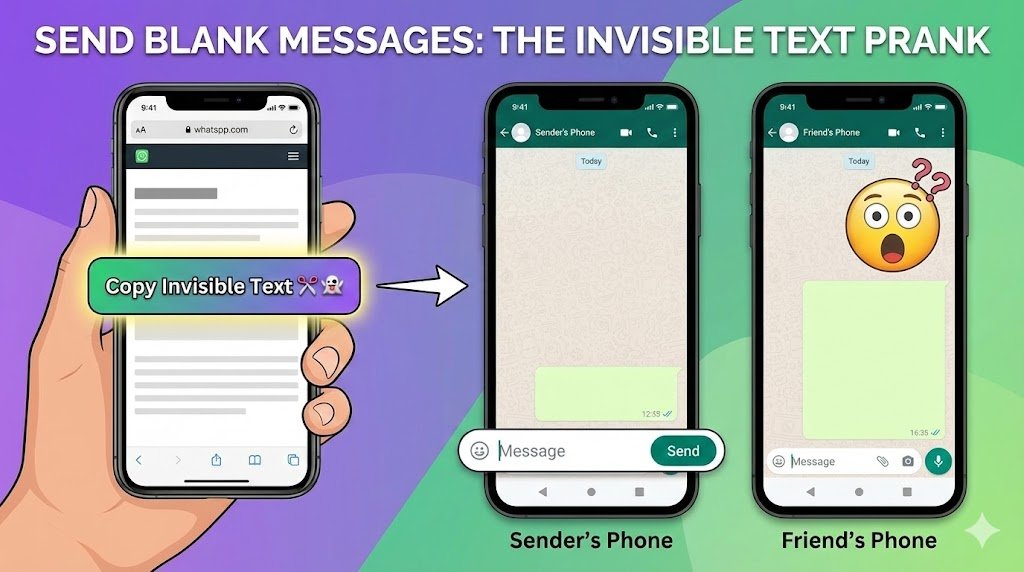
- Click the “Copy Invisible Text” button above.
- Open WhatsApp.
- Paste it into any chat.
- You will see the Send Button appear (even though the text box looks empty).
- Hit Send.
- Your friend receives an empty bubble. 🤯
Method 2: Prank Ideas using Invisible Text
Now that you have the power of invisibility, here is how to use it:
1. The “My Phone is Broken” Prank
Send 5-10 blank messages in a row to a friend. When they ask “What are you sending??”, reply with: “I am sending you the photos of my new car, can’t you see them?” Watch them panic and restart their internet.
2. The Nameless Profile
Want to be truly anonymous?
- Go to WhatsApp Settings > Profile.
- Edit your Name.
- Paste the invisible character.
- Save. Now your name is completely blank in group chats.
Note: Pair this with our guide on How to Hide Your Profile Picture to become a complete ghost on WhatsApp.
⚠️ Warning: Don’t Spam Strangers
It’s funny to prank friends, but sending blank messages to strangers can get you reported.
- If you are messaging someone new for a prank, use our Unsaved Number Trick so you don’t have to save their contact first. Looking for more pranks? Check out our list of 20+ Funny Prank Call Scripts for actual phone calls.