
Quick Answer
Seeing money deducted from your bank account while the merchant tells you that your payment failed can be alarming.
You might immediately wonder:
- Has my money been lost?
- Did the merchant make a mistake?
- Will I get a refund?
- Should I make the payment again?
- Who should I contact first?
The good news is that, in most cases, your money isn’t lost.
This situation usually happens because the payment has reached one part of the payment system but hasn’t completed the entire payment journey.
For example:
- Your bank may have successfully authorized the transaction.
- The payment gateway may still be processing it.
- The merchant may not yet have received confirmation.
- The payment could still be waiting for settlement.
- The transaction may eventually be reversed automatically.
These different stages explain why your bank account shows that money has been deducted while the merchant insists the payment failed.
The biggest mistake people make at this point is paying again immediately.
Doing so can create duplicate payments, duplicate orders, and lengthy refund processes.
Instead, it’s important to understand exactly where your payment is and what steps you should take before attempting another transaction.
In this guide, you’ll learn:
- Why this problem happens.
- Where your money actually is.
- Whether you’ll automatically receive a refund.
- How long you should wait.
- What information to collect before contacting support.
- When to contact the merchant.
- When to contact your bank.
- How to recover your money safely without paying twice.
By the end of this article, you’ll know exactly how to handle one of the most common online payment problems without unnecessary stress.
Introduction
Imagine you’re buying a new pair of headphones online.
You enter your card details.
Complete the payment.
Within seconds, your banking app sends a notification:
₹4,999 Debited
Everything appears normal.
But instead of seeing:
Order Confirmed
the website suddenly displays:
Payment Failed
You refresh the page.
Still no order.
You contact customer support.
The merchant replies:
“We haven’t received your payment.”
Now you’re stuck in a confusing situation.
Your bank has already deducted the money.
The merchant says the payment doesn’t exist.
Neither explanation seems to make sense.
Did the payment disappear?
Did the merchant receive the money but fail to record it?
Will your money come back automatically?
Should you try paying again?
Fortunately, situations like this are far more common than most people realize.
Modern online payments don’t move directly from your bank account to the merchant.
Instead, they pass through multiple systems, including:
- Your bank
- Payment network
- Payment gateway
- Merchant’s acquiring bank
- Merchant’s payment system
- Order management software
If communication is interrupted at any point, your account may be debited even though the merchant hasn’t yet received—or recognized—the payment.
In many cases, the issue resolves automatically.
In others, you may need to provide the merchant or your bank with your transaction details to trace the payment.
The important thing is not to panic and not to make another payment immediately.
This guide explains exactly why merchants sometimes report failed payments after money has already been deducted, where your money is likely to be, how refunds work, and the safest way to recover your payment.
Why This Guide Is Different
Many articles simply tell you:
“Wait a few days.”
or
“Contact your bank.”
That advice is incomplete.
This guide explains:
- exactly where your money is,
- why the merchant can’t see it,
- how payment gateways process failed transactions,
- when refunds happen automatically, and
- when you actually need to take action.
Instead of generic troubleshooting, you’ll understand the payment lifecycle and know how to respond based on what’s happening behind the scenes.
Why Did the Merchant Say the Payment Failed Even Though the Money Was Deducted?
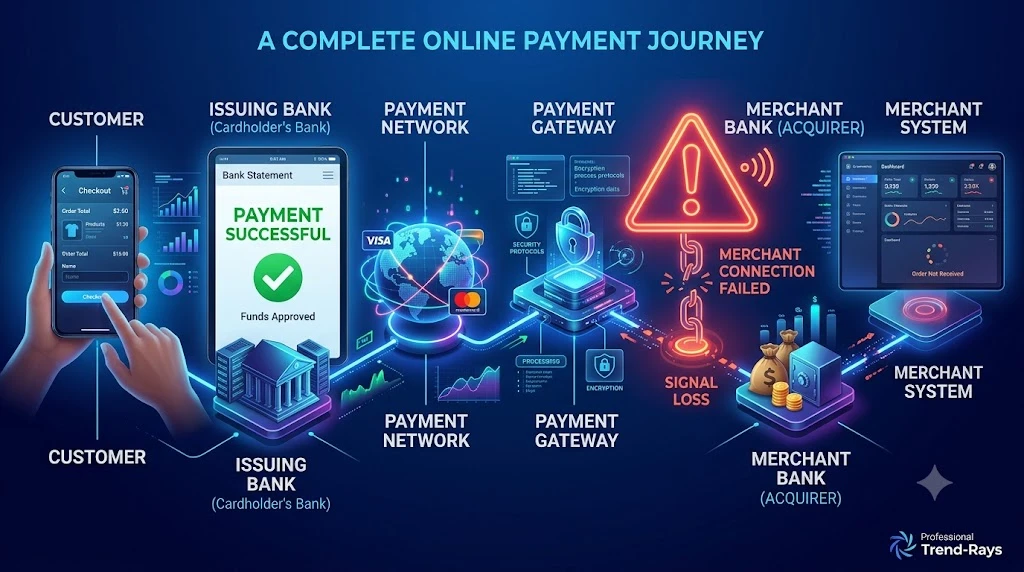
At first glance, this situation feels impossible.
Your bank account clearly shows that money has been deducted.
The merchant, however, insists:
“We didn’t receive your payment.”
It’s natural to think that either the bank or the merchant must be wrong.
In reality, both may be reporting accurate information based on what their own systems can see.
This happens because an online payment isn’t a single event—it’s a series of connected steps involving multiple organizations.
Your bank only knows whether it successfully processed the payment request.
The merchant only knows whether its own payment system has received and verified that payment.
If something interrupts communication between those stages, you end up with conflicting payment statuses.
Your Money Doesn’t Go Directly to the Merchant
Many people imagine online payments like handing cash to a cashier.
You give money.
The merchant immediately receives it.
Digital payments don’t work that way.
Instead, the payment follows a journey like this:
Customer
     │
     ▼
Issuing Bank
     │
     ▼
Payment Network
     │
     ▼
Payment Gateway
     │
     ▼
Merchant's Acquiring Bank
     │
     ▼
Merchant's Payment System
     │
     ▼
Order Confirmation
Every step has to complete successfully before the merchant can confidently say:
“We’ve received your payment.”
If one stage is delayed or interrupted, your bank may already have debited your account while the merchant is still waiting for confirmation.
Money Deducted Doesn’t Always Mean Money Delivered
This is one of the biggest misconceptions about online payments.
When your account balance decreases, it usually means your bank has:
- Approved the transaction.
- Reserved or debited the funds.
- Sent the payment into the payment network.
It doesn’t necessarily mean the merchant has already received the money.
Depending on the payment method, the funds may still be:
- Waiting for payment gateway confirmation.
- Undergoing settlement.
- Being reconciled between banks.
- Waiting for the merchant’s system to update.
This is why a merchant can honestly say:
“We don’t have your payment yet.”
even though your banking app shows:
Payment Successful
Why This Happens More Often Than You Think
Payment systems process millions of transactions every day.
Most complete within seconds.
However, delays occasionally occur because of:
Payment gateway outages
The gateway receives your payment but fails to notify the merchant immediately.
Merchant server issues
The payment arrives successfully, but the merchant’s website cannot create the order.
Network interruptions
A temporary internet or API failure interrupts communication between payment systems.
Settlement delays
The payment has been authorized but hasn’t yet been transferred to the merchant’s acquiring bank.
Fraud verification
Additional security checks temporarily pause order processing.
Real Example
Suppose you purchase a smartwatch for ₹12,999.
Here’s what happens:
10:15:02 AM
You click Pay Now.
↓
10:15:04 AM
Your bank approves the transaction.
↓
10:15:05 AM
₹12,999 is debited.
↓
10:15:06 AM
The payment gateway experiences a timeout while communicating with the merchant.
↓
10:15:08 AM
The merchant’s website displays:
Payment Failed
↓
10:20 AM
The payment gateway automatically retries the confirmation.
↓
10:22 AM
The merchant finally receives the payment and creates your order.
Throughout this entire process, your money was never lost.
The payment simply took longer to complete than expected.
Why You Should Never Judge a Payment by One Screen
Many customers make decisions based only on the checkout page.
For example:
Website:
Payment Failed
Customer:
“I’ll pay again.”
Meanwhile:
The banking app already shows:
Payment Successful
This creates duplicate payments.
Instead, always verify information from multiple sources:
- Your banking app.
- Your transaction history.
- Your email inbox.
- Your SMS notifications.
- Your merchant account or order history.
Looking at all of these together gives a much clearer picture of what actually happened.
What If the Merchant Really Didn’t Receive the Payment?
Sometimes the merchant is correct.
The payment may have:
- Failed after authorization.
- Been rejected during settlement.
- Timed out before reaching the merchant.
- Been automatically reversed.
In these situations, your bank will usually release or refund the amount according to its normal processing timelines.
We’ll cover those timelines later in this guide.
Related Reading
If you’re trying to understand different payment scenarios, these guides on Trend-Rays provide more detailed explanations:
- Money Debited but Order Failed: Why It Happens and What to Do — explains why orders sometimes fail after a successful debit and what steps to take.
- Bank Says Payment Successful but Merchant Says Payment Failed — covers the payment lifecycle, authorization, settlement, and why banks and merchants may report different statuses.
- Why COD Is Not Available on Zomato & Swiggy — explores how delivery platforms make payment and order eligibility decisions, which helps explain why some orders fail before or after checkout.
These articles complement each other and cover different stages of online payment and order processing.
Expert Tip
Whenever a merchant says your payment failed, don’t immediately assume the money has disappeared.
Instead, ask yourself:
“Has the payment completed the entire journey, or is it simply stuck somewhere along the way?”
That mindset will help you troubleshoot the issue logically instead of making another payment out of panic.
Key Takeaway
When a merchant reports that your payment failed after your bank has already deducted the money, it usually means the payment is still moving through the payment ecosystem rather than being lost.
In most cases, one of two things eventually happens:
- The merchant receives the payment and confirms the order.
- The payment fails completely, and the amount is returned to your account.
The next step is understanding where your money actually is during this period and how long you should wait before taking action.
Where Did Your Money Go? Understanding Authorization Holds, Settlement, and Automatic Refunds
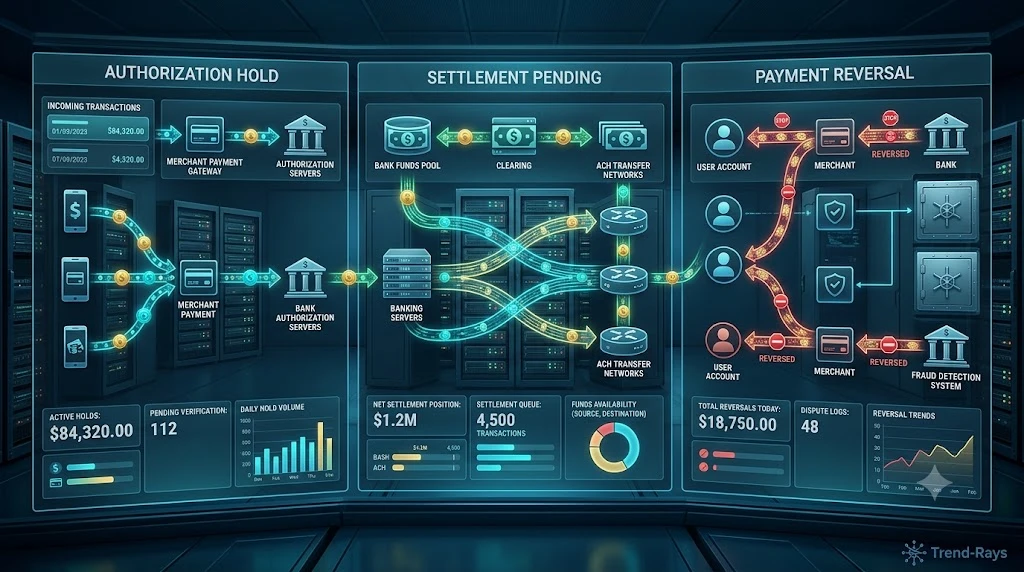
The moment you see money deducted from your account, it’s easy to assume that the merchant already has your payment.
In reality, that’s often not what has happened.
Your money could be in one of several places depending on how far the payment progressed before it failed.
Understanding these stages will help you determine whether you simply need to wait or whether it’s time to contact the merchant or your bank.
Scenario 1: The Money Is Under an Authorization Hold
This is the most common situation.
When you make an online payment, your bank doesn’t always transfer the money immediately.
Instead, it first places an authorization hold on the amount.
Think of it like reserving a hotel room.
The hotel blocks the room for you before you actually check in.
Similarly, your bank reserves the money before it’s permanently transferred to the merchant.
During this period:
- Your available balance decreases.
- Your bank may show the payment as successful.
- The merchant may still be waiting for confirmation.
- The funds haven’t necessarily reached the merchant.
This is completely normal.
Scenario 2: The Payment Is Waiting for Settlement
Authorization and settlement are two different stages.
Authorization
The bank approves the payment.
↓
Settlement
The actual money is transferred to the merchant.
Many people assume these happen simultaneously.
They don’t.
Settlement may occur:
- A few minutes later
- Several hours later
- The next business day
- During scheduled batch processing
Until settlement is completed, the merchant may not actually receive the funds.
Scenario 3: The Payment Is Stuck at the Payment Gateway
Payment gateways act as the bridge between your bank and the merchant.
If the gateway experiences:
- High server load
- API timeout
- Maintenance
- Temporary communication failure
your payment may be sitting safely inside the gateway while waiting to be forwarded.
Your bank considers the payment successful because it has already sent the funds.
The merchant hasn’t received them yet because the gateway hasn’t completed the next step.
Scenario 4: The Merchant Received the Payment but Couldn’t Match It to Your Order
Large online stores don’t process payments manually.
Their systems automatically connect:
- Payment ID
- Order ID
- Customer account
- Inventory
- Shipping
If that automatic matching process fails, the merchant may temporarily think the payment doesn’t exist.
The payment is actually sitting in their payment gateway or merchant account but isn’t linked to your order.
This usually requires manual reconciliation by the merchant’s payment team.
Scenario 5: The Payment Failed After Authorization
Sometimes the payment begins successfully but cannot be completed.
For example:
- The merchant server crashes.
- The payment gateway times out.
- The merchant rejects the transaction.
- The checkout process expires.
In these cases:
The authorization is cancelled.
Your bank releases the reserved funds.
The merchant never receives the money.
This is why many customers eventually see the amount credited back automatically without taking any action.
What Happens to Your Money in Each Situation?
| Situation | Where Is the Money? | Typical Outcome |
|---|---|---|
| Authorization Hold | Reserved by your bank | Released or settled |
| Settlement Pending | Moving between banks | Merchant receives payment |
| Payment Gateway Delay | Waiting in processing | Merchant receives confirmation |
| Merchant Reconciliation | Merchant has payment but hasn’t matched it | Order updated manually |
| Authorization Failed | Funds reserved temporarily | Money returned automatically |
How Long Does It Usually Take?
The timeline varies depending on:
- Your bank
- Payment method
- Merchant
- Payment gateway
- Weekends
- Public holidays
Generally speaking:
Payment Gateway Delays
Often resolved within minutes or a few hours.
Settlement Delays
May take up to one business day or the merchant’s next settlement cycle.
Authorization Holds
Commonly released within a few business days if the merchant never captures the payment.
Refunds
If the payment ultimately fails after being captured, the refund timeline depends on the merchant and your payment method.
Real-World Example
Arjun books movie tickets worth ₹1,250.
His bank immediately debits the amount.
The ticket booking app crashes before showing confirmation.
Here’s what actually happens:
- The bank authorizes the payment.
- The payment gateway receives it.
- The merchant server temporarily goes offline.
- No booking is created.
- Two hours later, the gateway retries the transaction.
- The booking system has already expired.
- The payment is automatically reversed.
- The authorization hold is released.
- Arjun’s money becomes available in his account again.
Although the money appeared to disappear temporarily, it was simply moving through the payment system.
Can You Track Where Your Money Is?
Not exactly.
Customers cannot see every stage of payment processing.
However, you can usually determine the likely status by checking:
Your Bank
Does the transaction show:
- Pending?
- Successful?
- Reversed?
The Merchant
Can they locate the payment using:
- Transaction reference number
- Payment amount
- Date and time
Payment Notifications
Did you receive:
- An order confirmation?
- A payment confirmation?
- A refund notification?
Looking at these together provides a much clearer picture than relying on just one status message.
Expert Tip
If your money has been deducted, avoid focusing only on your account balance.
Instead, ask:
Has the merchant captured the payment, or is the transaction still waiting to complete?
That question is much more useful than simply asking whether the payment was “successful.”
Did You Know?
Large merchants often receive thousands of payment confirmations every minute. To improve efficiency, many use automated reconciliation systems that periodically match incoming payments to customer orders. If this process is delayed or interrupted, a payment may temporarily exist in the merchant’s account without appearing in your order history.
Key Takeaway
Money deducted from your account doesn’t automatically mean the merchant has received it.
Your payment could be:
- Reserved through an authorization hold.
- Waiting for settlement.
- Being processed by a payment gateway.
- Awaiting reconciliation by the merchant.
- On its way back to your account after a failed authorization.
Understanding these possibilities helps you respond calmly and avoid unnecessary duplicate payments while waiting for the payment system to complete its normal processing.
How Long Should You Wait Before Taking Action?
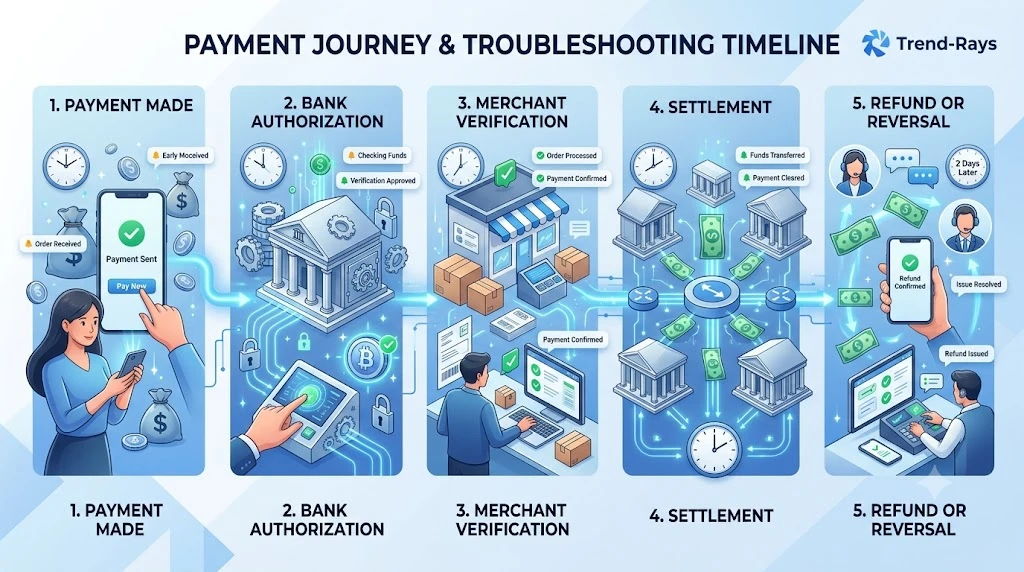
One of the biggest mistakes people make after seeing a payment deducted is taking action too quickly.
Some customers contact their bank within minutes.
Others immediately attempt another payment.
Some even file disputes before the merchant has had enough time to verify the transaction.
While it’s understandable to feel anxious, acting too quickly can sometimes create more problems than it solves.
The best approach depends on how much time has passed since you completed the payment.
First 5–10 Minutes
If the payment was just completed, don’t panic.
Many merchants receive payment confirmations almost instantly, but occasionally the confirmation takes a few extra minutes due to:
- Payment gateway synchronization
- Temporary server load
- Network delays
- Internal payment verification
During this period:
- Avoid refreshing the checkout page repeatedly.
- Don’t attempt another payment.
- Check your email and SMS for an order confirmation.
- Refresh your order history instead of restarting the payment process.
Many “failed” payments are resolved automatically during these first few minutes.
After 15–30 Minutes
If you still haven’t received:
- an order confirmation,
- an invoice,
- or an order number,
it’s reasonable to investigate further.
Start by logging into your merchant account.
Check:
- Recent Orders
- Purchase History
- My Bookings
- My Transactions
Sometimes the order exists even though the confirmation email was delayed or never delivered.
After One Hour
If there is still:
- no order,
- no confirmation,
- and no update,
contact the merchant’s customer support.
When contacting support, avoid writing a vague message like:
“My payment failed.”
Instead, provide complete information.
For example:
“I made a payment of ₹2,499 today at approximately 3:15 PM. My bank has marked the transaction as successful, but I haven’t received an order confirmation. My transaction reference number is XXXXXXXX. Could you please check your payment system?”
Providing complete details allows the support team to search their payment gateway much more efficiently.
After 24 Hours
If a full day has passed and the merchant still cannot locate your payment, it’s time to contact your bank.
Ask questions such as:
- Has the payment been settled?
- Is the amount still under authorization?
- Was the transaction reversed?
- Can you trace the payment using the transaction reference?
At this stage, both the merchant and the bank have usually had enough time to complete their normal reconciliation processes.
When Should You Contact Your Bank First?
There are a few situations where contacting the bank immediately makes sense.
For example:
Your account has been debited multiple times.
This may indicate duplicate authorizations.
The payment amount looks incorrect.
If the deducted amount doesn’t match your purchase, your bank should investigate immediately.
The transaction appears suspicious.
If you don’t recognize the payment at all, contact your bank without delay.
What You Should Avoid
While waiting for payment verification, avoid these common mistakes:
Don’t Pay Again Immediately
This is the fastest way to create duplicate charges.
Don’t Delete Payment Notifications
Your SMS, email, and banking notifications may contain valuable reference numbers.
Don’t Assume the Merchant Is Wrong
In many cases, the merchant genuinely cannot see the payment because it hasn’t yet reached their payment system.
Don’t Assume the Bank Is Wrong
Similarly, your bank may correctly report that the payment was authorized even though settlement hasn’t been completed.
Both organizations may be reporting accurate information based on different stages of the payment process.
A Simple Timeline to Follow
| Time Since Payment | Recommended Action |
|---|---|
| 0–10 minutes | Wait and check your order history. |
| 10–30 minutes | Look for confirmation emails or SMS messages. |
| Around 1 hour | Contact the merchant with your transaction reference number. |
| Around 24 hours | Contact your bank if the merchant still cannot locate the payment. |
This isn’t a strict rule for every payment system, but it’s a practical framework that works for most online transactions.
Real-World Example
Sneha purchases a pair of shoes online for ₹3,799.
Immediately after paying:
- Her bank confirms the payment.
- The shopping website shows Payment Failed.
Instead of paying again, she waits.
Twenty minutes later, she checks her account and still doesn’t see an order.
She contacts customer support with her transaction reference number.
The support team discovers that the payment was received by their gateway but had not yet been matched to an order because of a temporary synchronization delay.
The order is manually created, and no second payment is required.
Had Sneha attempted another payment within the first few minutes, she might have been charged twice.
Expert Tip
When contacting customer support, your transaction reference number is usually far more valuable than screenshots alone.
Support agents can often trace a payment within minutes using the reference number, while screenshots typically serve only as supporting evidence.
Key Takeaway
Time plays an important role in resolving payment mismatches.
Many issues resolve automatically once payment gateways, banks, and merchant systems complete their normal processing and reconciliation.
Instead of reacting immediately, follow a structured approach:
- Verify the payment.
- Wait briefly.
- Check your order history.
- Contact the merchant with complete transaction details.
- Contact your bank only if the merchant still cannot locate the payment after a reasonable investigation.
This approach minimizes confusion, reduces duplicate payment risks, and gives both parties enough time to process the transaction correctly.
Will You Automatically Get Your Money Back? Understanding Refunds vs Payment Reversals
One of the first questions people ask after seeing money deducted is:
“Will my money come back automatically?”
The answer is:
Usually, yes—but not always for the same reason.
This is where many people become confused because they assume every returned payment is a “refund.”
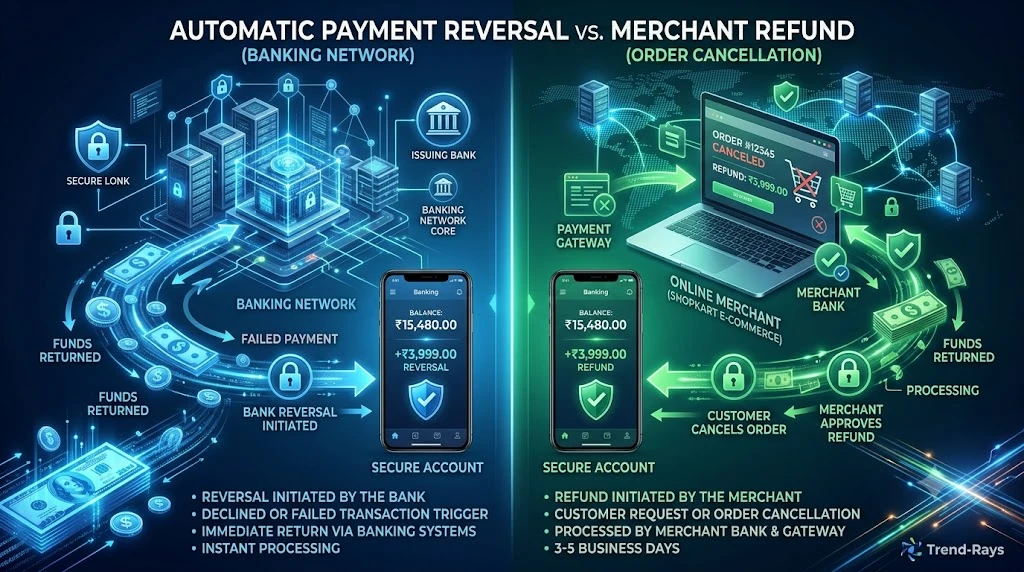
In reality, there are two completely different processes that can return money to your account:
- Payment Reversal
- Merchant Refund
Although both result in money reaching your account, they happen at different stages of the payment lifecycle.
Understanding the difference helps you know what to expect and who is responsible.
What Is a Payment Reversal?
A payment reversal happens when the payment never fully completes.
For example:
- Your bank authorizes the payment.
- The merchant never captures the payment.
- The payment gateway reports a failure.
- The authorization expires.
Since the merchant never actually receives the money, there is nothing for them to refund.
Instead, the banking system simply releases the authorization hold or reverses the transaction.
Think of it as cancelling a reservation before it becomes a completed purchase.
Example
Rahul attempts to pay ₹4,500 for a hotel booking.
His bank debits the amount.
Before the hotel receives payment confirmation, the booking website crashes.
The payment gateway reports a failed transaction.
After the authorization expires, Rahul’s bank automatically restores the amount to his account.
The hotel never handled the money.
Therefore:
No refund was required.
The payment was simply reversed.
What Is a Merchant Refund?
A refund is different.
A refund only happens after the merchant has successfully received your payment.
For example:
- The payment reaches the merchant.
- The merchant captures the payment.
- Later, the merchant cancels the order.
Since the merchant already has your money, they must initiate a refund.
Unlike reversals, refunds require action from the merchant.
Example
Priya purchases a jacket online.
Her payment succeeds.
The merchant later discovers the item is out of stock.
Since the merchant has already received the payment, they initiate a refund.
The money is then transferred back through the payment network to Priya’s bank account.
How Can You Tell Which One Is Happening?
Although every bank displays transaction information differently, there are some common signs.
Signs of a Payment Reversal
- The merchant cannot locate the payment.
- No order was created.
- The payment disappeared after remaining pending.
- The amount becomes available again without the merchant taking any action.
Signs of a Merchant Refund
- The merchant confirms they received your payment.
- The merchant tells you a refund has been initiated.
- You receive a refund confirmation email.
- The order exists but was cancelled afterward.
Who Is Responsible?
This depends entirely on where the payment stopped.
| Situation | Responsible Party |
|---|---|
| Authorization failed | Bank / Payment Network |
| Gateway processing failed | Payment Gateway |
| Merchant never received payment | Banking system handles reversal |
| Merchant received payment | Merchant must issue refund |
This is why customer support sometimes tells you:
“Please wait for an automatic reversal.”
while other times they say:
“We’ve initiated your refund.”
Those are two completely different processes.
Why Do Refunds Usually Take Longer?
Customers often wonder:
“If my payment was instant, why isn’t my refund instant?”
The reason is that payments and refunds follow different workflows.
A payment is designed to move money toward the merchant as quickly as possible.
A refund requires:
- Merchant approval.
- Refund initiation.
- Payment network processing.
- Banking verification.
- Crediting your account.
Each of these steps takes time.
What If Neither Happens?
Occasionally, customers find themselves in an unusual situation where:
- The merchant says they never received the payment.
- The bank says the payment was successful.
- No automatic reversal occurs.
- No refund is initiated.
This is where payment tracing becomes necessary.
Using your transaction reference number, the bank and the merchant can determine exactly where the payment stopped.
Fortunately, this situation is relatively uncommon.
Most transactions eventually end in either:
- Successful settlement,
- Automatic reversal,
- or Merchant-initiated refund.
Real-World Example
Amit orders a laptop worth ₹58,000.
His payment is authorized successfully.
The merchant’s payment gateway experiences a timeout before confirming the order.
Three days later, the authorization expires.
Without Amit contacting anyone, the amount becomes available in his account again.
This wasn’t a refund.
It was an automatic payment reversal because the merchant never captured the payment.
One Common Misunderstanding
Many people contact the merchant asking:
“Where is my refund?”
even though the merchant never received the payment.
In that situation, the merchant has nothing to refund.
The correct process is an authorization reversal handled by the payment system.
Understanding this distinction can save you several unnecessary support conversations.
Contextual Note
If your payment was successfully processed but your order itself failed, the troubleshooting process may be slightly different because the merchant might already have captured the funds. That’s a separate situation from a payment that never reached the merchant.
Expert Tip
Before asking for a refund, first ask:
“Did the merchant actually receive my payment?”
If the answer is no, you’re likely waiting for a payment reversal.
If the answer is yes, you’re waiting for a merchant refund.
Knowing which process applies helps set the right expectations.
Key Takeaway
Not every returned payment is a refund.
If the merchant never received your money, the banking system will usually handle an automatic payment reversal.
If the merchant already received your payment, they must initiate a refund.
Understanding the difference makes it much easier to know:
- who is responsible,
- what to expect,
- and why some returned payments take longer than others.
What Information Should You Collect Before Contacting Customer Support?
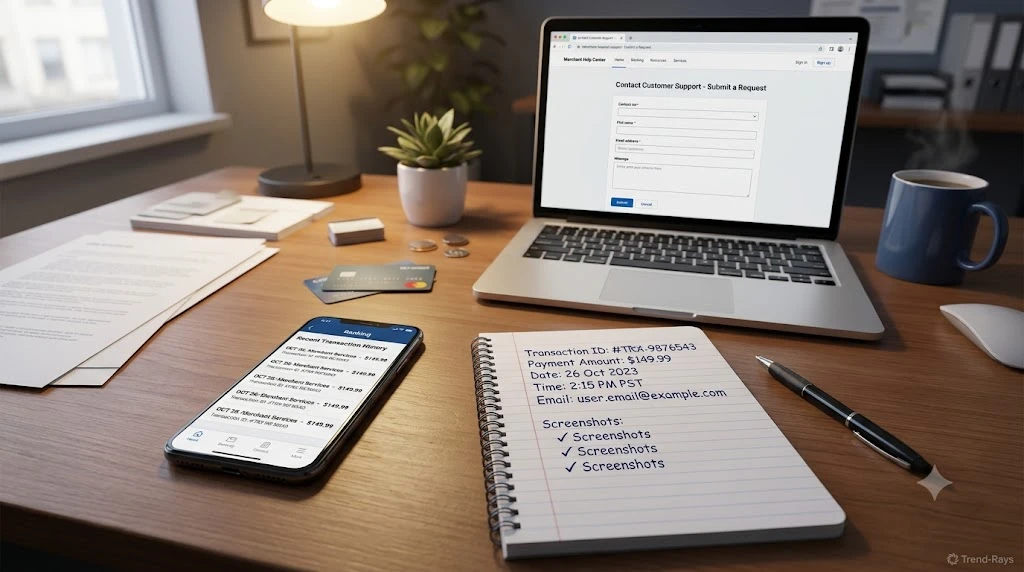
One of the biggest reasons payment issues take longer to resolve is that customers contact support with very little information.
Many conversations begin like this:
“My payment failed.”
While that’s true, it doesn’t give the support team enough information to locate your transaction.
Remember, large merchants process thousands—or even millions—of payments every day.
Without specific details, customer support often has to ask multiple follow-up questions before they can even begin investigating.
Collecting the right information beforehand can significantly reduce the time it takes to resolve your issue.
1. Transaction Reference Number (Most Important)
If there’s one piece of information you should never lose, it’s your transaction reference number.
Depending on your payment method, it may be called:
- Transaction ID
- Reference Number
- Payment ID
- UTR (Unique Transaction Reference)
- ARN (Acquirer Reference Number)
- Authorization Code
This number uniquely identifies your payment within the banking system.
When you provide it to the merchant, their payment team can often search directly in the payment gateway instead of manually reviewing thousands of transactions.
2. Exact Payment Amount
Always mention the exact amount that was deducted.
Instead of saying:
“Around ₹2,000”
say:
₹2,149
Exact amounts make payment searches much easier.
Merchants frequently use payment amount as one of their search filters.
3. Date and Time of Payment
Even a rough estimate helps.
For example:
- Date: 24 July 2026
- Time: Around 3:18 PM
Many payment gateways allow merchants to search transactions within a specific time range.
Providing this information speeds up reconciliation.
4. Payment Method Used
Mention exactly how you paid.
Examples include:
- UPI
- Debit Card
- Credit Card
- Net Banking
- Digital Wallet
Different payment methods follow different processing paths.
Knowing the payment method helps support teams identify the correct payment gateway and settlement channel.
5. Merchant Order Number (If Available)
Sometimes an order number is generated even when payment verification fails.
If you received:
- Booking ID
- Order Number
- Reservation Number
include it in your support request.
It allows the merchant to connect the payment investigation with your purchase.
6. Registered Email Address and Mobile Number
Many merchants search transactions using customer details.
Provide:
- The email address used during checkout.
- The mobile number linked to the order.
If you have multiple accounts, mention exactly which one was used.
7. Screenshots (Helpful, But Not Enough)
Screenshots can support your claim, but they shouldn’t replace transaction details.
Useful screenshots include:
- Banking app transaction page
- Payment confirmation screen
- Merchant error message
- SMS confirmation
- Email confirmation (if received)
Remember:
A screenshot shows what you saw.
A transaction reference number helps support teams locate what actually happened.
A Good Support Request
Here’s an example of a message that gives customer support everything they need:
Hello,
I attempted to place an order today using my debit card.
My bank shows the payment as successful, and ₹3,450 has been deducted from my account.
However, I did not receive an order confirmation, and the checkout page displayed “Payment Failed.”
Transaction Reference Number: 1234567890
Payment Time: Approximately 2:35 PM
Payment Method: Debit Card
Registered Email: example@email.com
Could you please check whether the payment has reached your payment gateway or if it is still pending verification?
This message immediately gives the support team enough information to begin investigating.
A Poor Support Request
Now compare it with this:
My payment failed.
Please help.
This forces the support agent to ask:
- Which payment?
- Which order?
- Which account?
- Which amount?
- Which date?
- Which payment method?
Every missing detail adds more time to the investigation.
Should You Contact the Merchant or the Bank First?
As a general rule:
If the payment has been deducted but the merchant says they haven’t received it:
Start with the merchant.
Why?
Because the merchant can first determine whether:
- The payment is waiting in their payment gateway.
- The payment reached their acquiring bank.
- The order simply failed to update.
- Manual reconciliation is required.
Only if the merchant confirms they cannot locate the payment should you contact your bank for payment tracing.
This sequence usually resolves issues faster and avoids unnecessary back-and-forth.
Keep Your Records Until the Issue Is Fully Resolved
Even after the issue appears resolved, keep:
- Transaction reference number
- Email confirmations
- Chat transcripts
- Refund confirmations
- Screenshots
until:
- Your order has been successfully completed, or
- The money has been credited back to your account.
Deleting these records too early can make future investigations more difficult if another issue arises.
Real-World Example
Karan contacts an online electronics store after a payment problem.
Instead of simply saying:
“Money was deducted.”
he provides:
- Transaction reference number
- Exact payment amount
- Time of payment
- Registered email address
- Screenshot of the banking transaction
Within a few minutes, the merchant identifies that the payment had reached their payment gateway but wasn’t linked to an order because of a temporary synchronization issue.
The order is manually restored without Karan needing to contact his bank.
The difference wasn’t luck.
It was the quality of the information he provided.
Expert Tip
If you’re asked for only one detail during a payment investigation, always provide the transaction reference number first.
It’s usually the fastest way for payment specialists to trace a transaction through the banking and payment gateway systems.
Key Takeaway
When reporting a payment issue, the information you provide directly affects how quickly it can be resolved.
Before contacting support, gather:
- Transaction reference number
- Exact payment amount
- Date and time of payment
- Payment method
- Order number (if available)
- Registered email or mobile number
- Relevant screenshots
Providing complete information from the beginning helps both merchants and banks investigate your payment much more efficiently, reducing delays and unnecessary follow-up questions.
Common Mistakes That Can Delay Your Payment Resolution
When a payment problem occurs, most people focus on finding out where their money went.
Unfortunately, many customers unknowingly make the situation worse by taking actions that delay the investigation or even create entirely new problems.
Understanding what not to do is just as important as knowing the correct troubleshooting steps.
Here are the most common mistakes to avoid.
Mistake #1: Making the Payment Again Immediately
This is by far the most expensive mistake.
Imagine this sequence:
- Your payment is authorized successfully.
- The merchant’s website displays Payment Failed because of a temporary communication issue.
- Without checking your banking app, you immediately attempt another payment.
A few minutes later:
- The first payment is successfully reconciled.
- The second payment also succeeds.
Now you’ve paid twice.
Instead of solving one payment issue, you’ve created a duplicate payment that may require a separate refund process.
Unless you’ve confirmed that the original transaction has completely failed or been reversed, avoid making another payment.
Mistake #2: Contacting Only Your Bank
Many customers assume that because the money left their account, the bank must be able to solve everything.
That’s not always true.
Your bank can usually confirm:
- Whether the payment was authorized.
- Whether the transaction has settled.
- Whether it was reversed.
However, the bank cannot see:
- Whether the merchant created your order.
- Whether the payment is waiting inside the merchant’s payment gateway.
- Whether the merchant’s system failed to match the payment.
That’s why the merchant should usually be your first point of contact after verifying that your payment was successful.
Mistake #3: Not Saving the Transaction Reference Number
Many users close the payment screen immediately after seeing an error.
Later, when customer support asks for the transaction reference number, they no longer have it.
Without this reference, tracing the payment becomes much slower.
As a habit, save:
- The transaction ID.
- Payment confirmation SMS.
- Banking notification.
- Confirmation email.
Even if the payment eventually succeeds, having these records can be valuable if another issue arises.
Mistake #4: Providing Incomplete Information to Support
Support agents investigate hundreds of payment issues every day.
Messages like:
“Money deducted.”
or
“Payment failed.”
don’t provide enough information.
Instead, include:
- Exact payment amount.
- Transaction reference number.
- Date and time.
- Payment method.
- Registered email or mobile number.
A well-documented support request often reduces the number of follow-up questions and speeds up the investigation.
Mistake #5: Ignoring Order History
Many customers repeatedly refresh the payment page but never check:
- My Orders
- Purchase History
- Booking History
In some cases:
The payment succeeds.
The order is created.
Only the confirmation page fails to load.
Checking your order history can sometimes confirm that everything completed successfully.
Mistake #6: Confusing a Reversal With a Refund
As explained earlier in this guide, these are different processes.
Some customers repeatedly contact the merchant asking:
“Where is my refund?”
when the merchant never actually received the payment.
In those situations, the banking system is usually processing an automatic reversal instead.
Understanding the difference helps you contact the correct organization.
Mistake #7: Escalating Too Quickly
It’s understandable to feel frustrated.
However, escalating a payment issue within a few minutes of making the payment rarely speeds things up.
Payment gateways, acquiring banks, and merchants all require time to complete:
- Authorization
- Settlement
- Reconciliation
Allowing the normal payment process to finish before escalating often resolves the issue without additional intervention.
Mistake #8: Believing Every Error Message Literally
Customers often assume that whatever appears on the checkout page reflects the final outcome.
For example:
Payment Failed
doesn’t always mean the payment actually failed.
Similarly,
Processing
doesn’t always mean the payment will eventually succeed.
The checkout page is only one part of a much larger payment ecosystem.
Always verify the payment using your banking app and transaction history before drawing conclusions.
A Better Approach
Whenever you encounter a payment issue, follow this simple mindset:
Instead of asking:
“Who made the mistake?”
Ask:
“Which stage of the payment process hasn’t finished yet?”
This small change in perspective makes payment problems much easier to understand and troubleshoot.
Real-World Example
Ananya purchases concert tickets online.
The payment page freezes after checkout.
She immediately considers making another payment.
Instead, she:
- Checks her banking app.
- Finds the payment marked as successful.
- Waits for fifteen minutes.
- Contacts the merchant with her transaction reference number.
The merchant confirms that the payment had reached their gateway but hadn’t yet been linked to an order because of a temporary synchronization issue.
The tickets are issued without requiring another payment.
By avoiding common mistakes, Ananya prevents a duplicate transaction and a lengthy refund process.
Expert Tip
Whenever something goes wrong during checkout, remember this rule:
Never make decisions based on a single screen.
Always compare:
- Your bank’s transaction status.
- Your order history.
- Confirmation emails or SMS messages.
- The merchant’s response.
Looking at all four together provides a much more accurate picture than relying on one error message.
Key Takeaway
Most payment disputes become more complicated because of customer actions taken in the first few minutes after the problem occurs.
Avoid these common mistakes:
- Paying again immediately.
- Contacting only your bank.
- Losing your transaction reference number.
- Sending incomplete support requests.
- Ignoring your order history.
- Confusing reversals with refunds.
- Escalating too early.
- Trusting a single error message.
Following a structured approach gives the payment system enough time to complete its normal processing and significantly improves your chances of resolving the issue without duplicate payments or unnecessary delays.
When Should You Escalate the Issue? Knowing When It’s Time to Push Further
Most payment problems are resolved without major intervention.
Either:
- the merchant eventually receives the payment,
- the payment is automatically reversed,
- or the merchant processes a refund.
However, there are situations where simply waiting is no longer the right approach.
The challenge is knowing when patience is appropriate and when escalation becomes necessary.
Escalating too early wastes time.
Escalating too late can unnecessarily delay your resolution.
Here’s how to decide.
Situation 1: The Merchant Hasn’t Responded Within Their Promised Timeframe
Many merchants will say something like:
“Please allow 24–48 hours for payment verification.”
If that timeframe has passed without:
- an update,
- an order confirmation,
- or a payment status,
follow up with the merchant.
When following up, reference your previous support ticket instead of creating a new one.
This helps keep the investigation in one place and avoids duplicate cases.
Situation 2: The Merchant Cannot Find the Payment
Sometimes customer support replies:
“We cannot locate your transaction.”
Before accepting that response, ask whether they searched using:
- Transaction Reference Number
- Payment Gateway Reference
- Payment Amount
- Payment Date and Time
Many first-level support agents only search by order number.
If no order was created, they may incorrectly conclude that no payment exists.
Request that the payment be verified by the merchant’s payments or finance team, not just general customer support.
Situation 3: Your Bank Confirms the Payment Has Been Successfully Settled
This is one of the strongest reasons to escalate.
If your bank confirms that:
- the payment has settled,
- the merchant has successfully captured the funds,
but the merchant still insists they haven’t received anything, the investigation needs to move beyond basic customer support.
At this stage, both parties should compare the transaction using the reference number.
Situation 4: The Merchant Asks You to Pay Again Without Investigating
This is a warning sign.
If customer support immediately says:
“Please make another payment.”
without checking your existing transaction, don’t proceed.
Instead, reply politely:
“My bank has already confirmed that the payment was successful. Could you please investigate this transaction using the reference number before asking me to make another payment?”
A responsible merchant should always verify an existing payment before recommending another one.
Situation 5: You Were Charged More Than Once
If:
- two successful transactions appear,
- multiple authorizations exist,
- or duplicate orders were created,
contact the merchant immediately.
Duplicate payments usually require merchant intervention because they already have access to both payment records.
Waiting too long can make reconciliation more complicated.
Situation 6: Several Business Days Have Passed Without Resolution
If the merchant has investigated but the issue still isn’t resolved after several business days, contact your bank again.
Explain:
- the merchant has completed its investigation,
- the payment still cannot be located,
- and you’d like the transaction formally traced.
Banks can sometimes initiate a payment trace using the transaction reference number and settlement records.
Who Should Handle Different Types of Problems?
| Problem | Contact First |
|---|---|
| Order not created | Merchant |
| Payment gateway verification | Merchant |
| Payment settlement confirmation | Bank |
| Duplicate payment | Merchant |
| Authorization reversal | Bank |
| Refund status | Merchant |
| Unrecognized transaction | Bank immediately |
Choosing the correct contact point saves time and reduces unnecessary back-and-forth.
How to Escalate Professionally
Avoid emotional messages like:
“You stole my money.”
or
“This is fraud.”
Most payment issues are technical rather than intentional.
A better message would be:
“My bank has confirmed that Transaction Reference Number XXXXX was successfully processed on 24 July 2026 for ₹3,999. The payment has not yet been matched to my order. Could you please escalate this case to your payments team for further investigation?”
Clear, factual communication usually produces faster results.
Real-World Example
Rohit purchases airline tickets online.
His bank confirms the payment immediately.
The airline’s website reports:
Payment Failed
Customer support initially says:
“We can’t find your payment.”
Instead of paying again, Rohit provides:
- Transaction reference number
- Payment amount
- Payment time
He politely requests that the payment team review the gateway records.
Two hours later, the airline confirms that the payment had reached their acquiring bank but wasn’t linked to the booking because of a temporary synchronization issue.
The booking is restored without any additional payment.
Expert Tip
Whenever you request escalation, ask what team will investigate your case.
For example:
- Payments Team
- Finance Team
- Billing Team
- Reconciliation Team
Knowing which department is handling the issue gives you clearer expectations and makes follow-up conversations more productive.
Key Takeaway
Escalation should be based on evidence—not frustration.
Consider escalating when:
- The merchant’s promised investigation time has passed.
- The merchant cannot locate the payment despite having your transaction reference number.
- Your bank confirms the payment has settled.
- You’re asked to pay again without any investigation.
- Duplicate payments appear.
- Several business days pass without meaningful progress.
A calm, well-documented escalation supported by transaction details is far more effective than repeatedly contacting support without new information.
Frequently Asked Questions
The following questions are based on real searches from Google, Reddit, banking forums, payment support communities, and “People Also Ask” results. These FAQs help answer additional search intent while improving the article’s topical completeness.
Does “Money Deducted” Always Mean the Merchant Has Received My Payment?
No.
A deduction from your bank account only confirms that your bank has processed or authorized the transaction.
The payment may still be:
- Waiting for settlement.
- Being processed by the payment gateway.
- Undergoing reconciliation.
- Waiting for merchant confirmation.
The merchant may not have received the funds yet.
How Long Does It Take for Money to Return If the Payment Failed?
There isn’t a single timeline that applies to every payment.
The processing time depends on factors such as:
- Your bank.
- The payment method.
- The merchant.
- The payment gateway.
- Whether the payment requires a reversal or a refund.
If the payment never reaches the merchant, the banking system usually processes an automatic reversal.
If the merchant has already received the payment, they normally need to initiate a refund.
Should I Pay Again If the Merchant Says Payment Failed?
Not immediately.
First:
- Check your banking app.
- Verify whether the amount has actually been deducted.
- Look for an order confirmation.
- Contact the merchant with your transaction reference number.
Making another payment too quickly is one of the most common causes of duplicate charges.
Who Is Responsible for My Money—the Bank or the Merchant?
It depends on where the payment stopped.
If the payment failed before reaching the merchant, the banking system usually handles the reversal.
If the merchant successfully received the payment, they are responsible for initiating any refund.
This is why identifying the stage at which the payment failed is so important.
Can the Merchant Trace My Payment?
Yes.
Most merchants can search for transactions using:
- Transaction reference number.
- Payment amount.
- Date and time.
- Payment method.
- Registered email or mobile number.
Providing complete transaction details greatly improves the chances of locating the payment quickly.
What Happens If the Merchant Never Receives My Payment?
If the merchant never captures the payment, the transaction is generally reversed automatically after the authorization expires.
The exact timeline depends on your bank and payment method.
Why Does My Banking App Say “Successful” While the Merchant Says “Failed”?
Because the bank and the merchant are viewing different stages of the payment lifecycle.
Your bank confirms that it successfully processed the payment request.
The merchant confirms whether they successfully received and verified the payment.
Temporary delays between these stages can result in conflicting payment statuses.
Can Internet Problems Cause Money to Be Deducted Without an Order Being Created?
Yes.
If your internet connection or the merchant’s server fails immediately after payment authorization, the payment may continue processing even though the checkout page displays an error.
In some cases, the order appears later.
In others, the payment is reversed automatically.
Is My Money Lost Forever?
In the overwhelming majority of cases, no.
Online payment systems include multiple safeguards designed to ensure that payments eventually reach one of two outcomes:
- Successful settlement with the merchant.
- Automatic reversal or merchant refund.
Temporary payment mismatches rarely result in permanently lost funds.
Can This Happen With UPI Payments?
Yes.
Although UPI transactions are generally very fast, temporary issues can still occur because of:
- Bank server delays.
- Payment Service Provider (PSP) issues.
- Merchant-side outages.
- Network interruptions.
The troubleshooting process remains largely the same:
Verify the transaction, avoid paying again immediately, and contact the merchant with your transaction reference if necessary.
Can This Happen With Credit Cards and Debit Cards?
Yes.
Card payments also pass through multiple stages:
- Authorization.
- Payment network processing.
- Settlement.
- Merchant confirmation.
Any interruption during these stages can produce the same mismatch between your bank and the merchant.
What Should I Keep Until the Issue Is Resolved?
Don’t delete any payment-related information until either:
- Your order has been successfully completed, or
- Your money has been returned.
Keep:
- Transaction reference number.
- Payment confirmation SMS.
- Banking notifications.
- Email confirmations.
- Merchant chat transcripts.
- Screenshots of the transaction.
These records can significantly speed up any investigation.
Can Customer Support See My Payment Immediately?
Not always.
First-level customer support agents often have access only to:
- Order records.
- Customer accounts.
- Basic payment status.
If the payment hasn’t yet been matched to an order, they may need to escalate the case to:
- Payments Team.
- Finance Team.
- Billing Team.
- Reconciliation Team.
This is why providing a transaction reference number is so important.
What If I Accidentally Paid Twice?
If you made another payment before the first transaction was fully investigated:
- Save both transaction reference numbers.
- Contact the merchant immediately.
- Request that both payments be reviewed together.
- Avoid requesting separate investigations for each transaction.
Most merchants can identify duplicate payments and begin the appropriate refund process.
Final Thoughts
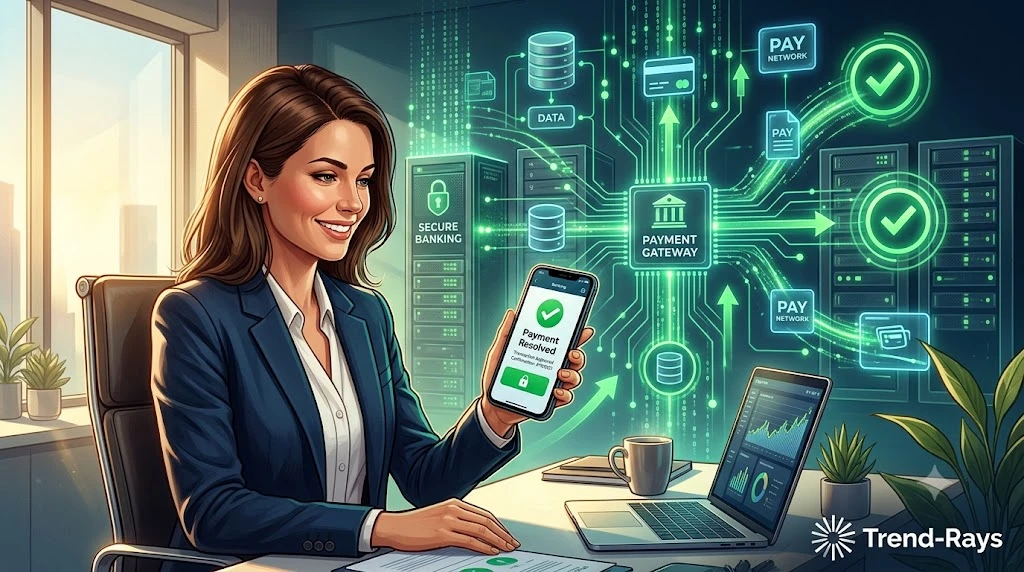
Discovering that money has been deducted while the merchant reports a failed payment can be stressful.
Fortunately, in most situations, the payment hasn’t disappeared—it is simply somewhere within the payment processing system.
The important thing is to remain patient and methodical.
Instead of reacting immediately:
- Verify the transaction.
- Understand where the payment may be.
- Keep your transaction details safe.
- Contact the merchant with complete information.
- Escalate only when appropriate.
Following this approach greatly reduces the chances of duplicate payments, unnecessary disputes, and prolonged investigations.
Understanding how modern payment systems work doesn’t just help with this transaction—it prepares you to handle similar situations confidently in the future.