Can You Split Payment Between Two Cards Online?
Yes—but only in certain situations.
Most online retailers do not allow you to split a purchase between two separate credit cards or two debit cards during a single online checkout. However, many stores do allow specific combinations, such as using a gift card together with a credit or debit card to pay the remaining balance. Some retailers also support store credit, loyalty rewards, or digital wallets alongside another payment method.
Whether split payment is available depends on several factors, including:
- The retailer’s checkout system
- The payment processor it uses
- The type of payment methods you’re combining
- Whether you’re shopping online or in-store
- Country-specific payment policies
For example, Amazon generally allows customers to combine an Amazon Gift Card balance with another eligible payment method, while many other retailers restrict online purchases to a single bank card. Individual policies vary, so it’s important to check the retailer’s checkout options before placing an order.
This guide compares the split-payment policies of major online retailers, explains why many stores don’t support two-card payments, and outlines practical alternatives when split payment isn’t available.
What You’ll Learn in This Guide
By the end of this article, you’ll know:
- Whether you can split payment between two credit cards.
- Whether two debit cards can be used for one online purchase.
- Which major retailers allow split payments.
- When gift cards can be combined with another payment method.
- Why most ecommerce websites don’t support two-card checkout.
- What to do if your preferred retailer doesn’t offer split payment.
- Alternative ways to complete a purchase when one payment method isn’t enough.
Instead of giving a simple “yes” or “no,” this guide explains how split payments actually work, compares retailer policies, and provides practical solutions based on common checkout scenarios.
Why This Guide Is Different
Many articles answer this question in just a few paragraphs before listing a handful of retailers.
The reality is much more complex.
Split payment policies differ depending on:
- The retailer
- The payment processor
- The payment method
- The country
- Whether you’re shopping online or in-store
A retailer may allow:
- Gift Card + Credit Card
while refusing:
- Credit Card + Credit Card
Another retailer may allow split payments in physical stores but not on its website or mobile app.
Because of these differences, we’ve organized this guide around real checkout situations rather than generic definitions, making it easier to find the answer that applies to your purchase.
Throughout the article, you’ll also find comparison tables, retailer-specific notes, and practical alternatives when split payment isn’t available.
What Does “Split Payment” Mean?
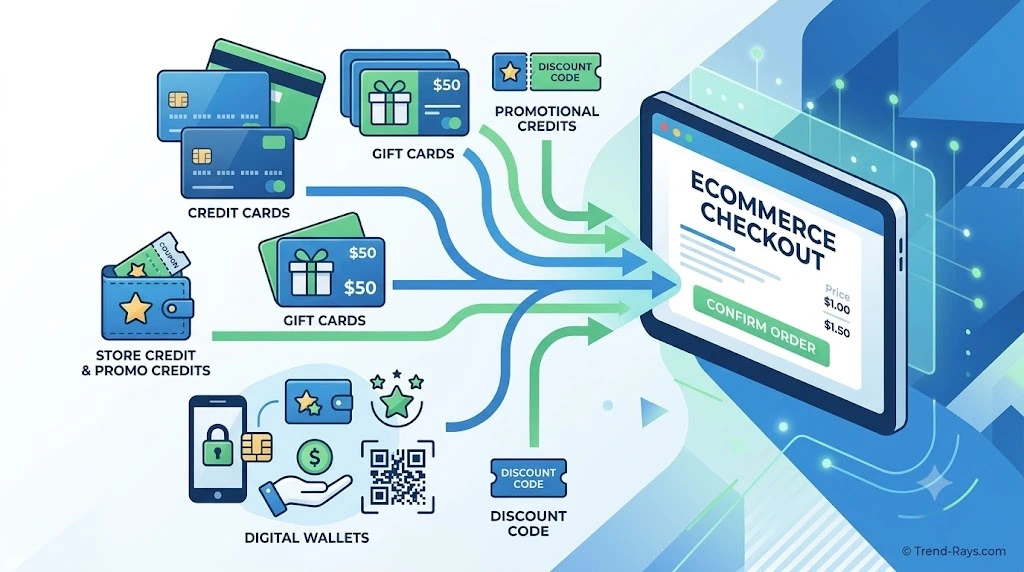
If you’ve ever tried to complete an online purchase using more than one payment method, you’ve probably encountered the term split payment. While the concept sounds straightforward, retailers, payment processors, and financial institutions often use different terminology to describe similar checkout options.
Understanding these terms makes it much easier to know what a retailer actually supports before you reach the payment page.
What Is a Split Payment?
A split payment is a checkout method that allows a customer to pay for a single purchase using more than one payment source.
For example, instead of paying a $150 order with one card, you might want to use:
- A $50 gift card plus a credit card for the remaining $100.
- Store credit combined with a debit card.
- Reward points plus another payment method.
Whether this is possible depends entirely on the retailer’s checkout system and payment policy.
What Is Split Tender?
You may also see the phrase split tender.
Split tender is the retail industry’s term for accepting multiple forms of payment during the same transaction.
For example:
- Gift Card + Credit Card
- Gift Card + Debit Card
- Store Credit + Credit Card
- Loyalty Rewards + Credit Card
Although “split payment” and “split tender” are often used interchangeably, many retailers use split tender in their official documentation.
Can You Split Payment Between Two Credit Cards?
In most cases, no.
Most online retailers require a single primary bank card for security, fraud prevention, and simpler payment processing.
Some physical stores may manually process two different cards at checkout, but this option is rarely available for online purchases because ecommerce checkout systems are designed to authorize a single card transaction.
This is why customers frequently discover that they can combine a gift card with another payment method but cannot divide the remaining balance across two different credit cards.
Can You Split Payment Between Two Debit Cards?
Again, usually not.
Although debit cards work differently from credit cards behind the scenes, most ecommerce platforms still process them as a single card payment.
If your debit card doesn’t have enough available funds, many websites won’t prompt you to enter a second debit card. Instead, the transaction is typically declined, and you’ll need to choose another payment method or reduce the order value.
Why Gift Cards Are Different
Gift cards are the most common exception to the “one payment method” rule.
Many retailers allow customers to:
- Apply the full value of a gift card.
- Automatically deduct that balance from the order total.
- Charge the remaining amount to another eligible payment method.
This process is much simpler because the retailer controls its own gift card system, making it easier to apply multiple payment sources without involving multiple bank authorizations.
For many shoppers, this is the closest experience to a true split payment.
Other Payment Combinations You May See
Depending on the retailer, checkout options may include combinations such as:
| Payment Combination | Commonly Supported? | Notes |
|---|---|---|
| Gift Card + Credit Card | ✅ Frequently | One of the most widely supported combinations. |
| Gift Card + Debit Card | ✅ Frequently | Often used when the gift card balance is insufficient. |
| Store Credit + Card | ✅ Common | Available on many ecommerce platforms. |
| Loyalty Rewards + Card | ✅ Sometimes | Depends on the retailer’s rewards program. |
| Two Credit Cards | ❌ Rare | Most online stores do not support this. |
| Two Debit Cards | ❌ Rare | Usually not available online. |
| Credit Card + Debit Card | ❌ Rare | Supported by very few online retailers. |
As you’ll see in the retailer comparison later in this guide, the available combinations vary widely from one store to another.
Why Understanding These Terms Matters
Many shoppers assume that if a retailer accepts several payment methods, it must also allow those methods to be combined in a single transaction.
Unfortunately, that’s not how most ecommerce checkout systems work.
Knowing the difference between split payment, split tender, gift card redemption, and multiple payment methods helps you avoid checkout errors and choose the most practical payment option before placing your order.
In the next section, we’ll explore why most online stores don’t allow two-card payments in the first place, even though the technology to process multiple payment methods already exists.
Why Most Online Stores Don’t Allow Two Cards for One Purchase
One of the biggest questions shoppers ask is:
“If stores accept multiple payment methods, why can’t I simply use two cards for one online purchase?”
The short answer is that it’s not primarily a technology problem.
Modern payment systems are capable of processing multiple transactions in seconds. However, allowing customers to split a single online purchase between two different bank cards introduces additional complexity for retailers, payment processors, and banks.
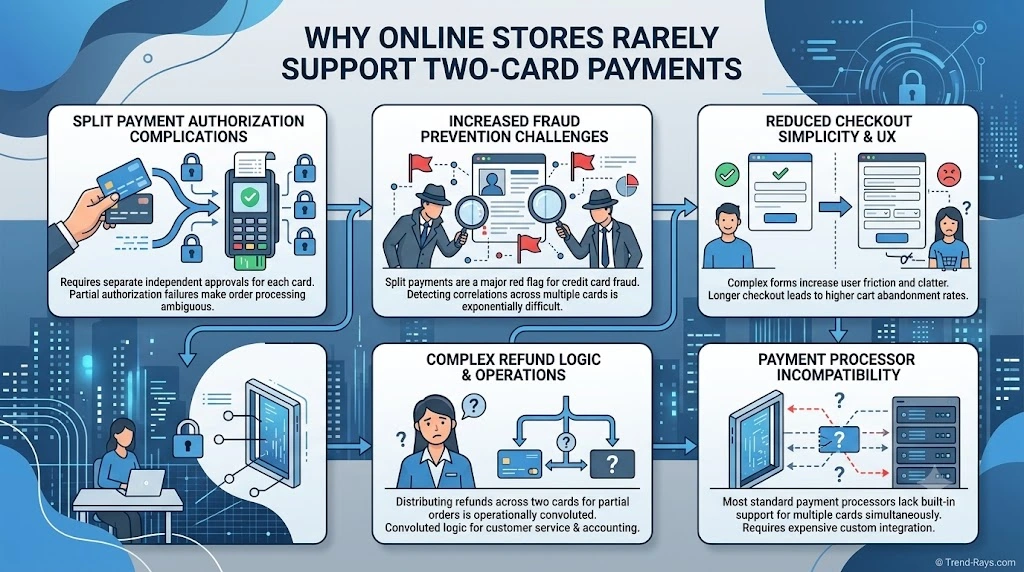
Below are the five biggest reasons why most ecommerce websites limit online purchases to one primary card.
1. Payment Authorization Becomes More Complicated
Every time you enter your card details at checkout, the retailer requests an authorization from your card issuer.
If the purchase needs to be divided between two separate cards, the checkout system must successfully authorize both transactions.
If one authorization succeeds while the second fails, the retailer must decide how to handle the order:
- Cancel the first authorization
- Retry the second payment
- Place the order on hold
- Ask the customer to start the checkout again
Each option creates additional complexity and increases the likelihood of abandoned carts or customer support requests.
Using one primary payment method is much simpler and reduces the chances of incomplete transactions.
2. Refunds Become Much More Difficult
Refunds are relatively straightforward when an order was paid using a single payment method.
For example:
- A $120 purchase paid entirely with one credit card can usually be refunded directly back to that card.
Now consider a split payment:
- $40 paid with Gift Card A
- $30 paid with Gift Card B
- $50 paid with a debit card
If the customer returns only part of the order, the retailer must determine:
- Which payment method should receive the refund first?
- Should the gift cards be reloaded?
- Should the debit card receive the refund?
- How should partial refunds be calculated?
Handling these scenarios consistently across thousands of daily transactions significantly increases operational complexity.
3. Fraud Prevention Systems Prefer Simpler Transactions
Online payment systems continuously monitor transactions for signs of fraud.
Using multiple payment methods for a single purchase can sometimes resemble suspicious activity, particularly when:
- Different cards are issued by different banks.
- Billing information does not match.
- Cards originate from different countries.
- Several payment attempts occur within a short period.
To reduce fraud risk, many retailers configure their checkout systems to accept only one primary bank card for online orders.
This approach simplifies fraud detection and reduces false positives.
4. Checkout Should Be Fast and Simple
Every additional step in the checkout process increases the likelihood that a customer will abandon their purchase.
Retailers spend significant resources optimizing checkout to make it as quick and straightforward as possible.
Supporting multiple card payments would require customers to:
- Enter two sets of card details.
- Decide how much to charge to each card.
- Complete multiple authorization requests.
- Resolve any payment errors before finishing checkout.
For most retailers, the additional complexity outweighs the relatively small number of customers who need split-card payments.
Instead, many stores support simpler alternatives such as combining a gift card with another payment method.
5. Payment Processor Limitations
Not every payment gateway offers built-in support for split-card transactions.
Many ecommerce platforms are designed around a single payment authorization per order.
Although some enterprise retailers can develop custom checkout systems, doing so often requires:
- Additional payment gateway integrations.
- More complex refund logic.
- Expanded customer support processes.
- Ongoing maintenance and testing.
For smaller businesses, these costs are difficult to justify.
As a result, many merchants choose the simpler option of accepting one primary payment method while allowing exceptions for store-issued gift cards or store credit.
Why Gift Cards Are Usually the Exception
If you’ve successfully used a gift card together with another payment method, you may wonder why that works when two bank cards do not.
The reason is that retailer-issued gift cards are typically managed within the retailer’s own payment system.
When you apply a gift card:
- The available balance is deducted from the order total.
- Only the remaining balance is sent for bank authorization.
- The bank processes a single card transaction rather than two separate card authorizations.
Because only one bank card is involved, the checkout process remains much simpler while still giving customers flexibility.
This is why many retailers support Gift Card + Credit Card or Gift Card + Debit Card combinations even though they don’t allow two separate bank cards for the same online purchase.
The Bottom Line
Most online stores don’t prohibit two-card payments because the technology is impossible.
They do it because a single payment method makes checkout faster, refunds easier, fraud detection more reliable, and payment processing less complex.
Understanding these behind-the-scenes factors also explains why payment policies vary from one retailer to another—and why gift cards are often treated differently from credit and debit cards.
In the next section, we’ll compare the split-payment policies of major online retailers so you can quickly see which stores allow multiple payment methods and which require a single card at checkout.
Retailer Split Payment Comparison
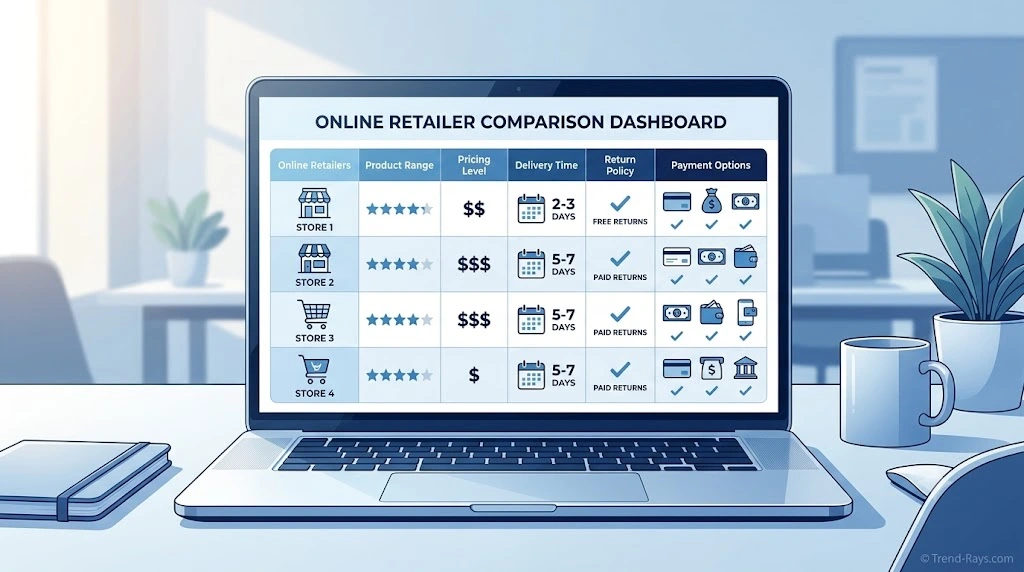
Although the concept of split payment sounds simple, there is no universal policy that applies to every online retailer.
Each company decides how its checkout system works based on its payment provider, fraud prevention policies, refund procedures, and customer experience goals.
As a result, two stores selling similar products may offer completely different payment options.
For example, one retailer may allow you to combine a gift card with a debit card, while another may require the full purchase to be paid using a single payment method.
The comparison below summarizes the current policies of several major online retailers. Because payment options can change over time and may vary by country, always review the checkout page before completing your purchase.
Major Marketplace Retailers
| Retailer | Two Credit Cards | Two Debit Cards | Gift Card + Card | Store Credit + Card | Overall Split Payment Support |
|---|---|---|---|---|---|
| Amazon | ❌ | ❌ | ✅ | Limited | Moderate |
| Walmart | Limited | Limited | ✅ | Limited | Moderate |
| Target | Limited | Limited | ✅ | Limited | Moderate |
| Best Buy | Limited | Limited | ✅ | Limited | Moderate |
| Costco | ❌ | ❌ | Limited | Limited | Low |
Amazon
Amazon generally does not allow customers to split a single online purchase between two separate credit cards or two debit cards.
However, customers can usually combine an Amazon Gift Card balance with another eligible payment method to cover any remaining balance.
Commonly Supported
- Amazon Gift Card + Credit Card
- Amazon Gift Card + Debit Card
Generally Not Supported
- Credit Card + Credit Card
- Debit Card + Debit Card
Alternative
If you need to use funds from multiple cards, consider purchasing an Amazon Gift Card with one card before completing your order using your remaining payment method.
Walmart
Walmart’s payment options vary depending on whether you’re shopping online or in a physical store.
Online purchases generally require one primary payment card, although Walmart Gift Cards can usually be combined with another eligible payment method.
Some in-store purchases may provide greater flexibility than online checkout.
Commonly Supported
- Walmart Gift Card + Credit Card
- Walmart Gift Card + Debit Card
May Be Available
- Split tender in selected in-store transactions
Generally Not Supported Online
- Two separate bank cards during one online checkout
Target
Target supports several payment methods, including Target GiftCards and REDcard payment options.
For many online purchases, Target GiftCards can be applied before charging the remaining balance to another eligible payment method.
However, customers generally cannot divide one online purchase between two different credit cards.
Best Buy
Best Buy typically allows customers to redeem Best Buy Gift Cards during checkout before charging any remaining balance to another accepted payment method.
Using two separate bank cards for one online order is generally unavailable through the standard checkout process.
Costco
Costco keeps its online checkout process relatively simple.
Most purchases require one primary payment method, and split payments between two bank cards are generally unavailable.
Depending on the purchase, Costco Shop Cards may provide additional flexibility, although this differs from true two-card split payment.
The retailers above illustrate an important pattern.
Although policies differ slightly, most major ecommerce platforms support retailer-issued gift cards much more readily than two separate bank cards.
In the next section, we’ll examine fashion retailers, discount marketplaces, and international ecommerce platforms to see whether the same pattern applies across other industries.
Fashion Retailers and Global Marketplaces
Fashion retailers and international ecommerce marketplaces often use different checkout systems than large department stores. While many accept a wide range of payment methods, most still restrict customers to one primary bank card per online transaction.
The most common exception remains retailer-issued gift cards or store credit, which can usually be applied before charging the remaining balance to another eligible payment method.
The table below compares the general split-payment support offered by several popular fashion retailers and online marketplaces.
| Retailer | Two Credit Cards | Two Debit Cards | Gift Card + Card | Store Credit + Card | Overall Split Payment Support |
|---|---|---|---|---|---|
| Nike | ❌ | ❌ | ✅ | Limited | Moderate |
| Adidas | ❌ | ❌ | ✅ | Limited | Moderate |
| SHEIN | ❌ | ❌ | ❌ | Limited | Low |
| Temu | ❌ | ❌ | ❌ | Limited | Low |
| AliExpress | ❌ | ❌ | ❌ | Limited | Low |
| eBay | Depends on Seller | Depends on Seller | Limited | Limited | Moderate |
| Etsy | Depends on Seller | Depends on Seller | Limited | Limited | Moderate |
Nike
Nike generally processes online orders using one primary payment method.
Customers can often combine a Nike Gift Card with another eligible payment method, but splitting the remaining balance between two separate credit or debit cards is generally unavailable through Nike’s online checkout.
Commonly Supported
- Nike Gift Card + Credit Card
- Nike Gift Card + Debit Card
Generally Not Supported
- Credit Card + Credit Card
- Debit Card + Debit Card
Helpful Tip
If your Nike Gift Card doesn’t fully cover your purchase, the remaining balance can usually be paid using one eligible payment method during checkout.
Adidas
Adidas follows a payment structure similar to many large retail brands.
Gift cards may be combined with another accepted payment method where available, but customers generally cannot divide a single online purchase across two separate bank cards.
Commonly Supported
- Adidas Gift Card + Credit Card
- Adidas Gift Card + Debit Card
Generally Not Supported
- Two Credit Cards
- Two Debit Cards
SHEIN
SHEIN offers numerous payment methods, including cards and digital wallets, but its online checkout generally requires one primary payment source for each transaction.
Customers should not expect to split an order between two separate bank cards during standard checkout.
Available Alternatives
- Digital wallets (where supported)
- Buy Now, Pay Later services in eligible regions
- Promotional credits (where applicable)
Temu
Temu supports multiple payment methods depending on your country, including major credit cards, debit cards, digital wallets, and regional payment services.
However, customers generally cannot split a purchase between two separate bank cards.
Good to Know
Temu frequently offers promotional credits and coupons that automatically reduce the order total before payment, but these should not be confused with true split payment.
AliExpress
AliExpress serves customers across many countries and supports a wide variety of payment methods.
Despite that flexibility, each transaction is generally completed using one primary payment method, rather than two separate bank cards.
Depending on your region, local payment methods may also be available, but split-card checkout is generally not offered.
eBay
Unlike traditional retailers, eBay operates as a marketplace where individual sellers list products.
Because payment processing depends on eBay’s checkout system rather than the seller, customers generally complete purchases using one payment method.
Gift cards, promotional credits, or eBay-specific offers may be available for eligible purchases, but two-card split payments are not commonly supported.
Etsy
Etsy works differently from many large retailers because independent sellers manage their own stores.
Even so, Etsy’s checkout process generally accepts a single payment method per transaction.
Some promotional credits or Etsy Gift Cards may be combined where supported, but customers should not expect to divide one online purchase between two separate credit or debit cards.
Key Takeaways from Fashion and Marketplace Retailers
Although these retailers vary in size and business model, several consistent patterns emerge:
- Most require one primary bank card for online purchases.
- Retailer-issued gift cards are usually the only widely supported form of split payment.
- Marketplaces such as eBay and Etsy process payments through centralized checkout systems, so seller preferences typically don’t override payment rules.
- Promotional credits, coupons, and loyalty rewards may reduce your order total, but they are not the same as true split payments.
If you’re shopping with fashion retailers or global marketplaces, the safest assumption is that two separate bank cards won’t be accepted unless the retailer explicitly states otherwise.
In the next section, we’ll examine food delivery platforms, where payment policies can vary depending on the app, restaurant, and country, making checkout rules even more nuanced.
Food Delivery Platforms
Food delivery apps have become one of the most common places where customers want to use multiple payment methods.
A typical situation looks like this:
- You have a gift card with a small remaining balance.
- Your debit card doesn’t have enough funds to cover the full order.
- A friend sent you promotional credit.
- You want to use two different cards to complete checkout.
Unfortunately, most food delivery apps are designed to process one primary payment method per order, although many also support platform-issued gift cards, promotional credits, or account balances.
The comparison below summarizes the general split-payment options offered by major food delivery services.
| Platform | Two Credit Cards | Two Debit Cards | Gift Card + Card | Account Credit + Card | Overall Split Payment Support |
|---|---|---|---|---|---|
| Uber Eats | ❌ | ❌ | Limited | ✅ | Moderate |
| DoorDash | ❌ | ❌ | Limited | ✅ | Moderate |
| Grubhub | ❌ | ❌ | Limited | Limited | Low–Moderate |
| Instacart | ❌ | ❌ | Limited | Limited | Low–Moderate |
Uber Eats
Uber Eats generally requires one primary payment method for each order.
Customers cannot normally divide a single order between two separate credit cards or two debit cards.
However, Uber Eats may automatically apply:
- Uber Cash
- Promotional credits
- Gift card balance (where supported)
before charging the remaining amount to your selected payment method.
Commonly Supported
- Uber Cash + Credit Card
- Uber Cash + Debit Card
- Promotional Credits + Card
Generally Not Supported
- Credit Card + Credit Card
- Debit Card + Debit Card
Helpful Tip
If you receive Uber Cash through promotions or refunds, it is usually applied automatically before your primary payment method is charged.
DoorDash
DoorDash follows a similar payment model.
Each order normally requires one primary payment method, although eligible promotional credits and DoorDash account credits may reduce the final amount before payment is processed.
Customers generally cannot split an online order between two separate bank cards.
Commonly Supported
- DoorDash Credits + Card
- Promotional Credits + Card
Generally Not Supported
- Two Credit Cards
- Two Debit Cards
Grubhub
Grubhub accepts several payment methods depending on your location, but online checkout is generally completed using one primary payment source.
Gift cards, promotional offers, or account credits may be available in certain situations, but true split-card payments are generally unavailable.
Instacart
Instacart supports major payment cards, digital wallets, and several regional payment methods depending on the country.
Despite these options, customers should generally expect to use one primary payment method for each order.
If credits or promotions are available, they are typically applied before charging the remaining balance.
Why Food Delivery Apps Handle Payments Differently
Food delivery platforms process payments differently from traditional online retailers because several businesses are involved in a single transaction.
A typical order includes:
- The customer
- The delivery platform
- The restaurant
- The payment processor
- The delivery driver
Managing multiple payment authorizations across all these parties would significantly increase processing complexity.
As a result, most platforms simplify checkout by requiring one primary payment method while allowing account credits or promotional balances to reduce the total amount owed.
If Your Food Delivery App Doesn’t Allow Split Payment
If your preferred platform doesn’t support two-card checkout, consider these alternatives:
Use Platform Credits
Many apps automatically apply available account credits before charging your payment card.
Redeem Gift Cards
If supported in your region, adding a platform gift card to your account may help reduce the amount charged to your bank card.
Reduce Your Order Total
Removing one or two items may allow the purchase to fit within the available balance on your preferred payment method.
Use a Digital Wallet
Some digital wallets simplify checkout by storing your preferred payment method, although they generally don’t bypass the platform’s split-payment restrictions.
Key Takeaways
Food delivery platforms prioritize fast, reliable checkout.
Although they accept a variety of payment methods, most still process orders using one primary bank card, while allowing credits, promotions, or platform balances to reduce the remaining amount.
If your goal is to combine two separate credit or debit cards, you’ll usually need to explore other alternatives because true split-card payments remain uncommon across major food delivery services.
The next section looks at digital stores and subscription platforms, where payment policies differ again due to digital goods, recurring billing, and account-based purchases.
Digital Stores and Subscription Services
Digital stores operate differently from traditional ecommerce retailers.
When you purchase:
- Apps
- Games
- Movies
- Music
- Cloud storage
- Software subscriptions
- Streaming services
the payment is usually processed immediately through your account rather than a standard shopping cart.
Because of this, digital platforms generally require one primary payment method for each transaction or subscription renewal.
Instead of allowing customers to split purchases between two separate bank cards, many platforms apply account balances, gift cards, or promotional credits before charging the remaining amount to a single payment method.
The comparison below summarizes the general payment flexibility offered by popular digital platforms.
| Platform | Two Credit Cards | Two Debit Cards | Gift Card/Balance + Card | Promotional Credit + Card | Overall Split Payment Support |
|---|---|---|---|---|---|
| Apple App Store | ❌ | ❌ | ✅ | Limited | Moderate |
| Google Play | ❌ | ❌ | ✅ | Limited | Moderate |
| Steam | ❌ | ❌ | Limited | Limited | Low |
| PlayStation Store | ❌ | ❌ | ✅ | Limited | Moderate |
| Xbox Store | ❌ | ❌ | ✅ | Limited | Moderate |
| Spotify | ❌ | ❌ | ❌ | Limited | Low |
| Netflix | ❌ | ❌ | ❌ | Limited | Low |
Apple App Store
Apple purchases are tied to your Apple Account.
Customers generally cannot split a purchase between two different credit or debit cards.
However, Apple Account balance (including redeemed gift cards) is typically used first, with any remaining amount charged to your primary payment method if applicable.
Commonly Supported
- Apple Account Balance + Credit Card
- Apple Account Balance + Debit Card
Generally Not Supported
- Credit Card + Credit Card
- Debit Card + Debit Card
Google Play
Google Play follows a similar model.
If you have Google Play balance available, eligible purchases may use that balance before charging your selected payment method.
Google Play generally does not support dividing one purchase between two different bank cards.
Commonly Supported
- Google Play Balance + Card
Generally Not Supported
- Two separate bank cards
Steam
Steam Wallet funds can usually be applied toward eligible purchases before the remaining balance is charged to your selected payment method.
However, Steam generally does not allow customers to split one purchase between two separate credit or debit cards.
For many gamers, adding funds to the Steam Wallet in advance is the easiest way to manage purchases using multiple payment sources.
PlayStation Store
PlayStation Store purchases are processed through your PlayStation Network account.
Wallet funds are typically used before your primary payment method is charged.
Customers generally cannot split a single purchase between two separate bank cards.
Xbox Store
Microsoft uses a similar payment structure for Xbox purchases.
Microsoft account balance can often be combined with another eligible payment method, but purchases are generally not divided between two different bank cards during checkout.
Spotify
Spotify subscriptions normally renew using one payment method linked to your account.
Customers generally cannot combine two separate cards for a single subscription payment.
If payment fails, Spotify typically asks users to update or replace their primary payment method rather than allowing a second card to cover part of the subscription.
Netflix
Netflix also relies on one primary payment method for recurring billing.
Although Netflix supports several payment options depending on your country, customers generally cannot divide a monthly subscription between two different bank cards.
Gift cards are available in selected regions and may be used to pay for future subscription periods, but they do not function as true split payments during checkout.
Why Digital Platforms Rarely Support Split Payments
Digital platforms prioritize:
- Instant payment processing
- Automated subscription renewals
- Simplified account management
- Lower fraud risk
Supporting two-card payments would introduce unnecessary complexity for recurring billing and digital content delivery.
Instead, many platforms encourage customers to maintain an account balance or redeem gift cards before purchases, allowing the remaining amount to be charged to one primary payment method.
Key Takeaways
Across digital stores, the pattern is remarkably consistent:
- Two separate bank cards are rarely accepted for one transaction.
- Platform balances and gift cards are the most common alternatives.
- Recurring subscriptions usually rely on one primary payment method.
- Account-based payment systems simplify renewals and reduce payment failures.
If you’re purchasing apps, games, software, or streaming subscriptions, using a platform balance or gift card is often the closest alternative to a traditional split payment.
In the next section, we’ll move beyond retailer policies and explore which payment combinations are actually supported, helping you understand what works in real-world checkout scenarios regardless of the store you’re shopping with.
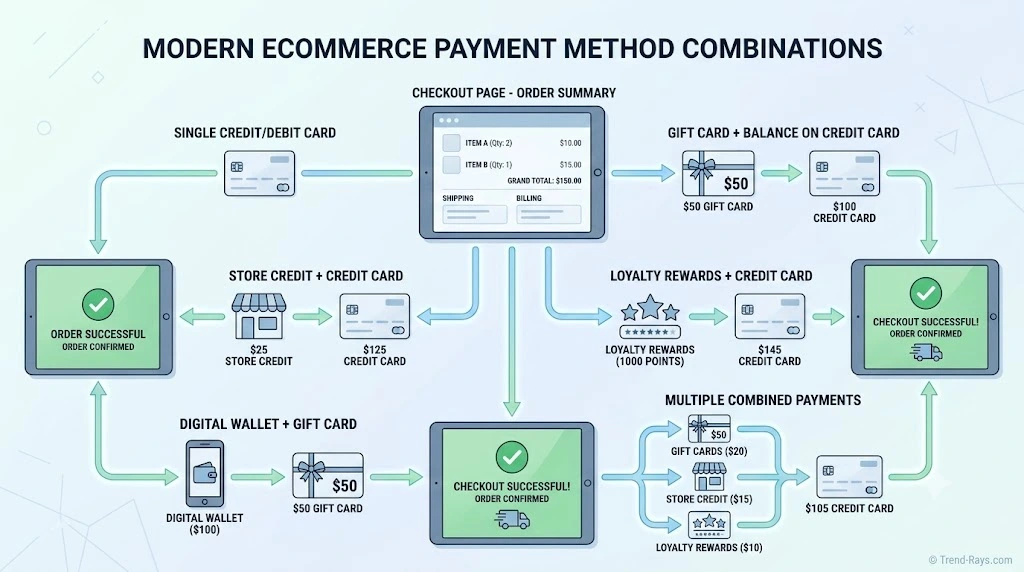
Which Payment Combinations Actually Work?
After comparing dozens of retailers and digital platforms, one pattern becomes clear:
Most online stores don’t support two separate credit cards or two debit cards during a single checkout.
However, that doesn’t mean you’re limited to one way of paying.
Many retailers support alternative payment combinations that achieve a similar result without requiring two bank card authorizations.
Understanding which combinations are commonly accepted can save time, reduce payment errors, and help you complete your purchase more efficiently.
Payment Combination Comparison
| Payment Combination | Commonly Supported | Typical Availability | Notes |
|---|---|---|---|
| Gift Card + Credit Card | ✅ Very Common | Most major retailers | Remaining balance is charged to your card. |
| Gift Card + Debit Card | ✅ Very Common | Most major retailers | One of the most widely accepted combinations. |
| Store Credit + Credit Card | ✅ Common | Retailers with store credit | Store credit is applied first. |
| Store Credit + Debit Card | ✅ Common | Selected retailers | Depends on the retailer’s checkout system. |
| Loyalty Rewards + Card | ✅ Sometimes | Retailers with rewards programs | Rewards reduce the order total before payment. |
| Promotional Credit + Card | ✅ Sometimes | Delivery apps and digital stores | Credits are usually applied automatically. |
| Digital Wallet + Card | ⚠️ Depends | Apple Pay, Google Pay, PayPal | Wallets simplify payment but don’t usually split bank cards. |
| Buy Now, Pay Later + Deposit | ⚠️ Depends | Selected retailers | Availability depends on the financing provider. |
| Two Credit Cards | ❌ Rare | Very few online retailers | Usually unavailable. |
| Two Debit Cards | ❌ Rare | Very few online retailers | Usually unavailable. |
| Credit Card + Debit Card | ❌ Rare | Very limited | Supported only by a small number of merchants. |
1. Gift Card + Credit Card
Success Rate: ★★★★★
This is by far the most common form of split payment available online.
Here’s how it usually works:
- Enter your gift card code.
- The retailer deducts the available balance.
- Any remaining amount is automatically charged to your selected credit card.
Example
Order Total:
$120
Gift Card Balance:
$40
Remaining Balance:
$80
Charged to your credit card.
For many shoppers, this is the easiest alternative to using two separate cards.
2. Gift Card + Debit Card
Success Rate: ★★★★★
This combination works almost identically to Gift Card + Credit Card.
It’s especially useful when:
- Your debit card doesn’t have enough funds for the full purchase.
- You received a retailer gift card as a gift.
- You’re trying to use the remaining balance on an older gift card.
Many retailers automatically calculate the remaining balance during checkout, eliminating the need for manual calculations.
3. Store Credit + Bank Card
Success Rate: ★★★★☆
Many retailers issue store credit after:
- Returns
- Refunds
- Price adjustments
- Promotional offers
When available, store credit is usually applied before charging your selected credit or debit card.
Because the retailer manages the credit internally, this process is much simpler than authorizing two separate bank cards.
4. Loyalty Rewards + Card
Success Rate: ★★★☆☆
Retailers with loyalty programs may allow customers to redeem:
- Reward points
- Cashback credits
- Shopping rewards
before charging the remaining balance to another payment method.
Examples include:
- Retail membership programs
- Grocery rewards
- Airline shopping portals
- Hotel loyalty programs
Policies vary widely, so always review your account benefits before checkout.
5. Promotional Credits + Card
Success Rate: ★★★★☆
Food delivery platforms and digital services frequently issue promotional credits.
Examples include:
- First-order discounts
- Referral rewards
- Customer service credits
- Delivery fee credits
These credits generally reduce your payable amount automatically before your primary payment method is charged.
Although this feels similar to split payment, the platform still processes only one bank card transaction.
6. Digital Wallets
Success Rate: ★★★☆☆
Digital wallets such as:
- Apple Pay
- Google Pay
- PayPal
can simplify checkout because they securely store your preferred payment methods.
However, using a digital wallet does not automatically allow you to combine two different bank cards for one purchase.
Most wallets simply charge the primary payment method you’ve selected within the wallet.
Some wallets may support account balances or stored credits, depending on the platform and region.
7. Buy Now, Pay Later Services
Success Rate: ★★★☆☆
Buy Now, Pay Later (BNPL) services provide another alternative when you can’t pay the full amount immediately.
Instead of combining two payment cards, these services divide your purchase into scheduled installments.
Availability depends on:
- The retailer
- Your country
- Eligibility requirements
- Credit approval (where applicable)
Although BNPL isn’t technically split payment, many shoppers use it to solve the same budgeting problem.
Combinations That Rarely Work
Despite advances in ecommerce technology, these payment combinations remain uncommon:
❌ Credit Card + Credit Card
❌ Debit Card + Debit Card
❌ Credit Card + Debit Card
These combinations require multiple bank authorizations, more complex refund handling, and additional fraud checks, making them impractical for many online retailers.
Quick Decision Guide
Use this simple checklist before placing your order.
You have a retailer gift card.
→ Use the gift card first, then pay the remaining balance with one bank card.
You have store credit.
→ Apply the credit before selecting your primary payment method.
You have two bank cards.
→ Check the retailer’s policy first.
Most online stores won’t allow two-card checkout.
You don’t have enough money on one card.
→ Consider reducing your order, purchasing a retailer gift card beforehand, or using an eligible financing option if available.
The Bottom Line
While true two-card payments remain uncommon online, many retailers provide practical alternatives through gift cards, store credit, promotional balances, and account credits.
Knowing which payment combinations are commonly accepted allows you to choose the most effective option before reaching checkout, reducing payment failures and avoiding unnecessary frustration.
In the next section, we’ll look at what to do when your preferred retailer doesn’t allow split payment, including practical workarounds that many shoppers overlook.

What to Do If a Retailer Doesn’t Allow Split Payment
Finding out that your preferred retailer doesn’t accept two separate payment cards can be frustrating—especially if you already have money spread across multiple accounts or gift cards.
The good news is that you still have several practical options.
Depending on the retailer and the payment methods you have available, one of the alternatives below may help you complete your purchase without waiting for additional funds.
Option 1: Use a Retailer Gift Card
Best For
- Large online retailers
- Fashion stores
- Electronics retailers
- Grocery chains
This is often the easiest workaround.
Instead of trying to use two separate bank cards during checkout, you can:
- Purchase a retailer gift card using your first payment method.
- Apply the gift card balance during checkout.
- Pay the remaining balance using your second payment method.
Example
Purchase Total:
$180
Card A Available Balance:
$75
Buy a $75 retailer gift card using Card A.
During checkout:
- Gift Card: $75
- Card B: $105
Because many retailers already support gift cards alongside another payment method, this approach often succeeds where two-card checkout does not.
Option 2: Use Store Credit First
Many retailers issue store credit after:
- Returns
- Refunds
- Price adjustments
- Promotional campaigns
If store credit is available in your account, it is usually applied before charging your selected payment card.
Always check your account balance before placing a new order—you may have unused credit without realizing it.
Option 3: Split the Purchase Into Two Orders
If your retailer doesn’t support split payments, consider dividing your purchase into multiple transactions.
Example
Instead of placing:
One order:
$240
Create:
Order 1
$120
Order 2
$120
This allows you to use different payment methods for each order.
Before doing this, consider:
- Shipping charges
- Minimum order requirements
- Promotional discounts
- Inventory availability
Sometimes splitting an order costs more than using a different payment method.
Option 4: Use a Digital Wallet
Digital wallets such as:
- Apple Pay
- Google Pay
- PayPal
don’t usually allow two-card checkout, but they can simplify payment by securely storing your preferred payment method.
Some wallets also support:
- Stored account balances
- Promotional credits
- Cashback rewards
Depending on the platform, these balances may automatically reduce your payable amount before charging your selected card.
Option 5: Consider Buy Now, Pay Later (BNPL)
If your retailer supports Buy Now, Pay Later services, they may provide another way to complete your purchase without needing two payment cards.
Depending on availability, eligible customers may be able to divide the purchase into scheduled installments rather than paying the full amount immediately.
Before choosing this option, review:
- Repayment schedule
- Interest or fees (if any)
- Eligibility requirements
- Terms and conditions
BNPL is not a substitute for split payment, but it may solve the same budgeting challenge for some shoppers.
Option 6: Contact Customer Support
If you’re making:
- A high-value purchase
- A business order
- A custom order
- A bulk purchase
it may be worth contacting the retailer directly.
Some customer support teams can:
- Suggest alternative payment options.
- Process special orders.
- Recommend payment methods not available through standard online checkout.
This won’t be possible for every retailer, but it can be worthwhile for larger purchases.
Option 7: Wait for Pending Transactions to Clear
Sometimes the issue isn’t the retailer at all.
If your available card balance seems lower than expected, pending authorizations may temporarily reduce the amount you can spend.
Examples include:
- Hotel deposits
- Fuel station pre-authorizations
- Restaurant holds
- Previous online purchases
Waiting until these temporary holds are released may allow your preferred payment method to cover the full purchase without needing split payment.
Workarounds to Avoid
When trying to complete a purchase, some online advice can create more problems than it solves.
Avoid:
❌ Using multiple browser sessions
This rarely bypasses checkout restrictions.
❌ Attempting repeated failed transactions
Multiple failed payment attempts may trigger fraud detection systems or temporary security blocks.
❌ Sharing payment accounts with strangers
Never use someone else’s payment account or allow unknown individuals to complete purchases on your behalf.
❌ Purchasing third-party gift cards from unofficial sources
Only buy gift cards from trusted retailers or authorized sellers to reduce the risk of fraud or unusable balances.
Which Alternative Works Best?
| Situation | Recommended Solution |
|---|---|
| You have a retailer gift card | Apply the gift card first, then pay the remaining balance with one card. |
| You have store credit | Use the available credit before selecting your payment method. |
| You have funds across two bank cards | Consider purchasing a retailer gift card with one card if supported. |
| Your card balance is temporarily low | Check for pending authorizations before trying again. |
| You’re making a large purchase | Contact customer support to discuss available payment options. |
The Bottom Line
Although many online retailers don’t support true split payments between two bank cards, there are several practical alternatives that can help you complete your purchase.
Gift cards, store credit, account balances, promotional credits, and carefully planned purchases often provide the same flexibility without requiring changes to the retailer’s checkout system.
Understanding these alternatives before you begin shopping can save time, reduce payment failures, and help you choose the most efficient way to pay.
In the next section, we’ll answer some of the most common split-payment problems and troubleshooting questions, including what happens when your gift card balance isn’t enough, why a second card may be declined, and how refunds work when multiple payment methods are involved.
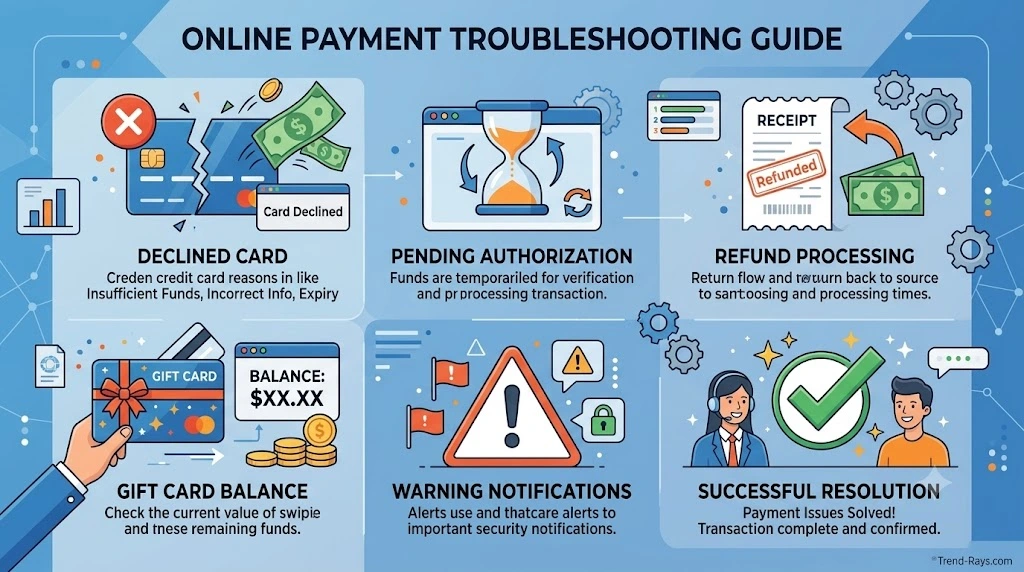
Common Split Payment Problems (And How to Fix Them)
Even when a retailer supports certain types of split payments, customers can still encounter problems during checkout.
Sometimes the issue is the payment method itself.
Other times it’s caused by temporary authorization holds, retailer policies, or account settings.
Below are the most common problems shoppers experience—and the practical steps you can take to resolve them.
My Gift Card Doesn’t Cover the Full Purchase
Why It Happens
This is one of the most common checkout situations.
For example:
Order Total:
$135
Gift Card Balance:
$90
Remaining Balance:
$45
Many shoppers assume they can simply use another gift card or a second credit card to pay the difference.
Whether that’s possible depends entirely on the retailer.
Most major retailers allow:
- Gift Card + One Credit Card
- Gift Card + One Debit Card
However, they usually do not allow:
- Gift Card + Two Credit Cards
- Multiple Debit Cards
- Multiple Credit Cards
How to Fix It
- Apply the gift card first.
- Use one eligible payment method for the remaining balance.
- Check whether the retailer accepts multiple gift cards.
- Review the retailer’s payment policy before checkout.
My Second Card Was Declined
Why It Happens
Most online checkout systems aren’t designed to process two separate bank cards during one transaction.
If you attempt to use a second card after the first payment has already been authorized, the retailer may reject the transaction because two-card payments aren’t supported.
Other possible reasons include:
- Fraud prevention checks
- Incorrect billing information
- Insufficient available balance
- Temporary bank restrictions
How to Fix It
- Confirm that the retailer actually supports multiple payment methods.
- Verify your billing address and card details.
- Contact your card issuer if you believe the transaction was incorrectly declined.
- Consider using a gift card or store credit instead.
My Payment Is Still Pending
Why It Happens
Pending transactions occur when your bank temporarily reserves funds before the retailer completes the purchase.
This can happen when:
- A payment attempt fails.
- An order is cancelled.
- The retailer hasn’t finalized the transaction yet.
Although the money may appear unavailable, the charge has not necessarily been completed.
How to Fix It
- Wait for the pending authorization to expire.
- Monitor your bank account for updates.
- Contact your bank if the pending charge remains longer than expected.
- Avoid making repeated payment attempts unless instructed by the retailer.
I Was Charged Twice
Why It Happens
Duplicate charges sometimes occur because:
- The checkout page was refreshed.
- A payment timed out.
- The first authorization was delayed.
- Multiple payment attempts were submitted.
In many cases, one of the charges is only a temporary authorization rather than a completed transaction.
How to Fix It
- Check whether one charge is marked as “pending.”
- Wait for the bank to release duplicate authorizations.
- Contact the retailer if both transactions are completed.
- Keep screenshots or email confirmations in case customer support requests proof of purchase.
My Refund Didn’t Go Back to the Right Payment Method
Why It Happens
Refunds generally follow the retailer’s refund policy.
If multiple payment methods were used—such as a gift card and a debit card—the retailer may refund:
- The gift card portion back to the gift card.
- The remaining balance back to the original card.
Some retailers process refunds in a different order depending on their payment system.
What You Can Do
- Review the retailer’s refund policy.
- Check both your gift card balance and bank statement.
- Contact customer support if the refund appears incomplete.
My Promotional Credit Wasn’t Applied
Why It Happens
Promotional credits often include conditions.
For example:
- Minimum purchase amounts
- Expiration dates
- Eligible products
- Specific payment methods
- First-time customer requirements
If one requirement isn’t met, the credit may not apply automatically.
How to Fix It
- Read the promotion terms carefully.
- Confirm the credit hasn’t expired.
- Make sure the items in your cart qualify.
- Refresh your cart before trying again.
My Digital Wallet Didn’t Split the Payment
Why It Happens
Many shoppers believe that Apple Pay, Google Pay, or PayPal automatically combine multiple cards.
In reality, most digital wallets simply charge the default payment method you’ve selected.
While some wallets can use account balances or promotional credits, they generally don’t split one purchase between two different bank cards.
How to Fix It
- Check which payment method is selected as your default.
- Verify whether your wallet has an available account balance.
- Review the wallet’s supported payment options for your country.
Quick Troubleshooting Checklist
Before contacting customer support, work through this checklist:
✅ Verify that the retailer supports the payment combination you’re trying to use.
✅ Confirm your card details and billing address are correct.
✅ Check your available balance—not just your account balance.
✅ Look for pending authorizations.
✅ Review whether any gift cards or promotional credits have already been applied.
✅ Avoid repeatedly submitting the same payment if checkout appears to freeze.
The Bottom Line
Most split-payment problems are caused by retailer payment policies rather than issues with your bank card.
Understanding how gift cards, account balances, promotional credits, and payment authorizations work can help you identify the real cause of the problem and choose the fastest solution.
In the next section, we’ll answer the most frequently asked questions about split payments, including whether two debit cards can ever be used online, whether PayPal allows split payments, and which retailers offer the most flexibility.

Frequently Asked Questions
Can You Split Payment Between Two Credit Cards Online?
In most cases, no.
Most online retailers require one primary credit card for each transaction. While some stores allow customers to combine a retailer gift card or store credit with a credit card, true two-credit-card checkout is uncommon because it complicates payment authorization, refunds, and fraud prevention.
Can You Split Payment Between Two Debit Cards?
Usually not.
Most ecommerce checkout systems authorize only one debit card per transaction. If your debit card doesn’t have enough available funds, you’ll typically need to use another payment method, reduce your order total, or choose an alternative such as a retailer gift card.
Can You Use One Credit Card and One Debit Card?
Only in limited situations.
A small number of retailers or payment systems may support this combination, but the vast majority of online stores require one primary bank card. Combining a retailer-issued gift card with either a credit or debit card is far more common than combining two bank cards.
Which Retailers Allow Split Payments?
Policies vary by retailer.
Many major retailers support:
- Gift Card + Credit Card
- Gift Card + Debit Card
- Store Credit + Card
However, relatively few allow:
- Credit Card + Credit Card
- Debit Card + Debit Card
Always review the retailer’s checkout options or payment policy before placing your order.
Does Amazon Allow Split Payments?
Amazon generally allows customers to combine their Amazon Gift Card balance with another eligible payment method.
However, Amazon does not normally allow customers to divide one purchase between two separate credit cards or two debit cards during online checkout.
Does Walmart Allow Split Payments Online?
Walmart Gift Cards can usually be combined with another eligible payment method for online purchases.
Using two separate bank cards for one online transaction is generally not supported through Walmart’s standard checkout process.
Can You Split Payment on Uber Eats?
Uber Eats typically processes one primary payment method per order.
If you have Uber Cash or eligible promotional credits, those are usually applied before charging your selected payment method.
Using two separate credit or debit cards for one order is generally not available.
Does PayPal Allow Split Payments?
It depends on what you mean by “split payment.”
PayPal can use your available PayPal balance before charging your linked payment method. However, PayPal generally does not allow customers to split one purchase between two separate linked credit or debit cards during a standard checkout.
Available features may vary depending on your country and the merchant you’re purchasing from.
Does Apple Pay Allow Split Payments?
Apple Pay itself does not normally split a purchase between two different bank cards.
Instead, it charges the payment method you’ve selected within Apple Wallet. If you have Apple Account balance for eligible purchases, that balance may be used before another payment method, depending on the transaction.
Why Do Most Retailers Allow Gift Cards but Not Two Cards?
Gift cards are managed within the retailer’s own payment system.
This allows the retailer to deduct the gift card balance before requesting authorization from your bank for the remaining amount.
Processing two separate bank cards requires multiple authorizations, more complex refund handling, and additional fraud checks, making it far more difficult to support.
Can I Split a Subscription Payment Between Two Cards?
Usually not.
Subscription services such as streaming platforms and software providers generally require one primary payment method for recurring billing.
Some services allow prepaid account balances or gift cards, but recurring subscriptions are typically charged to a single payment method.
What Happens If My Card Doesn’t Have Enough Money?
The outcome depends on the retailer.
Possible solutions include:
- Applying a retailer gift card.
- Using available store credit.
- Redeeming promotional credits.
- Reducing your order total.
- Waiting for pending authorizations to clear.
- Choosing an eligible financing option if available.
Most online stores will not automatically ask for a second credit or debit card to cover the remaining balance.
Is Split Payment Safer Than Using One Card?
Using multiple payment methods is not inherently safer.
In fact, processing several payment methods for one purchase can make refunds, payment disputes, and fraud detection more complicated.
For this reason, many retailers intentionally keep online checkout simple by accepting one primary payment method while offering alternatives such as gift cards or store credit.
Will More Retailers Support Split Payments in the Future?
Possibly.
As ecommerce technology continues to evolve, more flexible checkout experiences may become available.
However, widespread support for two-bank-card payments will likely depend on improvements in payment processing, fraud prevention, and refund management. For now, most retailers continue to rely on a single-card checkout model because it is simpler and more reliable.
Final Thoughts
Split payment between two cards remains one of the most requested online checkout features, yet it is still unavailable at many retailers.
The good news is that alternatives such as gift cards, store credit, promotional balances, loyalty rewards, and account credits often provide similar flexibility without requiring two separate bank card authorizations.
Before making your next purchase, check the retailer’s payment options, understand which combinations are supported, and choose the method that best fits your situation. Doing so can help you avoid declined payments, reduce checkout frustration, and complete your order more smoothly.