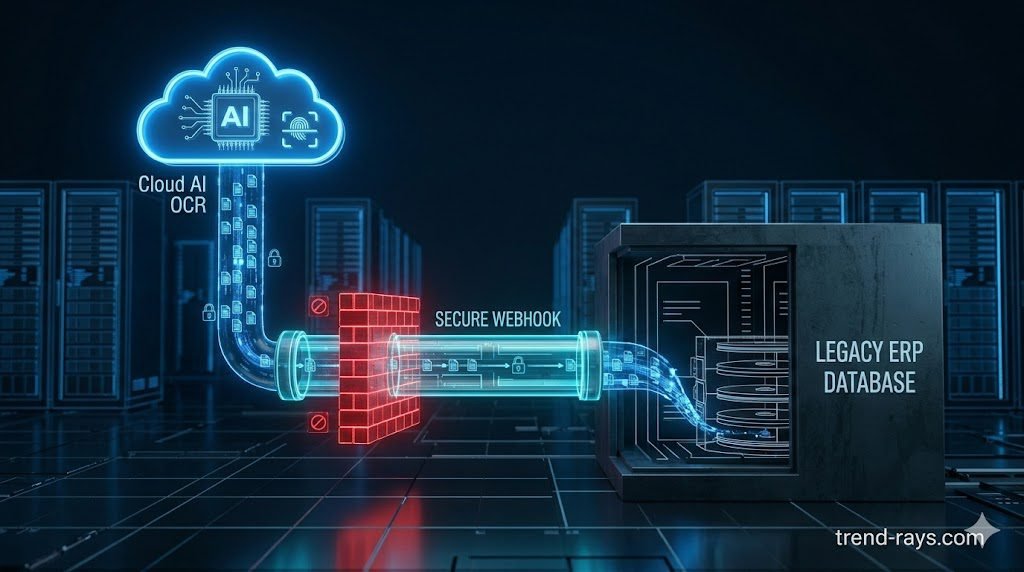
Enterprises face a massive bottleneck when attempting to automate Accounts Payable (AP). Modern AI Optical Character Recognition (OCR) lives in the cloud, but legacy Enterprise Resource Planning (ERP) databases often reside on air-gapped, on-premise servers. The Solution: To achieve secure financial automation without ripping out the legacy ERP, Enterprise Architects must deploy a “bridge” architecture. This requires utilizing secure webhook tunneling to safely penetrate the corporate firewall, enforcing SOC-2 compliant invoice parsing with zero-data retention, and utilizing enterprise RPA (Robotic Process Automation) to write the data into systems that lack modern API endpoints.
The Financial Automation Bottleneck
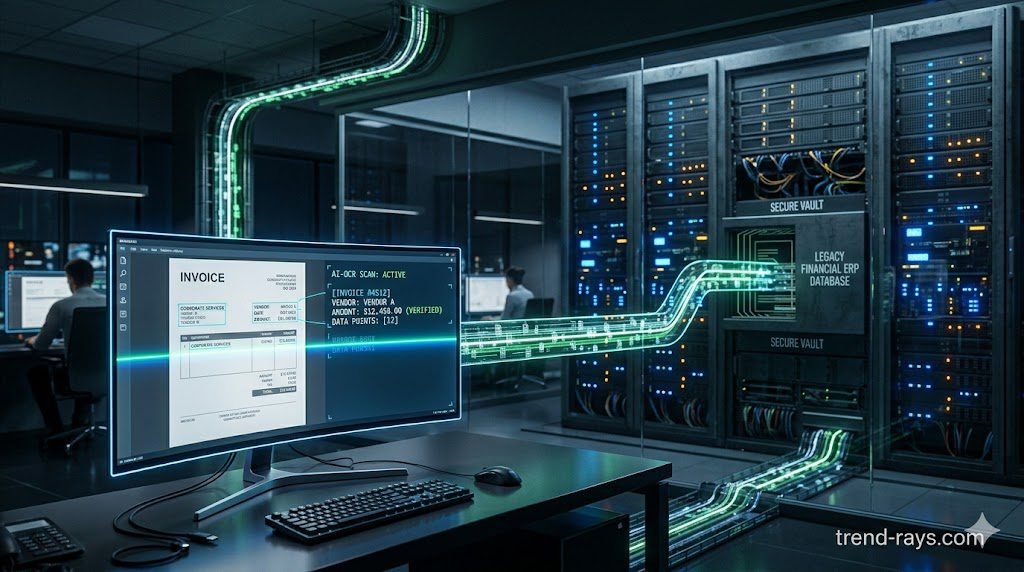
In 2026, manual data entry is no longer just an operational inefficiency; it is a critical security vulnerability. Financial departments relying on humans to manually type invoice data into accounting software suffer from high error rates, slow vendor payments, and an increased susceptibility to AP fraud and phishing attacks.
The obvious solution is AI-powered Optical Character Recognition (OCR). Unlike legacy OCR, which relies on rigid, rule-based templates that break if a vendor changes their logo, modern AI OCR uses Large Language Models (LLMs) to natively “read” and understand an invoice regardless of its layout.
However, integrating this technology presents a massive architectural roadblock. The most advanced AI OCR engines are purely cloud-native (SaaS). Meanwhile, the financial data they are trying to process must ultimately be written into legacy, on-premise ERP systems (like older versions of SAP, Oracle, or proprietary banking software) that were built long before the modern cloud existed. Exposing these fragile, on-premise servers directly to the public internet to receive an AI payload is a catastrophic security risk.
The CFO’s Mandate: ROI vs. Data Sovereignty
For the CFO, navigating this integration is a high-stakes balancing act between modernization ROI and regulatory compliance.
- The ROI of AI OCR: Automating the AP pipeline reduces the cost-per-invoice by up to 80%. It enables real-time 3-way matching (Invoice to Purchase Order to Receipt), allowing the enterprise to capture early-payment vendor discounts and instantly flag duplicate or fraudulent billing attempts.
- The Compliance Risk: Financial data is heavily regulated. If the enterprise uses a generic cloud AI to read its invoices, it risks exposing highly sensitive corporate financial data, vendor bank routing numbers, and employee PII to third-party servers.
To satisfy the CFO and external auditors, the IT department cannot simply buy an AI tool; they must architect a legally defensible, zero-trust bridge between the cloud and the basement server room.
Essential Integration Architecture (Deep Dive)
Bridging the gap between a 2026 cloud LLM and a 2005 on-premise database requires a highly specialized networking and compliance stack. Here is how Enterprise Architects execute the integration.
SOC-2 Compliant Invoice Parsing
Before an invoice ever touches your internal network, the AI vendor processing it must undergo rigorous external auditing. SOC-2 compliant invoice parsing requires the AI SaaS provider to guarantee that they operate under a “Zero-Retention” policy. This means the cloud AI ingests the PDF, extracts the financial data into a JSON payload, and instantly deletes both the source file and the processed data from its RAM. The vendor must be legally bound to never use your corporate financial data to train their internal machine learning models.
Secure Webhook Tunneling
The core technical challenge is getting the parsed AI data into the on-premise server without opening a dangerous inbound port on your corporate firewall. The industry standard solution is secure webhook tunneling. By deploying an enterprise-grade reverse proxy (like an internal Ngrok Enterprise agent or a tightly scoped API Gateway), the on-premise network initiates a persistent, outbound-only connection to the cloud. When the AI finishes reading an invoice, it passes the data down this secure, encrypted tunnel, completely bypassing the need for public-facing IP addresses.
Legacy ERP API Bridging
Modern AI tools communicate exclusively via RESTful APIs (JSON over HTTP). Legacy ERPs typically only understand outdated protocols like SOAP (XML), EDI, or flat-file drops (CSV via secure FTP). To translate this data, architects must deploy an integration middleware (like MuleSoft or Dell Boomi) to act as a legacy ERP API bridging layer. The middleware catches the modern JSON payload from the AI, formats it into the archaic XML structure the ERP requires, and pushes it into the database queue.
RPA for On-Premise Accounting
What happens when your legacy accounting software is so old that it literally does not have an API to connect to? In these edge cases, IT must deploy RPA for on-premise accounting. Robotic Process Automation utilizes “software bots” installed locally on a virtual machine. The bot securely receives the parsed invoice data from the cloud AI, physically opens the legacy accounting software’s desktop user interface, and types the data into the screen exactly as a human clerk would.
AS400 Modern Integration
The ultimate test of financial automation is the IBM AS/400 (now IBM i)—the indestructible mainframe that still powers thousands of global banks and logistics companies. AS400 modern integration requires specialized terminal emulation software. Modern AI OCR platforms can be integrated with these mainframes via “screen scraping” APIs or IBM’s specialized REST API connectors, allowing cloud-native AI to seamlessly update 30-year-old green-screen ledger systems in real-time.
The Architect’s Dilemma: Build vs. Buy (Pros & Cons)
Once the architecture is mapped, the enterprise faces a critical procurement decision. Do you task your internal engineering team with building the secure webhook tunnels from scratch, or do you license an Enterprise iPaaS (Integration Platform as a Service) like MuleSoft, Dell Boomi, or Workato?
Here is the strategic breakdown of both approaches:
Option A: The Custom In-House Build
This involves your internal DevOps team writing custom Python or Node.js middleware to catch the AI webhooks and translate them into your ERP’s native format.
- The Advantages (Pros):
- Zero Licensing Fees: You avoid paying the hefty $50,000+ annual subscription fees associated with premium enterprise integration platforms.
- Total Architectural Control: The code is completely proprietary. You do not have to rely on a third-party vendor’s roadmap to fix bugs or add new AS400 connectors.
- The Disadvantages (Cons):
- Technical Debt & Maintenance: APIs change constantly. If the cloud AI vendor updates their API payload and the engineer who wrote your custom bridge has left the company, your AP department goes completely offline until the code is reverse-engineered and patched.
- Compliance Burden: Your internal team must independently prove to SOC-2 auditors that your custom-built tunnels are encrypted and secure.
Option B: Deploying an Enterprise iPaaS
This involves purchasing a subscription to an enterprise-grade integration middleware platform that sits between the AI SaaS and your on-premise ERP.
- The Advantages (Pros):
- Pre-Built Legacy Connectors: iPaaS platforms already possess the rare, certified connectors for legacy systems (like SOAP protocols for old SAP databases or green-screen scraping for IBM i), reducing a six-month deployment to a few weeks.
- Inherited Compliance: Premium iPaaS vendors are already SOC-2, HIPAA, and GDPR certified, meaning you inherit their compliance posture for the data in transit.
- The Disadvantages (Cons):
- High Vendor Lock-in: Once you build your financial workflows inside a specific iPaaS ecosystem, migrating away from them in the future is incredibly difficult and expensive.
- Premium Cost: The licensing scales with your data volume. As your company processes more invoices, the monthly iPaaS bill increases significantly.
The Business Verdict: For Fortune 500 enterprises with massive engineering teams, building in-house can protect margins. However, for mid-market companies where IT resources are scarce, paying for an iPaaS is usually the safest insurance policy against integration failure.
Handling AI “Hallucinations” in Financial Data
Even the most advanced AI OCR engines are not 100% perfect. In creative writing, an AI hallucination is an annoyance; in accounts payable, misreading a $10,000 invoice as a $100,000 invoice is a financial disaster.
To mitigate this, the integration architecture must enforce strict Confidence Thresholds.
- When the AI parses an invoice, it assigns a mathematical confidence score to every extracted field (e.g., “I am 99.8% sure this number is the Total Amount”).
- If the AI encounters a blurry scan, a coffee stain, or handwriting that drops its confidence score below 95%, the system automatically suspends the API payload.
- The invoice is then routed to a “Human-in-the-Loop” dashboard, where an AP clerk manually verifies the flagged discrepancy before the data is allowed to cross the secure tunnel into the ERP.
Frequently Asked Questions (Financial AI & ERP Integration)
What is the difference between legacy OCR and AI OCR for invoice processing?
Legacy OCR uses rigid, template-based rules. If a vendor moves their “Total Due” box one inch to the left, legacy OCR breaks and fails to read the document. AI OCR uses computer vision and Large Language Models to understand the semantic context of the document, allowing it to accurately extract data from entirely new or highly complex invoice layouts without any manual template setup.
Is it safe to use cloud AI for corporate financial data?
It is only safe if the vendor provides SOC-2 compliant invoice parsing with a strict zero-data retention policy. You must verify via an external audit report that the AI provider does not store your invoices on their servers post-processing and does not use your financial data to train their commercial models.
How do you integrate cloud AI with an ERP that has no APIs?
When legacy ERP API bridging is impossible, organizations utilize RPA for on-premise accounting. A secure local software bot receives the data from the cloud AI and interacts directly with the legacy software’s graphical user interface (GUI), simulating human keystrokes to enter the data.