Unexplained AWS NAT Gateway billing spikes are almost always caused by high-volume internal traffic (like EC2 instances querying Amazon S3 or DynamoDB) being accidentally routed through the public internet. Because AWS charges a $0.045 per-GB data processing fee for NAT Gateways, this architectural flaw can cost enterprises thousands of dollars overnight. The Fix: To eliminate these fees, Cloud Architects must deploy Gateway VPC Endpoints to route S3 and DynamoDB traffic internally, bypassing the NAT Gateway entirely.

What Exactly is an AWS NAT Gateway? (The 30-Second Primer)
Before diagnosing the billing spike, it is crucial to understand the architectural purpose of the tool. A NAT (Network Address Translation) Gateway acts as a secure, one-way mirror for your cloud infrastructure.
If you have highly sensitive databases or application servers (EC2 instances) running in a private subnet, they are intentionally disconnected from the public internet to prevent hacking. However, those servers still need to occasionally reach out to the internet to download security patches or connect to third-party APIs (like Stripe or Twilio). The NAT Gateway sits on the edge of your network, masking your private servers’ IP addresses and securely fetching that data for them. It is a mandatory security feature—but it comes with a hidden pricing trap.
The “Bill Shock”: Why NAT Gateways Drain IT Budgets
In modern cloud architecture, a NAT (Network Address Translation) Gateway is essential. It allows your private EC2 instances to connect to the outside internet to download patches or third-party APIs while remaining invisible to inbound internet traffic.
However, NAT Gateways are the silent budget killers of cloud infrastructure. Many new cloud architects assume they only pay the flat hourly rate for the gateway. They overlook the NAT Gateway Data Processing Fee, which charges roughly $0.045 for every single gigabyte of data that passes through it.
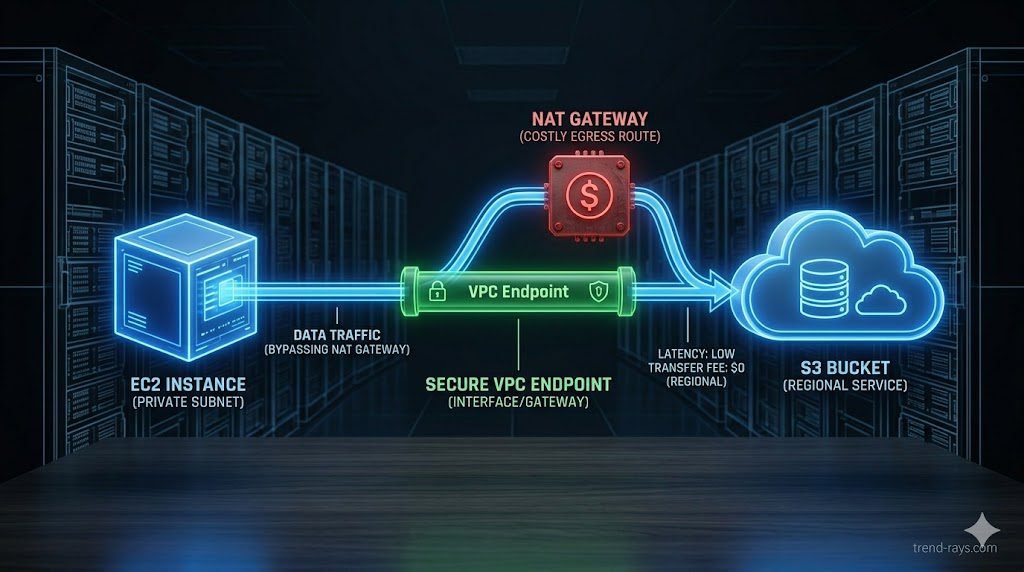
If your private EC2 instances are constantly pulling massive datasets from an Amazon S3 bucket, and that traffic is routed through your NAT Gateway instead of the internal AWS network, you are paying a massive premium to send your own data to yourself.
Step 1: Isolating the Spike in AWS Cost Explorer
Before you change any routing tables, you must prove to the CFO exactly where the money is going. You cannot fix what you cannot measure. Here is the exact process to isolate the cost source:
- Open AWS Cost Explorer: Navigate to the Billing dashboard and launch Cost Explorer.
- Set the Granularity to Daily: This helps identify the exact day the spike started (usually correlating with a new code deployment).
- Filter by Service: Select
EC2 - Other(NAT Gateway charges do not show up under standard EC2 compute). - Filter by Usage Type: This is the critical step. Search for and select
NatGateway-Bytes. - Analyze the Flow Logs: To see which specific server is causing the spike, enable VPC Flow Logs on the NAT Gateway’s Elastic Network Interface (ENI). Query the logs using Amazon Athena to identify the top internal IP addresses pushing traffic to the gateway.
Step 2: The Architectural Fix (VPC Endpoint Routing)
Once you confirm that your internal servers are pushing heavy traffic to AWS services (like S3 or DynamoDB) through the NAT Gateway, you must deploy an architectural bypass. The definitive fix for this FinOps nightmare is deploying VPC endpoints.
Deploying a Gateway VPC Endpoint (The Free Fix)
For S3 and DynamoDB, AWS offers “Gateway Endpoints” completely free of charge.
- How it works: A Gateway Endpoint creates a direct, private route from your VPC directly to S3.
- The Result: When your EC2 instance requests a file from S3, the traffic never hits the NAT Gateway and never touches the public internet. The $0.045 per-GB processing fee drops to $0.00 instantly.
Deploying Interface VPC Endpoints (AWS PrivateLink)
If your egress spike is caused by traffic going to other AWS services (like Kinesis, SNS, or Secrets Manager), you must use an Interface Endpoint powered by AWS PrivateLink.
- The Cost Difference: While Interface Endpoints are not free, they cost significantly less (around $0.01 per GB) than the standard NAT Gateway processing fees, resulting in immediate cost reduction and massive monthly savings.
The CFO’s Perspective: Defending the Quarterly Business Budget
From an engineering standpoint, routing data through a NAT Gateway is just a technical oversight. But from a business and accounting perspective, it is a critical failure of OpEx (Operational Expenditure) management.
Unlike on-premise hardware (CapEx), where budgets are fixed and predictable, cloud infrastructure operates on a variable consumption model. When engineers deploy code that inadvertently triggers millions of internal NAT Gateway requests, it causes a silent, exponential spike in the monthly AWS bill.
For the CFO, these unpredictable cloud costs are catastrophic for two reasons:
- Margin Erosion: For B2B SaaS companies, the cost of cloud infrastructure is directly tied to the Cost of Goods Sold (COGS). If backend data transfer fees double overnight, the profit margin of your entire software product evaporates.
- Forecast Invalidation: Financial teams build quarterly budgets based on predictable cloud spend. A hidden $15,000 NAT Gateway egress spike destroys that forecast, forcing budget cuts in other critical areas like marketing or hiring.
This is why FinOps is no longer just an IT buzzword; it is a mandatory bridge between the engineering department and the finance department. Fixing this architectural flaw isn’t just about saving gigabytes—it is about protecting the company’s financial runway.
Advanced FinOps Cloud Optimization Metrics (Deep Dive)
To truly master AWS billing, Cloud Architects must move beyond simple EC2 compute costs and understand the granular network fees that silently drain IT budgets. Here is how modern FinOps cloud optimization tackles the most expensive routing traps.
Mastering AWS Cost Explorer Egress Fees
The most common mistake new DevOps teams make is confusing internal data transfer with outbound data transfer. AWS Cost Explorer egress fees specifically track data leaving the AWS network to the public internet. If your Cost Explorer shows a massive spike in “DataTransfer-Out-Bytes,” your architecture is likely forcing internal server-to-server communication out to the public web before looping it back inside, triggering premium public bandwidth rates.
The Impact of Cross-AZ Data Transfer Costs
Many companies deploy multi-AZ (Availability Zone) architectures for high availability and disaster recovery. However, they forget that AWS charges for data moving between these zones. Cross-AZ data transfer costs typically run at $0.01 per GB in each direction. If your application tier in us-east-1a is constantly querying a database in us-east-1b, you are paying for that data twice. A proper FinOps audit will consolidate chatty microservices into the same Availability Zone whenever possible to eliminate this fee.
VPC Endpoint Routing vs. Public Routing
The core solution to the NAT Gateway trap is VPC endpoint routing. Instead of assigning a public IP address to your database or forcing traffic through a gateway, a VPC Endpoint creates a private, encrypted tunnel directly to AWS services using the internal AWS backbone network. This is not only significantly cheaper, but it also drastically reduces your attack surface by keeping your data off the public internet.
As enterprises scale, they often connect multiple VPCs and on-premise data centers using a Transit Gateway. However, AWS Transit Gateway pricing is notoriously complex. You are billed an hourly rate for every VPC attached, plus a per-GB processing fee for all traffic flowing through it. If you accidentally route internet-bound traffic through a Transit Gateway and then through a NAT Gateway, AWS will charge you data processing fees on both services for the exact same gigabyte of data.
Step 3: Setting Up Automated FinOps Billing Alarms
Fixing the current leak is only half the battle; ensuring it never happens again is the foundation of mature FinOps. Do not rely on checking your bill at the end of the month.
- Deploy AWS Budgets: Create a custom budget strictly tracking
NatGateway-Bytes. - Set Threshold Alarms: Configure the system to trigger an alert if the forecasted NAT Gateway spend exceeds your baseline by 10%.
- Integrate with Slack/Teams: Route the SNS notification directly to your DevOps Slack channel. If a junior developer deploys a script that accidentally routes terabytes of data through the public internet, the team will be alerted within hours, not weeks.
Frequently Asked Questions (FinOps & Egress Costs)
Why are my AWS egress fees so high?
High egress fees are typically caused by inefficient architecture. The most common culprits are routing internal AWS traffic through a NAT Gateway (incurring data processing fees), misconfigured cross-AZ data transfer costs (sending data between different Availability Zones), or pulling data out of AWS to the public internet without a CDN like CloudFront.
What is the difference between AWS Transit Gateway pricing and NAT Gateway pricing?
A NAT Gateway is used to connect private subnets to the public internet and charges per GB of data processed. AWS Transit Gateway pricing applies to a central hub that connects multiple VPCs and on-premise networks together. Transit Gateways charge an hourly attachment fee plus a per-GB data processing fee. Sending traffic through both a Transit Gateway and a NAT Gateway will result in paying double processing fees.
Do VPC Endpoints completely eliminate NAT Gateways?
No. You still need a NAT Gateway if your private EC2 instances need to download software updates from third-party websites (like GitHub or Ubuntu repositories) or communicate with external SaaS APIs (like Stripe or Twilio). VPC Endpoints only bypass traffic destined for internal AWS services.