When a modern ransomware cartel breaches a corporate network, their primary target is Active Directory (AD). If AD is encrypted or corrupted, the enterprise functionally ceases to exist—users cannot log in, cloud identities fail, and emails stop routing. The Solution: IT SysAdmins must execute a highly choreographed Bare-Metal Active Directory Forest Recovery. This involves immediate domain controller isolation, verifying NTDS.dit database integrity, executing an authoritative restore from offline immutable backups, and forcefully seizing FSMO roles to rebuild the forest trust from scratch.
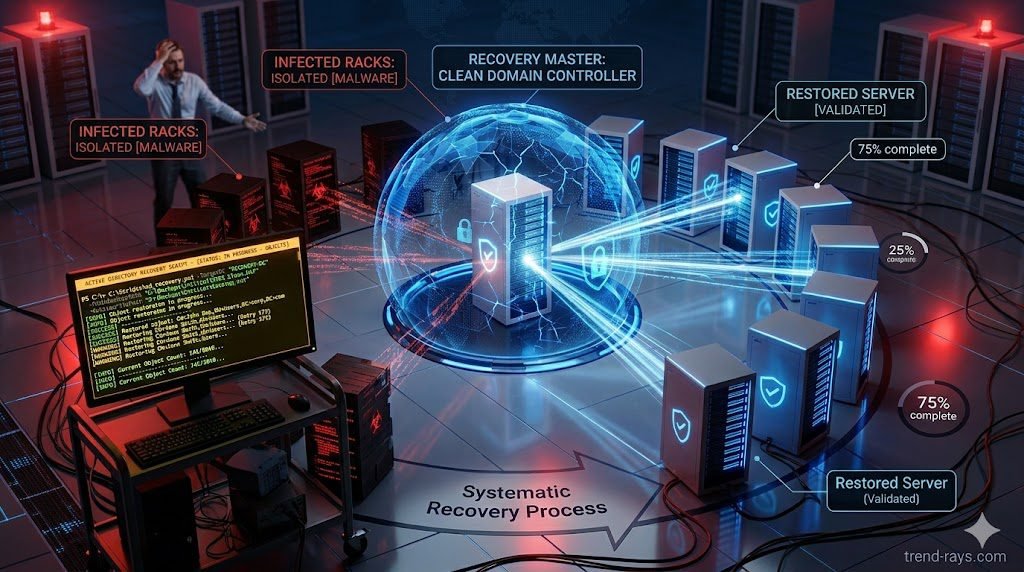
The “Keys to the Kingdom” are Gone: Immediate Containment
In 2026, ransomware is no longer just a workstation problem. Advanced Persistent Threats (APTs) specifically target your Active Directory Domain Controllers (DCs) to deploy their encryption payload globally across the enterprise.
When your domain controllers go down, you are flying blind. You cannot authenticate administrator accounts to troubleshoot, and Microsoft Entra ID (formerly Azure AD) will immediately stop syncing.
Your first step is not recovery; it is immediate containment. You must physically or logically sever all Domain Controllers from the network. If your organization has deployed modern endpoint security (as detailed in our guide on EDR vs. Traditional Antivirus: Defending Against AI Malware), you should use the EDR console to issue a global “Network Isolate” command to all DCs. If the EDR is compromised, physically pull the ethernet cables.
The CFO’s Nightmare: The Cost of AD Downtime
While the IT department views an AD failure as a technical crisis, the CFO views it as a catastrophic business hemorrhage.
Every minute Active Directory is offline, the company experiences a 100% halt in productivity. Supply chain logistics freeze, the AP department cannot process invoices (stalling integrations like SOC-2 AI OCR Accounting Workflows), and customer-facing web portals fail to authenticate users.
This downtime cost justifies the massive expense of incident response retainers. The goal of this triage guide is to reduce your Recovery Time Objective (RTO) from weeks to hours, mitigating the financial impact of the breach.
Core Recovery Architecture (Deep Dive)
Rebuilding a compromised identity infrastructure requires executing highly specific, complex procedures that most SysAdmins have never practiced. Here is the technical breakdown of the recovery phases.
Assessing the Damage: NTDS.dit Ransomware Corruption
Before attempting to restore anything, you must determine what the attackers actually did. The core database of Active Directory is the NTDS.dit file. You must boot a compromised DC into Directory Services Restore Mode (DSRM) and check for NTDS.dit ransomware corruption. Did the attackers encrypt the file, or did they use a tool like Mimikatz to exfiltrate the database and steal all user password hashes? If the hashes were stolen, you must force a global password reset for all 10,000+ employees the moment the network comes back online.
Executing an Active Directory Forest Recovery Plan
You cannot simply click “Restore” on your backup software. Microsoft explicitly warns against restoring multiple DCs simultaneously, as this causes a devastating “USN Rollback” where the servers irreversibly corrupt each other via replication. A proper Active Directory forest recovery plan dictates that you must wipe all DCs bare, pick one primary DC, and restore it in complete isolation.
Authoritative vs. Non-Authoritative Restore
When restoring that first primary Domain Controller from your immutable backup vault (see our CISO Playbook on Ransomware Recovery for secure backup architecture), you must understand the difference between an authoritative vs non-authoritative restore.
- You will perform an authoritative restore (specifically for the SYSVOL folder) on this first machine, telling the network: “This server holds the absolute truth; overwrite all other data.”
- Subsequent Domain Controllers rebuilt later will be non-authoritative, meaning they will pull the fresh, clean data from this primary server.
Domain Controller Isolation and Network Clean-Up
Because the cartel likely left rootkits or backdoors on the compromised servers, domain controller isolation is paramount. The restored primary DC must be brought online in an air-gapped VLAN. You must use this safe environment to forcefully run metadata cleanup—deleting the computer objects and DNS records of all the still-infected DCs before reconnecting to the broader corporate network.
Seizing FSMO Roles Post-Breach
In a multi-server environment, specific servers hold Flexible Single Master Operations (FSMO) roles, governing crucial network functions. If the server that held the “RID Master” or “PDC Emulator” role was destroyed and cannot be restored, the newly restored primary DC must forcefully take over. Seizing FSMO roles post-breach via PowerShell is a required step to ensure the new forest can create new user accounts and process password changes.

Rebuilding the Trust Safely
Once the primary Domain Controller is clean, holds all FSMO roles, and is actively blocking unauthorized logins, you must carefully reconnect it to your cloud environments.
If you are a defense contractor or government entity, you must ensure your newly restored identity perimeter still satisfies federal mandates. Review your compliance baselines (detailed in our Microsoft Defender XDR CMMC 2.0 Mapping Guide) to ensure Entra ID Conditional Access policies are instantly reapplied before allowing user traffic to flow.
Finally, do not restore the remaining Domain Controllers from backups. Rebuild them as fresh, bare-metal Windows Server installations and simply promote them to DCs, letting them replicate naturally from the clean primary server.
Frequently Asked Questions (AD Forest Recovery)
What is the difference between an authoritative vs non-authoritative restore in Active Directory?
A non-authoritative restore brings the DC back to its backup state and then updates it with any newer changes from other DCs on the network. An authoritative restore forcefully increments the version number of the restored data, forcing all other Domain Controllers in the network to accept the restored backup data as the absolute truth, effectively overwriting any corrupted data replicated by the ransomware.
How do I detect NTDS.dit ransomware corruption?
During triage, boot the server into DSRM (Directory Services Restore Mode). Attempt to run the ntdsutil command-line tool to perform a semantic database analysis. If the tool fails to mount the database, or if the file extension of the NTDS.dit file has been changed to a known ransomware extension, the database is corrupted and must be restored from an offline backup.
Why is seizing FSMO roles post-breach necessary?
If the Domain Controllers that originally held the 5 FSMO roles (Schema Master, Domain Naming Master, RID Master, PDC Emulator, Infrastructure Master) were permanently wiped or encrypted, the active directory forest cannot function properly. You must use PowerShell (Move-ADDirectoryServerOperationMasterRole -Force) to tell the newly restored DC to violently seize these roles to restore network operations.