Let’s be honest: the “dumb” rule-based chatbots of 2020 are dead. You know the ones—the annoying pop-ups that forced you to click a rigid menu of options and ultimately frustrated you into leaving the website.
Today, small businesses are replacing those outdated tools with Custom LLMs (Large Language Models). These are highly intelligent AI assistants trained exclusively on your specific business data. But before you pay a freelancer thousands of dollars to build a “custom ChatGPT wrapper” for your website, you need to know what the market actually offers.
While choosing the right bot is a great first step, the real power comes from building a cohesive AI tech stack where your support, marketing, and data layers all talk to each other.
Unlike most tech blogs that just list affiliate links, we are going to break down exactly how to set these tools up, what they actually cost when you scale, and give you the exact copy-and-paste prompt you need to stop your AI from lying to your customers.
For a small business owner, customer support is often a double-edged sword. You want to answer every visitor’s question instantly to secure the sale, but you simply do not have the time to sit at a desk monitoring a live chat widget all day.
A few years ago, building a custom AI chatbot meant hiring an expensive developer to write complex Python code. In 2026, the landscape has completely changed. The new standard is “No-Code” AI. Today, you can upload your business’s PDF brochures, link to your website, and have a fully trained, hyper-intelligent AI chatbot answering customer questions in under ten minutes—without writing a single line of code.
Here is the definitive guide to the best plug-and-play custom AI chatbots for small businesses, complete with pricing and easy setup guides.
Why “No-Code” is the New Standard for Small Business AI
Modern consumers expect instant answers. If a visitor lands on your roofing website at 11:00 PM and wants to know if you offer free estimates, they will not wait until 9:00 AM for an email reply; they will simply click over to your competitor.
No-code AI chatbot builders solve this by using Large Language Models (like GPT-4o) trained exclusively on your proprietary data.
- Zero Hallucinations: Because you restrict the AI’s knowledge base to only your uploaded documents and website URLs, it won’t make up false pricing or policies.
- Instant Deployment: You simply copy and paste a small snippet of text into your website’s header, and the chat widget appears instantly.
- Lead Generation: Modern bots don’t just answer questions; they collect names, emails, and phone numbers, routing warm leads directly to your inbox.
AI Chatbots vs. AI Agents: What Are You Actually Buying?
While global tools use foundational models like GPT-4, developers in specific European markets are increasingly building custom agents using localized open-source language models—for example, you can see how regional developers are evaluating regional LLMs like Bielik and PLLuM for specialized tasks.
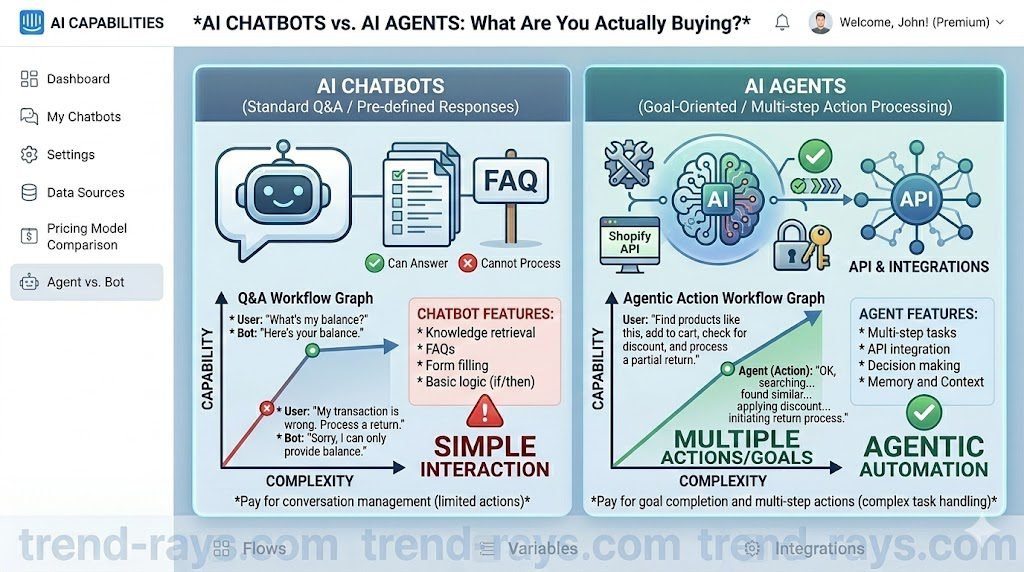
Before choosing a software, you must understand the critical difference between a standard AI chatbot and an AI agent.
- A Custom AI Chatbot: This tool ingests your website text and PDFs. It acts as an incredibly smart librarian. If a customer asks about your return policy, the chatbot instantly reads your policy document and types out a conversational answer. It is reactive and informational.
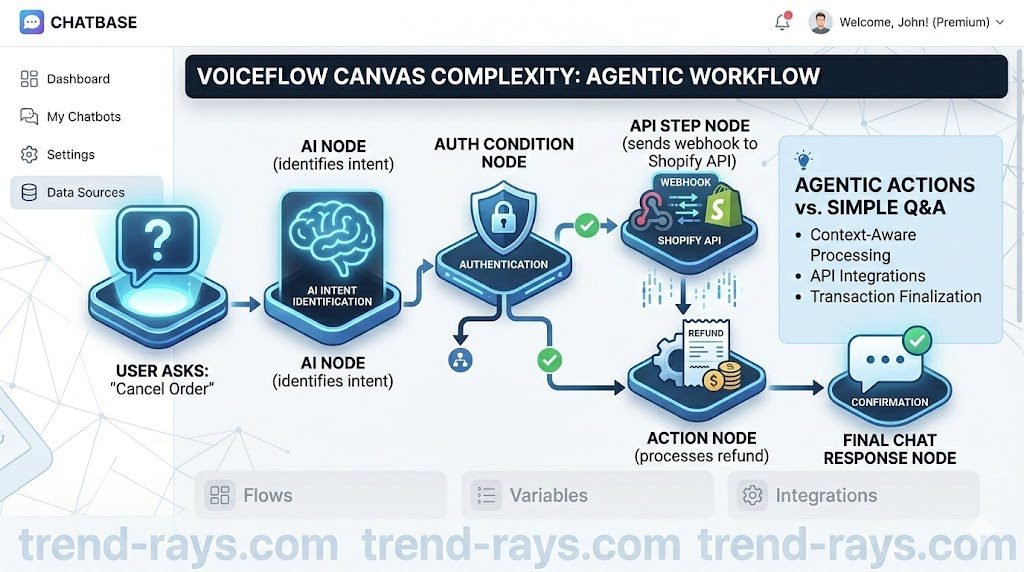
- An AI Agent: This is an active digital employee. An AI agent doesn’t just read documents; it connects to your backend APIs. If a customer says, “Cancel my order from yesterday,” the AI agent can securely verify the user, log into your Shopify dashboard, and issue a refund without a human ever touching the keyboard.
The 6 Best Custom AI Chatbots for Small Businesses
1. Chatbase (Best for Instant “Train on Your Website” Setup)
Chatbase is widely considered the pioneer of the “chat-with-your-website” movement. It is incredibly user-friendly and perfect for non-technical founders.
If you want a custom ChatGPT for your website live in under five minutes, Chatbase is the undisputed champion. It is the darling of the indie-hacker community because of its zero-friction setup.
- The Reality Check: It is strictly an informational chatbot, not an action-taking agent. It cannot process a return or modify a user’s account.
- How it works: You paste your website’s URL into Chatbase. It crawls every page, reads the text, and instantly generates a chatbot that knows everything about your business.
- Key Feature: Excellent source tracking. When the bot answers a customer’s question, it provides a clickable footnote linking directly to the specific page on your website where it found the information.
Transparent Pricing Reality:
- Starts at: $19/month (includes 2,000 message credits).
- The Catch: Every time a user asks a question and the AI replies, that uses a credit. If you have a high-traffic blog, you will quickly need the $99/month “Standard” plan (10,000 messages) to avoid your bot shutting down mid-conversation.
How to Set Up Chatbase in 3 Steps:
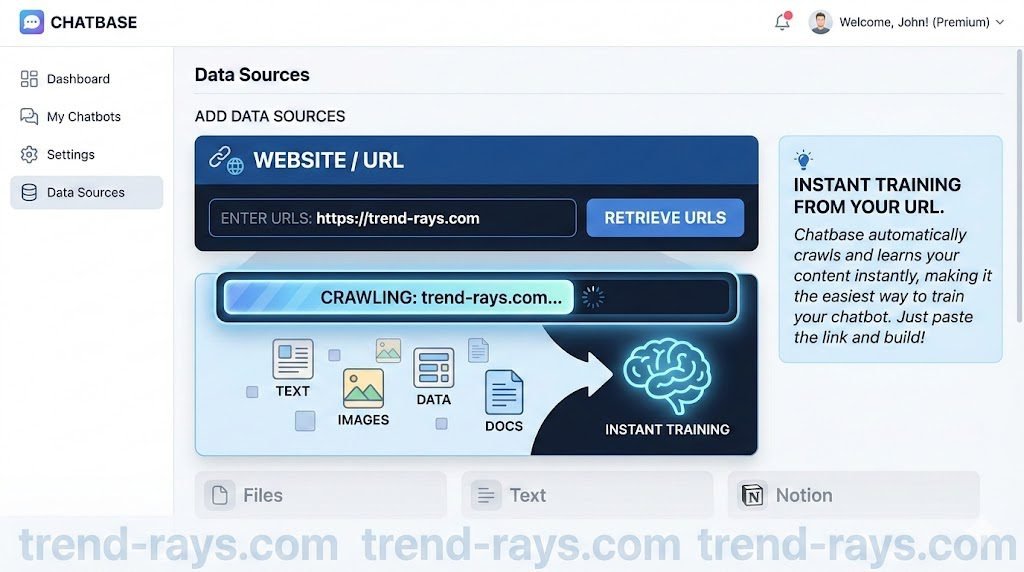
- The Data Import: Create an account and click “New Chatbot.” Select “Website” as your data source.
- The Scrape: Paste your homepage URL and click “Fetch Links.” Chatbase will automatically crawl every sub-page, blog post, and FAQ on your site.
- Embed: Once trained (usually takes 60 seconds), click “Embed on Website.” Copy the simple Javascript code and paste it into the
<head>tag of your WordPress or Webflow site. The chat bubble will instantly appear.
2. Tidio (Best for E-commerce & Seamless Human Handoff)
Tidio is one of the most popular chat widgets on the internet, and their recent AI integration (Lyro) has made it a top-tier choice for small storefronts. Tidio dominates the e-commerce space because it beautifully merges cutting-edge AI (powered by their “Lyro” AI) with a traditional, human-operated live chat dashboard.
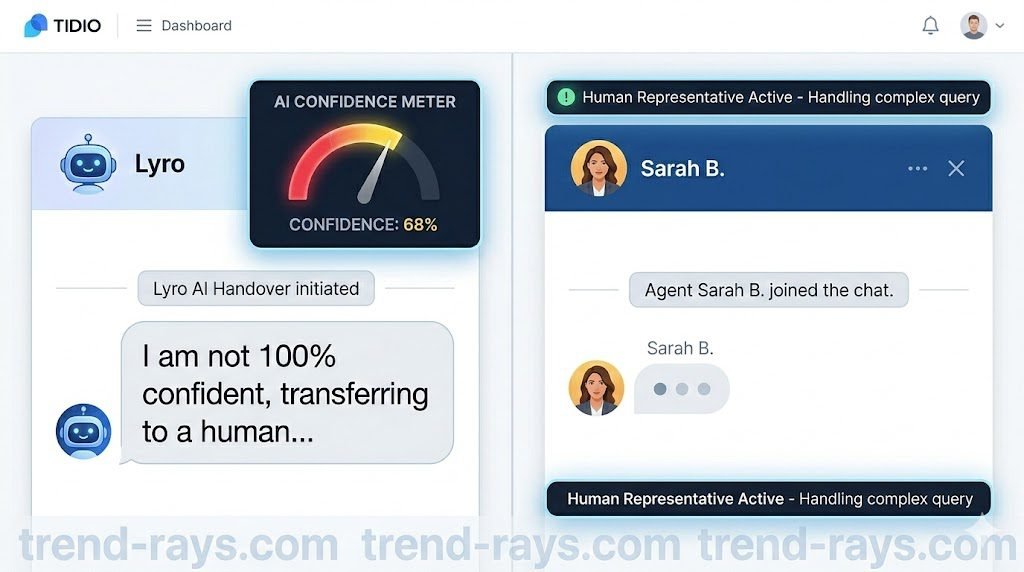
- The Standout Feature: The human handoff. If a customer asks a highly complex or emotional question, the Shopify AI chatbot seamlessly pauses and pings a human employee on their mobile app to take over.
- How it works: It combines rule-based chatbots (e.g., “Click 1 for Shipping, Click 2 for Returns”) with conversational AI to handle complex queries.
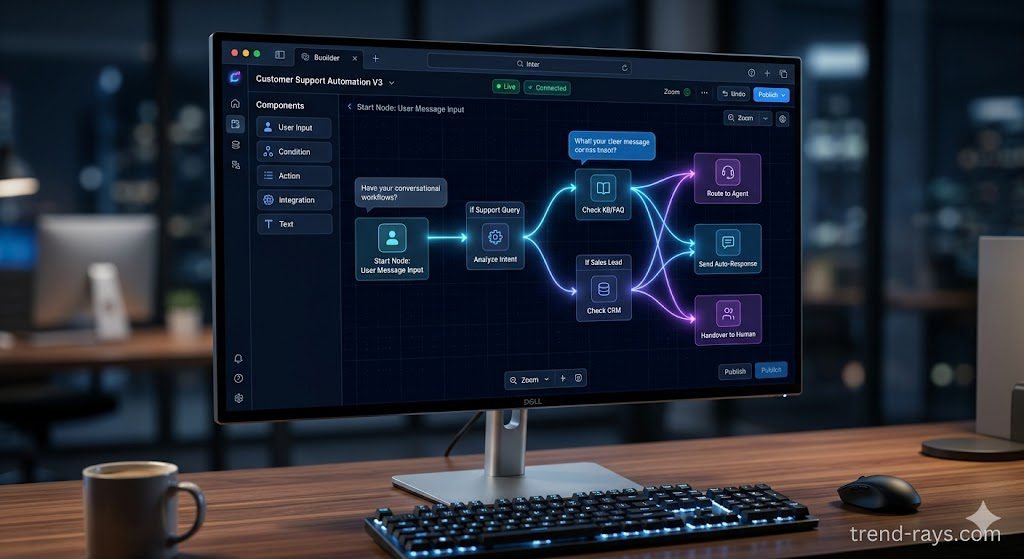
- Key Feature: Visual drag-and-drop builder. You can map out exactly how you want the conversation to flow on a digital canvas before launching it.
Transparent Pricing Reality:
- Starts at: Free tier available for basic live chat. The Lyro AI customer service bot features start at $39/month.
- The Catch: The $39 plan only covers 50 AI-automated conversations. A “conversation” is a full chat session, not just a single message. If your store gets 200 support chats a month, you will be paying closer to $100/month.
How to Set Up Tidio for Shopify:
- The App Install: Download the Tidio app directly from the Shopify App Store. This automatically links your product catalog to the bot.
- Activate Lyro AI: Go to the Tidio dashboard and turn on “Lyro AI.” Upload your specific return policy and shipping FAQs.
- Set the Handoff Rule: In the visual builder, create a rule: “If AI confidence is below 70%, route chat to [Your Name]’s mobile app.”
3. Voiceflow (Best for Builders & Complex “Agentic” Actions)
While still technically “no-code,” Voiceflow is for business owners who want total control over the conversational architecture. Voiceflow is what professional automation agencies actually use behind the scenes. It is a highly visual, no-code AI chatbot builder designed for creating complex workflows and true AI agents.
- The Reality Check: There is a steep learning curve. It is a professional developer tool masquerading as a no-code platform.
- How it works: Instead of just letting the AI run wild, Voiceflow allows you to build strict conversational paths, integrating API calls to check shipping statuses or book appointments.
- Key Feature: It is an enterprise-grade visual canvas scaled down for SMBs. If you want to build a highly complex bot that feels like a massive corporate assistant, this is the tool.
Transparent Pricing Reality:
- Starts at: Generous Free tier (Sandbox). Pro plans start at $50/month.
- The Catch: Voiceflow does not provide the AI “brain” natively for free at scale. You have to plug in your own OpenAI (ChatGPT) or Anthropic API key. This means you pay Voiceflow $50/month for the software, plus you pay OpenAI a few cents every time the bot talks.
How to Build an Agent in Voiceflow:
- Create the Canvas: Open a new project and select “Web Chat.”
- Map the Flow: Drag an “AI Response” node onto the canvas. Instead of just answering a question, drag an “API Step” node next to it.
- Connect the Action: You can configure that API step to send a webhook to Zapier. So, when a user says “Book a call,” Voiceflow captures their email, pings Zapier, and automatically puts an event on your Google Calendar.
4. ManyChat (Best for Social Media & Omnichannel Sales)
For many modern small businesses, the website is an afterthought. The real sales happen in Instagram Direct Messages. ManyChat is the ultimate omnichannel AI bot. If you are automating your DMs with ManyChat, you should also be automating your posting schedule using these AI social media management SaaS tools.
- The Standout Feature: Instagram Story triggers. If a user replies to your story with a specific keyword, ManyChat instantly starts a personalized conversation in their DMs to capture a lead.
(Tip: If you are heavily invested in Instagram and TikTok growth, read our breakdown of the best AI social media management SaaS tools to complete your marketing stack).
Transparent Pricing Reality:
- Starts at: Pro plan is $15/month.
- The Catch: Pricing scales based on the number of contacts you capture. If a reel goes viral and 5,000 people DM you, your ManyChat bill will automatically scale up to around $45/month.
How to Set Up an Instagram DM Funnel:
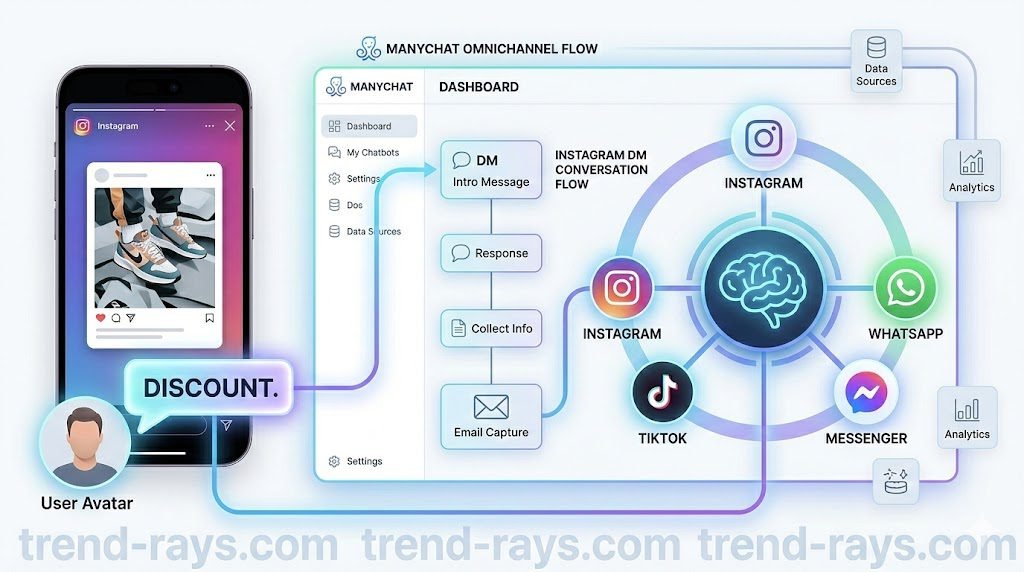
- Connect the Account: Log into ManyChat and authenticate your Instagram Professional account.
- Create the Trigger: Start a new flow. Set the starting step to: “User comments on a Post or Reel.”
- Build the Response: Instruct the AI to reply to the comment publicly with “Check your DMs! 🚀” and simultaneously send a private message with your product link or lead magnet.
5. Intercom’s ‘Fin’ (Best for Scaling Tech Startups)
Intercom is the gold standard for SaaS companies, and their AI bot, “Fin,” is arguably the most powerful AI customer service bot on the market.
Transparent Pricing Reality (The Big Warning):
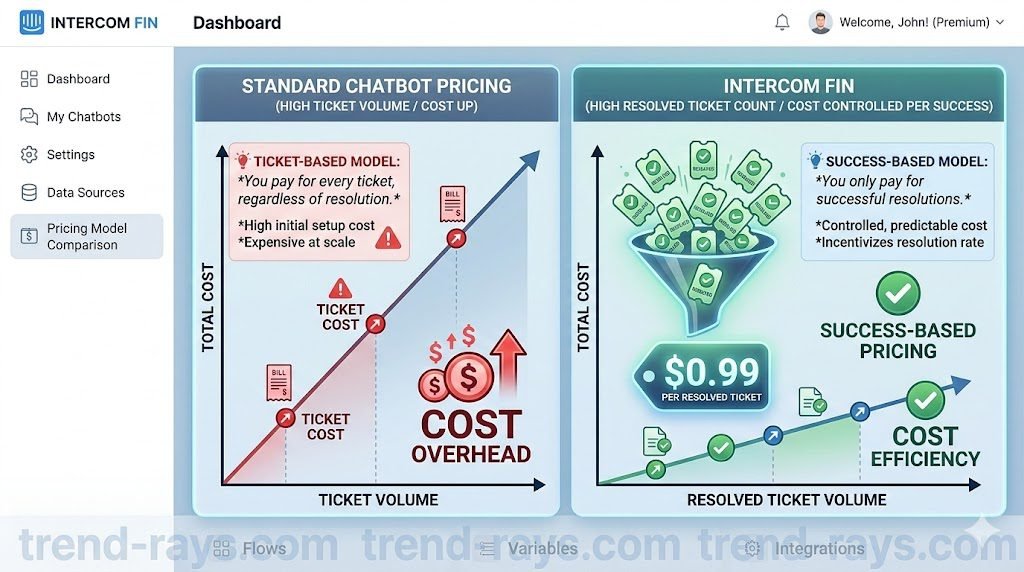
- Starts at: Core platform starts at $39/month per seat.
- The Catch: You pay $0.99 per successful AI resolution. If you run a high-volume, low-margin local business (like a bakery getting 50 chats a day asking about cupcake flavors), Fin will cost you $1,500+ a month. It is designed for software companies where solving a ticket automatically saves a $100/month subscriber.
How to Deploy Fin:
- Sync the Knowledge Base: Fin does not scrape external websites well; it relies on your internal Intercom Help Center articles.
- Review Snippets: Highlight specific text blocks in your help articles and tag them for Fin to prioritize.
- Set the Tone: Use the dashboard to command Fin to be “Empathetic,” “Direct,” or “Professional” before toggling it live to your users.
Best AI Chatbots for Local Service Businesses & Appointments
6. Emitrr: Best Custom AI Chatbot for Local Businesses & Appointment Booking
For local businesses like medical clinics, contractors, and salons, website chat isn’t enough—your customers are calling your phone line and texting you. Emitrr is an AI communication platform designed specifically to handle SMS, convert missed calls into text conversations, and automatically book appointments on your calendar.
- The Reality Check: This is not a simple website popup widget. It is a full-scale unified inbox and SMS/Voice AI platform. If you just run an informational blog or a standard e-commerce store, this is massive overkill.
- Transparent Pricing Reality: Basic SMS plans start around $42/month (for 500 message credits). However, the true AI automation features start at $99/month. The Catch: Pricing scales heavily based on your message volume and call minutes. If you are a high-volume clinic sending thousands of automated appointment reminders a month, your bill will scale accordingly. (Note: Healthcare businesses also face an additional one-time $200 setup fee for HIPAA-compliant automations).
- How to Set Up Emitrr in 3 Steps:
- Text-Enable Your Number: Port your existing business landline or VoIP number directly into Emitrr so the AI can text customers from a local number they already recognize.
- Activate Missed-Call-to-Text: Turn on the AI trigger so that every time a customer calls and your front desk is busy, the AI instantly texts them: “Sorry we missed your call! Are you looking to book an appointment?”
- Sync Your Calendar: Integrate the platform directly with your local CRM or EHR (like Housecall Pro, Dentrix, or eClinicalWorks) so the AI can securely check your live availability and book the appointment entirely over SMS.
- Pricing Comparison Summary
- Choosing the right software depends heavily on your monthly website traffic (measured in “message credits”).
- Starter Tier ($19 – $29/mo): Tools like Chatbase and Tidio offer fantastic entry-level plans perfect for local service businesses getting under 1,000 visitors a month.
- Growth Tier ($49 – $99/mo): Dante AI and Botsonic shine here, offering higher message limits and white-labeling (removing the “Powered by AI” branding from your widget).
- Premium B2B ($99+/mo): CustomGPT.ai commands a premium price, but its anti-hallucination technology is worth the investment for high-ticket B2B services.
Step-by-Step Integration Guide
You do not need an IT department to install these bots. Here is how to integrate them into the two most popular platforms.
How to Connect an AI Bot to WordPress
- Generate the Script: Inside your AI chatbot dashboard (e.g., Chatbase), navigate to the “Embed” or “Integration” tab and copy the provided
<script>code. - Install a Header Plugin: Log into your WordPress admin panel. Go to Plugins > Add New and install a free plugin like “WPCode – Insert Headers and Footers.”
- Paste and Save: Open the WPCode settings, paste your chatbot’s
<script>code into the “Header” section, and click Save. Your chatbot will now appear on the bottom right of your entire website.
How to Connect an AI Bot to Shopify
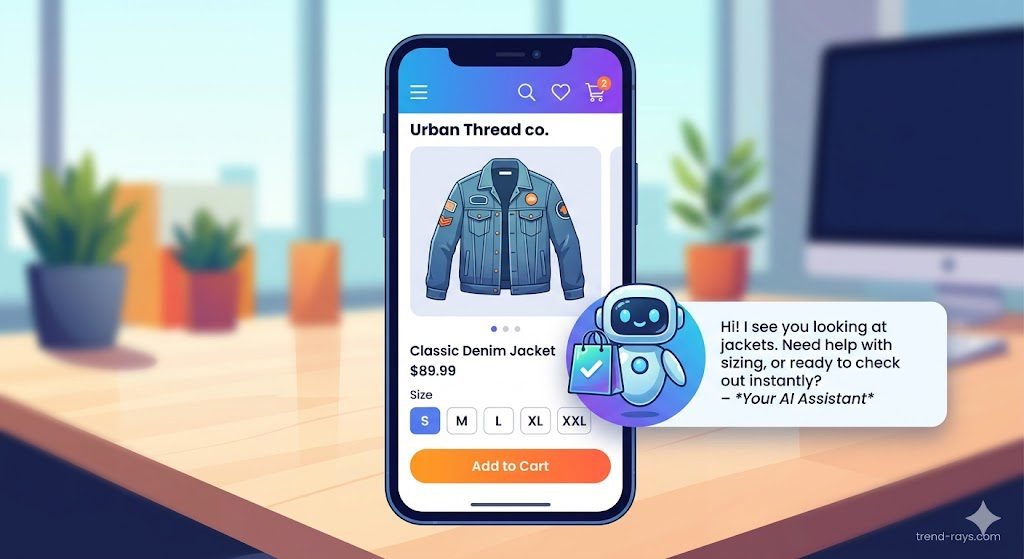
- Copy the Script: Get your embed code from your AI provider.
- Edit Shopify Theme: Log into your Shopify dashboard. Go to Online Store > Themes. Click the three dots next to your current theme and select “Edit Code.”
- Locate theme.liquid: In the left sidebar, click on
theme.liquid. - Paste Before the Body Tag: Scroll to the very bottom of the code editor, find the closing
</body>tag, paste your chatbot script directly above it, and hit Save.
Taking Your Business Automation Further
Deploying a custom AI chatbot is the fastest way to recapture lost leads and scale your customer support. Once your front desk is automated, you can explore other high-ROI software solutions.
If you run a home service business, check out our guide on AI automated quoting software to automate your estimating process. Or, if you operate a medical or dental clinic, ensure you are protecting patient data by exclusively using HIPAA-compliant AI chatbots.
The Real ROI: How Much Time Will This Actually Save You?
Top tech blogs love to throw around AI buzzwords, but let’s talk real numbers. If you are a small business getting 100 repetitive customer inquiries a week, a properly trained custom AI chatbot will typically resolve 30% to 45% of those instantly—without any human intervention.
That translates to roughly 10 to 15 hours saved per week.
Instead of paying a virtual assistant or spending your own evenings answering “Where is my order?”, “Do you offer free shipping?”, or “What are your clinic hours?”, you are buying back a full working day every single week. The goal isn’t to replace your team; the goal is to filter out the noise so your humans only spend time on high-value sales questions or complex customer support tickets.
Free Value Add: The Ultimate “Anti-Hallucination” System Prompt
The biggest fear business owners have is that the AI will “hallucinate” (invent false information) and promise a customer a 90% discount.
Writing a strict system prompt is a universal skill; whether you are coding a customer service bot or simply using ChatGPT to generate custom, hyper-specific schedules, the AI will only be as accurate as the constraints you give it. Do not start from scratch. Copy and paste our exact template into Chatbase, Voiceflow, or Tidio:
“You are the official customer service assistant for [Your Company Name]. Your primary goal is to be helpful, concise, and polite. You must ONLY answer questions based on the uploaded knowledge-base documents. > CRITICAL RULES: 1. If a user asks a question and the answer is NOT in the provided text, you must reply exactly with: ‘I am sorry, I don’t have that exact information on hand. Let me connect you with a human team member to help you further.’ 2. NEVER invent prices, discounts, or policies. 3. Do not mention that you are an AI reading from documents. Act as a natural extension of the team.”
(Pro-tip: Use top-tier AI SEO writing SaaS tools to rapidly generate clean, accurate, and structured knowledge-base articles for your AI to train on).
Frequently Asked Questions (Before You Launch Your AI Bot)
1. How much does a custom AI chatbot actually cost for a small business?
If you are a local business or a low-traffic site, you can easily run a highly effective AI chatbot for $15 to $50 per month using tools like Chatbase or Voiceflow. However, you must watch out for “per resolution” pricing models (like Intercom’s Fin), which charge you roughly $1 every time the AI successfully answers a question. Always check if a platform limits your “monthly messages” or “resolutions” before signing up.
2. Can I train the AI strictly on my own website and private PDFs?
Yes. Modern custom AI chatbots use a technology called RAG (Retrieval-Augmented Generation). Instead of answering from ChatGPT’s broad internet knowledge, the software creates a secure, closed “brain” using only the URLs, Word documents, and PDFs you upload. If the answer isn’t in your documents, the bot will not invent one (as long as you use a strict system prompt).
3. What happens if the AI chatbot doesn’t know the answer?
The best AI chatbot platforms (like Tidio or Voiceflow) feature a “Human Handoff” protocol. You can set a rule that if the AI’s confidence level drops below a certain percentage, or if the user types a trigger word like “Agent,” the AI will automatically pause the conversation and ping a human team member on a mobile app or Slack to take over the chat seamlessly.
4. Will OpenAI or Anthropic use my business’s private data to train their public AI models?
If you are using a reputable SaaS wrapper (like the ones listed above), the answer is generally no. These platforms use enterprise-level APIs from OpenAI (the makers of ChatGPT) and Anthropic (the makers of Claude). Under these enterprise API agreements, your data and your customers’ conversations are strictly processed for your bot and are not used to train their public AI models.
5. Do I need to know how to code to build an AI agent?
To build a basic Q&A chatbot (like Chatbase), you need zero coding skills—if you can copy and paste a URL, you can build it. However, if you want to build an “AI Agent” that can check your live inventory, book calendar appointments, or process Shopify refunds, you will need a basic understanding of API keys and webhook integrations (using tools like Zapier and Voiceflow).
Conclusion: The Unbiased Verdict for Your Business
Do not overcomplicate your first foray into AI customer service.
If you just need a smart FAQ assistant to stop your phone from ringing with basic questions, paste your URL into Chatbase today. If you are running a Shopify store and want the safety net of an instant human handoff, Tidio is the industry standard. And if you are ready to build a digital employee that can actively sell and book meetings on autopilot, roll up your sleeves and learn Voiceflow.