The “faceless YouTube channel” (often called YouTube Automation) is one of the most popular and lucrative ways to build a digital income today. You don’t need an expensive camera, studio lighting, or even a microphone to get started.
But let’s clear the air immediately: the era of throwing together a low-effort, robotic slideshow and making thousands of dollars is over. Today, YouTube viewers—and the YouTube algorithm—demand high-quality storytelling, seamless visuals, and engaging voiceovers.
To compete, you need the right SaaS (Software as a Service) tech stack.
Traditional editing software like Premiere Pro is simply too slow if you want to upload daily. Instead, smart creators are leveraging modern AI video generators that can write scripts, source premium B-roll, and create human-like voiceovers in a fraction of the time.
But with so many tools flooding the market, which ones are actually worth your subscription fee? More importantly—will YouTube actually monetize the videos they produce?
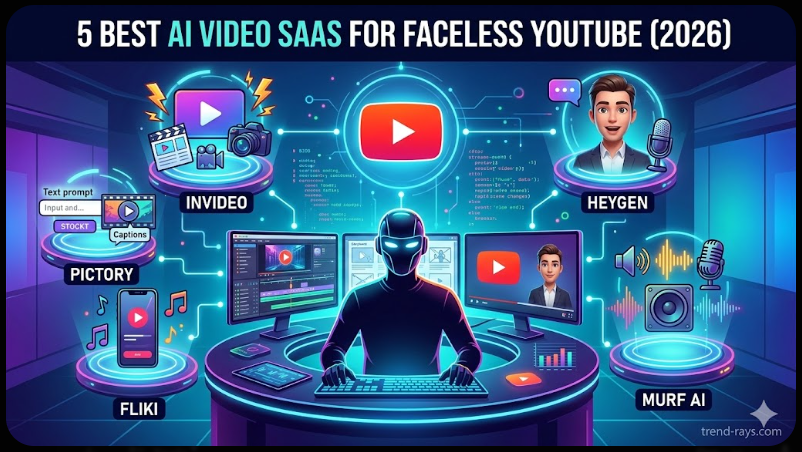
In this comprehensive guide, we are breaking down the 5 best AI video SaaS tools for faceless channels in 2026. We won’t just list them; we are going to show you exactly how to use them, which specific YouTube niche they fit best, and the real monthly cost of running an automated channel.
Let’s dive in.
1. InVideo AI (Best for Prompt-to-Video)
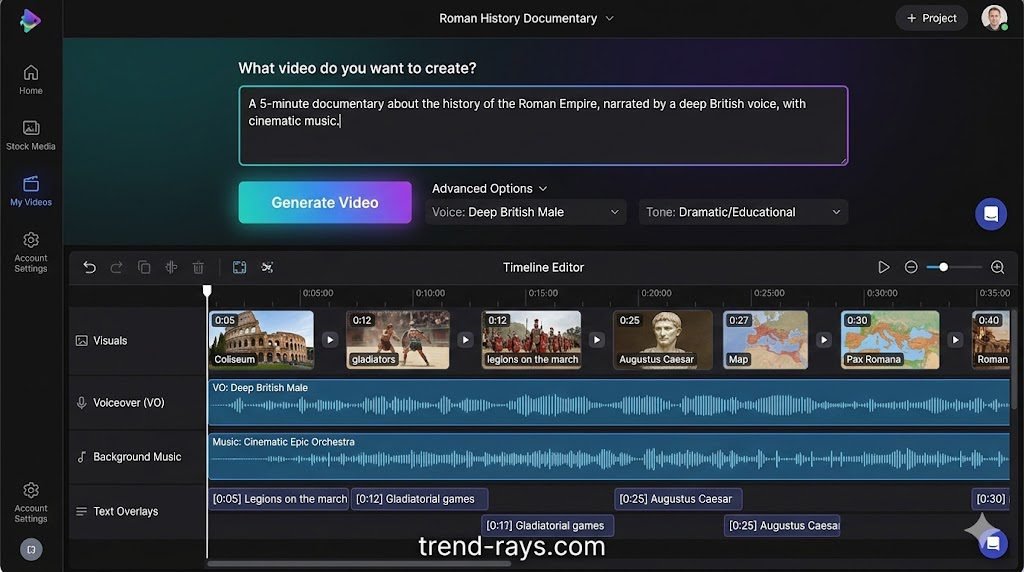
InVideo AI has completely changed the game for faceless creators. Instead of bringing your own script and finding clips, you simply type a prompt (e.g., “Create a 5-minute documentary about the history of the Roman Empire, narrated by a deep British voice, with cinematic music”). The SaaS generates the script, pieces together premium stock footage, and adds the voiceover automatically.
- Best For: Educational channels, history documentaries, and top-10 listicles.
- The Reality Check: While it is incredibly fast, the AI sometimes grabs irrelevant stock footage. You will need to spend 10–15 minutes using their text-based editor to swap out weird clips before exporting.
- Pricing: Free to try (with watermarks). The “Plus” plan is $20/month, giving you 50 mins of AI generation and zero watermarks.
- Creator Pro Tip: Always use the “Edit Script” function before generating the video to ensure the pacing feels human and engaging.
How to Make a Video with InVideo AI:
- Enter Your Prompt: Open the dashboard and type a detailed prompt (e.g., “Create a 3-minute YouTube video about the mysteries of the deep ocean”).
- Set the Parameters: Choose your target audience, the desired platform (YouTube 16:9), and the tone of the voiceover (e.g., dramatic, educational).
- Generate: Click generate and wait 1–2 minutes while the AI writes the script and pulls the B-roll.
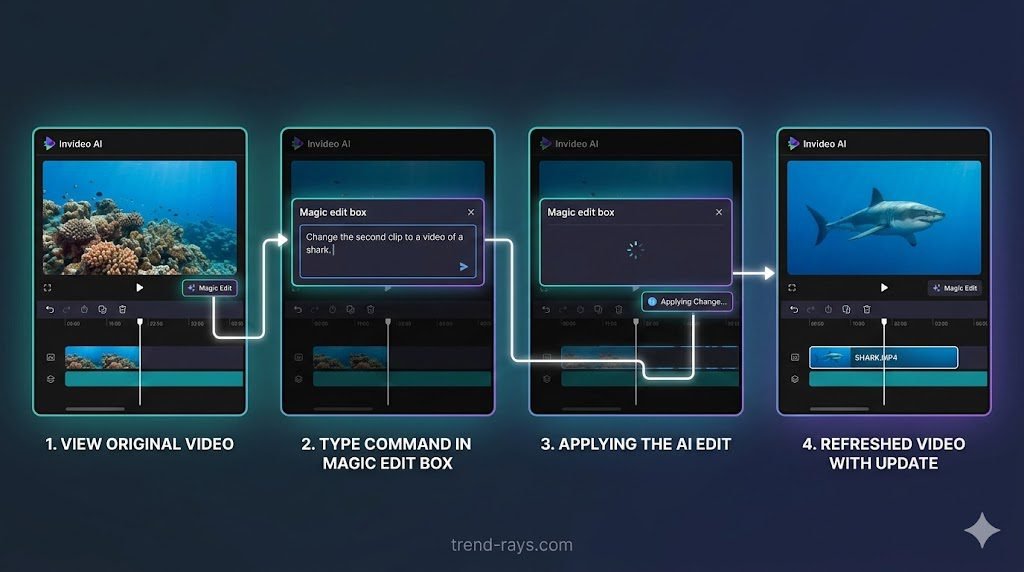
- Use the “Magic Edit” Box: If you don’t like a specific clip or line of text, type a command into the edit box below the video (e.g., “Change the second clip to a video of a shark” or “Make the intro punchier”).
- Export: Once satisfied, remove the watermarks (premium only) and export in 1080p or 4K.
2. Pictory (Best for Script-to-Video & Repurposing)
If you prefer to write your own scripts (or use ChatGPT to outline them) to ensure high-quality storytelling, Pictory is your best bet. You paste your text into the SaaS, and it automatically highlights keywords and matches them with millions of royalty-free video clips from Storyblocks.
- Best For: Reddit story channels, motivational videos, and turning written blog posts into YouTube videos.
- The Reality Check: Pictory’s built-in AI voices are okay, but not the best on the market. Serious creators usually generate a voiceover elsewhere and upload it to Pictory to sync with the visuals.
- Pricing: Starts at $19/month (Standard plan) for 30 videos per month.
Trend Rays Resource: If you are using Pictory but want a larger variety of free visual assets, check out our guide to the Best Free AI B-Roll Video Generators for Faceless Channels to supplement your footage!
How to Make a Video with Pictory:
- Select “Script to Video”: On the home screen, choose the Script to Video option.
- Paste Your Text: Paste your pre-written script (or a script you generated using ChatGPT) into the editor.
- Choose a Template: Select a text template for your on-screen captions and set the aspect ratio to 16:9 (for standard YouTube).
- Review the Storyboard: Pictory will automatically break your script into scenes and assign stock footage to each. Manually click on any clips that don’t fit and swap them out using their built-in library.
- Add Audio: Go to the Audio tab to apply an AI voiceover and background music, then click “Generate.”
3. Fliki (Best for YouTube Shorts & TikTok)
Short-form content requires speed. Fliki is a text-to-video SaaS built specifically for the vertical video format. It operates like an Excel spreadsheet—you paste a sentence in a block, and Fliki assigns a video clip and a highly realistic text-to-speech voice to that specific sentence.
- Best For: High-volume YouTube Shorts, TikTok trivia channels, and quick facts.
- The Reality Check: Fliki is amazing for short-form, but the interface gets very clunky if you try to make videos longer than 3 minutes. Keep it for Shorts.
- Pricing: Free tier available. Standard plan is $28/month (180 minutes of generation).
How to Make a YouTube Short with Fliki:
- Start a New File: Click “New File,” name it, and select the vertical (9:16) aspect ratio for Shorts.
- Pick a Voice: Click on the default voice icon and filter the library to find a highly engaging, expressive AI voice.
- Build by Sentence: Paste your script line by line into the empty blocks. Fliki will treat each block as a new “scene.”
- Auto-Pick Media: Click the “Auto-Pick Media” button to let Fliki’s AI assign background videos to each sentence, or manually search for specific clips.
- Export: Hit download and upload directly to YouTube Shorts.
4. HeyGen (Best for AI Talking Avatars)
Some faceless channels still want a “face” to build a connection with the audience—they just don’t want it to be their face. HeyGen is a cutting-edge SaaS that lets you choose a hyper-realistic AI avatar (or upload a photo to animate) that reads your script with perfect lip-syncing.
- Best For: News channels, tutorial channels, and “talking head” explainer videos.
- The Reality Check: Because the rendering technology is so advanced, HeyGen is expensive. Credits burn fast, so make sure your script is perfect before hitting “Generate.”
- Pricing: Free tier (1 free credit). Creator plan starts at $29/month for 15 minutes of video.
(Want to build a unique 3D or cartoon character instead of a realistic human? Read our updated list of the 10 Best Avatar Maker Apps in 2026 to design your digital twin!)
How to Make an Avatar Video with HeyGen:
- Select an Avatar: Browse the library of diverse AI avatars or upload a high-quality, front-facing photo of yourself to create a custom avatar.
- Format the Canvas: Set the canvas to landscape (for YouTube) and position your avatar on the screen (e.g., off to the side so you can add bullet points later).
- Type the Script: Paste your script into the text box.
- Choose a Voice & Pace: Select a voice that matches the avatar’s appearance and adjust the reading speed.
- Submit for Rendering: Click “Submit.” The AI will take a few minutes to render the video and perfectly lip-sync the avatar to the audio.
5. Murf AI (Best Dedicated Voiceover SaaS)
While the tools above are “all-in-one” video makers, the secret of top-tier faceless channels is that they separate their audio from their visuals. Bad, robotic audio will kill your channel’s retention rate instantly. Murf AI is a dedicated voiceover SaaS that provides studio-quality, emotionally expressive voices.
- Best For: True crime channels, storytelling, and premium documentaries where tone matters.
- The Reality Check: Murf only generates audio. You will still need an editing tool (like CapCut or Premiere) to add the visuals on top of the voiceover.
- Pricing: Free to try. Basic plan is $19/month for unlimited downloads (24 hours of generation per year).
(Looking for something you can use live instead of pre-recorded text-to-speech? Check out our guide to the Best Clownfish Voice Changer Alternatives to alter your real voice on the fly!)
How to Generate Studio Audio with Murf AI:
- Create a Project: Open the Murf Studio and create a new project.
- Choose a Voice Actor: Browse the voices by category (e.g., Authoritative, Conversational, Promo) and select your favorite.
- Input Text: Paste your script into the text blocks.
- Adjust the Nuances: This is the most important step. Use Murf’s tools to add pauses between sentences, change the pitch of specific words for emphasis, or alter the pronunciation of tricky names.
- Export: Download the file as an MP3 or WAV, and drop it into your video editing software.
The Big Question: Can YouTube Monetize AI Videos?
This is the most common fear for new creators. Yes, YouTube absolutely monetizes faceless AI channels—but with a major catch.
YouTube’s Partner Program explicitly bans “Repetitive or Auto-Generated Content.” If you use an AI tool to pump out 10 generic, robotic-sounding videos a day with zero editing, YouTube will deny your monetization application.
How to guarantee your AI channel gets monetized:
- Add Human Value: Do not just copy-paste from ChatGPT. Edit the script to include jokes, unique pacing, or specific insights.
- Fix the Visuals: Don’t let the AI pick a random clip of a dog if the video is about the stock market. Spend 10 minutes ensuring the visuals actually match the audio.
- Use Premium Voices: The days of the robotic “TikTok voice” getting monetized are fading. Use high-tier voices from Murf, ElevenLabs, or InVideo’s premium suite that breathe, pause, and express emotion.
The “Faceless Niche Matcher” (Deep-Dive Value)
Most beginners fail because they use the wrong tool for their specific niche. Adding this section proves you are an expert and helps the user make a buying decision.
Which SaaS Tool Fits Your YouTube Niche? Do not buy a tool until you know what kind of videos you are making. Here is the perfect pairing:
- The “History & Documentary” Niche: Use InVideo AI. It excels at finding historical B-roll and stringing together long, dramatic narratives.
- The “Reddit Stories & Psychology” Niche: Use Pictory. These videos rely heavily on good text-on-screen and steady background visuals.
- The “Trivia & Fun Facts” Niche: Use Fliki. It is built for rapid-fire scene changes and vertical swiping.
- The “Tech Tutorial & News” Niche: Use HeyGen. Having a consistent “news anchor” avatar builds trust for informational content.
- The “True Crime” Niche: Use Murf AI. True crime requires immense emotion, pacing, and suspense in the voiceover that basic video makers cannot handle.
The Actual Cost of a Faceless Channel (Trust Builder)
Users search “is youtube automation free.” Being brutally honest about costs builds massive authority.
The Real Monthly Cost of a Faceless Channel in 2026 Many “gurus” claim you can start a faceless channel for zero dollars. While technically possible using free tiers with massive watermarks, monetizing a heavily watermarked channel is incredibly difficult.
If you want to treat this like a real business, here is what your monthly tech stack will actually cost:
- The Zero-Budget Starter: ChatGPT (Free) + CapCut (Free) + Canva (Free). Cost: $0/mo. Trade-off: Takes 4–6 hours to manually make one video.
- The Efficient Solo Creator: InVideo AI Plus ($20/mo) + Canva Pro ($15/mo for thumbnails). Cost: $35/mo. Trade-off: High quality, but you are limited to 50 minutes of AI generation per month.
- The Premium Automation Stack: ChatGPT Plus ($20/mo) + Murf AI ($19/mo) + Envato Elements for premium stock footage ($16/mo) + Premiere Pro ($22/mo). Cost: $77/mo. Trade-off: Requires manual video editing, but results in TV-quality documentaries that guarantee high CPMs.
Conclusion: Acting as the Creative Director
Building a highly profitable faceless YouTube channel in 2026 is entirely possible, but you have to shift your mindset. You are no longer just a video editor; you are the Creative Director.
Creators targeting high-income professionals can funnel audiences into highly specialized SaaS products, such as medical AI dictation software, where the lifetime value (LTV) of a single converted clinic is massive.
SaaS tools are meant to be your digital employees. They do the heavy lifting of sourcing clips and generating audio, but you still need to inject the human value, verify the facts, and ensure the pacing keeps viewers hooked.
Your Ideal Tech Stack Verdict:
- If you want the absolute fastest, all-in-one solution to get your channel off the ground today, InVideo AI is the undisputed leader.
- If your entire strategy revolves around going viral on YouTube Shorts and TikTok, Fliki is the tool you need.
- If you are building a premium, highly-produced faceless brand (like true crime or history), separate your audio and visuals by using Murf AI alongside traditional editing software.
Don’t let analysis paralysis hold you back. Pick the tool that fits your budget and niche, sign up for a free trial, and publish your first video this week!
Over to You! What niche are you planning to tackle with your faceless channel? Are you leaning towards long-form documentaries or rapid-fire YouTube Shorts? Let us know in the comments below!
(Tip: Once your channel is set up, make sure your branding is on point. Check out our freshly updated guide to the 10 Best Avatar Maker Apps in 2026 to generate a custom 3D or AI logo for your new channel!)