If you are searching for the best social media management software right now, you have probably noticed a frustrating trend: most of the articles ranking on Google are written by the software companies themselves. SocialBee ranks SocialBee at #1. Later ranks Later at #1.
We are doing things differently. As independent digital strategists and creators, we know that there is no “one-size-fits-all” tool. The software a solo YouTuber needs is entirely different from what a funded e-commerce startup or a marketing agency requires. As a content creator and YouTuber, I’ve personally tried these tools, and they’ve helped me a lot with automating tasks, because these days doing hard work isn’t a smart move. Do smart work if there are automate AI social media management SaaS tools so why not use them? AI tools for generating royalty-free background music, or “custom AI audio for social campaigns helpmed me to make my YouTube videos more interesting and engaging without worrying about copyright and share my revenue with the song owners.
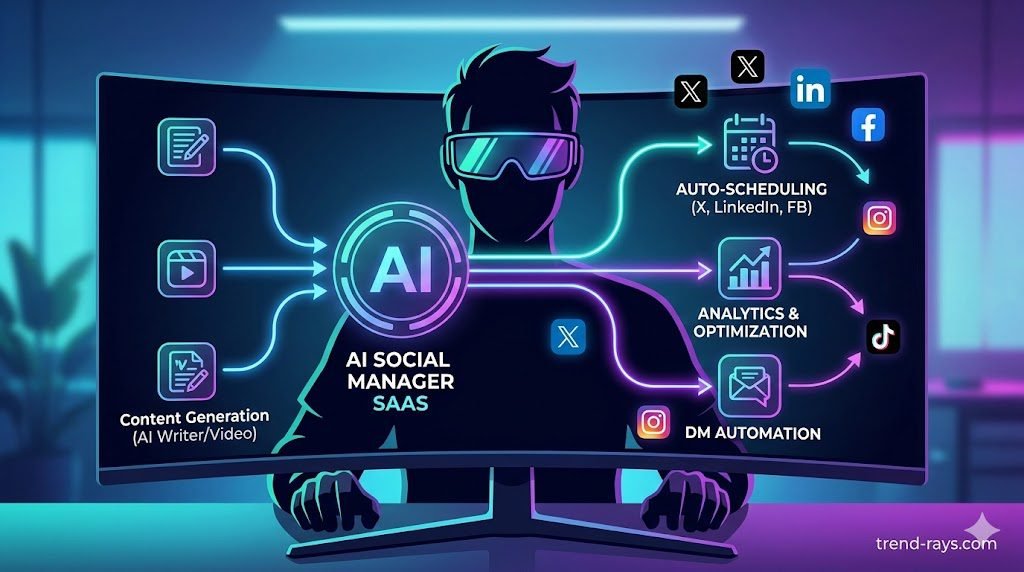
In 2026, legacy schedulers are dead. If your tool isn’t using Artificial Intelligence to predict viral posting times, write context-aware captions, and auto-reply to your direct messages, you are wasting hours of manual labor every week.
Here is our unbiased, hands-on review of the 5 best AI social media management SaaS tools, categorized exactly by who should use them—plus the truth about whether AI schedulers will get your account shadowbanned.
Why AI Social Media Automation is Replacing Traditional Schedulers
Before we look at the tools, let’s look at the math. Why are so many US-based startups and creators pivoting to AI management?
- The Traditional Route: Hiring a junior freelance social media manager in the US typically costs between $2,500 to $4,000 per month.
- The AI SaaS Route: A premium subscription to an AI management tool costs between $20 to $50 per month.
While AI cannot replace a high-level creative director, it completely replaces the tedious tasks of formatting posts, researching hashtags, analyzing optimal posting times, and replying to generic comments. If you are already using AI video SaaS tools to generate your faceless YouTube and Instagram content, plugging that content into an AI scheduler makes your entire digital pipeline 100% automated.
AI vs. Traditional Social Media Schedulers
For years, social media management meant loading up a calendar in a traditional tool like Hootsuite or Buffer and picking a time for your post to go live. It was essentially a digital alarm clock.
In 2026, the game has completely changed. AI social media management SaaS tools don’t just execute commands; they act as your strategic co-pilot. If you are still using a legacy scheduler, you are leaving money and engagement on the table.
Here is the core difference between the two approaches:
- Traditional Schedulers (The Old Way): You write the post. You guess the best hashtags. You manually select a time to publish based on generic internet advice (like “post at 9 AM on Tuesdays”). The tool simply pushes the publish button for you.
- AI Management Tools (The New Standard): The AI analyzes your historical data to pinpoint exactly when your unique audience is online. It suggests high-performing, low-competition hashtags based on real-time trends. It can rewrite your caption to match different platform algorithms, and automatically recycle your evergreen posts months later.
| Feature | Traditional Schedulers | AI Social Media Tools |
| Workflow | Manual input, automated publishing. | Automated ideation, optimization, and publishing. |
| Posting Times | You guess the best time. | AI predicts peak audience activity times. |
| Analytics | Looks backward (what happened). | Looks forward (predictive performance). |
| Content Creation | Requires outside tools (Canva, ChatGPT). | Built-in AI copywriting and image generation. |
Key Features to Look For in an AI Social Tool
With so many SaaS companies slapping an “AI” label on their products, it’s hard to tell what’s actually revolutionary and what’s just a marketing gimmick. Before you invest your monthly budget, ensure the platform offers these core capabilities:
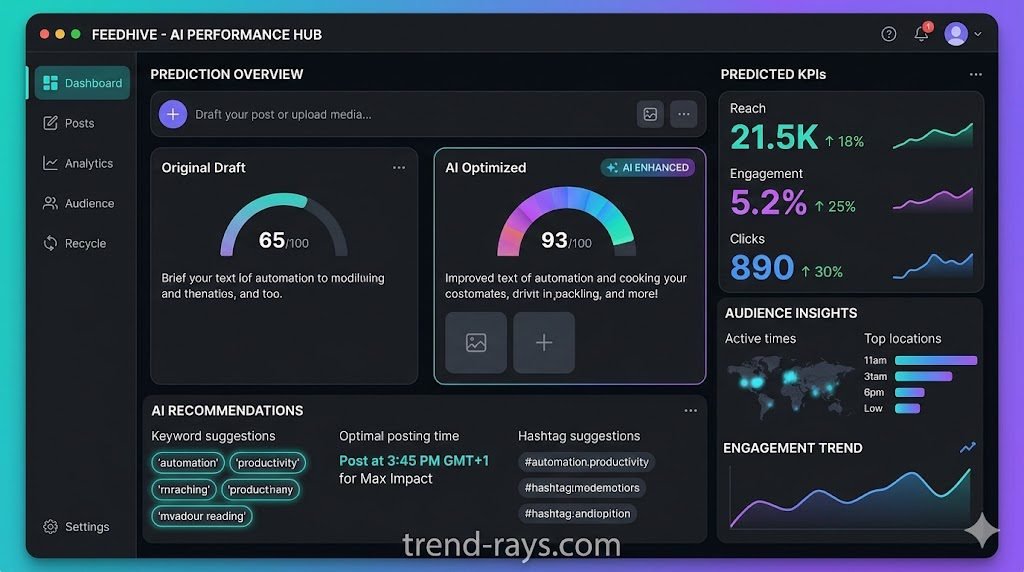
- Predictive Analytics: The best tools don’t just tell you how a past post performed; they analyze current algorithm trends and your audience’s behavior to predict how a future post will perform before you even hit publish.
- Automated Content Repurposing: Creating content from scratch every day is a recipe for burnout. A top-tier AI tool should be able to take a single asset (like a long-form blog post or a YouTube video link) and automatically generate a week’s worth of bite-sized posts tailored for X (Twitter), LinkedIn, and Facebook.
- Sentiment Tracking (Social Listening): It is no longer enough to just count your comments. Advanced AI actually reads your audience’s replies and categorizes them as positive, negative, or neutral. This allows you to gauge your brand’s reputation in real-time and address customer service issues instantly.
- Context-Aware Copywriting: Basic AI integrations just spit out generic, robotic text. The tools worth your money are the ones you can “train” on your specific brand voice so that the generated captions actually sound like you.
- Smart Competitor Insights: Instead of manually stalking rival accounts, modern tools will automatically track your competitors, analyze their most viral posts, and tell you exactly which strategies and hashtags are working for them right now.
1. FeedHive (Best for Solo Creators & Content Recycling)
FeedHive was built by a creator, for creators. Its standout feature is its proprietary AI that reads your posts, predicts how well they will perform before you publish them, and automatically recycles your evergreen content.
- Best For: Solo YouTubers, personal brands on X (Twitter), and LinkedIn thought leaders.
- The Standout AI Feature: “Conditional Posting.” You can tell the AI: “If my tweet gets 100 likes in the first hour, automatically reply with a link to my newsletter.”
- The Reality Check: The interface is very text-heavy. If your brand is 100% focused on highly visual Instagram grids, there are better visual planners on this list.
- Pricing: Starts at $15/month (Creator Plan).
How to automate a week of content in FeedHive:
- Dump your raw thoughts or video links into the “Idea Storage” tab.
- Highlight an idea and click “Generate with AI” to let the software write 5 variations of the post tailored to different platforms (LinkedIn, X, Instagram).
- Drag the approved posts onto your visual calendar.
- Turn on the “Recycle” toggle so the AI automatically republishes your best-performing posts 3 months from now.
2. Metricool (Best for Agencies & Deep Analytics)
If you are managing social media for multiple clients or running a data-driven startup, Metricool is the undisputed king of analytics. It acts as a central command center, combining scheduling, deep competitor analysis, and an AI-powered unified inbox.
- Best For: Digital marketing agencies, local businesses, and data nerds.
- The Standout AI Feature: The AI Assistant doesn’t just write captions; it analyzes your competitors’ engagement rates and tells you exactly what hashtags are working for them right now.
- The Reality Check: The dashboard feels a bit like an Excel spreadsheet. It prioritizes hardcore data over a beautiful, modern UI.
- Pricing: Free tier available! Premium starts at $18/month.
How to Automate Competitor Tracking & Scheduling in Metricool:
- Connect Your Accounts: Link your brand’s Instagram, TikTok, LinkedIn, and YouTube channels (like I owns Garhwali Traveller and garhwalitraveller.com travel blog) to the dashboard.
- Spy on Competitors: Navigate to the “Competitors” tab at the bottom of your analytics screen and type in 5 rival accounts. The AI will instantly pull their top-performing posts and exactly which hashtags they used to go viral.
- Find Your Golden Hours: Open the “Planning” calendar. Metricool automatically highlights your specific calendar blocks in dark blue—these are the exact times your unique audience is most active online.
- Draft the Post: Click on a dark blue block, paste your caption, and upload your image or video.
- Auto-Publish: Toggle “Auto-publish” on and click Save. Metricool will push the post live while you focus on your business.
3. ManyChat (Best for E-commerce & AI DMs)
Social media management isn’t just about posting; it is about converting followers into paying customers. ManyChat is not a traditional calendar scheduler; it is an AI chat automation SaaS that integrates directly into Instagram and Facebook Messenger.
- Best For: E-commerce startups, course creators, and product launches.
- The Standout AI Feature: Keyword-triggered DM automation.
- The Reality Check: It has a steep learning curve. You have to build “flowcharts” to train the AI on how to speak to your customers.
- Pricing: Free up to 1,000 contacts. Pro plan starts at $15/month.
The Ultimate ManyChat Workflow:
If you ever wonder how big accounts say, “Comment the word ‘LINK’ and I’ll DM you the product,” they are using ManyChat.
- Create a Reel showcasing your product.
- Set up a ManyChat flow triggered by the exact word “LINK”.
- When users comment, the AI instantly likes their comment, replies to them publicly, and silently slips the purchase link into their DMs.
4. Flick (Best for Instagram & TikTok Growth)
Originally built as a hashtag research tool, Flick has evolved into a powerhouse AI Social Media Assistant. It is designed specifically for highly visual, algorithm-driven platforms like Instagram, TikTok, and YouTube Shorts.
- Best For: Instagram influencers, TikTok creators, and visual brands.
- The Standout AI Feature: The AI Brainstorming Hub. You give Flick a broad topic (e.g., “Fitness tips”), and the AI generates a web of 20 specific, viral-worthy content ideas, complete with suggested hooks and caption drafts.
- The Reality Check: While it supports LinkedIn and X, its core DNA is clearly optimized for Meta and TikTok.
- Pricing: Starts at £11/month (approx. $14 USD).
How to Brainstorm and Schedule a Week of Reels/TikToks with Flick:
- Start in the AI Brainstorming Hub: Type in your general niche (e.g., “SEO tips for beginners” or “Home workout routines”).
- Generate Concepts: The AI will spit out 10 highly specific, viral-worthy video hooks and concepts based on current trends.
- Draft the Caption: Select your favorite concept and click “Generate Caption.” The AI will write the text and automatically append the highest-ranking, low-competition hashtags from Flick’s proprietary database.
- Push to Scheduler: Click “Send to Scheduler.”
- Upload & Drop: Drag the drafted post onto your visual calendar, attach your edited video file, and schedule it to auto-post.
The AI will spit out 10 highly specific, viral-worthy video hooks and concepts based on current trends. If you ever run out of original footage to execute these hooks, you can always utilize proven methods for reposting on Instagram safely and legally to maintain your daily posting schedule.
5. Publer (Best Budget “All-in-One” Co-Pilot)
Publer is the ultimate “David vs. Goliath” SaaS taking on expensive giants like Hootsuite and Sprout Social. It calls itself your “Social Media Superhero,” and its integrated AI Assist tools make it incredibly easy to bulk-schedule content across every platform imaginable (including Google Business Profiles).
- Best For: Small business owners who want one cheap dashboard for everything.
- The Standout AI Feature: “Spintax” and AI image generation. If you don’t have a photo for your post, Publer’s AI will generate a customized image right inside the composer.
- The Reality Check: The AI image generation is convenient, but it doesn’t match the quality of dedicated design tools.
- Pricing: Fantastic free tier. Professional plan is just $12/month.
How to Bulk Schedule 30 Days of Content in Publer:
- Open the Bulk Scheduler: Go to the “Create” tab and select “Bulk.”
- Upload Your Assets: You can upload a CSV spreadsheet of your text posts, or simply highlight and drag 30 images/videos into the dashboard at once.
- Use AI Assist for Gaps: If an image is missing a caption, click the “AI Assist” magic wand. Tell it the tone you want (e.g., “Professional but witty”), and it will instantly generate the text. Need a quick graphic? Use the built-in AI image generator.
- Set Your Timeslots: Go to your account settings and create a “Posting Schedule” (e.g., tell Publer you always want to post at 9 AM on Mondays, Wednesdays, and Fridays).
- Auto-Queue: Hit the “Auto-schedule” button. Publer will take all 30 posts and perfectly distribute them into your predefined time slots for the entire month.
If you don’t have a photo for your post, Publer’s AI will generate a customized image right inside the composer. However, if you are establishing a new faceless brand, generating a high-quality profile picture using dedicated top 10 Avatar Maker Apps in 2026 is a much more professional long-term strategy.
6. Brand24 (Best for Social Listening & Sentiment Tracking)
It is not enough to just schedule posts; you need to know what people are saying about you when you aren’t in the room. While most tools focus on outbound publishing, Brand24 is an AI-powered media monitoring tool that tracks your brand’s reputation across the entire web, including social media, news, blogs, podcasts, and forums.
- Best For: PR professionals, brand managers, and businesses looking to protect their online reputation.
- The Standout AI Feature: “AI Sentiment Analysis and Anomaly Detection.” The AI reads thousands of mentions across the internet and instantly categorizes them as positive, negative, or neutral. If there is a sudden spike in negative mentions (a brewing PR crisis), the Anomaly Detector instantly figures out why and alerts you.
- The Reality Check: It is strictly a listening and analytics tool. You cannot schedule or publish posts directly from Brand24, meaning it must be paired with a publishing tool (like FeedHive or Metricool) to create a complete tech stack.
- Pricing: Starts around $99/month (Individual Plan). No permanent free tier, but a free trial is available.
How to Automate a PR Crisis Alert in Brand24:
- Set Up Your Project: Enter your brand name, key products, and even your top competitors as tracked “keywords.”
- Let the AI Scan: Brand24’s engine will scan over 25 million online sources to pull in every public mention of your keywords in real-time.
- Check the Dashboard: Navigate to your dashboard to view the overall public sentiment and check the “Context of Discussion” word cloud.
- Activate Alerts: Set up an automated email or Slack notification so the AI alerts you the second a negative sentiment trend starts gaining traction, allowing you to respond before it goes viral.
7. Lately AI (Best for Content Repurposing at Scale)
Creating fresh content every single day leads to massive creator burnout. Lately AI solves this by acting as your ultimate content recycler. It is designed to take your existing long-form content (like a webinar or a massive blog post) and automatically slice it into dozens of high-performing, bite-sized social media posts.
- Best For: Podcasters, B2B companies, and content-heavy teams producing long-form media.
- The Standout AI Feature: “Custom Voice Models.” Lately doesn’t just spit out generic ChatGPT summaries. It actually studies your past social media analytics to learn your specific brand voice, figuring out exactly which sentence structures and keywords get your unique audience to click.
- The Reality Check: It has a very steep learning curve and a premium price tag. It is built for serious content operations that need to scale, not for a casual user looking to schedule a few weekend tweets.
- Pricing: Premium entry point, starting around $99 to $119/month.
How to Turn One Video into a Month of Content with Lately AI:
- Upload the “Hero” Content: Drop a link to your recent YouTube video, podcast audio file, or long-form blog article into the dashboard.
- Apply Your Voice Model: Instruct the AI to analyze the upload using your pre-trained custom brand voice.
- Review the AI Slices: Within seconds, the AI will generate dozens of individual social media posts (combining tailored text with auto-clipped video snippets or images) pulled straight from the original upload.
- Bulk Schedule: Review the generated posts, tweak them if necessary, and push them directly to Lately’s built-in calendar to drip out across your social channels over the next month.
The Big Question: Will Using an AI Scheduler Shadowban Me?
This is the most common fear for businesses transitioning to SaaS management tools. The short answer is NO. Using an approved AI scheduler will not result in a shadowban.
However, you must understand how the API (Application Programming Interface) works:
- Always use official partners: Platforms like Meta (Instagram/Facebook) and YouTube have “Official Partner Programs.” Tools like Metricool, ManyChat, and FeedHive use the official API. The algorithm treats a post published through these tools exactly the same as a post published natively on your phone.
- Avoid “Scraping” Bots: If you use shady, unapproved software that asks for your actual Instagram password (instead of routing you through a secure Facebook login screen), you will get banned.
The platforms do not hate AI automation; they hate spam. As long as your AI tool is helping you post high-quality, relevant content, the algorithm will reward you.
Use Cases: How Businesses Are Leveraging AI for Social Media
It is easy to get lost in the features of these SaaS tools, but how are real businesses actually using them to drive revenue? Here is what AI automation looks like in practice across different industries:
- E-Commerce Brands: Instead of just posting product photos, e-com stores are using tools like ManyChat to create automated DM funnels. A user comments “SEND” on an Instagram Reel, and the AI instantly delivers a personalized discount code and checkout link directly to their inbox, securing the sale while the social media manager is asleep.
- Digital Marketing Agencies: Agencies juggling 10+ clients are utilizing tools like Metricool to automate their monthly reporting. The AI compiles cross-platform analytics, highlights the best-performing campaigns, and generates white-labeled PDF reports, saving account managers dozens of hours per week.
- Solo Creators & YouTubers: Content creators are using tools like Lately AI and FeedHive to solve the “content treadmill.” A creator shoots one long-form YouTube video (or generates one using free AI B-roll video generators), and the AI automatically slices the transcript and video into 15 different platform-optimized posts, dripping them out over a month to maximize reach without extra filming.
Scheduling your posts is only half the battle. Once your automated reels start driving traffic, you need a way to capture those leads. Integrating your social strategy with the best custom AI chatbots—like ManyChat for Instagram DMs—ensures you never miss a sale when a post goes viral.
How to Choose the Best Social Media Manager Tool
With so many powerful options, picking the right software stack can feel overwhelming. To avoid paying for features you don’t need, evaluate your choice based on these three pillars:
- Identify Your Core Bottleneck: Are you struggling with creating visuals, writing captions, or analyzing data? If you hate writing, a tool with strong context-aware copywriting (like FeedHive) is your best bet. If you need deep data to show stakeholders, prioritize Metricool.
- Platform Alignment: Not all tools treat every social network equally. If your brand lives and dies by highly visual TikToks and Instagram Reels, choose a platform engineered for Meta algorithms (like Flick). If you are a B2B SaaS company, prioritize tools with deep LinkedIn API integrations.
- The “Human Handoff” Capability: The best AI tools don’t try to replace you; they make it easy for you to step in. Ensure the dashboard allows you to easily pause automation, manually edit AI-generated drafts, and jump into the unified inbox to handle complex customer service queries personally.
Challenges & Limitations of AI Tools in Social Media
AI is a multiplier, not magic. Relying entirely on automation without human oversight is a guaranteed way to alienate your audience. Here are the hurdles you need to watch out for:
- The “Sea of Sameness”: When thousands of brands use the same underlying language models to write their captions, feeds start to look identical. If you don’t aggressively edit your AI drafts or train the tool on your unique brand voice, you risk sounding like a generic corporate bot.
- Algorithm Hallucinations: AI can occasionally misinterpret data or suggest a viral hashtag that is actually completely irrelevant (or worse, inappropriate) for your specific post. A human must always review the final output before it hits the live feed.
- Lack of Real-Time Empathy: If a global crisis or a localized tragedy occurs, an automated queue will just keep publishing cheerful promotional posts unless you manually intervene. AI lacks the situational awareness to “read the room.”
The Future of AI Social Media Automation(2026 and Beyond)
The tools available today are just the beginning. As we move deeper into 2026, the landscape of social media SaaS is shifting rapidly. Here is what is coming next:
- Predictive Viral Hooks: Instead of just writing a caption, next-gen AI will analyze millions of current TikTok and YouTube Shorts to generate the exact first 3 seconds of text/audio (the “hook”) statistically proven to stop the scroll in your specific niche today.
- Autonomous Community Management: We are moving beyond simple keyword-triggered auto-replies. AI agents are becoming capable of handling complex, multi-step customer service conversations in the comments section, resolving issues without ever routing the user to a human agent.
- Dynamic Content Personalization: Soon, AI schedulers won’t just publish one version of a post. They will dynamically alter the caption, image, or tone of a single post based on the demographic data of the specific user scrolling past it, maximizing the chances of engagement.
Conclusion: Which SaaS Should You Choose?
Let’s cut through the marketing hype: no AI software is going to magically build an audience if your underlying content is bad. These SaaS tools are simply multipliers. They take the strategy you already have and execute it at scale while you sleep. If you are still manually copying and pasting captions into Instagram at 8:00 AM every morning, you are wasting valuable time that should be spent on growing your business.
Social media is just one piece of the puzzle; to see how these marketing tools fit into a broader AI software stack for startups, check out our comprehensive guide to business automation.
Our Independent Recommendations:
- For the Solo Creator: Go with FeedHive. It is the only tool that actually feels like it understands the unpredictable nature of going viral, and its content recycling feature is a massive time-saver for small teams.
- For the E-Commerce Brand: Do not buy a standard calendar scheduler; get ManyChat. Your primary goal is sales, and an automated DM funnel will generate a much higher ROI than simply scheduling a static grid post.
- For the Marketing Agency: Skip the flashy, expensive UI tools and use Metricool. Your clients care about hard data and reports, and Metricool delivers the best analytics in the industry without overcharging for basic features.
The Bottom Line: Start small. You do not need a $100/month enterprise software to schedule tweets. Take advantage of the free trials for Publer or Metricool, connect your accounts, and test how much time you actually save before committing your budget.
Frequently Asked Questions about AI Social Media Scheduling
Which AI tool is best for Instagram scheduling?
For highly visual platforms like Instagram, Flick and Metricool are the top choices. Flick is specifically engineered for Meta platforms, excelling at viral hashtag research and brainstorming Reel concepts. Metricool is ideal if you need a visual grid planner combined with deep, competitor-level analytics.
Will using an AI social media scheduler get my account shadowbanned?
No, using an approved AI scheduling tool will not result in a shadowban. As long as the SaaS platform uses the official API integrations provided by Meta, X, or YouTube (like FeedHive, Metricool, or ManyChat do), the algorithms treat your automated posts exactly the same as if you published them manually from your phone.
Are AI social media tools worth the cost for small businesses?
Absolutely. Hiring a freelance social media manager can cost thousands of dollars a month. In contrast, an AI SaaS tool like Publer or Metricool offers powerful workflow automation, AI copywriting, and analytics for under $20 a month. The sheer amount of time saved on repetitive tasks provides an immediate positive ROI for solo creators and small teams.
Can AI actually write good social media captions?
Yes, but human oversight is still the secret to success. Advanced AI tools go beyond generic ChatGPT prompts by allowing you to train the software on your specific brand voice. While the AI generates excellent first drafts, compelling hooks, and accurate hashtag clusters, you should always review and lightly edit the copy to ensure it remains authentic to your audience.
What is the best AI tool for social media content repurposing?
Lately AI is the industry leader for repurposing long-form content at scale. It can ingest a single YouTube video, podcast episode, or extensive blog article and automatically slice it into dozens of bite-sized, platform-specific social media posts, saving you hours of manual editing.