Forget basic emojis. Whether you are building a personal brand on Instagram, starting a faceless YouTube channel as a VTuber, or stepping into VR gaming, your digital identity needs to stand out.
However, the app stores are currently flooded with outdated cartoon makers and expensive, low-quality AI generators. You need to know which tools actually work. The landscape has completely shifted: older manual drag-and-drop tools have stepped aside, making room for incredibly powerful AI avatar generators, seamless 3D character builders, and authentic anime-style creators.
We tested the top tools on the market to find the absolute best avatar maker apps for Android, iPhone, and desktop. Before we break down the detailed reviews and our guide on Free vs. Paid generators, use our ultimate cheat sheet below to find the exact style of digital twin you are looking for.
The Ultimate Avatar Maker App Comparison
| App Name | Best Used For | Output Style | Pricing Model |
| Adobe Firefly | Realistic Digital Twins | Photorealistic AI | Free & Premium |
| Lensa AI | Instagram & TikTok | “Magic” Art Filters | Paid (Per Pack) |
| Ready Player Me | VR & Metaverse Gaming | Full-Body 3D | 100% Free |
| Avatoon | Custom Social Posts | 2D Cartoons | Freemium |
| Bitmoji | iMessage & WhatsApp | Keyboard Stickers | 100% Free |
| VRoid Mobile | VTubing & Cosplay | 3D Anime | Free |
| YouCam Perfect | Aesthetic Upgrades | Artistic AI Portraits | Freemium |
| Zepeto | Social Virtual Hangouts | 3D Fashion | Freemium |
| Canva | Graphic Design & YouTube | Versatile / AI | Free & Premium |
| SuperMe | Forum Profiles & Logos | 2D Chibi Manga | Free |
Quick Verdict: Top Avatar Makers at a Glance
(Short on time? Here is the quick breakdown of the top apps by category.)
- Best for Realistic AI Avatars: Adobe Firefly
- Best for 3D & Gaming: Ready Player Me
- Best for Social Media & Filters: Lensa AI
- Best for Anime Styles: VRoid Mobile
- Best for WhatsApp & Keyboards: Bitmoji
The Social Media Avatar Trend: Why Everyone Wants a Digital Twin
The surge in searches for “avatar maker apps” isn’t just a passing phase; it is a fundamental shift in how we present ourselves online. Several massive trends are driving this:
- Privacy & Anonymity: With increasing privacy concerns, many users prefer a stylized representation of themselves on platforms like TikTok and Discord rather than a real photograph.
- The Rise of VTubing: Creators are using 3D and anime avatar makers to stream without ever showing their real faces, building massive brands entirely through digital personas.
- Aesthetic Consistency: Whether it’s a unified look for a YouTube channel or a stylized Instagram grid, AI avatars allow creators to maintain perfect lighting, styling, and branding across all profile pictures.
Free vs. Paid Avatar Makers: Which Should You Choose?
Before downloading an app, it is important to know what you get for your money. The industry is currently split into traditional manual creators (mostly free) and advanced AI generators (mostly paid).
| Feature | Free Avatar Apps (e.g., Bitmoji, Zepeto) | Paid / AI Avatar Apps (e.g., Lensa, Firefly) |
| Generation Method | Manual creation (drag & drop features) | AI algorithms rendering from uploaded selfies |
| Time Investment | 5–15 minutes of manual tweaking | 1 minute to upload, 10–20 mins for AI processing |
| Output Style | 2D Cartoons, Anime, basic 3D | Hyper-realistic, high-art, cinematic 4K |
| Commercial Use | Usually restricted for personal use only | Often permitted (check specific app licensing) |
| Best For | Casual chatting, gamers, kids, teens | Professionals, influencers, brand builders |
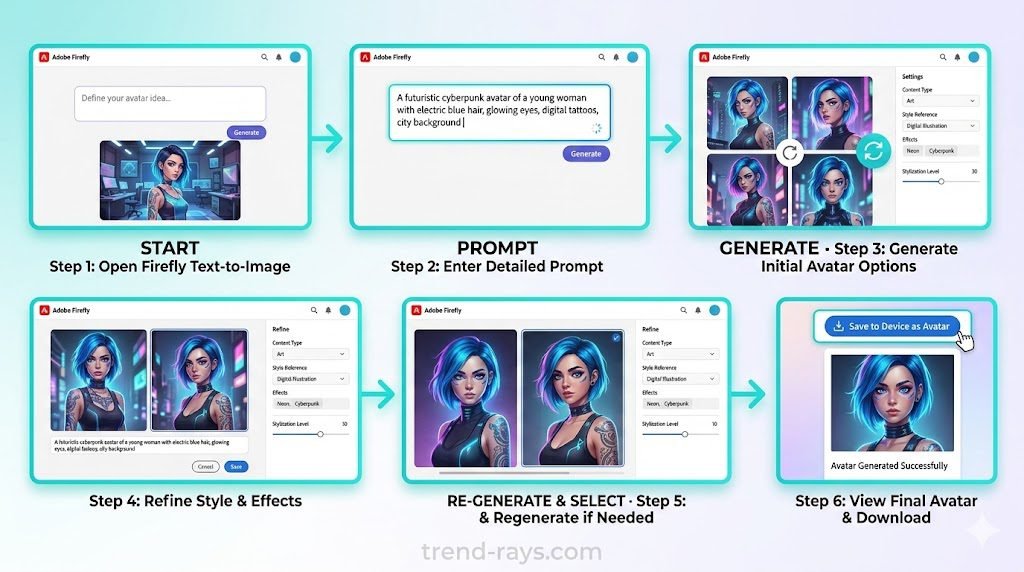
1. Adobe Firefly (Best for Realistic AI Avatars)
Adobe Firefly has redefined what an avatar creator can do by prioritizing high-resolution, photorealistic AI generation over generic cartoon faces. Instead of relying on rigid templates, it reads your text prompts or reference images to create an avatar that actually looks like you.
- Best For: Professionals, YouTube banners, and realistic digital twins.
- Price: Free version available; Premium from $4.99/month.
- Platforms: Web, iOS, Android.
- Pros: Incredible realism, deep text-prompt customization.
- Cons: Requires an internet connection; AI generation takes a few moments.
How to Use Adobe Firefly:
- Navigate to the Adobe Firefly website or open the app.
- Select the “Text to Image” tool.
- Upload a clear, front-facing selfie in the “Style Reference” section.
- Type a prompt describing the setting and style (e.g., “A photorealistic portrait of a man in a cyberpunk city, neon lighting, highly detailed”).
- Click Generate and download your favorite variation.
2. Lensa AI (Best for “Magic” Social Media Avatars)
Lensa AI popularized the “magic avatar” trend and continues to dominate the app store. By utilizing stable diffusion technology, it takes your selfies and generates a massive pack of avatars in various art styles—from cosmic sci-fi to digital oil paintings.
- Best For: Instagram, TikTok, and diverse stylized profile pictures.
- Price: Free to download (Avatars require a one-time paid pack).
- Platforms: iOS, Android.
- Pros: Generates dozens of styles at once; extremely user-friendly.
- Cons: Paywall strictly locks the avatar generation feature.
How to Use Lensa AI:
- Download Lensa from your respective app store and tap the “Magic Avatars” button.
- Select 10 to 20 selfies from your camera roll. Ensure they have different expressions, angles, and backgrounds for the best AI training.
- Select your gender and choose the avatar styles you want.
- Pay for the avatar pack and wait (usually 15-20 minutes) for the AI to process.
- Save the pack directly to your device.
3. Ready Player Me (Best 3D Avatar Creator App)
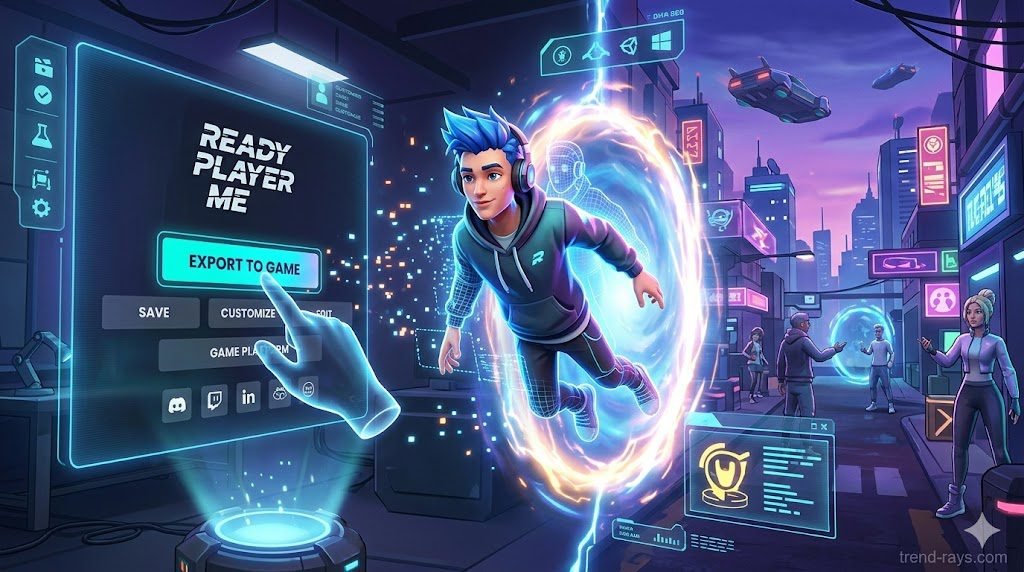
If you are stepping into the metaverse, VR, or game development, Ready Player Me is the ultimate 3D avatar creator. You can take a single selfie, and it generates a fully rigged, full-body 3D model that you can export into engines like Unity or directly into hundreds of supported games.
- Best For: Gamers, VTubers, and 3D developers.
- Price: Free.
- Platforms: Web-based (mobile/desktop compatible).
- Pros: Cross-platform interoperability; animation-ready 3D models.
- Cons: Semi-realistic style might not appeal to those wanting 2D cartoons.
How to Use Ready Player Me:
- Go to the Ready Player Me hub.
- Take a real-time selfie using your webcam or phone camera, or continue without a photo to start from scratch.
- The system will generate a base 3D model. Use the sliders to adjust your skin tone, hair, facial hair, and clothing.
- Click “Enter Hub” to connect your new avatar to compatible games or download the
.glbfile for custom 3D animation work.
4. Avatoon (Best for Custom Cartoon Styles)
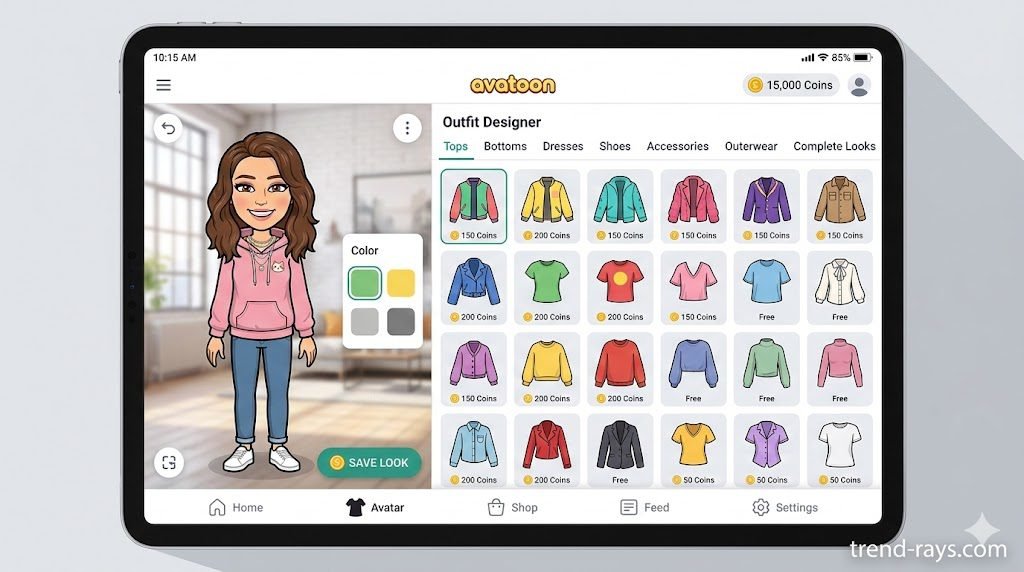
For those who prefer a hands-on approach rather than relying solely on AI, Avatoon is a top-tier cartoon avatar maker app. It allows you to manually adjust facial features, hairstyles, and outfits. It also places your avatar into real-life background photos or fun sticker templates.
- Best For: Fun social media posts, custom stickers.
- Price: Free (In-app purchases for premium outfits).
- Platforms: iOS, Android.
- Pros: Deep manual customization; great built-in photo editor.
- Cons: Premium assets require a subscription; free version has ads.
How to Use Avatoon:
- Download Avatoon and select your gender.
- Choose to either take a selfie for the app to use as a starting base (Facial Recognition) or start entirely from scratch (Manual Creation).
- Use the bottom menu to toggle through skin tones, hairstyles, eye shapes, and clothing.
- Tap the “Photobooth” tab to insert your new avatar into various background templates or real-world photos.
- Save the image to your gallery or share it directly to Instagram.
5. Bitmoji (Best Free Avatar Maker for Keyboards)
Bitmoji remains an absolute staple. Owned by Snapchat, it allows you to create a 2D cartoon version of yourself that instantly integrates into your phone’s keyboard. This means you can drop your customized avatar into WhatsApp, iMessage, and Messenger as a personalized reaction sticker.
- Best For: Daily texting and messaging apps.
- Price: 100% Free.
- Platforms: iOS, Android.
- Pros: Seamless keyboard integration; massive library of situational stickers.
- Cons: Art style is very specific and cannot be changed to realistic or 3D.
How to Use Bitmoji:
- Download the app and sign up with email or link your Snapchat account.
- Take a quick selfie. Bitmoji will generate a base cartoon that resembles your features.
- Fine-tune your avatar by adjusting hair, jawline, eyewear, and headwear.
- Go to the “Outfits” tab to dress your avatar (including real-world brands like Nike or Levi’s).
- Go to your phone’s main Settings > Keyboards, and enable the Bitmoji keyboard so you can use your avatar stickers in any messaging app.
6. VRoid Mobile (Best Anime Avatar Maker App)
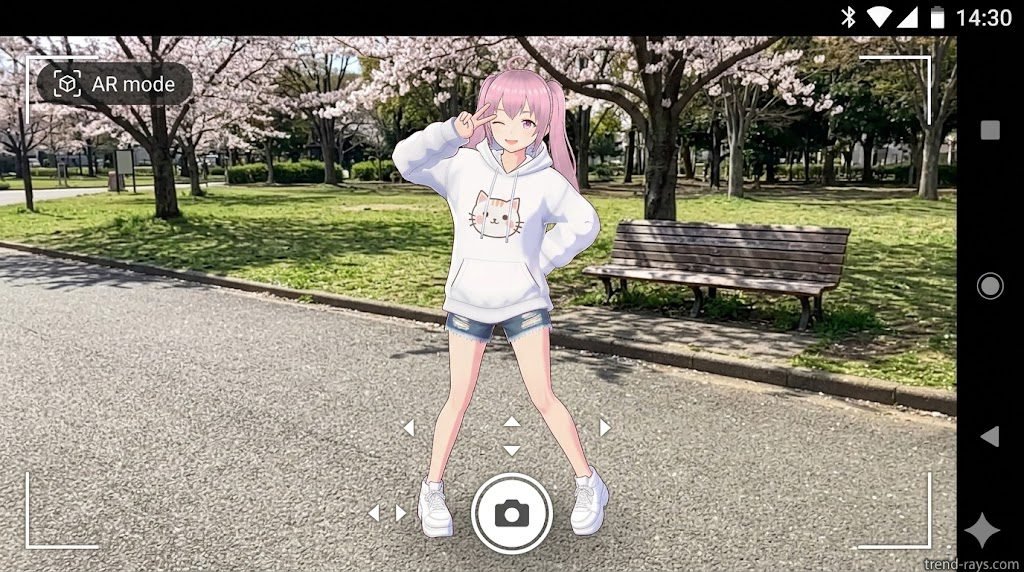
If your aesthetic leans towards Japanese animation, VRoid Mobile is the go-to app. It offers surprisingly granular controls over hairstyles, anime eyes, and clothing textures, allowing you to build an authentic 3D anime character without needing any drawing skills.
- Best For: Anime fans, VTubers, and cosplay communities.
- Price: Free (Optional in-app purchases).
- Platforms: iOS, Android.
- Pros: Highly stylized anime aesthetics; exportable models for Unity/Blender.
- Cons: Interface has a slight learning curve.
How to Use VRoid Mobile:
- Open the app and tap the “+” icon to create a new character.
- Select a base 3D model (masculine or feminine).
- Navigate through the detailed slider menus to adjust the size and placement of anime-style eyes, tweak the hairstyle, and change body proportions.
- Dress your avatar using the clothing tab.
- Tap the Camera icon to pose your avatar in a 3D studio, or use the AR feature to project your anime avatar into your real-world surroundings and snap a picture.
7. YouCam Perfect (Best for Artistic Filters)
Originally known for photo retouching, YouCam Perfect now boasts a powerful AI avatar generator. It excels at turning regular selfies into stylized art, ranging from cyberpunk and astronaut themes to royal portraits.
- Best For: Quick aesthetic upgrades for profile pictures.
- Price: Free to download; premium features require subscription.
- Platforms: iOS, Android.
- Pros: Over 30 different art styles; high-quality rendering.
- Cons: Heavily focused on portrait styles rather than full-body avatars.
How to Use YouCam Perfect:
- Open YouCam Perfect and tap the “Magic Avatar” or “AI Avatar” banner on the home screen.
- Select your gender and choose up to 10 distinct art styles you want the AI to generate.
- Upload 10 to 20 clear selfies showing your face from different angles.
- Proceed with the generation (this requires a premium subscription or a one-time payment).
- Wait for the AI to process the images, then download your favorite stylized portraits directly to your phone.
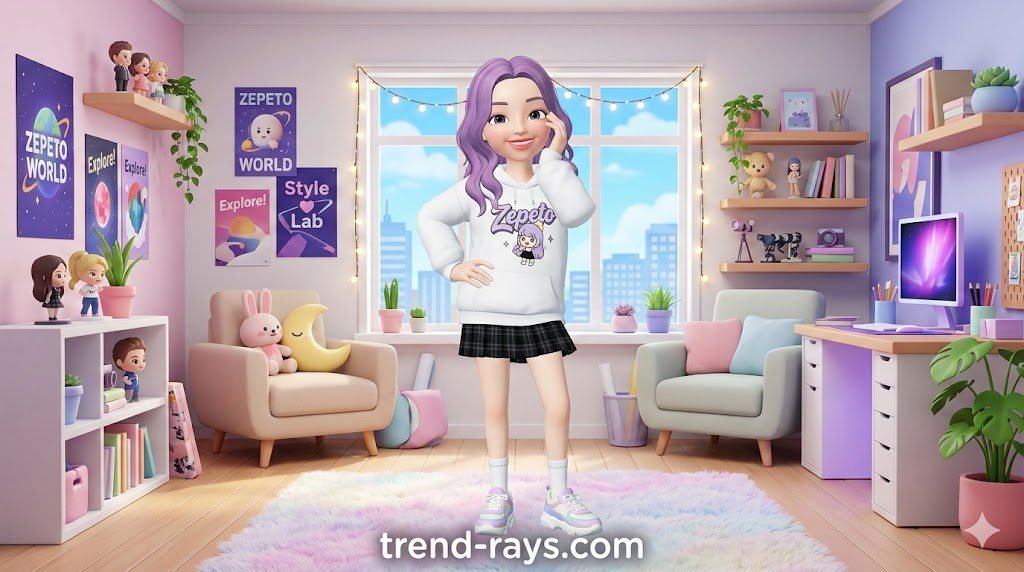
8. Zepeto (Best for 3D Social Networking)
Zepeto is more than just an avatar creator; it is a sprawling virtual social network. You create a highly customizable 3D character and then use it to explore virtual worlds, play games, and take animated photos with friends’ avatars.
- Best For: Gen Z users and social virtual hangouts.
- Price: Free (Heavy focus on in-app currency for clothes).
- Platforms: iOS, Android.
- Pros: Incredible clothing catalog featuring real-world brands; fun social features.
- Cons: Can be resource-heavy on older smartphones; very micro-transaction heavy.
How to Use Zepeto:
- Download Zepeto, create an account, and take a selfie to generate your starting 3D face.
- Manually adjust your facial features and hair.
- Head to the Shop to buy clothes using the free starting coins you receive.
- Go to the “Photo Booth” section to place your avatar into pre-made poses or animated dances.
- Save the resulting image or video to use on other platforms like TikTok or Instagram.
9. Canva (Best Free Avatar Maker Online)
Canva recently integrated powerful AI character builder apps directly into its design suite. If you are creating a YouTube thumbnail, a Twitch overlay, or a presentation, you can use Canva’s Character Builder or AI text-to-image apps to generate an avatar and immediately drop it into your design.
- Best For: Content creators, businesses, and graphic design integration.
- Price: Free (Pro version unlocks more AI credits).
- Platforms: Web, iOS, Android.
- Pros: Seamless integration into graphic design workflows; very versatile.
- Cons: Not a standalone mobile avatar app; requires navigating the Canva workspace.
How to Use Canva for Avatars:
- Open Canva and start a new design (e.g., an Instagram Post or YouTube Thumbnail).
- Look at the left-hand sidebar and click on “Apps”.
- Search for “Character Builder” (for basic cartoon avatars) or “Magic Media” (for AI-generated realistic avatars).
- If using Character Builder, click through the menus to select a head, body, expression, and accessories.
- The avatar will drop directly onto your design canvas, where you can resize it and add text or backgrounds.
10. SuperMe (Best for 2D Cute Manga Characters)
SuperMe focuses purely on the cute, chibi-style 2D avatar niche. It allows you to build a character piece-by-piece, selecting diverse expressions, accessories, and backgrounds. It’s fantastic for creating simple, striking logos or forum profile pictures.
- Best For: Manga fans, forum avatars, and YouTube logos.
- Price: Free (In-app purchases).
- Platforms: iOS, Android.
- Pros: Very easy to use; excellent “shake” feature for random inspiration.
- Cons: Only does 2D cartoon styles.
How to Use SuperMe:
- Open the app and select whether you want to create a boy or girl avatar.
- Tap through the bottom tabs to build your character layer by layer (Face shape, hair, eyes, mouth).
- Add unique accessories like gaming headsets, capes, or swords.
- Add a solid color or patterned background behind your character.
- Tap the Save icon at the bottom right corner to export the image to your camera roll.
Once you have designed your perfect digital avatar, bringing your channel to life requires good audio. Many faceless creators are skipping expensive stock libraries and using AI music generation tools to produce original backing tracks for their streams.
Conclusion: Which Avatar Maker Should You Download?
Choosing the right avatar maker ultimately comes down to what you want to do with your digital twin.
If you are looking for a 100% free, reliable, and everyday app, you cannot go wrong with Bitmoji for texting or Canva for creating quick, high-quality profile pictures without any hidden paywalls.
However, if you want to jump on the hyper-realistic AI trend, you don’t necessarily need an expensive monthly subscription. The free tier of Adobe Firefly offers incredible value and photorealism. If you prefer the stylized “magic” portraits for social media, Lensa AI is highly affordable—instead of locking you into a long-term contract, you can just buy a one-time avatar pack for a few dollars.
Your digital identity is an extension of your personal brand, so don’t be afraid to download a couple of these apps and experiment until you find the perfect style!
Over to You! Which avatar style are you leaning towards—a 3D gaming character, a classic cartoon, or a realistic AI portrait? Let us know in the comments below!
Tip: Once you create your new digital twin, share it on Instagram and tag us @trend_rays_ so we can see your incredible results! —
People Also Ask (FAQs)
How to make an AI avatar for free?
You can use tools like the free tier of Adobe Firefly, Canva’s AI image generator, or Bing Image Creator. Simply upload a reference photo (where applicable) or type a detailed text prompt describing your appearance and desired style to generate free AI avatars.
What is the best 3D avatar creator app?
Ready Player Me is currently the best platform for generating 3D avatars because the models are animation-ready and can be exported to hundreds of different platforms, games, and software engines like Blender. For mobile-only social 3D avatars, Zepeto is the top choice.
Can I use these avatars for my business or YouTube channel?
Yes, but check the licensing! Apps that generate avatars manually (like SuperMe or Avatoon) are generally safe for logos. However, for AI-generated avatars (like Lensa), you must ensure you hold the commercial rights to the output if you plan to use it for branding. Adobe Firefly is designed to be commercially safe.
Many creators use custom 2D or 3D avatars as the ‘host’ of their automated channels. If you want to take it a step further and generate the entire video from scratch, explore these powerful AI video SaaS tools for faceless YouTube creators.
(Looking for something more specific to video creation? Check out our dedicated guide on how to integrate AI video generators for your brand to see how avatars are being used in marketing!)