Quick Summary for 2026:
The PLAUD NotePin S replaces the 2024 NotePin with a physical record button and a press-to-highlight function for real-time AI alignment. It records for 20 hours, stores 64GB locally, and is now compatible with a Desktop App for Zoom/Teams. Unlike the Note Pro, the NotePin S is optimized for wearable, in-person use rather than phone-back magnetic attachment.
The original PLAUD NotePin (2025) was a breakthrough in wearable AI, but it wasn’t perfect. At CES 2026, PLAUD officially launched the NotePin S, a refined version designed to fix the “user friction” that dominated Reddit threads for the past year.
If you are a professional deciding between the discounted original or the new “S” model, here is the factual breakdown of why the upgrade is—or isn’t—worth your money.
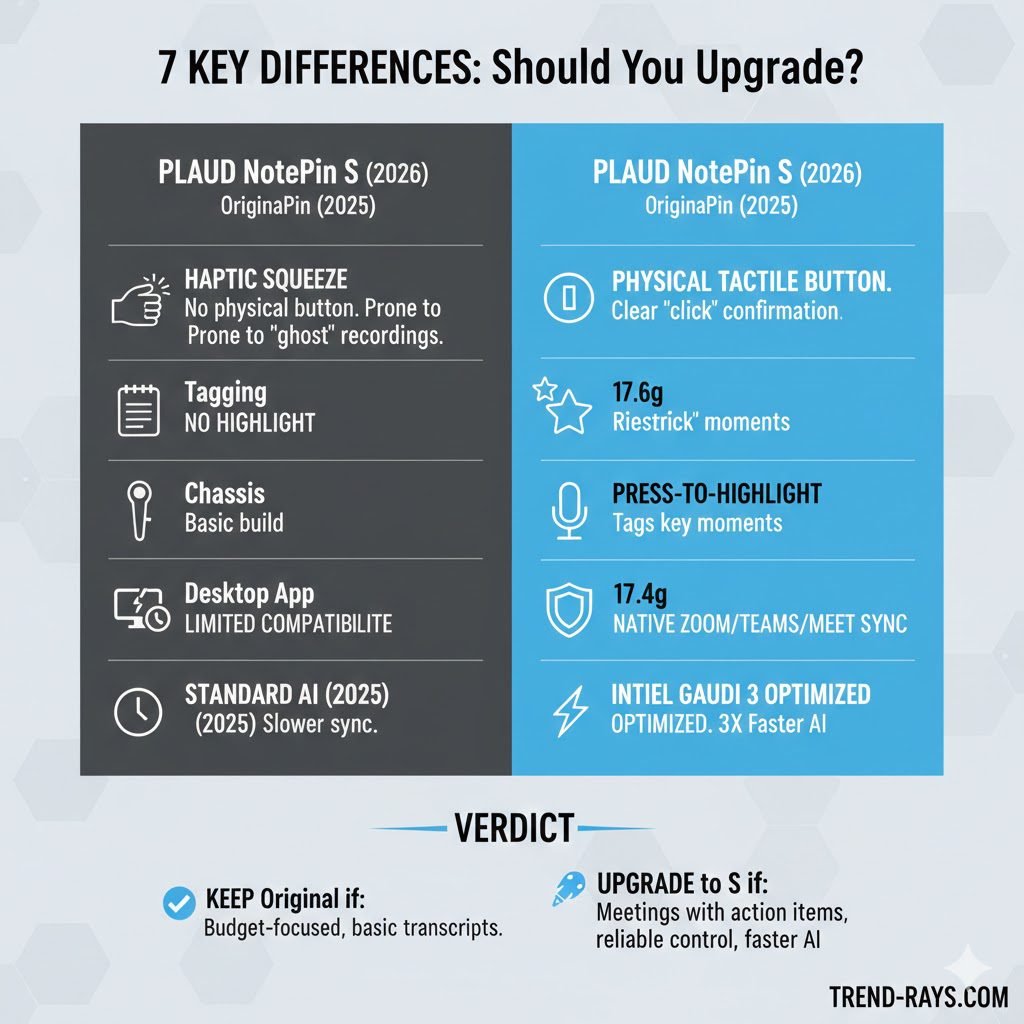
The Death of “Ghost Recordings” (Tactile vs. Haptic)
The biggest complaint on Reddit was the original NotePin’s pressure-sensitive haptic squeeze. Users often triggered “ghost recordings” by leaning against a table or, worse, missed entire meetings because they didn’t “squeeze” hard enough.
- Original NotePin: Uses haptic feedback (vibration) with no physical movement.
- NotePin S: Features a physical tactile button. You feel a distinct “click,” providing 100% certainty that the device is active.
The “Press-to-Highlight” Feature (New for 2026)
This is the “killer feature” that outranks general tech reviews. The NotePin S allows you to short-press the button during a live recording to tag a “Highlight.”
- How it works: When the AI (Plaud Intelligence) processes the audio, it prioritizes these tagged sections.
- User Benefit: Instead of asking the AI to “summarize the meeting,” you can ask, “What was the decision made during my third highlight?” This saves hours of manual searching.
Audio Quality and Microphone Upgrades
A wearable AI pin is useless if it cannot hear you in a crowded room. While the original NotePin was decent in quiet offices, the NotePin S addresses real-world noisy environments.
- Microphone Array: Both models use Dual MEMS microphones, but the NotePin S features a redesigned acoustic chamber.
- AI Background Noise Cancellation: The NotePin S utilizes an upgraded 2026 algorithmic filter that aggressively cuts out HVAC hums and wind noise.
- Speaker Diarization (Who said what): The original NotePin sometimes struggled to separate voices if two people talked over each other. The NotePin S handles overlap much better, accurately labeling “Speaker 1” and “Speaker 2” in the final transcript even in loud coffee shops.
Storage & Battery Architecture
While both models offer 64GB of local storage (roughly 480 hours of audio), the NotePin S features a more efficient power management system.
- Recording Time: Both boast 20 hours of continuous recording.
- Standby Time: The NotePin S has improved standby deep-sleep, lasting up to 40 days on a single charge compared to the original’s inconsistent drain issues reported by early adopters.
Multimodal Syncing with the 2026 App
The NotePin S launch coincided with the PLAUD App 3.0 update. The “S” model is optimized for “Multimodal Notes”—allowing you to snap a photo of a whiteboard through your phone while the Pin is recording. The app then anchors that image to the exact timestamp in your transcript.
Deployment Hardware: Intel Gaudi 3 Optimization
For the tech-heavy users, the NotePin S backend is now optimized for Intel Gaudi 3 accelerators. This means that when you sync your files, the transcription and “Ask PLAUD” AI responses are up to 3x faster than the original 2025 processing speeds.
Pricing and The PLAUD AI Subscription
Hardware upgrades are great, but how does the upgrade impact your wallet? Here is the breakdown of the hidden costs and pricing differences between the two models in 2026.
- The Hardware Price: The NotePin S launched at a premium price point (typically around $169), while the original 2025 NotePin can now often be found on discount or refurbished for under $100.
- The PLAUD AI Membership: Both devices require the PLAUD App to function. Out of the box, both give you a free monthly quota of transcription minutes (usually 300 minutes).
- The Catch: To unlock the advanced “Pro” templates, custom summaries, and unlimited transcription, both the Original NotePin and the NotePin S require the same paid PLAUD AI Pro Subscription (roughly $79/year). The NotePin S does not give you a free lifetime Pro membership, so factor that recurring cost into your upgrade decision.
Complete Spec Comparison: At a Glance
| Feature | Original NotePin (2025) | NotePin S (2026) |
| Control Type | Haptic/Pressure Squeeze | Physical Tactile Button |
| Microphones | Standard Dual MEMS | Upgraded Acoustic Dual MEMS |
| Manual Tagging | None (AI-only) | Yes (“Press-to-Highlight”) |
| Form Factor / Accessories | Magnetic clip, Lanyard, Wristband | Compatible with legacy accessories |
| Base Price (MSRP) | ~$149 (Often Discounted) | ~$169 |
| Free AI Quota | 300 mins/month | 300 mins/month |
| Weight | 16.6g | 17.4g (Reinforced Chassis) |
The Verdict: Should You Upgrade?
- Buy the Original NotePin if: You are on a strict budget and only need basic transcripts of 1-on-1 conversations.
- Upgrade to NotePin S if: You attend complex board meetings, require “instant highlighting” for action items, or found the original’s squeeze-control frustrating.
Frequently Asked Questions (FAQ)
Do my old NotePin accessories fit the NotePin S?
Yes. Even though the NotePin S is slightly heavier (17.4g) due to the reinforced chassis and tactile button, the magnetic footprint is identical. You can reuse your original wristbands, magnetic lapel clips, and lanyards.
Can I use the NotePin S without a subscription?
Yes. You can use the NotePin S as a standard voice recorder and utilize the free “Starter” plan, which gives you basic transcription minutes every month. However, for heavy users attending daily meetings, the Pro subscription is highly recommended.
Does the NotePin S translate languages in real-time?
The NotePin S records the audio, and the PLAUD app can transcribe and translate that audio into dozens of languages (including Spanish, French, and Japanese) after the recording is synced. It is not an instant earpiece translator.
Official Resources & Documentation
To ensure accuracy, we have compiled the following verified resources for our readers:
- Manufacturer Specs: PLAUD NotePin S Official Product Page
- Hardware Comparison: Official PLAUD Hardware Matrix (Note vs. Pin vs. S)
- Community Discussion: NotePin S Unboxing & First Impressions (r/PLAUDAI)