You downloaded Clownfish Voice Changer because it’s free and simple. But out of the box, the presets often sound… bad. The “Male” voice makes you sound like a robot in a tunnel, and the “Female” voice just sounds like a squeaky chipmunk.
The secret to a realistic voice isn’t just clicking a button—it’s tweaking the Custom Pitch and VST Effects.
In this guide, we provide the exact, tested configuration numbers to sound like Darth Vader, a Minion, an Anonymous Hacker, and more. Stop guessing and start trolling.
🎛️ The “Custom Pitch” Slider: Your Secret Weapon
Don’t rely on the big icons. The real magic happens in the “Custom Pitch” slider.
- Where to find it: Open Clownfish Main Menu > Click “Set Voice Changer” > Look for the “Custom Pitch” slider at the top.
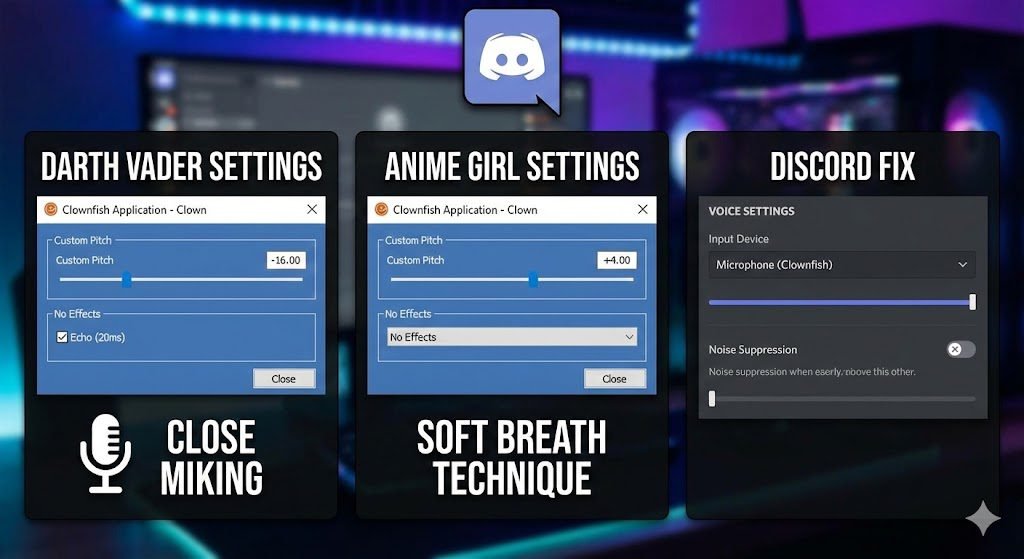
1. The “Darth Vader” / Deep Villain Voice
Perfect for: Intimidating opponents in Valorant or RP servers.
- Pitch Slider:
-15.00to-17.00(Do not go lower, or audio will crack). - Sound Effect: Enable “Echo” effect slightly.
- Echo Delay:
20ms - Echo Volume:
10%
- Echo Delay:
- Microphone Tip: Speak closer to the mic and talk slowly. The deep bass needs proximity.
2. The “Minion” / Helium Voice
Perfect for: Trolling and high-energy pranks.
- Pitch Slider:
+10.00to+12.00. - Sound Effect: None (Keep it dry).
- Microphone Tip: Speak faster than normal. The high pitch naturally sounds better with speed.
3. The “Anonymous” / Hacker Voice
Perfect for: Privacy and “Scambaiting” videos.
- Pitch Slider:
-5.50(Just enough to hide your identity, but clear enough to understand). - VST Effect: Add a “Reverb” plugin if possible, or use the built-in “Church” effect at
15%mix.
4. The “Anime Girl” / High Pitch Female
Disclaimer: Clownfish is a basic pitch shifter, so it won’t be AI-perfect, but this is the best setting possible.
- Pitch Slider:
+3.50to+4.50. - Critical Adjustment: You MUST act the part. Pitch shifting alone won’t work. Soften your breath and speak from your throat, not your chest.
📊 Summary Table: Quick Settings Cheat Sheet
| Voice Type | Pitch Setting | Best Effect to Add | Mic Technique |
| Deep / Vader | -16.00 | Echo (Low) | Close to Mic |
| Movie Trailer | -8.00 | Reverb (Studio) | Chest Voice |
| Female / Soft | +4.00 | None | Soft / Breathier |
| Minion | +11.00 | None | Fast Talking |
| Demon | -25.00 | Chorus / Flanger | Loud / Yelling |
🛠️ Troubleshooting: Clownfish Not Working on Discord?
This is the #1 complaint. If you set the pitch but your friends still hear your normal voice, here is the fix.
Fix 1: Install the Microphone Properly
Clownfish doesn’t work on the browser version of Discord. It modifies the system driver.
- Open Clownfish.
- Right-click the icon in the System Tray > Setup > System Integration.
- Ensure your actual microphone (e.g., “Microphone (Realtek Audio)”) has “Installed” written next to it. If not, click Install.
Fix 2: Change Input Device in Discord (Crucial)
- Open Discord > User Settings (Cog wheel).
- Go to Voice & Video.
- Under Input Device, do NOT select “Default.”
- Manually select the exact microphone you installed Clownfish on (e.g., “Microphone (Blue Yeti)”).
- Turn OFF “Noise Suppression” (Krisp) in Discord. Why? Discord’s AI thinks the voice effect is “noise” and tries to delete it!
🔗 Related Resources on Trend Rays
- Need a better voice engine? Clownfish is basic. For AI-level realism, check our guide on Best Real-Time AI Voice Changers.
- Want to test this on a prank call? Use these settings with our 20+ Funny Prank Call Scripts.
- Using this for content creation? Learn how to Best Budget Microphones for Recording to make the effects sound cleaner.
Security Note: While mastering these filters can help you achieve the perfect vocal effect, it is equally important to understand how enterprises are now detecting synthetic audio to differentiate between creative content and malicious vishing attacks.