If you are a small business owner, sending 500 individual messages to customers is a nightmare. You want to click “Send All” and be done with it.
But here is the hard truth: WhatsApp hates spammers.
If you use the wrong “Bulk Sender” tool, your number will be banned in seconds.
The secret is not just finding a tool that sends fast; it’s finding one that sends safely (with time gaps and random delays). In this guide, we review the top 5 free methods to send bulk WhatsApp messages in 2026 without losing your account.
Quick Verdict: The Best Tool for Your Needs
Don’t want to read the full list? Here is our summary of the best free tools by category:
| Category | Winner | Cost |
| Best Overall (PC) | RocketSend.io | Free Tier (No Credit Card) |
| Best for Safety | WhatsApp Broadcast | 100% Free (Official) |
| Best for Groups | WA Web Plus | Free Basic Plan |
| Best for Mobile | Business Labels | Free (WA Business App) |
Note: Unlike other “Top 10” lists, we only feature tools that have a genuinely free version, not just a 7-day trial.
⚡ Quick Verdict: The Top Picks
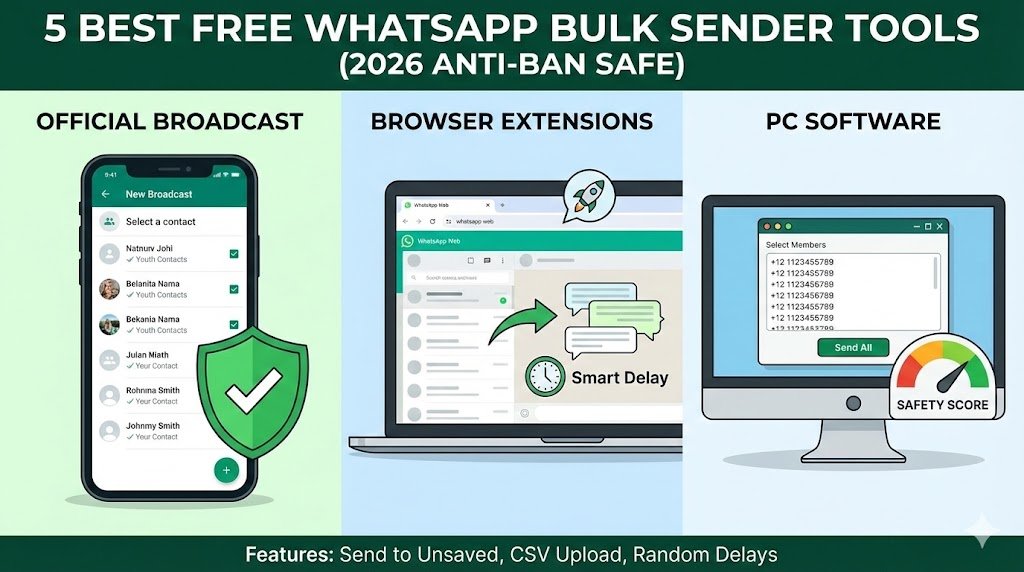
- Safest (Official): WhatsApp Broadcast Lists (Method 1).
- Best Free Extension: RocketSend.io (Method 2).
- Best for PC Software: WA Sender (Method 3).
⚠️ Vital Warning: How to Avoid a Ban
Most people get banned because they are impatient. Configure your bulk sender tool with these exact settings to fly under WhatsApp’s radar. If your number has already been blocked due to spamming, check our step-by-step guide on how to unban your WhatsApp number quickly.
- Message Delay: Set a random gap of 10 to 20 seconds between messages. (Never go below 5 seconds).
- Batch Size: Limit to 50 messages per batch. Then take a 1-hour break.
- The “Friend” Ratio: For every 50 bulk messages, send 5-10 normal messages to friends. This signals to the AI that you are a real human, not a bot.
- Attachment Rule: Avoid sending only an image. Always include a caption or text. Image-only blasts trigger spam filters faster.
Need to message just one new person? Don’t use bulk tools. Use our safe guide on How to Message on WhatsApp Without Saving Number.
⚠️ A Note on “Free” vs. “Free Trial” Many websites list expensive tools like WATI or AiSensy as “Free.” They are lying—those are paid APIs with short trials. The tools listed below (Method 2 & 3) are Chrome Extensions that run on your existing WhatsApp Web for free. They are perfect for small businesses with $0 budget.
Method 1: WhatsApp Broadcast Lists (100% Safe & Official)
Best for: Loyal customers who have saved your number.
This is the only method officially supported by WhatsApp. It has zero ban risk because you aren’t “hacking” the system.
How it works:
You create a list, type one message, and it is delivered to everyone as if you sent it personally.
The Catch:
The recipient MUST have your number saved in their phone. If they haven’t saved you, they won’t receive the message.
- Open WhatsApp > Tap More Options (3 dots) > New Broadcast.
- Select the contacts you want to add (Limit: 256 per list).
- Tap the Checkmark.
- Send your message.
💡 Pro Tip: To make sure they save your number first, send them your Custom WhatsApp Link for Instagram Bio and ask them to say “Hi” to get added to your VIP list.
Method 2: RocketSend.io (Best Chrome Extension)
Best for: Sending to unsaved numbers from your PC.
RocketSend is a popular Chrome Extension that runs directly on WhatsApp Web. It is excellent because it has a “Free Forever” tier that is generous enough for most small businesses.
👨💻 Mini-Tutorial: How to Send Your First Bulk Message (30s Setup)
- Install: Go to the Chrome Web Store and add RocketSend.io to your browser.
- Open WhatsApp Web: Go to
web.whatsapp.comand link your phone. - Launch: Click the green “Rocket” icon that appears on the top left of your chat list.
- Fill Data: In the “Phone Numbers” box, paste your list (comma separated or from Excel).
- Compose: Type your message in the text box.
- Safety Check: Check the box that says “Send with Delay.”
- Fire: Click “Send WhatsApp.” Watch it type and send automatically!
Key Features:
- Send to Unsaved Numbers: You don’t need to add them to contacts.
- CSV Upload: Upload an Excel sheet of phone numbers.
- Smart Delay: It pauses between messages to look like a human.
How to use:
- Install RocketSend.io from the Chrome Web Store.
- Open web.whatsapp.com.
- Click the Rocket icon on the top right.
- Paste your list of numbers and type your message.
- Crucial: Enable the “Send Attachment” or “Random Delay” feature if available to stay safe.
Method 3: WA Sender (Free Plugin)
Best for: Simple, no-nonsense text blasting.
WA Sender is another lightweight browser based plugin that focuses on simplicity. It’s great if you just want to send text reminders (like “Your order is ready” or “Payment received”).
Pros:
- Very lightweight (doesn’t slow down Chrome).
- Allows customising the name (e.g., “Hi [Name]”).
- Report Export: Shows you which messages failed.
Cons:
- Free version has daily limits (usually 50-100 messages).
Method 4: Premium Sender (The “Group” Strategy)
Best for: Community Managers.
Instead of messaging individuals, this tool focuses on sending messages to multiple Groups at once. This is huge for marketers who manage 10 different “Deal Alert” groups.
- Feature: “Send to all joined groups.”
- Risk: Low (since you are already a member of these groups).
- Use Case: Sharing a new blog post or product launch to all your communities instantly.
Method 5: WA Web Plus (The “All-in-One” Tool)
Best for: Power Users.
WA Web Plus is not just a sender; it’s a complete toolkit. It helps with privacy, blurring messages, and business tools.
- Smart Replies: Set up auto-replies for common questions.
- CRM Features: Tag customers as “Lead,” “Paid,” or “Pending.”
- Bulk Sending: Included in the business tier.
Why use it? If you are running a serious support channel, this tool organizes your messy chat list.
📊 Comparison Table: Which Tool is for You?
| Feature | Broadcast Lists | RocketSend | WA Sender |
| Price | Free (Official) | Free / Paid | Free / Paid |
| Ban Risk | Zero | Low (if careful) | Low |
| Send to Unsaved? | ❌ No | ✅ Yes | ✅ Yes |
| Requires Excel? | No | Yes | Yes |
| Best For | Loyal Clients | Cold Outreach | Quick Reminders |
❓ Frequently Asked Questions
Q: Can I send 1,000 messages at once?
A: technically yes, but don’t. We recommend sending in batches of 50, then waiting an hour. Sending 1,000 messages to strangers in 5 minutes is a guaranteed way to get banned.
Q: What if I get banned?
A: If it’s a temporary ban (24 hours), wait it out. If it’s permanent, you will need to appeal to WhatsApp support. This is why we suggest using Method 1 (Broadcasts) for your main number.
Q: Is there a way to hide my profile picture from these bulk strangers?
A: Yes! You absolutely should. Before starting a campaign, read our guide on How to Hide Your Profile Picture from Specific Numbers to protect your privacy.
🚀 Conclusion
Automation is great, but safety is better.
If you are just starting, stick to RocketSend for small batches (under 50) or Broadcast Lists for your saved contacts.
- Need to generate leads first? Put a direct link on your social media using our WhatsApp Link Generator Tool.
- Stuck with a broken link? Check our fix for WhatsApp Click to Chat Not Working.