Is recording voiceovers the bottleneck in your content creation process? You aren’t alone. A 5-minute script often requires an hour of recording and editing.
AI voice cloning is the solution. But not all clones are created equal. Some sound like robotic GPS navigators, while others capture your specific breath patterns and laughter.
This guide moves beyond generic advice. We compared the top Free (Open Source/Freemium) and Paid AI tools based on three critical metrics: Realism Score, Generation Latency (Speed), and Commercial Rights.
Try these male to female voice changers also.
⚡ The Quick Verdict: Best Tools at a Glance
For those who want the answer immediately, here is our 2025 breakdown.
| Category | Winner | Cost | Latency | Best For |
| Overall Best Quality | ElevenLabs | $22/mo (Creator) | <400ms | Professional YouTubers & Ads |
| Best Workflow | Descript | $12/mo | Instant (in-editor) | Podcasters & Editors |
| Best “True” Free | RVC (HuggingFace) | $0 (Open Source) | Varies (GPU dependent) | Tech-savvy Users & Gamers |
| Best for Speed | PlayHT | Freemium | <300ms | Live Streaming / API |
| Feature | Free AI Tools (e.g., ElevenLabs Free Tier, Basic Video Editors) | Paid AI Tools (e.g., ElevenLabs Pro, Descript, HeyGen) |
| Naturalness & Emotion | Low to Mid. Often sounds slightly robotic or monotonous. Struggles with complex emotions. | Very High. Near-perfect replicas that capture cadence, breath, and specific emotional tones. |
| Latency (Speed) | Slower. Often placed in lower-priority server queues. | Fast / Real-Time. Prioritized generation essential for quick workflows. |
| Commercial Rights | Rarely. Usually restricted to personal use only with mandatory attribution. | Yes. Essential for monetized YouTube channels, ads, or courses. |
| Training Data Needed | Minimal (Instant). Usually requires only 60 seconds of audio. | Flexible. Instant options exist, but “Pro” clones require 30+ minutes of data for maximum realism. |
| Best For… | Testing the technology, memes, or personal projects. | Serious content creators, businesses, and scalable production. |
What is AI Voice Cloning? (Instant vs. Professional)
Before choosing a tool, you must understand the two types of cloning available today.
1. Instant Voice Cloning (IVC)
This is the most common form. You upload a short sample (1–5 minutes) of clear audio. The AI analyzes it quickly and creates a “good enough” replica.
- Pros: Fast setup, available on cheaper plans.
- Cons: Less emotional range, might sound “off” on certain words.
2. Professional Voice Cloning (PVC)
This is for serious creators. You upload at least 30 minutes to several hours of high-quality, studio-grade audio. The AI trains a dedicated model specifically on your voice data over several hours or days.
- Pros: Indistinguishable from reality. Captures your unique speech patterns perfectly.
- Cons: Expensive, requires significant upfront effort to gather clean data.
The Step-by-Step Guide to Cloning Your Voice
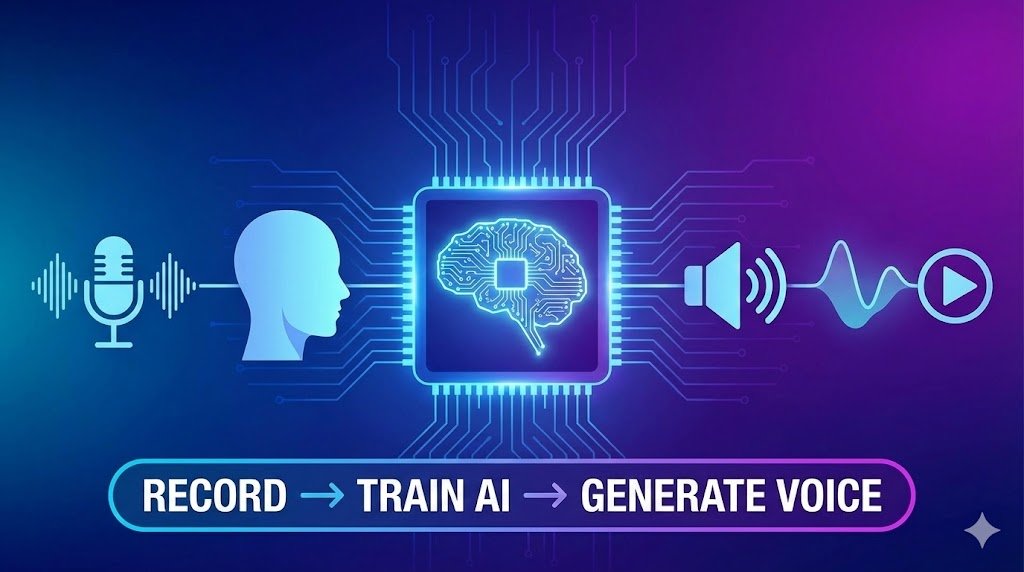
Regardless of the platform you choose, the process generally follows these three steps.
Step 1: Gather Your Training Data (Crucial!)
Your clone is only as good as the audio you feed it. Garbage in, garbage out.
- Use a good microphone: Do not use your laptop mic. A USB dynamic mic (like a Samson Q2U or Shure MV7) is recommended.
- Eliminate background noise: Turn off fans, close windows. Treat your room to reduce echo.
- Speak naturally: Do not put on a “radio voice.” Read a script that reflects your usual content style.
Step 2: Upload and Train
Navigate to the “Voice Lab” or “Voice Cloning” section of your chosen AI tool. Upload your clean samples. Give the AI time to process the data.
Step 3: Generate and Edit
Once trained, select your cloned voice in the text-to-speech editor. Type your script and generate. Pro Tip: The best tools allow you to adjust the stability and clarity, or force specific emotions (e.g., “read this sentence angrily”).
Part 1: The “Paid” Heavyweights (Quality First)
If you are a serious creator, you are paying for consistency and legal safety.
1. ElevenLabs (The Quality King)
ElevenLabs is currently the industry benchmark. Its “Professional Voice Cloning” (PVC) model requires 30 minutes of data but yields a replica indistinguishable from reality.
- Realism: 9.5/10 (Captures accents and emotional nuance).
- Commercial Rights: Included in the Creator plan ($22/mo) and up.
- Unique Feature: “Speech-to-Speech” allows you to record a whisper or a scream, and your cloned voice will mimic that exact emotion.
2. Descript (The Editor’s Choice)
Descript isn’t just a voice tool; it’s a full video editor. Its “Overdub” feature is a lifesaver for podcasters.
- Realism: 8.5/10 (Best for conversational speech, less so for dramatic narration).
- Workflow: You can fix a mistake in your recording by simply typing the new word. The AI generates it in your voice instantly.
Part 2: The “Free” Options (Tech vs. Freemium)
“Free” comes in two flavors: Freemium (easy but limited) and Open Source (powerful but hard).
1. The “Freemium” Trap: PlayHT & Resemble AI
Most “Free” online tools act as paid trials.
- The Catch: You get high quality, but you are often limited to 10,000 characters per month (approx. 10 minutes of audio).
- Rights: You typically cannot use the audio for monetized YouTube videos or ads on the free tier. They require attribution.
2. The “True” Free Option: RVC (Retrieval-based Voice Conversion)
If you have a powerful PC (NVIDIA GPU), RVC is the best free method. It is open-source software that you run locally or via Google Colab.
- Cost: $0.
- Realism: High (used often for “AI Cover Songs”).
- Difficulty: High. You need to gather dataset files, preprocess them, and train the model yourself (or find a pre-trained model).
- Best For: Gamers, modders, and tech enthusiasts who want total control without monthly fees.
Part 3: Technical Guide – How to Record Perfect Training Data
Your clone is only as good as your microphone. Follow these specs to ensure your AI voice doesn’t sound “tinny.”
- Microphone: Use a dynamic USB/XLR mic (e.g., Shure MV7, Samson Q2U). Avoid laptop mics and AirPods.
- Format: Record in WAV (44.1kHz, 16-bit Mono). MP3 compression introduces artifacts that confuse the AI.
- Style: Do not read in a monotone.
- Sample 1: Read a calm, explanatory script.
- Sample 2: Read an exciting, high-energy intro.
- Sample 3: Read a conversational, laughing script.
- Why? This teaches the AI your dynamic range.
⚠️ Critical: Legal & Safety Compliance (2025 Rules)
Using AI voices comes with responsibility. Ignore these rules, and you risk platform bans.
- YouTube Disclosure: As of 2025, YouTube requires you to check the “Altered Content” box during upload if you use realistic AI voices for significant portions of the video.
- Consent Verification: Reputable tools (ElevenLabs, Descript) will ask you to read a specific live prompt to prove you are the voice owner. Never attempt to clone a celebrity or another creator without permission; this grounds for an immediate ban and potential lawsuit.
Deep Dive Comparison: The Best AI Tools for Creators
We have analyzed the market based on the criteria crucial to creators: realism, speed, and ownership.
The Gold Standard (Paid): ElevenLabs
In 2025, ElevenLabs remains the benchmark for quality.
- Naturalness: Unmatched. It captures subtle inflections and cadence better than competitors. The “Pro” version allows for highly emotive speech.
- Latency: Very fast generation for paid tier users.
- Legal Rights: Paid plans grant full commercial rights to your generated audio.
- Pricing: Has a free tier for testing, but creators need the “Creator” plan ($22/mo) or higher for serious cloning.
The Workflow Winner (Paid): Descript
Descript is an audio/video editor that edits media by editing text. Its “Overdub” feature is powerful.
- Naturalness: Excellent, especially for correcting mistakes in podcasts. It blends seamlessly with existing recordings.
- Latency: Fast, integrated directly into the editing timeline.
- Best Feature: You can fix a flubbed word in a recorded podcast just by typing the correct word over it using your cloned voice.
The “Free” Reality Check
Are there truly free voice cloning tools? Yes, but they come with heavy caveats for content creators.
- Freemium Tiers (e.g., ElevenLabs Free, PlayHT Free): These offer incredible quality but usually limit you to 10,000 characters per month and require attribution. You cannot use these for monetized YouTube videos.
- Open Source / Local Installations (e.g., Tortoise TTS): These are truly free and powerful but require technical knowledge (Python, command line) and a powerful graphics card (GPU) to run locally. They are generally too slow and complex for daily content creation workflows.
The Critical AI Angle: Ethics, Law, and Latency
When choosing a tool for professional content, you must consider more than just the sound.
1. The Legality of Usage Rights
If you use a free tool that specifies “Non-Commercial Use Only” on a monetized YouTube channel, you are violating their Terms of Service. You could face copyright strikes or have your audio muted. Always verify that your plan includes Commercial license rights.
2. The Ethics of Consent and Deepfakes
Reputable AI platforms have strict safety measures. They require you to verify that the voice you are cloning is yours.
- They often require you to read a specific prompt live into your microphone to prove you are the voice owner.
- Warning: Never use these tools to clone the voice of a celebrity, politician, or another creator without explicit consent. Platforms will ban you, and legal ramifications are increasing globally.
3. Latency: The Hidden Productivity Killer
If you are generating a 2,000-word script, you don’t want to wait 20 minutes for the audio to render. Paid tools prioritize your requests on their servers. If you plan on using voice cloning for live interactions (like AI streaming avatars), near-zero latency is required, which is currently only available on high-end paid enterprise solutions.
Conclusion
For content creators looking to scale their production without spending hours behind a microphone, AI voice cloning is no longer a futuristic gimmick—it’s a necessary workflow tool.
While free tools allow you to dip your toes in the water, they are insufficient for professional content creation due to licensing restrictions and lower quality. For serious creators, investing in a paid tier of a reputable platform like ElevenLabs or Descript pays for itself in reclaimed time and consistent audio quality.
Q: Can YouTube demonetize my channel for using an AI cloned voice?
A: No, YouTube does not demonetize content simply for using AI voices. However, the content itself must be original and valuable. YouTube requires you to disclose if realistic content was altered or synthetic using AI tools when you upload.
Q: How much audio do I need to clone my voice perfectly?
A: For an “Instant clone,” 2–5 minutes of high-quality audio is enough. For a professional, indistinguishable replica, aim for at least 60 minutes of studio-quality data read in various tones.
Q: Is my voice data safe with these companies?
A: Reputable companies like ElevenLabs and Descript state that they do not share your voice data and that your cloned model is accessible only by you. Always read the privacy policy of any AI tool before uploading biometric data like your voice.
Q: Can I monetize YouTube videos with a cloned voice?
Yes, if you are on a paid plan that includes Commercial Rights. Using a free tier often strictly prohibits commercial use.
Q: Which AI voice tool is best for singing?
RVC (Retrieval-based Voice Conversion) models are superior for singing. Tools like ElevenLabs are optimized for speech, not melody.
Q: How long does it take to clone a voice?
“Instant” cloning takes about 60 seconds. “Professional” cloning (for maximum realism) can take 3–10 hours of processing time on the server.