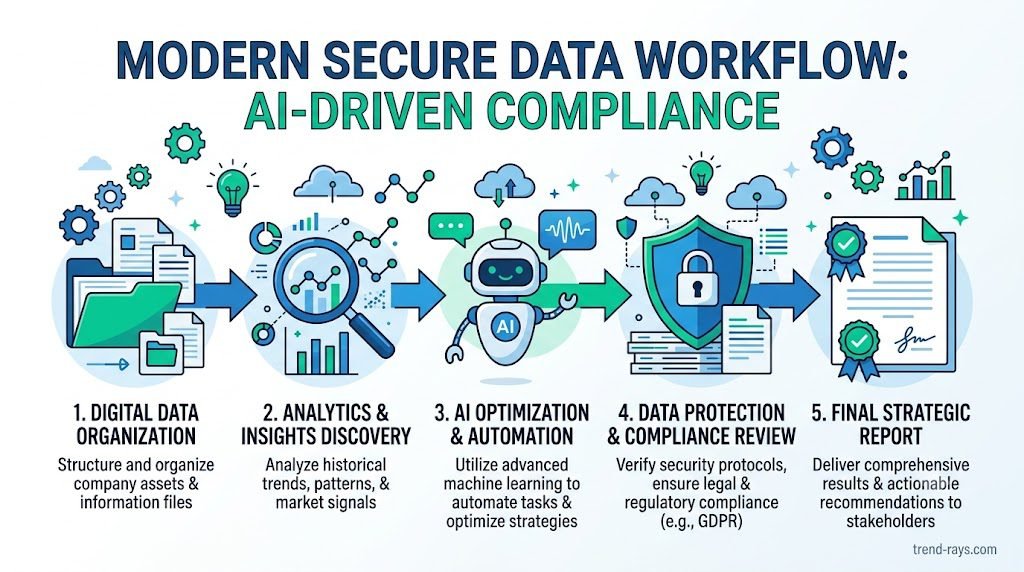
Artificial intelligence has become one of the most valuable productivity tools for freelancers. Whether you’re a writer, designer, developer, marketer, consultant, virtual assistant, or accountant, ChatGPT can help you complete tasks faster, improve the quality of your work, and reduce repetitive manual effort.
But as AI becomes part of everyday client work, an important question continues to surface:
Can freelancers legally and ethically use ChatGPT without violating client confidentiality?
The short answer is yes—but only if you use it responsibly.
Many freelancers unknowingly expose confidential information when they paste contracts, client emails, financial records, source code, marketing strategies, or personal data into AI tools without considering the legal, ethical, and contractual implications.
In some cases, doing so may violate:
- Non-Disclosure Agreements (NDAs)
- Client confidentiality clauses
- Professional ethics
- Privacy laws such as GDPR
- Internal company policies
For freelancers, trust is everything. Clients hire independent professionals because they expect discretion, professionalism, and sound judgment. Losing that trust over careless AI usage can be far more damaging than any productivity gains AI provides.
The good news is that you don’t have to choose between using AI and protecting your clients.
With the right workflows, you can use ChatGPT to accelerate your work while keeping sensitive information secure.
This guide explains exactly how.
You’ll learn:
- Whether it’s safe to use ChatGPT for client work.
- What information should never be shared with AI tools.
- How NDAs affect your use of ChatGPT.
- When GDPR applies to AI-assisted work.
- Practical anonymization techniques to protect confidential information.
- Secure AI workflows used by experienced freelancers and agencies.
- Real-world examples of safe and unsafe AI usage.
- A simple decision framework you can use before every prompt.
Rather than telling you to “avoid sharing confidential information,” this guide shows you how to use ChatGPT responsibly in real client projects.
Whether you’re drafting proposals, writing blog posts, reviewing code, brainstorming marketing campaigns, summarizing research, or improving client communications, the goal is the same:
Use AI as a productivity partner—not as a place to store or expose confidential client information.
Executive Summary
If you only have five minutes, here’s what you need to know.
Yes, freelancers can use ChatGPT for client work.
However, responsible use depends on what you share, how you share it, and which version of ChatGPT or AI service you are using.
As a general rule:
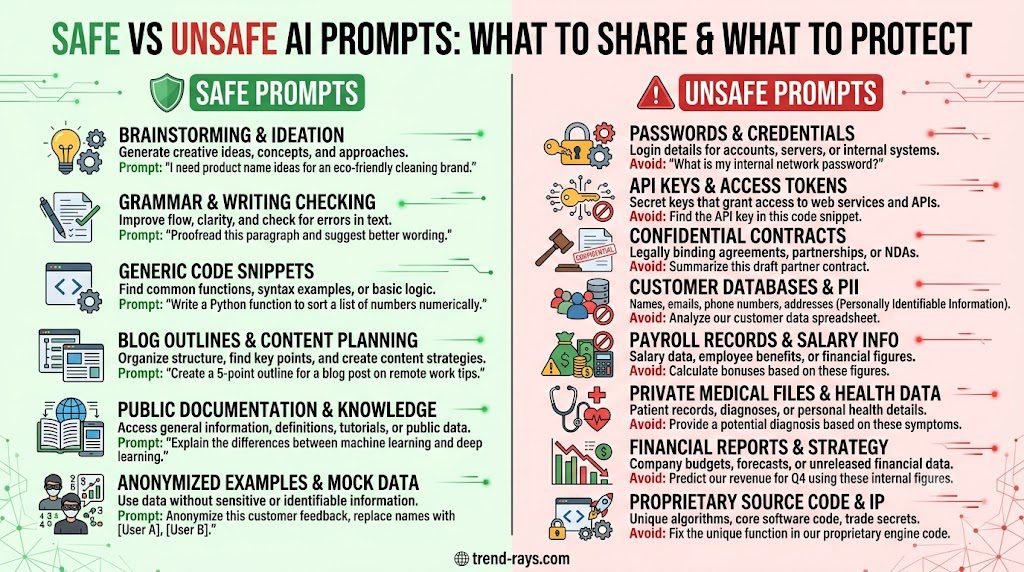
✅ Usually Safe
- Brainstorming ideas
- Creating outlines
- Improving grammar
- Rewriting your own drafts
- Generating marketing ideas
- Writing generic email templates
- Learning new skills
- Creating code examples without proprietary information
- Summarizing public information
⚠️ Use Caution
- Client project details
- Internal business processes
- Marketing strategies
- Technical documentation
- Unpublished content
- Customer support conversations
Always remove identifying details before using AI.
❌ Never Paste Without Explicit Permission
- Client passwords
- API keys
- Financial records
- Medical information
- Personally identifiable information (PII)
- Confidential contracts
- Legal documents
- Trade secrets
- Proprietary source code
- Unreleased product information
- Sensitive HR records
If you’re unsure whether something is confidential, assume that it is until you’ve confirmed otherwise.
Why This Guide Is Different
Most articles on this topic stop after saying:
“Don’t paste confidential information into ChatGPT.”
While that’s good advice, it’s not very helpful.
Freelancers don’t need another generic warning.
They need practical guidance.
For example:
- Can I ask ChatGPT to improve a client’s blog article?
- Is it safe to paste website copy?
- What about client meeting notes?
- Can I use AI to summarize interview transcripts?
- Is anonymizing data enough?
- Should I tell clients I’m using AI?
- Does using ChatGPT violate an NDA?
- Which version of ChatGPT is safest for professional work?
- How do agencies use AI without compromising confidentiality?
These are the questions that arise during real client work—and they’re exactly what this guide will answer.
Instead of fear-based advice, you’ll learn practical workflows that balance productivity with professionalism.
Who Should Read This Guide?
This guide is written for anyone who provides professional services using ChatGPT or other generative AI tools.
It is especially relevant if you work as a:
- Freelance writer
- Copywriter
- Content marketer
- SEO consultant
- Graphic designer
- Web developer
- Software engineer
- Digital marketer
- Virtual assistant
- Business consultant
- Financial consultant
- Accountant
- Translator
- UX designer
- Video editor
- Social media manager
- Project manager
- Agency owner
- Independent contractor
Even if your work doesn’t involve sensitive industries like healthcare or finance, you’re still responsible for protecting your clients’ confidential information.
Why Client Confidentiality Matters More Than Ever
Artificial intelligence has changed how freelancers work—but it hasn’t changed what clients expect.
Clients still expect that:
- Their business strategies remain private.
- Their customer information stays protected.
- Their intellectual property isn’t exposed.
- Their financial information isn’t shared without permission.
- Their confidential documents are handled with care.
When a client hires you, they’re not just paying for your skills.
They’re trusting you with information that may directly affect their business, reputation, and competitive advantage.
Breaking that trust—even unintentionally—can lead to:
- Lost clients
- Contract disputes
- Damaged reputation
- Legal claims
- Financial penalties
- Negative referrals
- Reduced future opportunities
Fortunately, protecting confidentiality doesn’t mean avoiding AI altogether.
It simply means learning how to use AI responsibly.
Throughout this guide, you’ll learn a practical framework that allows you to benefit from ChatGPT while maintaining the trust your clients place in you.
By the end, you’ll know exactly what you can share, what you should never share, and how to build a secure AI workflow that protects both your clients and your freelance business.
Can You Legally Use ChatGPT for Client Work?

The answer is yes—in many cases, you can use ChatGPT for client work. I personally use ChatGPT and other AI tools for my freelancing work.
However, whether it’s appropriate, compliant, or permitted depends on several important factors.
One of the biggest misconceptions among freelancers is believing that simply using ChatGPT automatically violates client confidentiality.
That’s not true.
Another common misconception is believing that using ChatGPT is always safe because millions of people use it every day.
That isn’t true either.
The reality sits somewhere in the middle.
Before using ChatGPT for any client project, you should consider four separate responsibilities:
- Legal obligations
- Contractual obligations
- Professional ethics
- Client expectations
Understanding the difference between these responsibilities will help you make better decisions and avoid unnecessary risks.
1. Legal Responsibilities
The first question to ask is:
Are you handling information that is protected by law?
For example:
- Personal information
- Financial records
- Medical information
- Government documents
- Sensitive employee records
Depending on where you and your client operate, different privacy laws may apply.
For freelancers working with European clients, the GDPR is often relevant because it governs how personal data is processed.
If you’re working with clients in other jurisdictions, there may be additional privacy or sector-specific regulations to consider.
This doesn’t automatically mean you cannot use AI—but it does mean you should understand what data you’re processing and whether sharing it with an AI service is appropriate.
2. Contractual Responsibilities
Many freelancers overlook this area.
Your contract may be more restrictive than the law itself.
For example, your agreement with a client might include:
- A Non-Disclosure Agreement (NDA)
- Confidentiality clauses
- Intellectual property provisions
- Security requirements
- Restrictions on subcontractors or third-party services
Some contracts explicitly prohibit sharing confidential information with third-party platforms unless the client has approved it.
Since AI services can be third-party providers, you should review your agreement carefully rather than assuming their use is permitted.
If the contract is unclear, ask the client for clarification before using AI with sensitive project information.
3. Professional Responsibility
Even if there is no law or contract preventing you from using AI, your professional judgment still matters.
Imagine two freelance copywriters.
Freelancer A
Copies an entire confidential product launch document into ChatGPT to rewrite it.
Freelancer B
Removes the client’s name, product name, pricing, internal strategy, and identifying details before asking ChatGPT to improve the structure and tone.
Both freelancers used AI.
Only one demonstrated professional care.
Responsible AI use isn’t about avoiding AI—it’s about minimizing unnecessary exposure.
4. Client Expectations
Sometimes the most important question isn’t:
“Can I do this?”
It’s:
“Would my client be comfortable if they knew I did this?”
Imagine explaining your workflow to a client:
“To improve your proposal, I uploaded the entire confidential document into an AI tool.”
Now compare that with:
“I removed all identifying information, replaced company names with placeholders, and used AI only to improve the writing style before reviewing everything manually.”
Most clients would view the second approach as significantly more responsible.
When in doubt, transparency builds trust.
Understanding the Difference Between Using AI and Sharing Confidential Information
Many discussions about ChatGPT create unnecessary fear because they blur two very different activities.
Let’s separate them.
Scenario 1: Safe Use
You’re writing a blog article about email marketing.
You ask:
“Give me five ideas for improving email open rates.”
No client information is involved.
This is generally a low-risk use of AI.
Scenario 2: Higher-Risk Use
You paste:
- Client names
- Customer lists
- Revenue figures
- Confidential strategy documents
- Internal emails
and ask ChatGPT to summarize them.
Now you’ve introduced confidential information into the workflow.
The difference isn’t using ChatGPT.
The difference is what you choose to share with it.
Is ChatGPT Confidential?
This is one of the most searched questions online.
The honest answer is:
It depends on which product you’re using, your account settings, and your organization’s policies.
Different AI services and subscription plans may handle data differently. Features, retention practices, and administrative controls can vary over time, so you should always review the provider’s current documentation before using the service for professional work.
As a freelancer, you should never assume that every AI service offers the same privacy protections.
Instead, ask questions like:
- Does this service use my prompts to improve its models?
- Can I control data retention?
- Are there business or enterprise privacy options?
- Does the provider offer a data processing agreement if needed?
- Is my client comfortable with this workflow?
Treat AI tools with the same level of diligence you would apply when selecting cloud storage, accounting software, or a project management platform.
Does Using ChatGPT Automatically Break an NDA?
Not automatically.
An NDA does not usually prohibit the use of technology.
Instead, it protects confidential information.
For example:
Likely Safe
You ask ChatGPT:
“Rewrite this generic project proposal to sound more persuasive.”
No confidential information is included.
Potentially Problematic
You upload:
- The client’s confidential proposal
- Internal pricing strategy
- Customer database
- Product roadmap
without permission.
The issue is not the AI tool itself.
The issue is whether you’re disclosing information that your agreement requires you to protect.
Always read the confidentiality clause carefully.
If you’re uncertain, ask the client or seek professional legal advice for your specific situation.
A Simple Rule Every Freelancer Should Remember
Before you paste anything into ChatGPT, ask yourself one question:
“If this prompt accidentally became public tomorrow, would my client be comfortable with it?”
If the answer is no or even maybe, stop.
Review the information.
Remove identifying details.
Generalize sensitive content.
Or avoid using AI for that specific task altogether.
This single habit can prevent many of the confidentiality mistakes freelancers make.
Real-World Examples
Example 1: Freelance Writer
A client sends a draft blog post for editing.
The article contains only public information and no confidential business details.
Using ChatGPT to improve grammar and readability after removing client-specific references presents relatively low risk.
Example 2: Marketing Consultant
A client shares an unpublished product launch strategy with sales forecasts and campaign budgets.
Uploading the entire document into an AI tool without reviewing confidentiality obligations would be a poor practice.
A safer approach is to extract only the writing task, remove identifying details, and work with generalized content whenever possible.
Example 3: Web Developer
A client asks for help debugging code.
Instead of uploading an entire proprietary application, the developer isolates the relevant code snippet, removes API keys, credentials, internal URLs, and company-specific logic, then asks ChatGPT to explain the programming issue.
This approach reduces unnecessary exposure while still benefiting from AI assistance.
Key Takeaways
Using ChatGPT for freelance work is not inherently unprofessional or non-compliant.
The important questions are:
- What information are you sharing?
- Do you have the client’s permission if it’s needed?
- Are you respecting confidentiality obligations?
- Have you minimized unnecessary exposure?
- Are you reviewing AI-generated outputs before delivering them?
Freelancers who treat AI as a professional productivity tool rather than a place to store client information can often enjoy the benefits of AI while maintaining the trust that successful client relationships depend on.
In the next section, we’ll answer one of the biggest misconceptions about generative AI:
What can ChatGPT actually “see,” store, or learn from your prompts—and what does that mean for freelancers?
Understanding that distinction is essential before deciding what information is appropriate to share.
One of the biggest reasons freelancers hesitate to use ChatGPT is uncertainty about what happens after they submit a prompt.
Questions like these are common:
- Can ChatGPT read my client documents?
- Does OpenAI store everything I type?
- Will my prompts be used to train future AI models?
- Can someone else see my conversations?
- Is ChatGPT private enough for professional work?
These are valid questions—but they often don’t have simple yes-or-no answers.
The reality depends on which ChatGPT product you’re using, your account settings, your organization’s policies, and the type of information you share.
Before using any AI tool professionally, it’s important to understand one key principle:
Privacy isn’t determined by the AI model alone. It’s determined by the entire workflow around it.
Think of ChatGPT Like Any Other Cloud Service
Many freelancers treat ChatGPT differently from other online software.
In reality, it’s more helpful to compare it to services such as:
- Google Drive
- Dropbox
- Microsoft 365
- Notion
- Slack
- Trello
Whenever you upload information to a cloud-based platform, you should ask similar questions:
- Who can access this data?
- How long is it retained?
- What controls do I have?
- Can I delete it?
- Is it encrypted?
- Does the provider offer business-grade privacy controls?
- Does my client permit the use of this service?
The same due diligence applies to AI tools.
Understanding the Three Levels of Information
Not all information carries the same level of sensitivity.
A useful way to think about AI prompts is to classify information into three categories.
Level 1: Public Information
This is information that is already publicly available or intended for public use.
Examples include:
- Published blog posts
- Public product descriptions
- Marketing slogans
- Press releases
- Documentation already available on a company website
- General educational content
Example Prompt
“Rewrite this published blog post in a more conversational tone.”
This type of prompt generally presents a much lower confidentiality risk because the information is already public.
Level 2: Internal Business Information
This information is not publicly available but is also not highly sensitive.
Examples include:
- Internal meeting summaries
- Draft marketing campaigns
- Website copy before publication
- Business process documentation
- Internal training materials
- Project timelines
This category requires caution.
Before using AI:
- Remove company names.
- Replace product names with placeholders.
- Generalize financial figures.
- Remove employee names.
The goal is to reduce unnecessary exposure while still benefiting from AI assistance.
Level 3: Confidential Information
This is the category where freelancers need to be most careful.
Examples include:
- Client contracts
- Financial statements
- Customer databases
- Medical information
- Passport numbers
- API keys
- Passwords
- Source code for proprietary software
- Legal strategies
- Acquisition plans
- Unreleased product designs
These materials should not be pasted into AI tools without a clear understanding of your contractual obligations, the AI service’s privacy controls, and—where appropriate—the client’s informed approval.
The AI Privacy Pyramid
Think of every prompt as moving through a simple decision framework.
| Information Type | Examples | Recommended Approach |
|---|---|---|
| Public | Published articles, public FAQs | Safe for most AI-assisted tasks |
| Internal | Draft content, internal notes | Anonymize before sharing |
| Confidential | Contracts, customer data, trade secrets | Avoid sharing unless you have an appropriate, approved workflow |
This simple classification system is easy to remember and can significantly reduce accidental disclosure.
Data Minimization: The Freelancer’s Best Habit
Privacy professionals often use the phrase data minimization.
It simply means:
Only share the minimum amount of information necessary to complete the task.
For freelancers, this is one of the most effective ways to use AI responsibly.
Instead of This
“Here’s my client’s complete 25-page business proposal. Improve it.”
Try This
“Here’s a generic introduction section with company names removed. Suggest ways to make the writing more persuasive.”
The second prompt gives the AI enough context to help while exposing far less sensitive information.
Before and After: A Better Way to Write Prompts
❌ Poor Prompt
“Rewrite this confidential investor presentation for Acme Technologies. Their annual revenue is €8.4 million, and they plan to acquire three competitors next year.”
Problems:
- Company identified
- Revenue disclosed
- Business strategy exposed
- Acquisition plans revealed
✅ Better Prompt
“Rewrite this presentation introduction for a mid-sized B2B software company. Focus on clarity, professionalism, and stronger messaging.”
Same writing task.
Much lower confidentiality risk.
What About Source Code?
Developers often ask:
“Can I paste code into ChatGPT?”
The answer depends on the type of code.
Generally Lower Risk
- Learning exercises
- Personal projects
- Open-source examples
- Code you’ve written for yourself
Higher Risk
- Proprietary client software
- Authentication systems
- Payment integrations
- Internal algorithms
- Production database queries
- API credentials
- Security configurations
If you need AI assistance, isolate only the relevant code snippet and remove credentials, company-specific logic, and any information that could identify the client or compromise security.
What About Client Emails?
Emails often contain more sensitive information than freelancers realize.
A single message may include:
- Customer names
- Phone numbers
- Email addresses
- Pricing
- Internal discussions
- Future product plans
- Legal matters
Instead of copying the entire email into ChatGPT, summarize the situation yourself.
For example:
Instead of
“Rewrite this email from my client.”
Try
“Help me write a polite response to a client requesting a project extension.”
This preserves the communication goal without exposing unnecessary details.
The Five-Question Prompt Safety Check
Before submitting any prompt, ask yourself these questions:
1. Does this identify the client?
If yes, remove names and identifiers where possible.
2. Does it contain personal data?
If yes, determine whether that information is necessary for the task—or remove it.
3. Would I be comfortable showing this prompt to my client?
If the answer is no, rethink the prompt.
4. Does the AI need all of this information?
Often, the answer is no.
Reduce the prompt to only what is necessary.
5. Can I generalize or anonymize it?
In many cases, replacing names, numbers, and company-specific details with placeholders allows you to achieve the same result while reducing confidentiality risks.
Expert Tip: Separate Content From Context
One of the safest habits experienced freelancers develop is separating the task from the client’s identity.
For example:
Instead of saying:
“Improve this proposal for XYZ Manufacturing.”
Think:
“Improve this proposal for a medium-sized manufacturing company.”
Instead of:
“Rewrite Acme Bank’s customer email.”
Think:
“Rewrite a customer email for a financial services company.”
This simple shift keeps the writing task intact while reducing the amount of sensitive information shared.
Common Mistakes Freelancers Make
❌ Uploading entire contracts when only one clause needs review.
❌ Sharing complete meeting transcripts instead of summarizing key points.
❌ Leaving customer names, phone numbers, or email addresses in prompts.
❌ Including passwords, API keys, or access credentials in debugging requests.
❌ Assuming every AI service offers the same privacy protections.
❌ Believing that deleting a conversation automatically resolves every confidentiality concern.
Responsible AI use isn’t about avoiding technology—it’s about making thoughtful decisions before sharing information.
Key Takeaways
Understanding what ChatGPT can and cannot see isn’t about memorizing technical policies.
It’s about developing a professional mindset.
Before using AI:
- Classify the information.
- Share only what is necessary.
- Remove identifying details whenever possible.
- Keep confidential information out of prompts unless you have an approved, secure workflow.
- Remember that protecting client trust is ultimately your responsibility.
Freelancers who consistently follow these habits are far less likely to expose sensitive information while still enjoying the productivity benefits of AI.
In the next section, we’ll explore one of the most misunderstood aspects of freelance AI use:
How Non-Disclosure Agreements (NDAs) interact with ChatGPT—and whether using AI can accidentally breach your client’s contract.
Non-Disclosure Agreements (NDAs) and ChatGPT: Can Using AI Breach Your Client Contract?
If you’ve ever signed a freelance contract, there’s a good chance you’ve also signed a Non-Disclosure Agreement (NDA) or accepted a confidentiality clause.
These agreements exist for one reason:
To protect your client’s confidential information from unauthorized disclosure.
As AI tools become part of everyday freelance work, many professionals naturally ask:
- Does using ChatGPT violate an NDA?
- Can I upload client documents into ChatGPT?
- Is ChatGPT considered a third party?
- Should I ask my client before using AI?
The honest answer is:
Using ChatGPT does not automatically breach an NDA.
However, how you use it absolutely matters.
The risk isn’t that AI exists.
The risk comes from sharing confidential information without understanding your contractual responsibilities.
Understanding What an NDA Actually Protects
One of the biggest misconceptions freelancers have is believing that NDAs only apply to legal documents.
In reality, most NDAs define confidential information very broadly.
Depending on your contract, this may include:
Business Information
- Business strategies
- Product roadmaps
- Marketing campaigns
- Pricing models
- Sales forecasts
- Investment plans
Customer Information
- Client databases
- Customer names
- Contact information
- Support conversations
- Purchase history
Technical Information
- Proprietary source code
- APIs
- Database structures
- Security architecture
- Internal software
Financial Information
- Revenue reports
- Budgets
- Payroll
- Profit margins
- Forecasts
Intellectual Property
- Draft books
- Articles
- Course material
- Design files
- Brand assets
- Research
Notice something?
Very little of this information needs to be shared with ChatGPT to complete most freelance tasks.
The Important Question Isn’t “Can I Use ChatGPT?”
It’s this:
“Am I disclosing confidential information unnecessarily?”
That subtle distinction changes everything.
Imagine two freelance copywriters.
Freelancer A
Receives a confidential product launch document.
Copies all 38 pages into ChatGPT.
Asks:
“Rewrite this for better readability.”
Freelancer B
Reads the document.
Removes:
- Company name
- Product names
- Pricing
- Internal dates
- Financial projections
Then asks:
“Rewrite this product launch introduction in a more persuasive tone.”
Both freelancers used AI.
Only one minimized confidentiality risks.
Most NDAs Never Mention AI
Here’s something many freelancers don’t realize.
Most NDAs signed today were written before generative AI became mainstream.
Instead of mentioning ChatGPT specifically, they usually contain language such as:
- Confidential Information
- Unauthorized Disclosure
- Third Parties
- Reasonable Security Measures
- Protection of Trade Secrets
Because AI tools are relatively new, your contract may not explicitly reference them.
That doesn’t mean AI use is automatically prohibited—or automatically permitted.
It means you need to interpret your obligations carefully and, when necessary, seek clarification from your client.
Is ChatGPT a “Third Party”?
This is one of the most debated questions online.
The answer depends on the specific AI service, your contractual terms, and how the tool is configured.
Rather than trying to answer this with a blanket “yes” or “no,” ask yourself:
- Does my client allow third-party software?
- Have I agreed to specific security requirements?
- Am I introducing a service the client hasn’t approved?
- Would I be comfortable explaining this workflow to the client?
Thinking this way leads to better decisions than relying on assumptions.
The Freelancer’s NDA Decision Framework
Before using AI with confidential work, ask yourself these five questions.
Question 1
Is this information confidential?
If you’re unsure,
assume that it is.
Question 2
Does ChatGPT actually need this information?
Usually,
the answer is no.
Most prompts can be rewritten using generalized examples.
Question 3
Can I anonymize it?
Replace:
- Client names
- Product names
- Employee names
- Revenue numbers
- Customer identifiers
- Internal project names
with placeholders.
Question 4
Would my client approve of this workflow if I explained it?
Transparency is an excellent test for professional judgment.
Question 5
Could I achieve the same result without exposing confidential information?
Very often,
yes.
A Better Way to Work With AI
Instead of uploading confidential documents,
extract the task.
Poor Workflow
Upload:
- Entire proposal
- Entire contract
- Entire strategy document
Ask AI:
“Improve this.”
Professional Workflow
You identify the writing problem first.
Then create a generalized prompt.
Example:
“Improve the clarity of this executive summary written for a manufacturing company. Remove jargon and make it suitable for senior decision-makers.”
Same objective.
Far less exposure.
Red Flags That Should Make You Stop
Pause before using AI if your prompt contains:
🚩 Confidential client contracts
🚩 Acquisition discussions
🚩 Source code repositories
🚩 Database exports
🚩 Financial statements
🚩 Medical records
🚩 Passport information
🚩 Banking information
🚩 Security credentials
🚩 API keys
These situations deserve additional care and may require an approved workflow or explicit client permission.
Expert Insight: Confidentiality Is a Competitive Advantage
Many freelancers think confidentiality is simply about avoiding legal problems.
In reality, it’s one of your strongest selling points.
Clients increasingly ask questions like:
- Do you use AI?
- How do you protect confidential information?
- Can you work under an NDA?
- What security practices do you follow?
Being able to explain a clear, thoughtful AI workflow demonstrates professionalism and builds trust.
Over time, that trust becomes a competitive advantage that helps you win and retain higher-value clients.
Key Takeaways
An NDA doesn’t automatically prevent you from using ChatGPT.
What it does require is that you protect confidential information in accordance with your contractual obligations.
The safest approach is to:
- Understand what your NDA covers.
- Minimize the information you share.
- Remove identifying details whenever possible.
- Avoid exposing sensitive business information unnecessarily.
- Be transparent with clients when appropriate.
Freelancers who combine AI productivity with disciplined confidentiality practices are well positioned to deliver efficient work without compromising the trust their clients place in them.
GDPR and ChatGPT for Freelancers: What Every European Client Expects You to Know
If you work with clients in Europe—or process information about people in the European Union—you’ve probably heard about the General Data Protection Regulation (GDPR).
For many freelancers, the mention of GDPR immediately creates uncertainty.
Questions like these are common:
- Can I use ChatGPT if my client is in Europe?
- Does GDPR prohibit AI?
- Is it legal to paste client emails into ChatGPT?
- What counts as personal data?
- Do I need my client’s permission before using AI?
The good news is that GDPR does not prohibit the use of artificial intelligence.
Instead, GDPR regulates how personal data is collected, processed, stored, and protected.
Understanding this distinction makes AI much less intimidating.
First, What Is Personal Data?
Many freelancers assume personal data only means:
- Passport numbers
- Credit cards
- Government IDs
In reality, GDPR defines personal data much more broadly.
Personal data is any information that can identify a living individual, either directly or indirectly.
Examples include:
Direct Identifiers
- Full names
- Email addresses
- Phone numbers
- Home addresses
- Employee IDs
- Customer numbers
Indirect Identifiers
- IP addresses
- Location data
- User account IDs
- Photos
- Voice recordings
- Device identifiers
- Purchase history
Even if a prompt contains only an email address and a job title, it may still involve personal data.
This is why freelancers need to think beyond obvious identifiers.
GDPR Doesn’t Regulate AI—It Regulates Data
This is perhaps the biggest misconception online.
Many articles ask:
“Is ChatGPT GDPR compliant?”
The more useful question is:
“Am I processing personal data responsibly when I use ChatGPT?”
Think of GDPR as focusing on the information, not the technology.
The regulation doesn’t say:
“Don’t use AI.”
Instead, it asks questions like:
- Why are you processing this data?
- Do you have a legitimate reason?
- Have you minimized the data?
- Are you protecting it appropriately?
- Are individuals’ rights being respected?
These are the same principles that apply whether you’re using email, cloud storage, project management software, or AI.
The Freelancer’s GDPR Mindset
Rather than trying to memorize legal articles, adopt a simple workflow.
Before submitting a prompt, ask yourself:
Does this contain personal data?
If yes,
continue to the next question.
Does ChatGPT actually need this personal information?
Very often,
the answer is no.
Instead of:
“Rewrite this customer complaint from John Smith at ABC Manufacturing.”
Try:
“Rewrite this customer complaint from a manufacturing client.”
The task stays the same.
The personal data disappears.
Understanding Data Minimization
One of the core principles of GDPR is data minimization.
It means:
Only process the personal data that is necessary for your specific purpose.
This principle fits perfectly with responsible AI use.
Let’s compare two prompts.
❌ Poor Example
“Summarize this customer support conversation between Sarah Williams and our finance department regarding her unpaid invoice.”
Problems:
- Customer name
- Financial information
- Company relationship
- Potentially identifiable circumstances
✅ Better Example
“Summarize this customer support conversation about an unpaid invoice. Replace names with placeholders and focus only on the communication issues.”
Same objective.
Far less personal data.
Anonymization vs. Pseudonymization
These two terms are often confused, but they are not the same.
Anonymization
Information is altered so that the individual can no longer be identified.
Example:
Instead of:
“Maria Rodriguez from Madrid ordered Product X on 5 January.”
Use:
“A customer purchased a software product.”
The person is no longer identifiable.
Pseudonymization
Identifiers are replaced, but the individual could still potentially be linked back using additional information.
Example:
Customer A
Employee 42
Company XYZ
This reduces risk but does not necessarily remove personal data entirely.
For freelancers, anonymization is generally the safer approach whenever it is practical.
Common Freelancer Scenarios
Let’s look at situations many professionals encounter.
Scenario 1: Blog Writing
Your client sends a draft article for editing.
There is no personal data.
Only public marketing content.
Risk:
✅ Generally low.
Scenario 2: Customer Testimonials
The document includes:
- Customer names
- Job titles
- Companies
- Photos
Before using AI:
Remove identifying information unless it is already intended for public publication and your workflow is appropriate.
Scenario 3: HR Documents
A client asks you to improve interview notes.
The notes include:
- Candidate names
- Addresses
- Employment history
- Salary expectations
Risk:
⚠️ High.
These documents involve personal data and deserve extra caution.
Scenario 4: Marketing Analytics
You want ChatGPT to summarize campaign performance.
Instead of uploading raw CRM exports containing customer information,
extract only:
- Conversion rates
- Click-through rates
- Engagement metrics
The AI doesn’t need individual customer records to explain marketing performance.
A Simple GDPR Checklist Before Every Prompt
Ask yourself:
✅ Does this prompt contain personal data?
✅ Can I remove names?
✅ Can I replace companies with placeholders?
✅ Can I summarize instead of copying?
✅ Am I sharing more information than necessary?
If you answer “yes” to the first question and “no” to the remaining ones, pause and revise your prompt.
This simple habit dramatically reduces privacy risks.
Professional Tip: Build AI-Friendly Working Files
Experienced freelancers often separate their project files into two categories.
Original Client Files
These contain:
- Real names
- Contracts
- Emails
- Customer information
- Financial data
These remain securely stored in your approved project environment.
AI Working Files
These contain:
- Placeholder names
- Generalized examples
- Edited excerpts
- Sanitized content
- Abstract writing tasks
This separation allows you to use AI effectively without repeatedly exposing sensitive information.
Common GDPR Mistakes Freelancers Make
❌ Copying complete CRM exports into AI.
❌ Uploading customer support databases.
❌ Including email signatures with personal details.
❌ Sharing interview notes containing identifiable candidates.
❌ Assuming that because a client uses AI internally, every AI workflow is automatically approved.
❌ Forgetting that drafts may still contain confidential personal information.
Most of these mistakes happen because freelancers focus on completing the task rather than reviewing the information they’re sharing.
Key Takeaways
GDPR doesn’t stop freelancers from using ChatGPT.
It encourages them to think carefully about how personal data is handled.
The safest workflow is simple:
- Identify personal data.
- Remove unnecessary identifiers.
- Share only what the AI needs.
- Separate confidential files from AI working files.
- Keep human judgment at the center of every decision.
When these habits become part of your daily workflow, AI becomes a productivity tool—not a privacy risk.
Expert Insight: Privacy Is Becoming a Selling Point
A growing number of European businesses now ask freelancers about:
- AI usage
- Data protection
- Security practices
- Confidentiality
- GDPR awareness
Being able to explain your AI workflow confidently can differentiate you from competitors who simply say, “I use ChatGPT.”
Clients are increasingly looking for professionals who can combine efficiency with responsible data handling.
That combination builds trust—and trust is one of the strongest competitive advantages a freelancer can have.
The 10-Second Confidentiality Test: A Simple Framework Every Freelancer Should Use Before Every AI Prompt
Artificial intelligence is incredibly powerful—but it can also make it easy to share information without thinking.
You’re in the middle of a busy workday.
A client emails you a draft proposal.
You open ChatGPT.
You copy.
You paste.
You press Enter.
The entire process takes less than ten seconds.
Ironically, those same ten seconds can determine whether you’re protecting your client’s confidential information—or exposing more than you intended.
That’s why every freelancer should develop one simple habit:
Never submit an AI prompt before running the 10-Second Confidentiality Test.
It takes less time than making a cup of coffee, yet it can prevent costly mistakes, strengthen client trust, and help you build a professional AI workflow.
Why You Need a Decision Framework
Most confidentiality mistakes aren’t intentional.
Freelancers rarely wake up thinking:
“Today I’m going to violate my client’s trust.”
Instead, mistakes happen because of speed.
You’re focused on solving a problem.
The AI is only one click away.
Without a quick mental checklist, it’s easy to paste far more information than the AI actually needs.
A simple framework slows you down just enough to make better decisions.
The TREND Framework™
To make the process easy to remember, use the TREND Framework™ before every prompt.
T – Think
R – Remove
E – Evaluate
N – Necessity
D – Deliver
Let’s break it down.
T — Think
Ask yourself one simple question:
What am I about to share?
Identify the type of information.
Is it:
- Public?
- Internal?
- Confidential?
- Personal data?
- Proprietary code?
- Financial information?
You can’t protect information if you haven’t first recognized what it is.
R — Remove
Now remove everything that isn’t necessary.
Delete or replace:
- Client names
- Employee names
- Customer names
- Email addresses
- Phone numbers
- Company names
- Project names
- Financial figures
- Product names
- Internal identifiers
If removing these details doesn’t change the task, they shouldn’t be in the prompt.
E — Evaluate
Now ask yourself:
Could someone identify my client from this prompt?
Even if you’ve removed names, the combination of details might still reveal the client’s identity.
For example:
“European electric vehicle manufacturer launching a compact SUV next month.”
Even without the company name, that description might identify the client.
Generalize wherever possible.
N — Necessity
This is the most important step.
Ask yourself:
Does ChatGPT actually need this information?
Most of the time:
No.
For example:
Instead of:
“Rewrite our confidential pricing proposal.”
Try:
“Rewrite a B2B pricing proposal to sound more persuasive.”
The AI can usually perform the writing task without knowing anything about your client.
D — Deliver
Finally ask:
Would I confidently show this exact prompt to my client?
Imagine your client saying:
“Can I see what you entered into ChatGPT?”
If you hesitate,
revise the prompt.
Professional AI workflows should be transparent enough that you’re comfortable explaining them.
The 10-Second Checklist
Before pressing Enter, quickly ask:
✅ Does this identify my client?
✅ Does it contain personal data?
✅ Have I removed unnecessary details?
✅ Does the AI truly need everything I’m sharing?
✅ Would I be comfortable showing this prompt to my client?
If every answer supports responsible use,
you’re ready to proceed.
Real-World Examples
Example 1: Freelance Copywriter
Original Prompt
“Rewrite this landing page for Acme Cybersecurity. Their enterprise package starts at €18,000 annually and targets European banks.”
TREND Review
- Client identified ❌
- Pricing exposed ❌
- Target market revealed ❌
Improved Prompt
“Rewrite this landing page for a B2B cybersecurity company selling enterprise software. Focus on stronger value propositions and clearer calls to action.”
Result:
The writing task remains exactly the same.
The confidentiality risk is significantly lower.
Example 2: Web Developer
Original Prompt
“Here’s my client’s authentication module. Find security problems.”
The code contains:
- Database credentials
- API keys
- Internal URLs
Better Workflow
Remove:
- Credentials
- Secrets
- Internal references
Share only the isolated function relevant to the issue.
Example 3: Virtual Assistant
Original Prompt
“Summarize this customer complaint.”
The email contains:
- Customer name
- Phone number
- Address
- Order number
Better Prompt
“Summarize this customer complaint about a delayed software subscription renewal. Remove identifying details and focus on the customer’s concerns.”
The AI still performs the task while minimizing exposure.
Common Situations Where the TREND Framework Helps
You can use this framework before asking ChatGPT to help with:
- Blog writing
- SEO optimization
- Proposal drafting
- Contract summaries
- Client emails
- Marketing campaigns
- Meeting notes
- Project planning
- Code reviews
- Customer support responses
- Research summaries
- Social media content
The framework is technology-agnostic—it works with ChatGPT, Microsoft Copilot, Claude, Gemini, Perplexity, and other AI assistants.
Mistakes the Framework Prevents
Without a structured review, freelancers often:
❌ Paste entire contracts instead of a single clause.
❌ Share complete meeting transcripts instead of summaries.
❌ Include customer names when placeholders would work.
❌ Upload confidential presentations instead of extracting the relevant section.
❌ Reveal financial information that has no impact on the AI’s response.
Most of these mistakes are easy to avoid once you build the habit of pausing for ten seconds.
Turn the Framework Into a Daily Habit
The goal isn’t perfection.
The goal is consistency.
The more often you use the TREND Framework, the more naturally you’ll start writing privacy-conscious prompts.
Eventually, you’ll anonymize information automatically before copying anything into an AI tool.
That’s the mindset that separates professionals from casual users.
Printable Prompt Safety Card
Consider saving this checklist near your workspace or adding it to your browser bookmarks.
Before Every AI Prompt
T — Think
- What information am I sharing?
R — Remove
- Delete names, identifiers, and unnecessary details.
E — Evaluate
- Could this still identify my client?
N — Necessity
- Does the AI actually need this information?
D — Deliver
- Would I be comfortable showing this prompt to my client?
If you can confidently answer these questions, you’ve already reduced much of the confidentiality risk associated with everyday AI use.
Key Takeaways
Responsible AI use isn’t about avoiding ChatGPT.
It’s about developing reliable habits.
The TREND Framework™ gives freelancers a simple decision-making process that takes less than ten seconds but can prevent accidental disclosures, strengthen client trust, and improve professional standards.
As AI becomes a standard part of freelance work, clients won’t just evaluate the quality of your deliverables—they’ll increasingly evaluate how responsibly you use AI to produce them.
Freelancers who adopt practical frameworks like this will be better positioned to build long-term client relationships and differentiate themselves in a competitive market.
What You Should NEVER Paste into ChatGPT (Without Careful Review)
One of the biggest myths about AI is that there are only two categories of information:
- Safe
- Unsafe
In reality, there’s a third—and much larger—category:
Information that may be appropriate only after careful review, anonymization, or explicit client approval.
This distinction matters because AI is not inherently risky. The real risk comes from sharing more information than is necessary to complete the task.
A good rule to remember is:
If removing a piece of information doesn’t change the quality of ChatGPT’s answer, that information probably didn’t need to be included in the first place.
Let’s break this down by category.
Category 1: Passwords, API Keys, and Security Credentials
Risk Level: 🔴 Critical
Never paste:
- Passwords
- API keys
- OAuth tokens
- SSH keys
- Private certificates
- Database credentials
- Cloud access keys
- Two-factor authentication backup codes
- Encryption keys
Why?
These credentials provide direct access to systems, applications, and sensitive infrastructure. Even if you’re simply asking for debugging help, there’s almost never a reason to expose live credentials.
Better Approach
Replace them with placeholders.
Instead of:
API_KEY=sk_live_xxxxxxxxxxxxxxxxxUse:
API_KEY=YOUR_API_KEYThe AI can usually explain the problem without the real value.
Category 2: Personally Identifiable Information (PII)
Risk Level: 🔴 High
Examples include:
- Full names
- Email addresses
- Phone numbers
- Home addresses
- Passport numbers
- National ID numbers
- Tax identification numbers
- Driver’s licence details
- Customer IDs
- Employee records
Why?
Personal information may be protected by privacy laws such as the GDPR and by your contractual obligations to clients.
Even when it’s legal to process this information, that doesn’t mean it’s necessary to include it in an AI prompt.
Better Approach
Replace:
John Smith
with:
Customer A
Replace:
with:
Focus on the issue, not the person’s identity.
Category 3: Financial Information
Risk Level: 🔴 High
Examples:
- Revenue reports
- Profit margins
- Payroll records
- Tax documents
- Bank statements
- Investor reports
- Pricing strategies
- Cost breakdowns
- Payment details
Why?
Financial information is often commercially sensitive. It can reveal how a business operates, competes, or negotiates.
Better Approach
Instead of sharing exact figures, generalize them.
Example:
“A mid-sized company with annual recurring revenue in the multi-million-euro range.”
This provides enough context without exposing exact numbers.
Category 4: Client Contracts and Legal Documents
Risk Level: 🔴 High
Avoid uploading:
- Signed contracts
- NDAs
- Employment agreements
- Vendor agreements
- Licensing terms
- Settlement documents
- Legal correspondence
Why?
Legal documents often contain:
- Confidential clauses
- Commercial terms
- Personal data
- Intellectual property
- Negotiation history
If you need help understanding a clause, extract only that section and remove identifying information where appropriate.
Category 5: Medical and Health Information
Risk Level: 🔴 Critical
Examples include:
- Patient records
- Medical histories
- Test results
- Prescriptions
- Insurance claims
- Diagnostic reports
Healthcare information often carries additional legal and ethical obligations.
Unless you have a compliant, approved workflow specifically designed for this type of information, avoid using it in general-purpose AI prompts.
Category 6: Proprietary Source Code
Developers often ask:
“Can I paste code into ChatGPT?”
The better question is:
“What kind of code am I sharing?”
Generally Lower Risk
- Personal projects
- Practice exercises
- Open-source repositories
- Generic examples
Higher Risk
- Client repositories
- Authentication logic
- Payment processing
- Internal algorithms
- Security systems
- Proprietary frameworks
Better Workflow
Instead of uploading an entire repository:
- isolate the relevant function
- remove credentials
- remove internal URLs
- remove company-specific references
- replace sensitive variables with placeholders
The AI only needs the part of the code related to your question.
Category 7: Customer Databases and CRM Exports
Risk Level: 🔴 High
Never upload:
- Customer spreadsheets
- CRM exports
- Email subscriber lists
- Purchase histories
- Loyalty programme data
- Support databases
These files often combine personal data with commercially valuable business information.
If you need analytical help, aggregate the data first.
Instead of:
Uploading 10,000 customer records
Ask:
“Analyse these anonymized conversion metrics and suggest possible reasons for a decline in customer retention.”
The insight remains useful without exposing individual records.
Category 8: Unreleased Business Strategies
This includes:
- Product launch plans
- Marketing campaigns
- Pricing changes
- Acquisition discussions
- Investor presentations
- Internal roadmaps
- Competitive analysis
These documents often represent months of work and significant competitive value.
Before using AI, ask:
Does the model need to know the strategy—or just the writing problem I’m trying to solve?
In most cases, it’s the latter.
Category 9: Internal Emails and Meeting Notes
Emails frequently contain:
- Opinions
- Confidential discussions
- Employee names
- Customer information
- Business strategy
- Legal considerations
Rather than copying an entire email thread, summarize the situation yourself and ask ChatGPT to help with the communication task.
Example:
Instead of:
“Rewrite this entire email chain.”
Use:
“Help me draft a professional response to a client requesting additional revisions after the project deadline.”
Category 10: Anything That Would Embarrass Your Client if It Became Public
This final category is intentionally broad.
Ask yourself:
If this prompt accidentally appeared on the front page of a newspaper tomorrow, would my client be comfortable with it?
If the answer is no, stop.
Review the prompt.
Generalize it.
Or don’t use AI for that task.
This simple thought experiment is one of the most effective safeguards you can adopt.
Quick Reference Table
| Information Type | Share Freely? | Better Approach |
|---|---|---|
| Public blog content | ✅ Usually | Fine for editing or brainstorming |
| Published website copy | ✅ Usually | Verify accuracy before publishing |
| Personal names | ⚠️ Avoid | Replace with placeholders |
| Customer emails | ⚠️ Avoid | Summarize the issue instead |
| Contracts | ❌ No | Extract only the relevant clause |
| API keys | ❌ Never | Replace with placeholders |
| Passwords | ❌ Never | Do not include them |
| Financial reports | ❌ Avoid | Generalize figures |
| Medical records | ❌ Avoid | Keep outside general AI workflows |
| Proprietary source code | ⚠️ Depends | Share only sanitized snippets |
The Golden Rule
If ChatGPT can provide the same quality answer without seeing confidential information, then don’t include the confidential information.
This single principle simplifies almost every AI privacy decision.
Instead of asking:
“Can I paste this?”
Train yourself to ask:
“How little information can I provide while still getting a useful answer?”
That shift in mindset will improve both your AI prompts and your professional reputation.
Key Takeaways
Responsible AI use isn’t about refusing to use ChatGPT—it’s about recognizing that different types of information carry different levels of sensitivity.
By identifying high-risk categories, minimizing unnecessary disclosures, and replacing sensitive details with generalized descriptions, freelancers can dramatically reduce confidentiality risks while still benefiting from AI-assisted productivity.
What Is Safe to Paste Into ChatGPT? A Practical Guide for Freelancers
By now, you know there are certain types of information that deserve extra care before being shared with an AI assistant.
That doesn’t mean ChatGPT is off-limits for professional work.
In fact, most freelancers can safely use AI for a large percentage of their daily tasks—as long as they focus on the task rather than the client’s sensitive information.
The safest prompts have three characteristics:
- They don’t identify the client.
- They don’t contain confidential business information.
- They ask the AI to solve a generic problem rather than exposing proprietary content.
Let’s explore the kinds of work that AI is particularly well suited for.
Category 1: Brainstorming and Idea Generation
Risk Level: 🟢 Low
One of ChatGPT’s greatest strengths is helping you overcome creative blocks.
Examples:
- Blog topic ideas
- Headline suggestions
- Marketing campaign concepts
- Social media post ideas
- Email subject lines
- Product names
- Business taglines
- Content calendars
Example Prompt
“Suggest ten blog topics for a cybersecurity company targeting small businesses.”
Notice that the AI doesn’t need to know the client’s identity to provide useful ideas.
Category 2: Improving Writing Style
Editing is another excellent use case.
Examples:
- Grammar
- Spelling
- Tone
- Readability
- Sentence structure
- Clarity
- Conciseness
Example Prompt
“Rewrite this paragraph in a more professional tone.”
If the text contains confidential details, anonymize them first.
The writing task stays exactly the same.
Category 3: Public Content
Information that is already publicly available generally presents much lower confidentiality risks.
Examples include:
- Published blog posts
- Public product pages
- Help centre articles
- Press releases
- Public documentation
- Government publications
- Research papers
- Open-source documentation
Example Prompt
“Summarize this published documentation into beginner-friendly language.”
Always verify that you have the right to use the content and review the AI’s output for accuracy.
Category 4: Learning New Skills
Many freelancers use ChatGPT as a personal tutor.
Examples:
- Learning Excel formulas
- Understanding CSS
- Practising SQL queries
- Improving copywriting
- Studying marketing frameworks
- Exploring SEO concepts
- Learning Python
- Understanding GDPR terminology
Because you’re asking about general knowledge rather than client-specific information, these prompts are usually low risk.
Category 5: Generic Templates
Templates are one of the safest and most valuable ways to use AI.
Examples:
- Project proposals
- Follow-up emails
- Meeting agendas
- Client questionnaires
- Invoice reminders
- Discovery call scripts
- Onboarding checklists
- Content briefs
Example Prompt
“Create a proposal template for a freelance web designer working with small businesses.”
The AI generates reusable content without needing confidential project information.
Category 6: Research and Summaries
ChatGPT can help organize information you’ve already gathered.
Examples:
- Summarizing public reports
- Explaining technical concepts
- Creating study notes
- Comparing software features
- Organizing research findings
- Generating FAQs from public documentation
Instead of uploading confidential reports, summarize the relevant points yourself and ask the AI to improve clarity or structure.
Category 7: Sanitized Code Reviews
Developers can benefit greatly from AI without exposing proprietary systems.
Safe examples include:
- Practice projects
- Open-source snippets
- Generic algorithms
- Programming concepts
- Isolated code functions with sensitive elements removed
Example Prompt
“Explain why this JavaScript function creates an infinite loop.”
The AI only needs the code relevant to the problem—not your client’s entire application.
Category 8: SEO and Content Optimization
This is one of the most common freelance use cases.
AI can help with:
- Meta titles
- Meta descriptions
- Heading structures
- Keyword clustering
- Schema suggestions
- Content outlines
- Internal linking ideas
- FAQ generation
For example:
“Suggest FAQ questions for an article about cybersecurity awareness.”
There’s no need to include client-sensitive analytics or unpublished strategy documents.
Category 9: Project Planning
AI is excellent at turning ideas into structured plans.
Examples include:
- Content production schedules
- Website migration checklists
- Marketing launch timelines
- Project milestones
- Risk registers
- Meeting agendas
- Task prioritization
Example Prompt
“Create a six-week content publishing plan for a B2B software company.”
The AI helps organize work without requiring confidential operational details.
Category 10: Communication Assistance
Freelancers often struggle to find the right words.
ChatGPT can help draft:
- Polite client replies
- Scope clarification emails
- Revision requests
- Deadline extension messages
- Proposal introductions
- Thank-you emails
- Meeting follow-ups
Instead of copying an entire email chain, describe the situation.
Example:
“Help me write a professional response to a client requesting additional revisions outside the agreed project scope.”
The communication objective is clear, and the client’s private correspondence stays private.
The “Generalize First” Technique
One of the simplest ways to use AI responsibly is to rewrite your prompt before submitting it.
Compare these examples.
Original Prompt
“Rewrite Acme Logistics’ confidential proposal for a €2 million warehouse automation project.”
Generalized Prompt
“Rewrite a proposal for a warehouse automation project. Improve clarity, persuasion, and executive readability.”
The AI receives the context it needs while unnecessary identifying details are removed.
This habit alone can significantly reduce confidentiality risks.
The Safe Prompt Formula
Whenever possible, structure prompts like this:
Task + Context + Goal (Without Sensitive Details)
For example:
Task
Summarize
Context
A customer support conversation about delayed delivery
Goal
Create a professional response that reassures the customer
Notice what’s missing:
- Customer names
- Order numbers
- Email addresses
- Internal notes
- Account information
The AI still has everything it needs to help.
Safe vs. Risky Prompt Examples
| Instead of This… | Try This… |
|---|---|
| “Rewrite this confidential client proposal.” | “Rewrite this proposal for clarity and stronger persuasion.” |
| “Debug my client’s payment gateway.” | “Explain why this sanitized payment function returns an error.” |
| “Summarize this HR file.” | “Summarize the key hiring challenges described in these anonymized notes.” |
| “Improve this investor presentation for Company X.” | “Improve the executive summary of a startup investor presentation.” |
The second column consistently focuses on the work—not the identity of the client.
A Helpful Rule of Thumb
Ask yourself:
Could another freelancer use this prompt without knowing who my client is?
If the answer is yes, you’ve probably written a much safer prompt.
If the answer is no, look for opportunities to remove identifying details or simplify the request.
Key Takeaways
Using ChatGPT responsibly doesn’t mean avoiding AI—it means learning how to frame your requests.
The safest prompts:
- Focus on the task.
- Remove unnecessary identifiers.
- Generalize sensitive details.
- Minimize personal data.
- Keep confidential business information out of the conversation whenever possible.
When freelancers adopt these habits, they can use AI to save time, improve quality, and increase productivity while continuing to protect the trust their clients place in them.
The S.A.F.E. Workflow™: A Professional AI Process Every Freelancer Should Follow
Using ChatGPT responsibly isn’t about making perfect decisions every time.
It’s about building a workflow that naturally reduces risk.
The most successful freelancers don’t think:
“Should I use AI?”
Instead, they ask:
“How can I use AI while protecting my client’s information?”
The answer is having a repeatable process.
That’s where the S.A.F.E. Workflow™ comes in.
Instead of treating AI as the first step in your project, make it one carefully managed stage within your overall workflow.
The S.A.F.E. Workflow™
Every AI-assisted project should move through four simple stages:
S — Scan
A — Abstract
F — Facilitate
E — Examine
Think of it as a quality-control process rather than a technology process.
Stage 1: Scan
Identify what you’re working with before opening ChatGPT.
Before copying anything, quickly classify the information.
Ask yourself:
- Is this public?
- Is this internal?
- Does it contain personal data?
- Does it contain confidential business information?
- Does it contain passwords or credentials?
- Does my NDA cover this material?
This step usually takes less than a minute.
Yet it’s the step most freelancers skip.
Example
A client sends you:
- Proposal
- Marketing strategy
- Customer list
Instead of immediately opening ChatGPT,
pause.
Determine which parts actually require AI assistance.
Often, it’s only one section—not the entire document.
Stage 2: Abstract
Now reduce the information to its essential purpose.
This is where professionals outperform beginners.
Instead of sharing the document,
extract the task.
For example:
Original:
“Improve this confidential investor presentation.”
Abstracted:
“Improve the executive summary of a startup investment presentation. Make it more persuasive and easier to scan.”
The AI receives the writing challenge—not the confidential business context.
What Can Be Removed?
Almost always remove:
- Company names
- Customer names
- Employee names
- Email addresses
- Revenue figures
- Internal project names
- Product codenames
- Meeting links
- Account numbers
- Internal URLs
If removing the information doesn’t reduce the quality of the AI’s answer,
it shouldn’t be included.
Stage 3: Facilitate
Now let AI do what it does best.
Use ChatGPT for:
- Brainstorming
- Editing
- Summarizing
- Simplifying
- Explaining
- Structuring
- Rewriting
- Generating ideas
Avoid treating AI as the final decision-maker.
Think of it as an intelligent assistant—not an autonomous employee.
Human Expertise Still Matters
AI cannot:
- Understand your client’s priorities.
- Read the emotional context of a business relationship.
- Verify confidential facts.
- Interpret every contractual obligation.
- Replace your professional judgment.
Its role is to accelerate your thinking—not replace it.
Stage 4: Examine
This is the stage that separates experienced freelancers from inexperienced ones.
Never deliver AI output directly to a client.
Instead, review it carefully.
Ask:
- Is every statement accurate?
- Did AI invent facts?
- Does the tone match the client’s brand?
- Did it misunderstand the brief?
- Is confidential information accidentally included?
- Does this reflect my professional standards?
Every deliverable should pass through a human review before it reaches the client.
A Complete Workflow Example
Let’s imagine you’re an SEO freelancer.
Step 1
Your client sends a 4,000-word article draft.
Step 2
You identify the task:
Improve readability.
Step 3
You remove:
- Client name
- Internal links
- Product names
- Confidential statistics
- Customer examples
Step 4
You ask:
“Rewrite this article introduction for better readability and stronger engagement.”
Step 5
ChatGPT provides suggestions.
Step 6
You review every recommendation.
You verify facts.
You restore the correct product names.
You adjust the tone.
Step 7
You deliver the finished article.
Notice something?
The client benefited from AI.
The confidential information never became the focus of the prompt.
The Professional Freelancer Mindset
Beginners think:
“AI writes my work.”
Professionals think:
“AI helps me improve my work.”
That difference changes everything.
The freelancer remains responsible for:
- Accuracy
- Confidentiality
- Compliance
- Quality
- Client communication
AI simply accelerates parts of the process.
Common Workflow Mistakes
Mistake 1
Using AI before understanding the task.
Mistake 2
Uploading an entire document when only one paragraph needs improvement.
Mistake 3
Skipping anonymization.
Mistake 4
Trusting AI output without verification.
Mistake 5
Sending AI-generated work directly to the client.
Mistake 6
Treating AI as an expert instead of an assistant.
Workflow Comparison
| Beginner Workflow | Professional Workflow |
|---|---|
| Receive document | Receive document |
| Upload everything to AI | Scan information first |
| Ask AI to rewrite | Abstract the task |
| Copy AI output | Review and edit AI output |
| Send to client | Human quality review before delivery |
The difference isn’t the AI tool.
The difference is the process.
The 80/20 Rule of AI Productivity
One of the most effective ways to use AI is to let it handle the repetitive 20% of the work that consumes 80% of your time.
Examples include:
- Grammar corrections
- Formatting
- Brainstorming
- Headline ideas
- Outline generation
- First drafts
- Summaries
- Template creation
Reserve the high-value work for yourself:
- Strategic thinking
- Client communication
- Creative direction
- Final editing
- Fact-checking
- Decision-making
- Brand voice
- Relationship management
This balance allows you to work faster without sacrificing quality or trust.
Building an AI-Ready Freelance Business
As AI becomes a standard part of professional work, successful freelancers will be distinguished by how they use AI—not simply whether they use it.
Clients increasingly value professionals who can demonstrate:
- Clear workflows
- Data awareness
- Responsible prompt writing
- Human quality control
- Transparent communication
- Reliable results
Developing these habits today positions you for long-term success in an AI-assisted economy.
Key Takeaways
The S.A.F.E. Workflow™ transforms AI from a potential confidentiality risk into a structured productivity tool.
By scanning information, abstracting sensitive details, using AI strategically, and examining every output before delivery, freelancers can integrate ChatGPT into their daily work while maintaining high professional standards.
Remember:
The quality of your AI workflow matters just as much as the quality of your AI prompts.
Industry-Specific Examples: How Different Freelancers Can Use ChatGPT Responsibly
The principles of confidentiality remain the same regardless of your profession.
What changes is the type of information you work with.
A freelance writer handles different data than a software developer.
A virtual assistant works with different information than a video editor.
Understanding the unique risks of your profession helps you use AI more confidently while protecting client trust.
Freelance Writers & Copywriters
Typical Tasks
- Blog writing
- Website copy
- Landing pages
- Product descriptions
- Email campaigns
- White papers
- Case studies
Safe Uses
✅ Brainstorm article ideas
✅ Improve grammar and readability
✅ Generate content outlines
✅ Create headline variations
✅ Rewrite publicly available content with added value
Use Extra Caution With
⚠️ Unpublished product launches
⚠️ Confidential marketing campaigns
⚠️ Investor communications
⚠️ Internal brand strategy
Better Prompt
Instead of:
“Rewrite Company X’s confidential product launch announcement.”
Try:
“Rewrite this technology product launch announcement to sound more persuasive and customer-focused.”
SEO Consultants
SEO professionals regularly work with sensitive business information.
Safe Uses
- Keyword clustering
- Title tag suggestions
- Meta descriptions
- FAQ generation
- Internal linking ideas
- Content briefs
- Schema recommendations
Avoid Sharing
- Google Search Console exports with identifiable business data
- Proprietary keyword strategies
- Confidential SEO audits
- Revenue analytics
- Client login credentials
Better Workflow
Instead of uploading an entire SEO audit, describe the issue:
“Suggest technical SEO improvements for an e-commerce website experiencing declining organic traffic.”
Web Developers & Software Engineers
Developers often gain significant productivity benefits from AI.
Safe Uses
- Explaining code
- Learning frameworks
- Debugging sanitized snippets
- Writing documentation
- Creating test cases
- Refactoring generic functions
Avoid Sharing
- Production credentials
- API keys
- Authentication systems
- Entire proprietary repositories
- Security configurations
- Customer databases
Professional Tip
Share the smallest possible code snippet that reproduces the issue instead of an entire application.
Graphic Designers
Designers often use AI for creative support rather than confidential analysis.
Safe Uses
- Creative brainstorming
- Mood board ideas
- Typography suggestions
- Colour palette recommendations
- Design critique
- Presentation structure
Use Extra Caution With
- Unreleased branding
- Confidential packaging
- Product prototypes
- Client trademarks before launch
- Internal campaign assets
When asking for feedback, describe the design challenge instead of exposing confidential campaign details.
Social Media Managers
AI can dramatically speed up social media production.
Safe Uses
- Caption ideas
- Hashtag research
- Editorial calendars
- Campaign concepts
- Engagement questions
- Community management templates
Avoid Sharing
- Internal campaign budgets
- Customer conversations
- Crisis communication plans
- Private influencer agreements
Generalize the campaign objective rather than revealing confidential strategy.
Virtual Assistants
Virtual assistants frequently handle highly sensitive information.
Common Responsibilities
- Inbox management
- Calendar scheduling
- Meeting coordination
- Customer support
- CRM updates
- Administrative tasks
Safe Uses
- Drafting generic email templates
- Creating meeting agendas
- Summarizing anonymized notes
- Organizing workflows
- Productivity planning
Avoid Sharing
- Client inboxes
- Full email threads
- Personal addresses
- Banking information
- Medical appointments
- Login credentials
Because VAs often have broad access to client systems, maintaining strict confidentiality is particularly important.
Digital Marketing Consultants
Marketing professionals often work with commercially valuable information.
Safe Uses
- Campaign brainstorming
- Copy improvements
- Audience personas
- Content calendars
- Ad copy variations
- Marketing frameworks
Use Extra Caution With
- Marketing budgets
- ROAS reports
- Customer lists
- Competitor analysis
- Internal strategy documents
Focus on describing the marketing challenge rather than uploading confidential reports.
Video Editors
Editors increasingly use AI for scripting and planning.
Safe Uses
- Storyboarding
- Video descriptions
- Script refinement
- YouTube metadata
- Thumbnail ideas
- Chapter generation
Avoid Sharing
- Unreleased commercial footage
- Confidential interviews
- Internal training videos
- Private client recordings
If seeking script feedback, remove identifying references wherever possible.
Translators
Translation professionals can use AI to improve productivity while remaining responsible.
Safe Uses
- Grammar refinement
- Terminology suggestions
- Tone adjustments
- Public documents
- Educational material
Avoid Sharing
- Legal contracts
- Medical records
- Government documents
- Confidential correspondence
- Immigration paperwork
Always review translations carefully—especially where legal or technical precision is required.
Business Consultants
Consultants often advise clients on strategic decisions.
Safe Uses
- Framework development
- Presentation structure
- Workshop agendas
- Executive summaries
- Meeting facilitation ideas
Avoid Sharing
- M&A discussions
- Board papers
- Financial models
- Strategic roadmaps
- Competitive intelligence
Instead of uploading confidential decks, ask AI to improve the structure of a generalized executive presentation.
Accountants & Bookkeepers
Financial professionals work with some of the most sensitive business information.
Safe Uses
- Explaining accounting concepts
- Creating spreadsheet templates
- Drafting client communications
- Learning tax principles
- Productivity workflows
Avoid Sharing
- Tax returns
- Payroll files
- Bank statements
- Client invoices
- Financial forecasts
- Audit documentation
When discussing accounting scenarios, anonymize figures and remove all identifying information.
Agencies Managing Multiple Clients
Agencies face an additional challenge: preventing information from one client from influencing work for another.
Best practices include:
- Creating separate AI workflows for each client.
- Avoiding mixed prompts that combine details from different projects.
- Maintaining clear internal policies on AI usage.
- Training team members on confidentiality and prompt hygiene.
A structured process becomes even more important as teams grow.
Universal Best Practices Across Every Profession
No matter what services you provide, these habits apply:
✔️ Classify information before using AI.
✔️ Remove unnecessary identifiers.
✔️ Share only what is needed for the task.
✔️ Review every AI-generated output manually.
✔️ Respect your client’s confidentiality agreements.
✔️ Stay informed about the AI tools you choose to use.
The technology may evolve, but these professional principles remain consistent.
Quick Reference Matrix
| Profession | Excellent AI Use Cases | Requires Extra Care |
|---|---|---|
| Writer | Editing, outlines, headlines | Unpublished manuscripts |
| SEO Consultant | Meta tags, keyword clusters | Search Console exports |
| Developer | Debugging snippets | Proprietary repositories |
| Designer | Creative concepts | Unreleased branding |
| Virtual Assistant | Templates, planning | Client inboxes |
| Marketer | Campaign ideas | Budgets and strategy |
| Video Editor | Scripts, metadata | Private footage |
| Translator | Tone improvement | Legal and medical documents |
| Consultant | Frameworks, agendas | Strategic plans |
| Accountant | Templates, explanations | Financial records |
Key Takeaways
The safest way to use ChatGPT isn’t determined by your job title—it’s determined by the type of information you share.
Whether you’re writing blog posts, debugging code, managing social media, or consulting with executives, the same principles apply:
- Minimize sensitive data.
- Focus on the task rather than the client.
- Use AI to enhance your expertise, not replace your judgment.
- Review every output before it reaches the client.
Freelancers who combine technical skill with responsible AI practices will be better positioned to build lasting client relationships in an increasingly AI-enabled marketplace.
Common AI Confidentiality Mistakes Freelancers Make (and How to Avoid Them)
Most AI confidentiality issues don’t happen because freelancers intend to misuse AI.
They happen because someone is trying to save time.
A document is copied without review.
A prompt includes more information than necessary.
A piece of confidential data slips through unnoticed.
Fortunately, most of these mistakes are preventable.
By understanding the most common errors—and the habits that prevent them—you can build a safer, more professional AI workflow.
Mistake 1: Copying Entire Documents Instead of the Relevant Section
This is by far the most common mistake.
A client sends:
- A 40-page proposal
- A contract
- A strategy document
- A technical specification
Instead of identifying the specific paragraph they need help with, the freelancer uploads the entire file.
Why This Is a Problem
Large documents often contain information unrelated to your question, including:
- Client names
- Financial figures
- Internal discussions
- Future business plans
- Personal data
- Legal clauses
The AI doesn’t need all of this to answer a simple editing question.
Better Practice
Extract only the relevant section.
If you need help rewriting a conclusion, provide the conclusion—not the entire proposal.
Mistake 2: Forgetting Hidden Identifiers
Many freelancers remove the company name but overlook other details that still identify the client.
For example:
“A European fintech startup with 3 million users launching a digital bank in Sweden.”
Even without the company name, these details could make the client identifiable.
Better Practice
Generalize whenever possible.
Instead of describing the exact business, describe the industry or challenge.
For example:
“A financial technology company preparing to launch a new consumer product.”
Mistake 3: Sharing Login Credentials for Debugging
Developers occasionally paste:
- API keys
- Database passwords
- Cloud credentials
- Access tokens
while asking AI to troubleshoot an issue.
Why This Is Dangerous
Credentials are never required to explain code logic.
Better Practice
Replace all sensitive values with placeholders.
For example:
DATABASE_PASSWORD=YOUR_PASSWORD
API_KEY=YOUR_API_KEY
The code remains understandable without exposing live credentials.
Mistake 4: Uploading Customer Lists
A marketing freelancer wants AI to analyse customer behaviour.
Instead of creating a summary, they upload an entire CRM export.
This file may contain:
- Names
- Email addresses
- Purchase history
- Locations
- Phone numbers
Better Practice
Aggregate the information first.
Ask questions based on metrics rather than individual customer records.
For example:
“Customer retention fell by 12% over the last quarter. What factors should I investigate?”
The AI can provide valuable insights without needing access to personal data.
Mistake 5: Trusting AI Output Without Verification
AI can write confidently—even when it’s wrong.
This can lead to:
- Incorrect legal advice
- Outdated technical information
- Fabricated citations
- Invented statistics
- Misinterpreted requirements
Better Practice
Treat AI output as a draft, not a final deliverable.
Always:
- Verify facts.
- Check references.
- Confirm calculations.
- Review technical accuracy.
- Ensure the content aligns with the client’s instructions.
Mistake 6: Using AI Before Reading the Client Brief
Some freelancers upload the brief and immediately ask:
“Complete this project.”
Without understanding the assignment themselves, they risk:
- Missing key requirements.
- Sharing unnecessary information.
- Producing generic output.
Better Practice
Read the brief first.
Identify the task.
Then create a focused prompt that reflects your understanding.
AI should assist your thinking—not replace it.
Mistake 7: Mixing Information from Multiple Clients
Imagine you’re managing projects for three companies.
You ask:
“Compare these marketing strategies and suggest the best approach.”
If those strategies belong to different clients, you’ve unintentionally combined confidential information.
Better Practice
Treat every client as a separate workspace.
Never mix:
- Documents
- Strategies
- Internal discussions
- Customer information
Maintain clear boundaries between projects.
Mistake 8: Assuming Public Availability Equals Permission
Sometimes information is publicly accessible but still protected by copyright, confidentiality agreements, or contractual terms.
For example:
- A draft press release accidentally published online.
- A client presentation shared in a private webinar.
- Internal documentation accessible through a public link.
Better Practice
Ask yourself:
“Am I authorised to use this information in this way?”
Public access does not always mean unrestricted use.
Mistake 9: Ignoring Client Policies on AI
Some organisations have internal rules governing AI use.
These may specify:
- Approved AI tools
- Restricted data types
- Required approvals
- Security standards
Better Practice
If a client provides an AI policy, follow it.
If you’re unsure, ask.
A simple clarification can prevent misunderstandings later.
Mistake 10: Using AI to Make Final Business Decisions
AI is excellent at generating options.
It is not responsible for your business decisions.
Examples include:
- Choosing legal language.
- Approving financial transactions.
- Diagnosing medical conditions.
- Making hiring decisions.
- Assessing regulatory compliance.
Better Practice
Use AI to support your analysis—not replace professional judgment or specialist advice where required.
Mistake 11: Forgetting to Review Attachments
Sometimes the text of a prompt is perfectly safe.
The attached file is not.
Examples include:
- A PDF containing customer details.
- A spreadsheet with payroll information.
- A presentation including confidential financial forecasts.
Better Practice
Review every attachment before uploading it.
Don’t assume the file contains only what you intend to discuss.
Mistake 12: Prioritising Speed Over Professionalism
The final—and perhaps most common—mistake is rushing.
AI makes it tempting to move quickly.
But professional freelancers understand that quality, confidentiality, and trust matter more than saving a few seconds.
Developing a consistent review process protects both your clients and your reputation.
The “Pause Before You Paste” Habit
Whenever you’re about to submit a prompt, pause for a moment and ask yourself:
- Does this contain confidential information?
- Can I remove any identifying details?
- Is every piece of information necessary?
- Would I be comfortable explaining this prompt to my client?
If the answer to any of these questions raises concern, revise the prompt before continuing.
Those few extra seconds can make a significant difference.
Quick Summary Table
| Common Mistake | Better Practice |
|---|---|
| Uploading entire documents | Share only the relevant section |
| Leaving hidden identifiers | Generalize industries and scenarios |
| Including credentials | Replace with placeholders |
| Uploading customer databases | Use aggregated metrics |
| Trusting AI without review | Verify all outputs |
| Skipping the client brief | Understand the task first |
| Mixing client information | Keep projects separate |
| Assuming public means unrestricted | Confirm usage rights |
| Ignoring AI policies | Follow client requirements |
| Letting AI make final decisions | Apply human judgment |
| Forgetting attachments | Review every file |
| Rushing prompts | Pause before you paste |
Key Takeaways
Most AI confidentiality mistakes are not caused by the technology—they’re caused by workflow habits.
By slowing down just enough to review your prompts, isolate the relevant information, and verify AI-generated outputs, you can significantly reduce risk while continuing to benefit from AI’s productivity gains.
Professional freelancers aren’t distinguished by using AI differently.
They’re distinguished by using it more thoughtfully.
Free AI Usage Policy Template for Freelancers and Small Agencies
As artificial intelligence becomes a normal part of professional work, more clients are asking an important question:
“How do you use AI when working on my projects?”
Having a clear answer demonstrates professionalism, builds trust, and helps set expectations before a project begins.
An AI usage policy doesn’t need to be long or filled with legal language.
It simply explains:
- when you use AI,
- how you protect client information,
- what you never share,
- and how human review fits into your workflow.
Below is a practical template you can adapt for your freelance business or agency.
AI Usage Policy Template
AI Usage Policy
Effective Date: [Insert Date]
This policy explains how artificial intelligence (AI) tools may be used in our business while protecting client confidentiality, data privacy, and professional standards.
1. Purpose
Artificial intelligence is used to improve productivity, enhance creativity, and assist with repetitive tasks.
AI tools support our work—they do not replace professional judgment, expertise, or final quality review.
2. Acceptable Uses
AI may be used for tasks such as:
- Brainstorming ideas
- Content outlines
- Grammar and readability improvements
- Draft generation
- Summarization
- Translation assistance
- Coding assistance using sanitized examples
- Research support
- Workflow planning
- Template creation
Every AI-generated output is reviewed and edited by a human before delivery.
Unless an approved workflow specifically requires otherwise, we do not intentionally submit the following information to general-purpose AI tools:
- Passwords
- API keys
- Authentication credentials
- Banking information
- Payment card details
- Personal identification numbers
- Medical records
- Payroll information
- Customer databases
- Confidential contracts
- Trade secrets
- Proprietary source code containing sensitive information
- Internal financial reports
4. Data Minimization
When AI assistance is appropriate, we aim to share only the information necessary to complete the task.
Whenever practical, identifying details are removed or replaced with placeholders before prompts are submitted.
5. Human Review
AI-generated content is treated as a draft.
Before any work is delivered to a client, we review it for:
- Accuracy
- Completeness
- Brand voice
- Confidentiality
- Compliance with project requirements
- Overall quality
Final responsibility always remains with our business.
6. Confidentiality
We respect all confidentiality obligations contained in client agreements, including NDAs and contractual confidentiality clauses.
Where AI use may affect contractual obligations, we review the applicable agreement and follow the client’s documented requirements.
7. Privacy
When working with information that may contain personal data, we strive to minimise unnecessary disclosure by:
- Removing identifiers where possible
- Generalising examples
- Sharing only relevant excerpts
- Avoiding unnecessary personal information in prompts
8. Client Communication
If a client requests information about our AI workflow, we will explain:
- Which types of tasks AI may assist with
- Our confidentiality safeguards
- Our human review process
- Our commitment to protecting client information
Transparency helps build long-term trust.
9. Policy Review
Because AI technology evolves rapidly, this policy is reviewed periodically and updated when necessary to reflect changes in technology, business practices, or client requirements.
Example Client Disclosure Statement
Many freelancers wonder whether they should tell clients they use AI.
The answer depends on:
- your contract,
- client expectations,
- industry standards,
- and the nature of the work.
When disclosure is appropriate, a short and professional statement is often sufficient.
For example:
We may use AI-assisted tools to support certain aspects of our workflow, such as brainstorming, drafting, editing, summarising, and research. We do not intentionally submit confidential client information, passwords, personal data, or proprietary business information to general-purpose AI tools unless an approved workflow specifically requires it. All AI-assisted work is reviewed by a human before delivery to ensure quality, accuracy, and compliance with project requirements.
This statement is clear, balanced, and avoids making promises you cannot guarantee.
Optional Contract Clause
If you regularly work with new clients, you may wish to include an AI clause in your service agreement.
Here’s an example:
AI-Assisted Work
The Service Provider may use artificial intelligence tools to assist with activities such as brainstorming, drafting, editing, research, translation, coding assistance, and workflow planning. AI tools are used only to improve efficiency and are not relied upon as the sole basis for deliverables. The Service Provider remains responsible for all final work delivered under this agreement and will take reasonable steps to minimise unnecessary disclosure of confidential information when using AI-assisted workflows.
Remember that contracts vary, so consider obtaining legal advice if you need language tailored to your jurisdiction or industry.
AI Policy Checklist
Before publishing your own policy, make sure it answers these questions:
- Do you explain why you use AI?
- Have you listed the tasks AI may assist with?
- Have you identified information you avoid sharing?
- Do you describe your human review process?
- Have you addressed confidentiality?
- Have you addressed privacy?
- Can clients easily understand the language?
- Does the policy reflect your actual workflow?
Your policy should describe what you genuinely do—not what you think sounds impressive.
Common Mistakes When Writing an AI Policy
Avoid statements like:
❌ “We never use AI.”
If you later use AI for brainstorming or proofreading, the statement becomes inaccurate.
Avoid promising absolute guarantees:
❌ “No client data will ever be processed by AI.”
Unless you have complete technical certainty and carefully controlled systems, avoid making promises that may be impossible to uphold.
Avoid vague wording:
❌ “We use AI responsibly.”
Instead, explain what “responsibly” means in practice.
Specific commitments inspire more confidence than general claims.
Why Every Freelancer Should Have an AI Policy
An AI policy isn’t just a legal document.
It’s a trust document.
It tells clients that you’ve thought carefully about:
- confidentiality,
- privacy,
- quality,
- and professionalism.
As AI adoption grows, many clients will begin asking these questions during the hiring process.
Having a written policy demonstrates maturity, preparedness, and transparency.
Even if a client never asks to see it, the process of creating one helps you establish better internal practices.
Key Takeaways
A clear AI usage policy helps freelancers and agencies communicate how AI fits into their professional workflow.
The strongest policies focus on transparency, data minimization, confidentiality, and human oversight rather than making unrealistic promises or relying on vague language.
Whether you work independently or manage a growing team, documenting your AI practices today will help build trust with clients tomorrow.
Frequently Asked Questions
1. Can I legally use ChatGPT for client work?
In many cases, yes. Using ChatGPT for client work is not automatically illegal. However, whether it’s appropriate depends on factors such as your contract, confidentiality obligations, applicable privacy laws, and the type of information you share with the AI.
For example, brainstorming blog ideas is very different from uploading a confidential client contract. Always review your client’s requirements and minimize unnecessary disclosure of sensitive information.
2. Does using ChatGPT automatically violate an NDA?
No.
An NDA generally protects confidential information rather than banning specific technologies.
The important question is whether your AI workflow exposes confidential information in a way that conflicts with your contractual obligations.
If you can complete the task without sharing confidential details, that is usually the safer approach.
3. Can I paste client documents into ChatGPT?
It depends on the document and your workflow.
Before doing so, ask yourself:
- Does the document contain confidential information?
- Does it include personal data?
- Can you remove identifying details?
- Can you extract only the relevant section?
Avoid uploading complete documents when a summarized or anonymized excerpt will achieve the same result.
4. Is ChatGPT GDPR compliant?
This question doesn’t have a simple yes-or-no answer.
GDPR focuses on how personal data is processed rather than whether a particular technology exists.
If you’re working with personal data, think about data minimization, anonymization, and your contractual responsibilities before using AI.
Organizations should also consider their own policies and the features of the AI service they choose.
5. What is the safest way to use ChatGPT for freelance work?
The safest workflow is:
- Understand the task.
- Remove confidential information.
- Replace names and identifiers with placeholders.
- Ask a generalized question.
- Review the AI’s output carefully before delivering it.
This approach reduces unnecessary exposure while preserving the value of AI assistance.
6. Should I tell my clients that I use AI?
There isn’t a universal rule.
Some clients expect disclosure.
Some contracts require it.
Others don’t mention AI at all.
If AI plays a meaningful role in your workflow—or if your agreement requires disclosure—being transparent can help build trust and avoid misunderstandings.
7. Can clients detect that I used ChatGPT?
There is no reliable method that can definitively prove whether a piece of writing was created or assisted by ChatGPT.
However, clients may notice:
- Generic language.
- Repetitive phrasing.
- Inaccurate facts.
- A sudden change in writing style.
The best practice is to treat AI output as a draft and edit it so it reflects your own expertise and the client’s brand voice.
8. Can I upload PDFs into ChatGPT?
Many AI tools support PDF uploads.
However, the more important question is:
What information does the PDF contain?
Before uploading:
- Review the document.
- Remove sensitive information where practical.
- Share only the pages relevant to your task.
Large confidential documents rarely need to be uploaded in full.
9. Can I use ChatGPT to improve client emails?
Yes—provided you do so responsibly.
Instead of uploading an entire email thread containing names, signatures, and confidential discussions, summarize the situation and ask ChatGPT to improve the wording of your reply.
This keeps the focus on communication rather than confidential content.
10. Is it safe to paste source code into ChatGPT?
It depends on the code.
Open-source examples, educational exercises, and personal projects are generally lower risk than proprietary client code.
If you’re debugging client code, consider sharing only the specific function related to the problem and remove:
- API keys
- Passwords
- Internal URLs
- Credentials
- Company-specific references
11. Can ChatGPT replace a freelancer?
No.
ChatGPT can generate drafts, organize ideas, explain concepts, and assist with repetitive tasks.
It cannot replace:
- Professional judgment.
- Client relationships.
- Strategic thinking.
- Industry experience.
- Accountability.
The most successful freelancers use AI to improve productivity—not to eliminate human expertise.
12. What’s the difference between anonymization and pseudonymization?
Anonymization removes information so an individual can no longer be identified.
Pseudonymization replaces identifiers with alternatives, but the individual could potentially still be identified using additional information.
For many freelance workflows, anonymization offers a stronger privacy safeguard whenever it is practical.
13. What should I never paste into ChatGPT?
Examples include:
- Passwords
- API keys
- Banking information
- Customer databases
- Medical records
- Payroll information
- Confidential contracts
- Trade secrets
- Authentication credentials
If the AI can complete the task without this information, don’t include it.
14. Can AI-generated work be delivered directly to clients?
It’s not recommended.
Every AI-generated draft should be reviewed by a human for:
- Accuracy.
- Tone.
- Completeness.
- Brand consistency.
- Confidentiality.
- Compliance with the client’s instructions.
Human review remains an essential part of professional freelance work.
15. What is the biggest mistake freelancers make when using AI?
The most common mistake isn’t using AI.
It’s sharing more information than necessary.
Many freelancers upload entire documents when only a few paragraphs are relevant.
Learning to isolate the task, remove sensitive information, and write focused prompts is one of the simplest ways to reduce risk while still benefiting from AI.
Quick FAQ Summary
If you remember only five ideas from this guide, let them be these:
- AI is a tool—not a replacement for professional judgment.
- Share only the information necessary for the task.
- Remove confidential and personal information whenever possible.
- Review every AI-generated output before delivering it.
- Build workflows that prioritize client trust as much as productivity.