For independent DevOps engineers, cloud architects, and sysadmins operating in the European market, 2026 has introduced a hard stop in the enterprise procurement cycle. Landing a high-value contract is no longer just about demonstrating Kubernetes expertise or AWS architecture mastery; it requires passing a hostile legal audit of your own infrastructure.
With the full enforcement of the NIS2 Directive across EU Member States, enterprise compliance teams are actively blocking external contractors who manage client environments using consumer-grade security. If you cannot provide an immutable audit trail of your access controls, secret rotation, and endpoint posture, your contract is a legal liability to the client. This guide breaks down the architectural requirements of modern freelance identity infrastructure and how to deploy an Identity and Access Management (IAM) stack that satisfies European enterprise procurement.
Why European Enterprise Clients Now Mandate Consultant IAM
The shift in enterprise behavior is not driven by general security best practices; it is driven by aggressive regulatory financial penalties. To understand why your clients are demanding enterprise-grade IAM from solo consultants, you have to look at the exact legal frameworks they are auditing you against.
NIS2 Article 21 and Supply Chain Liability
Under the original NIS Directive, cybersecurity liability generally stopped at the enterprise perimeter. NIS2 Directive Article 21 fundamentally rewrote this by introducing mandatory Supply Chain Cybersecurity Risk management.
Specifically, Article 21(2)(d) explicitly forces “Essential and Important entities”—which includes energy, transport, banking, and digital infrastructure companies—to actively audit and manage the security posture of their direct suppliers and service providers.
Because C-suite executives now face personal liability and fines up to €10M (or 2% of global turnover) for gross negligence in cybersecurity governance, enterprise Third-Party Risk Management (TPRM) teams have zero tolerance for contractor blind spots. When a client performs Coordinated Risk Assessments, they must prove to national regulators that their external DevOps consultants are governed by the same strict access controls as internal employees. If your IAM stack cannot generate the necessary compliance logs to prove your environment is hardened, the client legally cannot grant you access to their production systems.
The Death of the “Bring Your Own VPN” Era
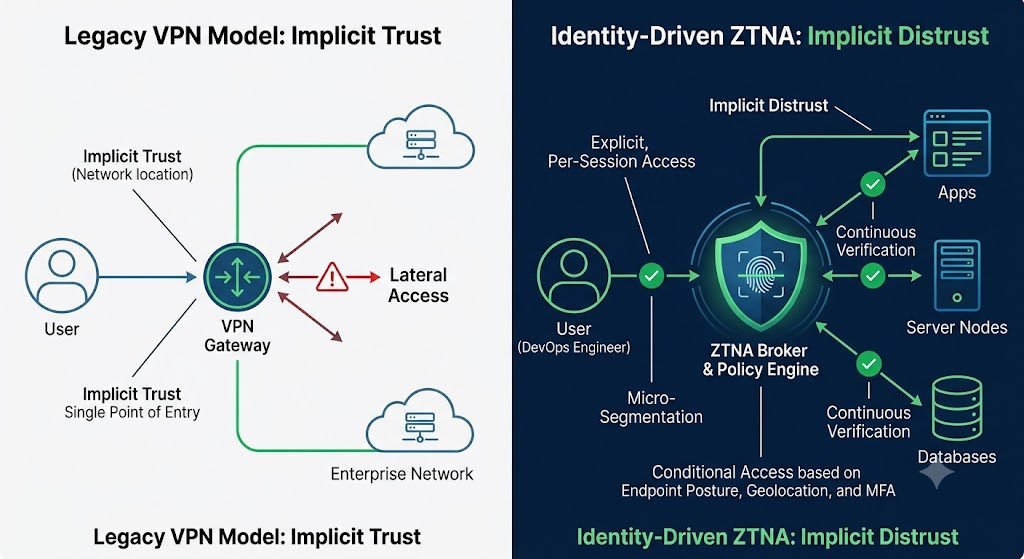
Historically, independent contractors accessed client environments by tunneling in via a corporate VPN or whitelisting a static IP address. In 2026, this legacy perimeter-based architecture is a massive compliance red flag.
Traditional VPNs grant broad lateral network access once authenticated, violating the principle of least privilege. Furthermore, they lack the granularity to evaluate the real-time security posture of the unmanaged device (your personal workstation) connecting to the network.
To satisfy NIS2 requirements, client architecture is rapidly migrating to Zero Trust Network Access (ZTNA). In a ZTNA model, trust is never implicitly granted based on network location. Instead, access to individual applications or infrastructure nodes is dynamically granted per-session, requiring your freelance IAM stack to support context-aware authentication. Your tools must be capable of passing telemetry—such as device encryption status, OS patch levels, and phishing-resistant MFA tokens—to the client’s identity provider before a connection is ever established.
Core Architecture: Deploying Sovereign Zero Trust Network Access (ZTNA)
For a freelance DevOps engineer, the architectural mandate of 2026 is moving from network-centric security to identity-centric security, while ensuring that the infrastructure hosting that identity layer does not violate European data sovereignty laws.
Context-Aware Access vs. Static IP Whitelisting
The traditional method of securing client environments involved whitelisting your home office’s static IP address or tunneling into the client’s corporate network via a legacy VPN. Both methods are fundamentally incompatible with a Zero Trust architecture. A VPN grants broad, lateral access to the network once the perimeter is breached, and a static IP proves where the traffic is coming from, but nothing about the state of the machine sending it.
Zero Trust Network Access (ZTNA) flips this model. Instead of granting access to a network, ZTNA grants access to specific applications or micro-segmented infrastructure nodes on a per-session basis. To satisfy enterprise TPRM audits, your IAM stack must evaluate access dynamically using Context-Aware Access (CAA) policies.
When you attempt to SSH into a client’s production server, a compliant ZTNA solution doesn’t just check your password; it evaluates the telemetry of your unmanaged device in real time. Is the hard drive encrypted? Is the OS patched to the latest version? Is the connection originating from an expected geolocation? If your freelance workstation fails any of these posture checks, the ZTNA broker drops the connection before it ever reaches the client’s infrastructure.
Implementing ZTNA is only half the battle; where that ZTNA broker processes your authentication traffic dictates your legal compliance. This is where most off-the-shelf US-based SaaS tools fail the European enterprise test.
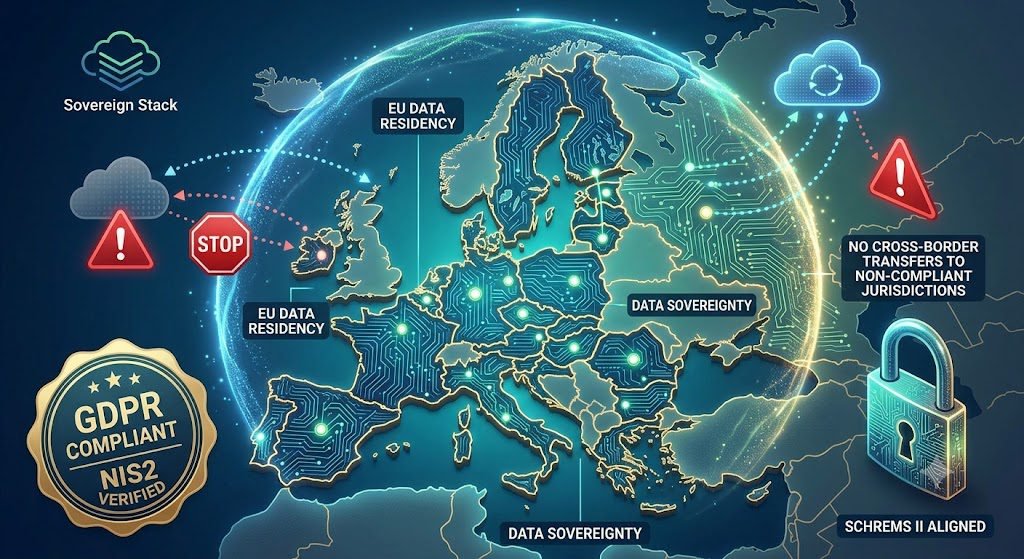
Following the landmark Schrems II ruling—which invalidated the Privacy Shield—the industry temporarily relied on the EU-U.S. Data Privacy Framework (DPF). However, the legal reality of 2026 has made relying on the DPF highly radioactive for enterprise compliance teams. Recent US Supreme Court rulings regarding the independence of the Federal Trade Commission (the primary oversight body for the DPF) have severely destabilized the framework, prompting new legal challenges (the anticipated “Schrems III”) and pushing European regulators toward stricter de facto Data Localization.
For a freelance DevOps engineer, this means you cannot simply purchase a US-hosted IAM tool and route your authentication traffic through servers in Virginia. Because IP addresses, device telemetry, and authentication logs are classified as Personally Identifiable Information (PII) under the GDPR, routing this telemetry through US jurisdiction exposes the client to non-compliance.
To architect a compliant solution, you must deploy a “Sovereign Stack.” This requires selecting an IAM or ZTNA vendor that guarantees strict data localization within the EU. You must ensure that your control plane, identity broker, and all generated audit logs are physically hosted and processed in European availability zones (e.g., AWS Frankfurt or Scaleway in Paris) and that the vendor utilizes encryption architectures where they do not hold the decryption keys, thereby neutralizing the risk of foreign government data requests.
Managing Non-Human Identities (NHI) and API Access
The greatest vulnerability in modern freelance DevOps infrastructure is the assumption that identity security starts and ends with human users. In 2026, Non-Human Identities (NHI)—the service accounts, API tokens, certificates, and machine identities executing automated tasks—outnumber human accounts by an order of magnitude.
Enterprise auditors know that a compromised DevOps engineer’s password is bad, but a leaked, long-lived AWS programmatic access key is catastrophic. Extending Zero Trust to machine identities requires strict IAM Lifecycle Management, ensuring that automated workflows never rely on static, hardcoded credentials that can be scraped from a GitHub repository or a misconfigured S3 bucket.
Automating Secret Rotation Across Multi-Cloud Environments
Static secrets are a ticking time bomb. The longer an API key or database credential remains unchanged, the higher the probability it is quietly exfiltrated. To meet enterprise compliance mandates, you must deploy a dedicated secrets vault (like HashiCorp Vault, Cycode, or AWS Secrets Manager) and enforce automated Secret Rotation.
The technical challenge for a multi-cloud consultant is executing this rotation without breaking the downstream applications relying on those credentials. This is achieved through a “dual-credential” or overlapping rotation pattern. During a rotation event, the vault generates a new credential while keeping the old one active for a brief, defined grace period (e.g., 5 minutes). The vault injects the new credential into the workload, verifies successful authentication, and then revokes the original secret.
For maximum security, you should transition entirely away from stored secrets and implement dynamic credential generation. In this architecture, when a microservice needs to query a database, it requests a temporary token from the vault. The vault creates a credential on the fly, issues it to the service, and automatically destroys it once the task is complete (or after a strict Time-to-Live expires).
To help readers visualize the dual-credential process, here is an interactive sequence diagram you can embed on Trend-Rays that demonstrates zero-downtime rotation.
Securing AI Agents and CI/CD Pipelines
With the aggressive adoption of Agentic AI workflows in 2026, autonomous agents are now capable of making decisions and executing API calls across client networks without human intervention. This radically expands the attack surface of your automation tools.
Securing your infrastructure means enforcing least-privilege execution within CI/CD Pipeline Security. When your GitHub Actions or Jenkins pipelines deploy infrastructure as code (IaC) to a client’s Azure environment, those pipelines must authenticate using OpenID Connect (OIDC) federation rather than static secrets. OIDC allows the pipeline to request short-lived, scoped access tokens directly from the cloud provider, completely eliminating the need to store sensitive cloud credentials within the CI/CD platform itself.
Furthermore, you must establish an immutable audit trail for every action your automated scripts perform. If a malicious actor injects code into your pipeline, your IAM stack must immediately flag the anomalous token usage and revoke the automated agent’s access rights before lateral movement occurs.
Implementing Phishing-Resistant Authentication Standards
For years, the standard freelance security stack relied on Time-Based One-Time Passwords (TOTP) from apps like Google Authenticator, or push notifications from Microsoft Authenticator. In 2026, enterprise cyber insurers and NIS2 auditors classify both of these as legacy MFA.
The fatal flaw of legacy MFA is that it relies on a shared secret or a delegable code. The aggressive proliferation of Adversary-in-the-Middle (AiTM) phishing kits—like Evilginx—allows attackers to proxy the legitimate login page, intercept your TOTP code in real-time, and replay it to steal the session cookie. To pass a modern TPRM audit, your IAM stack must be structurally immune to these interception attacks.
Cryptographic Origin Binding with FIDO2 and Passkeys
The only acceptable standard for high-privilege access in 2026 is phishing-resistant MFA, defined by the National Institute of Standards and Technology (NIST) as asymmetric cryptographic processes governed by FIDO2 and WebAuthn standards.
Instead of typing a code that can be stolen, FIDO2 utilizes public-key cryptography tied directly to the hardware of your device (via a TPM chip or Secure Enclave). When you register a hardware security key (like a YubiKey) or a device-bound passkey, the device generates a unique keypair. The public key is sent to the client’s identity provider, but the private key never leaves your hardware.
The critical technical mechanism that defeats AiTM attacks is Origin Binding. When you attempt to authenticate, the client server sends a cryptographic challenge to your device. Your authenticator will only sign that challenge with your private key if the domain in your browser exactly matches the domain registered to the credential. If an attacker tricks you into visiting login-microsoft.fake.com, the FIDO2 handshake simply fails at the hardware level. The authentication cannot proceed because the origin does not match, entirely removing human error from the equation.
Continuous Authentication and Automated Token Revocation
Zero Trust Architecture dictates that authentication is not a one-time gate you pass at 9:00 AM; it is a continuous state of evaluation.
In a traditional setup, once you complete the MFA challenge, the server issues a long-lived session cookie or JSON Web Token (JWT). If an attacker manages to hijack that session cookie, they bypass your MFA entirely. To mitigate this, compliant IAM tools now enforce Continuous Authentication.
Continuous Authentication links your identity broker to your endpoint telemetry (EDR). Your IAM tool continuously ingests signals such as geo-velocity (impossible travel), behavioral anomalies, and active endpoint threats. If you are authenticated into a client’s Azure environment, and your EDR suddenly flags an unauthorized PowerShell script running on your local machine, the IAM policy engine executes an automated Token Revocation.
The system instantly invalidates your active SAML or OIDC tokens across all connected client applications, severing your access mid-session before lateral movement can occur. Documenting this capability—proving to a client that your infrastructure will autonomously isolate itself if compromised—is the golden ticket to passing an enterprise security audit.
Conclusion: Security as a Revenue Enabler
The era of the informal contractor handshake—where a client hands over a privileged AWS IAM role over a shared Slack channel—is permanently dead in the European enterprise market. The legal liability introduced by the NIS2 Directive and the strict data localization enforcements following the collapse of the EU-US Data Privacy Framework have shifted the burden of proof onto the freelancer.
However, this regulatory friction is also a massive commercial opportunity. By architecting a Zero Trust, sovereign, and phishing-resistant IAM stack, you cease to be a compliance liability. Instead, your infrastructure becomes a competitive differentiator. When you can hand an enterprise procurement team a real-time, read-only dashboard proving your workstation telemetry, automated secret rotation, and hardware-bound authentication, you bypass the TPRM bottleneck entirely. Security is no longer just an IT overhead cost; it is the prerequisite for commanding premium consulting rates in 2026.
![One of the most dangerous blind spots in modern enterprise security does not come from sophisticated nation-state hackers—it comes from your own employees trying to bypass IT restrictions. Whether it is a remote worker downloading a cracked version of Adobe Premiere, or an employee installing a pirated "repack" of a video game (like a FitGirl or Dodi repack) onto their corporate laptop, the threat vector is the same. Threat actors are now heavily relying on repackaged "flat-pack" malware—inexpensive, off-the-shelf malicious components bundled inside seemingly legitimate software installers. These "piggyback" attacks are designed to silently execute InfoStealers, ransomware, or Remote Access Trojans (RATs) while the user is distracted by the installation of the main program. Because the malware is heavily compressed and obfuscated, traditional signature-based Antivirus (AV) completely fails to detect it. In this guide, we break down exactly how modern Security Operations Center (SOC) teams use Endpoint Detection and Response (EDR) platforms to hunt, isolate, and neutralize repackaged malware before it can compromise the corporate network. The Corporate Threat of "Repacks" (Why Antivirus Fails) To understand how to defeat flat-pack malware, you must understand why legacy security tools fail to see it. Traditional Antivirus relies on Static Properties Analysis. It scans a file's code on the hard drive and checks if its digital "signature" matches a known database of bad files. Malware authors easily bypass this by "packing" or compressing the malicious payload inside a custom wrapper. Because the wrapper's code is mathematically unique, the AV scans it, finds no matching signature, and allows the file to execute. Furthermore, attackers are utilizing "vibe-hacking" and social engineering to distribute these files. They buy sponsored search engine ads for "Microsoft Teams Installer" or "Free PDF Editor," which redirect employees to cloned websites serving the repackaged malware. The legitimate application actually installs and functions perfectly, but a secondary, invisible child process unpacks the malicious payload directly into the computer's volatile memory (RAM), bypassing the hard drive entirely. (Image Prompt 1 - Featured Hero) Prompt: A highly photorealistic, 16:9 cinematic image of a modern Security Operations Center (SOC). In the foreground, a dark-mode glowing computer monitor displays a complex cybersecurity threat-hunting dashboard. A red warning alert reads "Obfuscated Payload Detected." In the background, out-of-focus IT analysts monitor large digital wall screens. Cool blue and aggressive red cyber lighting. A clear, semi-transparent watermark reading "trend-rays.com" sits neatly in the bottom right corner. Step 1: Hunting for Indicators of Compromise (IoCs) If your organization does not yet have an enterprise EDR solution deployed, your IT administrators must actively hunt for the behavioral footprints—known as Indicators of Compromise (IoCs)—left behind by repackaged software. When analyzing an endpoint suspected of a shadow IT infection, look for these specific anomalies: Suspicious Child Processes: Legitimate software installers rarely need to invoke command-line tools. If a setup file (e.g., setup_v2.exe) suddenly spawns cmd.exe, PowerShell.exe, or WMI Provider Host in the background, it is a massive red flag that a flat-pack script is attempting to alter registry keys or disable local Windows Defender settings. Abnormal Memory Allocation: Packed malware must eventually unpack itself in memory to execute. Look for processes that allocate highly unusual amounts of memory relative to their size on the disk. Unrecognized Outbound Beacons: InfoStealers bundled in repacks will immediately attempt to exfiltrate browser passwords and session cookies. Monitor your network firewall logs for endpoints making sudden, persistent outbound connections to unknown IP addresses or unregistered domains (often using Telegram bots or Discord webhooks as Command and Control servers). Step 2: Deploying EDR to Catch "Unpacking" in Memory While manual threat hunting is possible, it does not scale. To protect a fleet of 5,000 corporate laptops, you need Endpoint Detection and Response (EDR). Unlike legacy AV, EDR focuses on Behavioral Analysis and continuous telemetry. It does not care what a file looks like; it cares what the file does. When an employee runs a repackaged installer, the EDR agent monitors the execution in real-time. The moment the hidden malware attempts to unpack itself and inject code into a legitimate process (like explorer.exe), the EDR’s machine learning algorithms flag the behavior as hostile. Top 3 Enterprise EDR Solutions for Repack Detection If you are upgrading your endpoint security stack in 2026, these three platforms provide the most robust defense against obfuscated, flat-pack payloads: CrowdStrike Falcon (Best for Memory Scanning): CrowdStrike’s lightweight agent is peerless at detecting fileless malware and in-memory unpacking. Its AI models instantly recognize the behavioral signatures of InfoStealers attempting to scrape credential vaults, killing the process in milliseconds before data exfiltration can occur. SentinelOne Singularity (Best for Automated Rollback): SentinelOne operates entirely autonomously on the endpoint, meaning it does not need a cloud connection to stop a threat. If a repackaged ransomware payload manages to execute, SentinelOne's "Storyline" technology can track every single file the malware altered and execute a 1-click automated rollback, restoring the PC to its pre-infected state instantly. Microsoft Defender XDR (Best for Windows-Native Environments): For organizations heavily invested in the Microsoft 365 ecosystem, Defender XDR provides incredible native telemetry. It correlates data not just from the endpoint, but from Office 365 emails and Azure Active Directory, allowing SOC analysts to see if the repackaged malware was initially delivered via a phishing link. (Image Prompt 2 - Threat Isolation) Prompt: A photorealistic 16:9 close-up of a cybersecurity professional's dual-monitor workstation. The screen displays an Enterprise EDR dashboard (like SentinelOne or CrowdStrike) showing a visual node-graph of a malware attack. One specific malicious file node is highlighted in bright red and marked "Isolated / Quarantined." Clean, bright corporate IT office lighting. A clear, semi-transparent watermark reading "trend-rays.com" sits neatly in the bottom right corner. The CISO Playbook: Blocking Shadow IT at the Perimeter Detecting malware is good; preventing the execution entirely is better. Chief Information Security Officers (CISOs) must implement strict "Zero Trust" policies to prevent employees from running unverified repacks in the first place. Enforce Application Allowlisting: Use tools like Windows AppLocker to create a strict Allowlist. Block the execution of any .exe, .msi, or script that does not reside in a protected directory (like Program Files) or isn't signed by a trusted corporate publisher. Revoke Local Admin Rights: 90% of repackaged malware requires administrative privileges to install its rootkits or disable security telemetry. By implementing a Privilege Access Management (PAM) solution, employees cannot install unauthorized software without an IT helpdesk ticket. Deploy DNS Filtering: Block access to known software piracy forums, torrent trackers, and "free software" directories at the network level using tools like Cisco Umbrella or Cloudflare Gateway. The True Cost of a Repack Breach (ROI & Business Impact) When an executive pushes back on the budget required for premium EDR software, it is vital to contextualize the financial devastation of a single successful flat-pack malware breach. An employee downloading a cracked PDF editor to "save the company $15 a month" can easily result in the deployment of an InfoStealer. That malware scrapes the employee's browser cookies, capturing their active session token for the company's AWS environment or Salesforce CRM. The attacker bypasses Multi-Factor Authentication (MFA) entirely using the stolen token, accesses your customer database, and deploys network-wide ransomware. The resulting downtime, ransom demands, regulatory fines (GDPR, HIPAA, or CCPA), and class-action lawsuits frequently exceed millions of dollars. Investing in an EDR platform that costs $50 per endpoint annually is the cheapest insurance policy a modern enterprise can buy. Frequently Asked Questions (Endpoint Malware Defense) What is flat-pack malware? Flat-pack malware refers to malicious payloads that are heavily compressed, obfuscated, and bundled together with legitimate software components using off-the-shelf hacker tools. This "repackaging" technique allows attackers to rapidly generate new malware variants that bypass traditional, signature-based antivirus scanners. Why is downloading FitGirl or Dodi repacks a corporate security risk? While often used by gamers to pirate software, "repacks" are a massive vector for shadow IT. Because these installers are inherently modified to bypass digital rights management (DRM), employees who download them onto corporate hardware often accidentally execute hidden InfoStealers or Remote Access Trojans (RATs) embedded by third-party distributors. What is the difference between EDR and Antivirus? Traditional Antivirus uses static signatures to block known bad files on the hard drive. Endpoint Detection and Response (EDR) uses behavioral analysis, AI telemetry, and memory scanning to monitor what a program is actively doing. EDR can detect and kill unknown, "zero-day" malware that legacy AV cannot see. How do InfoStealers bypass MFA? When an InfoStealer (often hidden in repackaged software) infects an endpoint, it targets the web browser's local storage to steal active session cookies. Attackers can import these stolen cookies into their own browsers, allowing them to log into corporate systems (like Microsoft 365 or Slack) without needing a password or triggering an MFA prompt. Conclusion & Next Steps The perimeter of your corporate network is no longer defined by your office firewall; it is defined by the security of your employees' endpoints. Relying on legacy antivirus to stop modern, repackaged malware is a guaranteed path to a data breach. By deploying behavioral-based EDR solutions and strictly policing shadow IT, you can isolate threats in memory before they execute their payloads. Securing your endpoints against rogue software is critical, but it is only half the battle. Threat actors are also using advanced AI to bypass human verification. Ensure your organization is prepared for the next wave of social engineering by reading our definitive guide on [Best Enterprise AI Voice Cloning SaaS for Corporate Training] to learn how to deploy deepfake guardrails and secure corporate communications.](https://trend-rays.com/wp-content/uploads/2026/03/unnamed-54-1.jpg "How to Detect Repackaged \"Flat-Pack\" Malware on Endpoints (2026) 3")